Track
AI Fundamentals
9 hr
Perplexity Computer is a cloud agent you assign to a task and step away from. Since its February 2026 launch, updates have changed who can access it, how credits are tracked, and how much control you get before a run starts. That makes many early reviews dated.
I tested a parallel research workflow across eight AI coding tools, using a fixed prompt and a visible credit total. The result gave me enough to judge the pricing, the limits, and the plan choice together.
Computer is Perplexity's cloud-based agent product. It is not a device, and it is not the same thing as Perplexity Ask. Ask returns answers. Computer takes actions: it browses the web, generates documents and slides, runs code in a sandbox, hits hundreds of connectors, and chains those steps into a finished output.
There is a separate product called Personal Computer that runs locally on a Mac. It launched in mid-April 2026 and is rolling out from Max to Pro. This review is about the cloud Computer.
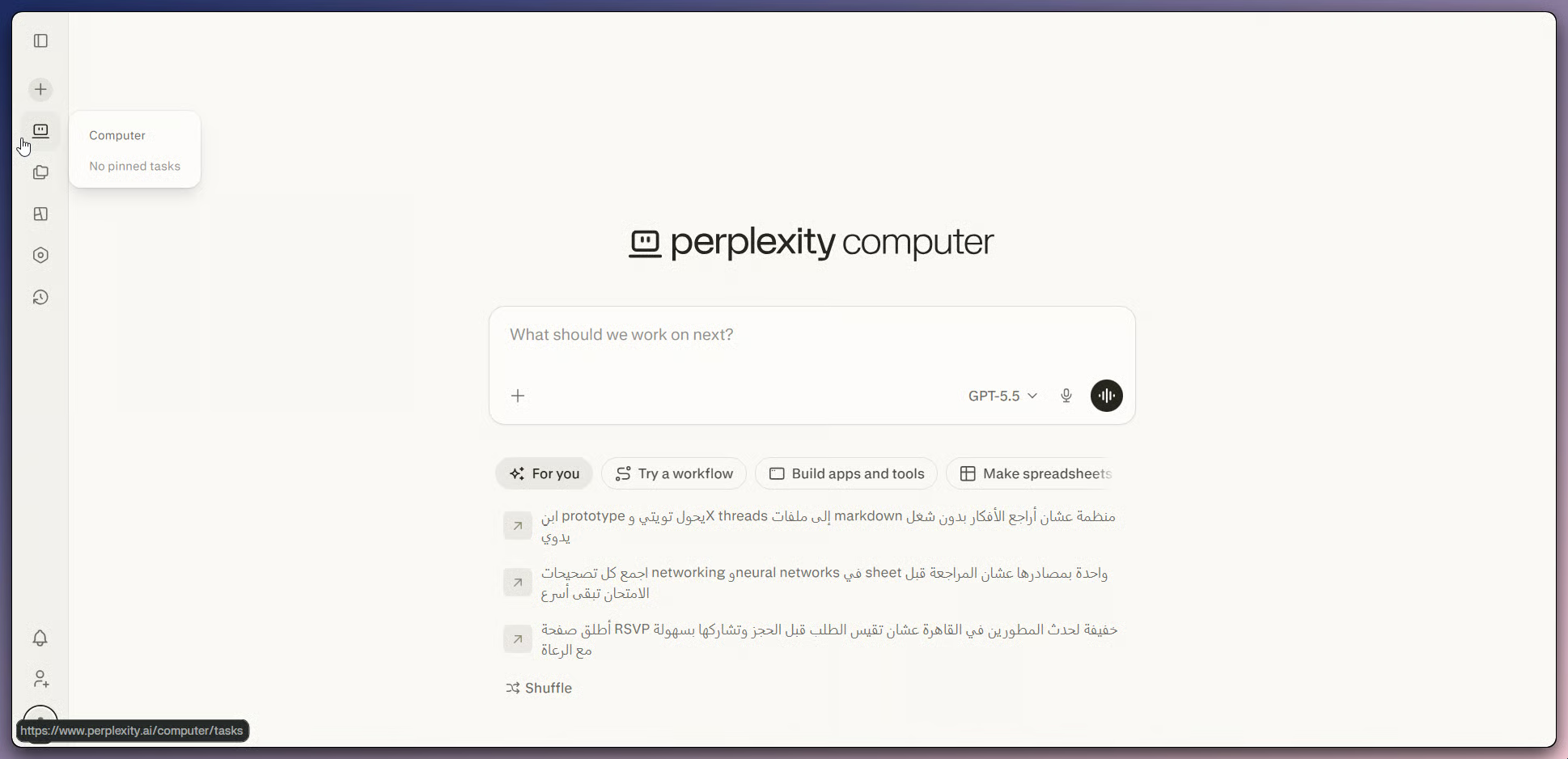
Computer task composer on Perplexity web. Image by Author.
The architecture matters because it shapes the cost story. Computer drafts a plan, then routes steps to specialized sub-agents inside an isolated cloud sandbox. As of the May 4, 2026 update, GPT-5.5 is the default orchestrator for Pro and Max subscribers, so launch-era references to Claude Opus 4.6 as the default are stale.
For research tasks, "parallel execution" refers to how Computer searches and splits work. A single research sub-agent can run seven search types at once: web, academic, people, image, video, shopping, and social, reading full source pages instead of snippets. Multiple sub-agents can also run inside one task. For Max users, Model Council adds a separate model cross-check for questions where disagreement matters.
Two later additions matter for this review: plan previews before long tasks, and live cost tracking during execution. Those controls let me track the run instead of judging cost afterward.
Regular Perplexity Ask searches and Deep Research do not consume credits. Computer tasks do.
Computer billing has two parts: a flat subscription plan, plus a separate credit balance the agent draws down as it runs. Read them together, or the real cost is hard to judge.
Here is the current consumer and enterprise pricing as of early May 2026. Verify the figures on the day you sign up, since pricing and credit rules can shift by region, plan, or promotion.
|
Plan |
Monthly price |
Computer access |
Included monthly credits |
|
Free |
$0 |
No |
None |
|
Pro |
$20 a month, or $200 a year |
Yes, since March 13, 2026 |
None included; credits must be purchased |
|
Max |
$200 a month, or $2,000 a year |
Yes |
10,000 |
|
Enterprise Pro |
$40 per seat per month |
Yes |
500 per seat |
|
Enterprise Max |
$325 per seat per month |
Yes |
15,000 per seat |
Two details usually get glossed over. Pro gives access but no monthly Computer credits, so users need purchased credits or auto-refill. Max includes 10,000 monthly credits, plus current one-time bonus credits for paid Pro and Max signups, per the official help center page on credits. Treat bonuses as temporary because they can change and expire.
Credit cost varies by task, and Perplexity does not publish a per-task table. Simple jobs can cost tens of credits; research-heavy tasks can run into the hundreds or thousands; failed coding loops have crossed 10,000. Auto-refill is off by default, monthly credits do not roll over, and active tasks pause if you run out.
Here is the actual test. I asked Computer to research eight AI coding tools, collect the same fields for each one, flag contradictions, and turn the results into a comparison table plus a short memo. I picked this case because it tests parallel research without drifting into open-ended coding work, where credit use is harder to control.
Before the prompt, a few prerequisites need to be in place.
The test ran on Max for the credit allowance. As mentioned earlier, Pro users can run the same workflow with purchased credits. No special connectors are required for a research-only task. You need:
The Computer panel opens from the home page on web, from the Computer tab on iOS, and from the Perplexity desktop app on Mac.
Prompt design matters because Computer turns your instructions into sub-agent work. A vague prompt produces a vague run. This one fixes the targets, fields, citation rule, memo audience, and pause point.
Research the following 8 AI coding tools in parallel: GitHub Copilot, Cursor,
Claude Code, Windsurf, Aider, Continue.dev, Tabnine, and Cody.

For each tool, collect the same fields:
Pricing for individual paid plansCore features, with a focus on agent behaviorMain use casesTwo main limitationsOne notable update from the past 90 daysA primary source link for every important claim
Then:
Build a single normalized comparison tableFlag any field where two of your sources contradict each otherWrite a 200-word recommendation memo for a senior backend engineer who already pays for one AI coding tool and is considering whether to switch
Before producing the final memo, show the plan, the list of sources you intend to cite, and your credit estimate, then wait for my approval.
Two design choices matter most. The plan preview gives you a chance to narrow scope before credits are spent. The "flag contradictions" line pushes Computer to surface disagreements instead of flattening them into one answer.
After submitting the prompt, Computer paused on a written plan that listed the eight target tools, the data sources it intended to use, the order of work, and a rough credit estimate. Approving the plan started the parallel research phase, and the live credit counter began ticking up in the thread. That counter, added in the March 27, 2026 update, became the number I watched most closely.
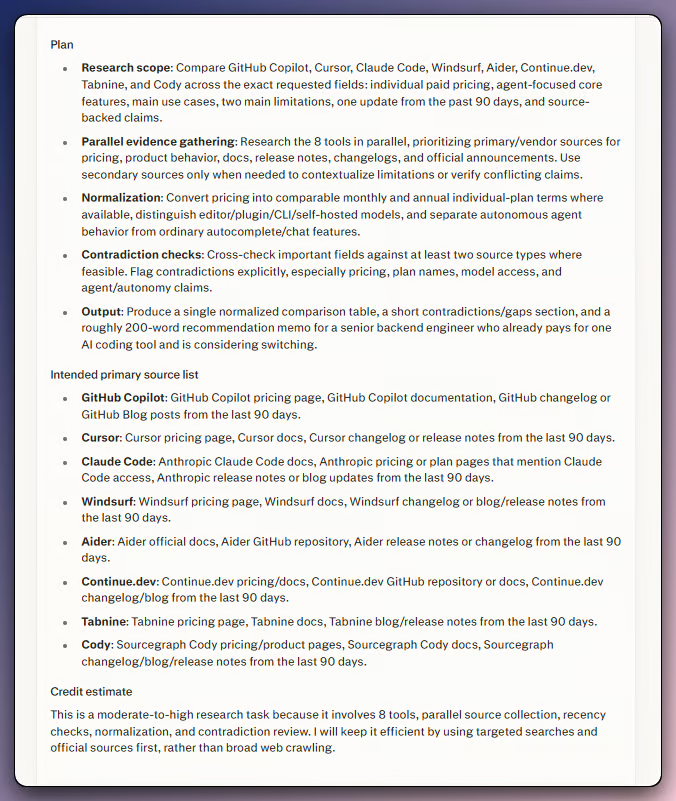
Plan preview before approving the run. Image by Author.
Sub-agents ran across the eight tools at the same time. The activity panel showed progress lines with brief notes on which sites were being read. One sub-agent paused mid-run to ask whether to count a company's open-source CLI as a separate product. That kind of interrupt matters because early reviews described Computer as a black box. As of the April 17, 2026 update, you can stop a single sub-agent or type a follow-up instruction mid-task.
The full run took 7 minutes 59 seconds and consumed 225.71 credits. That number will not match yours. Agent runs are non-deterministic: the same prompt produces a different decomposition, a different model assignment, and a slightly different output on each run. If you are recording for a video or a demo, do a dry run before the real one.
The output was a Markdown comparison table covering all eight tools across the requested fields, with inline citations in the cells. It also included a contradictions-and-gaps table and a short recommendation memo. Computer drafts in Markdown by default since the March 27 update, with PDF and DOCX export available on demand.
I graded the output against a checklist I built before the run.
|
Category |
Verdict |
Notes |
|
Accuracy on hard facts |
Mixed |
A handful of pricing and feature claims needed verification against the cited primary sources |
|
Source quality |
Passed |
Cited primary docs and pricing pages, not aggregator blog posts |
|
Structure |
Passed |
Normalized table did not need rebuilding; column order matched the prompt |
|
Conflict handling |
Passed |
Flagged fields where sources disagreed, with the disagreement spelled out |
|
Cleanup time |
Mixed |
About thirty minutes of editing, almost all of it on the recommendation memo |
|
Credit use |
Mixed |
225.71 credits for the run, but still hard to estimate before execution |
The cleanup split cleanly. The table was nearly publish-ready. The recommendation memo, on the other hand, leaned on hedging language and a few sentences that did not match the evidence in the table. That memo, not the data, is the part that needs a careful human pass. Treat the output like a junior analyst's first draft: useful, mostly right, and worth one careful read before it leaves your hands.
The result tracks what other testers have reported since launch. The use case is narrow.
I would not stretch the claim beyond research and synthesis. Coding is where I would slow down.
Several limitations are real, and a few have shifted since launch. These are the ones that mattered most during the test.
Connector reliability is uneven and changes fast. Early 2026 tests found Vercel OAuth expiry, shallow Ahrefs data, and GitHub workarounds using a manual Personal Access Token. The March 27 update added a Vercel connector, an improved Box connector, and a general note about connector performance. That does not prove the older complaints are fixed. Test any connector you rely on in a low-stakes task first.
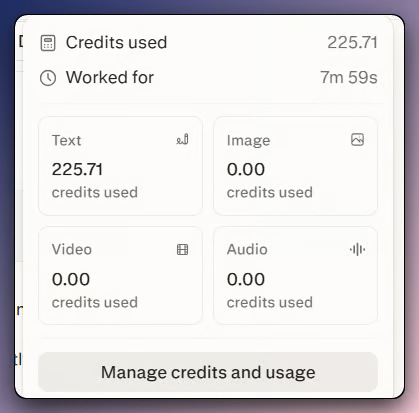
Credit usage after the test run. Image by Author.
Coding workflows carry the highest cost risk. Cloud Computer still has no live preview, no hot reload, and limited in-progress visibility. The Mac product mentioned earlier adds local access, and *.pplx.app publishing gives you something to inspect before going live, but neither turns cloud Computer into a tight coding loop.
Credit consumption is still hard to predict before a task runs. The controls used in the test reduce the guesswork during execution, but broad tasks with many sub-agents are still the most variable.
Reproducibility is limited. Two runs of the same prompt produce different sub-agent plans and slightly different outputs. Credit cost varies with the run, so do a dry run before any recorded demo.
Privacy settings deserve attention for regulated teams or sensitive workflows. Enterprise accounts are excluded from training by default. Consumer Pro and Max users have to opt out in account settings.
The answer depends on the work you give it, how often you use it, the plan you start on, and how disciplined you are about credit caps.
Here is the breakdown by user type.
|
User type |
Verdict |
Reason |
|
Analysts and researchers |
Max for frequent use |
Parallel research is the main case; the included monthly credits can cover regular use |
|
Technical writers |
Pro test, with caution |
Bounded research and synthesis tasks match the product better than open-ended work |
|
Developers building production apps |
High risk at any plan |
The coding feedback loop is still indirect |
|
Casual users |
Hard to justify at Max |
The $200 monthly price needs real workflow volume to break even |
|
Teams in regulated industries |
Evaluate Enterprise Pro or Max |
Adds audit logs, no-training guarantee, network firewall controls, and admin connector controls |
|
Content creators and strategists |
Pro test first |
Competitive research and structured reports are where the output needed less cleanup |
If you only want to test Computer once, Pro with a small credit purchase is the lower-risk starting point. If you run several bounded research tasks a week, Max gives you a fixed monthly credit pool.
These rules came out of the test runs.
Set a monthly spending cap before any task; lowering the default $200 cap on early runs limits the damage if a task spirals. For anything that does not need an agent, use Perplexity Ask instead. Require a plan preview, then approve or correct it before execution.
Keep prompts narrow, fix the target list, and demand citations for every important claim. During long runs, watch the same cost counter used in the test. If it climbs faster than planned, stop the run and ask Computer where the work stalled. In my runs, the recommendation memo needed more checking than the table. If you are recording, use a sandboxed account with sanitized connectors; real account data leaks easily into screenshots.
Computer works better when the task has a clear shape: a fixed list, a schema, source rules, and a stopping point. Leave it open-ended, and it starts to feel expensive quickly.
In my test, the table needed less editing than the memo, and the running cost mattered more than I expected. For repeated bounded research, Max has the simpler credit setup. For casual testing, Pro plus a small credit purchase is the lower-commitment path. For coding, I would still be cautious.
For more background on the agent pattern itself, our Developing LLM Applications with LangChain course covers chains, tools, and agents in Python.
Learn with DataCamp
Track
Course
Course
blog
Vinod Chugani
8 min
blog
Vikash Singh
13 min
podcast
Adel Nehme
36 min
Tutorial
Bexruz (Bex) Tuychiev
8 min
Tutorial
François Aubry
8 min
Tutorial
Aashi Dutt
10 min