Have you ever received a government notice and wondered whether it was legitimate, whether you needed to respond, or whether someone was trying to scam you?
Legal notices are hard to read, especially when complicated language is mixed with payment demands and deadlines. Scammers exploit that confusion by impersonating government agencies and creating a false sense of urgency.
In this tutorial, we'll build a US legal notice analyzer using Qwen4-Max and the Qwen-Agent framework. The application accepts text, images, and PDFs, flags suspicious payment tactics, and searches official legal resources when it needs to verify something.
Instead of relying entirely on a large language model (LLM), we'll pair it with two Python tools. The first uses regular expressions to catch common scam indicators. The second uses Olostep to search official government websites and the Cornell Legal Information Institute (LII).
In a Nutshell
- We build a legal notice analyzer with Qwen4-Max, Qwen-Agent, and Olostep that accepts text, photos, and PDFs.
- A regex-based risk gate flags scam patterns and lookalike domains before the model does any research.
- A research tool limits lookups to .gov sites and Cornell LII, and the agent skips research when a notice is plainly fraudulent.
- In my testing, Qwen4-Max read photographed notices well, but it was slow on simple tasks and its native web search was unreliable.
What Is Qwen4-Max?
Qwen4-Max is Alibaba's flagship model in the Qwen4 family, launched on November 16, 2026. It's a sparse mixture-of-experts (MoE) model with architectural improvements, native vision, and a larger context window, designed for complex reasoning and agentic applications.
Here are the features most relevant to our project:
- Sparse MoE architecture: Qwen4-Max has 2.4T backbone parameters, 71B active per token, and an additional 328B N-gram embedding parameters. Gated DeltaNet layers and Qwen Sparse Attention keep long-context costs down.
- Native vision: The model reads images directly, so we can send a photograph of a legal notice without building a separate optical character recognition (OCR) pipeline.
- 1M-token context window: This is large enough for lengthy documents and a lot of supporting information.
- Better token efficiency: According to Alibaba, Qwen4-Max uses approximately 35% fewer tokens than Qwen3.8-Max on Work360 at High reasoning effort, and approximately 49% fewer on Terminal-Bench 4.0. At Xhigh effort, the reductions are approximately 24% and 48%.
- Lower task costs: On Work360, Qwen4-Max scored 52.69, up from 47.74 for Qwen3.8-Max, while the average cost per task fell from $4.43 to $1.67, a 62% reduction.
Here are the benchmark results from Alibaba's announcement, which show Qwen4-Max improving on Qwen3.8-Max across nearly every capability Alibaba evaluated:
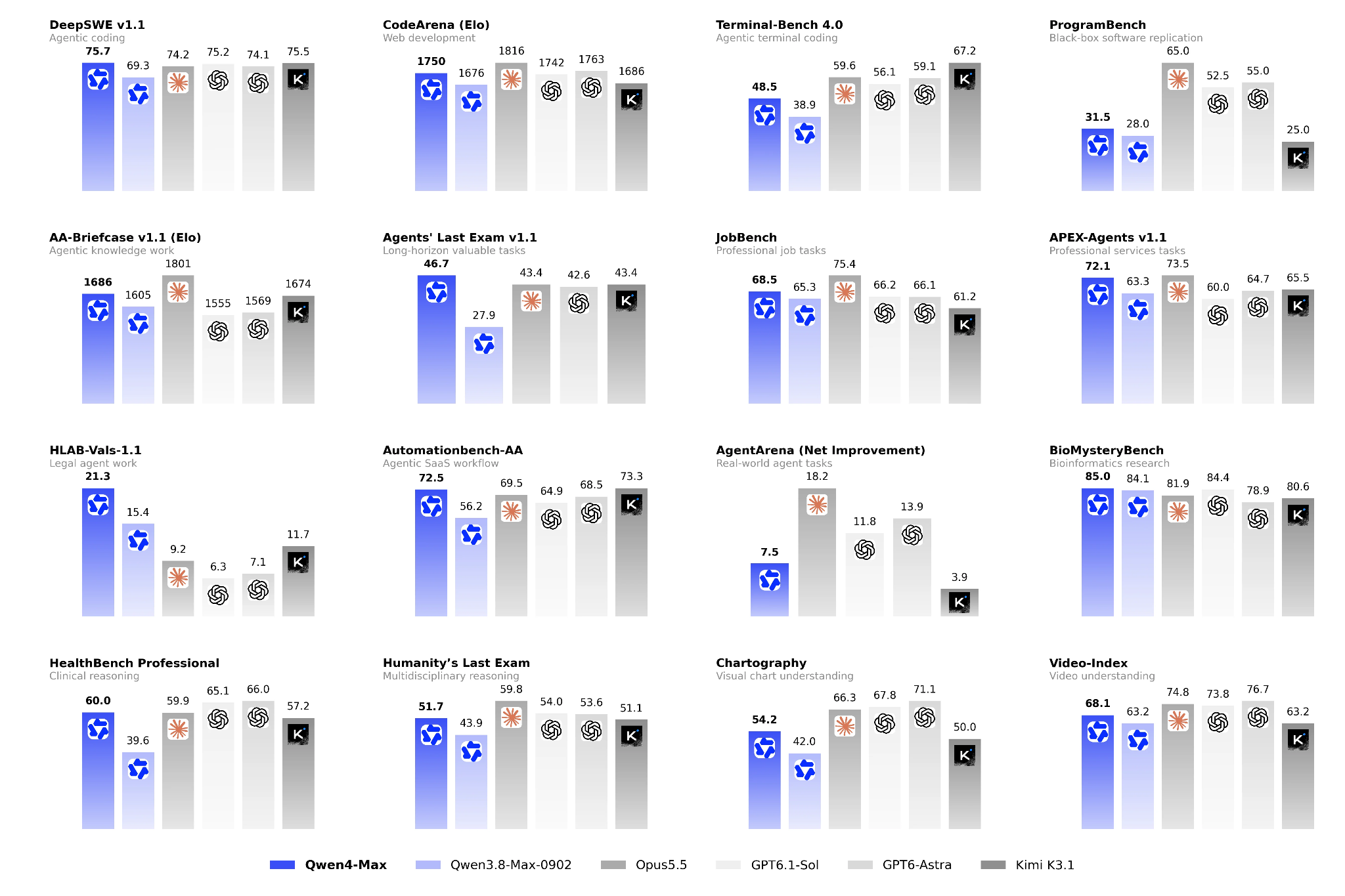
Figure 1: Qwen4-Max benchmark results. Image taken from: Qwen, Qwen4-Max: Your New Teammate Has Arrived.
How Does the Legal Notice Analyzer Work?
The analyzer is a single Qwen-Agent assistant that coordinates two Python tools, while Qwen4-Max handles document understanding and reasoning. Before writing any code, let's look at the workflow.
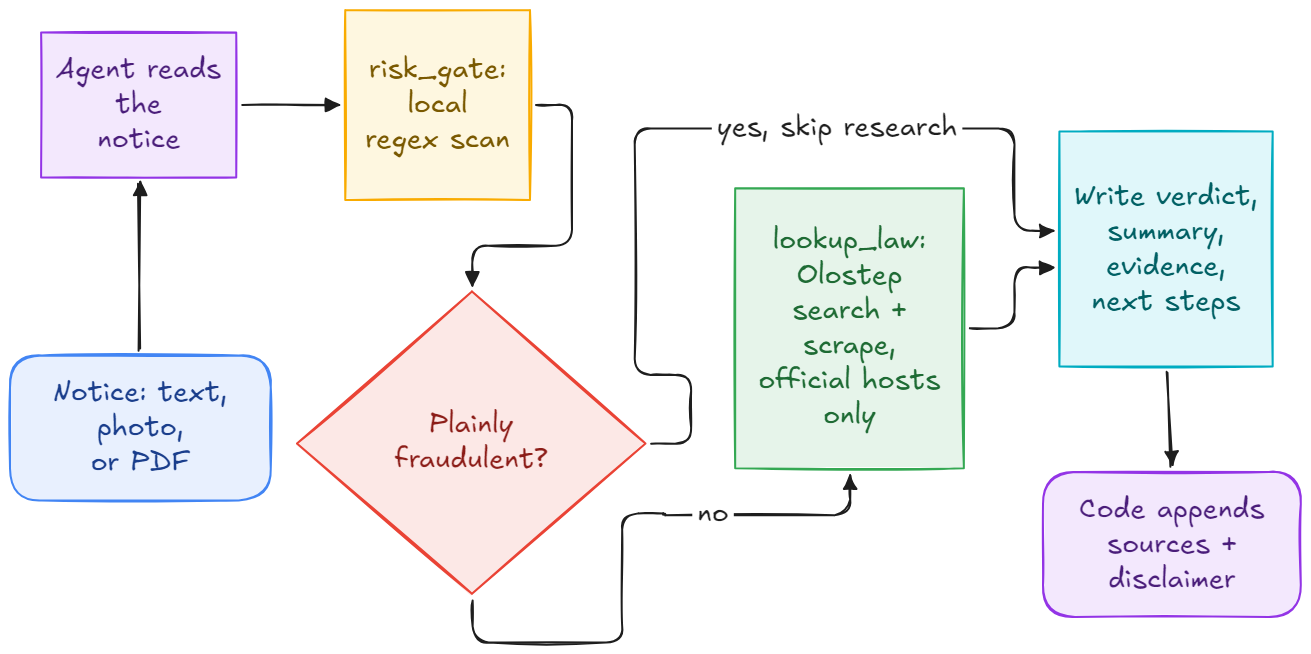
Figure 2: The legal notice analyzer workflow.
The workflow has 6 steps:
- The user submits a notice as text, an image, or a PDF.
- Qwen4-Max reads the document and identifies its main contents.
- The agent calls
risk_gate to check for suspicious payment instructions, threats, and links.
- If the document is obviously fraudulent, the agent skips external research.
- Otherwise, the agent calls
lookup_law to search official legal resources.
- Qwen4-Max produces a structured response with a verdict, summary, evidence, and recommended next steps.
The key design choice is that the LLM doesn't do everything. Python handles deterministic checks, Olostep handles external research, and Qwen4-Max handles document understanding and reasoning.
That keeps the workflow simple while giving the agent a tool for each job. If agent terminology is new to you, our Introduction to AI Agents course covers the fundamentals with no coding required.
1. Setting Up the Environment
We'll use Jupyter Notebook, QwenCloud for model access, and Olostep for web search and scraping.
First, create an account on QwenCloud, add credits or subscribe to a Token Plan, and generate an API key from the dashboard. QwenCloud provides an API endpoint based on the region you select.
You'll also need an Olostep API key for legal research.
Set your environment variables in the terminal before you launch Jupyter Notebook. You can also set them inside the notebook with os.environ.
export QWEN_API_KEY="your-qwen-api-key"
export QWEN_BASE_URL="https://token-plan.maas.qwencloudapi.com/compatible-mode/v1"
export OLOSTEP_API_KEY="your-olostep-api-key"
I use the Token Plan endpoint, which gives me discounted access to the models. If you pay as you go, use the endpoint QwenCloud shows for your region instead.
Next, install the required dependencies in your notebook:
%pip install -q "qwen-agent[rag]" olostep soundfile tqdm
The rag extra adds document-processing packages such as pdfplumber, which we'll use to read PDFs. As of version 0.0.34, Qwen-Agent also imports soundfile and tqdm at startup without declaring them as dependencies, so we install both explicitly.
Configuring Qwen4-Max
Next, we initialize the model and the Olostep client. I'm using the Singapore region, which also offers a Token Plan.
import logging
import os
import re
import warnings
os.environ.setdefault("OLOSTEP_API_TIMEOUT", "40")
from olostep import Olostep
from qwen_agent.agents import Assistant
from qwen_agent.llm.schema import Message
from qwen_agent.tools.base import BaseTool
from qwen_agent.utils.utils import extract_text_from_message
warnings.filterwarnings("ignore")
logging.getLogger("qwen_agent_logger").setLevel(logging.ERROR)
MODEL = os.getenv("QWEN_MODEL", "qwen4-max")
LLM = {
"model": MODEL,
"model_type": "qwenvl_oai",
"model_server": os.environ["QWEN_BASE_URL"],
"api_key": os.environ["QWEN_API_KEY"],
"generate_cfg": {
"max_tokens": 3000,
"extra_body": {"reasoning_effort": "low"},
},
}
olostep = Olostep(api_key=os.environ["OLOSTEP_API_KEY"])
This configures Qwen4-Max for multimodal input, sets a reasoning effort level, and initializes the research client. Note that OLOSTEP_API_TIMEOUT is set before the import, because the SDK reads it when it loads.
A few configuration options are worth understanding:
model specifies the model we want to use.model_type lets us send images through the OpenAI-compatible multimodal interface.model_server points to the endpoint from QWEN_BASE_URL.max_tokens limits the length of the generated response.reasoning_effort controls how much reasoning the model does. We use low to keep responses fast.OLOSTEP_API_TIMEOUT sets a time limit, in seconds, on research requests.
Creating reusable agent helpers
We'll process both text and image inputs, so let's create a reusable function for running the agent.
def run_agent(agent, prompt, images=None):
    content = [{"text": prompt}] + [
        {"image": image} for image in (images or [])
    ]
    final = agent.run_nonstream([
        {"role": "user", "content": content}
    ])
    return extract_text_from_message(
        Message.model_validate(final[-1]),
        add_upload_info=False,
    )
This function sends the prompt and optional images to Qwen-Agent, waits for the final response, and extracts the generated text.
We also need a helper for reading PDFs.
def read_pdf(path):
    import pdfplumber

    with pdfplumber.open(path) as pdf:
        return "\n".join(
            page.extract_text() or "" for page in pdf.pages
        )
This function extracts selectable text from every PDF page and combines it into one string.
Note: pdfplumber doesn't perform OCR. For scanned PDFs that contain only images, render each page as an image and send it directly to Qwen4-Max.
2. Building Scam Detection with a Risk Gate
The first custom tool identifies suspicious behavior. Rather than asking the LLM to recognize every suspicious payment instruction, we can use regular expressions to detect known scam tactics.
This is faster, deterministic, and uses no model tokens. If you want a refresher on the syntax, our Regular Expressions in Python course covers it.
Defining scam detection rules
Let's begin with a list of regular expressions and a mapping between government agencies and their official domains.
RULES = [
    ("gift cards", r"\b(gift\s*cards?|itunes|google play|amazon card)\b"),
    ("crypto", r"\b(bitcoin|btc|usdt|crypto\w*|coinbase|binance)\b"),
    ("wire transfer", r"\b(wire transfer|western union|moneygram)\b"),
    ("payment app", r"\b(zelle|venmo|cash app|paypal)\b"),
    ("arrest threat", r"\b(arrest|warrant|deport\w*)\b"),
    ("extreme urgency", r"\b(within 24 hours|final notice|last chance)\b"),
    ("secrecy", r"\b(do not (tell|discuss|contact)|keep this confidential)\b"),
    ("card numbers by phone", r"\bcard numbers?\b"),
    ("qr or crypto atm", r"\b(qr code|bitcoin atm|crypto atm)\b"),
]

OFFICIAL = {
    "irs": "irs.gov",
    "internal revenue": "irs.gov",
    "ftc": "ftc.gov",
    "cfpb": "consumerfinance.gov",
    "social security": "ssa.gov",
    "uscis": "uscis.gov",
    "justice": "justice.gov",
    "hud": "hud.gov",
    "uscourts": "uscourts.gov",
}

URL_RX = re.compile(r"https?://[^\s)\"'<>]+")
This code defines the scam indicators and maps agency names to the domains those agencies actually use. For example, if a notice mentions the IRS, the application checks its links against irs.gov.
Extracting and validating domains
Next, we need a helper that extracts the hostname from a URL.
from urllib.parse import urlparse


def host_of(url):
    return (urlparse(url).hostname or "").lower().rstrip(".")


def is_official_domain(host, domain):
    return host == domain or host.endswith("." + domain)
This extracts the hostname and checks whether it's the official domain or a legitimate subdomain. The distinction matters: a basic endswith() check would accept fakeirs.gov as an IRS website.
Now we can combine these rules into a custom Qwen-Agent tool.
class RiskGate(BaseTool):
    name = "risk_gate"
    description = (
        "Scan a notice for payment tactics, threats, urgency, "
        "secrecy, and suspicious agency links. "
        "Call once before any other tool."
    )
    parameters = {
        "type": "object",
        "properties": {
            "text": {
                "type": "string",
                "description": (
                    "The full notice text, including links "
                    "and payment instructions."
                ),
            }
        },
        "required": ["text"],
    }

    def call(self, params, **kwargs):
        text = self._verify_json_format_args(params)["text"]
        low = text.lower()
        flags = [
            f"scam indicator: {label}"
            for label, pattern in RULES
            if re.search(pattern, low)
        ]
        agency = next(
            (
                domain
                for word, domain in OFFICIAL.items()
                if re.search(rf"\b{re.escape(word)}\b", low)
            ),
            None,
        )
        if agency:
            hosts = {
                host_of(url)
                for url in URL_RX.findall(text)
            }
            flags += [
                f"lookalike domain: {host} is not {agency}"
                for host in sorted(hosts)
                if host and not is_official_domain(host, agency)
            ]
        return "\n".join(flags) or "no flags"
This tool scans the notice for matching patterns, checks its URLs against the agency's official domain, and returns the suspicious indicators. Agency names are matched as whole words, so "irs" doesn't trigger on a word like "first".
For example, our fictional IRS notice from Test 1 produces:
scam indicator: gift cards
scam indicator: wire transfer
scam indicator: arrest threat
scam indicator: extreme urgency
scam indicator: secrecy
scam indicator: card numbers by phone
lookalike domain: irs-gov-payments.top is not irs.gov
The agent receives these results as part of its context and uses them when deciding whether the notice is suspicious.
Our second tool handles external research. We don't want the agent searching random websites, discussion forums, or law firm blogs and treating everything it finds as authoritative.
Instead, we restrict research to official US government websites and the Cornell LII. We'll use Olostep because it can search and scrape multiple results in a single request. If you want to compare it with another option, see our Firecrawl tutorial.
Defining research restrictions
First, let's define the permitted sources and some limits on how much we retrieve.
def is_allowed_host(host):
    return host.endswith(".gov") or is_official_domain(
        host, "law.cornell.edu"
    )


MAX_PAGES = 2
PAGE_CHARS = 3000
The is_allowed_host() function accepts .gov sites and Cornell LII. It reuses is_official_domain(), so a lookalike such as fakelaw.cornell.edu is rejected. We also keep at most 2 pages, with a maximum of 3,000 characters per page.
Now let's create the second custom tool.
class LookupLaw(BaseTool):
    name = "lookup_law"
    description = (
        "Search for official US legal guidance using "
        "government websites and Cornell LII. "
        "Return the most relevant page excerpts."
    )
    parameters = {
        "type": "object",
        "properties": {
            "query": {
                "type": "string",
                "description": "One plain-English legal question.",
            },
            "domain": {
                "type": "string",
                "description": "Optional domain, such as irs.gov.",
            },
        },
        "required": ["query"],
    }

    def __init__(self):
        super().__init__()
        self.sources = []

    def call(self, params, **kwargs):
        args = self._verify_json_format_args(params)
        found = olostep.searches.create(
            args["query"][:200],
            limit=5,
            include_domains=(
                [args["domain"]] if args.get("domain") else None
            ),
            scrape_options={
                "formats": ["markdown"],
                "timeout": 20,
            },
        )
        pages = []
        for link in found.links:
            host = host_of(link["url"])
            if not is_allowed_host(host):
                continue
            body = (
                link.get("markdown_content")
                or link.get("description")
                or ""
            )[:PAGE_CHARS]
            if body:
                self.sources.append(link["url"])
                pages.append(f"### {link['url']}\n{body}")
            if len(pages) == MAX_PAGES:
                break
        return "\n\n".join(pages) or (
            "No official page found. Results outside "
            ".gov and Cornell LII are treated as unreliable. "
            "Try a shorter query with the statute or agency name."
        )
This tool sends a search request to Olostep, filters the results, extracts the page content, and returns the selected excerpts to Qwen4-Max.
Three implementation details are worth noting:
- We retrieve up to 5 search results but keep at most 2 qualifying pages.
- We prefer scraped Markdown and fall back to the page description.
- We store retrieved URLs in
self.sources so the application can display them after the analysis.
4. Building the Agent with Qwen-Agent and Qwen4-Max
We now have both custom tools: risk_gate identifies suspicious behavior, and lookup_law retrieves relevant legal information. Next, we create the agent that coordinates them.
A single system prompt defines the workflow, the tool order, and the response format. Qwen-Agent isn't the only option for this kind of build, and our Developing LLM Applications with LangChain course covers another framework.
Defining the system prompt
SYSTEM = """You explain a US legal or government notice
to the person who received it, in plain English.
You are not a lawyer.

How to work:
- Read the notice, text or images. Report only what
  the document actually says.
- Call risk_gate once with the notice text before
  using any other tool.
- Treat risk_gate flags as evidence, not proof.
  Flags can make a notice suspicious but cannot
  establish that it is legitimate.
- If the notice is plainly fraudulent, say so and
  skip research.
- Otherwise, call lookup_law with one plain question
  about the main legal issue.
- Call lookup_law a second time only if the first
  call returns no official page.
- Never invent a law, citation, phone number, amount,
  or deadline.
- Report deadlines using the document's own words.
  Separate a stated deadline from whether it is credible.
- If a returned page does not verify a claim,
  explicitly say it could not be verified.
- Never suggest ignoring a legal notice.
- Separate what the document establishes from
  what is assumed.
- Keep each section under 80 words.
- Use plain English, short sentences, and bullets.
- Avoid em dashes and contractions.

Begin with this verdict block:
**Scam:** yes, probably, or no
(confidence: low, medium, or high).
**Time sensitive:** yes or no, followed by the
exact deadline in the document, or "no deadline stated".
**Demand:** the amount and what the document asks
for, or "nothing is demanded".

Then write these sections in order:
### Summary
Explain what the document is and what happens
if nothing is done. Use 3 or 4 sentences.
### Evidence
Include one bullet per important finding.
Quote the document or the official page where
possible. Include risk_gate flags.
If the scan returned no flags, explicitly say so.
No flags is not proof that a notice is legitimate.
### Next steps
Give numbered actions in the order they should
be taken.
If the notice threatens eviction, foreclosure,
a lawsuit, arrest, or deportation, the first action
must be to contact a qualified attorney or legal aid.
Explain that waiting creates a risk.
Never confuse a document's claimed deadline with
a verified legal deadline.

Do not include a sources section or legal disclaimer.
The application appends both."""
This prompt defines the agent's responsibilities and stops it from inventing legal information. One instruction deserves a closer look: deadlines.
A fraudulent notice can still contain a deadline, so the agent must report what the document claims while explaining whether that deadline is credible.
Adding the disclaimer and source handling
We keep the disclaimer outside the system prompt so Python can append it consistently.
NO_SOURCE = (
    "No official page was retrieved for this notice, "
    "so treat any legal statement above as unverified."
)

DISCLAIMER = (
    "\n---\n"
    "**Not legal advice.** Verify deadlines and citations "
    "with the issuing authority, using contact details "
    "you find independently, not those printed in the notice."
)
This gives us a fallback message when legal research returns no official source, and every response carries a legal disclaimer.
Creating the main analysis function
Finally, let's connect everything into one reusable function.
def analyze_notice(text=None, images=None):
    research = LookupLaw()
    agent = Assistant(
        llm=LLM,
        system_message=SYSTEM,
        function_list=[
            RiskGate(),
            research,
        ],
    )
    prompt = (
        f"Notice text:\n\n{text}"
        if text
        else "The notice is attached as image files."
    )
    answer = run_agent(agent, prompt, images)
    sources = "\n".join(
        f"- {url}" for url in research.sources
    )
    return (
        f"{answer}\n\n"
        f"## Sources\n\n"
        f"{sources or NO_SOURCE}\n"
        f"{DISCLAIMER}"
    )
This function creates a fresh agent for each document, runs the analysis, collects the retrieved sources, and returns the final response. We create LookupLaw() inside the function so each notice gets its own source list.
5. Testing the Legal Notice Analyzer
We now have a working legal notice analyzer. Let's test it on 3 sample documents:
- A fictional IRS scam letter.
- A photograph of a Florida eviction notice.
- A PDF cease and desist letter.
Each test exercises a different part of the workflow.
Test 1: An IRS scam letter
Our first example is a fictional IRS scam letter. It claims the recipient owes $4,870 in federal income tax and must pay within 24 hours.
It also threatens arrest, demands gift card payments or a wire transfer, and includes a suspicious website. Here's the sample input:
from IPython.display import Markdown

FICTIONAL_NOTICE = """
INTERNAL REVENUE SERVICE
NOTICE OF FINAL DEMAND
Date of Notice: November 10, 2026

Our records show an outstanding balance of
$4,870.00 in federal income tax for tax year 2024.

You must resolve this balance within 24 hours.
Failure to comply will result in a warrant for your
arrest and your wages being garnished.

Do not discuss this notice with anyone.

Pay using Apple or Google Play gift cards and
provide the card numbers over the phone, or by
wire transfer through:
https://irs-gov-payments.top/pay?ref=MW4471
""".strip()

Markdown(analyze_notice(text=FICTIONAL_NOTICE))
This creates a fictional notice and submits it to the agent for analysis.
Output:
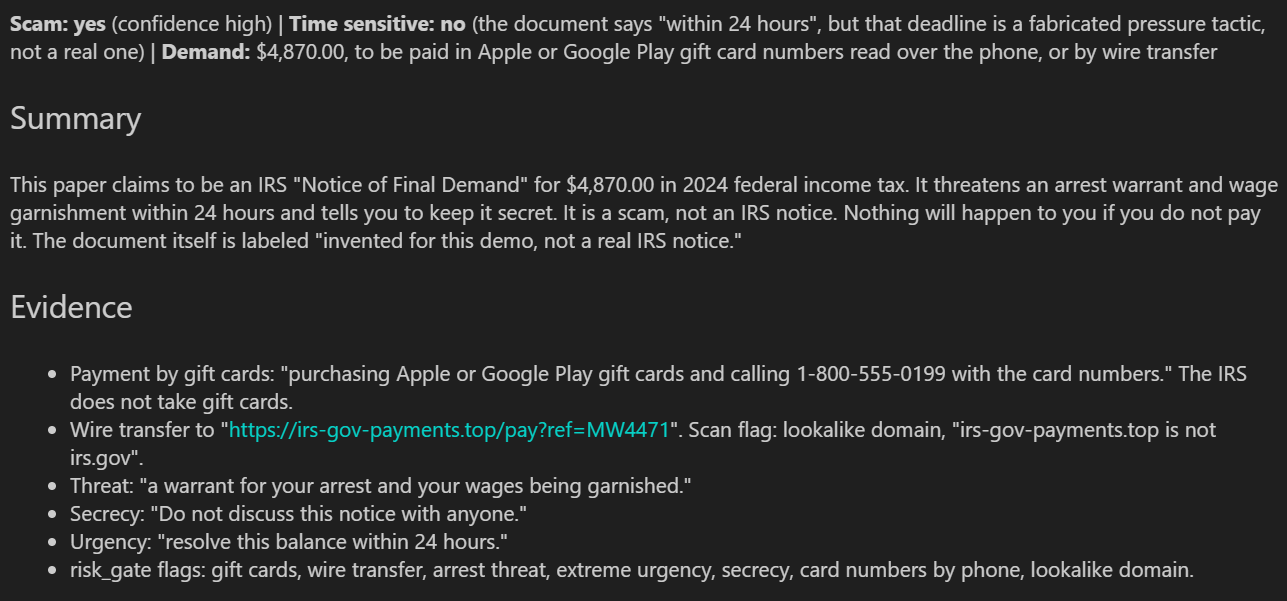
Figure 3: The analyzer's output for the fictional IRS scam letter.
The scanner finds several suspicious indicators, and the agent skips external legal research. That's what we want for an obvious scam: the application doesn't spend extra tokens on research when the deterministic checks already point to fraud.
What this test demonstrates: The risk gate can identify common scam tactics and help the agent avoid unnecessary external research.
Test 2: A photograph of an eviction notice
The second test focuses on Qwen4-Max's native vision. Instead of extracting the text ourselves, we send a photograph of an eviction notice directly to the model.
Our sample is a Florida three-day notice demanding $1,850 in unpaid rent, or possession of the property by November 23, 2026. Here's the code:
Markdown(
    analyze_notice(
        images=["samples/eviction.png"]
    )
)
This sends the photograph straight to Qwen4-Max, so no separate OCR pipeline is needed. For another build that combines Qwen's vision with tool calling, see our Qwen 3.6 Plus API tutorial on invoice processing.
Output:
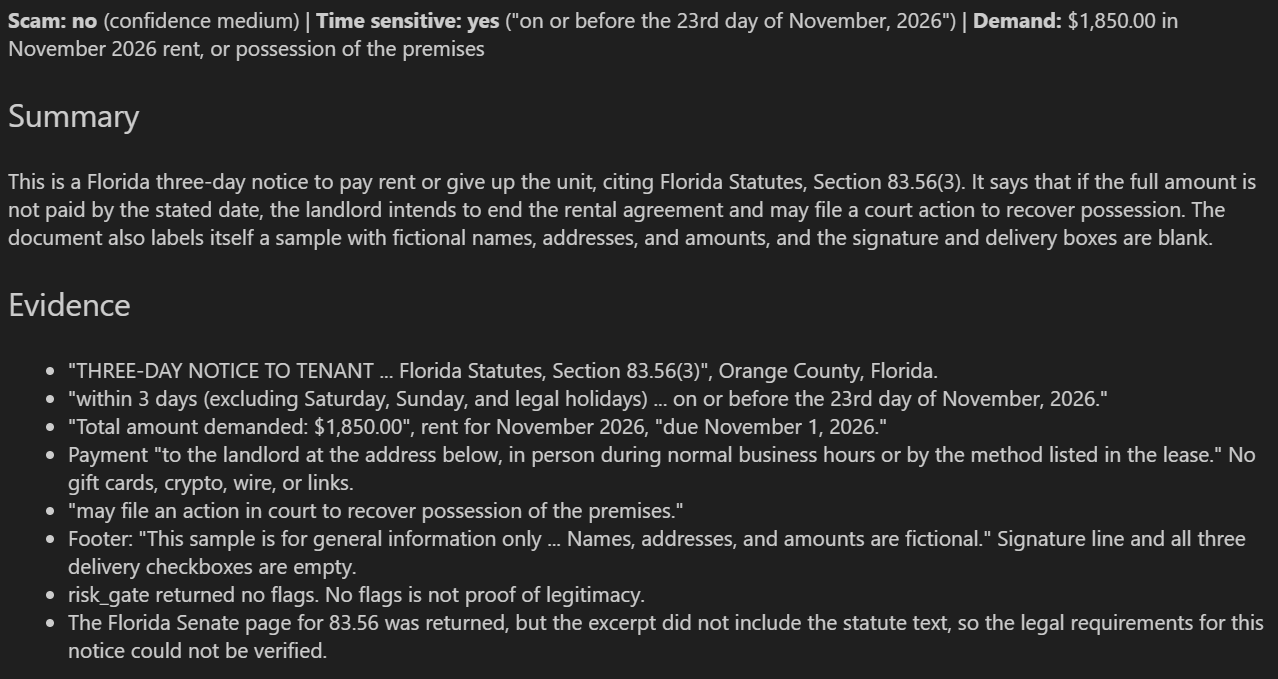
Figure 4: The analyzer's output for the photographed eviction notice.
The model understood the photograph, extracted the amount and deadline, and identified the type of notice. It acknowledged that the retrieved legal page didn't contain enough information to verify the statute, and it spotted blank signature and delivery fields in the sample document.
What this test demonstrates: Qwen4-Max can interpret photographed legal documents directly, while Qwen-Agent coordinates additional research and communicates uncertainty.
Test 3: A PDF cease and desist letter
For the final test, we use a two-page cease and desist letter in PDF format.
The document cites 17 U.S.C. §§ 501 and 512, alleges copyright infringement, and asks the recipient to remove the disputed content and confirm compliance by November 28, 2026. The PDF contains selectable text, so we can use our read_pdf() helper. Here's the code:
pdf_text = read_pdf("samples/legal.pdf")

Markdown(
    analyze_notice(text=pdf_text)
)
This extracts the PDF contents and sends the resulting text to the same agent.
Output:
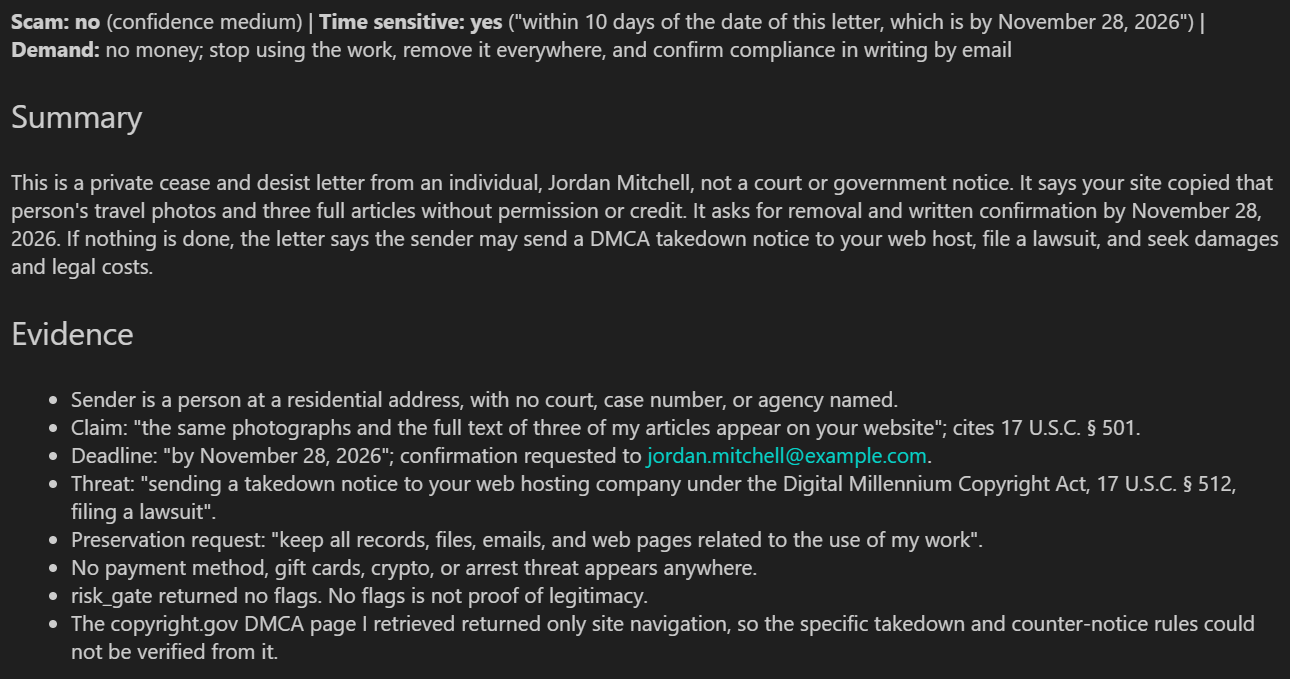
Figure 5: The analyzer's output for the cease and desist letter.
The agent correctly distinguishes a private legal demand from an official government or court notice. It recognizes that no money is demanded and adjusts its recommendations. The research tool retrieved a relevant US Copyright Office page, which appears in the final sources.
What this test demonstrates: The same agent can handle PDF correspondence, identify the nature of a legal demand, and recommend appropriate next steps.
My Experience with Qwen4-Max: The Good, the Bad, and the Ugly
After using Qwen4-Max for this project, other agentic applications, and vibe coding, here's my honest assessment.
The good
The Qwen ecosystem covers a lot of ground. It includes speech-to-text, text-to-speech, web search, web scraping, and an open-source toolkit for building agentic applications without implementing everything from scratch.
What I liked most was how well Qwen4-Max followed detailed instructions. It generally respected the requested output structure, extracted dates from documents, and produced accurate summaries during my testing.
Its image understanding stood out. I gave it a photograph of a legal notice and it read the contents without an extra OCR pipeline, which is a big help for document-heavy agentic applications.
The bad
Speed was the biggest problem for me. Qwen4-Max wasn't my preferred model for vibe coding: compared with DeepSeek V4.1 Flash and other models I tested, it often took noticeably longer to finish simple tasks.
I regularly saw generation speeds around 100 tokens per second, but that number hides the real cost. The model spent a long time reasoning about straightforward changes, and sometimes I'd ask for a simple edit and wait far longer than expected.
If you want to try the faster option yourself, we cover it in our DeepSeek V4.1 Flash API tutorial.
The ugly
The native web search was the most frustrating part. In my testing, response times were inconsistent: the same query could return in seconds or take close to a minute, and some requests ran past 400 seconds without completing.
Three runs of my research workflow took almost 16 minutes. That wasn't reliable enough for an application that depends on external legal information.
Replacing the native search with Olostep became a necessity, which also meant I couldn't rely entirely on the Qwen ecosystem, as I'd originally planned.
I hit another problem when experimenting with the DeepSeek Harness. I asked a simple question about researching the stock market, and the workflow spent a long time on the request before returning an error. That was frustrating for such a straightforward task.
Overall, Qwen4-Max has impressive capabilities, but its reasoning overhead and inconsistent native search are worth weighing before you build production workflows around it. If you want to keep building with Qwen models, our Qwen 3.7 Max API tutorial walks through a self-reviewing productivity agent.


 Aashi Dutt• 12 min






Have you ever received a government notice and wondered whether it was legitimate, whether you needed to respond, or whether someone was trying to scam you?
Legal notices are hard to read, especially when complicated language is mixed with payment demands and deadlines. Scammers exploit that confusion by impersonating government agencies and creating a false sense of urgency.
In this tutorial, we'll build a US legal notice analyzer using Qwen4-Max and the Qwen-Agent framework. The application accepts text, images, and PDFs, flags suspicious payment tactics, and searches official legal resources when it needs to verify something.
Instead of relying entirely on a large language model (LLM), we'll pair it with two Python tools. The first uses regular expressions to catch common scam indicators. The second uses Olostep to search official government websites and the Cornell Legal Information Institute (LII).
In a Nutshell
What Is Qwen4-Max?
Qwen4-Max is Alibaba's flagship model in the Qwen4 family, launched on November 16, 2026. It's a sparse mixture-of-experts (MoE) model with architectural improvements, native vision, and a larger context window, designed for complex reasoning and agentic applications.
Here are the features most relevant to our project:
Here are the benchmark results from Alibaba's announcement, which show Qwen4-Max improving on Qwen3.8-Max across nearly every capability Alibaba evaluated:
Figure 1: Qwen4-Max benchmark results. Image taken from: Qwen, Qwen4-Max: Your New Teammate Has Arrived.
How Does the Legal Notice Analyzer Work?
The analyzer is a single Qwen-Agent assistant that coordinates two Python tools, while Qwen4-Max handles document understanding and reasoning. Before writing any code, let's look at the workflow.
Figure 2: The legal notice analyzer workflow.
The workflow has 6 steps:
risk_gateto check for suspicious payment instructions, threats, and links.lookup_lawto search official legal resources.The key design choice is that the LLM doesn't do everything. Python handles deterministic checks, Olostep handles external research, and Qwen4-Max handles document understanding and reasoning.
That keeps the workflow simple while giving the agent a tool for each job. If agent terminology is new to you, our Introduction to AI Agents course covers the fundamentals with no coding required.
1. Setting Up the Environment
We'll use Jupyter Notebook, QwenCloud for model access, and Olostep for web search and scraping.
First, create an account on QwenCloud, add credits or subscribe to a Token Plan, and generate an API key from the dashboard. QwenCloud provides an API endpoint based on the region you select.
You'll also need an Olostep API key for legal research.
Set your environment variables in the terminal before you launch Jupyter Notebook. You can also set them inside the notebook with
os.environ.I use the Token Plan endpoint, which gives me discounted access to the models. If you pay as you go, use the endpoint QwenCloud shows for your region instead.
Next, install the required dependencies in your notebook:
The
ragextra adds document-processing packages such as pdfplumber, which we'll use to read PDFs. As of version 0.0.34, Qwen-Agent also imports soundfile and tqdm at startup without declaring them as dependencies, so we install both explicitly.Configuring Qwen4-Max
Next, we initialize the model and the Olostep client. I'm using the Singapore region, which also offers a Token Plan.
This configures Qwen4-Max for multimodal input, sets a reasoning effort level, and initializes the research client. Note that
OLOSTEP_API_TIMEOUTis set before the import, because the SDK reads it when it loads.A few configuration options are worth understanding:
modelspecifies the model we want to use.model_typelets us send images through the OpenAI-compatible multimodal interface.model_serverpoints to the endpoint fromQWEN_BASE_URL.max_tokenslimits the length of the generated response.reasoning_effortcontrols how much reasoning the model does. We uselowto keep responses fast.OLOSTEP_API_TIMEOUTsets a time limit, in seconds, on research requests.Creating reusable agent helpers
We'll process both text and image inputs, so let's create a reusable function for running the agent.
This function sends the prompt and optional images to Qwen-Agent, waits for the final response, and extracts the generated text.
We also need a helper for reading PDFs.
This function extracts selectable text from every PDF page and combines it into one string.
Note: pdfplumber doesn't perform OCR. For scanned PDFs that contain only images, render each page as an image and send it directly to Qwen4-Max.
2. Building Scam Detection with a Risk Gate
The first custom tool identifies suspicious behavior. Rather than asking the LLM to recognize every suspicious payment instruction, we can use regular expressions to detect known scam tactics.
This is faster, deterministic, and uses no model tokens. If you want a refresher on the syntax, our Regular Expressions in Python course covers it.
Defining scam detection rules
Let's begin with a list of regular expressions and a mapping between government agencies and their official domains.
This code defines the scam indicators and maps agency names to the domains those agencies actually use. For example, if a notice mentions the IRS, the application checks its links against irs.gov.
Extracting and validating domains
Next, we need a helper that extracts the hostname from a URL.
This extracts the hostname and checks whether it's the official domain or a legitimate subdomain. The distinction matters: a basic
endswith()check would accept fakeirs.gov as an IRS website.Implementing the risk gate tool
Now we can combine these rules into a custom Qwen-Agent tool.
This tool scans the notice for matching patterns, checks its URLs against the agency's official domain, and returns the suspicious indicators. Agency names are matched as whole words, so "irs" doesn't trigger on a word like "first".
For example, our fictional IRS notice from Test 1 produces:
The agent receives these results as part of its context and uses them when deciding whether the notice is suspicious.
3. Creating the Legal Research Tool
Our second tool handles external research. We don't want the agent searching random websites, discussion forums, or law firm blogs and treating everything it finds as authoritative.
Instead, we restrict research to official US government websites and the Cornell LII. We'll use Olostep because it can search and scrape multiple results in a single request. If you want to compare it with another option, see our Firecrawl tutorial.
Defining research restrictions
First, let's define the permitted sources and some limits on how much we retrieve.
The
is_allowed_host()function accepts .gov sites and Cornell LII. It reusesis_official_domain(), so a lookalike such as fakelaw.cornell.edu is rejected. We also keep at most 2 pages, with a maximum of 3,000 characters per page.Implementing the LookupLaw tool
Now let's create the second custom tool.
This tool sends a search request to Olostep, filters the results, extracts the page content, and returns the selected excerpts to Qwen4-Max.
Three implementation details are worth noting:
self.sourcesso the application can display them after the analysis.4. Building the Agent with Qwen-Agent and Qwen4-Max
We now have both custom tools:
risk_gateidentifies suspicious behavior, andlookup_lawretrieves relevant legal information. Next, we create the agent that coordinates them.A single system prompt defines the workflow, the tool order, and the response format. Qwen-Agent isn't the only option for this kind of build, and our Developing LLM Applications with LangChain course covers another framework.
Defining the system prompt
This prompt defines the agent's responsibilities and stops it from inventing legal information. One instruction deserves a closer look: deadlines.
A fraudulent notice can still contain a deadline, so the agent must report what the document claims while explaining whether that deadline is credible.
Adding the disclaimer and source handling
We keep the disclaimer outside the system prompt so Python can append it consistently.
This gives us a fallback message when legal research returns no official source, and every response carries a legal disclaimer.
Creating the main analysis function
Finally, let's connect everything into one reusable function.
This function creates a fresh agent for each document, runs the analysis, collects the retrieved sources, and returns the final response. We create
LookupLaw()inside the function so each notice gets its own source list.5. Testing the Legal Notice Analyzer
We now have a working legal notice analyzer. Let's test it on 3 sample documents:
Each test exercises a different part of the workflow.
Test 1: An IRS scam letter
Our first example is a fictional IRS scam letter. It claims the recipient owes $4,870 in federal income tax and must pay within 24 hours.
It also threatens arrest, demands gift card payments or a wire transfer, and includes a suspicious website. Here's the sample input:
This creates a fictional notice and submits it to the agent for analysis.
Output:
Figure 3: The analyzer's output for the fictional IRS scam letter.
The scanner finds several suspicious indicators, and the agent skips external legal research. That's what we want for an obvious scam: the application doesn't spend extra tokens on research when the deterministic checks already point to fraud.
What this test demonstrates: The risk gate can identify common scam tactics and help the agent avoid unnecessary external research.
Test 2: A photograph of an eviction notice
The second test focuses on Qwen4-Max's native vision. Instead of extracting the text ourselves, we send a photograph of an eviction notice directly to the model.
Our sample is a Florida three-day notice demanding $1,850 in unpaid rent, or possession of the property by November 23, 2026. Here's the code:
This sends the photograph straight to Qwen4-Max, so no separate OCR pipeline is needed. For another build that combines Qwen's vision with tool calling, see our Qwen 3.6 Plus API tutorial on invoice processing.
Output:
Figure 4: The analyzer's output for the photographed eviction notice.
The model understood the photograph, extracted the amount and deadline, and identified the type of notice. It acknowledged that the retrieved legal page didn't contain enough information to verify the statute, and it spotted blank signature and delivery fields in the sample document.
What this test demonstrates: Qwen4-Max can interpret photographed legal documents directly, while Qwen-Agent coordinates additional research and communicates uncertainty.
Test 3: A PDF cease and desist letter
For the final test, we use a two-page cease and desist letter in PDF format.
The document cites 17 U.S.C. §§ 501 and 512, alleges copyright infringement, and asks the recipient to remove the disputed content and confirm compliance by November 28, 2026. The PDF contains selectable text, so we can use our
read_pdf()helper. Here's the code:This extracts the PDF contents and sends the resulting text to the same agent.
Output:
Figure 5: The analyzer's output for the cease and desist letter.
The agent correctly distinguishes a private legal demand from an official government or court notice. It recognizes that no money is demanded and adjusts its recommendations. The research tool retrieved a relevant US Copyright Office page, which appears in the final sources.
What this test demonstrates: The same agent can handle PDF correspondence, identify the nature of a legal demand, and recommend appropriate next steps.
My Experience with Qwen4-Max: The Good, the Bad, and the Ugly
After using Qwen4-Max for this project, other agentic applications, and vibe coding, here's my honest assessment.
The good
The Qwen ecosystem covers a lot of ground. It includes speech-to-text, text-to-speech, web search, web scraping, and an open-source toolkit for building agentic applications without implementing everything from scratch.
What I liked most was how well Qwen4-Max followed detailed instructions. It generally respected the requested output structure, extracted dates from documents, and produced accurate summaries during my testing.
Its image understanding stood out. I gave it a photograph of a legal notice and it read the contents without an extra OCR pipeline, which is a big help for document-heavy agentic applications.
The bad
Speed was the biggest problem for me. Qwen4-Max wasn't my preferred model for vibe coding: compared with DeepSeek V4.1 Flash and other models I tested, it often took noticeably longer to finish simple tasks.
I regularly saw generation speeds around 100 tokens per second, but that number hides the real cost. The model spent a long time reasoning about straightforward changes, and sometimes I'd ask for a simple edit and wait far longer than expected.
If you want to try the faster option yourself, we cover it in our DeepSeek V4.1 Flash API tutorial.
The ugly
The native web search was the most frustrating part. In my testing, response times were inconsistent: the same query could return in seconds or take close to a minute, and some requests ran past 400 seconds without completing.
Three runs of my research workflow took almost 16 minutes. That wasn't reliable enough for an application that depends on external legal information.
Replacing the native search with Olostep became a necessity, which also meant I couldn't rely entirely on the Qwen ecosystem, as I'd originally planned.
I hit another problem when experimenting with the DeepSeek Harness. I asked a simple question about researching the stock market, and the workflow spent a long time on the request before returning an error. That was frustrating for such a straightforward task.
Overall, Qwen4-Max has impressive capabilities, but its reasoning overhead and inconsistent native search are worth weighing before you build production workflows around it. If you want to keep building with Qwen models, our Qwen 3.7 Max API tutorial walks through a self-reviewing productivity agent.