
Khóa học
Làm việc với DeepSeek trong Python
3 giờ
1.4K
DeepSeek V3.2 Speciale là một mô hình suy luận hiệu năng tính toán cao được tinh chỉnh cho các quy trình có tăng cường công cụ phức tạp. Thay vì chỉ trả lời trực tiếp, mô hình được thiết kế để lập kế hoạch, suy luận và phối hợp công cụ nhằm xây dựng hệ thống phân tích dạng agent.
Trong hướng dẫn này, chúng ta sẽ dùng DeepSeek V3.2 Speciale để xây dựng một Agent Phân Tích Dữ Liệu AI hoạt động trên bất kỳ tệp CSV nào. Quy trình như sau:
Kết thúc, bạn sẽ có một ứng dụng Streamlit với kế hoạch rõ ràng và các bước phân tích có thể tái lập. Nếu bạn muốn tìm hiểu thêm về agent AI, tôi khuyến nghị xem lộ trình kỹ năng AI Agent Fundamentals.
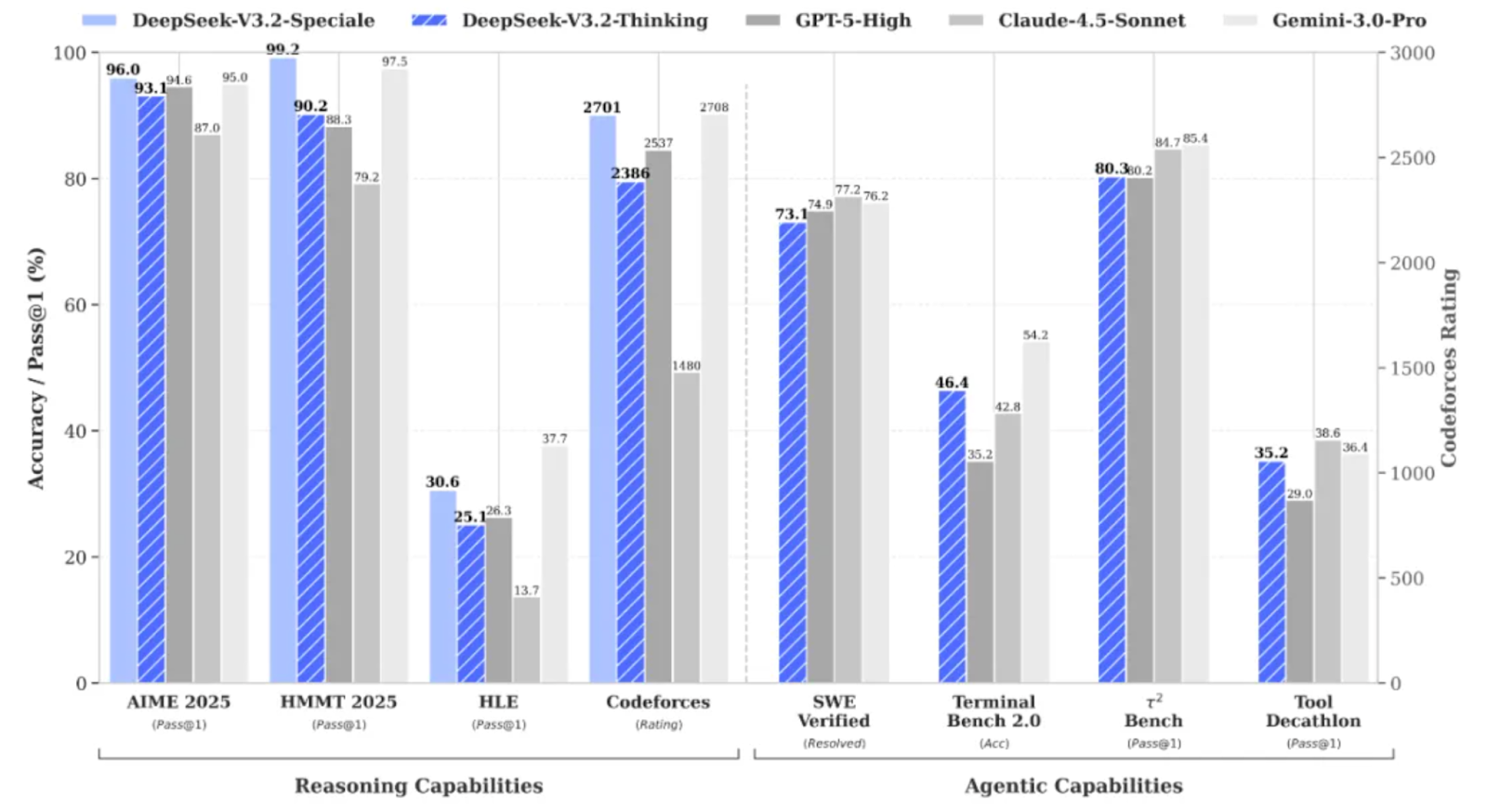
DeepSeek V3.2 Speciale là biến thể tăng cường bằng học tăng cường với năng lực tính toán cao thuộc họ DeepSeek V3.2, được thiết kế chuyên cho suy luận sâu thay vì trò chuyện thông thường.
Mô hình đạt hiệu năng đủ để sánh với các mô hình như Gemini 3 Pro trên các tác vụ phức tạp, và thậm chí đạt huy chương vàng ở các chuẩn như IMO, CMO, ICPC World Finals và IOI 2025.
DeepSeek V3.2 Speciale được tối ưu cho:
V3.2 Speciale chỉ hỗ trợ chế độ suy nghĩ và hiện chưa hỗ trợ gọi công cụ qua API chính thức. Bạn không thể chỉ điều chỉnh temperature và kỳ vọng JSON sạch ngay lần đầu. Mô hình Speciale sẽ suy nghĩ dài và thường đan xen phần suy luận với câu trả lời cuối.
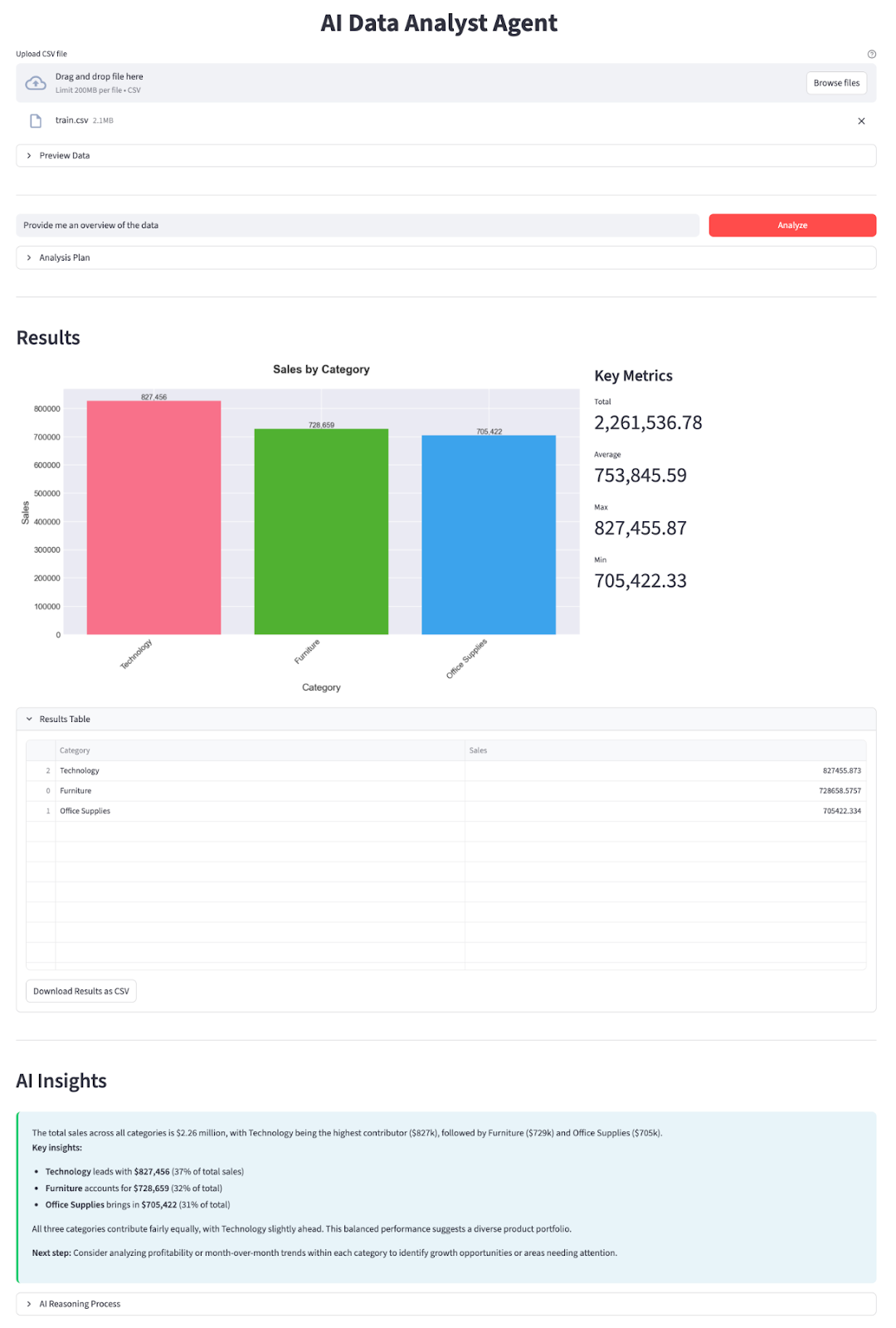
Trong phần này, chúng ta sẽ triển khai một Agent Phân Tích Dữ Liệu AI với mô hình DeepSeek V3.2 Speciale bọc trong ứng dụng Streamlit. Ở mức cao, ứng dụng cuối sẽ làm những việc sau:
Hãy xây dựng từng bước.
Trước tiên, cài đặt các phụ thuộc cốt lõi và lấy khóa API từ nền tảng API của DeepSeek:
pip install streamlit pandas matplotlib seaborn python-dotenv openaiChúng ta sẽ dùng một vài thư viện chính như streamlit để xây dựng giao diện web tương tác, pandas để tải và xử lý dữ liệu CSV, matplotlib và seaborn để tạo biểu đồ và trực quan hóa. Thư viện python-dotenv dùng để tải biến môi trường từ tệp .env, và OpenAI làm client để giao tiếp với API tương thích OpenAI của DeepSeek.
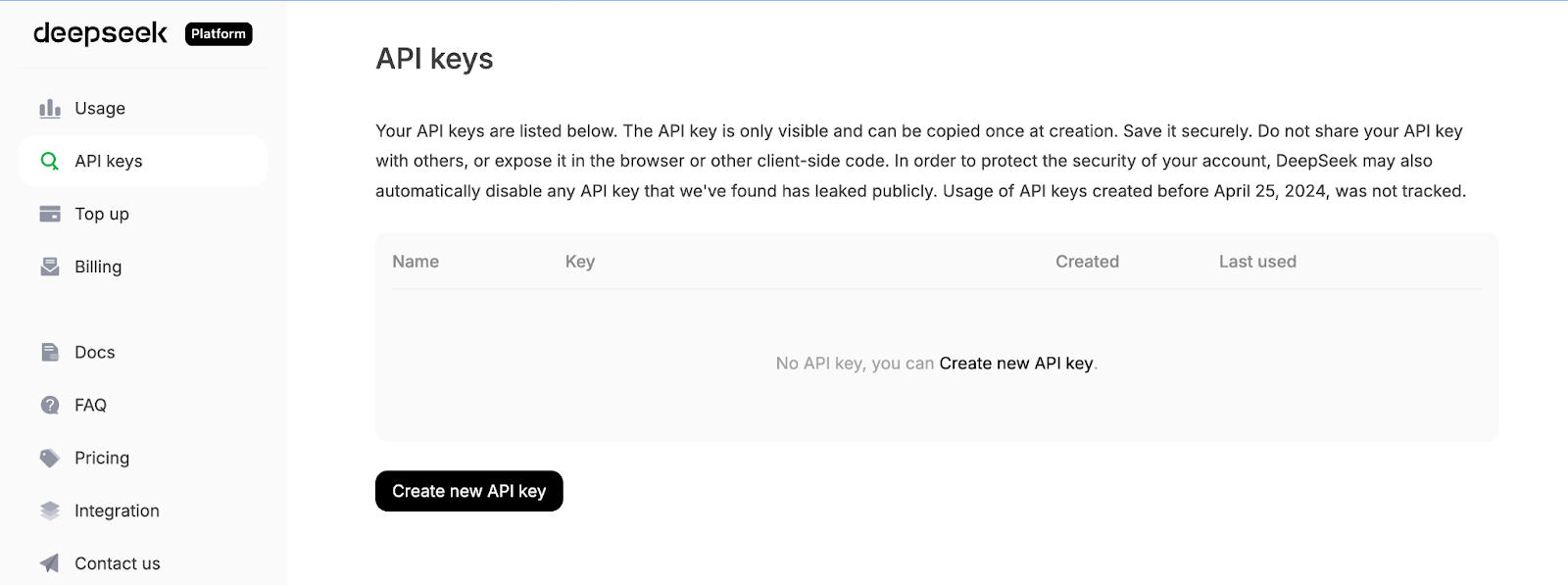
Tiếp theo, đăng nhập nền tảng API DeepSeek, vào tab API Keys và nhấp Create a new API key.
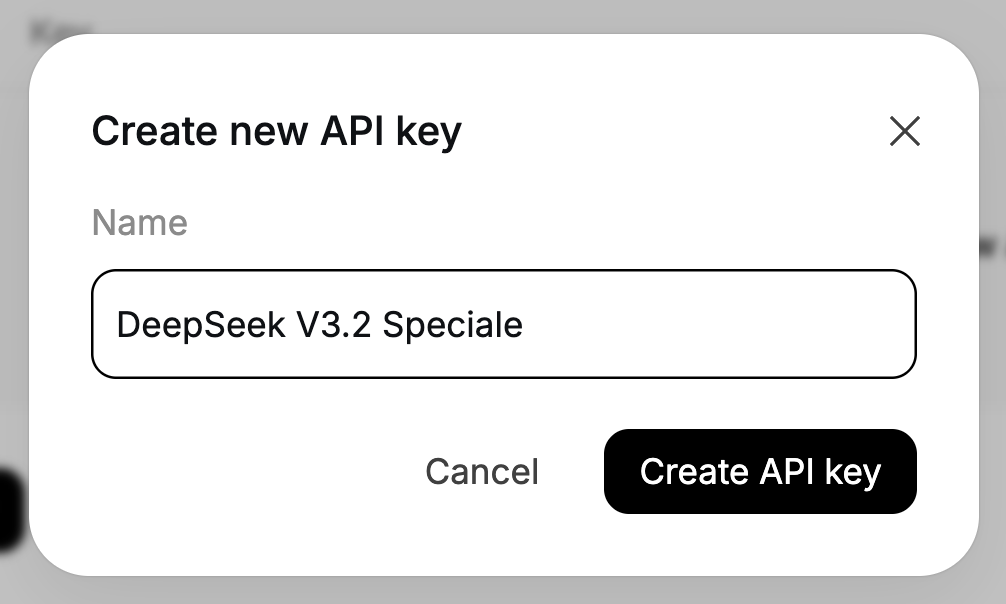
Cuối cùng, đặt tên cho khóa của bạn và sao chép khóa được tạo.
Thiết lập khóa API DeepSeek của bạn làm biến môi trường:
export DEEPSEEK_API_KEY="your_api_key_here"Giờ môi trường đã sẵn sàng.
Với các phụ thuộc đã cài, bước tiếp theo là import chúng vào script và kết nối client DeepSeek để vận hành các agent lập kế hoạch và diễn giải.
import io
import json
import os
import re
from datetime import datetime
import matplotlib.pyplot as plt
import pandas as pd
import seaborn as sns
import streamlit as st
from dotenv import load_dotenv
from openai import OpenAI
plt.style.use('seaborn-v0_8-darkgrid')
sns.set_palette("husl")
load_dotenv()
DEEPSEEK_API_KEY = os.getenv("DEEPSEEK_API_KEY")
if not DEEPSEEK_API_KEY:
    raise RuntimeError("Please set DEEPSEEK_API_KEY env variable.")
DEEPSEEK_BASE_URL = os.getenv(
    "DEEPSEEK_BASE_URL",
    "https://api.deepseek.com/v3.2_speciale_expires_on_20251215",
)
client = OpenAI(
    api_key=DEEPSEEK_API_KEY,
    base_url=DEEPSEEK_BASE_URL,
)
Khối mã trên làm ba việc: import các thư viện cốt lõi, áp dụng style vẽ, và tải biến môi trường từ .env. Sau đó đọc DEEPSEEK_API_KEY, kiểm tra hợp lệ và tạo client OpenAI trỏ tới endpoint tạm thời của V3.2 Speciale của DeepSeek để mọi lệnh gọi LLM sau đó đi đúng mô hình.
Lưu ý DeepSeek V3.2 Speciale hiện được phục vụ từ endpoint tạm thời hết hạn ngày 15/12/2025. Sau đó URL triển khai có thể thay đổi, nhưng tên mô hình vẫn là deepseek-reasoner. Để biết endpoint mới nhất và cách dùng, tham khảo tài liệu chính thức của DeepSeek.
Khi client đã cấu hình xong, hãy định nghĩa hai agent của chúng ta - một để lập kế hoạch phân tích, và một để giải thích kết quả.
Khi client đã sẵn sàng, ta có thể xây dựng Planner Agent, quyết định phân tích gì với dữ liệu. Thay vì cho phép mô hình thao tác trực tiếp trên DataFrame, ta yêu cầu nó tạo một kế hoạch JSON có cấu trúc để “data worker” Python thực thi an toàn.
Planner nhận mô tả văn bản về tập dữ liệu cùng câu hỏi của người dùng và trả về đối tượng JSON mô tả thao tác, các cột group-by, bộ lọc, chỉ số và loại biểu đồ.
def call_planner_llm(schema_text: str, question: str) -> tuple[dict, str]:
    system_prompt = """
    You are a data analysis planner. Convert user questions into JSON plans.
    JSON Structure (REQUIRED):
    {
      "operation": "group_by_summary",
      "group_by": ["column_name"],
      "filters": [],
      "target_column": "column_to_analyze",
      "metric": "sum",
      "need_chart": true,
      "chart_type": "bar"
    }
    Fields:
    - operation: Always use "group_by_summary" (most flexible)
    - group_by: Columns to group by (e.g., ["Product Name"] or ["Category", "Region"])
    - filters: Optional filters, e.g., [{"column": "Year", "op": "==", "value": "2023"}]
    - target_column: Column to aggregate (must exist in schema!)
    - metric: One of: sum, mean, count, max, min
    - need_chart: true (always show chart)
    - chart_type: bar, line, or pie
    Quick Rules:
    - Use ONLY columns from the provided schema
    - For "this year", look for year columns or use the latest year in data
    - For "top N", use appropriate group_by and metric
    - For comparisons, use filters to split groups
    Think briefly, then output the complete JSON.
    """.strip()
    messages = [
        {"role": "system", "content": system_prompt},
        {
            "role": "user",
            "content": f"Dataset:\n{schema_text}\n\nQuestion:\n{question}\n\nReminder: After analyzing, output the complete JSON plan.",
        },
    ]
    resp = client.chat.completions.create(
        model="deepseek-reasoner",
        messages=messages,
        max_tokens=8192,
    )
    message = resp.choices[0].message
    content = message.content or ""
    content = content.strip()
    reasoning_content = getattr(message, 'reasoning_content', None) or ""
    finish_reason = resp.choices[0].finish_reason
    def extract_json_from_text(text: str) -> dict | None:
        if not text:
            return None
        try:
            return json.loads(text)
        except json.JSONDecodeError:
            pass
        code_block_match = re.search(r'```(?:json)?\s*(\{[\s\S]*?\})\s*```', text, re.DOTALL)
        if code_block_match:
            try:
                return json.loads(code_block_match.group(1))
            except json.JSONDecodeError:
                pass
        def find_all_json_objects(s):
            objects = []
            depth = 0
            start_idx = None
            in_string = False
            escape_next = False
            for i, char in enumerate(s):
                if escape_next:
                    escape_next = False
                    continue
                if char == '\\':
                    escape_next = True
                    continue
                if char == '"' and not in_string:
                    in_string = True
                elif char == '"' and in_string:
                    in_string = False
                elif not in_string:
                    if char == '{':
                        if depth == 0:
                            start_idx = i
                        depth += 1
                    elif char == '}':
                        depth -= 1
                        if depth == 0 and start_idx is not None:
                            objects.append(s[start_idx:i+1])
                            start_idx = None
            return objects
        for candidate in find_all_json_objects(text):
            try:
                parsed = json.loads(candidate)
                if isinstance(parsed, dict) and any(k in parsed for k in ['operation', 'target_column', 'metric', 'group_by']):
                    return parsed
            except json.JSONDecodeError:
                continue
        for i in range(len(text)):
            if text[i] == '{':
                decoder = json.JSONDecoder()
                try:
                    parsed, _ = decoder.raw_decode(text[i:])
                    if isinstance(parsed, dict) and any(k in parsed for k in ['operation', 'target_column', 'metric', 'group_by']):
                        return parsed
                except json.JSONDecodeError:
                    continue
        return None
    if reasoning_content:
        plan = extract_json_from_text(reasoning_content)
        if plan is not None:
            return plan, reasoning_content
    plan = extract_json_from_text(content)
    if plan is not None:
        return plan, reasoning_content
    error_msg = (
        f"Planner returned non-JSON content.\n"
        f"Finish reason: {finish_reason}\n"
        f"Content received: {repr(content[:500]) if content else '(empty)'}\n"
        f"Reasoning content length: {len(reasoning_content) if reasoning_content else 0}\n"
        f"Reasoning content sample: {reasoning_content[:500] if reasoning_content else '(none)'}"
    )
    if finish_reason == "length":
        error_msg += "\n\nNote: Response was truncated due to token limit. The model didn't finish generating the JSON."
    raise ValueError(error_msg)
Đầu tiên, system_prompt định nghĩa “hợp đồng” cho Planner Agent, chuyển câu hỏi người dùng thành kế hoạch JSON và chỉ rõ các trường mong đợi như danh sách cột group_by, filters tùy chọn, target_column, metric và chart_type.
Chúng ta cũng thêm một vài quy tắc kinh nghiệm (như xử lý “năm nay” hay “top N”) để mô hình hành xử giống một nhà phân tích dữ liệu mới vào nghề hơn là chatbot chung chung.
Tiếp theo, ta xây dựng thông điệp hệ thống mang hướng dẫn, gói kèm hai nội dung: mô tả văn bản về schema của dữ liệu (tên cột, dtype, vài dòng mẫu) và câu hỏi của người dùng. Điều này cho mô hình đủ ngữ cảnh để chọn tên cột hợp lệ và phép tổng hợp phù hợp với câu hỏi.
DeepSeek V3.2 Speciale được gọi qua client.chat.completions.create(). Vì đây là mô hình suy luận, nó có thể xuất ra hai kênh, chuỗi nội dung hiển thị và chuỗi reasoning_content nội bộ nơi phần “suy nghĩ” và đáp án cuối thường xuất hiện. Ta lấy cả hai và lưu finish_reason để phát hiện bị cắt bớt.
Phần nặng nằm trong hàm extract_json_from_text(). Do các mô hình suy luận không phải lúc nào cũng trả JSON sạch, ta bọc nó trong markdown. Để planner bền bỉ, hàm trợ giúp này thử nhiều chiến lược tuần tự:
json.loadsVới mỗi ứng viên, chỉ chấp nhận đối tượng trông giống kế hoạch hợp lệ, tức chứa ít nhất một trong các trường operation, target_column, metric hoặc group_by.
Cuối cùng, ta kết nối mọi thứ bằng cách áp dụng extract_json_from_text() lên reasoning_content.
Tổng hòa, các thành phần này biến mọi câu hỏi ngôn ngữ tự nhiên và snapshot schema thành kế hoạch phân tích có cấu trúc.
Khi Data Worker đã chạy phân tích bằng Pandas, chúng ta gửi bảng kết quả cùng kế hoạch JSON trở lại DeepSeek và chuyển tất cả thành bản tóm tắt với insight cụ thể.
def call_explainer_llm(question: str, plan: dict, result_summary: list) -> tuple[str, str]:
    system_prompt = """
    You are a senior data analyst explaining insights to business stakeholders.
    The user asked a question about their CSV data.
    Another agent already designed an analysis plan and we executed it in Python.
    You will now explain the results in clear, engaging, non-technical language.
    Requirements:
    - Start with a direct 1-2 sentence answer to their question
    - Use bullet points (3-5 points) to highlight key insights, trends, or comparisons
    - Include specific numbers and percentages where relevant
    - Use business-friendly language (avoid technical jargon like "aggregation", "groupby")
    - If the data shows interesting patterns, point them out
    - End with a brief recommendation or next step if appropriate
    Keep it concise and actionable.
    """.strip()
    limited_summary = result_summary[:20] if len(result_summary) > 20 else result_summary
    user_content = f"""
    User question:
    {question}
    Analysis performed:
    {json.dumps(plan, indent=2)}
    Results (top rows):
    {json.dumps(limited_summary, indent=2)}
    Total rows in result: {len(result_summary)}
    """.strip()
    messages = [
        {"role": "system", "content": system_prompt},
        {"role": "user", "content": user_content},
    ]
    resp = client.chat.completions.create(
        model="deepseek-reasoner",
        messages=messages,
        max_tokens=2048,
    )
    message = resp.choices[0].message
    content = message.content or ""
    content = content.strip()
    reasoning_content = getattr(message, 'reasoning_content', None) or ""
    if not content:
        if reasoning_content:
            content = reasoning_content.strip()
    return (content if content else "Unable to generate explanation from the model response.",
            reasoning_content)
Explainer agent bắt đầu bằng cách thiết lập system_prompt, yêu cầu DeepSeek hành xử như một nhà phân tích dữ liệu cấp cao đang trao đổi với các bên liên quan kinh doanh. Chúng ta chỉ rõ hình thức câu trả lời mong muốn cùng các gợi ý soạn thảo khác.
Tiếp theo, ta chuẩn bị user_content, cung cấp mọi ngữ cảnh cần thiết: câu hỏi gốc, kế hoạch phân tích JSON (để biết đã chạy những phép tính gì) và tổng số dòng.
Sau đó, ta ghép danh sách messages và gọi DeepSeek V3.2 Speciale qua client.chat.completions.create(). Giống planner, mô hình có thể trả về văn bản ở cả content và reasoning_content, nên ta lấy cả hai và dùng reasoning_content khi content trống.
Cuối cùng, hàm trả về một bộ gồm phần giải thích và chuỗi suy luận thô hiển thị trong expander.
Với Explainer Agent này, vòng lặp đã hoàn chỉnh:
Trước khi để DeepSeek lập kế hoạch, ta cần mô tả dữ liệu rõ ràng và tối ưu cho phân tích. Điều này đạt được bằng một loạt hàm trợ giúp.
Planner Agent không thể nhìn trực tiếp DataFrame của bạn, nên ta gửi cho nó một tóm tắt văn bản gọn nhẹ về tập dữ liệu.
def get_schema_description(df: pd.DataFrame, max_rows: int = 3) -> str:
    schema_lines = ["Columns:"]
    for col, dtype in df.dtypes.items():
        if dtype == 'object' and df[col].nunique() < 20:
            unique_vals = df[col].dropna().unique()[:5]
            schema_lines.append(f"- {col} ({dtype}) - sample values: {', '.join(map(str, unique_vals))}")
        else:
            schema_lines.append(f"- {col} ({dtype})")
    sample = df.head(max_rows).to_markdown(index=False)
    return "\n".join(schema_lines) + "\n\nSample rows:\n" + sample
Hàm này lặp qua tất cả các cột. Nó cũng kèm một vài giá trị mẫu cho các trường như tên sản phẩm, vùng hoặc danh mục. F
inally, nó nối thêm một bảng markdown ngắn gồm vài dòng đầu, để mô hình có ví dụ cụ thể để suy luận.
Chuỗi schema này là “đôi mắt” của planner trước dữ liệu của bạn, giúp nó chọn đúng tên cột và group-by.
Chúng ta tự động phát hiện các cột ngày tháng và thêm các trường hỗ trợ như <col>_year và <col>_year_month, giúp DeepSeek dễ trả lời các câu như “năm ngoái” hay “theo tháng”.
def preprocess_dates(df: pd.DataFrame) -> pd.DataFrame:
    df = df.copy()
    date_columns = []
    for col in df.columns:
        if pd.api.types.is_datetime64_any_dtype(df[col]):
            date_columns.append(col)
            continue
        if any(x in col.lower() for x in ['date', 'time', 'day']):
            try:
                df[col] = pd.to_datetime(df[col], errors='coerce')
                if df[col].notna().sum() > 0:
                    date_columns.append(col)
            except:
                pass
    for col in date_columns:
        if col in df.columns and pd.api.types.is_datetime64_any_dtype(df[col]):
            df[f'{col}_year'] = df[col].dt.year
            df[f'{col}_month'] = df[col].dt.month
            df[f'{col}_year_month'] = df[col].dt.to_period('M').astype(str)
    return df
Đầu tiên, ta quét các cột, nếu cột đã là datetime hoặc tên gợi ý ngày tháng (như order_date hay day), ta thử parse bằng pd.to_datetime. Với mỗi cột ngày tháng, ta tạo các đặc trưng <col>_year, <col>_month và <col>_year_month.
Tiền xử lý này giúp planner có thể tham chiếu an toàn các cột year và year_month mà bạn không cần tự tạo đặc trưng thời gian cho mọi tập dữ liệu.
Planner có thể thêm các bộ lọc hàng đơn giản vào kế hoạch, và hàm trợ giúp này chuyển chúng thành bộ lọc pandas.
def apply_filters(df: pd.DataFrame, filters: list) -> pd.DataFrame:
    if not filters:
        return df
    filtered = df.copy()
    for f in filters:
        col = f.get("column")
        op = f.get("op")
        val = f.get("value")
        if col not in filtered.columns:
            continue
        try:
            val_cast = pd.to_numeric(val)
        except Exception:
            val_cast = val
        if op == "==":
            filtered = filtered[filtered[col] == val_cast]
        elif op == "!=":
            filtered = filtered[filtered[col] != val_cast]
        elif op == ">":
            filtered = filtered[filtered[col] > val_cast]
        elif op == "<":
            filtered = filtered[filtered[col] < val_cast]
        elif op == ">=":
            filtered = filtered[filtered[col] >= val_cast]
        elif op == "<=":
            filtered = filtered[filtered[col] <= val_cast]
        elif op == "contains":
            filtered = filtered[filtered[col].astype(str).str.contains(str(val_cast), case=False, na=False)]
    return filtered
Với mỗi bộ lọc, ta kiểm tra cột tồn tại, ép kiểu giá trị sang số nếu có thể, rồi áp dụng phép so sánh phù hợp. Tất cả bộ lọc được áp dụng tuần tự, nên bạn có thể kết hợp các điều kiện như “Region chứa West” và “Year >= 2021”.
Hàm này kết nối các ràng buộc ngôn ngữ tự nhiên trong kế hoạch với tập con các hàng.
Giờ chúng ta triển khai Data Worker, một lớp mỏng đọc kế hoạch JSON và chạy các phép tổng hợp pandas tương ứng.
def run_analysis_plan(df: pd.DataFrame, plan: dict) -> pd.DataFrame:
    op = plan.get("operation")
    target_col = plan.get("target_column")
    group_by = plan.get("group_by") or []
    filters = plan.get("filters") or []
    metric = plan.get("metric", "sum")
    if filters:
        df = apply_filters(df, filters)
    if not op or not target_col or target_col not in df.columns:
        return df.head(20)
    if op in ("aggregate_compare", "group_by_summary", "filter_then_aggregate"):
        if not group_by:
            if metric == "sum":
                value = df[target_col].sum()
            elif metric == "mean":
                value = df[target_col].mean()
            elif metric == "count":
                value = df[target_col].count()
            elif metric == "max":
                value = df[target_col].max()
            elif metric == "min":
                value = df[target_col].min()
            else:
                raise ValueError(f"Unsupported metric: {metric}")
            return pd.DataFrame({f"{metric}_{target_col}": [value]})
        if metric == "sum":
            agg_df = df.groupby(group_by)[target_col].sum().reset_index()
        elif metric == "mean":
            agg_df = df.groupby(group_by)[target_col].mean().reset_index()
        elif metric == "count":
            agg_df = df.groupby(group_by)[target_col].count().reset_index()
        elif metric == "max":
            agg_df = df.groupby(group_by)[target_col].max().reset_index()
        elif metric == "min":
            agg_df = df.groupby(group_by)[target_col].min().reset_index()
        else:
            raise ValueError(f"Unsupported metric: {metric}")
        agg_df = agg_df.sort_values(by=target_col, ascending=False)
        return agg_df
    return df.head(20)
Ta bắt đầu bằng việc mở kế hoạch gồm thao tác, cột mục tiêu, các cột nhóm, bộ lọc và tham số chỉ số. T
iếp theo, bộ lọc được áp dụng qua hàm apply_filters(). Nếu kế hoạch tham chiếu cột không hợp lệ, ta quay về trả bản xem trước đơn giản.
Nếu hợp lệ, với các thao tác hỗ trợ, ta hoặc tổng hợp trên toàn bảng hoặc chạy groupby, sau đó thực hiện các phép như sum, mean, count, max hoặc min, và sắp xếp kết quả theo cột chỉ số.
Đây là lõi của tầng công cụ: LLM quyết định cần tính gì, còn hàm này quyết định cách tính an toàn bằng pandas.
Cuối cùng, ta chuyển bảng kết quả thành biểu đồ khớp với chart_type trong kế hoạch, để đầu ra có cả số liệu và hình ảnh.
def generate_chart(df: pd.DataFrame, plan: dict):
    if not plan.get("need_chart") or df.empty:
        return None
    chart_type = plan.get("chart_type", "bar")
    group_by = plan.get("group_by") or []
    target_col = plan.get("target_column")
    if not target_col or target_col not in df.columns:
        return None
    fig, ax = plt.subplots(figsize=(10, 6))
    if group_by and len(group_by) > 0:
        x_col = group_by[0]
        if x_col not in df.columns:
            return None
        plot_df = df.head(15)
        if chart_type == "bar":
            bars = ax.bar(range(len(plot_df)), plot_df[target_col], color=sns.color_palette("husl", len(plot_df)))
            ax.set_xticks(range(len(plot_df)))
            ax.set_xticklabels(plot_df[x_col], rotation=45, ha='right')
            ax.set_ylabel(target_col, fontsize=12)
            ax.set_xlabel(x_col, fontsize=12)
            for i, (bar, val) in enumerate(zip(bars, plot_df[target_col])):
                height = bar.get_height()
                ax.text(bar.get_x() + bar.get_width()/2., height,
                       f'{val:,.0f}' if abs(val) > 100 else f'{val:.2f}',
                       ha='center', va='bottom', fontsize=9)
        elif chart_type == "line":
            ax.plot(range(len(plot_df)), plot_df[target_col], marker='o', linewidth=2, markersize=8)
            ax.set_xticks(range(len(plot_df)))
            ax.set_xticklabels(plot_df[x_col], rotation=45, ha='right')
            ax.set_ylabel(target_col, fontsize=12)
            ax.set_xlabel(x_col, fontsize=12)
            ax.grid(True, alpha=0.3)
        elif chart_type == "pie" and len(plot_df) <= 10:
            ax.pie(plot_df[target_col], labels=plot_df[x_col], autopct='%1.1f%%', startangle=90)
            ax.axis('equal')
        else:
            bars = ax.bar(range(len(plot_df)), plot_df[target_col])
            ax.set_xticks(range(len(plot_df)))
            ax.set_xticklabels(plot_df[x_col], rotation=45, ha='right')
        title = f"{target_col} by {x_col}"
    else:
        ax.bar([target_col], [df[target_col].iloc[0]])
        title = f"{target_col}"
    ax.set_title(title, fontsize=14, fontweight='bold', pad=20)
    fig.tight_layout()
    buf = io.BytesIO()
    fig.savefig(buf, format="png", dpi=150, bbox_inches='tight')
    buf.seek(0)
    plt.close(fig)
    return buf
Ta đọc chart_type, group_by và target_column từ kế hoạch và dựng một figure Matplotlib. Hàm generate_chart() trên trả về một buffer PNG trong bộ nhớ để ứng dụng Streamlit hiển thị cạnh các chỉ số chính.
Với các hàm trợ giúp này, phần còn lại của hệ thống đơn giản hơn nhiều. Planner dùng get_schema_description để thiết kế phân tích, Data Worker dùng các hàm preprocess_dates(), apply_filters() và run_analysis_plan() để xử lý số liệu, và generate_chart() chuyển bảng cuối thành biểu đồ.
Khi planner, data worker, explainer và các hàm trợ giúp đã sẵn sàng, ta có thể gói tất cả vào một ứng dụng Streamlit.
st.set_page_config(
    page_title="AI Data Analyst Agent",
    page_icon="📊",
    layout="wide",
    initial_sidebar_state="expanded"
)
st.markdown("""
<style>
    .main-header {

        font-weight: 700;


        text-align: center;
    }
    .sub-header {


        text-align: center;
    }
    .metric-card {
        background-

        border-radius: 0.5rem;
        border-left: 4px solid #1f77b4;
    }
    .insight-box {
        background-

        border-radius: 0.5rem;
        border-left: 4px solid #2ecc71;

    }
</style>
""", unsafe_allow_html=True)
st.markdown("<h1 class='main-header'>AI Data Analyst Agent</h1>", unsafe_allow_html=True)
uploaded_file = st.file_uploader("Upload CSV file", type=["csv"], help="Upload any CSV file to get started")
if uploaded_file is not None:
    try:
        df = pd.read_csv(uploaded_file)
        df = preprocess_dates(df)
    except Exception as e:
        st.error(f"Error loading CSV: {e}")
        st.stop()
    with st.expander("Preview Data", expanded=False):
        col1, col2, col3 = st.columns(3)
        col1.metric("Total Rows", f"{len(df):,}")
        col2.metric("Total Columns", len(df.columns))
        col3.metric("Memory Usage", f"{df.memory_usage(deep=True).sum() / 1024**2:.1f} MB")
        st.dataframe(df.head(100), width='stretch', height=300)
        st.markdown("**Numeric Columns Summary:**")
        numeric_cols = df.select_dtypes(include=['number']).columns
        if len(numeric_cols) > 0:
            st.dataframe(df[numeric_cols].describe(), width='stretch')
    st.markdown("---")
    col1, col2 = st.columns([4, 1])
    with col1:
        question = st.text_input(
            " Ask a question about your data",
            placeholder="e.g., Which product category had the highest sales last year?",
            label_visibility="collapsed"
        )
    with col2:
        analyze_button = st.button("Analyze", type="primary", width='stretch')
    if analyze_button and question.strip():
        with st.spinner("Analyzing data..."):
            schema_text = get_schema_description(df)
            try:
                plan, planner_reasoning = call_planner_llm(schema_text, question)
            except Exception as e:
                st.error(f" Planner agent failed: {e}")
                st.stop()
            with st.expander(" Analysis Plan", expanded=False):
                col1, col2 = st.columns(2)
                with col1:
                    st.json(plan)
                with col2:
                    if planner_reasoning:
                        st.markdown("**AI Reasoning Process:**")
                        st.text_area("Planner Reasoning", planner_reasoning[:1000] + "..." if len(planner_reasoning) > 1000 else planner_reasoning,
                                   height=200, label_visibility="collapsed")
            try:
                result_df = run_analysis_plan(df, plan)
            except Exception as e:
                st.error(f" Error running analysis: {e}")
                st.info(" Tip: Try rephrasing your question or be more specific about the columns you want to analyze.")
                st.stop()
        st.markdown("---")
        st.markdown("## Results")
        chart_buf = generate_chart(result_df, plan)
        if chart_buf is not None:
            col1, col2 = st.columns([2, 1])
            with col1:
                st.image(chart_buf)
            with col2:
                st.markdown("### Key Metrics")
                target_col = plan.get("target_column")
                if target_col in result_df.columns:
                    st.metric("Total", f"{result_df[target_col].sum():,.2f}")
                    st.metric("Average", f"{result_df[target_col].mean():,.2f}")
                    st.metric("Max", f"{result_df[target_col].max():,.2f}")
                    st.metric("Min", f"{result_df[target_col].min():,.2f}")
        else:
            st.info("Chart generation skipped (not applicable for this query)")
        with st.expander("Results Table", expanded=True):
            st.dataframe(result_df, width='stretch', height=400)
            csv_data = result_df.to_csv(index=False)
            st.download_button(
                label="Download Results as CSV",
                data=csv_data,
                file_name=f"analysis_results_{datetime.now().strftime('%Y%m%d_%H%M%S')}.csv",
                mime="text/csv"
            )
        with st.spinner("Generating insights..."):
            result_df_serializable = result_df.copy()
            for col in result_df_serializable.columns:
                if pd.api.types.is_datetime64_any_dtype(result_df_serializable[col]):
                    result_df_serializable[col] = result_df_serializable[col].astype(str)
                elif pd.api.types.is_period_dtype(result_df_serializable[col]):
                    result_df_serializable[col] = result_df_serializable[col].astype(str)
            result_summary = result_df_serializable.to_dict(orient="records")
            explanation, explainer_reasoning = call_explainer_llm(
                question=question,
                plan=plan,
                result_summary=result_summary,
            )
        st.markdown("---")
        st.markdown("## AI Insights")
        st.markdown(f'<div class="insight-box">{explanation}</div>', unsafe_allow_html=True)
        if explainer_reasoning:
            with st.expander(" AI Reasoning Process", expanded=False):
                st.text_area("Explainer Reasoning", explainer_reasoning[:1500] + "..." if len(explainer_reasoning) > 1500 else explainer_reasoning,
                           height=300, label_visibility="collapsed")
Ở trên cùng, ta cấu hình trang bằng st.set_page_config và CSS để tạo phong cách bảng điều khiển. Người dùng trước hết tải lên CSV, ta nạp vào DataFrame, đưa qua preprocess_dates và hiển thị trong expander Preview Data với số hàng/cột, bộ nhớ sử dụng và tóm tắt nhanh.
Ẩn sau hậu trường, ta xây dựng schema bằng hàm get_schema_description(), gọi call_planner_llm để nhận kế hoạch JSON, và hiển thị cả kế hoạch lẫn suy luận của mô hình trong một expander. Data Worker sau đó thực thi kế hoạch bằng pandas, và phần Results hiển thị biểu đồ từ generate_chart cùng các chỉ số chính.
Cuối cùng, ta gọi call_explainer_llm với câu hỏi, kế hoạch và tóm tắt kết quả để tạo phần giải thích cho hộp AI Insights, kèm expander AI Reasoning Process tùy chọn cho ai muốn xem bên trong.
Lưu tất cả thành app.py và chạy:
streamlit run app.pyTrong video dưới đây, bạn có thể xem phiên bản rút gọn của quy trình đang chạy:
Khóa học hàng đầu trên DataCamp
Khóa học
Khóa học
Khóa học
blog
Matt Crabtree
10 phút
