

कोर्स
Python में DeepSeek के साथ काम करना
3 घंटा
1.4K
अभ्यास और ट्रैक अपनी प्रगति को।
Google के साथ जारी रखेंDeepSeek V3.2 Speciale एक हाई-कम्प्यूट रीज़निंग मॉडल है जिसे जटिल, टूल-आधारित वर्कफ़्लोज़ के लिए ट्यून किया गया है। सीधे जवाब देने के बजाय, इसे एजेंटिक एनालिटिक्स सिस्टम बनाने के लिए प्लान करने, तर्क करने और टूल्स का समन्वय करने के लिए डिज़ाइन किया गया है।
इस ट्यूटोरियल में, हम DeepSeek V3.2 Speciale का उपयोग करके एक AI डेटा एनालिस्ट एजेंट बनाएंगे जो किसी भी CSV के ऊपर चलता है। प्रवाह इस प्रकार है:
अंत में, आपके पास स्पष्ट योजनाओं और पुनरुत्पाद्य विश्लेषण चरणों वाला एक Streamlit ऐप होगा। यदि आप AI एजेंट्स के बारे में और सीखना चाहते हैं, तो मैं AI Agent Fundamentals स्किल ट्रैक देखने की सिफारिश करता/करती हूं।
DeepSeek V3.2 Speciale, DeepSeek V3.2 परिवार का हाई-कम्प्यूट, रीइन्फोर्समेंट-लर्निंग से संवर्धित संस्करण है, जिसे आकस्मिक चैट के बजाय गहन तर्क के लिए विशेष रूप से डिज़ाइन किया गया है।
यह प्रदर्शन को इतना आगे बढ़ाता है कि जटिल कार्यों पर Gemini 3 Pro जैसे मॉडलों की टक्कर देता है, और IMO, CMO, ICPC वर्ल्ड फाइनल्स और IOI 2025 जैसे बेंचमार्क्स पर गोल्ड-मेडल परिणाम भी हासिल किए हैं।
DeepSeek V3.2 Speciale इन कार्यों के लिए अनुकूलित है:
V3.2 Speciale केवल थिंकिंग मोड का समर्थन करता है और वर्तमान में आधिकारिक API के माध्यम से टूल-कॉलिंग का समर्थन नहीं करता। आप सिर्फ temperature को समायोजित करके पहली बार में साफ-सुथरा JSON अपेक्षित नहीं कर सकते। Speciale मॉडल लंबा सोचेगा और अक्सर अपने तर्क को अंतिम उत्तर के साथ मिला देगा।
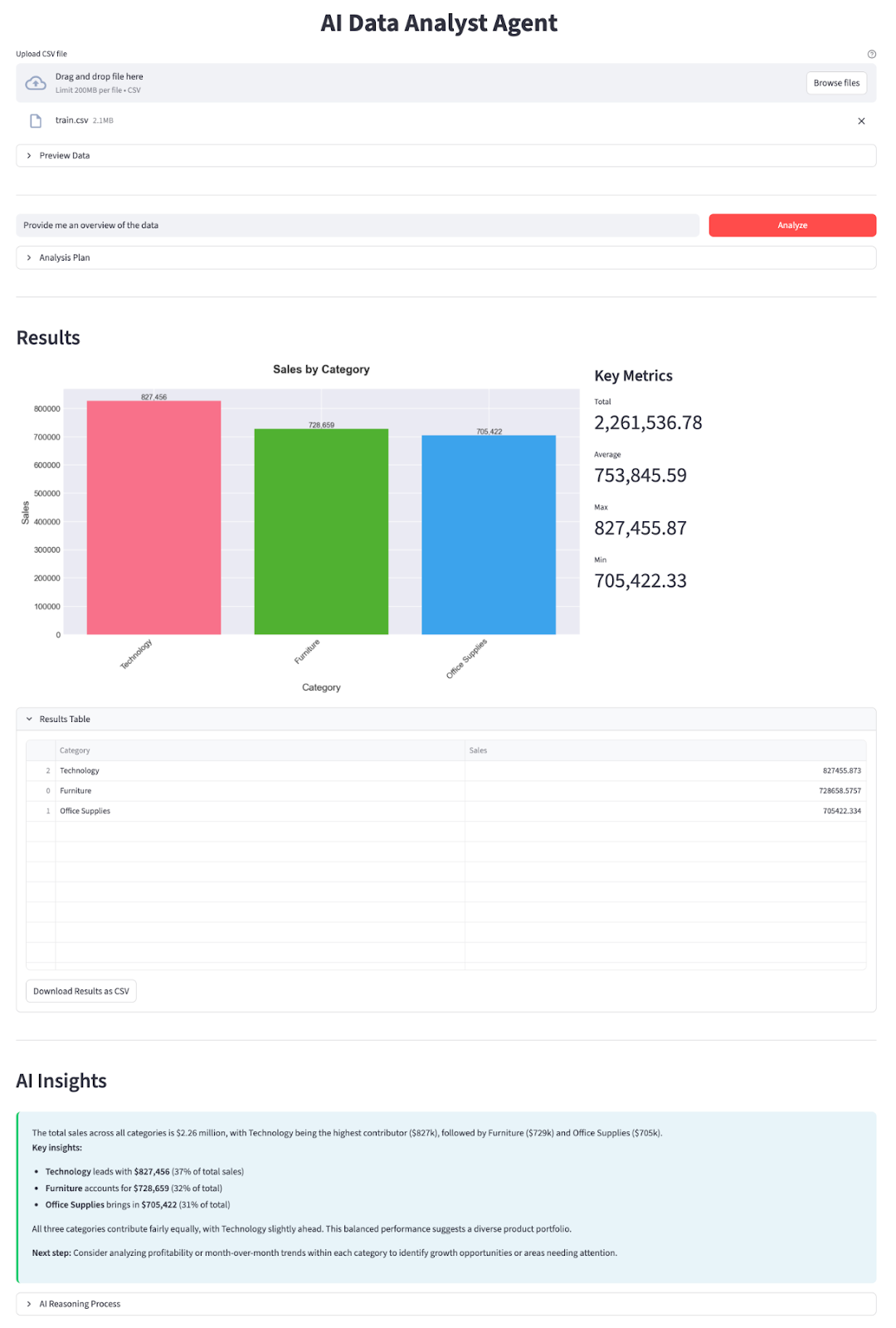
इस सेक्शन में, हम DeepSeek V3.2 Speciale मॉडल को Streamlit एप्लिकेशन में रैप करके एक AI डेटा एनालिस्ट एजेंट लागू करेंगे। उच्च स्तर पर, अंतिम ऐप यह करता है:
आइए इसे चरण दर चरण बनाते हैं।
सबसे पहले, कोर डिपेंडेंसियाँ इंस्टॉल करें और DeepSeek के API प्लेटफ़ॉर्म से एक API कुंजी लें:
pip install streamlit pandas matplotlib seaborn python-dotenv openaiहम कुछ कोर लाइब्रेरीज़ का उपयोग करेंगे जैसे इंटरैक्टिव वेब ऐप UI के लिए streamlit, CSV डेटा लोड और मैनिपुलेट करने के लिए pandas, चार्ट और विज़ुअलाइज़ेशन बनाने के लिए matplotlib और seaborn। python-dotenv लाइब्रेरी .env फ़ाइल से environment variables लोड करने के लिए उपयोग होती है, और OpenAI, DeepSeek के OpenAI-कम्पैटिबल API से बात करने के क्लाइंट के रूप में।
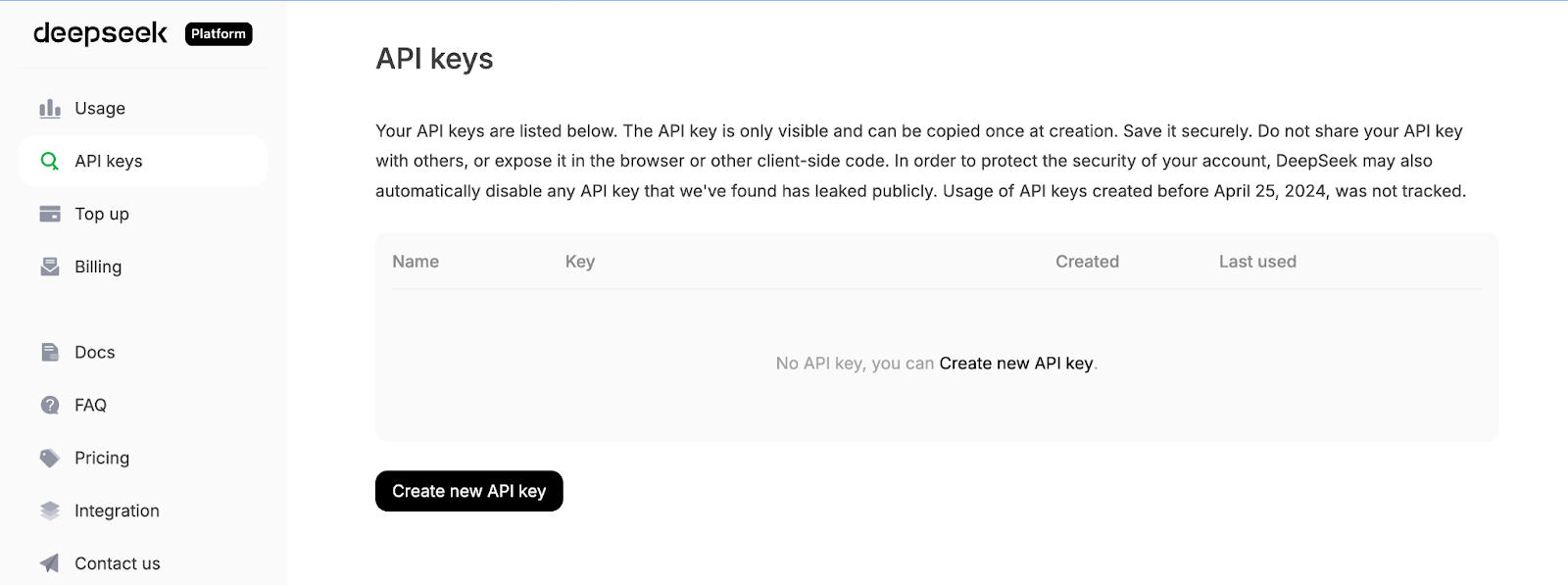
इसके बाद, DeepSeek API प्लेटफ़ॉर्म में लॉग इन करें, API Keys टैब पर जाएँ, और Create a new API key पर क्लिक करें।
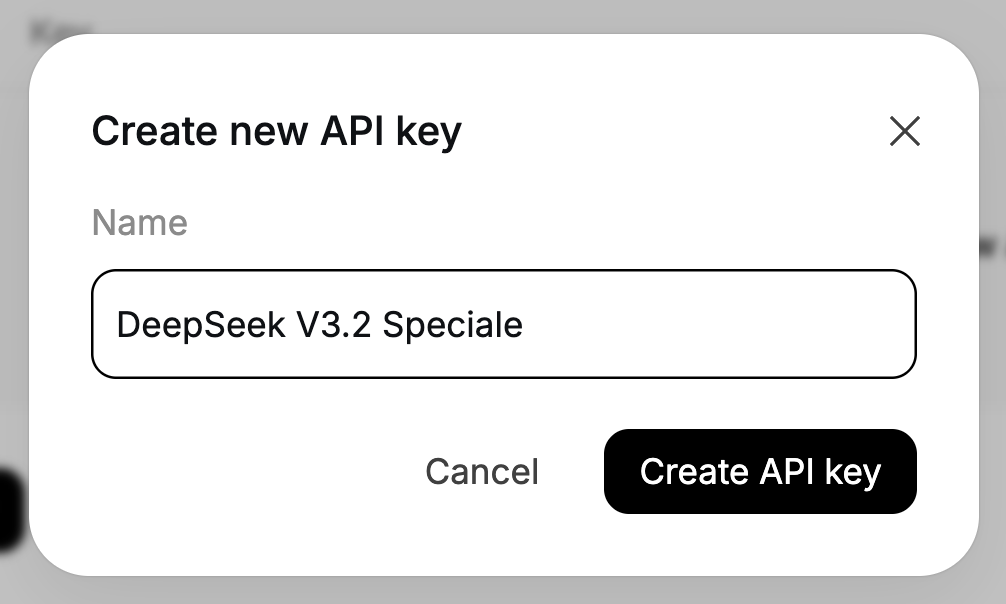
अंत में, अपनी कुंजी को एक नाम दें, और जनरेट की गई कुंजी को कॉपी करें।
अपनी DeepSeek API कुंजी को एक environment variable के रूप में सेट करें:
export DEEPSEEK_API_KEY="your_api_key_here"अब हमारा environment तैयार है।
डिपेंडेंसियाँ इंस्टॉल होने के बाद, अगला कदम है उन्हें हमारे स्क्रिप्ट में इम्पोर्ट करना और DeepSeek क्लाइंट को वायर करना जो हमारे प्लानर और एक्सप्लेनर एजेंट्स को शक्ति देगा।
import io
import json
import os
import re
from datetime import datetime
import matplotlib.pyplot as plt
import pandas as pd
import seaborn as sns
import streamlit as st
from dotenv import load_dotenv
from openai import OpenAI
plt.style.use('seaborn-v0_8-darkgrid')
sns.set_palette("husl")
load_dotenv()
DEEPSEEK_API_KEY = os.getenv("DEEPSEEK_API_KEY")
if not DEEPSEEK_API_KEY:
    raise RuntimeError("Please set DEEPSEEK_API_KEY env variable.")
DEEPSEEK_BASE_URL = os.getenv(
    "DEEPSEEK_BASE_URL",
    "https://api.deepseek.com/v3.2_speciale_expires_on_20251215",
)
client = OpenAI(
    api_key=DEEPSEEK_API_KEY,
    base_url=DEEPSEEK_BASE_URL,
)
ऊपर दिए गए कोड ब्लॉक तीन काम करते हैं। यह हमारी कोर लाइब्रेरीज़ इम्पोर्ट करता है, प्लॉटिंग स्टाइल लागू करता है, और .env से environment variables लोड करता है। फिर यह DEEPSEEK_API_KEY पढ़ता है, उसे मान्य करता है, और DeepSeek के अस्थायी V3.2 Speciale एंडपॉइंट पर प्वाइंट किया हुआ OpenAI क्लाइंट बनाता है ताकि हर अगली LLM कॉल सही मॉडल से होकर गुज़रे।
ध्यान दें कि DeepSeek V3.2 Speciale फिलहाल एक अस्थायी एंडपॉइंट से सर्व हो रहा है जो 15 दिसंबर 2025 को एक्सपायर हो जाएगा। उसके बाद डिप्लॉयमेंट URL बदल सकता है, लेकिन मॉडल का नाम deepseek-reasoner ही रहेगा। नवीनतम एंडपॉइंट्स और उपयोग विवरण के लिए आधिकारिक DeepSeek डॉक्युमेंटेशन देखें।
क्लाइंट कॉन्फ़िगर होने के साथ, आइए हमारे दो एजेंट परिभाषित करें — एक विश्लेषण की योजना बनाने के लिए, और दूसरा परिणाम समझाने के लिए।
क्लाइंट तैयार होने पर, हम प्लानर एजेंट बना सकते हैं, जो तय करता है कि डेटा के साथ कौन-सा विश्लेषण चलाना है। मॉडल को सीधे DataFrame में छेड़छाड़ करने देने के बजाय, हम उससे एक संरचित JSON प्लान बनवाते हैं जिसे हमारा Python “डेटा वर्कर” सुरक्षित रूप से चला सके।
प्लानर को डेटासेट का पाठ्य विवरण और उपयोगकर्ता का प्रश्न दिखाई देता है, और वह ऑपरेशन, ग्रुप-बाय कॉलम्स, फ़िल्टर्स, मेट्रिक और चार्ट टाइप का वर्णन करने वाला JSON ऑब्जेक्ट लौटाता है।
def call_planner_llm(schema_text: str, question: str) -> tuple[dict, str]:
    system_prompt = """
    You are a data analysis planner. Convert user questions into JSON plans.
    JSON Structure (REQUIRED):
    {
      "operation": "group_by_summary",
      "group_by": ["column_name"],
      "filters": [],
      "target_column": "column_to_analyze",
      "metric": "sum",
      "need_chart": true,
      "chart_type": "bar"
    }
    Fields:
    - operation: Always use "group_by_summary" (most flexible)
    - group_by: Columns to group by (e.g., ["Product Name"] or ["Category", "Region"])
    - filters: Optional filters, e.g., [{"column": "Year", "op": "==", "value": "2023"}]
    - target_column: Column to aggregate (must exist in schema!)
    - metric: One of: sum, mean, count, max, min
    - need_chart: true (always show chart)
    - chart_type: bar, line, or pie
    Quick Rules:
    - Use ONLY columns from the provided schema
    - For "this year", look for year columns or use the latest year in data
    - For "top N", use appropriate group_by and metric
    - For comparisons, use filters to split groups
    Think briefly, then output the complete JSON.
    """.strip()
    messages = [
        {"role": "system", "content": system_prompt},
        {
            "role": "user",
            "content": f"Dataset:\n{schema_text}\n\nQuestion:\n{question}\n\nReminder: After analyzing, output the complete JSON plan.",
        },
    ]
    resp = client.chat.completions.create(
        model="deepseek-reasoner",
        messages=messages,
        max_tokens=8192,
    )
    message = resp.choices[0].message
    content = message.content or ""
    content = content.strip()
    reasoning_content = getattr(message, 'reasoning_content', None) or ""
    finish_reason = resp.choices[0].finish_reason
    def extract_json_from_text(text: str) -> dict | None:
        if not text:
            return None
        try:
            return json.loads(text)
        except json.JSONDecodeError:
            pass
        code_block_match = re.search(r'```(?:json)?\s*(\{[\s\S]*?\})\s*```', text, re.DOTALL)
        if code_block_match:
            try:
                return json.loads(code_block_match.group(1))
            except json.JSONDecodeError:
                pass
        def find_all_json_objects(s):
            objects = []
            depth = 0
            start_idx = None
            in_string = False
            escape_next = False
            for i, char in enumerate(s):
                if escape_next:
                    escape_next = False
                    continue
                if char == '\\':
                    escape_next = True
                    continue
                if char == '"' and not in_string:
                    in_string = True
                elif char == '"' and in_string:
                    in_string = False
                elif not in_string:
                    if char == '{':
                        if depth == 0:
                            start_idx = i
                        depth += 1
                    elif char == '}':
                        depth -= 1
                        if depth == 0 and start_idx is not None:
                            objects.append(s[start_idx:i+1])
                            start_idx = None
            return objects
        for candidate in find_all_json_objects(text):
            try:
                parsed = json.loads(candidate)
                if isinstance(parsed, dict) and any(k in parsed for k in ['operation', 'target_column', 'metric', 'group_by']):
                    return parsed
            except json.JSONDecodeError:
                continue
        for i in range(len(text)):
            if text[i] == '{':
                decoder = json.JSONDecoder()
                try:
                    parsed, _ = decoder.raw_decode(text[i:])
                    if isinstance(parsed, dict) and any(k in parsed for k in ['operation', 'target_column', 'metric', 'group_by']):
                        return parsed
                except json.JSONDecodeError:
                    continue
        return None
    if reasoning_content:
        plan = extract_json_from_text(reasoning_content)
        if plan is not None:
            return plan, reasoning_content
    plan = extract_json_from_text(content)
    if plan is not None:
        return plan, reasoning_content
    error_msg = (
        f"Planner returned non-JSON content.\n"
        f"Finish reason: {finish_reason}\n"
        f"Content received: {repr(content[:500]) if content else '(empty)'}\n"
        f"Reasoning content length: {len(reasoning_content) if reasoning_content else 0}\n"
        f"Reasoning content sample: {reasoning_content[:500] if reasoning_content else '(none)'}"
    )
    if finish_reason == "length":
        error_msg += "\n\nNote: Response was truncated due to token limit. The model didn't finish generating the JSON."
    raise ValueError(error_msg)
सबसे पहले, system_prompt प्लानर एजेंट के लिए अनुबंध परिभाषित करता है, जो उपयोगकर्ता के प्रश्न को JSON प्लान में बदलता है, और यह ठीक-ठीक बताता है कि हम किन फ़ील्ड्स की अपेक्षा करते हैं, जैसे group_by कॉलम्स की सूची, वैकल्पिक filters, एक target_column, एक metric, और एक chart_type।
हम कुछ ह्यूरिस्टिक्स भी जोड़ते हैं (जैसे “इस साल” या “टॉप N” कैसे हैंडल करें) ताकि मॉडल एक सामान्य चैटबॉट के बजाय एक जूनियर डेटा एनालिस्ट की तरह बर्ताव करे।
इसके बाद, हम सिस्टम मैसेज बनाते हैं जो निर्देश वहन करता है, और दो चीजें समाहित करता है — डेटासेट स्कीमा (कॉलम नाम, dtypes, सैंपल रो) का पाठ्य विवरण और उपयोगकर्ता का प्रश्न। यह मॉडल को पर्याप्त संदर्भ देता है ताकि वह मान्य कॉलम नाम चुने और पूछे गए प्रश्न के लिए उपयुक्त एग्रीगेशन चुन सके।
DeepSeek V3.2 Speciale को client.chat.completions.create() के माध्यम से कॉल किया जाता है। चूंकि यह एक रीज़निंग मॉडल है, यह आउटपुट के दो चैनल दे सकता है — एक दृश्य content स्ट्रिंग और एक आंतरिक reasoning_content स्ट्रिंग जहां अधिकतर “सोच” और अंतिम उत्तर रहते हैं। हम दोनों को रेस्पॉन्स से निकालते हैं और finish_reason को ट्रैक करते हैं ताकि ट्रंकशन का पता चल सके।
मुख्य काम extract_json_from_text() फ़ंक्शन के भीतर होता है। क्योंकि रीज़निंग मॉडल हमेशा साफ JSON नहीं लौटाते, हम इसे मार्कडाउन में लपेटते हैं। प्लानर को मजबूत बनाने के लिए, यह हेल्पर फ़ंक्शन क्रम में कई रणनीतियाँ आज़माता है:
json.loads से पार्स करने की कोशिश करता हैहर प्रत्याशी पर, यह केवल उन्हीं ऑब्जेक्ट्स को स्वीकार करता है जो वैध प्लान जैसे दिखते हैं, यानी उनमें कम-से-कम operation, target_column, metric, या group_by में से कोई एक फ़ील्ड होना चाहिए।
अंततः, हम extract_json_from_text() फ़ंक्शन को reasoning_content पर लागू करके सब कुछ जोड़ते हैं।
मिलकर, ये हिस्से किसी भी स्वाभाविक भाषा के प्रश्न और स्कीमा स्नैपशॉट को एक संरचित विश्लेषण योजना में बदल देते हैं।
जब डेटा वर्कर Pandas के साथ विश्लेषण चला लेता है, तो हम परिणाम तालिका और JSON प्लान को DeepSeek को वापस भेजते हैं और सब कुछ ठोस इनसाइट्स वाले सारांश में बदल देते हैं।
def call_explainer_llm(question: str, plan: dict, result_summary: list) -> tuple[str, str]:
    system_prompt = """
    You are a senior data analyst explaining insights to business stakeholders.
    The user asked a question about their CSV data.
    Another agent already designed an analysis plan and we executed it in Python.
    You will now explain the results in clear, engaging, non-technical language.
    Requirements:
    - Start with a direct 1-2 sentence answer to their question
    - Use bullet points (3-5 points) to highlight key insights, trends, or comparisons
    - Include specific numbers and percentages where relevant
    - Use business-friendly language (avoid technical jargon like "aggregation", "groupby")
    - If the data shows interesting patterns, point them out
    - End with a brief recommendation or next step if appropriate
    Keep it concise and actionable.
    """.strip()
    limited_summary = result_summary[:20] if len(result_summary) > 20 else result_summary
    user_content = f"""
    User question:
    {question}
    Analysis performed:
    {json.dumps(plan, indent=2)}
    Results (top rows):
    {json.dumps(limited_summary, indent=2)}
    Total rows in result: {len(result_summary)}
    """.strip()
    messages = [
        {"role": "system", "content": system_prompt},
        {"role": "user", "content": user_content},
    ]
    resp = client.chat.completions.create(
        model="deepseek-reasoner",
        messages=messages,
        max_tokens=2048,
    )
    message = resp.choices[0].message
    content = message.content or ""
    content = content.strip()
    reasoning_content = getattr(message, 'reasoning_content', None) or ""
    if not content:
        if reasoning_content:
            content = reasoning_content.strip()
    return (content if content else "Unable to generate explanation from the model response.",
            reasoning_content)
एक्सप्लेनर एजेंट system_prompt सेट करने से शुरू होता है, जो DeepSeek को एक वरिष्ठ डेटा विश्लेषक की तरह व्यावसायिक हितधारकों से बात करने का निर्देश देता है। हम उत्तर के अपेक्षित ढांचे को निर्दिष्ट करते हैं और प्रतिक्रिया ड्राफ्ट करने के लिए अन्य अनुशंसाएँ देते हैं।
इसके बाद, हम user_content तैयार करते हैं, जो मॉडल को आवश्यक सारा संदर्भ देता है। हम मूल प्रश्न, JSON विश्लेषण योजना (ताकि उसे पता हो कि कौन-सी गणनाएँ चलीं), और कुल पंक्तियों की संख्या पास करते हैं।
फिर हम मैसेज सूची बनाते हैं और client.chat.completions.create() के माध्यम से DeepSeek V3.2 Speciale को कॉल करते हैं। प्लानर की तरह, मॉडल content और reasoning_content दोनों में टेक्स्ट लौटा सकता है, इसलिए हम दोनों को जोड़ते हैं और यदि content खाली है तो reasoning_content पर वापस जाते हैं।
अंततः, फ़ंक्शन दोनों — स्पष्टीकरण और कच्ची रीज़निंग स्ट्रिंग — का युग्म लौटाता है जो एक्सपैंडर में दिखता है।
इस एक्सप्लेनर एजेंट के साथ, लूप पूरा हो जाता है:
DeepSeek से कुछ भी प्लान करवाने से पहले, हमें डेटा को स्पष्ट रूप से वर्णित करना और उसे विश्लेषण-अनुकूल बनाना होगा। यह कई हेल्पर फ़ंक्शंस से हासिल होता है।
प्लानर एजेंट आपका DataFrame सीधे नहीं देख सकता, इसलिए हम उसे डेटासेट का कॉम्पैक्ट पाठ्य सारांश भेजते हैं।
def get_schema_description(df: pd.DataFrame, max_rows: int = 3) -> str:
    schema_lines = ["Columns:"]
    for col, dtype in df.dtypes.items():
        if dtype == 'object' and df[col].nunique() < 20:
            unique_vals = df[col].dropna().unique()[:5]
            schema_lines.append(f"- {col} ({dtype}) - sample values: {', '.join(map(str, unique_vals))}")
        else:
            schema_lines.append(f"- {col} ({dtype})")
    sample = df.head(max_rows).to_markdown(index=False)
    return "\n".join(schema_lines) + "\n\nSample rows:\n" + sample
यह हेल्पर सभी कॉलम्स पर लूप करता है। यह प्रोडक्ट नाम, क्षेत्र या कैटेगरी जैसी चीज़ों के लिए कुछ नमूना मान भी शामिल करता है। F
inally, यह शुरुआती कुछ पंक्तियों की एक छोटी मार्कडाउन तालिका जोड़ता है, ताकि मॉडल के पास तर्क करने के लिए ठोस उदाहरण हों।
यह स्कीमा स्ट्रिंग प्लानर की आपकी डेटा पर नज़र है, जो उसे मान्य कॉलम नाम और ग्रुप-बाय चुनने देती है।
हम स्वतः दिनांक कॉलम्स का पता लगाते हैं और <col>_year और <col>_year_month जैसे हेल्पर फ़ील्ड जोड़ते हैं, जिससे DeepSeek के लिए “पिछले साल” या “महीने के अनुसार” जैसे प्रश्नों का उत्तर देना आसान हो जाता है।
def preprocess_dates(df: pd.DataFrame) -> pd.DataFrame:
    df = df.copy()
    date_columns = []
    for col in df.columns:
        if pd.api.types.is_datetime64_any_dtype(df[col]):
            date_columns.append(col)
            continue
        if any(x in col.lower() for x in ['date', 'time', 'day']):
            try:
                df[col] = pd.to_datetime(df[col], errors='coerce')
                if df[col].notna().sum() > 0:
                    date_columns.append(col)
            except:
                pass
    for col in date_columns:
        if col in df.columns and pd.api.types.is_datetime64_any_dtype(df[col]):
            df[f'{col}_year'] = df[col].dt.year
            df[f'{col}_month'] = df[col].dt.month
            df[f'{col}_year_month'] = df[col].dt.to_period('M').astype(str)
    return df
सबसे पहले, हम कॉलम्स स्कैन करते हैं, और यदि कोई कॉलम पहले से datetime है या उसके नाम से दिनांक का संकेत मिलता है (जैसे order_date या day), तो हम उसे pd.to_datetime से पार्स करने की कोशिश करते हैं। हर दिनांक कॉलम के लिए, हम <col>_year, <col>_month, और <col>_year_month जैसी विशेषताएँ बनाते हैं।
यह प्रीप्रोसेसिंग मतलब प्लानर सुरक्षित रूप से year और year_month कॉलम्स का संदर्भ दे सकता है, बिना हर डेटासेट के लिए समय-विशेषताएं मैन्युअली इंजीनियर किए।
प्लानर योजना में सरल रो फ़िल्टर जोड़ सकता है, और यह हेल्पर उन्हें pandas फ़िल्टर्स में बदल देता है।
def apply_filters(df: pd.DataFrame, filters: list) -> pd.DataFrame:
    if not filters:
        return df
    filtered = df.copy()
    for f in filters:
        col = f.get("column")
        op = f.get("op")
        val = f.get("value")
        if col not in filtered.columns:
            continue
        try:
            val_cast = pd.to_numeric(val)
        except Exception:
            val_cast = val
        if op == "==":
            filtered = filtered[filtered[col] == val_cast]
        elif op == "!=":
            filtered = filtered[filtered[col] != val_cast]
        elif op == ">":
            filtered = filtered[filtered[col] > val_cast]
        elif op == "<":
            filtered = filtered[filtered[col] < val_cast]
        elif op == ">=":
            filtered = filtered[filtered[col] >= val_cast]
        elif op == "<=":
            filtered = filtered[filtered[col] <= val_cast]
        elif op == "contains":
            filtered = filtered[filtered[col].astype(str).str.contains(str(val_cast), case=False, na=False)]
    return filtered
प्रत्येक फ़िल्टर के लिए, हम जाँचते हैं कि कॉलम मौजूद है, और संभव हो तो मान को संख्या में कास्ट करते हैं, फिर उपयुक्त तुलना लागू करते हैं। सभी फ़िल्टर्स क्रमवार लागू होते हैं, इसलिए आप स्वाभाविक रूप से “Region contains West” और “Year >= 2021” जैसी शर्तें जोड़ सकते हैं।
यही फ़ंक्शन प्राकृतिक-भाषा बाधाओं को पंक्तियों के सबसेट से जोड़ता है।
अब हम डेटा वर्कर को लागू करते हैं, जो JSON प्लान को पढ़ता है और संबंधित pandas एग्रीगेशन चलाता है।
def run_analysis_plan(df: pd.DataFrame, plan: dict) -> pd.DataFrame:
    op = plan.get("operation")
    target_col = plan.get("target_column")
    group_by = plan.get("group_by") or []
    filters = plan.get("filters") or []
    metric = plan.get("metric", "sum")
    if filters:
        df = apply_filters(df, filters)
    if not op or not target_col or target_col not in df.columns:
        return df.head(20)
    if op in ("aggregate_compare", "group_by_summary", "filter_then_aggregate"):
        if not group_by:
            if metric == "sum":
                value = df[target_col].sum()
            elif metric == "mean":
                value = df[target_col].mean()
            elif metric == "count":
                value = df[target_col].count()
            elif metric == "max":
                value = df[target_col].max()
            elif metric == "min":
                value = df[target_col].min()
            else:
                raise ValueError(f"Unsupported metric: {metric}")
            return pd.DataFrame({f"{metric}_{target_col}": [value]})
        if metric == "sum":
            agg_df = df.groupby(group_by)[target_col].sum().reset_index()
        elif metric == "mean":
            agg_df = df.groupby(group_by)[target_col].mean().reset_index()
        elif metric == "count":
            agg_df = df.groupby(group_by)[target_col].count().reset_index()
        elif metric == "max":
            agg_df = df.groupby(group_by)[target_col].max().reset_index()
        elif metric == "min":
            agg_df = df.groupby(group_by)[target_col].min().reset_index()
        else:
            raise ValueError(f"Unsupported metric: {metric}")
        agg_df = agg_df.sort_values(by=target_col, ascending=False)
        return agg_df
    return df.head(20)
हम ऑपरेशन, टारगेट कॉलम, ग्रुपिंग कॉलम्स, फ़िल्टर्स और मेट्रिक पैरामीटर्स के साथ प्लान को अनपैक करके शुरू करते हैं। T
hen, फ़िल्टर्स apply_filters() फ़ंक्शन के माध्यम से लागू किए जाते हैं। यदि प्लान किसी अमान्य कॉलम का संदर्भ देता है, तो हम साधारण प्रीव्यू लौटाने पर वापस जाते हैं।
अन्यथा, समर्थित ऑपरेशंस के लिए, हम या तो पूरी तालिका पर एग्रीगेट करते हैं या groupby चलाकर sum, mean, count, max, या min जैसे ऑपरेशंस करते हैं, और परिणाम को मेट्रिक कॉलम के अनुसार सॉर्ट करते हैं।
यही टूल्स लेयर का हृदय है: LLM तय करता है क्या कंप्यूट करना है, और यह फ़ंक्शन तय करता है कि pandas के साथ उसे सुरक्षित रूप से कैसे कंप्यूट करना है।
अंत में, हम परिणामी तालिका को प्लान के chart_type से मेल खाते चार्ट में बदलते हैं, ताकि आउटपुट में संख्याएँ और विज़ुअल्स दोनों हों।
def generate_chart(df: pd.DataFrame, plan: dict):
    if not plan.get("need_chart") or df.empty:
        return None
    chart_type = plan.get("chart_type", "bar")
    group_by = plan.get("group_by") or []
    target_col = plan.get("target_column")
    if not target_col or target_col not in df.columns:
        return None
    fig, ax = plt.subplots(figsize=(10, 6))
    if group_by and len(group_by) > 0:
        x_col = group_by[0]
        if x_col not in df.columns:
            return None
        plot_df = df.head(15)
        if chart_type == "bar":
            bars = ax.bar(range(len(plot_df)), plot_df[target_col], color=sns.color_palette("husl", len(plot_df)))
            ax.set_xticks(range(len(plot_df)))
            ax.set_xticklabels(plot_df[x_col], rotation=45, ha='right')
            ax.set_ylabel(target_col, fontsize=12)
            ax.set_xlabel(x_col, fontsize=12)
            for i, (bar, val) in enumerate(zip(bars, plot_df[target_col])):
                height = bar.get_height()
                ax.text(bar.get_x() + bar.get_width()/2., height,
                       f'{val:,.0f}' if abs(val) > 100 else f'{val:.2f}',
                       ha='center', va='bottom', fontsize=9)
        elif chart_type == "line":
            ax.plot(range(len(plot_df)), plot_df[target_col], marker='o', linewidth=2, markersize=8)
            ax.set_xticks(range(len(plot_df)))
            ax.set_xticklabels(plot_df[x_col], rotation=45, ha='right')
            ax.set_ylabel(target_col, fontsize=12)
            ax.set_xlabel(x_col, fontsize=12)
            ax.grid(True, alpha=0.3)
        elif chart_type == "pie" and len(plot_df) <= 10:
            ax.pie(plot_df[target_col], labels=plot_df[x_col], autopct='%1.1f%%', startangle=90)
            ax.axis('equal')
        else:
            bars = ax.bar(range(len(plot_df)), plot_df[target_col])
            ax.set_xticks(range(len(plot_df)))
            ax.set_xticklabels(plot_df[x_col], rotation=45, ha='right')
        title = f"{target_col} by {x_col}"
    else:
        ax.bar([target_col], [df[target_col].iloc[0]])
        title = f"{target_col}"
    ax.set_title(title, fontsize=14, fontweight='bold', pad=20)
    fig.tight_layout()
    buf = io.BytesIO()
    fig.savefig(buf, format="png", dpi=150, bbox_inches='tight')
    buf.seek(0)
    plt.close(fig)
    return buf
हम प्लान से chart_type, group_by, और target_column पढ़ते हैं और एक Matplotlib फ़िगर बनाते हैं। ऊपर दिया गया generate_chart() फ़ंक्शन एक इन-मेमोरी PNG बफर लौटाता है जिसे Streamlit ऐप प्रमुख मेट्रिक्स के साथ दिखाता है।
इन हेल्पर फ़ंक्शंस के होने से, सिस्टम का बाकी हिस्सा बहुत सरल हो जाता है। प्लानर विश्लेषण डिज़ाइन करने के लिए get_schema_description का उपयोग करता है, डेटा वर्कर संख्याएँ निकालने के लिए preprocess_dates(), apply_filters(), और run_analysis_plan() का उपयोग करता है, और generate_chart() अंतिम तालिका को चार्ट में बदलता है।
अब जबकि हमारे पास प्लानर, डेटा वर्कर, एक्सप्लेनर और हेल्पर फ़ंक्शंस मौजूद हैं, हम सब कुछ एक Streamlit ऐप में लपेट सकते हैं।
st.set_page_config(
    page_title="AI Data Analyst Agent",
    page_icon="📊",
    layout="wide",
    initial_sidebar_state="expanded"
)
st.markdown("""
<style>
    .main-header {

        font-weight: 700;


        text-align: center;
    }
    .sub-header {


        text-align: center;
    }
    .metric-card {
        background-

        border-radius: 0.5rem;
        border-left: 4px solid #1f77b4;
    }
    .insight-box {
        background-

        border-radius: 0.5rem;
        border-left: 4px solid #2ecc71;

    }
</style>
""", unsafe_allow_html=True)
st.markdown("<h1 class='main-header'>AI Data Analyst Agent</h1>", unsafe_allow_html=True)
uploaded_file = st.file_uploader("Upload CSV file", type=["csv"], help="Upload any CSV file to get started")
if uploaded_file is not None:
    try:
        df = pd.read_csv(uploaded_file)
        df = preprocess_dates(df)
    except Exception as e:
        st.error(f"Error loading CSV: {e}")
        st.stop()
    with st.expander("Preview Data", expanded=False):
        col1, col2, col3 = st.columns(3)
        col1.metric("Total Rows", f"{len(df):,}")
        col2.metric("Total Columns", len(df.columns))
        col3.metric("Memory Usage", f"{df.memory_usage(deep=True).sum() / 1024**2:.1f} MB")
        st.dataframe(df.head(100), width='stretch', height=300)
        st.markdown("**Numeric Columns Summary:**")
        numeric_cols = df.select_dtypes(include=['number']).columns
        if len(numeric_cols) > 0:
            st.dataframe(df[numeric_cols].describe(), width='stretch')
    st.markdown("---")
    col1, col2 = st.columns([4, 1])
    with col1:
        question = st.text_input(
            " Ask a question about your data",
            placeholder="e.g., Which product category had the highest sales last year?",
            label_visibility="collapsed"
        )
    with col2:
        analyze_button = st.button("Analyze", type="primary", width='stretch')
    if analyze_button and question.strip():
        with st.spinner("Analyzing data..."):
            schema_text = get_schema_description(df)
            try:
                plan, planner_reasoning = call_planner_llm(schema_text, question)
            except Exception as e:
                st.error(f" Planner agent failed: {e}")
                st.stop()
            with st.expander(" Analysis Plan", expanded=False):
                col1, col2 = st.columns(2)
                with col1:
                    st.json(plan)
                with col2:
                    if planner_reasoning:
                        st.markdown("**AI Reasoning Process:**")
                        st.text_area("Planner Reasoning", planner_reasoning[:1000] + "..." if len(planner_reasoning) > 1000 else planner_reasoning,
                                   height=200, label_visibility="collapsed")
            try:
                result_df = run_analysis_plan(df, plan)
            except Exception as e:
                st.error(f" Error running analysis: {e}")
                st.info(" Tip: Try rephrasing your question or be more specific about the columns you want to analyze.")
                st.stop()
        st.markdown("---")
        st.markdown("## Results")
        chart_buf = generate_chart(result_df, plan)
        if chart_buf is not None:
            col1, col2 = st.columns([2, 1])
            with col1:
                st.image(chart_buf)
            with col2:
                st.markdown("### Key Metrics")
                target_col = plan.get("target_column")
                if target_col in result_df.columns:
                    st.metric("Total", f"{result_df[target_col].sum():,.2f}")
                    st.metric("Average", f"{result_df[target_col].mean():,.2f}")
                    st.metric("Max", f"{result_df[target_col].max():,.2f}")
                    st.metric("Min", f"{result_df[target_col].min():,.2f}")
        else:
            st.info("Chart generation skipped (not applicable for this query)")
        with st.expander("Results Table", expanded=True):
            st.dataframe(result_df, width='stretch', height=400)
            csv_data = result_df.to_csv(index=False)
            st.download_button(
                label="Download Results as CSV",
                data=csv_data,
                file_name=f"analysis_results_{datetime.now().strftime('%Y%m%d_%H%M%S')}.csv",
                mime="text/csv"
            )
        with st.spinner("Generating insights..."):
            result_df_serializable = result_df.copy()
            for col in result_df_serializable.columns:
                if pd.api.types.is_datetime64_any_dtype(result_df_serializable[col]):
                    result_df_serializable[col] = result_df_serializable[col].astype(str)
                elif pd.api.types.is_period_dtype(result_df_serializable[col]):
                    result_df_serializable[col] = result_df_serializable[col].astype(str)
            result_summary = result_df_serializable.to_dict(orient="records")
            explanation, explainer_reasoning = call_explainer_llm(
                question=question,
                plan=plan,
                result_summary=result_summary,
            )
        st.markdown("---")
        st.markdown("## AI Insights")
        st.markdown(f'<div class="insight-box">{explanation}</div>', unsafe_allow_html=True)
        if explainer_reasoning:
            with st.expander(" AI Reasoning Process", expanded=False):
                st.text_area("Explainer Reasoning", explainer_reasoning[:1500] + "..." if len(explainer_reasoning) > 1500 else explainer_reasoning,
                           height=300, label_visibility="collapsed")
ऊपर, हम st.set_page_config और डैशबोर्ड को स्टाइल करने के लिए CSS से पेज कॉन्फ़िगर करते हैं। उपयोगकर्ता पहले CSV अपलोड करता है, जिसे हम DataFrame में लोड करते हैं, preprocess_dates से गुजारते हैं, और Preview Data एक्सपैंडर में पंक्ति/कॉलम काउंट, मेमोरी उपयोग और त्वरित सारांश के साथ दिखाते हैं।
पर्दे के पीछे, हम get_schema_description() फ़ंक्शन से स्कीमा बनाते हैं, call_planner_llm कॉल करके JSON प्लान लेते हैं, और दोनों — प्लान और मॉडल की रीज़निंग — को एक एक्सपैंडर में दिखाते हैं। फिर डेटा वर्कर pandas के साथ प्लान को चलाता है, और Results सेक्शन generate_chart से चार्ट और प्रमुख मेट्रिक्स दिखाता है।
अंत में, हम call_explainer_llm को प्रश्न, प्लान और परिणाम सारांश के साथ कॉल करते हैं ताकि AI Insights बॉक्स के लिए स्पष्टीकरण तैयार हो, और चाहें तो AI Reasoning Process एक्सपैंडर में अंडर-द-हूड भी देखें।
सब कुछ app.py के रूप में सेव करें और चलाएँ:
streamlit run app.pyनीचे दिए गए वीडियो में, आप कार्यप्रवाह का संक्षिप्त संस्करण कार्रवाई में देख सकते हैं:
शीर्ष DataCamp कोर्स
कोर्स
कोर्स
अभ्यास और ट्रैक अपनी प्रगति को।
Google के साथ जारी रखें