

为何为 RAG 选择 Llama 3.2 视觉模型?
Llama 3.2 系列引入了一组强大的模型,融合了视觉与语言理解。两个最大规模的模型 11B 和 90B,专为需要同时理解视觉与文本信息的复杂任务而设计。
这些模型擅长阅读和分析图表与表格,非常适合提取传统纯文本模型难以获得的洞见。比如,一位企业主可以问:“去年哪个月的利润最高?”,而 Llama 3.2 会查看利润图并给出正确答案。
此外,这些模型还能基于描述在图片中定位目标。无论是在地图上寻找地标,还是在图形中识别趋势,Llama 3.2 都能轻松完成。
Llama 3.2 不仅能比肩顶尖竞品如 Claude 3 Haiku 和 GPT4o-mini,在视觉指令微调基准中展示了图像识别和视觉理解等任务上的同等表现。其同时处理文本与图像的能力,使其能够应对更自然、更灵活的对话,将视觉与文字信息交织在一起,适用于广泛的用例。
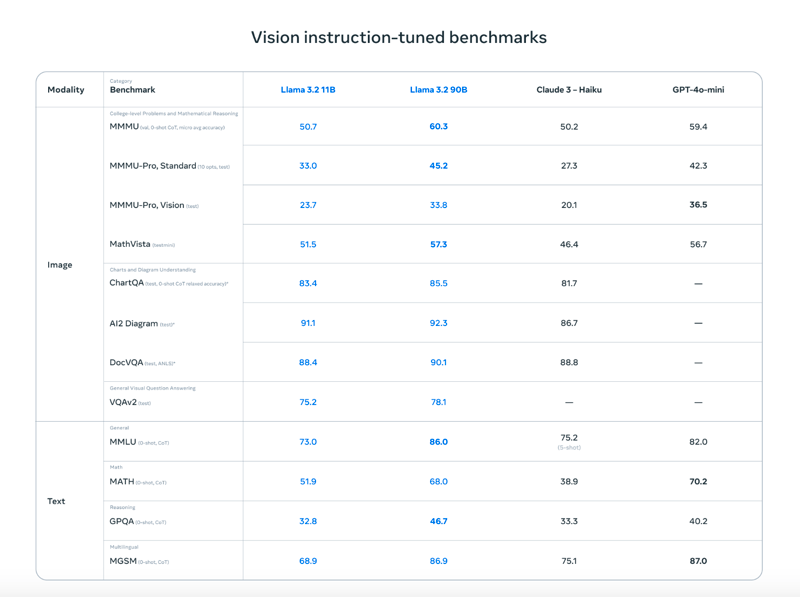
来源:Meta AI
凭借这些先进特性,Llama 3.2 视觉模型为RAG 应用打开了新可能。它们让从复杂数据源(如 PDF)中提取见解变得容易得多,将视觉与文本相结合,得到更准确且更有用的结果。
如何使用 Ollama 和 ColPali 基于 Llama 3.2 Vision 实现 RAG
要搭建基于 Llama 3.2 Vision 的 RAG 应用,您需要下载 Llama 3.2 Vision 模型、配置环境、安装所需库,并创建一个检索系统。下面提供一个简单的分步指南,帮助您使用 Llama 3.2 Vision 和 ColPali 实现 RAG 应用。
请注意,下述步骤已在带有 A100 实例的 Colab Pro 笔记本中测试通过。
步骤 1:下载依赖
首先,确保已安装必要的依赖项:
!pip install byaldi
!sudo apt-get install -y poppler-utils
!pip install -q git+https://github.com/huggingface/transformers.git qwen-vl-utils flash-attn optimum auto-gptq bitsandbytes
!pip install ollama
!pip install colab-xterm其中 byaldi 库对多模态文档的索引与检索至关重要,而 poppler-utils 等工具用于处理 PDF。
步骤 2:加载 ColPali RAG 模型
ColPali 是一种通过直接对文档页面(如扫描 PDF)的图像进行嵌入,而非仅依赖提取文本,来增强文档检索的方法。借助如 PaliGemma 等先进视觉语言模型和后期交互检索机制,ColPali 能高效处理复杂的视觉元素(表格、图片和图形),实现更准确、更快速的文档搜索。
我们将使用 ColPali 将 PDF 编码为向量嵌入。您可以如下加载 ColPali 的 RAGMultiModalModel:
import os
import base64
from byaldi import RAGMultiModalModel
RAG = RAGMultiModalModel.from_pretrained("vidore/colpali-v1.2", verbose=1)步骤 3:为示例 PDF 建立索引
我们将下载著名的 Attention is All You Need 论文,并使用 RAGMultiModalModel 为其创建索引。该步骤会处理文档,提取视觉和文本数据,以便快速检索。
!wget <https://arxiv.org/pdf/1706.03762>
!mkdir docs
!mv 1706.03762 docs/attention.pdfRAG.index(
input_path="./docs/attention.pdf",
index_name="attention",
store_collection_with_index=True, # Store base64 representation of images
overwrite=True
)Added page 1 of document 0 to index.
Added page 2 of document 0 to index.
Added page 3 of document 0 to index.
Added page 4 of document 0 to index.
Added page 5 of document 0 to index.
Added page 6 of document 0 to index.
Added page 7 of document 0 to index.
Added page 8 of document 0 to index.
Added page 9 of document 0 to index.
Added page 10 of document 0 to index.
Added page 11 of document 0 to index.
Added page 12 of document 0 to index.
Added page 13 of document 0 to index.
Added page 14 of document 0 to index.
Added page 15 of document 0 to index.
Index exported to .byaldi/attention
Index exported to .byaldi/attention
{0: 'docs/attention.pdf'}步骤 4:搜索已建立索引的文档
建立索引后,您可以按如下方式轻松从文档中检索相关内容:
query = "What's the BLEU score of the transformer architecture in EN-DE"
results = RAG.search(query, k=1)
results[{'doc_id': 0, 'page_num': 8, 'score': 19.0, 'metadata': {}, 'base64': 'iVBORw0KGgoAAAANSUhEUgAABqQAAAiYCAIAAAA+NVHkAAEAAElEQVR4nOzdd1gUx/8H8KGDoC....'}]这将从索引的 PDF 中检索出最匹配的页面或视觉元素。
步骤 5:展示检索到的图像
为可视化检索到的页面,我们可以将图像保存为文件并按如下方式显示:
from IPython.display import Image
def see_image(image_base64):
image_bytes = base64.b64decode(image_base64)
filename = 'image.jpg'
with open(filename, 'wb') as f:
f.write(image_bytes)
display(Image(filename))
# For multiple retrieved pages
for res in results:
see_image(res['base64'])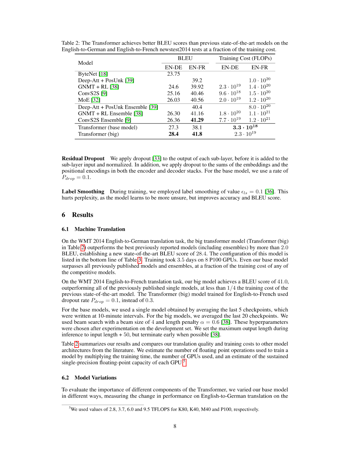
如您所见,检索到的页面包含回答问题 What's the BLEU score of the transformer architecture in EN-DE 所需的信息。下一步是将这张图像与用户的问题一起输入到我们的 Llama 3.2 视觉模型中。
步骤 6:设置 Llama 3.2 视觉模型以进行推理
在带有 A100 实例的 Colab Pro 笔记本中,我们将使用 Ollama 来安装并设置 Llama 3.2 视觉模型。您将在笔记本中运行 Ollama,并下载 Llama 3.2 视觉模型以供使用。
%load_ext colabxterm
%xterm%xterm 会在笔记本中创建一个终端,您可以使用命令 curl -fsSL <https://ollama.com/install.sh> | sh 下载 Ollama,然后运行以下命令以下载并运行 Llama 3.2 11B 视觉模型。
ollama serve & ollama run llama3.2-vision步骤 7:执行推理
成功下载并运行 Llama 3.2 11B 视觉模型后,我们可以按如下方式使用 ollama 库连接到该模型。注意,这里我们已将检索到的页面保存为 image.jpg,并将其与用户问题一同输入到 Llama 3.2 11B 视觉模型中。
import ollama
response = ollama.chat(
model='llama3.2-vision',
messages=[{
'role': 'user',
'content': "What's the BLEU score of the transformer architecture in EN-DE",
'images': ['image.jpg']
}]
)
print(response['message']['content'])The table shows that the BLEU score for the transformer (base model) on the EN-DE task is 27.3. The BLEU score for the transformer (big) on the same task is 28.4.
Therefore, the BLEU score of the transformer architecture in EN-DE is **28.4**.步骤 8:整合流程
我们可以将 ColPali 的检索与 Ollama 的推理代码合并到下面的 inference 函数中。该函数会从文档中检索最相关的页面,将其与查询一同传入视觉模型,并返回答案。
def inference(question: str):
results = RAG.search(question, k=1) # Retrieve relevant data
see_image(results[0]['base64']) # Save and display image
response = ollama.chat(
model='llama3.2-vision',
messages=[{
'role': 'user',
'content': question,
'images': ['image.jpg']
}]
)
return response['message']['content']
# Example queries
inference_result = inference("Please explain figure 1")
print(inference_result)The Transformer model is a type of neural network architecture that was introduced in the paper "Attention Is All You Need" by Vaswani et al. in 2017. It has since become one of the most widely used architectures for natural language processing tasks, such as machine translation, text summarization, and question answering.
**What is a Transformer?**
A Transformer is a type of neural network that uses self-attention mechanisms to process input sequences, such as sentences or paragraphs. Unlike traditional recurrent neural networks (RNNs), which rely on sequential processing of inputs, Transformers can process all input elements simultaneously using parallelized attention modules.
**How does the Transformer work?**
The Transformer consists of an encoder and a decoder. The encoder takes in a sequence of tokens (e.g., words or characters) as input and produces a continuous representation of the input sequence. This representation is then fed into the decoder, which generates output sequences one token at a time.
**Key Components:**
* **Self-Attention Mechanism:** This mechanism allows the model to attend to different parts of the input sequence simultaneously and weigh their importance.
* **Multi-Head Attention:** The Transformer uses multiple attention heads to process different aspects of the input sequence in parallel, improving the model's ability to capture complex relationships between tokens.
* **Positional Encoding:** To incorporate positional information into the input sequence, the Transformer uses a positional encoding scheme that adds a learned vector to each token based on its position in the sequence.
**Advantages:**
* **Parallelization:** The Transformer can process all input elements simultaneously, making it much faster than traditional RNNs.
* **Flexibility:** The Transformer can handle sequences of varying lengths and is particularly effective for tasks involving long-range dependencies.
**Applications:**
The Transformer has been widely adopted in various natural language processing applications, including:
* Machine Translation
* Text Summarization
* Question Answering
* Sentiment Analysis
In summary, the Transformer model is a powerful neural network architecture that uses self-attention mechanisms to process input sequences efficiently and effectively. Its ability to parallelize attention modules has made it a popular choice for many natural language processing tasks.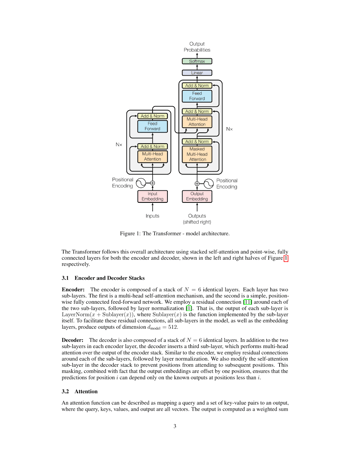
我们再试一个查询:
inference_result = inference("What's the maximum path length of recurrent layer type")
print(inference_result)The table provided in the image shows that for a Recurrent Layer, the Maximum Path Length is O(n). This means that as the number of nodes (n) in the network increases, the maximum path length also increases linearly with it.
Therefore, the maximum path length of a recurrent layer type is O(n).
*Answer*: O(n)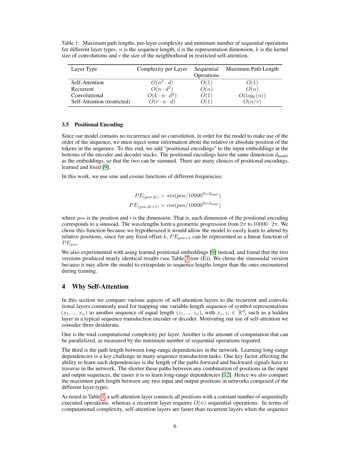
Llama 3.2 Vision:真实场景应用
Llama 3.2 Vision 兼具视觉与文本理解的能力,使其非常适合多种现实应用场景。
在医疗领域,Llama 3.2 Vision 能将 X 光片、MRI 等医学影像与患者病历结合分析,提升诊断准确性。这种视觉与文本数据的结合可支持医生做出更明智的决策,加速临床研究,最终惠及患者护理。
在零售中,Llama 3.2 Vision 可将商品图片、文本评价与客户查询结合起来,提供更个性化的推荐与量身定制的购物路径,提升互动性与满意度。
在法律行业,Llama 3.2 Vision 帮助专业人士快速从合同、判例与扫描文件中检索并归纳信息。它甚至能解读如法庭示意图或文档批注等复杂视觉内容,为法律分析与决策提供有价值的洞见。
最后,Llama 3.2 Vision 还能通过解读示意图、图表等视觉教具并给出清晰的实时文字说明,帮助学习场景变得更具互动性,助力学生与职场人士更高效地学习。
结论
借助 ColPali 和 Llama 3.2 视觉模型,您可以构建一套强大的 RAG 系统,能够理解并推理包含复杂视觉与文本数据的 PDF。此组合为从文档分析到自动报告生成等应用打开了大门,对多模态 AI 工作流非常有用。

Ryan 是一名首席数据科学家,专注于使用大型语言模型构建 AI 应用。他是伦敦帝国理工学院自然语言处理与知识图谱方向的博士候选人,并在该校获得了计算机科学硕士学位。除数据科学之外,他还撰写每周的 Substack 时事通讯 The Limitless Playbook,分享来自全球顶尖思想家的一个可操作理念,并不时撰写关于核心 AI 概念的文章。
传统的 RAG 方法在处理如 PDF 这类视觉信息丰富的文档时表现不佳。它们往往无法理解图像、表格和图形等复杂视觉元素,因而难以从这些格式中提取有用见解。
这正是Llama 3.2 视觉模型大显身手的地方。这些先进的多模态模型加入了强大的图像推理能力,使 AI 系统能够同时处理文本和视觉数据。借助 Llama 3.2 Vision,RAG 现在可以应对 PDF 的复杂性,从分析详细表格到解读图形,提供更准确、更有意义的答案。
在本文中,我将解释为何 Llama 3.2 Vision 是应对这些挑战的理想方案,并带您使用 Llama 3.2 11B Vision 模型结合 ColPali 完成实现。