
Track
AI for Software Engineering
7 hr
AI coding tools have split into two distinct paradigms: agents that work while you sleep, and assistants that work while you type. OpenAI Codex and GitHub Copilot are prime examples of each.
In this article, I will break down the core philosophical and technical differences between the two tools. We will look under the hood of both platforms, comparing them head-to-head across their agentic capabilities, IDE integrations, codebase context handling, and pricing structures.
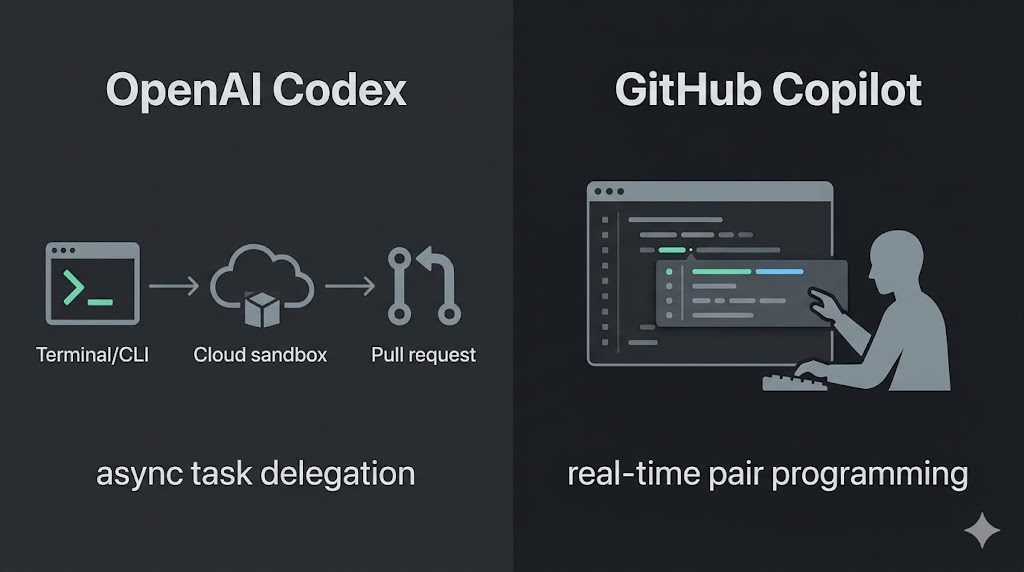
The quickest way to differentiate the two tools is by looking at how they expect you to work.
|
Feature |
OpenAI Codex |
Github Copilot |
|
Type |
Autonomous Coding Agent |
AI Pair Programmer & Multi-Agent Platform |
|
Interface |
CLI, desktop app, web interface |
Native IDE integration (VS Code, JetBrains, etc.), CLI, web interface |
|
Model Choice |
OpenAI GPT models only |
Multi-model picker (GPT, Claude, Gemini) |
|
Unique Edge |
Sandboxed execution and parallel task processing |
Zero-friction IDE workflow and MCP integration |
|
Best For |
Asynchronous task delegation and large-scale refactoring |
Real-time code suggestions and flow-state coding |
|
Pricing Tiers |
$20/mo (Plus), $100/mo or $200/mo (Pro tiers); limited access with Go ($8/mo) |
$10/mo and $39/mo (Individual), $19/mo (Business), $39/mo (Enterprise) |
Your primary choice should be dictated by your immediate engineering needs. Some power users even adopt a hybrid approach.
Before we look at the product, we have to untangle the terminology. "Codex" began as a specialized model family; the original engine behind the first iteration of GitHub Copilot.
While the underlying models have advanced (transitioning through GPT-5.3-Codex and increasingly relying on GPT-5.4 and GPT-5.5), OpenAI has repurposed the "Codex" name for a standalone, autonomous agent product.
Throughout this article, we refer to OpenAI Codex as the platform, not the model family. Whether you are interacting with it via the CLI, the desktop application, or the web interface, you are accessing the same core agentic service. We treat these as access points to the same underlying intelligence.
Today, OpenAI Codex functions as a heavy-duty autonomous coding agent. It spins up secure, sandboxed cloud environments, clones your repository, writes and tests the code, and then submits a Pull Request for your review.
To see Codex in action, I recommend taking a look at our tutorials showcasing how to use the Codex CLI for data workflow automation or integrating MCP servers.
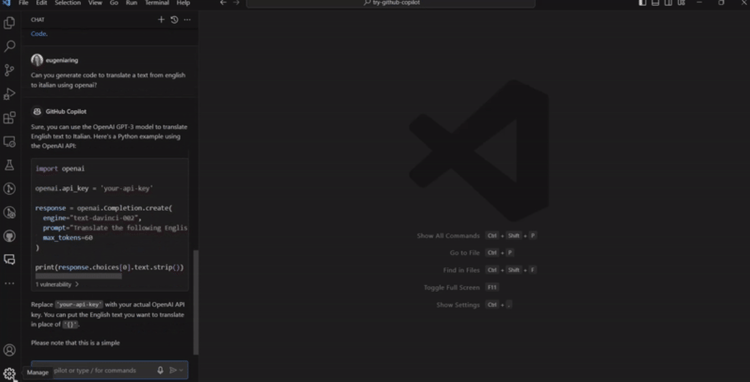
GitHub Copilot has changed dramatically from its origins as a simple inline autocomplete tool. Today, it is a multi-agent platform designed to live natively where you type.
However, Copilot’s rapid development into agentic workflows has fundamentally changed its compute demands. Long-running, parallelized sessions have strained its infrastructure, forcing GitHub to make drastic changes to its individual plan structures in Q2 2026 to maintain service reliability.
Multi-model flexibility: Copilot is no longer locked strictly to one provider. The model picker now includes access to GPT-5.4 and GPT-5.5, as well as Anthropic’s Claude (with Opus 4.7 available on Pro+ plans) and Google's Gemini.
Copilot workspace & plan mode: Workspace uses a plan-review-execute model. You can take "plan mode" in VS Code or the CLI to improve task efficiency and reduce token consumption before the agent starts writing.
Agent mode & /fleet: Copilot now supports multi-file edits and parallel workflows directly in the IDE, though these commands consume significant compute.
MCP integration: Model Context Protocol (MCP) allows Copilot to securely interface with your external local developer tools and data sources.
For more information, check out our GitHub Copilot CLI tutorial and see our comparison guides on how Copilot stacks up against Claude Code and Cursor.
Despite sharing the same underlying engineering DNA, Codex and GitHub Copilot are fundamentally different products. Here’s a detailed comparison across various critical factors:
|
Feature |
OpenAI Codex |
GitHub Copilot |
|
Product Type |
Autonomous coding agent |
AI pair programmer & multi-agent platform |
|
Interface |
Multi-interface platform (CLI, Desktop, Web) |
Native IDE (VS Code, JetBrains, Neovim) |
|
Model Choice |
GPT-5.4, GPT-5.5, etc. |
Multi-model (GPT-5.4/5.5, Claude 4.7, Gemini) |
|
Agentic Skills |
Sandboxed execution, parallel processing |
Workspace, agent mode, |
|
IDE Integration |
Extension-based (Sidebar chat-agent, |
Deep, zero-friction integration |
|
Context Handling |
Repo cloning + Chronicle memory |
Enterprise org-wide indexing |
|
Price (Individual) |
Free, $8/mo (Base), $20/mo (Plus), $100-200/mo (Pro) |
Free, $10/mo (Pro), $39/mo (Pro+) |
|
Price (Team) |
Pay-as-you-go pricing model |
$19/mo (Business), $39/mo (Enterprise) |
|
Security |
Sandboxed execution isolation |
IP indemnification, audit logs, policy controls |
|
Best For |
Task delegation, complex multi-file refactors |
Real-time collaboration, flow-state coding |
The core philosophical split between the two tools comes down to this:
To illustrate, imagine you need to refactor your application's authentication flow. With GitHub Copilot, you open your IDE, navigate to the relevant files, and begin collaborating. You use Copilot Chat when you are stuck, rely on inline suggestions as you type, and perhaps trigger Agent Mode for localized multi-file edits while you supervise.
With OpenAI Codex, the workflow looks more like managing a direct report. You describe the desired outcome via the Codex CLI interface or the desktop app, pass it the necessary repository context, and step away. Codex handles the refactoring in the background and eventually submits a Pull Request for you to review.
Today, Codex is heavily optimized around OpenAI’s latest GPT-5.4 and GPT-5.5 models, explicitly tuned for long-horizon software engineering tasks.
GitHub Copilot, on the other hand, embraces a "bring your own model" philosophy. Its multi-model picker allows you to switch between GPT-5.4, GPT-5.5, Google's Gemini, and Anthropic’s Claude (with Opus 4.7 available on Pro+ plans).
Both tools produce exceptionally strong code for routine tasks. The gap primarily appears on complex, multi-step problems:
This is where the divergence becomes most apparent. Codex is engineered from the ground up for true agentic autonomy. It uses secure, sandboxed cloud environments to run closed-loop test verification, and it natively supports parallel task processing so you can run multiple independent refactors simultaneously without freezing your machine.
GitHub Copilot has aggressively entered the agentic space with Copilot Workspace (with a plan-review-execute model) and IDE-based Agent Mode with commands like /fleet.
However, as mentioned earlier, these parallel workflows consume significant compute and often push Copilot users into restrictive token limits. More importantly, Copilot does not have independent, isolated code execution. It requires your local environment to run and test its outputs, making Codex a more robust choice for safe, hands-off, multi-file autonomy.
For a daily, in-the-zone coding flow, GitHub Copilot’s integration is unmatched. It is natively embedded in VS Code, JetBrains, and Neovim, and offers a frictionless tab-to-accept workflow that feels like a natural extension of your keyboard.
OpenAI Codex, meanwhile, has moved beyond its origins as a web-only agent. It now features a robust IDE extension (available for VS Code and JetBrains) that brings its autonomous capabilities directly into your editor sidebar.
While it isn't an "inline autocomplete" tool in the same sense as Copilot, it allows you to chat, reference files using @ syntax, and delegate complex tasks to run in the background without leaving your IDE. For background task delegation and multi-file reasoning, Codex’s ability to "think" while you continue working in your editor is a significant operational advantage.
Context is everything in AI-assisted coding. For large organizations with massive, complex codebases, GitHub Copilot Enterprise holds a distinct advantage with its persistent, org-wide repository indexing. It natively understands how your microservices interact simply because it has access to the entire organizational graph.
Codex handles context differently. It clones your repository fresh for its active session, to build a deep understanding of the codebase it is operating on. Previously, Codex would "forget" everything once the session ended.
However, with the newly introduced memory management feature known as Chronicle, Codex can now persistently carry critical architectural context, developer preferences, and complex learnings from one session to another.
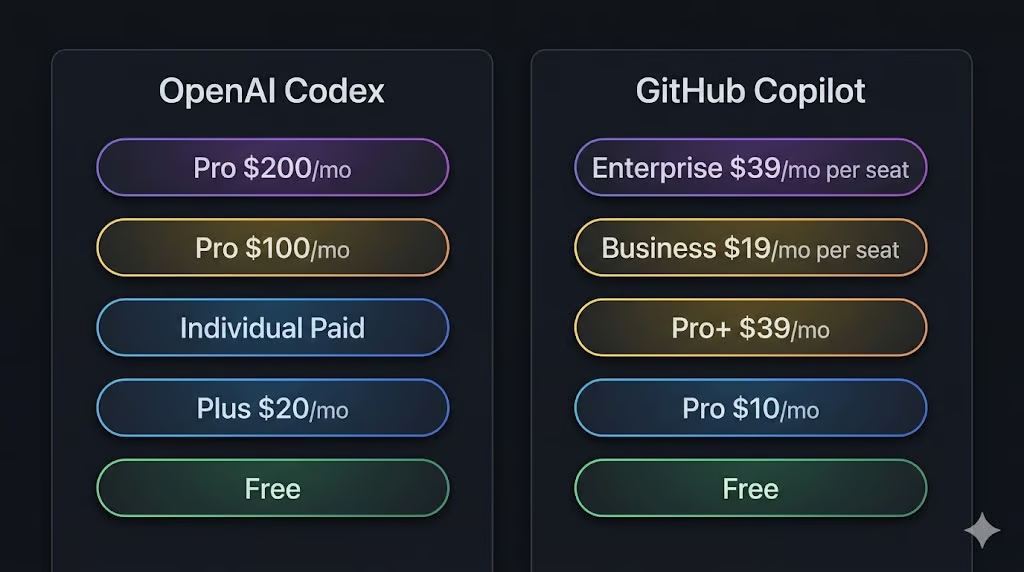
GitHub Copilot operates on a predictable per-seat pricing model. For individuals, there are three tiers:
For teams, the organizational tracks are:
Because agentic workflows have driven compute costs prohibitively high, often resulting in a handful of requests exceeding the price of an individual subscription, GitHub has taken aggressive action. If you are looking to sign up as an individual today, you will encounter a waitlist. New sign-ups for Copilot Pro, Pro+, and Student plans are currently paused to protect the experience of existing customers.
For those already on the platform, strict session and weekly (7-day) token limits have been implemented. These limits are dictated by token consumption and specific "model multipliers." If you run parallel workflows (like the /fleet command), you will burn through your token allotment rapidly.
To improve transparency, VS Code and the Copilot CLI now display real-time usage warnings when you approach your limit. Users who hit their cap will default to standard models until their weekly period resets, though upgrading to Pro+ offers over 5X the limits of the standard Pro plan.
OpenAI Codex is structured around compute capacity rather than per-seat SaaS predictability. It offers a highly accessible Free tier for developers who want to test it out, followed by an $8/mo starting plan for light usage. Both are only suitable for testing out Codex, but are very limited.
Beyond that, it scales with standard ChatGPT subscriptions:
The trade-off is straightforward: Copilot is far easier to budget for across an organization, while Codex gives you more granular entry points; being entirely free to start, but scaling up to be noticeably more expensive for power developers running heavy agentic workloads.
GitHub Copilot Enterprise leans heavily into traditional corporate compliance. It offers
Codex approaches security through architecture rather than policy. Its sandboxed execution isolation ensures that potentially destructive operations (like database migrations or dependency overhauls) cannot damage your local environment or production servers.
However, the compliance setup, such as managing API keys and maintaining audit trails, largely falls on your engineering team rather than being handled out of the box.
At the end of the day, picking between OpenAI Codex and GitHub Copilot is rarely a debate about which AI model is "smarter." Instead, it is a calculation of how you and your team prefer to work.
Do you need an assistant to draft boilerplate while your hands are on the keyboard, or do you need a highly capable agent to tackle heavy refactoring without you supervising it?
Choosing between OpenAI Codex and GitHub Copilot depends on how you and your engineering team actually work.
The guiding principle to remember is this:
If you want an intelligent pair programmer to catch your typos, unblock you with inline suggestions, and let you toggle between the world's best foundational models mid-session, GitHub Copilot has an advantage. But if you want to hand off a multi-file architecture update to an autonomous agent and simply review the Pull Request over your morning coffee, OpenAI Codex is the tool you need.
If you want to get started, I recommend enrolling in our AI for Software Engineering skill track, which teaches you using GitHub Copilot and similar AI tools.
Top AI Courses
Track
Course
Track
blog
Khalid Abdelaty
10 min
blog
Khalid Abdelaty
15 min
blog
Khalid Abdelaty
15 min
Tutorial
Aashi Dutt
7 min
Tutorial
Eugenia Anello
8 min
Tutorial
Abid Ali Awan
9 min