{count, plural, one {Curso} other {Cursos}}
Principios de ingeniería de software en Python
{hours} h
70.6K
¿Alguna vez te han preguntado cuánto tardará un proyecto de software y te has dado cuenta de que, en el fondo, estabas improvisando?
Así afrontaban la mayoría de equipos la estimación de costes en ingeniería de software en los años 70. Los proyectos se iban de presupuesto y de plazo con frecuencia, y los métodos al uso —básicamente juicio experto y analogías gruesas— no aguantaban a medida que los sistemas crecían en tamaño y complejidad.
COCOMO nació para solucionar eso. Significa COnstructive COst MOdel. Barry W. Boehm lo presentó en su libro de 1981 Software Engineering Economics, basando las fórmulas en datos reales de proyectos en lugar de intuiciones. Se convirtió en uno de los modelos de estimación algorítmica más enseñados del sector. Boehm, que falleció en agosto de 2022, pasó décadas refinando sus ideas.
En este tutorial, te mostraré cómo funciona el modelo, qué significan sus tipos y niveles, y resolveré un ejemplo numérico completo para que los números cobren sentido en la práctica.
COCOMO es un modelo paramétrico de estimación de costes de software. Toma como entrada principal el tamaño estimado del proyecto, medido en miles de líneas de código (KLOC), y con ello predice tres cosas: el esfuerzo total en persona-meses (PM), el tiempo de desarrollo en meses y el número de personas necesarias.
El modelo asume que el tamaño del proyecto es el principal predictor del esfuerzo. Boehm obtuvo las constantes del modelo realizando análisis de regresión sobre datos históricos de proyectos reales.
Dicho esto, COCOMO no estima el coste monetario directamente. Estima el esfuerzo. Para convertir persona-meses a euros, multiplicas por el coste laboral medio por persona-mes en tu organización. El modelo te da el esfuerzo; tú aportas la tarifa.
Boehm trabajaba como director de investigación y tecnología de software en TRW Aerospace, y la frustración era inmediata y práctica. Según un homenaje publicado después por la Academia Nacional de Ingeniería, un vicepresidente de TRW le dijo a Boehm tras revisar una oferta competitiva de software: "No quiero volver a aprobar otra oferta de software solo por fe. Ve y crea una forma creíble de estimar el coste de desarrollar un producto software".
De esa petición salió COCOMO. Boehm estudió 63 proyectos completados en TRW, que abarcaban software de entre 2.000 y 100.000 líneas de código, escritos en lenguajes desde ensamblador hasta PL/I, todos construidos bajo el modelo en cascada. El análisis de regresión sobre ese conjunto produjo las constantes usadas en COCOMO I, y el modelo se hizo público en 1981.
Las matemáticas detrás del COCOMO I básico son sencillas una vez que entiendes qué representa cada término.
La fórmula del esfuerzo es:

Aquí, el esfuerzo se mide en persona-meses, KLOC es el tamaño estimado del software en miles de líneas de código, y a y b son constantes que dependen del tipo de proyecto en el que trabajes.
La fórmula del tiempo de desarrollo se deriva de la estimación de esfuerzo:

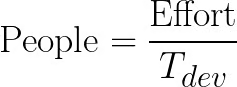
La constante d varía por modo, mientras que c está fijada en 2,5 en los tres. Muchos tutoriales se equivocan al sugerir que cambian las cuatro constantes. Una vez tengas Effort y , puedes estimar el número medio de personas necesarias:
La siguiente tabla muestra las constantes verificadas para COCOMO I básico:
|
Modo de proyecto |
a |
b |
c |
d |
|
Orgánico |
2.4 |
1.05 |
2.5 |
0.38 |
|
Semiindependiente |
3.0 |
1.12 |
2.5 |
0.35 |
|
Empotrado |
3.6 |
1.20 |
2.5 |
0.32 |
La variable clave aquí es b. En proyectos orgánicos, b = 1,05, lo que implica que el esfuerzo crece casi linealmente con el tamaño. En proyectos empotrados, b = 1,20, lo que genera una clara deseconomía de escala: duplicar el tamaño de un proyecto empotrado más que duplica el esfuerzo requerido.
COCOMO I clasifica los proyectos de software en tres modos de desarrollo. Cada modo refleja una combinación distinta de experiencia del equipo, complejidad del proyecto y restricciones operativas. El modo que elijas determina qué constantes usar en tus fórmulas.
Importante desde el principio: estos tres modos aplican solo a COCOMO I. COCOMO II, la actualización de 2000, los sustituyó por otro enfoque.
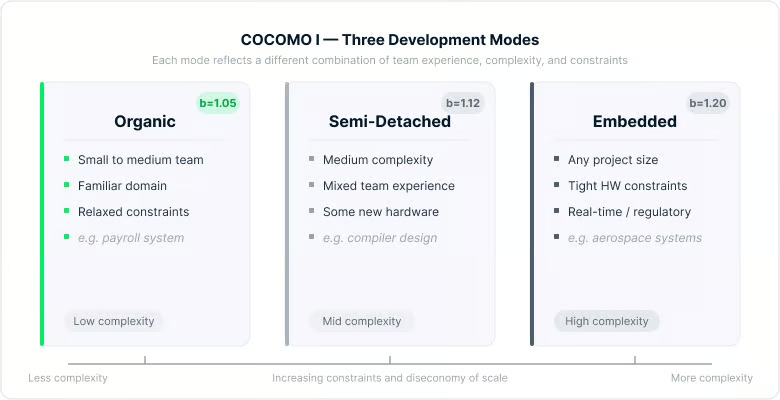
Comparativa visual de los tres modos de COCOMO I. Imagen del autor.
Los tres modos se sitúan en una escala de complejidad y restricciones crecientes. El tipo de proyecto y el contexto del equipo suelen dejar claro cuál aplica.
El modo orgánico cubre proyectos pequeños o medianos donde el equipo tiene experiencia sólida en el dominio, los requisitos se entienden razonablemente bien y no hay presiones externas significativas por hardware o requisitos regulatorios. Un sistema de nóminas, una aplicación de procesamiento de datos o una herramienta de gestión de inventario encajarían aquí.
Como el equipo es experimentado y el dominio es familiar, el overhead de comunicación se mantiene bajo incluso cuando el proyecto crece. Por eso el exponente b es el menor de los tres modos.
El modo semiindependiente se sitúa en el medio. Los equipos tienen experiencia mixta: algunas personas conocen bien el dominio y otras no. El proyecto tiene complejidad moderada y puede haber interacción con hardware nuevo o sistemas externos.
El desarrollo de compiladores, sistemas de procesamiento de transacciones y aplicaciones empresariales de nivel medio son ejemplos habituales. La deseconomía de escala es más visible aquí, con b = 1,12.
El modo empotrado aplica a proyectos con restricciones operativas estrictas: requisitos de hardware exigentes, demandas de procesamiento en tiempo real, estándares regulatorios o requisitos aeroespaciales y de defensa. El equipo puede ser grande y muy cualificado, pero la complejidad de la integración, las pruebas y la validación dispara el esfuerzo a medida que aumenta el tamaño del proyecto.
Con b = 1,20, los proyectos empotrados presentan la mayor deseconomía de escala de los tres modos. El modo empotrado no va de tamaño: incluso un sistema relativamente pequeño entra aquí si opera bajo restricciones severas.
Más allá de los tres modos, COCOMO I tiene tres niveles de detalle de estimación. Los modos te dicen qué constantes usar; los niveles indican cuán en profundidad modelar el proyecto. Cada nivel se apoya en el anterior añadiendo más factores al cálculo, lo que aumenta la precisión a costa de requerir más datos de entrada.
Piénsalo como un espectro: el COCOMO básico te da una cifra orientativa rápida, mientras que el detallado permite planificar con precisión por fases.
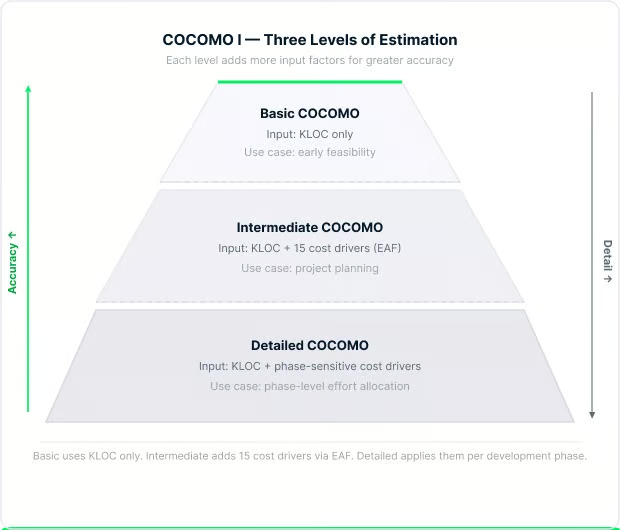
Niveles de COCOMO I según la profundidad de estimación. Imagen del autor.
Bajar en la pirámide añade factores al cálculo: mejora la precisión, pero también exige más datos para empezar.
El COCOMO básico usa solo el tamaño del proyecto en KLOC y el modo. Introduces los KLOC, aplicas las constantes del modo elegido y obtienes una estimación de esfuerzo. Es útil para evaluar viabilidad temprana cuando todavía no tienes información detallada del equipo o el entorno.
El COCOMO intermedio introduce un factor de ajuste de esfuerzo, normalmente escrito como EAF. La lista completa de multiplicadores de impulsores de coste está documentada en el COCOMO II Model Definition Manual. La fórmula del esfuerzo pasa a ser:

El EAF es el producto de 15 impulsores de coste, cada uno valorado de muy bajo a extra alto. Se agrupan en cuatro categorías: atributos del producto (fiabilidad, complejidad, tamaño de base de datos), atributos de hardware (restricciones de tiempo de ejecución y almacenamiento), atributos del personal (experiencia y capacidad del equipo) y atributos del proyecto (herramientas, presión de calendario y prácticas de desarrollo).
Algo a tener en cuenta en el COCOMO intermedio: la constante a cambia respecto a sus valores en el básico. En el modo orgánico, a pasa a 3,2 (no 2,4). En el modo semiindependiente se mantiene en 3,0. En el empotrado baja a 2,8. Los exponentes b, c y d se mantienen iguales entre los niveles básico e intermedio.
Los impulsores de coste de personal están invertidos: mayor capacidad implica un multiplicador menor, lo que reduce la estimación de esfuerzo. Un equipo experimentado necesita menos persona-meses que uno de principiantes para el mismo proyecto.
El COCOMO detallado, a veces llamado avanzado, aplica multiplicadores de esfuerzo a nivel de fase en lugar de al proyecto completo. Esto significa que los impulsores de coste de análisis de requisitos, diseño detallado, codificación e integración y pruebas se evalúan por separado.
Es el nivel más preciso y también el más laborioso. Tiene sentido en proyectos grandes donde distintos equipos se encargan de fases diferentes y donde la distribución del esfuerzo por fases importa para planificar.
A mediados de los 90, COCOMO I mostraba su edad. El desarrollo de software había pasado de proyectos en cascada en mainframes a programación orientada a objetos, bibliotecas de componentes reutilizables, prototipado rápido y sistemas distribuidos de escritorio. Aplicar datos de proyectos de los 70 a entornos de los 90 producía estimaciones poco fiables.
Boehm y su equipo en el USC Center for Software Engineering pasaron varios años reconstruyendo el modelo desde cero. El resultado fue COCOMO II, publicado en 2000 en el libro Software Cost Estimation with COCOMO II, calibrado con un conjunto de 161 proyectos, más del doble de los 63 del modelo original.
Las motivaciones de COCOMO II fueron el desarrollo orientado a objetos y basado en componentes, la reutilización de software y la integración de productos comerciales, los modelos iterativos y en espiral y las herramientas modernas. Un malentendido común a aclarar: COCOMO II no se creó para Agile. El Agile tal y como lo conocemos apenas existía cuando el modelo se desarrolló entre 1995 y 2000.
COCOMO II ofrece tres submodelos, cada uno adecuado a una fase distinta del ciclo de vida del proyecto.
El Application Composition Model está pensado para prototipado temprano, especialmente cuando se usan constructores de GUI y bibliotecas de componentes. En lugar de KLOC, usa Object Points: pantallas, informes y componentes de lenguajes de tercera generación ponderados por complejidad y ajustados por reutilización prevista. Es un modelo lineal sin factores de escala ni ajustes exponenciales.
El Early Design Model se usa antes de fijar la arquitectura. Toma Function Points no ajustados como entrada, los convierte a líneas de código equivalentes mediante tablas por lenguaje y aplica siete impulsores de coste. Da una estimación razonable cuando sabes qué debe hacer el sistema, pero aún no cómo se construirá.
El Post-Architecture Model es el más riguroso. Se aplica una vez asentada la arquitectura, usando miles de líneas de código fuente (KSLOC) o function points como entrada, 17 impulsores de coste y cinco factores de escala. La fórmula del esfuerzo es:

Donde E es un exponente dinámico calculado como:
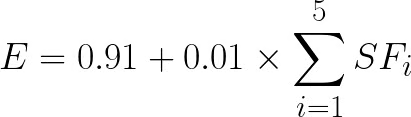
Y la fórmula del calendario es:

Donde:

Las constantes 2,94, 0,91, 3,67 y 0,28 provienen de la calibración COCOMO II.2000. Algunas fuentes antiguas citan 2,5 en lugar de 2,94; es un valor previo a 2000 y no debe usarse con el modelo actual. La USC COCOMO II Web Tool en softwarecost.org es una implementación gratuita y en vivo del modelo Post-Architecture si quieres hacer estimaciones sin calcular a mano.
Dos mecanismos hacen que COCOMO II funcione de forma distinta a COCOMO I: los factores de escala y los impulsores de coste. Esto es lo que hace cada uno.
En COCOMO I, el exponente b es fijo por modo: eliges orgánico, semiindependiente o empotrado y obtienes un número predefinido. COCOMO II lo sustituye por cinco factores de escala valorados de forma continua que calculan el exponente en función de cómo valores cada uno.
Los cinco factores de escala en COCOMO II son precedencia (PREC), flexibilidad de desarrollo (FLEX), arquitectura y resolución de riesgos (RESL), cohesión del equipo (TEAM) y madurez de procesos (PMAT). Cada uno se valora de muy bajo a extra alto, y su suma combinada determina E en la fórmula del esfuerzo. Una suma mayor indica un proyecto menos maduro, menos familiar y con más riesgo, lo que implica un exponente mayor y más esfuerzo.
Los factores de escala afectan a la forma de la curva de esfuerzo. Los impulsores de coste, en cambio, son ajustes multiplicativos aplicados al esfuerzo base. COCOMO II tiene 17 impulsores de coste en el modelo Post-Architecture, frente a 15 en el COCOMO I intermedio. Las incorporaciones en COCOMO II incluyen factores de reutilización requerida (RUSE), requisitos de documentación (DOCU), volatilidad de la plataforma (PVOL), continuidad del personal (PCON), experiencia en la aplicación (APEX), experiencia en la plataforma (PLEX), experiencia en lenguajes y herramientas (LTEX) y desarrollo multisede (SITE).
Un impulsor de coste a destacar es SCED, que cubre el calendario requerido. Si comprimes el calendario significativamente, el multiplicador de esfuerzo sube por encima de 1,0, lo que significa que en realidad necesitas más persona-meses para terminar antes. Esto encaja con lo que muchos ingenieros ya saben por experiencia: forzar al equipo a esprintar genera overhead de coordinación, errores y retrabajo que a menudo cuestan más que el tiempo ahorrado.
Su principal fortaleza es la transparencia. A diferencia de herramientas propietarias, COCOMO publica todas sus ecuaciones, constantes y metodología de calibración. Cualquiera puede auditar las entradas y verificar las salidas. Esto lo hace útil en contratación pública, defensa y aeroespacial, donde la auditabilidad matemática suele ser un requisito legal o contractual.
El modelo también puede recalibrarse. Las organizaciones que recopilan su propio historial de proyectos pueden ajustar las constantes para reflejar su entorno, composición de equipo y stack tecnológico específicos. Es importante, porque las constantes por defecto proceden de conjuntos de datos con varias décadas.
La estructura en tres niveles (Basic → Intermediate → Detailed) es otra ventaja práctica. Al inicio, cuando se sabe poco, usas el básico para una cifra aproximada. A medida que el proyecto madura y entiendes más del equipo y el entorno, pasas al intermedio o detallado para una planificación más fina.
La mayor limitación es su dependencia de KLOC. Para usar COCOMO, necesitas estimar el tamaño en líneas de código antes de escribir nada. En las primeras etapas —cuando más importa estimar— esto es notoriamente difícil de hacer con precisión.
Incluso cuando puedes estimar KLOC, las constantes de COCOMO I vienen de 63 proyectos construidos bajo cascada entre 1968 y 1979. Las de COCOMO II, de 161 proyectos de los 90. Ninguno de esos conjuntos incluye sistemas cloud-native, apps móviles, arquitecturas de microservicios o pipelines DevOps modernos. Aplicar estas constantes tal cual a un proyecto actual sin calibración local produce estimaciones poco fiables.
Un estudio de 2025 lo cuantificó. Un COCOMO básico sin calibrar aplicado a un dataset de proyectos de la NASA arrojó un error relativo medio de aproximadamente el 100%, sin predicciones dentro del 25% del esfuerzo real. No es un margen pequeño; refleja un modelo usado fuera de las condiciones para las que se construyó.
El modelo tampoco encaja bien con desarrollo iterativo. COCOMO asume un ciclo relativamente secuencial. Los equipos Agile que trabajan en sprints cortos con backlogs en evolución no encajan en las asunciones de cascada incorporadas en COCOMO.
Hay además un problema de fondo. Un artículo publicado en Frontiers in Artificial Intelligence en marzo de 2026 argumenta que COCOMO II no está alineado con el desarrollo asistido por IA, no solo por calibración sino estructuralmente. Cuando herramientas de IA generan porciones sustanciales del código, KLOC como proxy del esfuerzo humano se vuelve engañoso. El esfuerzo se centra en verificación, gobierno de arquitectura y revisión de seguridad, cosas que el marco de impulsores de coste de COCOMO no está diseñado para captar.
COCOMO no es la única opción. Conocer las alternativas te ayuda a elegir el enfoque adecuado para cada situación.
Function Point Analysis (FPA) mide la complejidad del sistema desde entradas y salidas de usuario, independiente del lenguaje. Funciona bien cuando tienes requisitos sólidos pero aún no una estimación de KLOC. El modelo Early Design de COCOMO II acepta function points como entrada, así que pueden usarse juntos.
Los story points son estándar en entornos Agile. Los equipos valoran historias por complejidad relativa y, con la velocidad, proyectan el avance. Son rápidos y específicos del equipo, pero no dan la base de coste total que requieren compras y planificación a largo plazo. COCOMO y los story points sirven a propósitos distintos.
Herramientas paramétricas como SEER-SEM y SLIM usan bases de calibración propietarias y conjuntos de parámetros más amplios. Los estudios muestran que superan a COCOMO II sin calibrar en precisión. La ventaja de COCOMO es la transparencia y su disponibilidad abierta, clave en contextos académicos o auditables.
Estimación con aprendizaje automático es un área de investigación activa. Un estudio de enero de 2026 encontró que los modelos en ensamblado que combinan random forests, regresión por vectores de soporte y redes neuronales superaron a los modelos de la familia COCOMO en datos de proyectos Agile en las cuatro métricas estándar de evaluación. Estos enfoques se adaptan a sus datos de entrenamiento en lugar de depender de constantes fijadas hace décadas.
Saber dónde encaja COCOMO frente a otros métodos es útil, pero la mejor forma de entender cómo funciona es echar números. Recorremos un cálculo completo con COCOMO I básico en modo orgánico y un proyecto estimado en 50 KLOC.
Las constantes para el modo orgánico son: a = 2,4, b = 1,05, c = 2,5, d = 0,38.

Para calcular 501,05, usa que  .
.

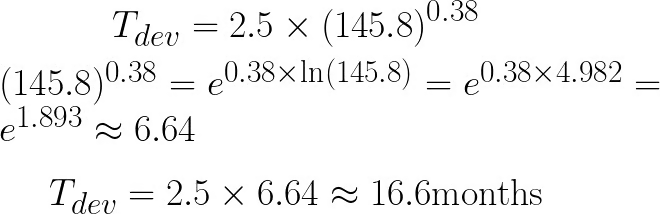

Resumen:
|
Salida |
Valor |
|
Esfuerzo |
~145,8 persona-meses |
|
Tiempo de desarrollo |
~16,6 meses |
|
Personas necesarias |
~9 personas |
Dos cosas digno de mención. Persona-meses y meses naturales son unidades distintas: 145,8 persona-meses en 16,6 meses naturales implica unas 9 personas trabajando en paralelo. Y, como esto es COCOMO básico, solo usa tamaño y modo. Si añades valoraciones reales de impulsores de coste vía EAF el esfuerzo se ajustará al alza o a la baja.
COCOMO aparece en cursos académicos, exámenes universitarios y entrevistas para roles en gobierno, defensa e ingeniería de sistemas. Rara vez surge en empresas Agile de consumo.
La pregunta más común es COCOMO I frente a COCOMO II: modos fijos y constantes predefinidas de 63 proyectos frente a cinco factores de escala continuos sobre un conjunto moderno mayor. Conocer esa distinción, las fórmulas básicas y los tres nombres de modos cubre la mayoría de casos. A veces piden un cálculo de muestra, así que conviene practicar el ejemplo resuelto anterior.
COCOMO sigue siendo útil donde sus supuestos se cumplen: desarrollo secuencial, contratación formal y estudio académico. Donde el software moderno se aleja de esas condiciones, el modelo se resiente.
Usa COCOMO básico para una comprobación rápida de orden de magnitud al inicio del proyecto. Usa COCOMO intermedio cuando ya dispones de datos del equipo y del entorno. Calibra con tu propio historial antes de fiarte de cualquier salida en una oferta o plan real. Como cubrí en Limitaciones, aplicar las constantes por defecto a un proyecto moderno sin calibración produce errores demasiado grandes como para actuar.
COCOMO III se desarrolla en el Boehm CSSE desde alrededor de 2015, sin lanzamiento público a marzo de 2026. El original de 1981 y su actualización de 2000 siguen siendo la referencia.
¿Quieres avanzar en desarrollo de software? Tenemos cursos de Software Engineering Principles in Python, Software Development with Cursor y Software Development with GitHub Copilot para ayudarte a aplicar lo aprendido.
Aprende con DataCamp
{count, plural, one {Curso} other {Cursos}}
{count, plural, one {Curso} other {Cursos}}
{count, plural, one {Curso} other {Cursos}}
{count, plural, one {blog} other {blogs}}
Natassha Selvaraj
15 min
{count, plural, one {blog} other {blogs}}
Abid Ali Awan
10 min
{count, plural, one {blog} other {blogs}}
Vinita Silaparasetty
14 min
{count, plural, one {Tutorial} other {Tutoriales}}
Abid Ali Awan
15 min
{count, plural, one {Tutorial} other {Tutoriales}}
Vikash Singh
13 min
{count, plural, one {Tutorial} other {Tutoriales}}
Josef Waples
8 min