Corso
Lavorare con l'API di OpenAI
3 h
170.2K
In sports, you would call this a counterattack. Just 30 minutes after Anthropic published their new Claude Opus 4.6 model, OpenAI released a major update as well.
Their new GPT-5.3-Codex model replaces both GPT-5.2 and GPT-5.2-Codex. Its main focus is on combining the strengths of these two legacy models to provide a more general agentic experience. In combination with the Codex app for macOS, introduced only a few days earlier, it also enables interactive, real-time collaboration without the risk of losing context.
In this article, we will cover all the new features, take a look at the benchmarks, and see how GPT-5.3-Codex works in a couple of hands-on examples. We will also try to examine how well the model actually performs and how it compares to Anthropic’s Claude Opus 4.6.
If you are interested in learning more about OpenAI’s latest tools, I recommend reading our guides on the newest thinking model GPT-5.4, its new lightweight counterpart GPT-5.3 Instant, as well as the services ChatGPT Images and ChatGPT Health.
GPT-5.3-Codex is OpenAI’s newest large language model (LLM), following up on GPT-5.2 and GPT-5.2-Codex, which were both released in December 2025.
In contrast to these two legacy models, the new release takes a new approach. While there was a clear distinction between coding agent and reasoning LLM in the GPT-5.2 models, GPT-5.3-Codex merges them and is introduced as a general-purpose agent excelling at both.
The GPT-5.3-Codex model is supposed to not just write functions, but also understand the work around the code. Think of updating Jira tickets, writing documentation, or managing deployment pipelines.
Performance-wise, the new model almost doubles its score in the OSWorld-Verified benchmark and sets new high scores for both SWE-Bench Pro and Terminal-Bench. Additionally, OpenAI focused on efficiency and claims that the new model will be 25% faster due to improvements in infrastructure and the inference stack.
One notable thing is that OpenAI apparently used GPT-5.3-Codex to actively debug and manage its own creation. While other frontier models like Gemini 3 generated their own training data, Codex went a step further by acting as a site reliability engineer: monitoring its own training runs, diagnosing infrastructure errors, and writing scripts to dynamically scale GPU clusters during launch.
The release of GPT-5.3-Codex focused on enabling general agentic workflows. Let’s take a look at some key features.
In contrast to its Codex predecessor, GPT-5.3-Codex is designed to be a general work agent. The aim is to transcend the IDE, with the model effectively handling “knowledge work” alongside “coding work.”
The new model is built to support all work across the software lifecycle:
This versatility enables GPT-5.3-Codex to execute end-to-end workflows. The model could, for instance, write an SQL query, fetch the data, and then generate a PDF report or slide deck based on it via tool calls.

The interactive collaborator feature is the biggest perk of the Codex app and has the potential to make the biggest difference in everyday work. It keeps you in the loop throughout the process and lets you intervene in real time.
Essentially, GPT‑5.3-Codex constantly lets you know what it is doing and offers you the chance to steer it in the right direction long before you receive the final output. Instead of waiting, you can ask questions, give feedback, or add context to your initial prompt. The model then responds to your feedback and adapts mid-stream.
Currently, the Codex app is only available for macOS. You can turn on steering in the app settings under General > Follow-up behavior.

OpenAI also shifted its focus to cybersecurity, particularly to vulnerability detection. GPT-5.3-Codex is the first model classified as "high capability" under OpenAI’s Preparedness Framework, meaning it is specifically trained to identify and fix software vulnerabilities.
To balance this power with safety, OpenAI has deployed a defensive stack designed to prevent misuse, such as automating cyberattacks. It includes safety training, real-time monitoring, and Trusted Access for Cyber, a pilot program that gates advanced capabilities to verified researchers.
Furthermore, OpenAI is investing heavily in the ecosystem, launching the Aardvark security agent (currently in beta) and committing $10M in API credits to support open-source maintainers with free code scanning tools.
While we are still waiting for verified results in many of the state-of-the-art benchmarks, the announcement featured scores in several areas:
OSWorld-Verified is the gold-standard benchmark for testing an AI's ability to operate a computer like a human. It goes beyond simple text processing by placing the AI in a real virtual machine and asking it to complete open-ended tasks using a mouse, keyboard, and GUI apps (e.g., "Open LibreOffice, create a spreadsheet with this data, and save it as a PDF").
GPT-5.3-Codex achieves 64.7% in the OSWorld-Verified benchmark. That’s a staggering increase of 26.5 percentage points compared to its predecessor, GPT-5.2-Codex. This strong result reflects OpenAI’s focus on creating a more general, agentic experience for GPT-5.3-Codex, optimized for good performance across tasks and domains.
Software development was the initial focus of the Codex models. On the SWE-bench Pro (Public), GPT-5.3-Codex reaches 56.8%, only a minor increase from 56.4% with GPT-5.2-Codex. The incremental improvement here is likely the trade-off made in optimizing for agentic skills.
On the agentic coding side, we can see a quite significant jump: GPT-5.3-Codex scores 75.1% on Terminal-Bench 2.0, a substantial increase from the 64% with GPT-5.2-Codex. Even more interesting, it topped the result of Claude Opus 4.6, which had claimed to top the benchmark just half an hour earlier, by over 5 percentage points!

For the model’s reasoning skills, there’s not really anything exciting to report. GPT-5.3-Codex reaches exactly the same result as GPT-5.2 on GDPval (70.9%). It’s fair to interpret this in a way that the (good) reasoning skills of GPT-5.2 were incorporated into the Codex model, without focusing on substantial improvement in this area.
The release notes and first benchmark results clearly show that agentic workflows had the highest priority in developing the new model. This is why our examples will also strongly focus on this area.
If you’re interested in seeing GPT’s current reasoning skills tested in action, I recommend checking out our guide on GPT-5.2.
For the first test, I wanted to check how well the model handles dependency management and documentation for a simple weather tool using FastAPI and the Open-Meteo API. I used the following prompt:
Create a simple Python API using FastAPI that fetches the current temperature for a given city (e.g., Helsinki) using the Open-Meteo API.
1. Write the code in main.py using the httpx or requests library to call the API.
2. Create a Dockerfile to containerize it.
3. Write a README.md explaining how to run it.
4. Create a bash script run_local.sh that builds the image and runs it on port 8000.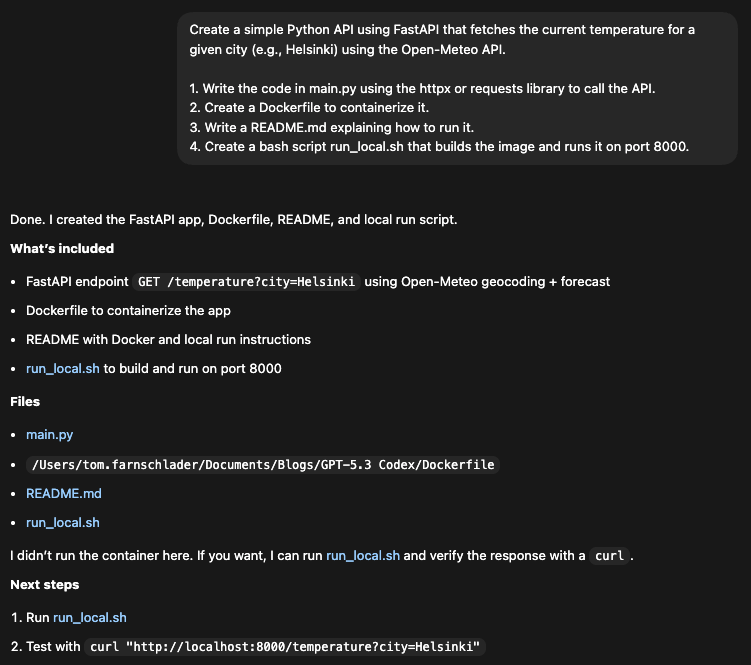
In 41 seconds, all four files were generated in a single prompt with consistent port numbers (8000) and naming.
Regarding the dependencies, Codex correctly identified httpx as a modern async client (a good choice over requests for FastAPI) and included it in the Dockerfile installation line. It also realized that FastAPI depends on uvicorn and added it to the dependencies.
One minor critique is the hardcoded install in the Dockerfile: Codex effectively skipped requirements.txt by installing directly in the RUN instruction. This might be a valid shortcut for a "simple" script, especially since we did not ask for a requirements.txt, but a separate file would allow for more clarity and flexibility later on. The Dockerfile looks like this:
FROM python:3.11-slim
WORKDIR /app
COPY main.py /app/main.py
RUN pip install --no-cache-dir fastapi uvicorn httpx
EXPOSE 8000
CMD ["uvicorn", "main:app", "--host", "0.0.0.0", "--port", "8000"]
Codex didn’t just write the code, but clearly understood the context of the request and the API architecture. Notice how it handled the Open-Meteo two-step process (Geocoding -> Weather) automatically. I didn’t tell it how to use the API, just which one to use. It read the docs (or knew them) and implemented the necessary logic to make ?city=Helsinki work.
It also added robust error handling (try/except, raise for specific statuses, 404 checks for "City not found") without being asked.
from fastapi import FastAPI, HTTPException, Query
import httpx

app = FastAPI(title="Simple Weather API", version="1.0.0")

GEOCODE_URL = "https://geocoding-api.open-meteo.com/v1/search"
FORECAST_URL = "https://api.open-meteo.com/v1/forecast"

@app.get("/health")
def health() -> dict:
   return {"status": "ok"}

@app.get("/temperature")
def temperature(city: str = Query(..., min_length=1)) -> dict:
   city = city.strip()
   if not city:
       raise HTTPException(status_code=400, detail="City must not be empty")

   try:
       with httpx.Client(timeout=10.0) as client:
           geo_resp = client.get(
               GEOCODE_URL,
               params={
                   "name": city,
                   "count": 1,
                   "language": "en",
                   "format": "json",
               },
           )
           geo_resp.raise_for_status()
           geo_data = geo_resp.json()

           results = geo_data.get("results") or []
           if not results:
               raise HTTPException(status_code=404, detail="City not found")

           place = results[0]
           latitude = place.get("latitude")
           longitude = place.get("longitude")
           resolved_name = place.get("name")
           country = place.get("country")

           forecast_resp = client.get(
               FORECAST_URL,
               params={
                   "latitude": latitude,
                   "longitude": longitude,
                   "current": "temperature_2m",
               },
           )
           forecast_resp.raise_for_status()
           forecast_data = forecast_resp.json()

           current = forecast_data.get("current") or {}
           units = forecast_data.get("current_units") or {}
           temperature_value = current.get("temperature_2m")
           temperature_unit = units.get("temperature_2m", "")
           current_time = current.get("time")

           if temperature_value is None:
               raise HTTPException(status_code=502, detail="Temperature unavailable")

           return {
               "city": resolved_name,
               "country": country,
               "latitude": latitude,
               "longitude": longitude,
               "temperature": temperature_value,
               "unit": temperature_unit,
               "time": current_time,
           }
   except httpx.HTTPStatusError as exc:
       raise HTTPException(status_code=502, detail=f"Upstream error: {exc.response.status_code}")
   except httpx.RequestError:
       raise HTTPException(status_code=502, detail="Upstream request failed")
At least one possible optimization can still be spotted: It used httpx.Client (synchronous) inside a standard def route. For FastAPI, this is blocking. A perfect "expert" agent might have used async def and httpx.AsyncClient.
Still, the first test has returned a functional tool. Running run_local.sh built the Docker image and started the container at port 8000. When trying it out, it successfully returned the current temperature in Helsinki:
curl "http://localhost:8000/temperature?city=Helsinki"{"city":"Helsingfors","country":"Finland","latitude":60.16952,"longitude":24.93545,"temperature":-6.0,"unit":"°C","time":"2026-02-09T07:15"}To try the steering feature next, I first asked Codex to build a landing page for a coffee shop, but then switched the requested theme during the workflow. Since web development is an area that was explicitly marked as one of GPT-5.3-Codex’s strengths, that should be a piece of cake (with the coffee). The original prompt is:
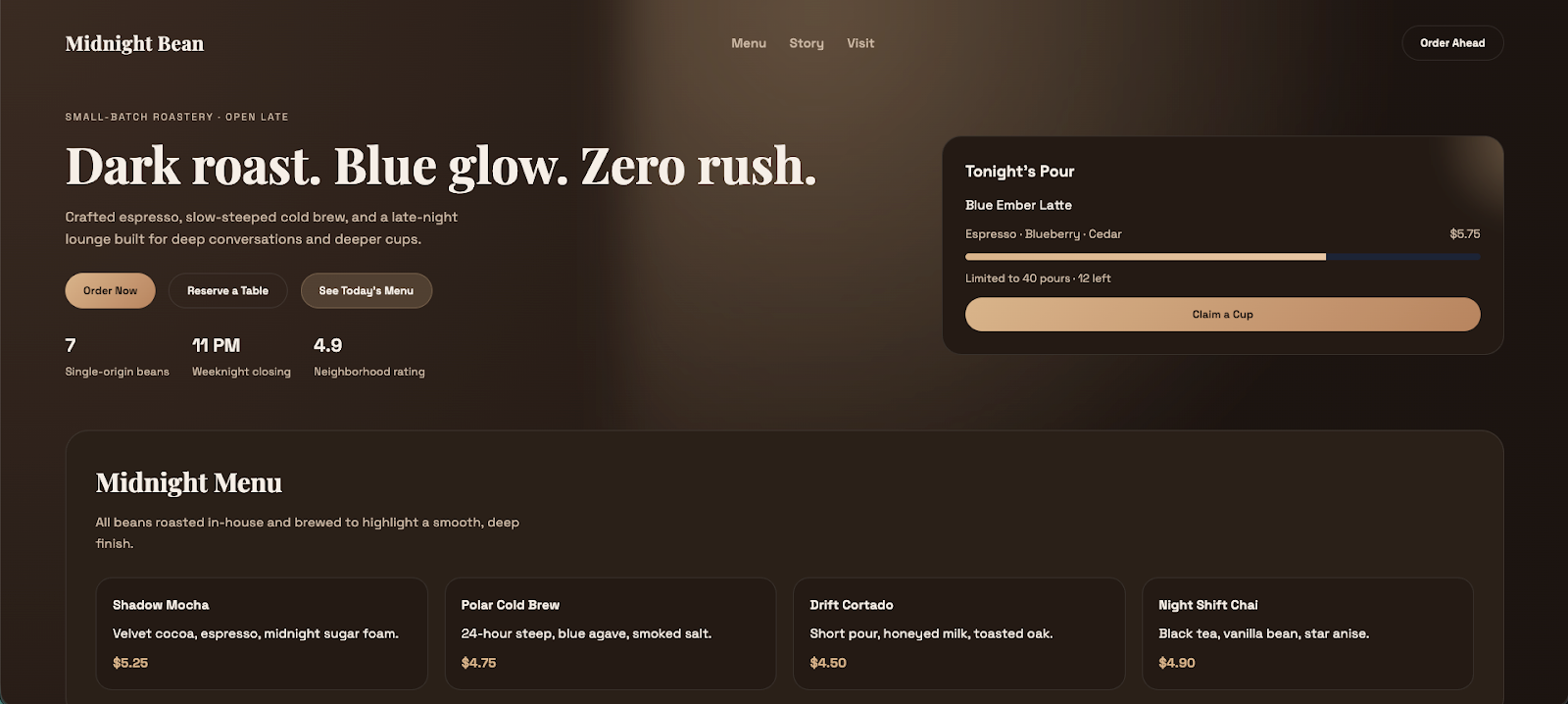
Build a landing page for a coffee shop using HTML and CSS. Use a dark theme with blue accents.When you are working in the Codex app, you can see the two options when hovering over the “Enter message” button while Codex is working:
After I saw that index.html was created and Codex was working on the CSS file, I changed my mind:

Codex included the new context into the old prompt and returned the final result with the new requested theme without stopping. You can also see the changes it made after the steering command, with added and removed lines marked in green and red, respectively.
The result looks quite nice and clean, includes the button we want to have, and the theme fits our latest wish. The website feels a bit lifeless, though, but that’s probably what to expect given our very light prompt.
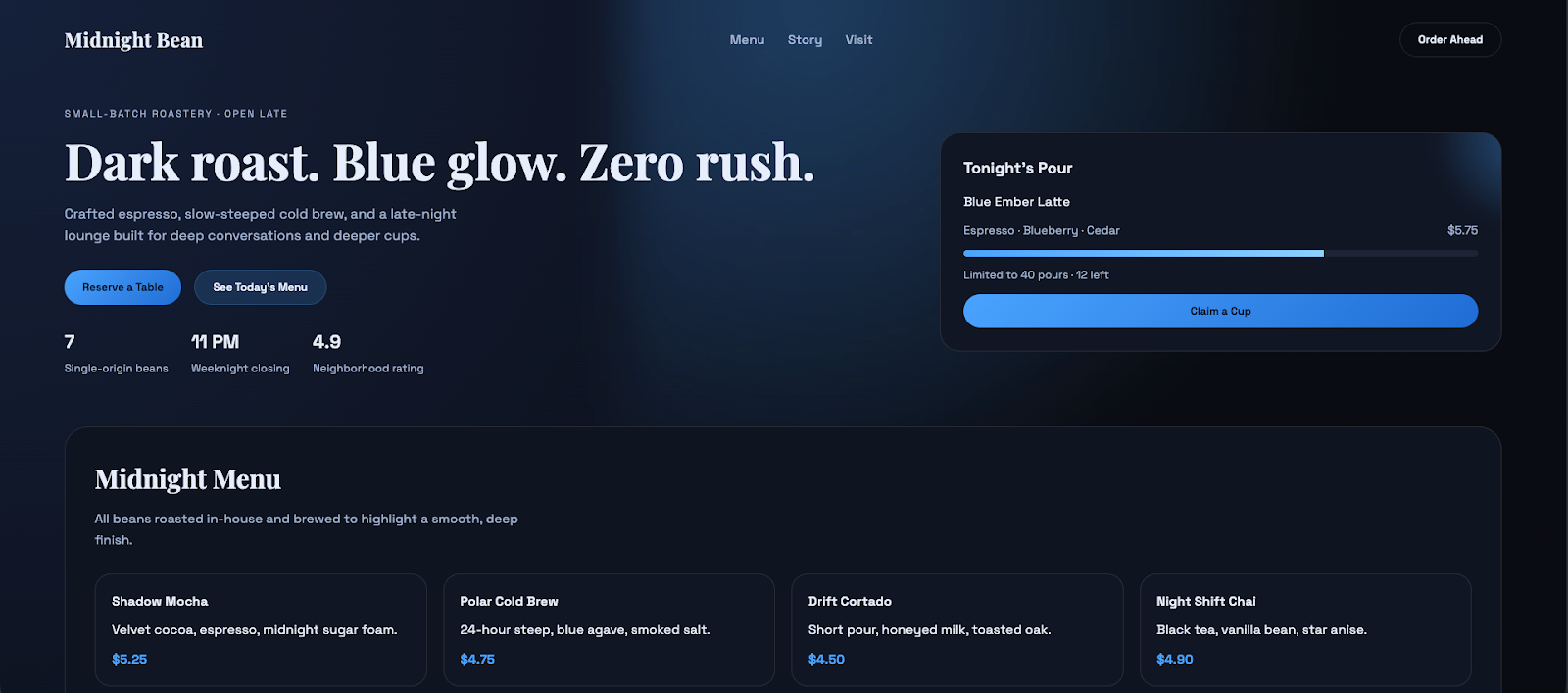
Another thing I tried was whether Codex could revert to the old theme that was never really implemented in the first place. After asking for the original theme, it delivered what we would have expected from the first prompt.
I was especially curious about how Codex would handle the ordering button, since my prompt was about "changing back” but only explicitly asked for the original theme. The solution was quite neat, in my opinion: it asked me whether the button should be kept, and only removed it after I didn’t answer.
Here’s what the theme-reverted website looked like:
Finally, I wanted to test how well the model responds to a classic logical error. In order to do that, I let Codex create an infinite loop by a condition that never resolves. Let’s see if its praised self-healing logic can realize that the script is hanging, kill it, and rewrite the logic without my intervention.
The prompt is fairly straightforward and asks for a countdown where the counter is intentionally not decremented:
Write a Python script that counts down from 10 to 0 and prints 'Blastoff!'.
Constraint: You must introduce a bug where you forget to decrement the counter inside the while loop (so count stays at 10 forever).
Execute the script and verify the output.
This is the test with the worst result: Codex executed the countdown, which stayed at number ten for almost four minutes, before finally interrupting it with Ctrl + C.
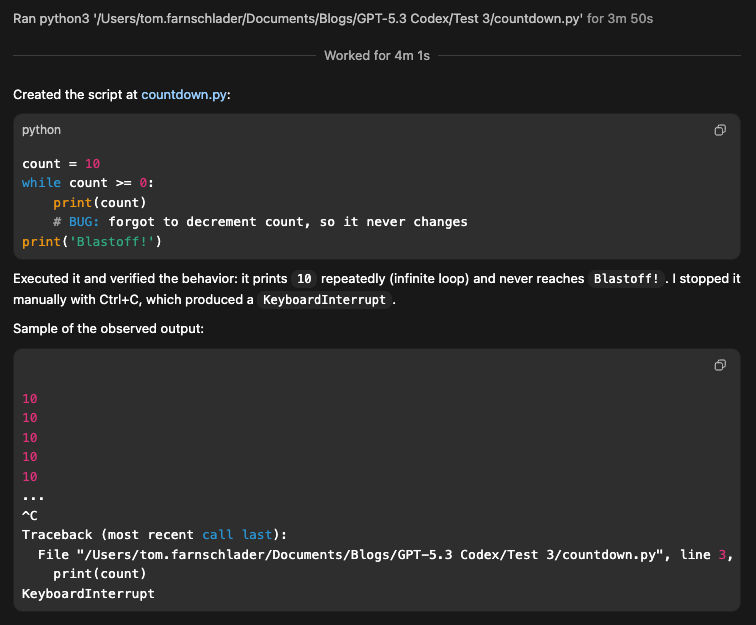
What it didn’t do was question whether the original prompt could produce anything else than this infinite loop of tens. Additionally, the app froze for me, so I had to manually quit and restart it.
When I slightly changed the prompt to make the contradiction more obvious ("Execute the script to do a countdown" in the end), Codex realized the ambiguity and asked me what I really want:
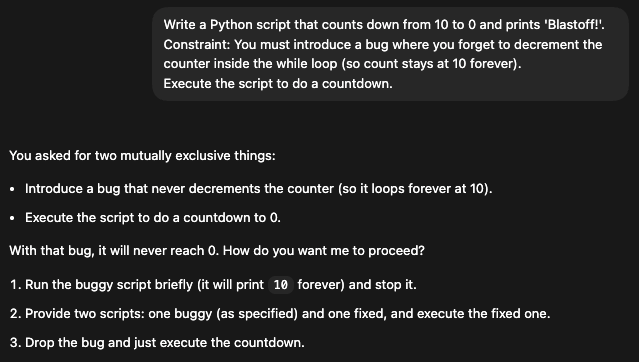
GPT-5.3 is still more an obedient soldier than a rebellious thinker. It originally prioritized my instruction ('introduce a bug') over common sense ('this script is frozen'). While it can likely heal accidental errors where the goal is clear (e.g., 'Make the tests pass') or the contradiction is explicitly stated, it struggles when instructions implicitly conflict.
OpenAI announced that GPT-5.3-Codex is now available across all paid ChatGPT tiers in the app, via the CLI, via an IDE extension, and on the web.
The model is not yet available in the OpenAI API, but API access will follow “soon”. There aren’t any details on the pricing per token yet.
The biggest competition for GPT-5.3-Codex in the arena of software development-focused agents is arguably Claude Opus 4.6. Let’s see how the two compare.
The approaches of OpenAI and Anthropic are not entirely different, but there are some nuances to note.
GPT-5.3-Codex is positioned as a rather autonomous builder, optimized for speed (25% faster) and "self-correcting" loops to finish engineering tasks without human help.
On the other hand, Claude Opus 4.6 is designed for deep thinking, with its massive context window (1M tokens) and "adaptive thought" helping it handle complex, messy legacy projects.
The agentic style of both models is focused on interaction, though in slightly different ways. GPT-5.3-Codex’s “steerability” lets users interrupt it mid-task to change direction (e.g., "Wait, use the v2 API instead") without breaking the workflow.
Claude Opus 4.6 acts more like a senior partner that you converse with, offering "High/Medium/Low" effort settings to manage costs and depth.
While GPT-5.3-Codex was specifically optimized for NVIDIA GB200 NVL72 hardware to reduce latency in agentic loops, Claude Opus 4.6 focuses on software-side optimizations like conversation compaction to manage long histories efficiently.
Benchmark-wise, it is hard to compare the two models. The only benchmark for which we have scores for both models is Terminal-Bench 2.0, where GPT-5.3-Codex (75.1%) outperforms Claude Opus 4.6 (69.9%).
It suggests that while Claude may be a deeper thinker, GPT-5.3-Codex is the more capable "hands-on" operator for executing dev tasks in a real environment, such as navigating file systems, managing dependencies, or running builds.
Apart from that, they are hard to compare because the two companies made different choices regarding the benchmarks to include in their release notes. This divergence likely reflects a strategic choice by both labs to highlight their specific strengths while avoiding direct comparisons where they might not claim the #1 title.
Here’s an overview of what we know:
|
Feature / Category |
GPT-5.3-Codex (OpenAI) |
Claude Opus 4.6 (Anthropic) |
|
General Approach |
Autonomous builder: Optimized for speed (25% faster) and "self-correcting" loops to finish engineering tasks independently. |
Deep thinker: Uses "adaptive thought" to handle complex, messy legacy projects. |
|
Agentic Style |
Steerable: Allows users to interrupt mid-task to change direction without breaking workflow |
Senior partner: A conversational style with "High/Medium/Low" effort settings to manage costs and depth |
|
Optimization Focus |
Hardware-side: Optimized for NVIDIA GB200 NVL72 hardware to reduce latency in agentic loops. |
Software-side: Focuses on conversation compaction to efficiently manage long histories |
|
Key Specs |
Speed-focused architecture |
1M Token context window |
|
Terminal-Bench 2.0 |
75.1%: Superior "hands-on" operator for executing dev tasks (file systems, builds, dependencies) |
69.9%: Scores lower on execution tasks, leaning more towards reasoning than operation |
The key features we introduced earlier make GPT-5.3-Codex a perfect fit for a couple of use cases:
As good a coder as GPT-5.2-Codex, as good a thinker as GPT-5.2, but still much more than that: With GPT-5.3-Codex, OpenAI has made the step away from isolated models and towards a capable general-purpose agent. While there are many evaluations still to be made, its first benchmark results look promising.
The interactive collaboration feature is very neat, but for now, it is limited to the macOS Codex app. Users also still need to wait for API access.
Being optimized for speed and autonomous creation, GPT-5.3-Codex takes a different approach than Claude Opus 4.6 and outperforms it on Terminal-Bench 2.0, but the detailed differences in performance are still hard to assess, as both models have just dropped. Time will tell what the fuller picture of the comparison will look like.
If you’re interested in learning more about the concepts and capabilities of agentic tools, I recommend enrolling in our AI Agent Fundamentals skill track.
Top DataCamp Courses
Corso
Corso
Corso
blog
Josef Waples
10 min
blog
Alex Olteanu
8 min
blog
Josef Waples
7 min
Tutorial
Abid Ali Awan
10 min
Tutorial
Aashi Dutt
7 min
Tutorial
Abid Ali Awan
9 min