
One week. 700+ courses for $0. No credit card needed.
Start Now
Let's dive into setting up Delta Lake! I'll break it down into two simple steps:
To get started, ensure you have an Apache Spark environment. Then install the
Delta Lake package (if using Python) with the following command:
The above command installs the delta-spark package, which equips your Spark session with the necessary Delta Lake integrations.
After installing the package, configure your Spark session to use Delta Lake with
these settings:
from pyspark.sql import SparkSession

# Initialize a SparkSession with Delta support
spark = SparkSession.builder \
    .appName("DeltaLakePractice") \
    .config("spark.sql.extensions", "io.delta.sql.DeltaSparkSessionExtension") \
    .config("spark.sql.catalog.spark_catalog", "org.apache.spark.sql.delta.catalog.DeltaCatalog") \
    .getOrCreate()

# Check if Spark is working
print("Spark Session Created Successfully!")Here, the Spark session is set up with two critical configurations. The first enables
Delta Lake SQL extensions and the second defines Delta Lake as the default
catalog, ensuring that your Delta-format data is correctly handled.
Now, let’s get into the basics. Delta Lake allows you to create ACID-compliant tables using a simple DataFrame API.
Create a Delta table by writing out a DataFrame in Delta format:
# Sample DataFrame creation
data = [("Alice", 34), ("Bob", 45), ("Cathy", 29)]
columns = ["name", "age"]
df = spark.createDataFrame(data, columns)

# Save the DataFrame as a Delta table (overwrite mode replaces any existing data)
df.write.format("delta").mode("overwrite").save("/path/to/delta/table")The code snippet above creates a basic DataFrame and writes it to a specified path using the Delta format. Using mode("overwrite") ensures that any existing data is replaced.
Once a Delta table is created, read its data as follows:
# Load the Delta table from a specified path
delta_df = spark.read.format("delta").load("/path/to/delta/table")
delta_df.show()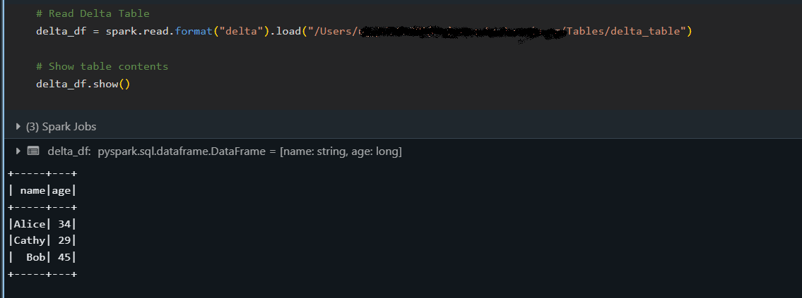
The snippet above loads the Delta table into a DataFrame and displays its content with the show() method, confirming that the data has been correctly read.
Delta Lake supports multiple write modes, allowing you to incrementally add new records (append) or replace existing data (overwrite) while maintaining ACID guarantees.
Append new data to an existing Delta table:
# New data to append
new_data = [("David", 40)]
new_df = spark.createDataFrame(new_data, columns)

# Append data to the existing Delta table
new_df.write.format("delta").mode("append").save("/path/to/delta/table")The mode "append" is used to add new rows to the table without affecting the existing data.
Overwrite the entire Delta table with updated data:
# Updated data for overwrite
updated_data = [("Alice", 35), ("Bob", 46), ("Cathy", 30)]
updated_df = spark.createDataFrame(updated_data, columns)

# Overwrite the current contents of the Delta table
updated_df.write.format("delta").mode("overwrite").save("/path/to/delta/table")Using the "overwrite" mode replaces the Delta table's content entirely with the new updated DataFrame.
This section covers some of Delta Lake’s powerful functionalities beyond basic operations.
In particular, we’ll explore how you can look back at past versions of your data, automatically manage schema changes, and perform multi-operation transactions atomically.
Delta Lake’s time travel feature lets you access previous versions of your table. Each write operation on a Delta table creates a new version so that you can query an earlier state of your data. I’ve used this feature to audit data changes, debug issues, or restore a previous snapshot if something goes wrong.
# Querying an earlier version (version 0) of the Delta table:
historical_df = spark.read.format("delta") \
    .option("versionAsOf", 0) \
    .load("/path/to/delta/table")
historical_df.show()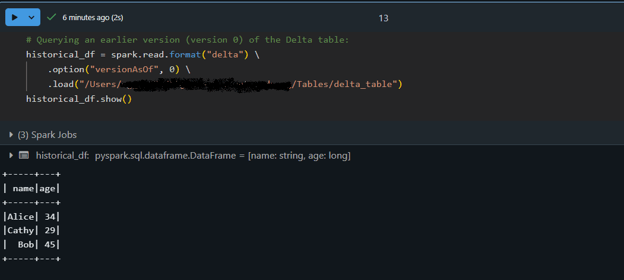
As datasets evolve, new columns might be added. Delta Lake can automatically evolve the schema, merging new fields into an existing table while enforcing data consistency. This means you don’t have to recreate or manually adjust your table whenever your data structure changes.
Let’s append data with an updated schema using automatic schema evolution:
# Create a DataFrame with an additional "country" column:
new_data = [("Alice", 34, "USA"), ("Bob", 45, "Canada")]
columns = ["name", "age", "country"]
new_df = spark.createDataFrame(new_data, columns)

# Append the new data to the Delta table with schema evolution enabled:
new_df.write.format("delta") \
    .mode("append") \
    .option("mergeSchema", "true") \
    .save("/path/to/delta/table")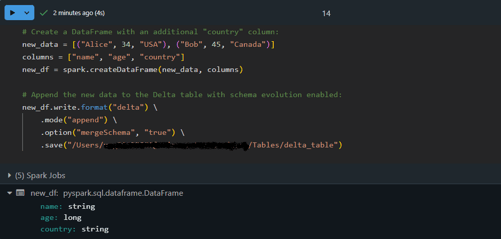
Here, the DataFrame new_df contains an extra column, country. By using option("mergeSchema", "true"), the Delta Lake engine automatically updates the table’s schema to accommodate the new column while appending the data safely!
Delta Lake’s ACID transactions guarantee that complex operations execute reliably—even under high concurrency. This means a series of operations (such as updates and inserts) are treated as a single unit. If any part of the transaction fails, no changes are applied, ensuring your data remains consistent.
Let’s perform an atomic transaction with a MERGE operation:
-- Execute a MERGE statement in SQL to update or insert data atomically:
MERGE INTO delta./path/to/delta/table AS target
USING (SELECT 'Alice' AS name, 35 AS age, 'USA' AS country) AS source
ON target.name = source.name AND target.country IS NULL
WHEN MATCHED THEN
   UPDATE SET target.age = source.age, target.country = source.country
WHEN NOT MATCHED THEN
   INSERT (name, age, country) VALUES (source.name, source.age, source.country)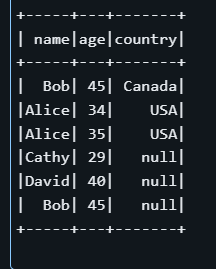
In the above example, the MERGE statement looks for rows in the target table where the name matches and the country field is NULL. If a match is found, it updates the row; otherwise, it inserts a new record.
Notice that even though there may already be a row for “Alice” in the table, the condition target.country IS NULL can cause the operation to insert a new row rather than updating one with a non-null country. This example demonstrates the importance of carefully defining the matching criteria in transactional operations.
Here are the best practices I follow when working with Delta Lake. These can help you build efficient, maintainable data pipelines.
Partitioning your Delta tables can significantly improve query performance when dealing with large datasets.
Tip: When writing your DataFrame, use the .partitionBy("column_name") option to break your data into smaller, more manageable chunks (for example, by date or category). This approach reduces the amount of data scanned during typical queries.
Delta Lake uses a transaction log (the _delta_log) to maintain metadata for all operations on your table.
Tip: Schedule periodic maintenance operations (such as the VACUUM command) to remove obsolete data files and streamline the metadata. This results in faster query performance and easier management of large datasets.
Z-ordering is a data clustering technique that organizes data on disk to improve query efficiency, especially when filtering on specific columns:
The SQL command above tells Delta Lake to rearrange the data physically based on the name and age columns. By co-locating similar values, queries that filter on these columns scan less data and run faster.
When working with Delta Lake, you might occasionally bump into roadblocks. The key is to treat these challenges as opportunities to deepen your understanding and master the technology. Here are some of my practical insights and tips to get you back on track.
You may encounter issues such as schema mismatches or partition alignment problems. For example, if your incoming data doesn’t match the table schema, you might see errors during write operations. Consider using options like mergeSchema to allow Delta Lake to adjust.
Also, if your query performance drops, check whether your data is optimally partitioned or if a maintenance command like VACUUM could help remove obsolete files.
When things don’t work as expected, don’t worry—it’s part of the process! A great first step is to inspect the transaction log (found in the _delta_log directory). This log offers a detailed history of transactions and can help you pinpoint when and where things went off track.
Additionally, if you notice inconsistencies or unexpected changes, try using time travel to compare different table versions. This approach will help you isolate the problem and understand the events leading up to the error.
Delta Lake brings a host of advantages—from robust ACID transactions and efficient metadata management to features like time travel and schema evolution—that empower you to build resilient and scalable data pipelines. Its integration with Apache Spark means that Delta Lake could be the perfect addition to streamlining your workflows if you’re already invested in the Spark ecosystem.
For those who want to deepen their understanding, I encourage you to explore further resources on DataCamp:
Happy learning, and best of luck on your data journey!
Delta Lake is an open-source storage layer that adds ACID transactions, schema enforcement and evolution, and time travel capabilities to Apache Spark. This makes data management more reliable and enables features that traditional data lakes lack.
To set up Delta Lake, install Apache Spark and the delta-spark package (using a command like pip install pyspark delta-spark). Then, configure your Spark session with Delta Lake-specific settings that enable SQL extensions and designate Delta as the default catalog.
Important features include ACID transactions for robust data operations, time travel to query historical data, automatic schema evolution to handle changes in data structure, and optimized metadata management for faster query performance.
Common issues such as schema mismatches or partitioning problems can be addressed by using options like mergeSchema or by optimizing your data partitions. Additionally, inspecting the _delta_log and using time travel queries can help pinpoint and resolve errors.
It is recommended to partition your data efficiently, schedule periodic maintenance tasks like VACUUM to manage obsolete files, and leverage techniques like Z-ordering to optimize query performance—all of which are covered in the best practices section of the article.

I’m a data engineer and community builder who works across data pipelines, cloud, and AI tooling while writing practical, high-impact tutorials for DataCamp and emerging developers.

ブログ
 Laiba Siddiqui• 11 分

ブログ
 Patrick Brus• 15 分

チュートリアル
 Allan Ouko• 12 分
Learn more about data engineering with these courses!
トラック
需要の高いスキルを身につけ、データを効率的に取り込み、クレンジングし、管理し、パイプラインをスケジュールして監視できるようになり、データエンジニアリング分野で差をつけましょう。





Data lakes are the gold standard for storing huge amounts of structured and unstructured data but often struggle with data inconsistency, schema evolution, and performance issues. Delta Lake solves these challenges by adding ACID transactions, schema enforcement, and scalable data processing on top of Apache Spark.
In this tutorial, I will explain Delta Lake's basics, including its architecture, features, and setup, along with practical examples to help you get started.
What Is Delta Lake?
Delta Lake is an open-source storage layer designed to integrate with Apache Spark, making it a preferred solution for teams using the Spark ecosystem. It introduces ACID (Atomicity, Consistency, Isolation, Durability) transactions to big data environments.
By enabling robust metadata management, version control, and schema enforcement, Delta Lake enhances data lakehouses and ensures high data quality for analytics and machine learning workloads.
Delta Lake features
Delta Lake architecture
Delta Lake improves upon traditional data architectures, particularly the Lambda architecture, by unifying batch and streaming data processing into a single, ACID-compliant framework.
Data platforms that use Delta Lake usually follow a medallion architecture, which organizes our data into three logical layers defined as follows:
Gold tables can be consumed by business intelligence tools, enabling real-time analytics and supporting decision-making.
The medallion architecture. Image source: Databricks
Delta Lake File Format
Delta Lake is built on top of Apache Parquet, a columnar storage format that enables efficient querying, compression, and schema evolution. However, what differentiates Delta Lake from standard Parquet-based data lakes is the DeltaLog, a transaction log that maintains a history of all changes made to a dataset.
Core components of the Delta Lake file format include:
_delta_log/):As you can see, without the DeltaLog, standard Parquet-based data lakes lack ACID transactions and cannot handle concurrent modifications safely. Delta Lake's file format allows streaming and batch processing to coexist while maintaining consistency. Lastly, features like merge-on-read, compaction, and optimized metadata queries make Delta tables highly efficient for large-scale analytics.