Course
Introduction to Claude Models
3 hr
14.3K
The three parts each do a specific job:
Connectors for routines are added on the claude.ai platform, and the same goes for MCP servers. Your local configs don't carry over.
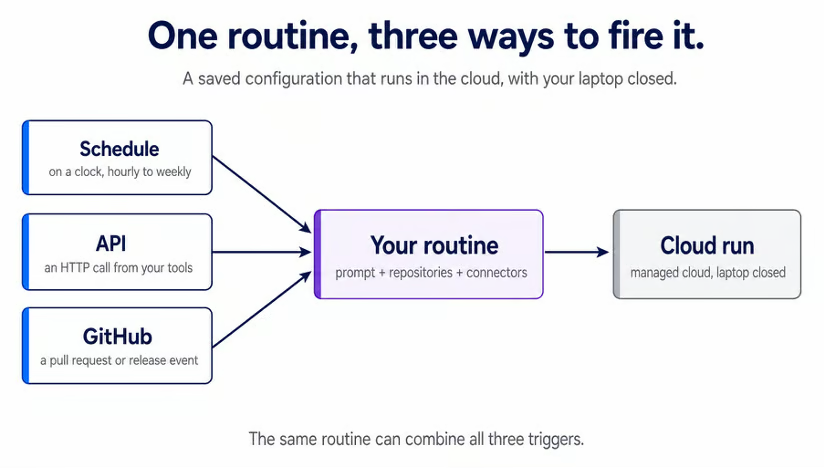
A routine can fire in three ways: on a schedule, via an API call, or via a GitHub event. A single routine can combine all three.
There is a difference between /loop and /schedule because the two solve different problems.
A /loop task lives in your current session. It fires only while Claude Code is running and idle on your machine, and closing the terminal stops it. That makes it good for polling a build you are watching right now.
For more information on /loop and other important commands, I recommend reading our Claude Code Terminal tutorial.
A routine runs in the cloud and survives independently of any session:
|
|
Cloud routine |
|
|
Runs on |
Anthropic cloud |
Your machine |
|
Machine required |
No |
Yes |
|
Session required |
No |
Yes |
|
Minimum interval |
1 hour |
1 minute |
There is also a third, local option. Desktop scheduled tasks run on your own computer, for work that needs your local files and tools. They only run while the machine is awake, but don’t require the Claude app to be open.
The mental model is set. Now you need something for a routine to work on. For this tutorial, we built pr-review-demo, a small Python project with one open pull request.
It has a cartlib package that handles a shopping cart: it stores prices as integer cents, applies member and bulk discounts, and adds state sales tax to reach a final charge. The package on the main branch is correct.
The open pull request adds a free-shipping coupon, and it carries a real bug we planted on purpose. It is a cross-file unit mismatch, invisible in any single file and visible only when you trace the value across two. That gives the routine something real to do for the rest of the tutorial.
Fork the repo to follow along on your own copy. It is a throwaway, and the patterns transfer to any repository you point a routine at.
You need a claude.ai account on a Pro, Max, Team, or Enterprise plan with Claude Code on the web enabled. Routines live at claude.ai/code/routines.
The /schedule command authenticates with your claude.ai subscription login, not an Anthropic API key or Bedrock, Vertex, or Foundry auth. It also needs a recent CLI, so run claude update if yours is old.
There are two separate GitHub prerequisites as well. First, /web-setup grants clone access, which the scheduled routine needs. Second, the Claude GitHub App, installed separately, enables the GitHub trigger covered later.
With a repo to point at, build the routine from the CLI. Run /schedule in any session. You can pass a description directly:
/schedule daily PR review at 9 amClaude then walks through the same fields the web form collects: name, prompt, repository, environment, connectors, and schedule. It confirms the schedule in your local zone and converts it for you, so 9 am becomes the right cron expression without you writing one.
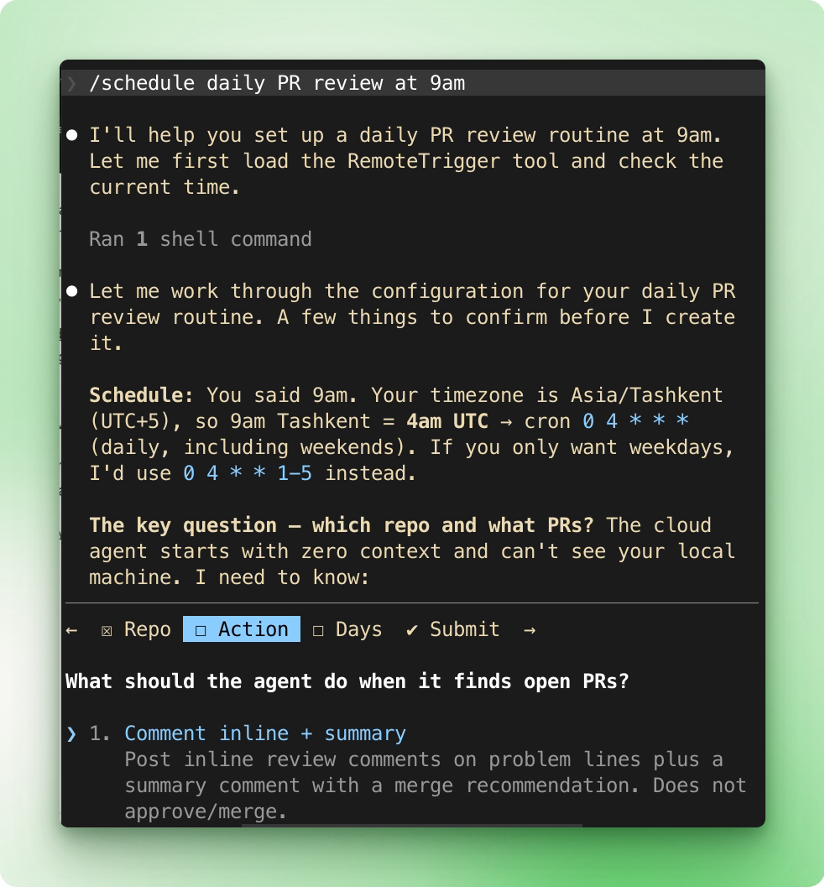
If your account has no GitHub connection yet, Claude prompts you to run /web-setup. Run it, then run /schedule again to pick up where you left off.
The prompt is what determines whether this routine succeeds or fails.
A normal session is a conversation, so you can correct Claude as it goes. A routine has no one to correct it. It starts cold, runs to the end, and cannot ask a clarifying question. The prompt has to name the task, the repository, and what a finished run looks like.
Compare these two. The first leaves too much unsaid:
Review the open PR.It doesn’t name a repo or review criteria, doesn’t have any place to leave comments, and has no definition of done. A cold run cannot fill those gaps. The second prompt answers all of it:
Review the open pull request in pr-review-demo. The cartlib package works entirely in integer cents. Read the checkout flow and the values it pulls from config.py, and check that every amount stays in cents end to end. If any value is mixed in using the wrong unit, leave an inline comment on that line explaining the error and its effect on the customer's total. Then, post a summary comment stating whether the PR is safe to merge.That prompt names the repo and states the invariant the code must hold: every amount in cents. It points to the two files that matter and defines done as an inline comment plus a merge verdict. That gives the run a target it can hit alone. Paste it in when /schedule asks what the agent should do.
All of your connectors are included by default, so a fresh routine can already reach everything your account connects to. That is fine for now, and a later section trims it down.
When you finish the flow, Claude saves the routine and confirms it is live, with its repository, schedule, model, and next run time.
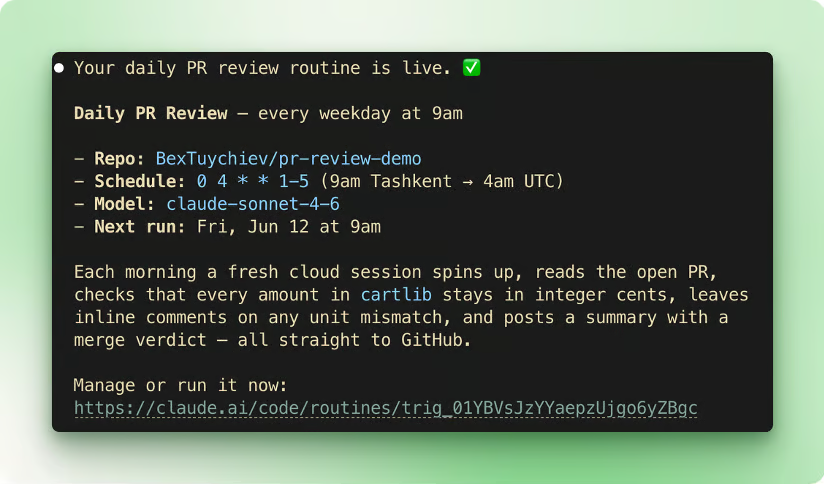
The routine also appears in the list at claude.ai/code/routines. Open its detail page to see everything in one place. That includes its status, repository, schedule, connectors, the full prompt, and a Run now button.
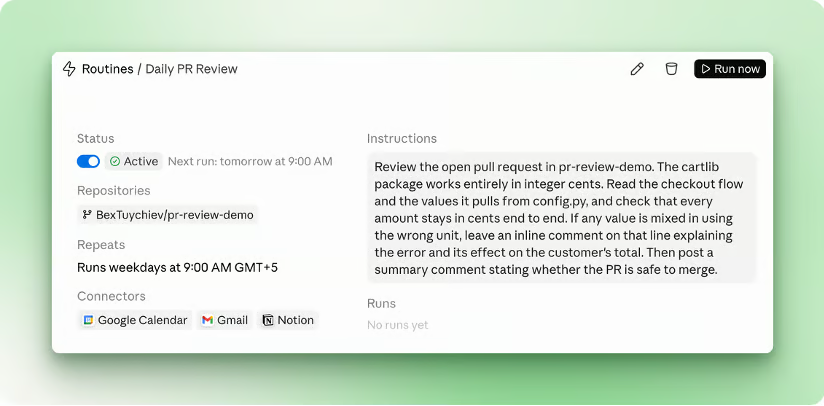
Click Run now to run it immediately, instead of waiting until 9am.
The run starts from a fresh clone of your repository, pulled from the default branch. Anything you committed is there. Anything you set up only on your own machine is not, so the routine sees the repo the way your teammates would.
Once it finishes, the run list shows a green status. That green means the session ran and exited without an infrastructure error. Yet it does not mean the task in your prompt succeeded. Three kinds of failure hide behind a green check and only show in the transcript:
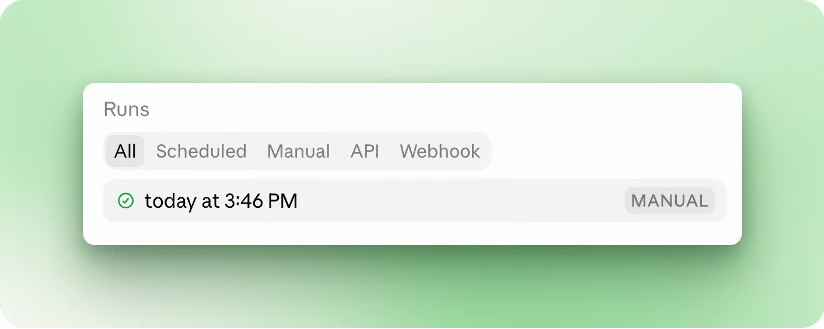
So open the run to confirm it. Click any run to read it as a full session, where you can see what Claude did, review the diff, open a pull request, or keep the conversation going.
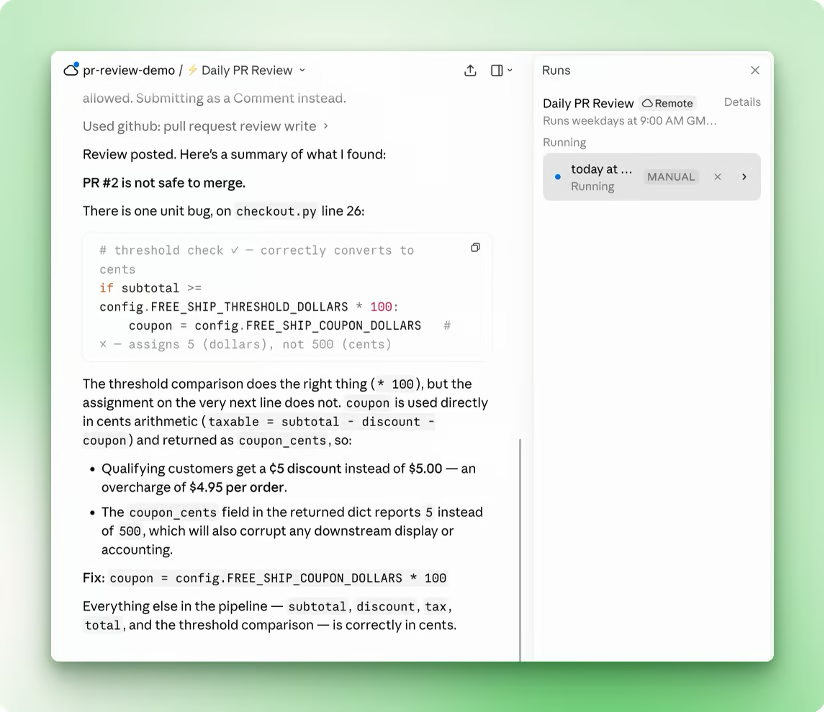
On the demo repo, the transcript shows the catch. Claude reads checkout.py and finds that the coupon is assigned 5 instead of 500. It explains that this applies $5 as 5 cents, overcharging the customer by $4.95 per order, and gives the one-line fix. Then it posts the review on the PR through the GitHub connector.
Once a routine exists, you manage it from the same command. Run /schedule list to see all of them, /schedule update to change one, and /schedule run to fire one immediately.
The schedule presets are hourly, daily, weekdays, and weekly. For a custom interval, such as every 2 hours or the first of each month, pick the closest preset first. Then run /schedule update to set a cron expression directly. The minimum interval is 1 hour, and anything faster is rejected.
Routines also count against your account's daily run allowance, and during the research preview, GitHub events have hourly caps. Events past the cap are dropped, not queued. The current numbers vary by plan and show up at claude.ai/code/routines.
The CLI creates scheduled routines only. To add a GitHub or API trigger, edit the routine in the web app.
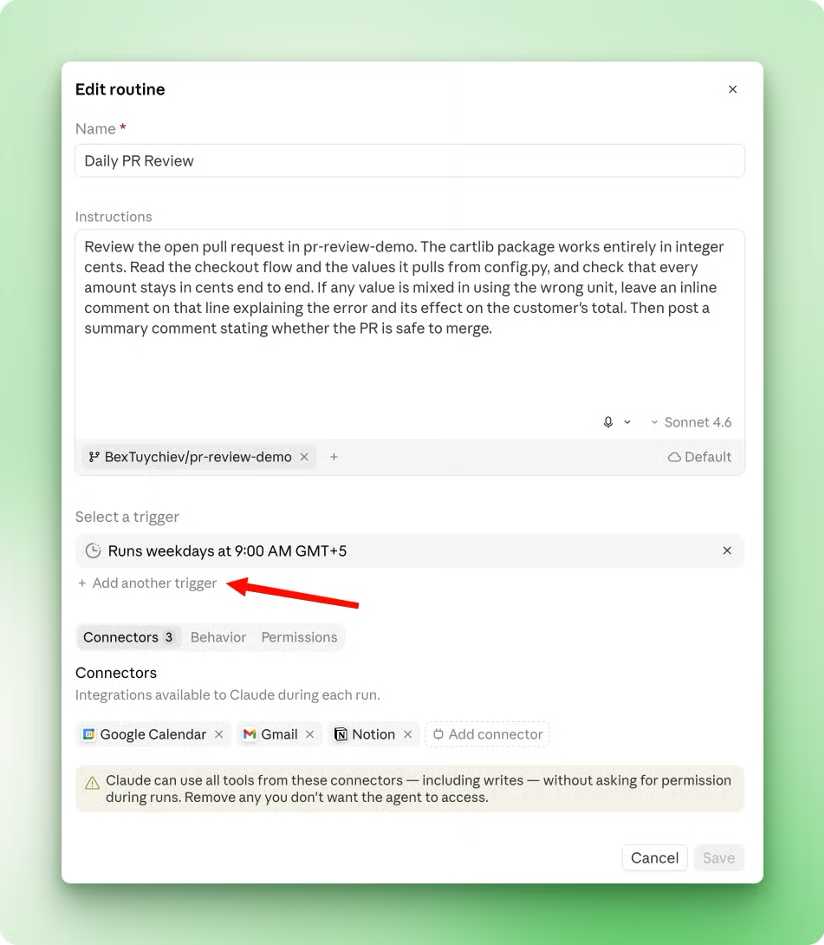
The schedule fires your routine on a clock. Two other triggers let GitHub or your own systems fire the same routine. A PR review routine can run nightly, react to every new PR, and start from a deploy script, all at once.
You add both by editing the routine at claude.ai/code/routines.
The GitHub trigger requires the Claude GitHub App installed on the repository you want to subscribe to. If the App is missing, the trigger setup prompts you to install it. Note that /web-setup from earlier grants only clone access. It does not install the App or deliver webhooks, so running it does not cover this step.
Once the App is installed, add the trigger and pick an event. The events fall into two categories, pull requests and releases, and you select a specific action inside one. The UI surfaces the common ones as presets, such as PR opened, PR merged, and Release published, plus a Custom option for the rest.
Then narrow it with filters. For pull requests, you can filter on author, title, body, base branch, head branch, labels, is-draft, and is-merged. All conditions have to match for the routine to fire.
The matches regex operator tests the whole field, not a substring. To match any title containing hotfix, write .*hotfix.*. A plain hotfix matches only a title that is exactly that, and nothing else.
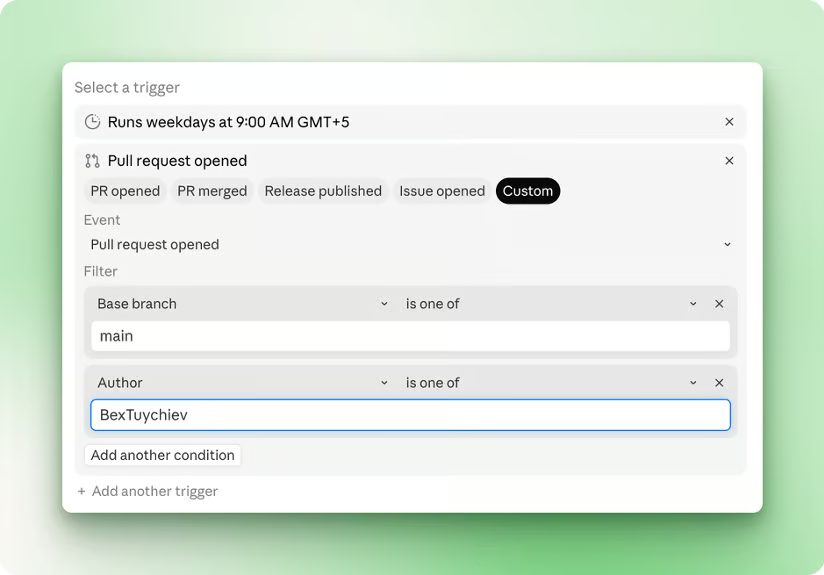
The GitHub trigger set to fire on a new pull request, filtered to the main branch, and a specific author.
For the demo repo, set the event to a pull request opening and leave the filters open. Now every new PR fires the review you wrote earlier, with no one at the terminal. It traces the coupon's unit across the files, leaves an inline comment on the bug, and posts a merge verdict.
Each matching event starts its own session, so two PRs in a row produce two independent runs.
The API trigger lets your own tools fire a routine. Choose the API under the trigger selector and click Generate token. The token shows once and cannot be retrieved later, so store it in your alerting tool's secret store right away.
Then POST to the routine's fire endpoint with the token and a text body:
curl -X POST https://api.anthropic.com/v1/claude_code/routines/$ROUTINE_ID/fire \
  -H "Authorization: Bearer $ROUTINE_TOKEN" \
  -H "anthropic-version: 2023-06-01" \
  -H "anthropic-beta: experimental-cc-routine-2026-04-01" \
  -H "Content-Type: application/json" \
  -d '{"text": "Sentry alert SEN-4521 fired in prod. Stack trace attached."}'
The text value is passed as a literal string and is not parsed, so write plain prose rather than JSON. Structured input arrives as raw text, and the routine reads it verbatim.
The anthropic-beta header is required, and the API is experimental, so check the API reference before wiring it into CI. From there, a monitoring tool can call this endpoint on an alert and have the routine open a draft fix PR on its own.
A routine runs on its own, so before pointing one at a real repo, constrain what it can reach. The docs frame this as four controls:
Scope each to what the routine actually needs.
Identity comes first because it is what a teammate notices on a shared repo. Everything a routine does through your GitHub identity or your connectors appears as you.
Commits and pull requests carry your GitHub user, and Slack messages and Linear tickets use your linked accounts. Teammates see your name on those commits and PRs, so name branches and titles in a way that signals a routine made them.
Branches come next. A run is a full cloud session with no permission prompts, so it never stops to ask before editing a file or opening a pull request.
The guardrail is the branch it can write to. By default, Claude pushes only to branches prefixed with claude/, which keeps it off protected or long-lived branches like main.
A per-repository setting, Allow unrestricted branch pushes, removes that restriction. Turn it on deliberately, only for a repo that needs it.
Connectors are the riskiest of the four. All of your claude.ai connectors are included by default, and Claude can use every tool from an included one, including writes, without asking during a run.
So trim the list to what the routine needs. A PR review routine needs GitHub and little else. A stray email or calendar connector is an access the routine has no use for, and a prompt injection hidden in a PR could turn that access against you.
Network access is the last control. The Default environment uses trusted network access, which reaches a built-in allowlist of package registries, cloud provider APIs, container registries, and common development domains, and blocks the rest.
A blocked request fails with a 403 and an x-deny-reason: host_not_allowed. Widen it only when the routine has to reach your own services. Otherwise, the failure is quiet, showing up in the transcript rather than as an obvious error.
You can build, fire, and scope a routine. These examples from the official docs each pair a job with the trigger that fits it:
Routines suit work that is unattended, repeatable, and tied to a clear outcome. If you can write the success criteria into the prompt, as you did for the PR review, the task is a candidate. Work that needs real-time human judgment is not.
Routines change how you spend time on recurring work. Instead of running each task at the terminal, you write it once and review what has already run. The PR review you built fires while your laptop is closed, and you read the verdict when you are ready.
To go further with Claude Code, the following tutorial reads pair well with this one:
Learn Using Claude with DataCamp!
Course
Course
Course
Tutorial
Tim Lu
15 min
Tutorial
Benito Martin
14 min
Tutorial
Bexruz (Bex) Tuychiev
15 min
Tutorial
Dario Radečić
15 min
Tutorial
Vikash Singh
10 min
Tutorial
Aashi Dutt
10 min