Course
Software Development with Claude Code
4 hr
9.1K
An agent resends the same system prompt, tool definitions, and repository context on every turn, so the rate that decides your bill is the cache read, not the input rate.
Fable 5.1 costs $10 per million input tokens and $50 per million output tokens, unchanged from Fable 5. Cache reads cost $0.25 per million, down from $1, and five-minute cache writes stay at $12.50 per million. Our Claude Fable 5.1 guide has the full rate table and Anthropic's own savings estimates. I also recommend our comparison of Fable 5.1 with GPT-6 Astra, the biggest competitor.
Reading a cached prefix is cheap. Writing it is not, at 50 times the read rate, so the loop only pays off when a prefix gets read back several times. The cost breakdown later shows how that landed on a real run, and which category actually dominated.
The token ceiling comes from the model, not your budget. Fable 5.1 gives you a 1M-token context window with up to 128K output tokens per response, and max_tokens is a hard limit on thinking plus response text together. At high effort you need room for both, which is why the agent loop below sets 16,000 rather than something tidier.
A few access details matter before you write code. Two of them will stop your requests outright:
Fable 5.1 requires 30-day data retention and is unavailable under zero data retention unless Anthropic authorizes access. A request from an incompatible workspace returns a 400 invalid_request_error with no other hint.
The model is not supported on Priority Tier. Fable 5 is, so this one catches people migrating.
Fable 5.1 text output carries Anthropic's text watermark. It adds no tokens and needs no request changes.
Our workflow has two stages:
The sample project is a small Flask JSON API for saving and searching bookmarks, with an app factory, three blueprints, a config module, models, and a pytest suite. I use rate limiting as the running task because the agent has to inspect the app setup, routes, config, and tests before it can identify the required files and tests. The complete code and sample project are available in the GitHub repository.
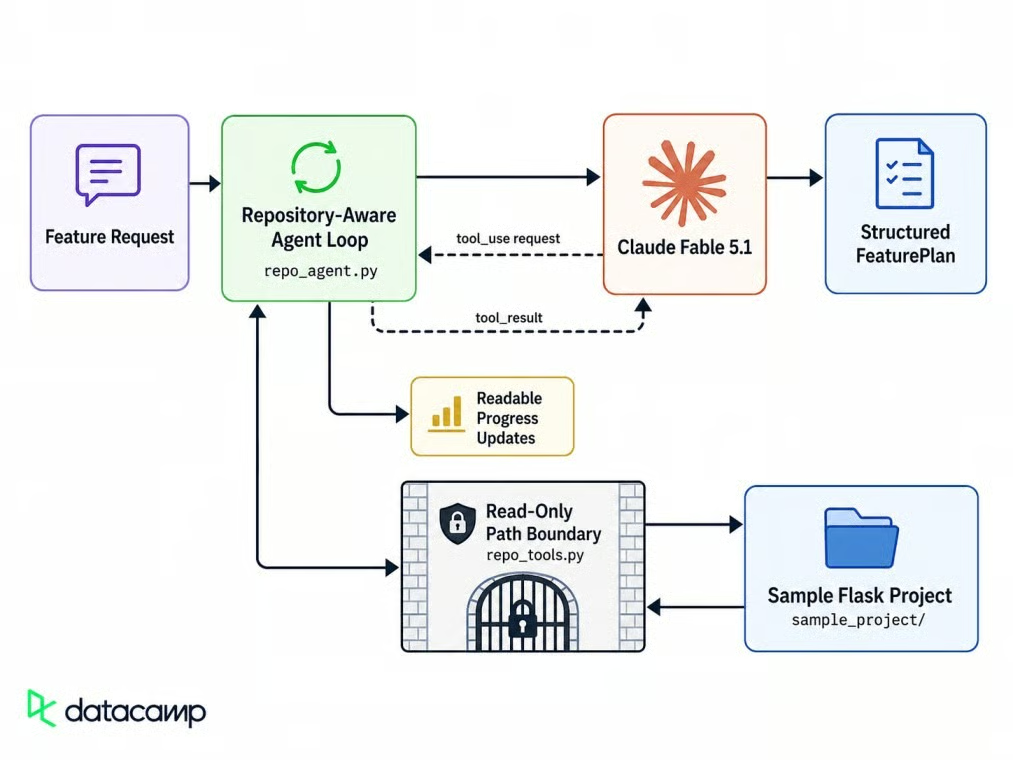
Requests reach files through one boundary. Image by Author.
The agent can use only three tools: list_project_files, read_project_file, and get_project_metadata. Claude never accesses the filesystem directly. It asks for a path, and your code decides whether that path is allowed.
Start with a separate Python environment and keep the API key on the server.
You need Python 3.10 or newer and an Anthropic API key with access to claude-fable-5-1.
To create an API key, sign in to the Claude Console, open the API keys page, click Create key, then copy the key. It is best practice to give it a name that helps you remember its purpose, choose an expiration date, and store the key safely.
Create a virtual environment and install the packages:
python -m venv .venv
source .venv/bin/activate          # macOS or Linux
.venv\Scripts\Activate.ps1         # Windows PowerShell
pip install anthropic==1.3.0 pydantic fastapi uvicorn python-dotenv
Keep the SDK pinned because beta features change frequently. Progress updates need at least 1.1.0, and the examples use 1.3.0.
Put the key in a .env file and add .env to .gitignore before your first commit. It belongs on a server you control, never in a browser or an accessible repository. Exposing it can allow unauthorized API use and charges across input, output, and cache operations.
ANTHROPIC_API_KEY=sk-ant-your-key-hereWith that in place, the client finds the key on its own.
Send the smallest API request you can before building anything on top of it.
Initialize the client, send one user message, and print the response metadata:
from anthropic import Anthropic
from dotenv import load_dotenv

load_dotenv()

client = Anthropic()
MODEL = "claude-fable-5-1"

response = client.messages.create(
    model=MODEL,
    max_tokens=512,
    messages=[{"role": "user", "content": "Reply in one sentence to confirm the API connection is working."}],
)

text = next((b.text for b in response.content if b.type == "text"), None)
print(text if text is not None else f"No text returned ({response.stop_reason})")
print(f"Model: {response.model}")
print(f"Stop reason: {response.stop_reason}")
print(f"Input tokens: {response.usage.input_tokens}")
print(f"Output tokens: {response.usage.output_tokens}")
print(f"Request ID: {response._request_id}")
First call returns text plus metadata. Image by Author.
The next(...) call selects the first text block. Adaptive thinking is always on and cannot be disabled, so a response can start with a thinking block; sending thinking: {"type": "disabled"} returns a 400 rather than turning it off. When a thinking block comes first, response.content[0].text raises an exception.
The solution is to filter by block type instead of assuming a fixed position. Log response._request_id too, since Anthropic support uses it to trace a request.
Here is the request used in those planning and effort examples. It requires the agent to inspect several files:
feature_request = (
    "Add rate limiting to the public API endpoints so one client cannot exhaust "
    "the search endpoint or brute force the token endpoint."
)
Keep that text unchanged while comparing effort levels and token counts. The results then describe the API settings rather than a different prompt.
Set reasoning effort through output_config. It accepts low, medium, high, xhigh, and max. The API default is high.
response = client.messages.create(
    model=MODEL,
    max_tokens=8192,
    output_config={"effort": "high"},
    messages=[{"role": "user", "content": feature_request}],
)
Effort can affect token use, tool behavior, and latency. I ran the same feature request three times at each of four effort levels; the table shows the averages:
|
Effort |
Seconds |
Thinking tokens |
Total output tokens |
Cost |
|---|---|---|---|---|
|
|
7.7 |
111 |
173 |
$0.0093 |
|
|
8.1 |
129 |
186 |
$0.0099 |
|
|
7.9 |
136 |
199 |
$0.0106 |
|
|
20.0 |
151 |
1,764 |
$0.0888 |
Thinking tokens are included in total output tokens, so do not add the two columns together. In these runs, low, medium, and high stayed close in latency and cost.
xhigh took two and a half times as long, produced nearly nine times the output tokens, and cost eight times as much.
The takeaway: Start at high, drop to medium for routine steps, and use higher levels only when your own tests show a measurable improvement. At low effort, the model may answer from memory instead of calling a retrieval tool. If a turn needs fresh information, say so or raise the level.
The system prompt defines the agent's behavior:
SYSTEM_PROMPT = """You are a senior engineer who turns feature requests into implementation plans for an existing codebase.

Stay inside the requested feature. Do not propose unrelated refactors, dependency upgrades, or style changes.

If a file or dependency you need does not exist, say so plainly instead of inventing it.

Write in plain sentences and do not use em dashes.

Finish with concrete guidance: what changes, where, in what order, what could break, and which tests to add."""
Anthropic's prompting guidance notes that the model can expand the task or stop too early. The prompt tells it to stay in scope and finish with concrete guidance. A schema handles the output format later.
Define the plan with Pydantic so your application can validate it and pass it to other code:
from pydantic import BaseModel, Field

class FeaturePlan(BaseModel):
    summary: str = Field(description="One or two sentences on what will be built.")
    implementation_steps: list[str]
    files_to_modify: list[str]
    risks: list[str]
    tests: list[str]

response = client.messages.parse(
    model=MODEL,
    max_tokens=8192,
    system=SYSTEM_PROMPT,
    messages=[{"role": "user", "content": feature_request}],
    output_format=FeaturePlan,
)

if response.stop_reason == "refusal":
    category = (
        response.stop_details.category
        if response.stop_details and response.stop_details.category
        else "unspecified"
    )
    print(f"Declined: {category}")
elif response.parsed_output is None:
    print(f"No plan. Stop reason: {response.stop_reason}")
else:
    print(response.parsed_output.summary)
messages.parse() converts the Pydantic model into a JSON schema, sends it, validates the reply, and returns a typed object on parsed_output. Structured outputs are generally available, so no beta header is involved. Check stop_reason first because a refusal, covered later, skips the schema and leaves you nothing to parse.
That generic result from the introduction did one thing right: it named no files it could not see. A schema validates structure, not factual grounding.
Before adding tools, account for forced-tool restrictions, thinking-block compatibility, and append-only history.
Fable 5.1 rejects forced tool selection. The tool-loop section below shows the error and the auto configuration used instead.
Thinking blocks are compatible in only one direction. Fable 5.1 reads blocks from earlier Claude models, but no earlier model can read its blocks.
When a router or fallback moves the conversation to an older model, the API removes the incompatible blocks before the target model sees them. The remaining history stays in place, but the older model has to plan without those blocks.
Editing earlier turns invalidates the thinking blocks that came after them. This can break history trimming and client-side summarization.
The migration guide covers the full set of changes.
Now give the model repository context through read-only tools.
The tool layer has two parts: the Python functions that enforce access rules and the schemas Claude can call.
Read-only is not the same as safe. A model can ask for ../../.env as easily as config.py, so the guard belongs in your code rather than your prompt:
def _resolve(self, relative_path: str) -> Path:
    relative = Path(relative_path)
    if relative.is_absolute() or relative.drive:
        raise ToolError(f"path is outside the project root: {relative_path}")

    cursor = self.root
    for part in relative.parts:
        cursor /= part
        if cursor.is_symlink():
            raise ToolError(f"symlinks are not followed: {relative_path}")

    candidate = (self.root / relative).resolve()

    # After resolving "..", the path still has to sit under the allowed root.
    if candidate != self.root and self.root not in candidate.parents:
        raise ToolError(f"path is outside the project root: {relative_path}")
    if candidate.name in DENY_NAMES:
        raise ToolError(f"reading {candidate.name} is not allowed")

    return candidate
Reject absolute paths and symlink components, then resolve the path and confirm that it remains under the project root. Asking for ../.env returns "path is outside the project root." The returned tool error lets the agent continue with allowed files.
The reader class controls what Python may open. Claude also needs JSON schemas that describe the three actions it can request:
EMPTY_SCHEMA = {
    "type": "object",
    "properties": {},
    "additionalProperties": False,
}

TOOLS = [
    {
        "name": "list_project_files",
        "description": "List readable text files in the project.",
        "input_schema": EMPTY_SCHEMA,
        "strict": True,
    },
    {
        "name": "read_project_file",
        "description": "Read one text file relative to the project root.",
        "input_schema": {
            "type": "object",
            "properties": {"path": {"type": "string"}},
            "required": ["path"],
            "additionalProperties": False,
        },
        "strict": True,
    },
    {
        "name": "get_project_metadata",
        "description": "Read project metadata and dependency manifests.",
        "input_schema": EMPTY_SCHEMA,
        "strict": True,
    },
]
strict checks the arguments when the model chooses a tool. It does not force a tool call, which matters for Fable 5.1.
Start with the base loop: send the tools, inspect stop_reason, run what was requested, append the results, and repeat.
MAX_AGENT_TURNS = 8
reader = ProjectReader("sample_project")
messages = [{"role": "user", "content": feature_request}]

for turn in range(1, MAX_AGENT_TURNS + 1):
    response = client.messages.create(
        model=MODEL,
        max_tokens=16000,
        system=SYSTEM_PROMPT,
        tools=TOOLS,
        messages=messages,
    )

    if response.stop_reason == "refusal":
        return declined(response.stop_details.category)
    if response.stop_reason == "max_tokens":
        return cutoff()
    if response.stop_reason != "tool_use":
        messages.append({"role": "assistant", "content": response.content})
        break

    messages.append({"role": "assistant", "content": response.content})
    results = []
    for block in response.content:
        if block.type != "tool_use":
            continue
        output, is_error = reader.run(block.name, block.input)
        results.append({
            "type": "tool_result",
            "tool_use_id": block.id,
            "content": output,
            "is_error": is_error,
        })

    messages.append({"role": "user", "content": results})
else:
    return turn_limit()
MAX_AGENT_TURNS bounds model requests, not spending, so enforce a separate cost limit if needed. The loop handles refusal, max_tokens, and tool_use directly; other stop reasons end the inspection stage. The is_error field tells the model that a path was refused, so it can choose another action.
On Fable 5, you could force the first call with tool_choice: {"type": "any"}. Fable 5.1 returns this error before the request executes:
tool_choice: type "tool" and "any" are not supported for this model.Forced calls would skip the always-on thinking. Keep tool_choice on auto, use the strict schemas defined above, and name the tools in the prompt when a step needs one.
Fable 5.1 sometimes issues one tool call per turn, whereas Fable 5 batched several. That adds round-trips. Add this line to the prompt: “Request independent files in the same turn instead of one per turn.” A sample run batched nine independent file requests, although the count varies.
Text streaming emits response content as it is generated; progress updates cover pauses between tool calls.
The full project uses context_system() to combine SYSTEM_PROMPT with a project summary before starting the stream:
with client.messages.stream(
    model=MODEL,
    max_tokens=8192,
    system=context_system(),
    messages=[{"role": "user", "content": feature_request}],
) as stream:
    for chunk in stream.text_stream:
        print(chunk, end="", flush=True)
    final = stream.get_final_message()

print(f"\nOutput tokens: {final.usage.output_tokens}")
get_final_message() gives you the assembled message with usage and stop reason once the stream drains. Streaming chunks are not guaranteed to contain complete JSON, so wait for the final message before parsing.
Text streaming does not cover delays during tool calls. Fable 5.1 can write short progress updates before tool calls. Under the default thinking.display of "omitted", the progress-specific thinking blocks are empty, although the model may still produce a normal text lead-in.
With display: "updates" and the thinking-display-updates-2026-08-18 beta header, the API documentation defines a readable progress update as a non-empty thinking block while the reasoning stays hidden. In the live runs for this project, the thinking field stayed empty and the readable status arrived as a normal text block immediately before tool_use. The helper therefore checks both block types, and the loop calls it only on turns that end with tool_use:
PROGRESS_BETA = "thinking-display-updates-2026-08-18"

response = client.beta.messages.create(
    model=MODEL,
    max_tokens=16000,
    betas=[PROGRESS_BETA],
    thinking={"type": "adaptive", "display": "updates"},
    system=SYSTEM_PROMPT,
    tools=TOOLS,
    messages=messages,
)

def status_lines(response) -> list[str]:
    lines = []
    for block in response.content:
        if block.type == "thinking":
            text = (block.thinking or "").strip()
        elif block.type == "text":
            text = (block.text or "").strip()
        else:
            continue
        if text:
            lines.append(text)
    return lines
The progress messages describe the files the model plans to read: "I'll read the app wiring, config, extensions, the public and auth routes, and the existing tests, since those are where rate limiting would hook in." Display those messages and ignore empty blocks.
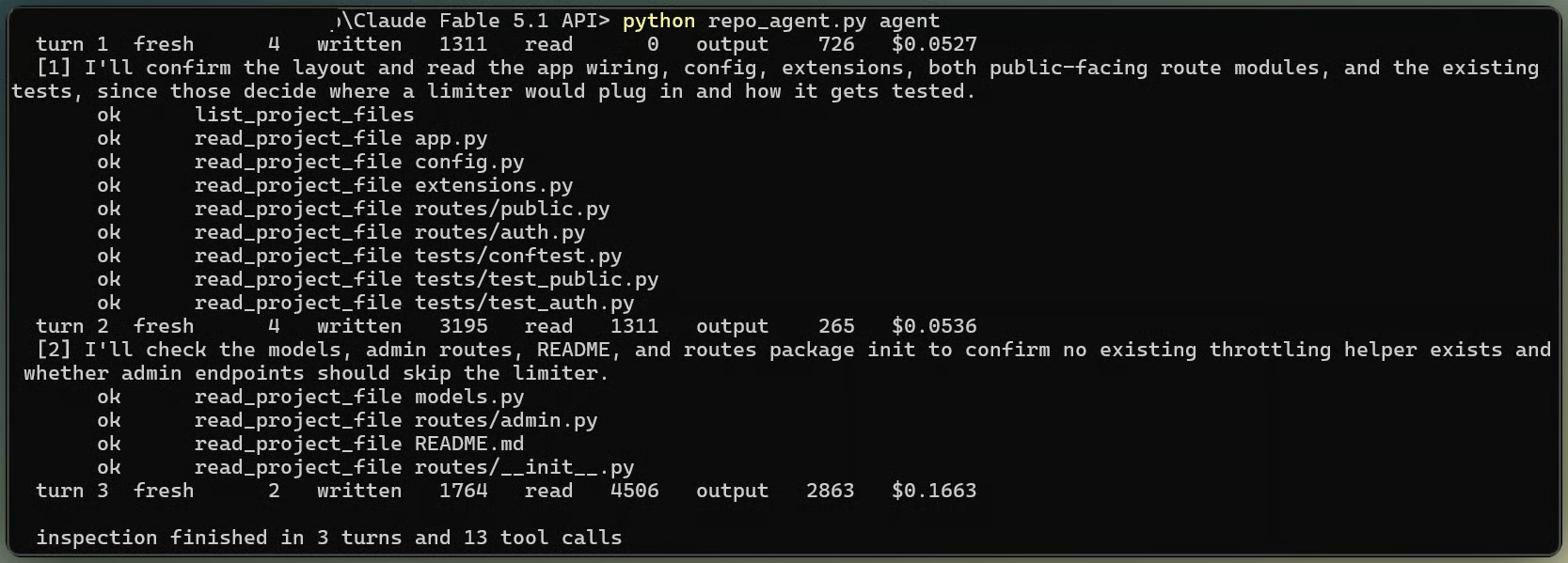
Agent reads files while reporting progress. Image by Author.
Fable 5.1 writes fewer of these than Fable 5 did, especially at higher effort. If your interface requires regular updates, ask for an opening line, progress messages, and a closing recap.
The next feature is very neat. As we all know, the repository agent does not need the same reasoning depth on every turn.
In an agent loop, lower effort for routine retrieval turns and raise it again for the final planning turn.
With the mid-conversation-output-config-2026-07-01 beta header, you can append a system message that changes only the effort level:
EFFORT_BETA = "mid-conversation-output-config-2026-07-01"

messages.append({"role": "system", "content": [], "output_config": {"effort": "low"}})
messages.append({"role": "user", "content": "Summarize the repository evidence in five words."})

response = client.beta.messages.create(
    model=MODEL,
    max_tokens=4096,
    betas=[EFFORT_BETA],
    output_config={"effort": "high"},
    messages=messages,
)
The new level applies from the next user turn, not partway through the current turn, and it does not invalidate the prompt cache. Changing the top-level output_config.effort between requests does invalidate it.
The agent keeps the top-level setting at high, appends a per-message medium directive before routine retrieval, and appends a high directive before the final plan. A paired test used 18 output tokens at lower effort versus 76 at the previous setting. Treat that result as an example, not an expected reduction.
Use a turn-scoped instruction to block additional file reads during final planning.
Set clear_at: "next_user_message" on a system message with the mid-conversation-system-clear-at-2026-08-21 beta header. The API treats its text as a system instruction for the current turn, then stops rendering it after the next user message. It stays in messages, so the earlier history does not change, the cache keeps matching, and the cleared message costs no input tokens.
SCOPED_SYSTEM_BETA = "mid-conversation-system-clear-at-2026-08-21"

messages.append({"role": "system", "content": [], "output_config": {"effort": "high"}})
messages.append({"role": "user", "content": "Write the implementation plan now."})
messages.append({
    "role": "system",
    "content": (
        "For this turn only: do not request more files. Base the plan on what "
        "you have already read, and name only paths you actually opened."
    ),
    "clear_at": "next_user_message",
})

response = client.beta.messages.create(
    model=MODEL,
    max_tokens=16000,
    betas=[EFFORT_BETA, SCOPED_SYSTEM_BETA],
    tool_choice={"type": "none"},
    output_config={"format": {"type": "json_schema", "schema": plan_schema()}},
    system=agent_system(),
    tools=TOOLS,
    messages=messages,
)
tool_choice={"type": "none"} keeps the final request from calling another tool. The scoped instruction limits the plan to files the agent already inspected. Do not add a reminder and delete it on the next request. That edit invalidates later thinking blocks.
A The block is bound to a different conversation error means the history before a thinking block changed. Every Fable 5.1 thinking block is bound to the exact system prompt, tool definitions, and messages that came before it.
The result depends on when your account was created.
Accounts created on or after August 31, 2026, get a 400 saying the block is bound to a different conversation.
For accounts created earlier, the API records the mismatch but acts on it only when the request sets thinking.block_binding.prefix_mismatch_behavior.
You can detect this with the thinking-binding-controls-2026-08-01 beta header, thinking.block_binding.prefix_mismatch_behavior set to "drop_block", and the input_transformations array. An edited history appears as reason: "prefix_binding_mismatch". Run this check once against your integration.
The following operations trigger the mismatch:
Editing, reordering, or removing an earlier turn while keeping the later ones
Injecting per-request text into an earlier turn and removing it next request
Changing the content or order of the top-level system prompt or tools array mid-conversation
Serving different bytes from an image or document URL on a later request
Each of those has a substitute that keeps the bindings intact:
Add instructions with mid-conversation system messages instead of editing system.
Change tools with mid-conversation tool changes instead of changing the top-level array.
Trim history with server-side context editing or compaction which do not count as edits.
Pass thinking blocks back unchanged.
Moving cache_control markers and changing request-level effort are both safe and do not invalidate thinking-block bindings. However, changing top-level effort restarts prompt caching, so use per-message effort when the cached prefix should stay in place.
The following run separates fresh input, cache writes, cache reads, and output costs.
Prompt caching reduces the cost of context that repeats across turns. The growing history changes where the breakpoint should sit, so automatic caching is a simpler fit here.
A top-level cache_control field moves the breakpoint to the latest cacheable block on each request:
response = client.beta.messages.create(
    model=MODEL,
    cache_control={"type": "ephemeral"},
    system=system,
    tools=TOOLS,
    messages=messages,
    # Other request fields...
)
A cacheable prefix shorter than 512 tokens is not cached on Fable 5.1, even when marked with cache_control. The API processes it normally and returns zero for both cache counters. Writing a 583-token prefix cost $0.0073; reading it on the next turn cost $0.00015. The second turn still had to write its new part to the cache, so a cache hit did not remove every input cost.
response.usage reports fresh input, cache creation, cache reads, and output separately. Price all four counters on their own; summing only input and output hides cache-write cost and overstates the price of cache hits.
Here is the cost breakdown from one full run that read 12 files across three turns and produced a final plan:
|
Line item |
Tokens |
Estimated cost |
Share |
|---|---|---|---|
|
Output |
5,713 |
$0.2857 |
59.4% |
|
Cache writes |
15,426 |
$0.1928 |
40.1% |
|
Fresh input |
50 |
$0.0005 |
0.1% |
|
Cache reads |
6,549 |
$0.0016 |
0.3% |
|
Total |
27,738 |
$0.4806 |
100% |
Cache reads made up a fraction of less than half a percent of this estimate. At Fable 5's old rate, the run would have cost about $0.4855 instead of $0.4806. The savings grow when each turn reuses much more context.
In this run, output produced almost 60% of the estimate, and cache writes produced about 40%. At the five-minute rate used here, a cache-write token costs 50 times as much as a cache-read token. A one-hour cache write costs 80 times as much.
A refusal and a failed request need different application behavior.
A refusal before output arrives as HTTP 200 with stop_reason: "refusal", empty content, and stop_details. Its category can be null. A refusal later in a stream can follow partial output, which the application should discard. A try/except around the call will not catch either case.
response = client.messages.create(model=MODEL, max_tokens=8192, messages=messages)

if response.stop_reason == "refusal":
    category = (
        response.stop_details.category
        if response.stop_details and response.stop_details.category
        else "unspecified"
    )
    return f"This request was declined ({category})."
Handle it as an application state. If an allowed request is unclear, rewrite it more precisely. Do not build retry logic whose purpose is to get around the classifier.
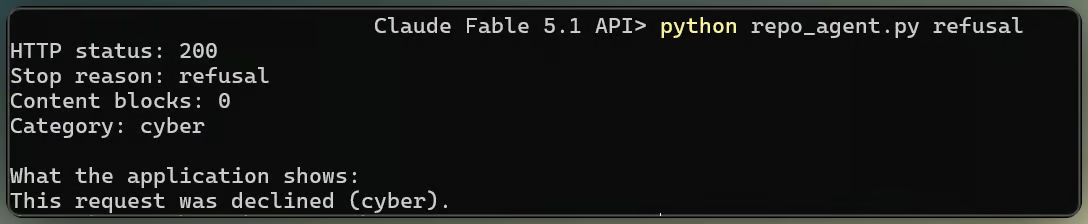
A refusal arrives as HTTP 200. Image by Author.
Server-side fallback can retry a declined request on another model, using fallbacks: "default" with the server-side-fallback-2026-07-01 beta header. The permitted targets for Fable 5.1 are Opus 4.8 and Opus 5.
Default fallback runs only when the refusal category has a recommended target. A tested reasoning_extraction refusal did not trigger fallback; inspect usage.iterations rather than assuming every refusal will retry. As mentioned earlier, moving to an older model also drops Fable 5.1 thinking blocks.
The local agent can now serve the same workflow through an HTTP API.
If you only need a local script, skip this section. For a web service, use FastAPI with AsyncAnthropic. Create one client for the process in a lifespan handler. Import the schema and prompts from the existing agent module.
@asynccontextmanager
async def lifespan(_: FastAPI):
    global client
    client = AsyncAnthropic()
    try:
        yield
    finally:
        await client.close()


@app.post("/plan", response_model=PlanResponse)
async def create_plan(body: PlanRequest):
    reader = resolve_project(body.project)
    messages, totals, turns, tool_calls = await inspect(reader, body.feature_request)
    plan, final_usage = await write_plan(messages)
    totals.add(final_usage)
    return PlanResponse(plan=plan, turns=turns, tool_calls=tool_calls, usage=as_usage(totals))
Notice the caller sends a project name, not a path. resolve_project() maps it to one of a small set of allowed roots, so a request cannot ask the server to read somewhere arbitrary. This service maps refusals to 422 as an application choice. The Claude API itself returns them as HTTP 200.
Run it with uvicorn app:app --reload. The interactive documentation is available at http://localhost:8000/docs.
Learn AI With DataCamp!
Course
Course
Track
Tutorial
Khalid Abdelaty
13 min
Tutorial
Abid Ali Awan
9 min
Tutorial
Khalid Abdelaty
15 min
Tutorial
Abid Ali Awan
9 min
Tutorial
Aashi Dutt
12 min
Tutorial
Bexruz (Bex) Tuychiev
14 min