

Track
Associate AI Engineer for Developers
29 hr
Practice and track your progress.
Continue with GoogleThe GPT-6 Astra API is how you access OpenAI's new flagship model, released on September 3, 2026, through the Responses API. For this tutorial, what matters is the surface: gpt-6-astra accepts text and image inputs through OpenAI’s Responses API. Its reasoning effort ranges from low to max, with no none option.
The examples in this tutorial use client.responses.create instead of client.chat.completions.create, but migration also requires changes to request, output, and tool-result formats. Remove the custom temperature, top_p, and log-probability settings as well, since Astra does not support them. Before making the first call, let's look at pricing.
For requests with at most 272,000 input tokens, standard pricing is $10 per million ordinary input tokens and $50 per million output tokens. Cached input costs $1 per million, and cache writes cost $12.50 per million.
Once a request exceeds that threshold, OpenAI applies a 2x multiplier to the input and cache rates and a 1.5x multiplier to the output rate. The higher rates apply to the entire request, not only the tokens above the threshold. None of the runs in this tutorial came close to the threshold.
The staging app is a small Flask task board: a home page, a form to add a task, a button to mark one done, and a /health endpoint. The complete code, staging app included, is in this GitHub repository.
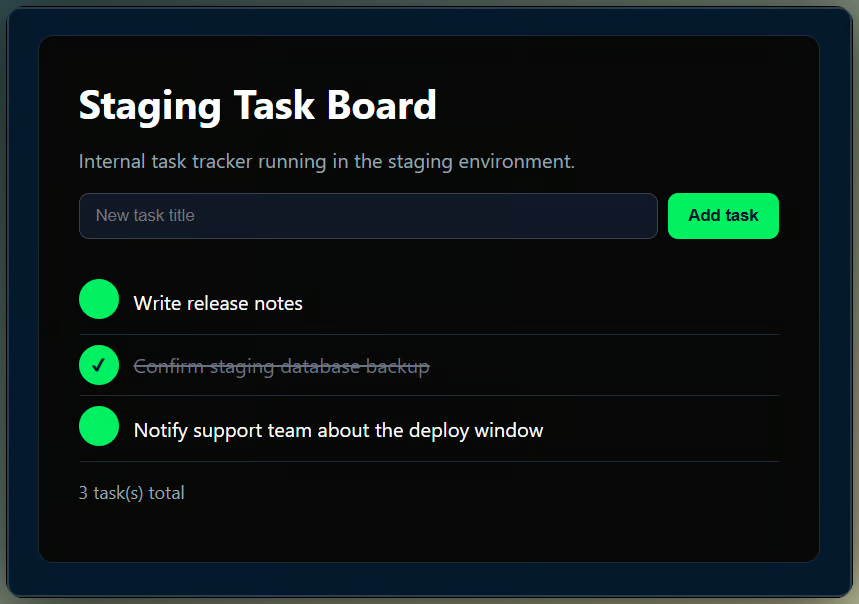
Three seeded tasks appear before testing. Image by Author.
The app has one intentional flaw. The agent has three checks, but only the test suite is designed to catch them.
The task-creation endpoint does not reject a blank title. I left that behavior in place so the agent has a known failure to find without revealing it in the prompt.
The agent can call three tools:
run_test_suite runs pytest, including a bulk import test with around 250 HTTP requests.
check_ui_flow uses Playwright to add a task and confirm that it appears.
check_staging_health sends a GET request to /health.
All three run against staging, with no mocks. The browser check uses fixed code; the model-authored computer use demo comes later.
You need an OpenAI API key with access to gpt-6-astra. Create a key at platform.openai.com/api-keys, and check that your project has gpt-6-astra enabled. Enterprise workspaces have Astra off by default at launch.
The commands below use Windows PowerShell and install all packages needed for this tutorial, including OpenAI’s realtime for the steering demo.
python -m venv .venv
.venv\Scripts\Activate.ps1
Copy-Item .env.example .env
pip install "openai[realtime]" flask pytest playwright pydantic matplotlib python-dotenv streamlit
playwright install chromium
On macOS or Linux, replace the activation command with source .venv/bin/activate and the copy command with cp .env.example .env.
Then add the API key to the new .env file: Open the .env file you just copied and add OPENAI_API_KEY=sk-..., which python-dotenv loads and the SDK picks up automatically, so you never pass the key in code.
If project-specific dependencies or .env files are new to you, our virtual environment and environment variables guides explain them. Confirm the key works before building on it.
If your API key already works with the Responses API, skip the next subsection and start with the synchronous tool loop. The first request only verifies setup.
Once the key is in place, it needs to be loaded using dotenv. After that, you can create an OpenAI client and send your first request using the client.responses.create() function. The smallest possible request looks like this:
from dotenv import load_dotenv
from openai import OpenAI

load_dotenv()

client = OpenAI()
response = client.responses.create(
    model="gpt-6-astra",
    reasoning={"effort": "low"},
    input="In one sentence, what is a staging environment used for?",
)
print(response.output_text)
The response's usage field lists the token counts needed for the later cost calculation.
Snippets below are excerpts; the runnable versions are in the accompanying GitHub repository.
Before touching anything async, I built the ordinary version:
Call the model
Check for a function_call item
Run the matching tool
Send the result back with previous_response_id
Repeat until the model stops asking for tools.
This blocking loop is the baseline for the async comparison.
for turn in range(max_turns):
    response = client.responses.create(
        model="gpt-6-astra",
        reasoning={"effort": "low"},
        tools=TOOLS,
        input=next_input,
        previous_response_id=previous_response_id,
    )
    calls = [item for item in response.output if item.type == "function_call"]
    if not calls:
        final_text = response.output_text
        break
    outputs = [
        {"type": "function_call_output", "call_id": call.call_id, "output": run_tool(call)}
        for call in calls
    ]
next_input, previous_response_id = outputs, response.idIn the baseline run, the model called each tool in turn. It found the known validation failure and returned a no-go decision. Across three runs, the total wall-clock time averaged 23.40 seconds. That average covers the whole run, not individual tool times.
Mark a tool with "async": true in its schema, and your app can defer that result while the model either continues working or waits. Your application still runs the tool and manages the background job.
I marked run_test_suite and check_ui_flow as async, and added an app-defined wait_for_tasks tool with no arguments, since this demo only ever has one batch of pending work at a time. That no-argument wait keeps the example small.
In a production runner, identify jobs with task handles, bind each handle to its original call_id, and wait only when the next step depends on a pending result.
Return each completed result on its original call_id, then return the wait status on the wait tool's own call_id.
TOOLS = [
    {"type": "function", "name": "run_test_suite", "async": True, ...},
    {"type": "function", "name": "check_ui_flow", "async": True, ...},
    {"type": "function", "name": "check_staging_health", ...},
    {"type": "function", "name": "wait_for_tasks", ...},
]
For this run, the app submitted each marked call to a thread pool. While the background checks ran, it performed the fast synchronous health check. It then blocked at wait_for_tasks until the pending checks were completed.
Across three runs, async reduced mean wall-clock time by 19.1%, from 23.40 seconds to 18.94 seconds. The average looked straightforward until the individual runs came in; the chart below shows how much they actually varied. Three runs are enough to show what happened here, not to predict production latency.
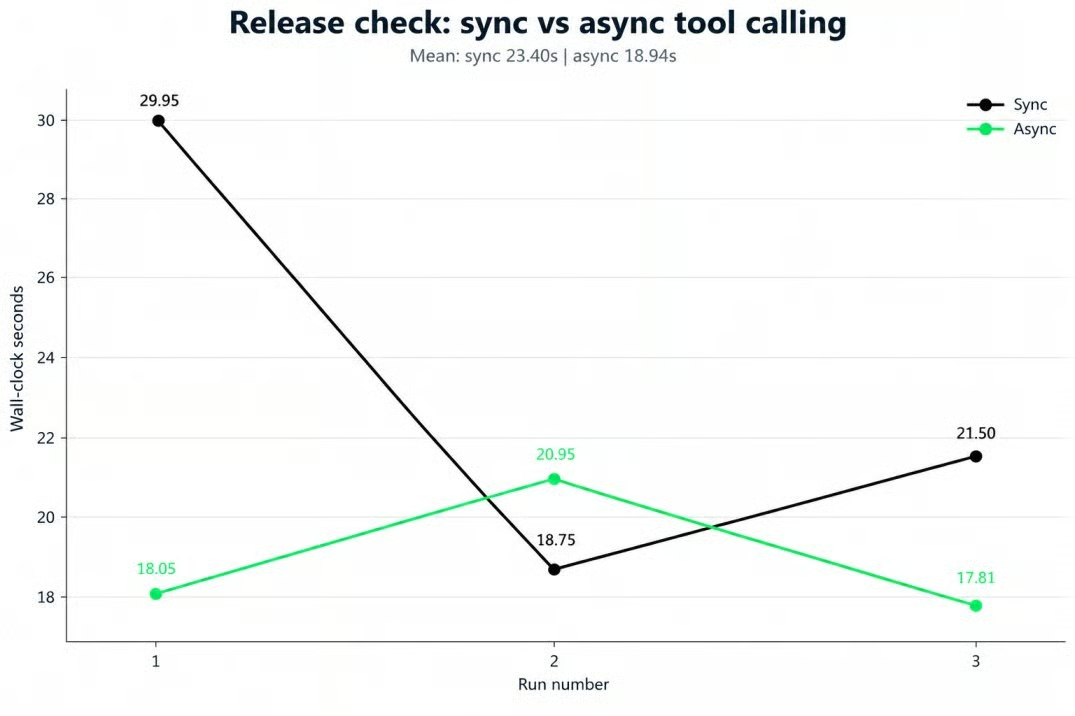
Run times varied in both modes. Image by Author.
Running the browser check and the bulk import test at once sometimes caused the bulk import assertion to fail because both checks modified the same in-memory task list. That broke the test's assumption of exclusive access. Isolating data in either the runner or the tests would avoid the race.
For computer use, GPT-6 Astra's docs recommend code execution, while the structured computer tool remains supported as an alternative. With code execution, one call can combine several actions, loops, and conditional logic, while the computer tool returns one structured mouse or keyboard action at a time for your application to translate and replay.
I called the class BrowserSandbox, but that name overstates its protection. It gives model-authored code a Playwright page, a log() function, and an expect_text() helper. Python can still inject built-ins into exec(), and the page can navigate to another origin.
sandbox_globals = {"page": self.page, "log": log, "expect_text": expect_text}
exec(code, sandbox_globals)
Treat this as a demo runner, not a security boundary. Model-authored code needs an isolated process or container with filesystem, process, network, and origin restrictions.
I capped the loop at eight turns because a bounded check needs a hard stop. The model inspected the page, found the form input, created the title "UI flow check, cobalt otter 73921," submitted the task, and confirmed that the title appeared, which took 13 seconds. Our GPT-5.4 computer use tutorial covers a detailed example using a predecessor model of Astra.
Mid-turn steering is available only for gpt-6-astra over a WebSocket connection.
Open a connection and create a response, then send a response.steer event with new instructions while the response is generating. A response.steer.accepted event means the update is queued, not applied. Before creating the automatic continuation, the server finishes the current output item and any hosted tool work already running.
If it still needs a client tool result or approval, response.steer.pending identifies the missing input.
async with client.responses.connect() as connection:
    await connection.response.create(model="gpt-6-astra", input=TASK)
    async for event in connection:
        if event.type == "response.created" and initial_response_id is None:
            initial_response_id = event.response.id
            await asyncio.sleep(1.0)
            await connection.response.steer(
                previous_response_id=initial_response_id,
                input="Also add a rollback plan, but skip mobile.",
            )
The one-second delay matches the experiment code and gives the first response time to start. Without that delay, this would test a different point in the response lifecycle.
Steering does not rewrite the original response. If the update interrupts it, that response ends with status: "incomplete" and incomplete_details.reason: "steered".A successor response then continues with the new instruction.
If the first response finishes before the update takes effect, it stays completed. Steering does not reverse or cancel client-side actions that have already started; your application still owns that behavior. Queued steering exists only on the current WebSocket connection, so record the update before attempting a reconnect.
The comparison path lets the first response finish, then sends a new request with the combined instructions. Across two runs, steering averaged 26.91 seconds versus 50.02 seconds for that finish-then-restart path. This comparison does not cover a cancel-and-restart policy or score the final text for correctness.
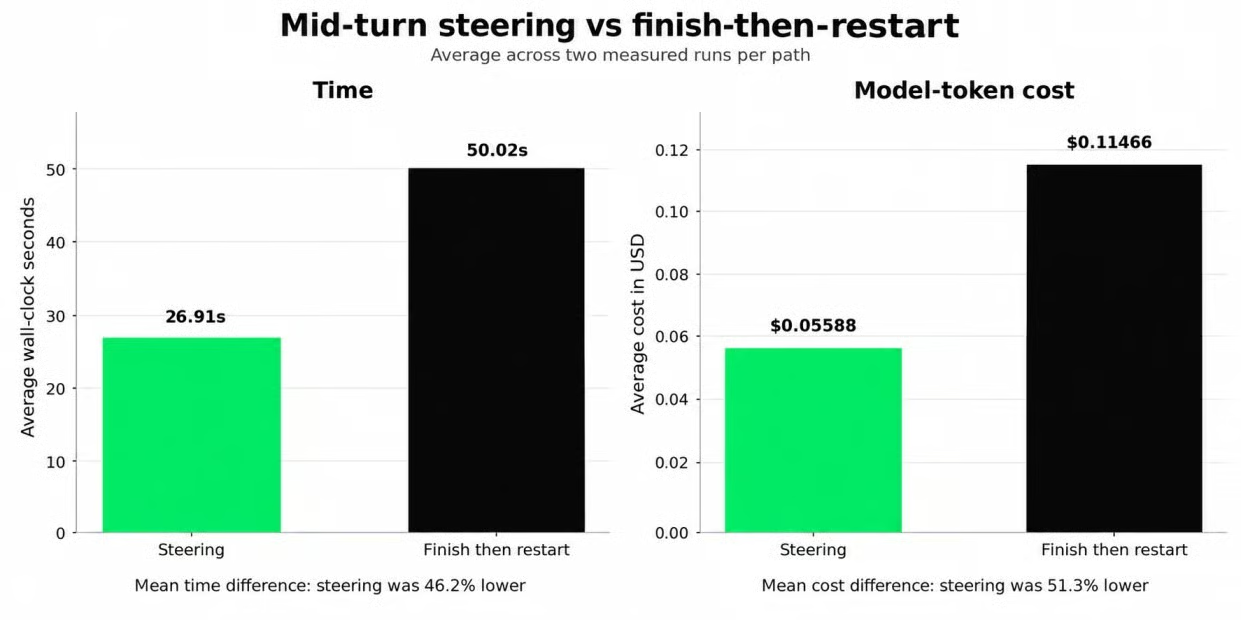
Two-run averages for time and cost. Image by Author.
The restart path generates two full responses that cover some of the same requests. That setup explains part of the time gap, so I would not treat these two runs as a general benchmark for steering.
gpt-6-astra supports reasoning effort from low through max. Higher effort can increase reasoning-token use, but it does not guarantee a different answer. A configuration_update changes the next and later responses until another update overrides it, while the request-level setting stays unchanged.
In this pipeline, the report ends the conversation, so the update affects only that final step.
response = client.responses.create(
    model="gpt-6-astra",
    previous_response_id=previous_id,
    reasoning={"effort": "low"},  # default remains low
    input=[
        {"type": "configuration_update", "reasoning": {"effort": "high"}},
        {"role": "user", "content": "Diagnose the root cause and recommend a fix."},
    ],
)
I used the same failure trace at both effort levels and compared the diagnosis and token use.
One subtlety: the response's reasoning.effort field still reports the request-level setting, not the effort selected by configuration_update. Do not use that field to check whether the update took effect.
In the full combined run, the escalated step used 108 reasoning tokens. Every other step at low used zero. In an earlier isolated test with a longer failure trace, low effort used zero reasoning tokens, and high effort used 318. Both versions identified the validation bug, so a higher-effort change altered token usage but not the diagnosis.
Configuration updates work only in standard, single-agent requests. The API rejects adjacent updates, and they cannot be combined with automatic compaction or automatic truncation.
The pipeline's last step calls client.responses.parse to replace free text with a validated Pydantic model.
class GoNoGoReport(BaseModel):
    decision: str
    summary: str
    checks_completed: list[str]
    failures: list[str]
    risks: list[str]
    follow_up_actions: list[str]
    confidence: float

response = client.responses.parse(
    model="gpt-6-astra",
    previous_response_id=previous_id,
    text_format=GoNoGoReport,
    input=[...],
)
Pydantic checks the field types declared here. It does not prove that the report matches the evidence, and this version does not restrict decision to two values or confidence to a range.
The report returned decision: "no_go". It classified the validation failure mentioned earlier under failures and the concurrency issue under risks. For the latter, it wrote: "possible interference from concurrent UI checks against shared staging data." The prompt did not name that risk.
Keep latency and cost outside this schema and calculate them in code. The model fills the report fields from the tool evidence.
The Streamlit interface consumes the same generator as the command-line runner. It renders each tool event as it arrives, then shows the parsed report in the Report and JSON tabs.
Learn AI With DataCamp!
Track
Course
Practice and track your progress.
Continue with Googleblog
Matt Crabtree
12 min
Tutorial
Abid Ali Awan
10 min
Tutorial
Bexruz (Bex) Tuychiev
Tutorial
Aashi Dutt
11 min
Tutorial
François Aubry
14 min
Tutorial
François Aubry
8 min


