
Course
Claude Code 101
3 hr
27.8K
Despite the name, Everything Claude Code is unaffiliated with Anthropic. It's an agent system and workflow layer that sits on top of Claude Code (not a model, not an IDE) and turns a generic coding agent into a specialized engineering platform that already knows your standards.
In this article, I'll cover what ECC is, how its pieces fit together, how to install it, and who should actually use it.
But what is Claude Code exactly? Enroll in our Claude Code 101 course to learn how to use it in your daily development workflows.
ECC is an open-source repo that wraps Claude Code with a pre-built operating layer for engineering work.
You can find the project at affaan-m/ECC on GitHub. It's MIT-licensed, maintained by Affaan Mustafa, and built from 10+ months of daily Claude Code use on real products.
The repo packages four things into one install:
It’s important to note that Claude Code is still the engine. It reads the code and runs the tools.
ECC's job is everything around that: telling Claude Code which sub-agent should handle this task, which workflow steps to follow, which conventions your stack uses, and what context to carry over from yesterday's session.
In practice, this means you no longer need to configure Claude Code from scratch for every project. You install ECC once, copy the rule packs for your stack, and have a specialized engineering platform that already knows how to go from there.
The growth started with one X thread.
In early 2026, Mustafa posted The Shorthand Guide to Everything Claude Code. It got over 10K bookmarks within days. Then he open-sourced the repo, and ECC has now crossed 200K stars and 34+ forks.
Here’s why it happened:
So it started as an X thread, but turned into a snowball effect from there.
ECC is a layered system.
There are five components between you and your codebase. Claude Code is the runtime. Skills, agents, MCP, and a memory layer wrap it. Each piece does one job, and they pass work between each other during a session.
Claude Code is the underlying model interface.
It's Anthropic's official CLI for running Claude as a coding agent. It reads files, writes diffs, runs shell commands, calls tools, and holds the conversation. ECC doesn't replace any of that. Everything ECC adds is loaded into Claude Code at session start and runs through its existing plugin, hook, and command system.
Skills are reusable workflow instructions stored as Markdown files.
Each skill is a small folder with a SKILL.md that tells Claude Code how to handle a specific kind of task. The skill names the description, steps, the expected output, and the constraints. ECC has around 260 skills that cover language patterns, testing workflows, framework conventions, ML engineering, and operational tasks.
The thing to remember is you don't run skills manually. Claude Code picks them based on what you're doing, or you reference them in a prompt.
Agents are specialized sub-agents that Claude Code delegates to.
Each one is defined in Markdown with a name, a description, a tool allowlist, and a system prompt that scopes its behavior. The code-reviewer agent only reads files and reports findings. The planner writes implementation blueprints before any code gets touched. You get the idea.
The point of this split is context isolation. Each sub-agent gets a clean context window for its task, so the main session doesn't fill up. The main agent coordinates and the sub-agents execute.
MCP (Model Context Protocol) is how Claude Code talks to external tools and data sources.
ECC has configs for connecting to GitHub, Supabase, Vercel, Railway, and others through MCP servers. Each server exposes tools that Claude Code can call mid-session. ECC just packages working configs and security rules for them.
By default ECC enables one connector (chrome-devtools). Everything else is opt-in, which avoids tool-name collisions and keeps the attack surface small.
The memory layer makes ECC stateful between sessions.
Hooks run at the Stop event of each conversation and write a session summary to ~/.claude/sessions/. The next session loads relevant context at start through a SessionStart hook. Skills the model "learns" from your patterns get extracted into the Continuous Learning v2 system, where they're stored as instincts with confidence scores and can be reused later.
Session aliases, learned skills, and metrics all live under a single agent data root (default ~/.claude, configurable per harness if you run ECC in both Claude Code and Cursor).
A typical session looks like this:
The model is still Claude Code. ECC just orchestrates which skill, which agent, and which tool gets used at each step.
Skills are the primary way ECC tells Claude Code what to do.
A skill is a folder with a SKILL.md file. The Markdown defines the description, steps, constraints, the expected output, and the contexts where it applies. It's just a plain text file the model reads at runtime.
And that’s by design. ECC isn't “retraining” anything, it's loading instructions that Claude reads and follows at the moment.
Skills live in the skills/ directory at the repo root. After install, they get copied to ~/.claude/skills/. Claude Code loads them as direct children of that folder.
Each skill folder has the same basic layout:
SKILL.md - the workflow definition
Optional supporting files (templates, scripts, examples)
An optional metadata.yaml for tagging and discovery
Skills influence agent behavior in two ways. First, Claude Code reads them at session start and keeps them available for reference. Second, the model picks the relevant skill based on what you ask. If you say "write a failing test first," the TDD skill activates. If you say "review this for SQL injection," the security review skill activates.
ECC comes with around 260 skills. Here are a few that show what the range looks like:
frontend-patterns: React and Next.js conventions. Component structure, hook usage, server vs. client component decisions, state management patterns.
django-patterns, django-tdd, django-security, django-verification: A full Django stack split into four skills. One for architecture, one for the test cycle, one for OWASP-style audits, one for the verify-before-shipping loop.
architect (paired with the architect agent): System design reviews. The skill defines what an architecture review covers, what artifacts it produces, and which trade-offs to surface.
tdd-workflow: The red-green-refactor cycle. Write the failing test, write the minimum code to pass it, refactor, verify coverage. The skill forces the order.
security-review: OWASP Top 10 audit checklist, hardcoded credential detection, input validation review, and dependency vulnerability checks. The skill defines what to scan and what to flag.
Agents are specialized personas with their own context window.
Each one is a Markdown file in the agents/ folder with a name, a description, a tool allowlist, and a system prompt. The system prompt defines the agent's job. The tool allowlist controls what it can do (read files, run bash, call MCP servers, write code). Claude Code delegates a task to an agent automatically for you.
ECC has 66 agents. They group into a few categories.
Planning agents run before any code gets written.
The planner agent breaks a feature request into an implementation blueprint: files to change, interfaces to define, tests to write, and edge cases to handle. The architect agent goes higher-level: system design, data model decisions, service boundaries. These agents only read code and write plans.
Coding agents do the implementation work.
The tdd-guide forces the test-first cycle. Language-specific resolvers like go-build-resolver, pytorch-build-resolver, and kotlin-build-resolver fix build errors in their respective ecosystems. The refactor-cleaner removes unused code.
Architecture agents review structural decisions.
The architect covers design, the database-reviewer covers query patterns and schema choices, and the mle-reviewer audits production ML pipelines (data contracts, eval coverage, serving, monitoring).
QA agents verify what got built.
The code-reviewer audits diffs for quality and security with a confidence threshold. The security-reviewer runs an OWASP-style pass. The e2e-runner handles Playwright end-to-end tests. Language reviewers (typescript-reviewer, python-reviewer, go-reviewer, rust-reviewer, and others) handle language-specific checks.
The reason for splitting all of this into separate agents is context isolation.
When the code-reviewer runs, it gets a fresh context window with only the diff and the review skill loaded. It doesn't see the planning notes or the conversation history. It just reviews. That focus produces better output than asking one general agent to plan, code, test, and review in the same context, which is what most ad-hoc Claude Code setups end up doing.
ECC doesn’t forget everything between sessions like Claude Code does.
Memory in ECC is a system of hooks that write files at the right moments and load them back at the right moments. They’re just plain Markdown and JSON files on disk.
Three things persist:
~/.claude/sessions/. The summary covers what was worked on, what got decided, what's still open. The next session reads it during a SessionStart hook so Claude knows where things left off./instinct-status to see what's been learned. Run /evolve to cluster related instincts into a new skill.~/.claude/metrics/ and ~/.claude/session-data/. Useful for debugging and for the dashboard GUI that ships with the repo.If you don’t think this is a big deal, here are a couple of reasons that’ll prove you otherwise:
You can tune the loaded context with environment variables. ECC_SESSION_START_MAX_CHARS caps how much summary loads at start (default 8,000 chars). ECC_SESSION_START_CONTEXT=off disables it for low-context setups. ECC_SESSION_RETENTION_DAYS controls how long sessions stick around before pruning.
If you run ECC in both Claude Code and Cursor on the same machine, set ECC_AGENT_DATA_HOME to keep their memory separate. Otherwise they overwrite each other's session files.
MCP is how Claude Code calls anything that isn't a file or a shell command.
The Model Context Protocol is Anthropic's standard for connecting language models to external tools. An MCP server runs as a separate process and exposes a typed set of operations: "read this Notion page" or "open a PR on GitHub." Claude Code calls those operations like function calls.
ECC comes with MCP configs in mcp-configs/mcp-servers.json for the common services: GitHub, Supabase, Vercel, Railway, Linear, and others. Each entry includes the command to start the server, the required environment variables, and the security rules ECC applies to it.
It’s worth knowing that ECC doesn't auto-enable these.
The June 2026 MCP connector policy reduced the default-enabled servers to one (chrome-devtools). Everything else is opt-in. You either copy the entry into your project's .mcp.json, or enable it through Claude Code's /mcp command. The reason for this is partly practical (long MCP tool names break some gateways) and partly a security choice (every MCP server is a potential attack surface).
Here’s what this support looks like in practice:
External integrations: Drop the GitHub entry into .mcp.json, supply a token, and Claude Code can read issues, open PRs, and check CI status without you copy-pasting.
Tool calling: Skills and agents reference MCP tools by name. For example, a deployment skill can call the Vercel MCP, and a database review agent can call the Supabase MCP.
Project automation: You can combine MCP servers with hooks to get automation that’s persistent across sessions. A PR-opened hook can start a review agent that uses the GitHub MCP to fetch the diff and the Linear MCP to update the ticket.
If you already run your own copies of any MCPs ECC bundles, set ECC_DISABLED_MCPS to a comma-separated list. ECC will skip those during install and sync, so you don't end up with duplicates fighting over the same server name.
Security is what sets ECC apart from the competition.
AgentShield is a standalone security auditor that comes with ECC. It scans Claude Code configurations for vulnerabilities, misconfigurations, errors, and injection risks. It runs as a separate npm package (ecc-agentshield), but it's connected with ECC through the /security-scan skill so you can run it from inside a Claude Code session.
The scan covers five categories:
You can run it with this command, no installation is needed:
npx ecc-agentshield scanThe output is a letter grade (A through F) plus a list of findings, sorted by severity. Critical findings exit with code 2.
Here are a few flags worth knowing:
-fix applies auto-fixes for safe issues (removing exposed secrets, tightening overly broad permissions…)
-opus runs the scan through three Claude Opus 4.X agents in a red-team / blue-team / auditor pipeline. The attacker tries to find exploit chains. The defender evaluates the protections. The auditor synthesizes both into a prioritized risk report.
-stream streams the analysis live, which is useful on slow configs.
The Opus-pipeline approach is the part that separates AgentShield from a generic linter. Adversarial agents try to find ways to chain known-OK components into something exploitable, which is where most real agent attacks come from.
AgentShield reports 102 static analysis rules and 1,282 internal tests at 98% coverage, per the repo. The numbers are worth verifying against the latest release, but you can clearly see it isn't a 50-line script.
Output formats include terminal (color-graded), JSON (for CI), Markdown, and HTML. There's also a GitHub Action and a separate ECC Tools GitHub App that runs AgentShield on PRs.
For most teams using Claude Code in production, AgentShield is the most concrete reason to install ECC even if you don't use the rest of the framework.
ECC has two install paths.
The most common broken setup is stacking the plugin install on top of the manual install. Both copy the same files into the same places, and you end up with duplicates. So before anything else: go with one path only.
Before you install, make sure you have Claude Code installed on v2.1.0 or later:
claude --version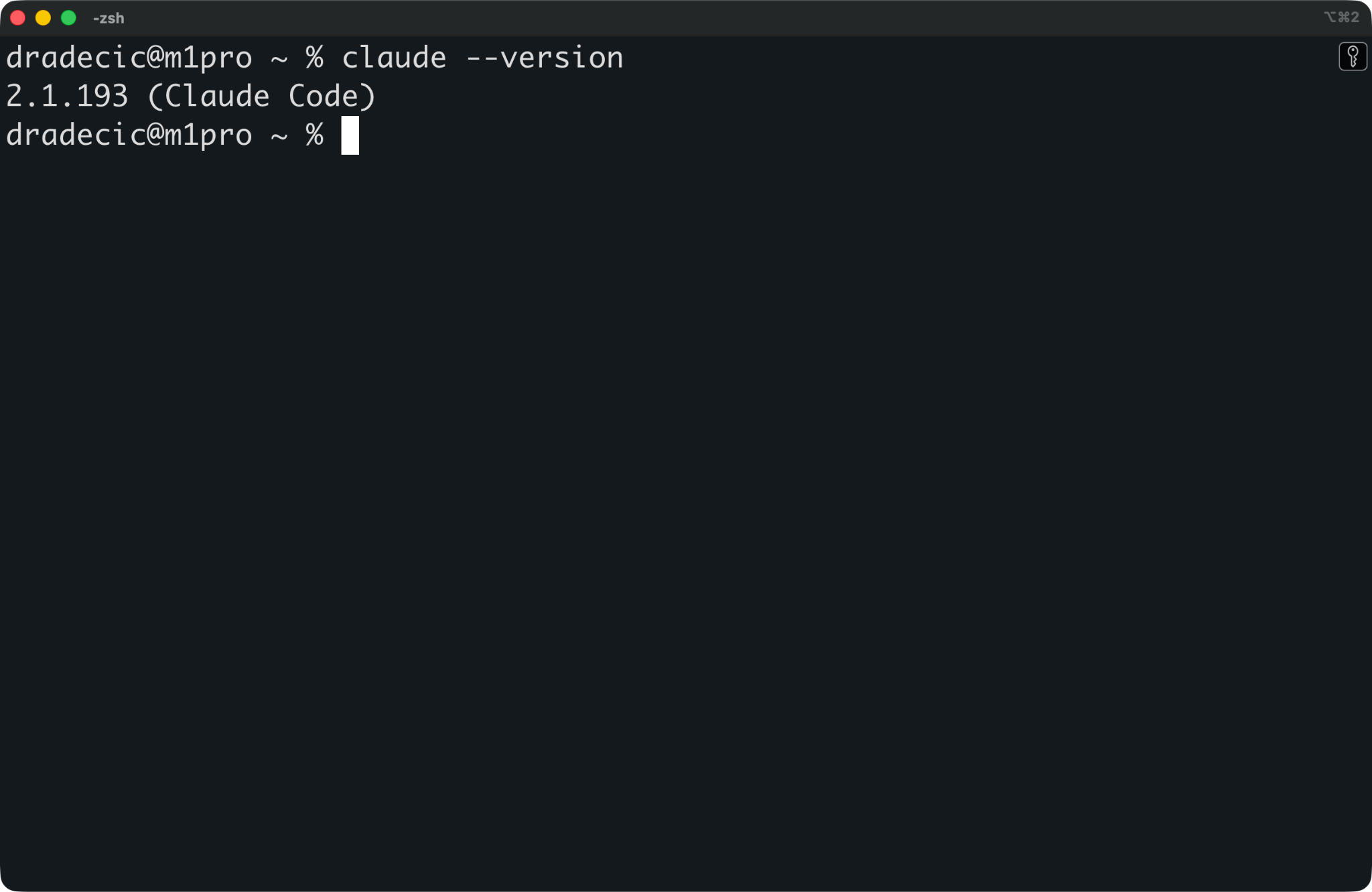
Claude version
This is the recommended path for most users.
From inside Claude Code, run:
/plugin marketplace add https://github.com/affaan-m/ECC
/plugin install ecc@ecc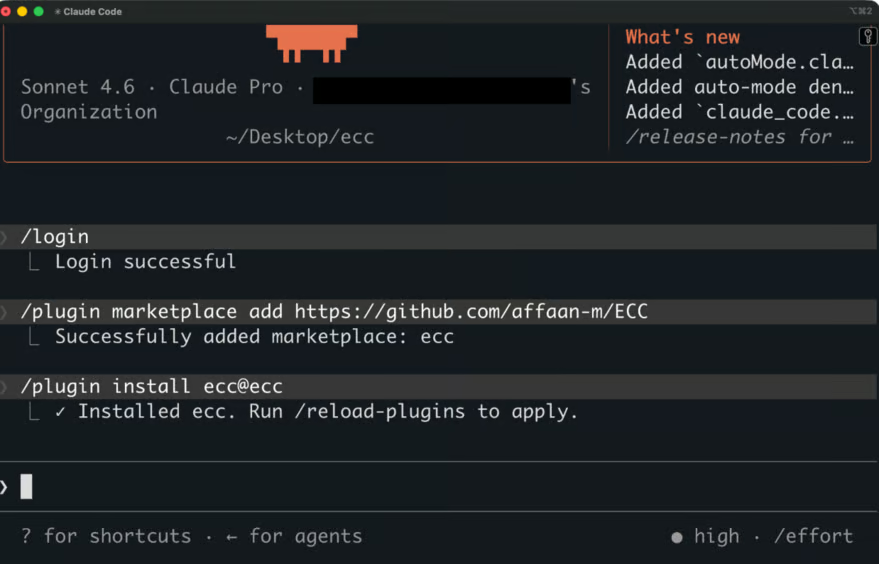
Plugin installation
The first command registers the ECC repo as a marketplace. The second installs the plugin.
One caveat is that the plugin system doesn't distribute rules. Rules are the always-follow guidelines (coding style, git workflow, testing standards, language-specific patterns), and Claude Code's plugin spec doesn't come with them. You copy those manually after the plugin install.
git clone https://github.com/affaan-m/ECC.git
cd ECC
mkdir -p ~/.claude/rules/ecc
cp -r rules/common ~/.claude/rules/ecc/
cp -r rules/python ~/.claude/rules/ecc/
Copy rules/common plus one language pack you actually use. In the example above, I’ve copied Python rules. Don't copy everything, as more rules means more context loaded into every session, and most of it won't apply to your project.
Use this approach if you want full control, or if the plugin install doesn't work on your setup.
git clone https://github.com/affaan-m/ECC.git
cd ECC
npm install
./install.sh --profile full
On Windows:
.\install.ps1 --profile full
# or
npx ecc-install --profile full
This copies agents, skills, commands, hooks, and rules into your ~/.claude/ directory. No plugin layer involved. Everything lives as files on disk that Claude Code reads at session start.
A few profile options worth knowing:
-profile minimal: Rules, agents, commands, and core skills only, without hooks.
-profile core: The default working set. Hooks included.
-profile full: Everything in the repo.
You can also install specific components with --modules or --with:
./install.sh --target claude --modules hooks-runtime
npx ecc install --profile minimal --target claude --with capability:machine-learning
If you're unsure which components fit your work, ask the packaged advisor:
npx ecc consult "security reviews" --target claudeIt returns matching components and the exact install commands.
Check what got installed:
/plugin list ecc@ecc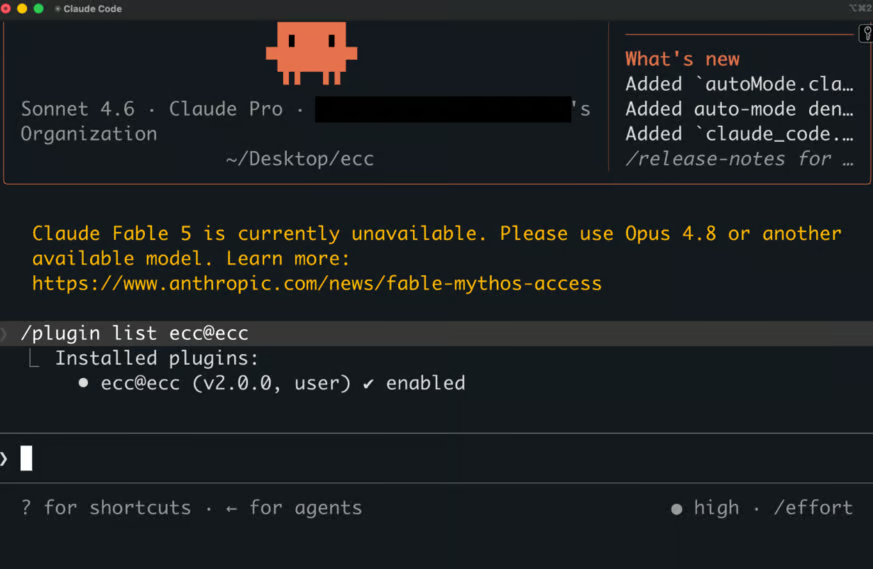
Plugin installation verification
That shows the agents, commands, and skills available from the plugin. For manual installs, use the lifecycle wrapper:
node scripts/ecc.js list-installed
node scripts/ecc.js doctor
doctor checks for missing files, broken hooks, and version mismatches. If it flags anything, run:
node scripts/ecc.js repairTo confirm Claude Code sees the new plugin, open a session and try a slash command:
/ecc:plan "Add user authentication"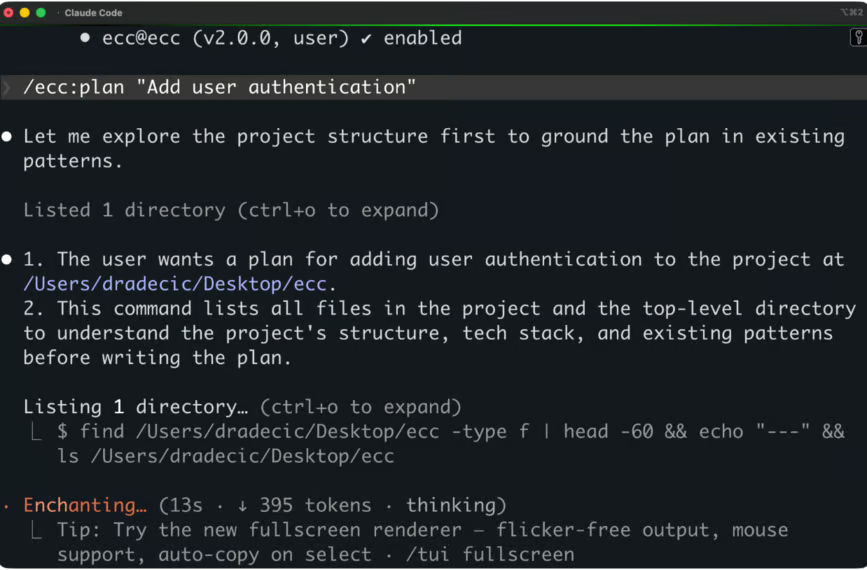
ECC plan output
For a plugin install, the namespaced /ecc: prefix is required. For a manual install, the short form (/plan) works.
If something looks duplicated or broken, don't reinstall on top of itself. Run node scripts/uninstall.js --dry-run first to see what would be removed, then node scripts/uninstall.js to clean up. ECC only removes files it installed, so the unrelated config stays unchanged.
Most of what you do in ECC runs through skills instead of commands.
The reason is the commands/ folder is still maintained for backward compatibility, but new workflow development is located in skills/ first.
Here are a few usage patterns that will cover most of your day-to-day work.
You don't usually call a skill by name. You describe what you want, and Claude Code picks the skill that fits. If you say "write a failing test first," the tdd-workflow skill will activate. The skill names show up in the response so you can see what got loaded.
When you want to be explicit, reference the skill in the prompt: "Use the django-tdd skill to add the new endpoint." Or run a command that wraps it:
/code-review
/security-scan

/ecc:plan "Add OAuth login"
The /ecc: prefix is required for plugin installs. Manual installs use the short form (/plan, /code-review).
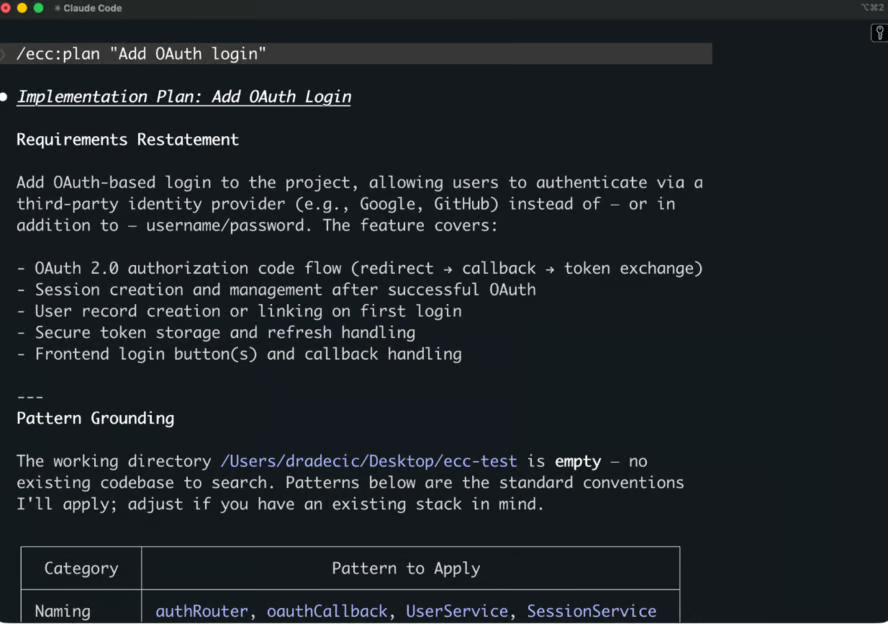
ECC planing phase output
Most agents and skills work on a specific scope: a file, a directory, a diff, a PR. You scope by mentioning the file in the prompt, by opening it in your editor before invoking, or by pointing the agent at a path:
/code-review src/auth/
/python-review services/billing/payment.py
The agent picks up the scope, loads only the files it needs, and runs in its own context window.
Skills can shell out for anything that needs real execution, such as running tests, building, linting, or calling a CLI. The TDD skill runs pytest or go test. The build-fix agent runs the actual build to see real errors. The security-scan skill runs npx ecc-agentshield scan and parses the output.
The skill defines which shell commands run and when. Hooks can also run shell commands on tool events (run a typecheck after every edit, warn about console.log before a save).
After install, ECC enables exactly one MCP server by default (chrome-devtools). To add more, copy entries from mcp-configs/mcp-servers.json into your project's .mcp.json, then enable them through Claude Code's /mcp command. The /mcp interface handles enabling, disabling, and re-authenticating.
If you run your own copies of MCP servers ECC bundles, set:
export ECC_DISABLED_MCPS="github,supabase"ECC's installer and sync flows will skip those, so you don't end up with two of the same server fighting over the same tool names.
You don't run skills one at a time. A typical feature workflow looks like:
/ecc:plan "Add OAuth login with Google"
# planner agent writes a blueprint

# tdd-workflow skill activates as you implement
# tests fail, code gets written, tests pass

/code-review
# code-reviewer agent audits the diff

/security-scan
# AgentShield checks the new code and config
Each step uses a different agent in a fresh context window. The main session coordinates, and the session summary captures the chain at the end and makes it available to the next session.
ECC isn't the only configuration layer for Claude Code. A few others do similar tasks with different trade-offs.
It’s worth being clear on the category first. ECC competes with other configuration frameworks that sit on top of Claude Code. It doesn't compete with the harnesses it runs alongside (Cursor, Codex, OpenCode, Zed) or with standalone agent platforms (OpenHands, LangGraph, CrewAI), which are different categories of tool.
Three rivals come up most often.
BMAD-Method is an agile SDLC framework with specialist role-based agents (Analyst, PM, Architect, Scrum Master, Developer, QA). It runs across Claude Code, Cursor, and Windsurf via npx bmad-method install. It shines in the upfront planning phase, as it turns a vague idea into a PRD, architecture doc, and decomposed stories before any code gets written. The execution tooling is lighter than ECC's. There is no security scanner and no MCP catalog. There are fewer language-specific patterns.
SuperClaude is a lightweight Markdown-based config framework. Around 30 slash commands, 20 agents, and a couple of behavioral modes. Install it with pip install SuperClaude. It's simpler than ECC by design, as there’s no security scanning and no orchestration runtime. But there’s also no built-in memory layer beyond what Claude Code provides. If you want a working CLAUDE.md plus a set of well-tested prompts, SuperClaude is a good pick.
claude-flow / Ruflo (renamed from Claude Flow in early 2026) is a multi-agent swarm orchestrator. It uses the SPARC methodology (specification, pseudocode, architecture, refinement, completion) and runs queen-led hierarchies of 60-100+ specialized agents in parallel. It has persistent memory through AgentDB and works across Claude, GPT, Gemini, and Ollama. The infrastructure is heavier than ECC's, and it's built for parallel agent work rather than single-session productivity.
If you want to browse more options before committing, awesome-claude-code is a curated directory of Claude Code resources (agents, skills, plugins, MCP servers, configs). It’s where most of the community discovery happens.
To recap, pick BMAD if you want agile-style planning, SuperClaude if you want a light config layer, Ruflo if you need parallel multi-agent work, and ECC if you want a complete engineering platform with security tooling and memory persistence built in.
ECC isn't for everyone. If you only use Claude Code a few times a week for small tasks, the framework will feel like a lot of overhead for very little payoff. A single 100-line CLAUDE.md will cover most of what you actually need.
ECC pays off when you're past that point.
Here are scenarios when it’s a better fit than vanilla Claude Code:
Here’s who shouldn’t go with ECC:
Casual Claude Code users: A few sessions a week of "help me debug this script" doesn't need 60+ agents, 260+ skills, and a memory layer. The setup overhead is just not worth it.
Simple, one-off coding tasks: Quick scripts, small fixes, demo apps, throwaway prototypes. Vanilla Claude Code handles these well, and adding ECC just adds friction without much value.
Teams that already have a working setup: If your CLAUDE.md is dialed in and your workflow is stable, switching to ECC requires migration time. Borrow the pieces you like, leave the rest.
If you're not sure where you land, the safe move is to read the repo, copy two or three agents and skills you find interesting, and skip the full install for now.
I’ll now walk you through a couple of ECC’s strengths and weaknesses. Both are worth knowing before making a decision..
Learning curve: 60+ agents, 260+ skills, three install paths, four profile types, and a stack of environment variables. The first week will mostly be figuring out what's loaded and what each component does.
Setup complexity: Plugin vs. manual install, the rules-not-distributed-via-plugin issue, the duplicate-hooks problem in older Claude Code versions, MCP enable/disable flows, the agent data home variable for multi-harness use. Most of these are documented, but still a lot of work.
Maintenance overhead: The repo updates regularly. Catalog counts shift between releases and skill names change.
Dependency on the Claude Code ecosystem: ECC depends on Claude Code's plugin spec, hook system, and MCP support. When Claude Code changes those, ECC has to follow.
Over-engineering for many use cases: For most teams, a well-written CLAUDE.md with 60-200 lines covers 80% of what ECC offers. The other 20% is valuable, but only if you use it.
The framework is the most complete Claude Code configuration layer available right now. But "most complete" and "necessary for everyone" aren't the same thing.
If you use Claude Code daily, ECC is worth a look. If you don't, the repo is still worth reading as a working reference for how to build agent workflows that don't fall apart in practice.
Either way, ECC is a clear indicator that software development is moving toward programmable agent pipelines instead of single-shot chat sessions. The frameworks for doing this well are still new, and ECC is one of the most complete attempts so far. It won't be the last one, and that's the point.
If you’re new to generative AI and agentic coding, enroll in our Generative AI Concepts course. It will give you a strong foundation for the future.
Learn with DataCamp
Course
Course
Course
blog
Derrick Mwiti
8 min
blog
Khalid Abdelaty
14 min
blog
Josef Waples
13 min
blog
Austin Chia
11 min
Tutorial
Dario Radečić
15 min
Tutorial
Tim Lu
15 min