SQL transactions are an important aspect of database management. They exist to make sure your data stays accurate and reliable. I would actually say that they are a fundamental part of maintaining data integrity in any application.
In this guide, we'll explore SQL transactions from the ground up. We'll cover everything you need to know. And if you're eager to expand your SQL skills, I highly recommend our Introduction to SQL or Intermediate SQL Server course, depending on how familiar you are with SQL. Both courses are very popular and are a great way to build a solid foundation in SQL with structured exercises using practical use cases.
What are SQL Transactions?
SQL transactions ensure that a sequence of SQL operations is executed as a single, unified process. This makes them a good tool for maintaining data integrity. You can use them in a lot of different ways, such as updating multiple rows in a table or transferring funds between accounts. Transactions work by grouping operations into one logical unit, so you have consistency and no interruptions.
Purpose of SQL transactions
An SQL transaction is a sequence of one or more database operations (such as INSERT, UPDATE, or DELETE) treated as a single, indivisible unit of work. With transactions, either all the changes within the transaction are applied successfully, or none of them are. This guarantees that the database remains consistent and free from corruption.
For example, imagine transferring money between two bank accounts:
- Deduct $100 from Account A.
- Add $100 to Account B.
If one operation fails without a transaction, you risk inconsistent data—money deducted but not credited. By grouping these steps into a transaction, you ensure that both operations succeed or neither is applied.
Key properties of transactions: ACID
The ACID properties govern the reliability of transactions:
| Property | Description | Real-World Analogy |
|---|
| Atomicity | Ensures all parts of a transaction are completed, or none are. | A light switch: It's either entirely on or fully off—no in-between state. |
| Consistency | Guarantees that a transaction leaves the database in a valid state and adheres to rules and constraints. | A scale: If weight is added to one side, the other side adjusts to maintain balance. |
| Isolation | Prevents transactions from interfering with each other, ensuring data is processed as if each transaction runs alone. | Grocery checkout: Everyone in line is served individually without mixing up their items. |
| Durability | Ensures that once a transaction is committed, its changes are permanent, even in a system failure. | Saving a document: It remains intact even if your computer crashes. |
Atomicity: Ensuring Complete Transactions
Atomicity means that a transaction is all or nothing. If any part of the transaction fails, the entire transaction is rolled back, leaving the database unchanged. For example:
BEGIN TRANSACTION;
UPDATE accounts SET balance = balance - 100 WHERE account_id = 1;
UPDATE accounts SET balance = balance + 100 WHERE account_id = 2;
COMMIT;
If an error occurs during the second UPDATE, the database reverts to its original state, ensuring no partial changes.
Consistency: Maintaining Database Rules
Consistency ensures that a transaction brings the database from one valid state to another. This means all rules, constraints, and relationships are maintained throughout the transaction.
For instance, if a table has a NOT NULL constraint on a column, a transaction that attempts to insert a NULL value will fail, preserving data integrity.
Isolation: Preventing Transaction Interference
Isolation ensures that transactions do not conflict with each other, even when executed simultaneously. For example, if two users update the same record, isolation prevents one user’s changes from overwriting or corrupting the other’s.
Levels of isolation, such as READ COMMITTED and SERIALIZABLE, determine how strict this separation is. This balances performance and consistency.
Durability: Making Changes Permanent
Durability guarantees that a database's changes are permanent once a transaction is committed, even during a system failure. Databases achieve durability by writing committed transactions to non-volatile storage.
For example, a draft email is stored securely, so it's available even if your computer crashes.
Our Transactions and Error Handling in SQL Server course is something I recommend taking. It is a valuable resource for learning about important SQL ideas like error handling.
How to Implement SQL Transactions
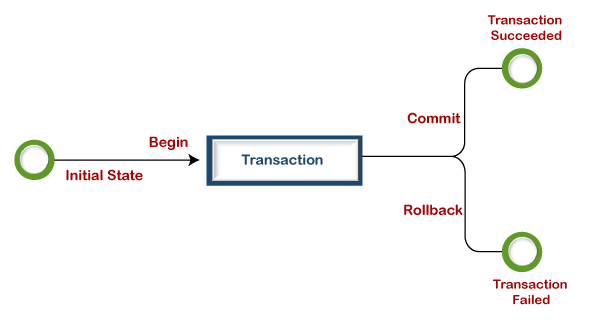
To use SQL transactions, we use commands like BEGIN, COMMIT, and ROLLBACK, so we can manage transactions effectively, group operations together, and handle errors.
Using BEGIN, COMMIT, and ROLLBACK
-
BEGIN: Marks the start of a transaction. All subsequent operations will be part of this transaction.
-
COMMIT: Finalizes the transaction, making all changes permanent in the database.
-
ROLLBACK: Undoes all changes made during the transaction, reverting the database to its previous state in case of an error or failure.
Here’s a simple workflow:
BEGIN TRANSACTION;
UPDATE accounts SET balance = balance - 100 WHERE account_id = 1;
UPDATE accounts SET balance = balance + 100 WHERE account_id = 2;
COMMIT;
If an error occurs, you can roll back the transaction instead:
BEGIN TRANSACTION;
UPDATE accounts SET balance = balance - 100 WHERE account_id = 1;
ROLLBACK;
Practical examples of transaction implementation
As we said, by grouping related operations, transactions ensure that either all changes are successfully applied or none at all, avoiding inconsistent states. Let’s now try real-world examples to show how transactions work in practice.
Example 1: Transferring funds between accounts
In a banking system, transferring money between accounts requires debiting one account and crediting another. A transaction ensures that these operations succeed together or fail together.
BEGIN TRANSACTION;
UPDATE accounts SET balance = balance - 500 WHERE account_id = 1;
UPDATE accounts SET balance = balance + 500 WHERE account_id = 2;
COMMIT;
If an error occurs, such as insufficient funds, the transaction can be rolled back:
BEGIN TRANSACTION;
UPDATE accounts SET balance = balance - 500 WHERE account_id = 1;
ROLLBACK;
COMMIT;
Example 2: Handling inventory in e-commerce
Imagine an e-commerce platform where a transaction needs to update inventory levels and log the sale simultaneously.
BEGIN TRANSACTION;
UPDATE inventory SET stock = stock - 1 WHERE product_id = 101;
INSERT INTO orders (order_id, product_id, quantity) VALUES (12345, 101, 1);
COMMIT;
```SQL
If an error occurs, such as trying to sell an out-of-stock product, the transaction can be rolled back to ensure consistency.
```SQL
BEGIN TRANSACTION;
UPDATE inventory SET stock = stock - 1 WHERE product_id = 101;
ROLLBACK;
INSERT INTO orders (order_id, product_id, quantity) VALUES (12345, 101, 1);
COMMIT;
Tips for Effective Transaction Management
Managing transactions effectively is key to maintaining database integrity and ensuring seamless operations. Whether you're handling financial updates or working with complex datasets, following best practices can save you from issues. Below are some tips to help you optimize transaction handling:
-
Use Transactions for Critical Operations: Group operations that must succeed or fail together, such as financial updates or multi-table inserts, as we saw in our examples.
-
Set Error Handling Mechanisms: Always anticipate potential errors and use ROLLBACK to maintain data integrity.
-
Test Your Transactions: Simulate different scenarios to ensure your transaction logic works correctly under all conditions.
Understanding and implementing transactions effectively enhances the robustness of your database and prepares you to tackle more advanced challenges in SQL. For in-depth learning, explore our SQL Fundamentals skill track to sharpen your database management skills.
Common Challenges and Solutions in SQL Transactions
Managing SQL transactions effectively involves addressing issues like deadlocks, concurrency, and data integrity. Understanding these challenges and applying the right strategies can ensure smooth transaction handling.
Handling deadlocks and concurrency
Deadlocks and concurrency issues are common challenges in database systems, especially when multiple transactions compete for shared resources. These problems can disrupt database performance, leading to slowed or halted operations. Implementing effective strategies is essential to maintaining smooth functionality.
Identifying and resolving deadlocks
A deadlock occurs when two or more transactions block each other indefinitely by waiting for resources held by one another. To handle deadlocks, go through these steps:
1. Identifying Deadlocks
- Use database logs or monitoring tools to detect deadlocks in real time.
- Modern relational database management systems (RDBMS) like PostgreSQL and SQL Server often include built-in mechanisms to automatically detect and terminate deadlocks.
2. Resolving Deadlocks
- Implement retry logic in your application to rerun a failed transaction after the deadlock is resolved.
- Establish a consistent order for accessing resources across transactions to minimize the risk of deadlocks.
Example of resource ordering:
BEGIN TRANSACTION;
UPDATE table_a SET col = 'value' WHERE id = 1;
UPDATE table_b SET col = 'value' WHERE id = 2;
COMMIT;
Techniques for managing concurrency
Concurrency issues occur when multiple transactions simultaneously interact with shared resources, potentially leading to conflicts or inconsistent data. To address these challenges, two primary techniques are commonly employed:
Locking mechanisms
Locks control access to resources and ensure transactional integrity. Shared locks allow multiple transactions to read a resource while preventing modifications and maintaining data consistency during read operations. On the other hand, exclusive locks restrict all other transactions from accessing the resource, ensuring exclusive write access.
Example of applying a lock:
SELECT * FROM inventory WITH (ROWLOCK, HOLDLOCK) WHERE product_id = 101;
Isolation levels
Isolation levels determine how transactions interact with one another and balance performance with data consistency. For instance:
-
Read Uncommitted allows dirty reads, improving performance by minimizing locking overhead.
-
Serializable ensures the highest level of consistency by fully isolating transactions, though it may reduce concurrency.
Setting a transaction to the Serializable isolation level:
SET TRANSACTION ISOLATION LEVEL SERIALIZABLE;
BEGIN TRANSACTION;
COMMIT;
Ensuring data integrity and error handling
Maintaining data integrity within transactions is essential to prevent partial updates or corrupt states. Robust error-handling mechanisms further ensure reliable database operations.
Using savepoints for partial rollbacks
Savepoints allow you to create checkpoints within a transaction. If an error occurs, you can roll back to a specific savepoint instead of undoing the entire transaction.
BEGIN TRANSACTION;
SAVEPOINT step1;
UPDATE accounts SET balance = balance - 100 WHERE account_id = 1;
UPDATE accounts SET balance = balance + 100 WHERE account_id = 2;
COMMIT;
Savepoints provide more granular control, particularly in complex transactions with multiple steps.
Implementing error-handling mechanisms
Effective error handling ensures transactions are completed successfully or fail gracefully. Key strategies include:
-
TRY CATCH Blocks: Handle errors dynamically within a transaction block.
-
Transaction Logging: Maintain logs to track errors and transaction states.
BEGIN TRY
BEGIN TRANSACTION;
UPDATE accounts SET balance = balance - 100 WHERE account_id = 1;
UPDATE accounts SET balance = balance + 100 WHERE account_id = 2;
COMMIT;
END TRY
BEGIN CATCH
ROLLBACK;
PRINT 'Transaction failed and rolled back.';
END CATCH;
By using these mechanisms, you can recover from unexpected errors and ensure that data integrity is preserved.
Addressing challenges like deadlocks, concurrency issues, and error handling is critical for robust transaction management. Techniques like setting appropriate isolation levels, using savepoints, and implementing TRY...CATCH blocks not only maintain data integrity but also improve system reliability.
Advanced Concepts in SQL Transactions
This next section covers nested transactions, savepoints, and the intricate world of distributed transactions across multiple databases. I recommend our Introduction to Oracle SQL course to learn about more advanced topics like these.
Nested transactions and savepoints
Nested transactions are transactions within transactions. While not directly supported by all RDBMSs, they can be simulated using savepoints to provide finer control over operations.
Savepoints allow partial rollbacks within a single transaction, enabling you to isolate and recover from errors in specific parts of a more significant transaction.
How savepoints work:
- Begin a transaction.
- Define savepoints at critical stages of the transaction.
- Roll back to a savepoint if an issue arises without discarding the entire transaction.
- Commit the transaction once all operations are successful.
Example: Simulating nested transactions with savepoints
BEGIN TRANSACTION;
SAVEPOINT step1;
UPDATE inventory SET quantity = quantity - 10 WHERE product_id = 1;
SAVEPOINT step2;
UPDATE inventory SET quantity = quantity + 10 WHERE product_id = 2;
ROLLBACK TO step2;
COMMIT;
Savepoints give you flexibility when managing complex transaction logic, allowing you to test and validate smaller chunks of operations before committing everything.
Distributed transactions across multiple databases
Distributed transactions involve coordinating actions across multiple databases to ensure consistency. These transactions are essential for systems with distributed architectures, such as microservices or data integration pipelines.
Challenges of distributed transactions
- Data Consistency: Ensuring all databases maintain a synchronized state despite being independent.
- Network Latency: Communication delays between databases can complicate transaction timing.
- Partial Failures: If one database commits and another fails, the entire system can become inconsistent.
Solutions for distributed transactions
Advanced protocols like Two-Phase Commit (2PC) and Three-Phase Commit (3PC) are used to address these challenges.
- Two-Phase Commit (2PC):
- Phase 1: Prepare – All databases confirm they are ready to commit.
- Phase 2: Commit – If all participants agree, the transaction is committed. Otherwise, it is rolled back.
- Three-Phase Commit (3PC) adds a pre-commit phase to address issues like network failures during 2PC.
Conclusion
Mastering SQL transactions is a worthwhile skill for any developer or database administrator. To get started, I think you should first learn about the basics of ACID properties and then practice basic implementations with BEGIN, COMMIT, and ROLLBACK. Only then would I move on to advanced concepts like nested and distributed transactions.
For specific recommendations to improve SQL skills, try our Intermediate SQL Server course. For a structured course with content similar to the content in this article, but providing much more detail and practice exercises, take our Transactions and Error Handling in SQL Server course. Taking both courses will help make you a strong developer. I also wrote an article on SQL Triggers, which is another important topic for SQL developers, so do take a look!









SQL transactions are an important aspect of database management. They exist to make sure your data stays accurate and reliable. I would actually say that they are a fundamental part of maintaining data integrity in any application.
In this guide, we'll explore SQL transactions from the ground up. We'll cover everything you need to know. And if you're eager to expand your SQL skills, I highly recommend our Introduction to SQL or Intermediate SQL Server course, depending on how familiar you are with SQL. Both courses are very popular and are a great way to build a solid foundation in SQL with structured exercises using practical use cases.
What are SQL Transactions?
SQL transactions ensure that a sequence of SQL operations is executed as a single, unified process. This makes them a good tool for maintaining data integrity. You can use them in a lot of different ways, such as updating multiple rows in a table or transferring funds between accounts. Transactions work by grouping operations into one logical unit, so you have consistency and no interruptions.
Purpose of SQL transactions
An SQL transaction is a sequence of one or more database operations (such as
INSERT,UPDATE, orDELETE) treated as a single, indivisible unit of work. With transactions, either all the changes within the transaction are applied successfully, or none of them are. This guarantees that the database remains consistent and free from corruption.For example, imagine transferring money between two bank accounts:
If one operation fails without a transaction, you risk inconsistent data—money deducted but not credited. By grouping these steps into a transaction, you ensure that both operations succeed or neither is applied.
Key properties of transactions: ACID
The ACID properties govern the reliability of transactions:
Atomicity: Ensuring Complete Transactions
Atomicity means that a transaction is all or nothing. If any part of the transaction fails, the entire transaction is rolled back, leaving the database unchanged. For example:
If an error occurs during the second
UPDATE, the database reverts to its original state, ensuring no partial changes.Consistency: Maintaining Database Rules
Consistency ensures that a transaction brings the database from one valid state to another. This means all rules, constraints, and relationships are maintained throughout the transaction.
For instance, if a table has a
NOT NULLconstraint on a column, a transaction that attempts to insert aNULLvalue will fail, preserving data integrity.Isolation: Preventing Transaction Interference
Isolation ensures that transactions do not conflict with each other, even when executed simultaneously. For example, if two users update the same record, isolation prevents one user’s changes from overwriting or corrupting the other’s.
Levels of isolation, such as
READ COMMITTEDandSERIALIZABLE, determine how strict this separation is. This balances performance and consistency.Durability: Making Changes Permanent
Durability guarantees that a database's changes are permanent once a transaction is committed, even during a system failure. Databases achieve durability by writing committed transactions to non-volatile storage.
For example, a draft email is stored securely, so it's available even if your computer crashes.
Our Transactions and Error Handling in SQL Server course is something I recommend taking. It is a valuable resource for learning about important SQL ideas like error handling.
How to Implement SQL Transactions
To use SQL transactions, we use commands like
BEGIN,COMMIT, andROLLBACK, so we can manage transactions effectively, group operations together, and handle errors.Using BEGIN, COMMIT, and ROLLBACK
BEGIN: Marks the start of a transaction. All subsequent operations will be part of this transaction.COMMIT: Finalizes the transaction, making all changes permanent in the database.ROLLBACK: Undoes all changes made during the transaction, reverting the database to its previous state in case of an error or failure.Here’s a simple workflow:
If an error occurs, you can roll back the transaction instead:
Practical examples of transaction implementation
As we said, by grouping related operations, transactions ensure that either all changes are successfully applied or none at all, avoiding inconsistent states. Let’s now try real-world examples to show how transactions work in practice.
Example 1: Transferring funds between accounts
In a banking system, transferring money between accounts requires debiting one account and crediting another. A transaction ensures that these operations succeed together or fail together.
Example 2: Handling inventory in e-commerce
Imagine an e-commerce platform where a transaction needs to update inventory levels and log the sale simultaneously.
Tips for Effective Transaction Management
Managing transactions effectively is key to maintaining database integrity and ensuring seamless operations. Whether you're handling financial updates or working with complex datasets, following best practices can save you from issues. Below are some tips to help you optimize transaction handling:
Use Transactions for Critical Operations: Group operations that must succeed or fail together, such as financial updates or multi-table inserts, as we saw in our examples.
Set Error Handling Mechanisms: Always anticipate potential errors and use
ROLLBACKto maintain data integrity.Test Your Transactions: Simulate different scenarios to ensure your transaction logic works correctly under all conditions.
Understanding and implementing transactions effectively enhances the robustness of your database and prepares you to tackle more advanced challenges in SQL. For in-depth learning, explore our SQL Fundamentals skill track to sharpen your database management skills.
Common Challenges and Solutions in SQL Transactions
Managing SQL transactions effectively involves addressing issues like deadlocks, concurrency, and data integrity. Understanding these challenges and applying the right strategies can ensure smooth transaction handling.
Handling deadlocks and concurrency
Deadlocks and concurrency issues are common challenges in database systems, especially when multiple transactions compete for shared resources. These problems can disrupt database performance, leading to slowed or halted operations. Implementing effective strategies is essential to maintaining smooth functionality.
Identifying and resolving deadlocks
A deadlock occurs when two or more transactions block each other indefinitely by waiting for resources held by one another. To handle deadlocks, go through these steps:
1. Identifying Deadlocks
2. Resolving Deadlocks
Example of resource ordering:
Techniques for managing concurrency
Concurrency issues occur when multiple transactions simultaneously interact with shared resources, potentially leading to conflicts or inconsistent data. To address these challenges, two primary techniques are commonly employed:
Locking mechanisms
Locks control access to resources and ensure transactional integrity. Shared locks allow multiple transactions to read a resource while preventing modifications and maintaining data consistency during read operations. On the other hand, exclusive locks restrict all other transactions from accessing the resource, ensuring exclusive write access.
Example of applying a lock:
Isolation levels
Isolation levels determine how transactions interact with one another and balance performance with data consistency. For instance:
Read Uncommitted allows dirty reads, improving performance by minimizing locking overhead.
Serializable ensures the highest level of consistency by fully isolating transactions, though it may reduce concurrency.
Ensuring data integrity and error handling
Maintaining data integrity within transactions is essential to prevent partial updates or corrupt states. Robust error-handling mechanisms further ensure reliable database operations.
Using savepoints for partial rollbacks
Savepoints allow you to create checkpoints within a transaction. If an error occurs, you can roll back to a specific savepoint instead of undoing the entire transaction.
Savepoints provide more granular control, particularly in complex transactions with multiple steps.
Implementing error-handling mechanisms
Effective error handling ensures transactions are completed successfully or fail gracefully. Key strategies include:
TRY CATCH Blocks: Handle errors dynamically within a transaction block.
Transaction Logging: Maintain logs to track errors and transaction states.
By using these mechanisms, you can recover from unexpected errors and ensure that data integrity is preserved.
Addressing challenges like deadlocks, concurrency issues, and error handling is critical for robust transaction management. Techniques like setting appropriate isolation levels, using savepoints, and implementing
TRY...CATCHblocks not only maintain data integrity but also improve system reliability.Advanced Concepts in SQL Transactions
This next section covers nested transactions, savepoints, and the intricate world of distributed transactions across multiple databases. I recommend our Introduction to Oracle SQL course to learn about more advanced topics like these.
Nested transactions and savepoints
Nested transactions are transactions within transactions. While not directly supported by all RDBMSs, they can be simulated using savepoints to provide finer control over operations.
Savepoints allow partial rollbacks within a single transaction, enabling you to isolate and recover from errors in specific parts of a more significant transaction.
How savepoints work:
Example: Simulating nested transactions with savepoints
Savepoints give you flexibility when managing complex transaction logic, allowing you to test and validate smaller chunks of operations before committing everything.
Distributed transactions across multiple databases
Distributed transactions involve coordinating actions across multiple databases to ensure consistency. These transactions are essential for systems with distributed architectures, such as microservices or data integration pipelines.
Challenges of distributed transactions
Solutions for distributed transactions
Advanced protocols like Two-Phase Commit (2PC) and Three-Phase Commit (3PC) are used to address these challenges.
Conclusion
Mastering SQL transactions is a worthwhile skill for any developer or database administrator. To get started, I think you should first learn about the basics of ACID properties and then practice basic implementations with
BEGIN,COMMIT, andROLLBACK. Only then would I move on to advanced concepts like nested and distributed transactions.For specific recommendations to improve SQL skills, try our Intermediate SQL Server course. For a structured course with content similar to the content in this article, but providing much more detail and practice exercises, take our Transactions and Error Handling in SQL Server course. Taking both courses will help make you a strong developer. I also wrote an article on SQL Triggers, which is another important topic for SQL developers, so do take a look!