

What Is Python?
Python is a free, open-source, general-purpose programming language known for code that reads almost like English. Guido van Rossum released it in 1991, and the current version is Python 3.15, released in October 2026.
A few traits explain why beginners and professionals both use it:
- Readable syntax. Indentation replaces curly braces, and common tasks take fewer lines than in Java or C++.
- Interpreted. You can run one line at a time and see the result immediately, which makes experimenting and debugging faster.
- Dynamically typed. You don't declare a variable's type; Python works it out when the code runs.
- A huge library ecosystem. pandas for data, Django and FastAPI for the web, scikit-learn and PyTorch for machine learning, and official SDKs from the major AI labs.
- Runs everywhere. The same script runs on Windows, macOS, and Linux.
The trade-off is speed: pure Python is slower than compiled languages, which is why the heavy lifting in libraries like NumPy happens in C underneath. For learning, and for most jobs that use Python, that doesn't matter.
If you want the longer explainer, our article What is Python? covers its history and uses in depth.
Why Learn Python in 2026, Even With AI Writing Code?
Python is worth learning in 2026 because it is the language most developers want to work with, it leads the main popularity rankings, and it is the language AI tools themselves are built and used with. The numbers back this up:
- It tops the TIOBE index. In November 2026, Python ranked #1 on the TIOBE index with 20.86%, almost double C in second place at 11.48%.
- Developers want it most. In the Stack Overflow 2026 Developer Survey, Python was the most desired language (33.4% of respondents want to work with it next year), and 58.0% had used it in the past year. A year earlier, Stack Overflow reported that Python usage had jumped 7 percentage points between 2024 and 2025.
- It grows fastest on GitHub after TypeScript. GitHub's Octoverse 2026 report ranks Python #2 by contributors, after it added 3.23 million monthly contributors in a year.
- It's the language of AI work. Stack Overflow's 2026 survey found Python is the language developers use most with coding agents, at 39%.
We see the same interest on our own site: Python is still the second most-searched term on DataCamp, behind only SQL.
What about AI writing code? It changes how you learn Python, not whether you should. You still need to read, check, and fix what an assistant produces, and that requires knowing the language.
I cover how to learn with AI tools later in this guide, and our article Is learning Python worth it? looks at jobs, salaries, and the AI question in detail.
As Richie Cotton, Data Evangelist at DataCamp, puts it:
Python is one of the easiest programming languages to pick up. What's really nice is that learning Python doesn't pigeonhole you into one domain; Python is so versatile it has applications in software development, data science, artificial intelligence, and almost any role that has programming involved with it!
How Long Does It Take to Learn Python?
Most beginners learn Python's foundations in about 2 to 3 months at 5 to 10 hours a week. Being able to do useful work in your field takes 3 to 4 months, and becoming job-ready takes 6 to 12 months, depending on your goal and how much you practice.
| Level | What you can do | Typical time at 5 to 10 hours a week |
|---|---|---|
| Foundations | Write scripts with variables, loops, functions, lists, and dictionaries; read error messages | 2 to 3 months |
| Useful in your field | Analyze a dataset with pandas, build a small API, call an LLM from code, or automate a weekly task | 3 to 4 months |
| Job-ready | A portfolio of 3 to 4 projects, Git, testing, and the libraries your target role uses | 6 to 12 months |
| Specialist | Deep expertise in one area, such as machine learning or production backend systems | 1 to 2 years and beyond |
These are our estimates, not guarantees. Three things move them most:
- Hours per week. An hour a day beats a 7-hour Sunday, because spaced practice sticks.
- Prior coding. If you know JavaScript or R, the foundations take weeks rather than months.
- How much you build. Learners who start projects early reach "useful" faster than those who finish every course first.
What a realistic study week looks like
Most people learn Python alongside a job, so the schedule has to survive a busy week. Here's a pattern that works at about 6 hours a week:
- Weekdays, 45 minutes: one lesson or chapter, then 10 minutes rewriting an example from memory.
- One weeknight: exercises only, no new material, to test what stuck.
- Weekend, 2 hours: work on your current project, using what you learned that week.
Miss a day and nothing breaks; miss 2 weeks and you'll spend the third relearning. If your schedule is unpredictable, protect the weekend project session first.
Now that you know what to expect, here are the steps in order.
How to Learn Python From Scratch, Step by Step
Learning Python from scratch follows 6 steps: set up, learn the core syntax, write real programs, learn your path's libraries, build projects, and then write cleaner, more Pythonic code. Each step ends with a checkpoint, so you know when you're ready to move on.
Step 1: Set up Python (or skip setup for now)
The fastest way to start is to skip installation entirely. Our courses run Python in the browser, and DataLab gives you a notebook online, so your first lesson can start in minutes rather than after an evening of troubleshooting.
When you're ready to install, download the current release from python.org (Python 3.15 as of October 2026). Our guide on how to install Python walks through macOS and Windows. Then choose an editor:
- VS Code with the official Python extension: free, and my default recommendation for beginners.
- PyCharm: a full Python IDE with strong debugging and refactoring tools.
- Jupyter notebooks: ideal for data work, because you see each result, table, and chart under the code that made it.
Later, learn to create a virtual environment for each project so their packages don't clash. uv is a fast, newer alternative that installs Python versions and packages and manages environments in one place.
Do I need Python 2? No. Python 2 stopped receiving updates in 2020, and everything new is written for Python 3.
You're ready to move on when… you can run a one-line script that prints your name, either in the browser or on your own machine. Don't spend more than an afternoon here.
Step 2: Learn the core syntax
The core of Python is a small set of ideas you will use in every program you ever write. Learn them in this order:
- Variables and data types: integers, floats, strings, and booleans.
- Lists, dictionaries, tuples, and sets: the containers that hold your data.
- Conditions with
if,elif, andelse(see our guide to elif statements). - Loops: for loops and while loops.
- Functions: packaging code so you can reuse it.
Here's what that looks like in practice. This short script combines a dictionary, a loop, and an f-string to summarize a month of spending:
expenses = {"rent": 1200, "groceries": 340, "transport": 95}
total = sum(expenses.values())
print(f"Total: ${total}")
for category, amount in expenses.items():
share = amount / total * 100
print(f"{category}: ${amount} ({share:.0f}%)")Total: $1635
rent: $1200 (73%)
groceries: $340 (21%)
transport: $95 (6%)Learn to read error messages from day one. A Python traceback tells you the file, the line, and the type of error, and reading the last line first solves most beginner bugs. Our Introduction to Python course and Introduction to Python for Developers both cover this step, and the Python Cheat Sheet for Beginners keeps the syntax on one page.
Do I need to be good at math? No, basic arithmetic is enough for the foundations. Statistics and linear algebra matter later, and only if you move into data science or machine learning.
You're ready to move on when… you can write a 20-line script from a blank file, without copying, that loops over a list or dictionary, makes a decision, and prints a result, and you can fix your own errors by reading the traceback.
Step 3: Write real programs
Real programs read input, handle mistakes, and use code other people wrote. This step turns exercises into tools:
- Files. Read and write text and CSV files.
- Modules and packages. Import from the standard library (
pathlib,datetime,json,csv) and install third-party packages withpiporuv. - Error handling. Use
tryandexceptso one bad row doesn't crash the whole script. Our tutorial on exception and error handling covers the patterns. - Git. Put every project in version control from now on, and push it to GitHub. Our Git push and pull tutorial covers the commands you'll use daily.
This script totals the amount column of a CSV file and skips rows it can't read, such as an amount of "N/A", instead of crashing:
import csv
from pathlib import Path
total = 0.0
skipped = 0
with Path("orders.csv").open(newline="") as file:
for row in csv.DictReader(file):
try:
total += float(row["amount"])
except ValueError:
skipped += 1
print(f"Revenue: {total:.2f}, bad rows skipped: {skipped}")It uses 3 things from this step: a standard-library module, a file, and error handling. Change the column name or add a second column, and you have a tool you can reuse at work.
Practice with small, self-contained problems. Our Python exercises for beginners come with answers, and Intermediate Python bridges the gap to data libraries.
You're ready to move on when… you've written a script that reads a file, processes it, handles at least one kind of bad input, and lives in a GitHub repository.
Step 4: Learn your path's libraries
This is where the paths split. Spend most of your time on the 2 or 3 libraries your goal needs, and ignore the rest for now:
| Path | Learn first | Add later |
|---|---|---|
| Data analysis and data science | pandas, Matplotlib or Seaborn | NumPy, scikit-learn, SQL |
| Software and backend development | FastAPI or Django, pytest | SQLAlchemy, Docker |
| AI applications | An LLM provider's Python SDK, Pydantic | LangChain or LangGraph, a vector database |
| Automating your own work | pathlib, openpyxl or pandas | requests, scheduling your scripts |
Data learners can take Data Manipulation with pandas, one of our courses that includes our AI tutor. Developers should learn testing early; our guide to unit testing with pytest is a good start.
Python or JavaScript first? If your goal is data, AI, or automation, start with Python. If you want to build websites' front ends, JavaScript comes first, and you can add Python later.
If your work is mostly querying databases, compare the options in our SQL vs Python guide.
You're ready to move on when… you can complete a small task in your field with these libraries, such as answering 3 questions about a dataset, serving one API endpoint, or getting a structured answer from an LLM, while checking the documentation rather than a tutorial.
Step 5: Build projects
Projects are where Python finally sticks, because you have to decide what to build, break it into steps, and get unstuck on your own. Start small and finish things:
- Beginner: a number guessing game, a budget tracker like the script above, or a file renamer.
- Intermediate: a web scraper, a dashboard of a public dataset, a small REST API, or a command-line tool you actually use.
- Advanced: a full-stack app, a machine learning model with a write-up, or an AI agent that calls tools.
Our guided projects give you a dataset and a brief so you can practice before going solo; Investigating Netflix Movies is a good first one for data learners. For more ideas at every level, see our list of Python projects for all levels.
You're ready to move on when… you've finished 2 projects nobody gave you instructions for, each with a README that explains what it does and how to run it.
Step 6: Write cleaner, more Pythonic code
Once you can build things, learn the features that make code shorter, safer, and easier for others to read:
- List comprehensions and generators
- Object-oriented programming: classes, inheritance, and when not to use them
- Type hints, which editors and AI tools both use to catch mistakes
- Testing, logging, and packaging your code so others can install it
- Decorators and context managers
Our Python Programming track covers writing efficient code, functions, and tests in about 19 hours.
You're ready to move on when… another person can read, run, and test one of your projects without asking you how. From here on, depth in your specialization matters more than more general Python.
How to Learn Python With AI (Without Letting It Write Your Code)
The best way to learn Python with AI is to use it as a tutor that explains, hints, and reviews, while you write the code yourself.
A few rules keep AI on the right side of that line:
- Attempt first, ask second. Spend 15 minutes on a problem before asking for help, and ask for a hint, not a solution.
- Ask "why", not "write". "Why does this loop skip the last item?" teaches you something; "fix this" doesn't.
- Type everything yourself. Never paste code you can't explain line by line.
- Use it as a reviewer. Once your code works, ask what a senior developer would change and why.
- Turn off inline autocomplete for your first few months. Suggestions that appear as you type make it hard to tell what you actually know.
- Ask it to quiz you. A few questions on yesterday's topic is the cheapest spaced repetition you'll find.
Some of our courses now include our AI tutor, which builds unique lessons based on every learner's role, skill level, and goals, so you get explanations without skipping the practice. Once you're comfortable, AI coding assistants like GitHub Copilot, Cursor, and Claude Code become productivity tools rather than crutches.
Your First Week Learning Python
Your first week should end with a small working program, not a finished course. Here's a plan for complete beginners at about an hour a day:
- Day 1: Run your first code. Start a course exercise in the browser or install Python and VS Code, then print a message and do some arithmetic. Output: a script that prints a greeting and the result of a calculation.
- Day 2: Variables and strings. Store your name, age, and city, then combine them with f-strings. Output: a script that asks for your name with
input()and greets you. - Day 3: Lists and dictionaries. Make a list of 5 favorite films and a dictionary of their release years. Output: print the oldest film.
- Day 4: Conditions and loops. Loop over your list and print only the films released after 2010. Output: a filtered list.
- Day 5: Functions. Turn your Day 4 code into a function that takes a year as input. Output: a reusable function you call 3 times.
- Day 6: A mini project. Build a number guessing game or a tiny budget tracker. Output: a program someone else can play or use.
- Day 7: Review and share. Reread your week's code, fix one thing, and push it to GitHub. Output: your first public repository.
If a day takes 2 sessions instead of one, that's normal. The point is to write code every day and finish the week with something that runs. Our Python Hello World guide is a gentle companion for Day 1.
Your Python Roadmap at a Glance
A Python roadmap from beginner to job-ready moves through 4 phases over about 12 months. Each phase builds on the one before, and the second half is where you specialize.
- Months 1 to 2: Foundations. Syntax, data structures, functions, and Git and GitHub.
- Months 3 to 4: Intermediate techniques. Object-oriented programming, basic algorithms, type hints, and introductory testing.
- Months 5 to 6: Professional practices. Packaging, environments, advanced testing, and databases with SQL.
- Months 7 to 12: Specialization and career readiness. Web, data and machine learning, or automation; then concurrency, a polished portfolio, and deployment with Docker and the cloud.
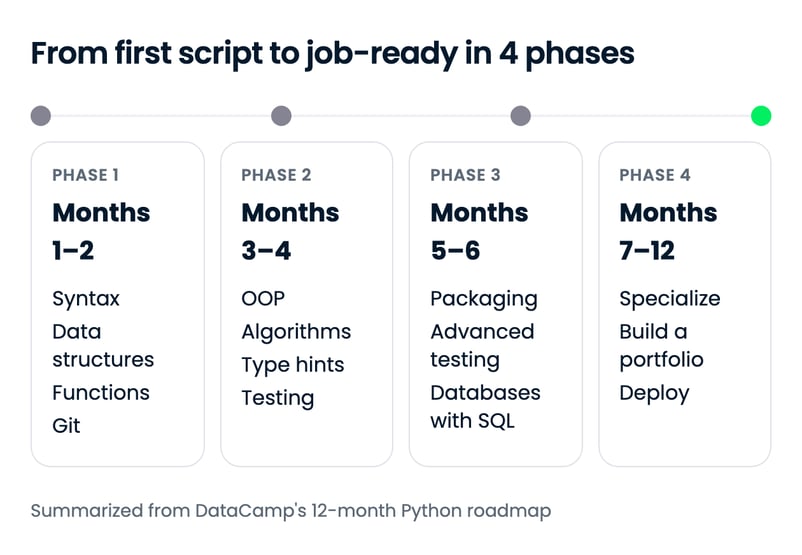
For the month-by-month plan, with the courses, tutorials, and projects for each phase, see our 12-month Python roadmap.
Can You Learn Python on Your Own?
Yes, you can learn Python on your own: the language, its official documentation, and plenty of good learning material are free. The question is how much structure you want, and what you're willing to pay in money or time.
| Option | Best for | Trade-offs |
|---|---|---|
| Self-study with free resources | Disciplined learners who enjoy finding their own way | No cost, but no path or feedback; easy to stall or jump between resources |
| Online courses and tracks | Most beginners, especially alongside a job | A structured path with practice built in; a subscription after any free lessons |
| Bootcamps | Career switchers who need deadlines and a cohort | Fast and intensive, but expensive and hard to combine with full-time work |
| Computer science degree | Students who want deep theory and a formal credential | The most thorough option, and the slowest and most expensive by far |
Even with a course, use the free official material. The official Python tutorial is short, accurate, and written by the people who build the language, and Al Sweigart's Automate the Boring Stuff with Python is free to read online and perfect for Path 4.
Structured online learning suits most people because it combines a path with practice. We have 179 Python courses, 44 Python tracks, and 76 Python projects.
Whichever course or platform you consider, check 4 things before you commit:
- You write code from the first lesson, rather than watching videos for hours.
- There's a clear path from beginner to your goal, not a pile of disconnected courses.
- Projects use real datasets or real problems.
- You can try the first lessons before paying.
Our roundups of the best Python courses and the best free resources to learn Python for data science compare the options. If you want a credential to show for it, see our guide to the best Python certifications.
Tips for Learning Python (and Mistakes to Avoid)
The most common reason beginners stall isn't difficulty: it's a handful of habits that feel productive and aren't. Here are the ones I see most, and what to do instead.
1. Avoid tutorial hell
Tutorial hell is finishing course after course without ever building something on your own. Watching someone else solve a problem feels like learning, but you only find out what you know when you face a blank file. After each course or chapter, build one small thing without instructions, even if it's ugly.
2. Don't let AI write your code yet
Copying an assistant's working code teaches you to copy. Follow the rules in the AI section above: attempt first, ask for hints, and never paste what you can't explain.
3. Don't try to learn everything at once
Python has libraries for everything, and that's a trap for beginners. Pick your path, learn its 2 or 3 core libraries, and ignore the rest until a project needs them.
4. Read your error messages
Beginners often skip the traceback and start changing code at random. Read the last line, then the line number, then the code on that line. Most bugs announce themselves.
5. Practice a little every day
Consistency beats intensity. 30 to 60 minutes a day for 3 months does more than a few long weekend sessions, because you forget less between them.
6. Don't over-polish your setup
Choosing an editor, a theme, and a package manager can eat a week. Any mainstream editor is fine to start with; change it when you have a real reason.
7. Share your work
Put projects on GitHub, ask for code reviews, and join a community such as a local Python meetup or the Python Discord. Explaining your code to someone else is one of the fastest ways to find what you don't understand yet.
Python Careers and How to Get Hired
Python is a core skill for data analysts, data scientists, software developers, machine learning engineers, and AI engineers. The roles differ in what they build and which libraries they use:
| Role | What they do | Key Python skills | US pay benchmark |
|---|---|---|---|
| Data analyst | Turns data into reports and answers for the business | pandas, visualization, SQL | Varies widely by industry |
| Data scientist | Builds models and experiments to answer business questions | pandas, scikit-learn, statistics | $120,230 median (data scientists) |
| Python or backend developer | Builds applications, APIs, and internal tools | Django or FastAPI, testing, databases | $135,980 median (software developers) |
| Machine learning engineer | Trains, deploys, and maintains models in production | PyTorch, scikit-learn, MLOps | $140,300 median (closest category: computer and information research scientists) |
| AI engineer | Builds applications and agents on top of LLMs | LLM SDKs, RAG, evaluation | No separate BLS category yet |
Pay figures are US medians for May 2025 from the US Bureau of Labor Statistics (BLS) pages for data scientists, software developers, and computer and information research scientists. The BLS also projects data scientist jobs to grow 35% between 2025 and 2035, and entry-level offers sit below these medians.
You don't need a computer science degree for most of these roles, but you do need proof that you can do the work. Three things matter most.
Build a portfolio that shows impact
A portfolio of 3 to 4 finished projects in your target area is more convincing than a list of courses. Choose real data and real problems, and explain the result in plain language, not just the code.
As Nick Singh, author of Ace the Data Science Interview, said on the DataFramed Careers Series podcast:
The key to standing out is to show your project made an impact and show that other people cared. Why are we in data? We're trying to find insights that actually impact a business, or we're trying to find insights that will actually shape society or create something novel. We're trying to improve profitability or improve people's lives using and analyzing data, so if you don’t somehow quantify the impact, then you are lacking impact.
For project write-ups that hiring managers read, see our guide on how to build a great data science portfolio.
Write a resume that gets past the filters
Many companies screen resumes with applicant tracking systems (ATS) before a person reads them. Match the job description's wording, list the Python libraries you've actually used, and link to your GitHub.
According to Jen Bricker, former Head of Career Services at DataCamp:
60% to 70% of applications get shifted out of consideration before humans actually look at the application.
That makes a clear, keyword-matched resume worth the effort. Our guide to building a standout data scientist resume walks through the structure.
Get noticed
Share your projects on LinkedIn, write short posts about what you learned, and contribute to open-source Python projects, even if it starts with documentation fixes. Visible, consistent work gets you conversations that applications alone don't.
Learning Python for Your Job (Non-Developers and Teams)
You can learn Python for your current job without becoming a developer. For analysts, marketers, and finance and operations staff, the goal is to automate repetitive tasks and handle data that has outgrown a spreadsheet.
Good first uses at work include:
- Combining dozens of monthly Excel or CSV exports into one clean file
- Cleaning and reshaping data before it goes into a dashboard
- Producing the same weekly report automatically
- Pulling data from an API instead of downloading it by hand
Start with Python for Spreadsheet Users, then Data Manipulation with pandas. Keep a human check on anything that feeds a decision: a script that silently drops rows is worse than a slow manual process.
If you're upskilling a team, DataCamp for Business gives each person a path for their role, hands-on practice, and reporting for managers, so a whole department can learn Python at its own pace.
Final Thoughts
To learn Python from scratch, choose why you're learning it, master the core syntax in short daily sessions, and build small projects from your first week. Give it 2 to 3 months for the foundations and 6 to 12 months to become job-ready.
The people who succeed aren't the ones who finish the most courses. They're the ones who write code most days, read their own error messages, and keep building things slightly beyond what they can already do. AI tools make that easier, as long as you let them teach you rather than do the work.
If you're starting today, I recommend our Python Data Fundamentals track for data, or Introduction to Python for Developers if you want to build software.
FAQs
What is Python?
Python is a high-level, interpreted programming language known for its clear and readable syntax. It supports multiple programming paradigms, including procedural, object-oriented, and functional programming, making it a versatile and flexible language.
What are the main features of Python?
Python is known for its readability and ease of learning. It is versatile, with applications in many fields, and has rich library support. Python is platform-independent, meaning it can run on any operating system. It's an interpreted language, which aids in debugging, and it's open-source and free. Python is also dynamically typed, enhancing code flexibility.
What are some applications of Python?
Python is widely used in data analysis and visualization, backend web development, software development for scripting, automation, and testing, game development, and machine learning & AI.
How long does it take to learn Python?
Most beginners learn Python's foundations in about 2 to 3 months at 5 to 10 hours a week, and become job-ready in 6 to 12 months. Prior coding experience, how many hours you practice each week, and how early you start building projects change the timeline most. These are our estimates, based on the hours of our Python tracks plus time for practice.
Is Python hard to learn?
Python is one of the most approachable first programming languages, because its syntax is short and reads almost like English. The hard part for most beginners isn't the syntax but learning to break a problem into steps, which is why building small projects early matters more than finishing more tutorials.
What are some job roles that use Python?
Roles that use Python include Data Scientist, Python Developer, Data Analyst, and Machine Learning Engineer. Each of these roles may require proficiency in Python and other specific skills and tools.
Do I need to be good at math to learn Python?
No. Basic arithmetic is enough to learn Python's foundations and to use it for automation or web development. Statistics and linear algebra become useful later, and only if you move into data science or machine learning.
Should I learn Python 2 or Python 3?
Learn Python 3. Python 2 stopped receiving updates on January 1, 2020, and new code, libraries, and courses are written for Python 3. The current release is Python 3.15, available from python.org.
Are there FREE resources to learn Python?
Yes! If you are a university teacher or student, you can use DataCamp Classrooms to get our entire course catalog for FREE.
Can I learn Python for free?
Yes. The official Python tutorial is free, and the first lesson of courses such as our Introduction to Python is free to try. Teachers can also create a free DataCamp Classroom that gives their students access to our courses. For a curated list, see our guide to the best free resources to learn Python for data science.
What is the best way to learn Python?
The best way to learn Python is to pick a goal (data, software, AI applications, or automation), learn the core syntax in short daily sessions, and build a small project every week. A structured course gives you a path and practice, but you only lock in what you learn when you write code without instructions.
What should I learn first in Python?
Learn variables and data types first, then lists and dictionaries, conditions, loops, and functions, in that order. Learn to read error messages from day one. Once you can write a short script from a blank file, move on to files, modules, and the libraries your goal needs.
Can I learn Python with no programming experience?
Yes. Python is a common first language, and beginner courses such as Introduction to Python for Developers assume no prior knowledge. Start in the browser so you can skip setup, and expect the foundations to take about 2 to 3 months at 5 to 10 hours a week.
Can I learn Python with ChatGPT or other AI tools?
Yes, if you use them as a tutor rather than a shortcut. Ask for explanations, hints, and code reviews, but write the code yourself: in an Anthropic study published in January 2026, developers who learned a new Python library with AI assistance scored 50% on a mastery quiz, against 67% for those who learned without it.

A senior editor in the AI and edtech space. Committed to exploring data and AI trends.

Adel is a Data Science educator, speaker, and VP of Media at DataCamp. Adel has released various courses and live training on data analysis, machine learning, and data engineering. He is passionate about spreading data skills and data literacy throughout organizations and the intersection of technology and society. He has an MSc in Data Science and Business Analytics. In his free time, you can find him hanging out with his cat Louis.






To learn Python from scratch, pick the goal you want Python for, learn the core syntax in small daily sessions, and start building tiny projects within your first week. By our estimates, at 5 to 10 hours a week, most beginners can write useful scripts after about 2 to 3 months, and reach a job-ready level in 6 to 12 months.
The goal matters more than most guides admit. A data analyst, a backend developer, someone building AI apps, and someone who just wants to stop copying cells between spreadsheets all start with the same basics, then split quickly. Picking your direction early decides which libraries you learn, which projects you build, and how long the whole thing takes.
This guide is for complete beginners, including people who have never written a line of code. I'll help you choose a path, then walk through each step with a checkpoint for when to move on, a first week you can start today, how to learn with AI tools without letting them do the learning for you, the mistakes that stall most beginners, and how to turn Python into a job, with advice from experts along the way.
If you want a structured way to practice the core syntax before choosing a direction, I suggest the Python Programming Fundamentals skill track, which covers built-in data types, writing your own functions, and working with modules and packages.
TL;DR
Where Should You Start? Pick Your Python Path
The best place to start learning Python depends on what you want to do with it. Most beginners fall into one of 4 paths, and each one has a different first step and a different first track.
The times are our estimates, based on the listed hours of our tracks at 5 to 10 hours of study a week, plus time for practice and projects. Many people start on one path and drift into another. That's fine, because the first 2 steps of every path are identical.
Path 1: Data analysis and data science
This is the most common reason people learn Python, and the path with the clearest early wins. You learn the basics, then spend most of your time with pandas, the library for working with tables of data, plus a plotting library such as Matplotlib or Seaborn.
Start with Introduction to Python, a 4-hour course that more than 7 million learners have taken, then continue with the Python Data Fundamentals track. If you're switching careers into data, the Data Analyst in Python career track (36 hours) goes further and adds the projects a portfolio needs.
Path 2: Software and backend development
This path treats Python as a general programming language. You spend more time on functions, classes, testing, and how a program is organized, and less on data libraries.
Introduction to Python for Developers takes about 3 hours and assumes no prior knowledge. The Associate Python Developer track then takes you from functions to classes, and our guide to Python backend development shows where web frameworks like Django and FastAPI fit in.
Path 3: AI applications
Python is the default language for building with AI models: most LLM providers, agent frameworks, and vector databases publish their libraries for Python first. This path covers the basics, then APIs and JSON, then prompting, retrieval-augmented generation (RAG), and agents.
The Associate AI Engineer for Developers track takes about 29 hours and starts at beginner level. If you want to use AI tools without writing code at all, you may not need Python yet; our guide on how to learn AI covers that path.
Path 4: Automating your own work
You don't need to become a programmer to get value from Python. Renaming 300 files, merging monthly exports, cleaning a CSV before it goes into a report: these are the scripts that pay off in your first month.
Python for Spreadsheet Users builds on what you already know from Excel or Google Sheets. Pick one weekly task, automate it badly, then improve it. I'd rather see a beginner automate one real task than finish five courses.
Who doesn't need Python (yet)?
Python isn't the right first step for everyone, and it's better to know that now than 2 months in:
If none of those describe you, Python is almost certainly the right first language.
Whichever path you choose, the rest of this guide follows the same order: what Python is, why it's worth learning, how long it takes, and then the steps.