

为什么在 RAG 中使用 DeepSeek-R1?
DeepSeek-R1 非常适合基于 RAG 的系统,原因在于其优化的性能、先进的向量检索能力,以及从本地到可扩展部署等不同环境中的灵活性。以下是其高效的几个原因:
- 高性能检索: DeepSeek-R1 能以低延迟处理大规模文档集合。
- 细粒度相关性排序: 通过计算语义相似度,确保准确检索到关键段落。
- 成本与隐私优势: 您可以在本地运行 DeepSeek-R1,避免 API 费用并保障敏感数据安全。
- 易于集成: 可轻松与 Chroma 等向量数据库集成。
- 离线能力: 下载模型后,即使在无网络环境下也能构建可用的检索系统。
概览:使用 DeepSeek-R1 构建 RAG 聊天机器人
我们的演示项目聚焦于使用 DeepSeek-R1 和 Gradio 构建一个 RAG 聊天机器人。
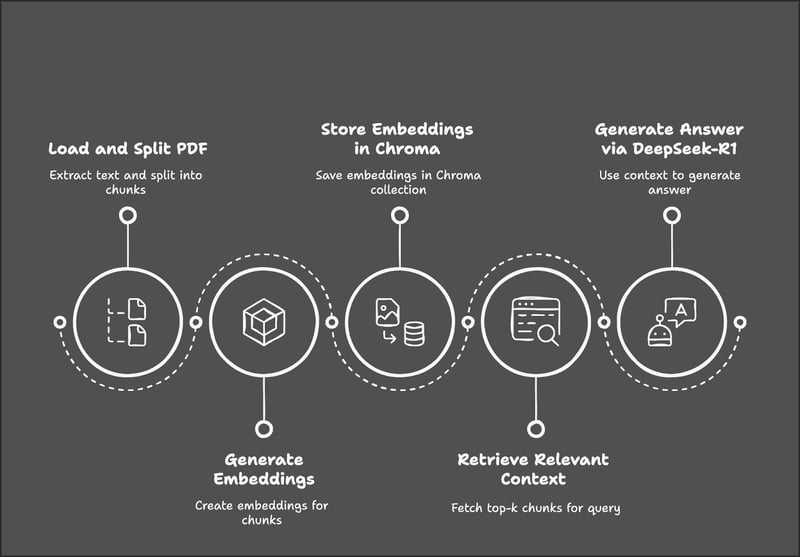
流程从加载并将 PDF 拆分为文本块开始,随后为这些文本块生成向量嵌入。这些嵌入被存储在 Chroma 数据库中以便高效检索。当用户提交查询时,系统会检索最相关的文本块,并使用 DeepSeek-R1 基于检索到的上下文生成答案。
步骤 1:前置条件
在开始之前,请确保已安装以下工具和库:
- Python 3.8+
- Langchain
- Chromadb
- Gradio
运行以下命令以安装必要的依赖:
!pip install langchain chromadb gradio ollama pymypdf
!pip install -U langchain-community安装完成上述依赖后,运行以下导入命令:
import ollama
import re
import gradio as gr
from concurrent.futures import ThreadPoolExecutor
from langchain.text_splitter import RecursiveCharacterTextSplitter
from langchain_community.document_loaders import PyMuPDFLoader
from langchain_community.embeddings import OllamaEmbeddings
from chromadb.config import Settings
from chromadb import Client
from langchain.vectorstores import Chroma步骤 2:使用 PyMuPDFLoader 加载 PDF
我们将使用 LangChain 的 PyMuPDFLoader 从 Tong Xiao 和 Jingbo Zhu 所著的《Foundations of LLMs》PDF 版本中提取文本——这是一部数学内容较多的书,这意味着我们的聊天机器人应能很好地解释 LLM 背后的数学原理。您可以在 arXiv 上找到这本书。
# Load the document using PyMuPDFLoader
loader = PyMuPDFLoader("/path/to/Foundations_of_llms.pdf")
documents = loader.load()加载文档后,我们就可以开始将文本划分为更小的块以便后续处理。
步骤 3:将文档拆分为更小的块
我们会将提取到的文本拆分为较小且相互重叠的块,以便更好地进行上下文检索。您可以在 RecursiveCharacterTextSpilitter() 函数中根据系统情况调整块大小和重叠大小。
# Split the document into smaller chunks
text_splitter = RecursiveCharacterTextSplitter(chunk_size=1000, chunk_overlap=200)
chunks = text_splitter.split_documents(documents)现在,我们已经得到了可用于转换为嵌入的文本块。
步骤 4:使用 DeepSeek-R1 生成嵌入
我们将使用基于 DeepSeek-R1 的 Ollama Embeddings 来生成文档嵌入。根据文档大小,生成嵌入可能需要一定时间,因此最好进行并行化处理以加快速度。
注意:model="deepseek-r1" 默认指 7B 参数规模模型。您可以根据需要更改为 8B、14B、32B、70B 或 671B。在以下模型名称中用模型规模替换 X:model="deepseek-r1:X"
# Initialize Ollama embeddings using DeepSeek-R1
embedding_function = OllamaEmbeddings(model="deepseek-r1")
# Parallelize embedding generation
def generate_embedding(chunk):
return embedding_function.embed_query(chunk.page_content)
with ThreadPoolExecutor() as executor:
embeddings = list(executor.map(generate_embedding, chunks))上述函数通过 Ollama 初始化 DeepSeek-R1,以生成高维语义嵌入,这些嵌入随后将用于基于相似度的文档检索。
generate_embedding() 函数接收文档块的文本并生成其嵌入。最后,ThreadPoolExecutor() 并发地将 generate_embedding() 应用于每个块,将嵌入收集为列表,相比顺序执行可更快完成处理。
步骤 5:将嵌入存储在 Chroma 向量存储中
我们将把嵌入及其对应的文本块存储在高性能向量数据库 Chroma 中。
# Initialize Chroma client and create/reset the collection
client = Client(Settings())
client.delete_collection(name="foundations_of_llms") # Delete existing collection (if any)
collection = client.create_collection(name="foundations_of_llms")
# Add documents and embeddings to Chroma
for idx, chunk in enumerate(chunks):
collection.add(
documents=[chunk.page_content],
metadatas=[{'id': idx}],
embeddings=[embeddings[idx]],
ids=[str(idx)] # Ensure IDs are strings
)我们按照以下步骤来存储嵌入:
1. 初始化 Chroma 客户端并重置集合:
Client(Settings())初始化 Chroma 客户端以管理向量存储。- 使用
client.delete_collection()删除与您的集合同名的已存在集合以避免报错。最后,使用client.create_collection()创建新集合以存储文档块及其嵌入。
2. 遍历文档块:
- 遍历每个文档块及其对应嵌入,并使用唯一的字符串 ID 进行标识。
3. 将块和嵌入添加到 Chroma:
- 对于每个块,
collection.add()会存储: - 其文档内容(
chunk.page_content) - 元数据(
{'id': idx})用于引用该块 - 对应的嵌入向量用于检索
- 用于标识条目的唯一ID 字符串
此设置可确保每个文档块都被正确索引,以便进行高效的向量化检索。
步骤 6:初始化检索器
我们将初始化 Chroma 检索器,确保其对查询使用同一套 DeepSeek-R1 嵌入。
# Initialize retriever using Ollama embeddings for queries
retriever = Chroma(collection_name="foundations_of_llms", client=client, embedding_function=embedding_function).as_retriever()Chroma 检索器连接到 "foundations_of_llms" 集合,并通过 Ollama 使用 DeepSeek-R1 嵌入对用户查询进行编码。它基于向量相似度检索最相关的文档块,以生成具备上下文的响应。
步骤 7:定义 RAG 流程
接下来,我们将检索最相关的文本块,并将其格式化后交给 DeepSeek-R1 以生成答案。
def retrieve_context(question):
# Retrieve relevant documents
results = retriever.invoke(question)
# Combine the retrieved content
context = "\n\n".join([doc.page_content for doc in results])
return contextretrieve_context 函数使用 DeepSeek-R1 对用户查询进行嵌入,并通过 Chroma 检索器检索最相关的文档块。随后将检索到的块内容合并为一个上下文字符串以供后续处理。
步骤 8:向 DeepSeek-R1 请求具备上下文的答案
现在我们已经有了问题和检索到的上下文。接下来,通过 Ollama 将其发送给 DeepSeek-R1 获取最终答案。
def query_deepseek(question, context):
# Format the input prompt
formatted_prompt = f"Question: {question}\n\nContext: {context}"
# Query DeepSeek-R1 using Ollama
response = embedding_function.chat(
model="deepseek-r1",
messages=[{'role': 'user', 'content': formatted_prompt}]
)
# Clean and return the response
response_content = response['message']['content']
final_answer = re.sub(r'<think>.*?</think>', '', response_content, flags=re.DOTALL).strip()
return final_answer为了得到最终答案,我们先将用户问题和检索到的上下文组合为结构化提示,然后通过 Ollama 将该提示发送给 DeepSeek-R1 以获取响应。为使最终输出更易阅读,我们会移除不必要的标签并返回最终答案。
步骤 9:构建 Gradio 界面
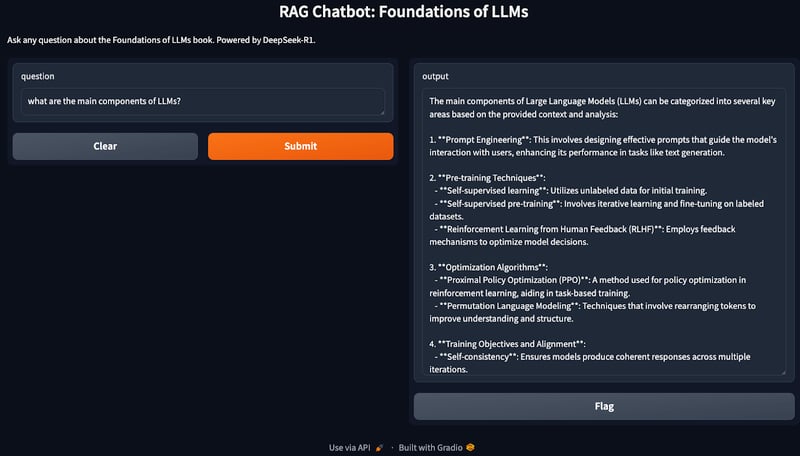
我们的 RAG 流程已就绪。现在,我们将使用 Gradio 创建一个交互式界面,供用户就其知识库(本例为《Foundations of LLMs》)提出问题。
def ask_question(question):
# Retrieve context and generate an answer using RAG
context = retrieve_context(question)
answer = query_deepseek(question, context)
return answer
# Set up the Gradio interface
interface = gr.Interface(
fn=ask_question,
inputs="text",
outputs="text",
title="RAG Chatbot: Foundations of LLMs",
description="Ask any question about the Foundations of LLMs book. Powered by DeepSeek-R1."
)
interface.launch()ask_question() 函数使用 Chroma 检索器获取相关上下文,并通过 DeepSeek-R1 生成最终答案。使用 gr.Interface() 构建的 Gradio 界面,使用户能够进行交互式提问,并获得具备上下文、依据充分的答案。
恭喜!您已经拥有一个本地运行的聊天机器人,可以讨论与 LLM 相关的任何内容。
优化建议
上述演示覆盖了一个非常基础的 RAG 实现,还可以进一步优化以提升效率。可尝试如下方法:
- 调整块大小: 调整
chunk_size和chunk_overlap参数,以在性能与检索质量之间取得平衡。 - 使用更小的模型版本: 如果 DeepSeek-R1 资源占用较高,您可以通过 Ollama 使用不同版本(deepseek-r1:7b、deepseek-r1:8b 或 deepseek-r1:14b)。
- 使用 Faiss 扩展: 对于更大的文档,考虑集成 Faiss 以实现更快的检索。
- 批处理: 如果嵌入生成较慢,可对文本块进行批量处理以提升效率。
结语
在本教程中,我们构建了一个基于 RAG 的本地聊天机器人,使用 DeepSeek-R1 和 Chroma 进行检索,确保基于大型知识库的问题得到准确且富含上下文的回答。
如需进一步了解 DeepSeek,推荐阅读以下博客:

我是一名 Google Developers 机器学习(生成式 AI)领域的专家、Kaggle 三项专家,以及 Women Techmakers 大使,拥有 3 年以上的技术从业经验。2020 年我共同创办了一家健康科技初创公司,目前在佐治亚理工学院攻读计算机科学硕士,专攻机器学习。
检索增强生成(RAG) 已成为一种强大的方法,它通过从外部来源检索并综合知识,构建能够生成精准、可靠且具备上下文相关性的答案的 AI 应用。
在本教程中,我将逐步讲解如何使用 DeepSeek-R1,并以一本关于 LLM 基础的书作为知识库,构建一个基于 RAG 的聊天机器人。完成本教程后,您将能够创建一个本地 RAG 应用,它可以回答书中的问题,并通过 Gradio 界面与用户交互。