Course
Claude Code 101
3 hr
26.9K
Somewhere in a Slack channel at Anthropic, an engineer types @Claude can you investigate this latency spike and open a PR with a fix? and then goes back to their other work. Claude pulls latency data from Datadog, diffs the recent deploy, reproduces the slow query, and posts the fix as a pull request, all in the thread, visible to anyone in the channel.
That is Claude Tag. It launched on June 23, 2026, in beta for Claude Enterprise and Team customers, and it changes how Anthropic positions Claude for teams. Instead of one person chatting with an AI in a private window, a whole Slack channel shares one Claude, with memory, connected tools, and, when it is switched on, a habit of checking in unprompted.
If your organization is on the old Claude in Slack app, there is an action item here: that app retires on August 3, 2026. You have a short window to migrate on your own terms before the switch goes automatic. Exact dates below.
Claude Tag makes Claude a participant in your Slack channels, not a chatbot you visit in a separate window. The product page brands it @Claude and the docs file it under "Claude in Slack," but Claude Tag is the name Anthropic uses in the launch announcement.
It works like this: anyone in a configured Slack channel can type @Claude followed by a task. Claude reads the channel's context, breaks the request into stages, works through connected tools and data sources, and posts results in a Slack thread. Every step is visible to the whole channel.
A few things separate this from a standard chatbot:
Anthropic describes Claude Tag as "the beginning of an evolution of Claude Code." That distinction matters and comes up again later. For now: Claude Code is single-player, terminal-based. Claude Tag is built for shared channels.
For now, it is Slack-only. More on what that rules out later.
Before Claude can join a channel, an administrator has to set it up. This is a one-time org-level configuration, and only a Primary Owner or Owner in the Claude organization can run it (the Admin role cannot). The four steps Anthropic outlines:
Once setup is done, end users configure nothing. Anyone in a channel where Claude Tag is on can tag @Claude right away, and channel work bills to the organization, not the person. DMs are the exception: there Claude runs on your own claude.ai account and bills to you, and admins can switch DMs off org-wide.
Tag @Claude with a task and it posts a checklist in the thread, then works the stages in view. With GitHub access it can open a pull request; with a database connection it can run a query. Everything lands back in the same thread, so nothing happens outside the channel history. The identity behind those actions is the next section.
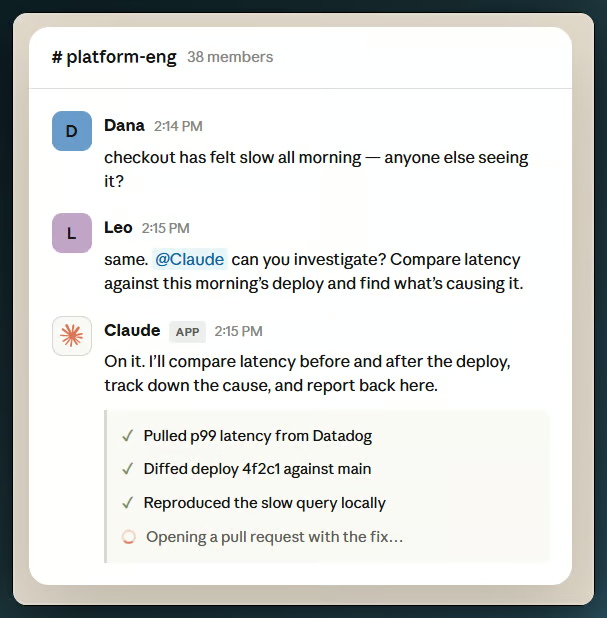
Claude Tag posts a live checklist as it works through each task stage. Image source: Anthropic.
The identity model is where Claude Tag departs most clearly from typical AI integrations, and the part that matters most for enterprise admins.
In most personal AI setups, the AI acts as you, using your credentials to read your documents or your calendar. That breaks down on a team. If three engineers and a PM share a channel, whose credentials should the AI use? There is no clean answer.
Claude Tag's answer is to give Claude its own identity. Claude posts in Slack as the Claude app. On GitHub, it opens PRs as the Claude GitHub App. In databases, it queries under an admin-provisioned service account. No user's personal credentials are ever in play, which means a shared channel cannot accidentally become a side door into someone's private documents.
The identity model also changes what channel members can ask Claude to do. A channel member without direct repo access can ask Claude to read that repo, if the channel's access allows it. Anthropic acknowledges this is a departure from per-user access control lists and frames it as a deliberate design decision for autonomous, multiplayer agents.
Permissions follow a three-level hierarchy:
So a private channel can carry its own credentials, while public channels in a workspace draw on the shared workspace set. Revoking a credential set ends Claude's access everywhere it was used at once, which is simpler than tracking individual actions across dozens of user accounts.
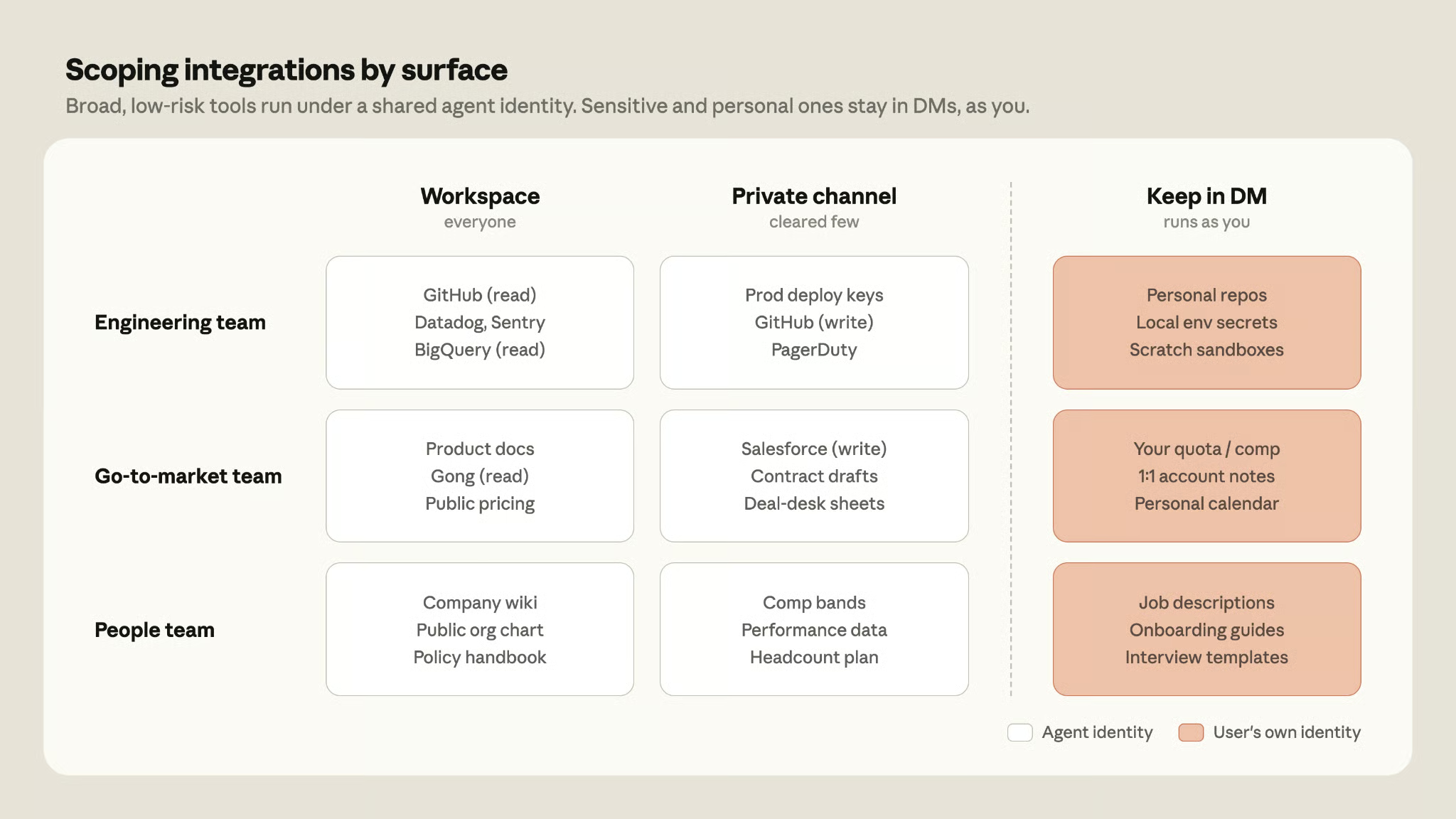
Broad integrations run in shared channels under agent identity; personal tools stay in DMs. Image source: Anthropic
Role-based access control (RBAC), which lets admins restrict which members can invoke Claude Tag at all, is an Enterprise-plan feature only.
Memory is what Anthropic leans on hardest in the launch materials, and the feature that needs the most care to understand.
Claude Tag has three scopes of memory:
Before assuming this means Claude knows everything in the org: it does not. What it learns in a private channel stays there, and a sales-channel Claude cannot see what an engineering-channel Claude knows.
Admins keep full control of what Claude retains: under Organization settings > Claude Tag > Audit, they can view, edit, and delete its channel and workspace memory. Slack conversations follow your existing Slack retention policies, and if the integration is disconnected, they are deleted from Claude's systems within 30 days.
The upside: a teammate returning after a week away does not need to re-brief Claude. The flip side: be deliberate about which channels you add it to, since whatever is shared there accumulates.
Most of Claude Tag's features you can reason about on paper. Ambient mode is the one that is hard to picture until you watch it work.
The default interaction is reactive: you tag it, it works, it responds. The asynchronous part is that you do not wait around. Hand off a task and go back to your own work while it runs, and the same in-thread checklist lets anyone in the channel follow along.
Claude can also schedule tasks for itself. In Anthropic's words, it can "pursue a project autonomously over hours or days." Cat Wu, Anthropic's head of product for Claude Code, described connecting Claude to her Gmail inbox so it watches for important emails and pings her in Slack when one arrives. She logs off; Claude keeps watching.
Ambient mode is opt-in. Switch it on, and Claude stops waiting to be tagged. As Anthropic's @claudeai account puts it: "Turn ambient behavior on, and Claude takes initiative. It follows up on threads that have gone quiet and flags what's relevant from across its channels and tools."
This is where Claude Tag starts to feel like an agent rather than a chat box, and where the governance questions get sharper. I will come back to those in the security section. The reason it is opt-in: an AI that posts unsolicited updates is helpful in some channels and a nuisance in others.
I flagged the retirement date at the top. Here is what actually changes between the two.
Claude Tag, Anthropic's replacement for Claude in Slack. Image source: Anthropic.
The older integration was session-based: each user's interaction was isolated, there was no shared channel memory, and Claude acted under individual user permissions and billing. It had three surfaces (DMs, an AI assistant panel, and thread participation), but the experience was closer to a personal assistant than a team resource.
Claude Tag replaces that with a shared, persistent agent: channel memory that builds up over time, an org-level identity, organization billing for channel work, and the ambient mode and scheduling I just walked through.
To put dates on it: you have until roughly July 23 to opt in manually, 30 days from the June 23 launch. After August 3, the old app stops working and the switch is automatic. Eligible Enterprise organizations get a one-time $25,000 launch credit toward initial usage; Team organizations get $2,500.
The governance side comes down to three things: spend controls, the audit log, and how network access is scoped.
As mentioned earlier, channel work bills to the organization, not the person, and it is metered at API rates rather than bundled into a per-seat fee. That adds up for an always-on agent, especially one with ambient mode running.
Here is what those controls look like. Organizations set an org-wide cap on monthly spend, plus per-channel limits, and new channels inherit a default. Admins get an alert at 75% of any limit, and again at 95%. A task that would push past the limit is declined outright rather than silently cut short, and the blocked user can ask an admin for more budget right there in Slack.
This matters because the risk is not hypothetical. Documented cases from other agentic Claude products show that token costs can climb fast when agents run on their own. The spend controls are the main tool for keeping that in check.
Every action Claude takes is logged. The audit view under Organization settings > Claude Tag > Audit records every scheduled and one-time task, plus every network call made with Claude's agent credentials. The agent identity from earlier is what makes those actions traceable inside each connected tool, and a GitHub pull request carries a link back to the Slack thread that triggered it.
The broader Claude Enterprise audit log records account and security events but excludes conversation content by default. Only event identifiers are logged, not the actual messages.
When an admin connects a tool to a channel, the credential is stored separately and tied to that channel, then injected at the network boundary only when a request needs it. Outbound traffic to any host an admin has not explicitly allowed is blocked. This means Claude cannot phone home to an unintended destination mid-task.
The most useful framing here is not a vendor ranking. It is a narrower question: which of these products gives a team shared, persistent memory inside Slack, scoped to a channel rather than a person?
The difference in this group comes back to the same thing: identity and memory that both belong to the channel, not the user.
Claude Tag is a public beta, and that label covers a lot, so here are the specifics.
When Anthropic launched Claude Tag, Andrej Karpathy posted about it on X. Karpathy joined Anthropic's pre-training team on May 19, 2026, so this is an insider view rather than neutral third-party analysis. Worth keeping in mind. His post called Claude Tag the "3rd major redesign of LLM UIUX" and laid out three paradigm shifts: from LLM as a website, to LLM as a downloaded app, to LLM as a persistent entity working alongside teams.
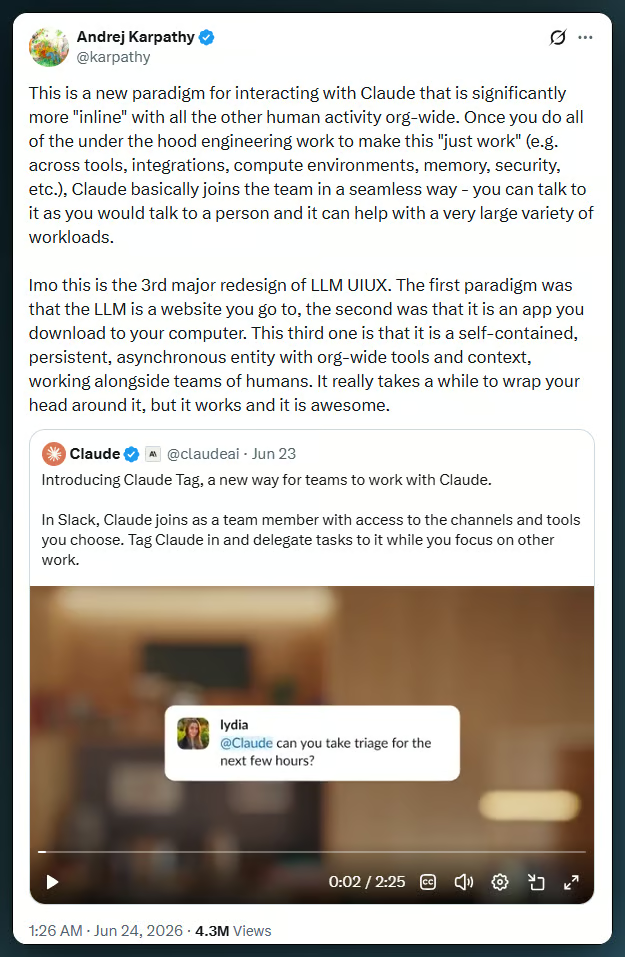
Karpathy's post on Claude Tag. Note: Karpathy is an Anthropic employee (joined May 2026). Image source: X / @karpathy.
The three-paradigm frame is a useful way to see what Anthropic is trying to build: not another place you go to use AI, but AI that sits where you already work. The shift in the interaction model is the part that sticks. Private, session-based AI is still how most people meet these tools, and a shared, persistent, channel-level agent is a different animal.
Whether this feels natural or intrusive depends almost entirely on governance, which is probably why the agent identity model and the spend controls are as developed as they are. Anthropic's own internal adoption is the main sign so far that the approach works in practice. The question for any org considering it: does the governance match the access Claude is given?
Claude Tag is Anthropic's attempt to move Claude from a tool you use on your own to one that sits inside how a team works. The mix of shared channel identity, persistent memory, and asynchronous task execution is a departure from the session-based AI most people are used to.
The things that matter most when evaluating it: the identity model, which removes personal credentials from the equation; the spend controls, which are the main protection against runaway costs; and the memory scoping, which determines what Claude knows and where. All three require active configuration.
If your organization is on the legacy Claude in Slack app, August 3 is the date for your calendar. Beyond the migration, the natural fit is teams with a defined use case (code investigation and metrics retrieval are the most documented) and the patience to set access up carefully.
If you want more on the other Claude products, we have write-ups on Claude Code and Claude Cowork. And if you are new to agentic AI in general, the Introduction to AI Agents course is a good place to start.
Learn Claude with DataCamp
Course
Course
Course
blog
Khalid Abdelaty
blog
Abid Ali Awan
9 min
Tutorial
Bexruz (Bex) Tuychiev
11 min
Tutorial
François Aubry
8 min
Tutorial
Laiba Siddiqui
13 min
Tutorial
Bexruz (Bex) Tuychiev
9 min