The problem with AI agents is that they can write correct code and still fail the moment they have to run it.
Most coding benchmarks give a model a prompt and grade the code it returns. Real work is messier, because an agent has to use tools, follow a multi-step workflow, and recover when a command fails. An answer that makes sense doesn't mean much if the service never starts.
Terminal-Bench 4.0 is the latest major version of a benchmark that places AI agents in command-line environments and checks whether the final result works. Because the agent has to run, test, and fix its own work, a passing score means the verifier accepted a working result.
In this article, I'll walk you through the tasks it includes, how the evaluation works, how to read the leaderboard, and what changed from previous versions.
Are you looking to dive into AI agents but don't know where to start? Make sure you understand Large Language Models (LLMs) Concepts first.
What Is Terminal-Bench 4.0?
Terminal-Bench 4.0 is a benchmark that tests whether AI agents can finish difficult tasks in a command-line environment.
It was released in August 2026 and has 66 tasks across seven areas:
- Software: 18 tasks, such as databases and distributed systems
- Science: 14 tasks, such as biology and formal mathematics
- Machine learning: 11 tasks, such as GPU kernels and inference serving
- Operations: 9 tasks, such as logistics and insurance claims
- Hardware: 5 tasks, such as CAD modeling and RTL design
- Security: 5 tasks, such as cryptography and forensics
- Media: 4 tasks, such as audio transcription and layout design
The benchmark checks if an agent completes a task instead of just judging if its answer sounds plausible. If the final result doesn't work, the agent doesn't pass the test.
Version 4.0 is an update to the current Terminal-Bench benchmark. It isn't a new suite.
Scores also don't belong to a model alone. They belong to a model and agent configuration, and the agent is the harness, which is the software that connects a model to the terminal and manages its tools. The same model can score differently under two different harnesses.
How Terminal-Bench 4.0 Works
Every task follows the same loop:
- Task: The agent receives instructions and access to a terminal environment
- Inspect: It looks around the environment and decides what needs to be done
- Act: It runs commands, edits files, or configures software
- Test and revise: It checks its own work and fixes problems
- Verify: A task-specific verifier decides whether the result meets the requirements
- Score: Every passed task counts toward the agent's resolution rate
Here's a more visual overview:
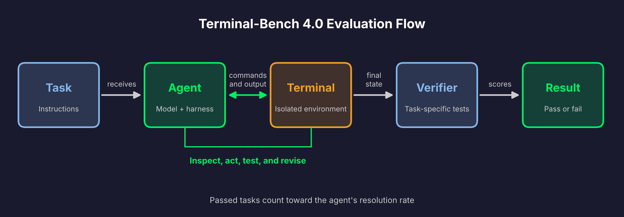
Terminal-Bench 4.0 evaluation flow
Each task runs in an isolated environment, and the verifier runs in a separate one. This way, the verifier checks the final state of the system.
A task passes only if every test in its verifier passes. The verifier doesn't read the agent's explanation, so a confident write-up earns nothing without a result that works.
What Changed in Terminal-Bench 4.0?
Version 4.0 is a maintenance release. In short, it didn't add any new tasks, but it removed eight, fixed 19, and changed how every task runs.
Updated task set
Version 4.0 reduces the benchmark from 74 to 66 tasks.
The team removed eight tasks for four reasons, two tasks each:
- Saturated: Every model class in the latest generation solved them five out of five times
- Refusals: Models refused to attempt them
- Public solutions: Solutions were publicly available
- Unresolved issues: Quality or platform-compatibility problems the team couldn't fix
Saturated tasks no longer separate strong models from each other.
Improved task instructions and verification
The team fixed 19 tasks. The fixes cover instructions, environments, and verifiers, and they address flakiness and misspecification that users reported or that the team found in leaderboard runs.
A flaky task passes or fails for reasons that have nothing to do with the agent's work. A misspecified task has instructions that don't match what the tests check.
Calibrated computing resources
The team calibrated time, CPU, and memory for each task. They followed a published method for measuring infrastructure noise in agentic evaluations.
First, they ran tasks with a large amount of headroom. Then they chose settings that didn't change the final metrics. The goal is to reduce failures caused by the infrastructure.
Longer task timeouts
Every task now has an eight-hour agent timeout. An agent that goes over the limit scores zero.
The team reports that frontier models rarely or never hit the time limit. This means a capable agent is less likely to fail because of the time issue.
Continuous benchmark updates
The team named this release 4.0 and not 3.1. Terminal-Bench is now a continuous benchmark with semantic versioning.
Semantic versioning uses a three-part number, like 4.0.0. Each part tells you what to do with old results:
- First number: Rerun the trials after changes such as new tasks, prompt fixes, or resource limits
- Second number: Regrade the results after verifier changes, such as fixing a verifier that's too strict
- Third number: Reuse the results after metadata, documentation, or dependency-pinning changes
Resource changes and removed tasks both count as first-number changes. That's why 4.0 isn't 3.1.
According to the release notes, 4.0 has fewer agent timeouts and errors than 3.0. Most remaining errors are model refusals and output-token-exceeded errors.
What Kinds of Tasks Does Terminal-Bench 4.0 Test?
Only 18 of the 66 tasks are software tasks. The rest cover other kinds of technical work:
- Software engineering: Databases, distributed systems, frontend performance, and algorithms
- Operations: Finance, insurance claims, compliance, and supply chain workflows
- Machine learning and science: Training runs, GPU kernels, biology, and formal mathematics
- Security: Cryptography, application security, and forensics
- Hardware and media: CAD modeling, RTL design, music theory, and audio transcription
Here's what a few of the tasks ask an agent to do.
The live-database-cutover task asks the agent to move a running e-commerce API from MySQL to PostgreSQL with zero downtime. The agent has to meet four requirements:
- No failed requests: Customers keep sending reads and writes, no request can fail, and reads can't return stale data
- Same behavior: Status codes and response bodies match the MySQL baseline
- Same speed: Each endpoint's p95 latency stays within 10 ms of the baseline
- No MySQL afterward: The app can't use it, even on future deploys in fresh containers
Here, p95 latency is the response time that 95% of requests beat. The verifier restores the agent's PostgreSQL dump into a fresh PostgreSQL 16 instance. It checks correctness first and latency second.
In wal-recovery-ordering, the agent builds a write-ahead log engine. A write-ahead log records each change before the change is applied, so a database can recover after a crash. The engine has to rebuild its state from the durable part of the log, in log sequence number order.
One Operations task asks the agent to speed up worker startup in a financial transaction pipeline.
The dataset also includes three FreeCAD tasks, which use an open-source CAD program. Three tasks need an NVIDIA H100 GPU, and 11 use more than one container.
How to Read the Terminal-Bench 4.0 Leaderboard
The official leaderboard at tbench.ai lists rank, model, agent, resolution rate, cost, and tokens. Evaluations use the Harbor harness with dataset version 4.0.0 pinned.
Resolution rate
Resolution rate is the share of the 66 tasks an agent resolves. A task counts only if it passes every test in its verifier, with no partial credit.
Scores are averaged across repeated runs, so one lucky or unlucky run doesn't decide the number. The number of runs depends on who runs the evaluation.
Agent harness
The agent harness is the software around the model. It decides which tools the model gets and how it reads command output.
Leaderboards compare harnesses such as Claude Code, Codex, and mini-SWE-agent. Claude Code and Codex are the coding agents from Anthropic and OpenAI, each with its own tools and prompts. mini-SWE-agent is minimal and works with any model, and the model gets one tool, bash, to run commands in the sandbox.
This is why the same model can score differently under two harnesses.
Reasoning effort
Reasoning effort is a setting that controls how much a model thinks before it acts. Values include none, high, xhigh, and max.
The official table doesn't show it. Snorkel AI's leaderboard does, as a column that the harness sets, not Terminal-Bench. A higher setting can raise the resolution rate, but it uses more tokens and costs more. On that leaderboard, higher-effort runs show much higher totals without a matching gain in resolution rate.
Cost per task
Token use varies a lot between runs. At launch, the official announcement pointed to one run that used 21.6B tokens and another that used 6.5B.
Cost follows tokens, and leaderboards report it differently. Snorkel AI's shows the total for a full 66-task run, and Vals AI's shows cost per task. To compare them, divide a run total by 66.
Confidence intervals
A resolution rate is an estimate. Agents give different results from run to run, so each score has a margin of error.
If two agents' ranges overlap, the gap between them may be noise. With 66 tasks, a single task is worth about 1.5 percentage points of one run.
Leaderboards compute the margin differently. The official one shows a 95% confidence interval, while Vals AI shows one standard error across three runs. So, don't compare margins across sites.
As of early November 2026, Claude Opus 5.5 has the highest resolution rate on Snorkel AI’s Terminal-Bench 4.0 leaderboard. Here are the top ten runs:
Top 10 AI models on Terminal-Bench 4.0
Each score belongs to a model, a harness, and a set of evaluation settings. If you change one of them, the score changes as well. Every score also has a margin of error of a few percentage points. If the gap between two runs is smaller than that, you can’t say which one is better.
Independent evaluators get different results too. Some run every model on the same minimal harness, and the order changes. Scores from different setups don’t belong in one list.
Cost differs a lot between runs. Two runs with similar scores can have very different costs, so check both numbers.
Scores change as new runs are added, so bookmark this blog post as we’ll update the leaderboard down the road.
Terminal-Bench 4.0 vs. Other AI Agent Benchmarks
Two comparisons matter most: Terminal-Bench 3.0 and SWE-bench.
Terminal-Bench 4.0 vs. Terminal-Bench 3.0
Version 3.0 introduced the current task set of 74 tasks across seven domains. Version 4.0 is a maintenance release on top of it, and it came out about a month later.
Here's what differs:
- Tasks: 74 become 66, with eight removed and none added
- Fixes: 19 tasks get updated instructions, environments, or verifiers
- Resources: CPU, memory, and time are calibrated per task
- Timeouts: Every task has a flat eight-hour agent timeout
- Maintenance: 4.0 retires and fixes tasks under the semantic versioning scheme that 3.0 introduced
Don't compare scores across the two versions. Resource changes and removed tasks both call for a rerun.
Terminal-Bench vs SWE-bench
SWE-bench is limited to testing resolving issues in a code repository. The model sees the issue text and the repository before the fix, and it has to produce a code change. Hidden tests then check the fix and confirm that the behavior that worked before still works.
SWE-bench comes in more than one variant. SWE-bench Pro, which OpenAI recommends over Verified, covers Python, Go, TypeScript, and JavaScript repositories.
Terminal-Bench covers a wider range. Software is 18 of its 66 tasks, and the rest include science, machine learning, operations, hardware, security, and media. The agent works in a terminal and has to finish the whole job.
| | Terminal-Bench 4.0 | SWE-bench Pro |
|---|
| Task types | 66 tasks across software, science, ML, ops, hardware, security, media | Bug fixes and features from real repo histories |
| Evaluation | Task-specific verifier checks final system state; all tests must pass | Fail-to-pass tests plus existing tests that must keep passing |
| Measures | End-to-end technical work in a terminal | Resolving software issues in a codebase |
Terminal-Bench 4.0 compared to SWE-bench Pro
How Reliable Is Terminal-Bench 4.0?
Terminal-Bench became popular because it has meaningful strengths and documented grading problems.
Strengths
Here's what makes it stand out:
- Practical terminal environments: Agents run real commands in isolated containers
- Verifiable outcomes: A verifier tests the final state, and a task passes only if every test passes
- Public task definitions: Anyone can inspect the tasks and their verifiers
- Repeated evaluations: Epoch AI's review notes that scores are averaged over five runs with 95% confidence intervals
- Transparent configuration: Token and cost data are disclosed, and the dataset version is also known
Limitations
An independent review by Epoch AI, published on September 4, 2026, classified Terminal-Bench 4.0.0 as Flawed. It found publicly documented scoring defects in 30 of the 66 tasks, which is about 45%.
Epoch based the review on issues already documented in the project's GitHub repository, and it stopped once the errors passed its threshold. It rates a benchmark Flawed when defects could affect at least 20% of the total score in the inspected sample, or corrupt grading at scale.
A verifier decides every score, so its mistakes become the benchmark's mistakes. It can fail in two ways:
- False positives: The verifier passes a wrong answer, for example because the agent exploited a scoring bug or read the answer from the environment
- False negatives: The verifier fails a correct answer, for example because a check is too strict or a requirement is never stated in the instructions
In plain English, a false positive adds credit the agent didn't earn, and a false negative removes credit it did. If those errors are present in some models more than others, the order of the scores changes. Epoch doesn't say how much.
Ten of the defective tasks have pending fixes. Epoch judged the benchmark in its current state, and it says planned fixes don't undo the effect on results for models evaluated on this version.
What Terminal-Bench 4.0 Tells Us About AI Agents
Beyond the scores, the design of Terminal-Bench 4.0 shows what agent work involves.
Commands vs code
Code generation is finished when the code is written, but task execution is only finished when the system works.
In live-database-cutover, a correct migration script isn't enough. The agent also has to keep the API answering requests during the move and hold latency within limits.
Long tasks
A task can run for up to eight hours. Frontier models rarely or never hit that limit, but long runs still fail for simple reasons.
According to the official announcement, most remaining errors are model refusals and output-token-exceeded errors. Epoch's review found one model with 37 of 330 trials ending early because of output-token and API errors.
Error recovery
Terminal work produces errors all the time, for example, when a command fails, a package isn't installed, or a test breaks.
Terminal-Bench tasks include recovering from failure, and the test-and-revise step is part of every run.
Tool use is part of what the benchmark measures. Epoch's review notes that Codex retries safety refusals, which creates an asymmetry between harnesses.
The benchmark sets no step or cost limit for the agent. An agent can spend a lot to reach a pass, which is why leaderboards report tokens and cost next to resolution rate.
Speed barely shows up in the score. A task passes the same way if the agent takes one hour or seven.
Benchmark scores vs production reliability
A pass means the verifier accepted the final state for that task. It doesn't mean the agent will do the same thing on the next run, which is why scores average repeated runs.
Real systems also come with goals that are less precise than a verifier's tests. And Epoch's findings on scoring defects are another reason to treat a score as an estimate.
As agents take on more operational and engineering work, benchmarks that run real commands and check real outcomes measure more of that job than code-only tests do.
Conclusion
In short, Terminal-Bench 4.0 measures if an AI agent can complete complex tasks in a terminal and leave a system that works.
Version 4.0 is a maintenance release. The team removed eight tasks, fixed 19, calibrated resources for each task, and moved to semantic versioning, so the benchmark gets regular updates.
A thing to remember here is that a leaderboard number belongs to a model, a harness, and a set of settings. Cost and margin of error matter just as much. Epoch AI’s review also found documented scoring defects in 30 of the 66 tasks, and only ten of them have fixes planned.
Terminal-Bench shows how hard it is to measure real technical work. The benchmark checks if an agent’s work is correct, and it turns out the benchmark needs the same check. Until the grading is solid, you should treat every score as an estimate and test the agent on your own tasks.
If you need more guidance on the topic, read our Evaluating AI Agents blog posts that shows you how to evaluate AI agents that use tools.







The problem with AI agents is that they can write correct code and still fail the moment they have to run it.
Most coding benchmarks give a model a prompt and grade the code it returns. Real work is messier, because an agent has to use tools, follow a multi-step workflow, and recover when a command fails. An answer that makes sense doesn't mean much if the service never starts.
Terminal-Bench 4.0 is the latest major version of a benchmark that places AI agents in command-line environments and checks whether the final result works. Because the agent has to run, test, and fix its own work, a passing score means the verifier accepted a working result.
In this article, I'll walk you through the tasks it includes, how the evaluation works, how to read the leaderboard, and what changed from previous versions.
Are you looking to dive into AI agents but don't know where to start? Make sure you understand Large Language Models (LLMs) Concepts first.
What Is Terminal-Bench 4.0?
Terminal-Bench 4.0 is a benchmark that tests whether AI agents can finish difficult tasks in a command-line environment.
It was released in August 2026 and has 66 tasks across seven areas:
The benchmark checks if an agent completes a task instead of just judging if its answer sounds plausible. If the final result doesn't work, the agent doesn't pass the test.
Version 4.0 is an update to the current Terminal-Bench benchmark. It isn't a new suite.
Scores also don't belong to a model alone. They belong to a model and agent configuration, and the agent is the harness, which is the software that connects a model to the terminal and manages its tools. The same model can score differently under two different harnesses.
How Terminal-Bench 4.0 Works
Every task follows the same loop:
Here's a more visual overview:
Terminal-Bench 4.0 evaluation flow
Each task runs in an isolated environment, and the verifier runs in a separate one. This way, the verifier checks the final state of the system.
A task passes only if every test in its verifier passes. The verifier doesn't read the agent's explanation, so a confident write-up earns nothing without a result that works.
What Changed in Terminal-Bench 4.0?
Version 4.0 is a maintenance release. In short, it didn't add any new tasks, but it removed eight, fixed 19, and changed how every task runs.
Updated task set
Version 4.0 reduces the benchmark from 74 to 66 tasks.
The team removed eight tasks for four reasons, two tasks each:
Saturated tasks no longer separate strong models from each other.
Improved task instructions and verification
The team fixed 19 tasks. The fixes cover instructions, environments, and verifiers, and they address flakiness and misspecification that users reported or that the team found in leaderboard runs.
A flaky task passes or fails for reasons that have nothing to do with the agent's work. A misspecified task has instructions that don't match what the tests check.
Calibrated computing resources
The team calibrated time, CPU, and memory for each task. They followed a published method for measuring infrastructure noise in agentic evaluations.
First, they ran tasks with a large amount of headroom. Then they chose settings that didn't change the final metrics. The goal is to reduce failures caused by the infrastructure.
Longer task timeouts
Every task now has an eight-hour agent timeout. An agent that goes over the limit scores zero.
The team reports that frontier models rarely or never hit the time limit. This means a capable agent is less likely to fail because of the time issue.
Continuous benchmark updates
The team named this release 4.0 and not 3.1. Terminal-Bench is now a continuous benchmark with semantic versioning.
Semantic versioning uses a three-part number, like 4.0.0. Each part tells you what to do with old results:
Resource changes and removed tasks both count as first-number changes. That's why 4.0 isn't 3.1.
According to the release notes, 4.0 has fewer agent timeouts and errors than 3.0. Most remaining errors are model refusals and output-token-exceeded errors.
What Kinds of Tasks Does Terminal-Bench 4.0 Test?
Only 18 of the 66 tasks are software tasks. The rest cover other kinds of technical work:
Here's what a few of the tasks ask an agent to do.
The
live-database-cutovertask asks the agent to move a running e-commerce API from MySQL to PostgreSQL with zero downtime. The agent has to meet four requirements:Here, p95 latency is the response time that 95% of requests beat. The verifier restores the agent's PostgreSQL dump into a fresh PostgreSQL 16 instance. It checks correctness first and latency second.
In
wal-recovery-ordering, the agent builds a write-ahead log engine. A write-ahead log records each change before the change is applied, so a database can recover after a crash. The engine has to rebuild its state from the durable part of the log, in log sequence number order.One Operations task asks the agent to speed up worker startup in a financial transaction pipeline.
The dataset also includes three FreeCAD tasks, which use an open-source CAD program. Three tasks need an NVIDIA H100 GPU, and 11 use more than one container.
How to Read the Terminal-Bench 4.0 Leaderboard
The official leaderboard at tbench.ai lists rank, model, agent, resolution rate, cost, and tokens. Evaluations use the Harbor harness with dataset version 4.0.0 pinned.
Resolution rate
Resolution rate is the share of the 66 tasks an agent resolves. A task counts only if it passes every test in its verifier, with no partial credit.
Scores are averaged across repeated runs, so one lucky or unlucky run doesn't decide the number. The number of runs depends on who runs the evaluation.
Agent harness
The agent harness is the software around the model. It decides which tools the model gets and how it reads command output.
Leaderboards compare harnesses such as Claude Code, Codex, and mini-SWE-agent. Claude Code and Codex are the coding agents from Anthropic and OpenAI, each with its own tools and prompts. mini-SWE-agent is minimal and works with any model, and the model gets one tool, bash, to run commands in the sandbox.
This is why the same model can score differently under two harnesses.
Reasoning effort
Reasoning effort is a setting that controls how much a model thinks before it acts. Values include none, high, xhigh, and max.
The official table doesn't show it. Snorkel AI's leaderboard does, as a column that the harness sets, not Terminal-Bench. A higher setting can raise the resolution rate, but it uses more tokens and costs more. On that leaderboard, higher-effort runs show much higher totals without a matching gain in resolution rate.
Cost per task
Token use varies a lot between runs. At launch, the official announcement pointed to one run that used 21.6B tokens and another that used 6.5B.
Cost follows tokens, and leaderboards report it differently. Snorkel AI's shows the total for a full 66-task run, and Vals AI's shows cost per task. To compare them, divide a run total by 66.
Confidence intervals
A resolution rate is an estimate. Agents give different results from run to run, so each score has a margin of error.
If two agents' ranges overlap, the gap between them may be noise. With 66 tasks, a single task is worth about 1.5 percentage points of one run.
Leaderboards compute the margin differently. The official one shows a 95% confidence interval, while Vals AI shows one standard error across three runs. So, don't compare margins across sites.
Which AI Models Perform Best on Terminal-Bench 4.0?
As of early November 2026, Claude Opus 5.5 has the highest resolution rate on Snorkel AI’s Terminal-Bench 4.0 leaderboard. Here are the top ten runs:
Top 10 AI models on Terminal-Bench 4.0
Each score belongs to a model, a harness, and a set of evaluation settings. If you change one of them, the score changes as well. Every score also has a margin of error of a few percentage points. If the gap between two runs is smaller than that, you can’t say which one is better.
Independent evaluators get different results too. Some run every model on the same minimal harness, and the order changes. Scores from different setups don’t belong in one list.
Cost differs a lot between runs. Two runs with similar scores can have very different costs, so check both numbers.
Scores change as new runs are added, so bookmark this blog post as we’ll update the leaderboard down the road.
Terminal-Bench 4.0 vs. Other AI Agent Benchmarks
Two comparisons matter most: Terminal-Bench 3.0 and SWE-bench.
Terminal-Bench 4.0 vs. Terminal-Bench 3.0
Version 3.0 introduced the current task set of 74 tasks across seven domains. Version 4.0 is a maintenance release on top of it, and it came out about a month later.
Here's what differs:
Don't compare scores across the two versions. Resource changes and removed tasks both call for a rerun.
Terminal-Bench vs SWE-bench
SWE-bench is limited to testing resolving issues in a code repository. The model sees the issue text and the repository before the fix, and it has to produce a code change. Hidden tests then check the fix and confirm that the behavior that worked before still works.
SWE-bench comes in more than one variant. SWE-bench Pro, which OpenAI recommends over Verified, covers Python, Go, TypeScript, and JavaScript repositories.
Terminal-Bench covers a wider range. Software is 18 of its 66 tasks, and the rest include science, machine learning, operations, hardware, security, and media. The agent works in a terminal and has to finish the whole job.
Terminal-Bench 4.0 compared to SWE-bench Pro
How Reliable Is Terminal-Bench 4.0?
Terminal-Bench became popular because it has meaningful strengths and documented grading problems.
Strengths
Here's what makes it stand out:
Limitations
An independent review by Epoch AI, published on September 4, 2026, classified Terminal-Bench 4.0.0 as Flawed. It found publicly documented scoring defects in 30 of the 66 tasks, which is about 45%.
Epoch based the review on issues already documented in the project's GitHub repository, and it stopped once the errors passed its threshold. It rates a benchmark Flawed when defects could affect at least 20% of the total score in the inspected sample, or corrupt grading at scale.
A verifier decides every score, so its mistakes become the benchmark's mistakes. It can fail in two ways:
In plain English, a false positive adds credit the agent didn't earn, and a false negative removes credit it did. If those errors are present in some models more than others, the order of the scores changes. Epoch doesn't say how much.
Ten of the defective tasks have pending fixes. Epoch judged the benchmark in its current state, and it says planned fixes don't undo the effect on results for models evaluated on this version.
What Terminal-Bench 4.0 Tells Us About AI Agents
Beyond the scores, the design of Terminal-Bench 4.0 shows what agent work involves.
Commands vs code
Code generation is finished when the code is written, but task execution is only finished when the system works.
In
live-database-cutover, a correct migration script isn't enough. The agent also has to keep the API answering requests during the move and hold latency within limits.Long tasks
A task can run for up to eight hours. Frontier models rarely or never hit that limit, but long runs still fail for simple reasons.
According to the official announcement, most remaining errors are model refusals and output-token-exceeded errors. Epoch's review found one model with 37 of 330 trials ending early because of output-token and API errors.
Error recovery
Terminal work produces errors all the time, for example, when a command fails, a package isn't installed, or a test breaks.
Terminal-Bench tasks include recovering from failure, and the test-and-revise step is part of every run.
Tool use and model capability
Tool use is part of what the benchmark measures. Epoch's review notes that Codex retries safety refusals, which creates an asymmetry between harnesses.
Performance, speed, and cost
The benchmark sets no step or cost limit for the agent. An agent can spend a lot to reach a pass, which is why leaderboards report tokens and cost next to resolution rate.
Speed barely shows up in the score. A task passes the same way if the agent takes one hour or seven.
Benchmark scores vs production reliability
A pass means the verifier accepted the final state for that task. It doesn't mean the agent will do the same thing on the next run, which is why scores average repeated runs.
Real systems also come with goals that are less precise than a verifier's tests. And Epoch's findings on scoring defects are another reason to treat a score as an estimate.
As agents take on more operational and engineering work, benchmarks that run real commands and check real outcomes measure more of that job than code-only tests do.
Conclusion
In short, Terminal-Bench 4.0 measures if an AI agent can complete complex tasks in a terminal and leave a system that works.
Version 4.0 is a maintenance release. The team removed eight tasks, fixed 19, calibrated resources for each task, and moved to semantic versioning, so the benchmark gets regular updates.
A thing to remember here is that a leaderboard number belongs to a model, a harness, and a set of settings. Cost and margin of error matter just as much. Epoch AI’s review also found documented scoring defects in 30 of the 66 tasks, and only ten of them have fixes planned.
Terminal-Bench shows how hard it is to measure real technical work. The benchmark checks if an agent’s work is correct, and it turns out the benchmark needs the same check. Until the grading is solid, you should treat every score as an estimate and test the agent on your own tasks.
If you need more guidance on the topic, read our Evaluating AI Agents blog posts that shows you how to evaluate AI agents that use tools.