Kurs
Generative KI für Unternehmen
1 Std.
65.3K
Frameworks für autonome KI-Agenten sind für Systeme gedacht, die mehrstufige Aufgaben nachvollziehbar lösen, eigenständig Tools auswählen und mit wenig manueller Eingabe Aktionen im Namen der Nutzenden ausführen. SuperAGI setzt das über eine ReAct-artige Schleife und eine GUI-first-Orchestrierungsschicht um.
SuperAGI ist eines der frühesten Open-Source-Frameworks, das genau dafür entwickelt wurde. Es bietet Entwicklerinnen und Entwicklern eine Plattform, um zielorientierte KI-Agenten über eine webbasierte GUI zu erstellen, zu verwalten und auszuführen – inklusive integriertem Monitoring, einem Tool-Marktplatz und Support für mehrere Large Language Models (LLMs).
In diesem Leitfaden erkläre ich, was SuperAGI ist, führe durch Architektur und Features, zeige dir die Installation mit Docker und vergleiche es mit AutoGPT und LangChain. Außerdem gehe ich darauf ein, was gut funktioniert, wo die Grenzen liegen und ob es sich für den Produktiveinsatz eignet.
Ein wichtiger Hinweis vorab: SuperAGI als Open-Source-Framework und SuperAGI als Unternehmen sind nicht mehr dasselbe. Das Unternehmen ist zu einem kommerziellen SaaS-Produkt mit Schwerpunkt auf KI-gestützten Vertriebstools geschwenkt, und das Open-Source-Repo war seit 2024 nur noch wenig aktiv. Dieser Artikel konzentriert sich auf das Open-Source-Framework. Den aktuellen Wartungsstatus greife ich im Verlauf auf, damit du fundiert entscheiden kannst, ob du es einsetzen willst.
SuperAGI ist ein entwicklerzentriertes, Open-Source-Framework für autonome KI-Agenten unter der MIT-Lizenz. Es wurde von TransformerOptimus erstellt und hat seit dem Start 2023 Tausende GitHub-Sterne und über 2.000 Forks gesammelt. Das Projekt ist primär in Python (ca. 70%) geschrieben, das Frontend läuft mit JavaScript (ca. 25%).
Die Kernidee: SuperAGI ist kein Modell. Es ist die Orchestrierungsschicht zwischen dir, einem LLM und den Tools, die der Agent nutzen soll. Du definierst Ziele für deinen Agenten, weist ihm Tools zu (z. B. Websuche, Dateiverwaltung oder GitHub-Integration), wählst einen LLM-Provider, und der Agent überlegt dann autonom, wählt in jedem Schritt das passende Tool und iteriert, bis das Ziel erreicht ist oder das Iterationslimit greift.
Drei Punkte vorweg, um SuperAGI im Ökosystem einzuordnen.
Ein Agentenframework (wie SuperAGI, AutoGPT oder CrewAI) orchestriert autonome Aufgabenausführung mit LLMs plus Tools. Eine LLM-API (wie die OpenAI API oder die Anthropic API) liefert rohen Modellzugang für Textgenerierung, und du steuerst jeden Call. Eine Chat-Oberfläche (wie ChatGPT oder Claude) ist die benutzerorientierte Hülle, über die Menschen direkt mit dem Modell interagieren.
SuperAGI agiert auf Framework-Ebene. Du setzt Ziele, der Agent entscheidet über das Vorgehen. Das unterscheidet sich grundlegend sowohl vom Chatten mit einem Modell als auch von direkten API-Calls.
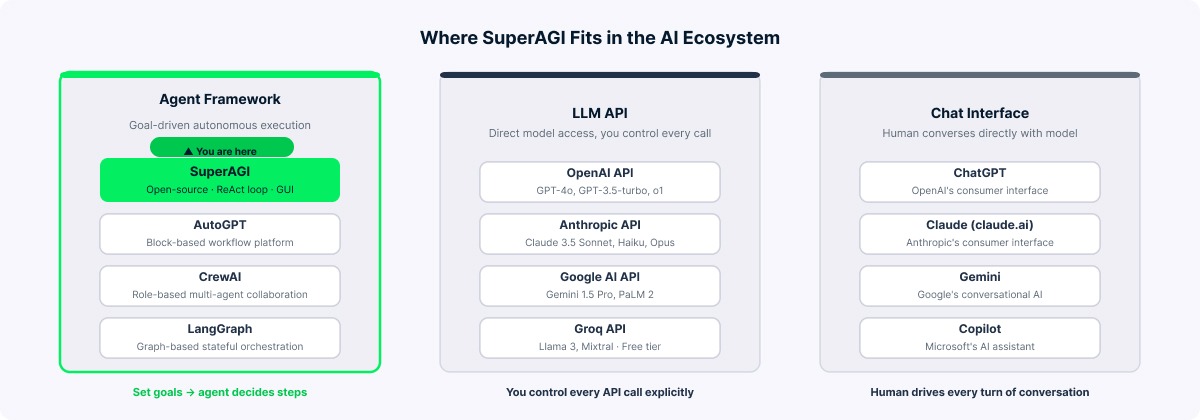
SuperAGI als Agentenframework erklärt. Bild: Autor.
Nachdem klar ist, was SuperAGI ist und wie es sich von einfacheren Tools unterscheidet, hier die Funktionen unter der Haube.
Autonome Agenten. Du stattest Agenten mit konkreten Zielen, Anweisungen, Tools und Einschränkungen aus. Es gibt drei Typen: Default (ein einzelner Think-Execute-Zyklus), Fixed Task Queue (zerlegt Ziele in geordnete Teilaufgaben) und Dynamic Task Queue (der Agent kann während der Ausführung neue Tasks hinzufügen, wenn Bedarf entsteht).
Tool-Integrationssystem. SuperAGI bringt zahlreiche Toolkits mit, darunter Google Search, DuckDuckGo, Web Scraper, File Manager, GitHub, Jira, Twitter, Notion, Google Calendar, DALL-E, ein Coding Toolkit und ein Knowledge-Search-Tool auf Basis von Vektordatenbanken. Community-Toolkits für Dienste wie Slack, Instagram oder weitere Bildgeneratoren können je nach Setup ebenfalls verfügbar sein. Auf die Tool-Integration gehe ich später detaillierter ein.
Webbasierte GUI. Eine Next.js-Oberfläche unter localhost:3000 bietet Agentenerstellung, Tool-Zuweisung, Echtzeitfeeds, Modell-Provider-Konfiguration, Agentenplanung und Marketplace-Browsing.
Agent Performance Monitoring (APM). Eingeführt in Version 0.0.8, ist das APM-Dashboard ein echtes Alleinstellungsmerkmal. Es liefert Organisationsmetriken (Anzahl Agenten, verbrauchte Tokens, Runs insgesamt), Modell-Breakdowns (Agenten, Runs und Tokens pro LLM) sowie Agenten-Analytics (durchschnittliche Tokens pro Run, API-Calls und Laufzeit). Umordnenbare Metrik-Karten erlauben dir ein individuelles Dashboard-Layout.
Orchestrierung mehrerer Agenten. Du kannst mehrere Agenten parallel ausführen, jeweils mit eigenen Zielen, Tools und LLMs, gesteuert über eine gemeinsame GUI.
Action Console. Das ist die Human-in-the-Loop-Funktion. Im eingeschränkten Berechtigungsmodus pausieren Agenten vor kritischen Aktionen (z. B. E-Mails senden oder Dateien schreiben) und warten auf deine Bestätigung in der Action Console. So hast du eine Sicherheitsschranke für sensible Vorgänge.
Vektordatenbanken. SuperAGI unterstützt Weaviate, Pinecone und Qdrant für Langzeitgedächtnis via Vektorembeddings. Kurzzeitkontext wird innerhalb eines Runs gehalten, während Langzeitwissen in der Vektordatenbank runs-übergreifend persistiert.
Marketplace. Ein Community-getriebener Marktplatz bietet Tools, Toolkits, Agentenvorlagen, Wissensembeddings und Modelle. Installation direkt aus der GUI.
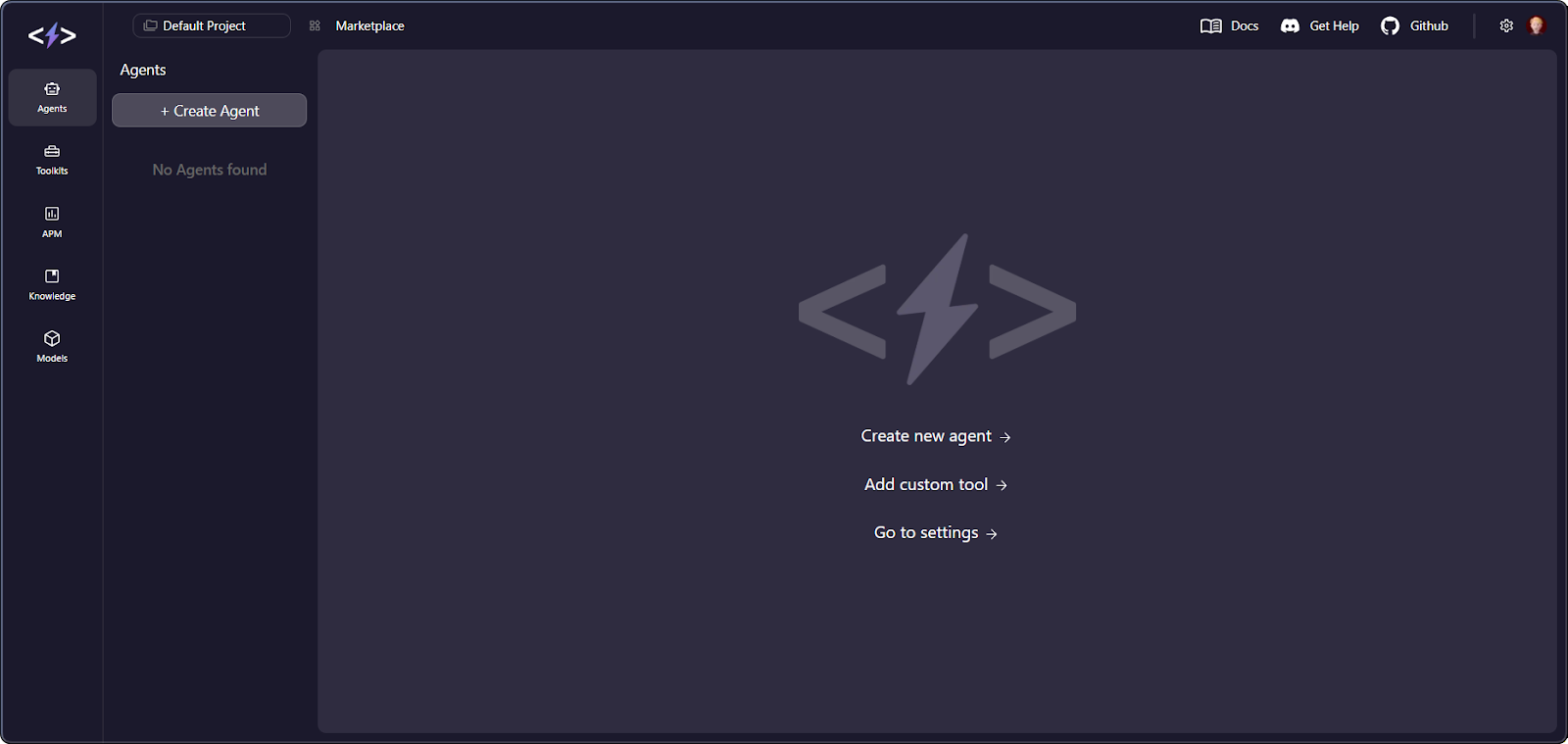
SuperAGI-Dashboard mit APM-Metriken. Bild: Autor.
Ein verbreitetes Missverständnis in Drittanbieter-Artikeln ist, dass SuperAGI eine "Planen, Ausführen, Reflektieren, Iterieren"-Schleife nutzt. Diese Darstellung ist geläufig, aber die Implementierung entspricht eher dem ReAct (Reason + Act)-Muster. SuperAGI implementiert eine Thought → Action → Observation-Schleife: Der Agent denkt über den Status nach, wählt ein Tool, beobachtet das Ergebnis und wiederholt. ReAct ist ein Muster, bei dem das Modell zwischen Denk-Schritten ("Thought") und Tool-Aufrufen ("Action") wechselt, gesteuert durch Beobachtungen.
Der Tech-Stack, anhand von docker-compose.yaml und Quellcode verifiziert, lässt sich so gliedern:
|
Komponente |
Technologie |
|
Web-Framework |
FastAPI |
|
Task-Queue |
Celery |
|
Message-Broker |
Redis (redis-stack-server) |
|
Datenbank |
PostgreSQL 15 |
|
ORM |
SQLAlchemy |
|
Migrationen |
Alembic |
|
Frontend |
Next.js |
|
Reverse Proxy |
Nginx |
|
Sprache |
Python |
Das Backend nutzt Uvicorn auf Port 8001; Nginx leitet /api-Requests an das Backend und alle anderen Pfade an die Next.js-GUI weiter. Celery verarbeitet Hintergrundaufgaben mit --beat für geplante Jobs. PostgreSQL speichert Agentenkonfigurationen, Run-Historie und Metadaten. Im Default-Setup dient Redis primär als Celery Message-Broker, nicht als Vektordatenbank, entgegen mancher Drittquellen.
Für Gedächtnis nutzt SuperAGI ein zweiteiliges System. Kurzzeitgedächtnis (STM) ist ein rollendes Fenster basierend auf dem Tokenlimit des LLM, während die Long-term Summary (LTS) komprimierten Kontext außerhalb des STM-Fensters enthält. Zusammen bilden sie die Agent Summary, die jeden Denk-Schritt speist. Vektordatenbanken verwalten Wissensembeddings separat.
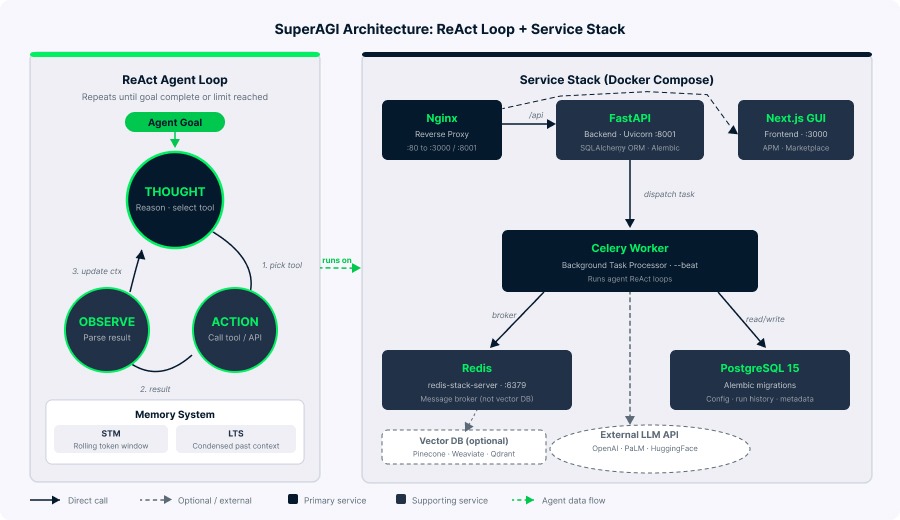
SuperAGI-Architektur mit ReAct-Agentenschleife. Bild: Autor.
Bevor du startest, installiere Docker Desktop, Git und besorge dir Zugang zu mindestens einem unterstützten LLM-Provider (z. B. einen OpenAI-API-Schlüssel). Rechne damit, dass der Stack ca. 3 bis 4 GB RAM nutzt. Unter Windows brauchst du zusätzlich WSL2.
Docker ist die empfohlene und zuverlässigste Installationsmethode. Der Prozess umfasst wenige klare Schritte.
So gehst du vor:
# Repository klonen
git clone https://github.com/TransformerOptimus/SuperAGI.git

# In das Projektverzeichnis wechseln
cd SuperAGI

# Konfigurationsvorlage kopieren
cp config_template.yaml config.yaml
Öffne config.yaml in einem Editor und konfiguriere deinen LLM-Provider. Für OpenAI setze OPENAI_API_KEY. Trage Schlüssel ohne Anführungszeichen oder Leerzeichen ein:
# LLM-Provider (wähle einen oder mehrere)
OPENAI_API_KEY: sk-your-openai-key-here
# PALM_API_KEY: your-palm-key-here
# HUGGING_FACE_API_KEY: your-hf-key-here

# Optional: für Google Search Tool
GOOGLE_API_KEY: your-google-key
SEARCH_ENGINE_ID: your-cse-id

# Optional: für Pinecone Vektor-DB
PINECONE_API_KEY: your-pinecone-keyBaue und starte nun die Container:
# Alle Services bauen und starten
docker compose -f docker-compose.yaml up --build
Der Erstbuild dauert ca. 10 bis 15 Minuten. Wenn alle sechs Container laufen (backend, celery, gui, redis, postgres und nginx), öffne http://localhost:3000 im Browser (der Standardport für die GUI über Nginx laut Compose-Datei).

SuperAGI-Container wurden erfolgreich gebaut. Bild: Autor.
Prüfe mit docker compose ps , ob alle sechs Container gelistet sind. Navigiere dann zu localhost:3000, gehe zu Settings und prüfe, ob deine API-Schlüssel erkannt wurden.
Im offiziellen Repository sind einige bekannte Probleme dokumentiert. Die häufigsten und ihre Lösungen:
Docker-Daemon läuft nicht: Stelle sicher, dass Docker Desktop aktiv ist, bevor du Compose-Befehle ausführst.
Celery-Fehler "Unable to load application": Prüfe, dass die Datei exakt config.yaml heißt und nicht config_template.yaml, dann neu bauen mit docker compose down && docker compose up --build.
Verschlüsselungs-Schlüssel Fehler: Wenn erscheint ValueError: Encryption key must be 32 bytes long, stelle sicher, dass ENCRYPTION_KEY in config.yaml genau 32 Zeichen hat und in Anführungszeichen steht:
ENCRYPTION_KEY: "abcdefghijklmnopqrstuvwxyz123456"
JWT_SECRET_KEY: "your-jwt-secret-key-change-this"
JavaScript heap out of memory (GUI-Container): Wenn der GUI-Build fehlschlägt, braucht der Next.js-Container mehr Speicher. Füge dies dem gui Service in docker-compose.yaml hinzu:
gui:
  environment:
    NODE_OPTIONS: "--max-old-space-size=1024"
  deploy:
    resources:
      limits:
        memory: 1g
Port 80 permission denied (Windows): Windows benötigt Admin-Rechte für Port 80. Ändere das Nginx-Port-Mapping in docker-compose.yaml:
nginx:
  ports:
    - "8080:80"  # Zugriff stattdessen über localhost:8080
Redis-URL-Formatfehler: Wenn ValueError: invalid literal for int() im Zusammenhang mit Redis erscheint, entferne das Präfix redis:// aus REDIS_URL in config.yaml:
REDIS_URL: "redis:6379" # Nicht redis://redis:6379/0Backend-Container im Neustart-Loop: Wenn das Backend ohne Fehlermeldung restartet, fehlt evtl. der Startbefehl. Prüfe, dass docker-compose.yaml einen korrekten Entrypoint enthält.
Portkonflikte: Wenn Port 3000 oder 8080 belegt ist, passe die Port-Mappings in docker-compose.yaml an.
Für GPU-beschleunigte lokale LLMs (seit v0.0.14) nutze die separate Compose-Datei:
docker compose -f docker-compose-gpu.yml up --buildDafür brauchst du eine NVIDIA-GPU mit NVIDIA Container Toolkit für Docker-GPU-Runtime.
Diese Methode ist nicht offiziell empfohlen, funktioniert aber für Entwicklung und Debugging. Backend und Frontend werden separat eingerichtet.
# Klonen und Verzeichnis betreten
git clone https://github.com/TransformerOptimus/SuperAGI.git
cd SuperAGI

# Virtuelle Umgebung erstellen und aktivieren
pip install virtualenv
virtualenv venv
source venv/bin/activate  # Windows: venv\Scripts\activate

# Python-Abhängigkeiten installieren
pip install -r requirements.txt

# Config kopieren und bearbeiten
cp config_template.yaml config.yaml
# config.yaml bearbeiten: POSTGRES_URL auf localhost setzen, REDIS_URL auf localhost:6379

# Backend starten
./run.sh  # Windows: .\run.bat
Beachte, dass die Python-Abhängigkeiten auf ältere Versionen gepinnt sind (openai==0.27.7, FastAPI==0.95.2), was in modernen Umgebungen zu Konflikten führen kann. Isolierung per virtueller Umgebung ist essenziell.
Für das Frontend gehe nach ./gui und starte npm install && npm run dev. Du musst eine PostgreSQL-Datenbank namens super_agi_main mit User superagi und Passwort password manuell erstellen. Redis muss separat laufen.
Nachdem SuperAGI läuft, erstellen wir deinen ersten Agenten.
Wechsle in der GUI zum Tab Agents und klicke auf "Create Agent". Im Provisionierungsdialog gibst du u. a. Name, Beschreibung, Ziele (Textstrings für die Aufgaben), Anweisungen, Einschränkungen, zugewiesene Tools, das LLM-Modell und ein Max-Iterations-Limit an.
Das Iterationslimit ist dein wichtigster Hebel für Kosten und Sicherheit. Jede Iteration triggert mindestens einen LLM-Call, und komplexe Agenten verbrauchen schnell Tokens. Starte niedrig (10 bis 15) und erhöhe, sobald du das Verhalten einschätzen kannst.
Es gibt zwei Modi. "God Mode" lässt den Agenten frei ausführen. Im eingeschränkten Modus pausiert er vor kritischen Aktionen und benötigt deine Freigabe in der Action Console. Zum Einstieg ist der eingeschränkte Modus eine gute Praxis.
Nach der Konfiguration kannst du den Agenten starten und in Echtzeit verfolgen.
Klicke auf "Create and Run". Der Activity Feed zeigt dir live die Überlegungen, Tool-Auswahlen und Ausgaben. Du kannst Agenten jederzeit pausieren, fortsetzen oder stoppen. Das APM-Dashboard, wie erwähnt, aggregiert Metriken über alle Agenten und Runs für den Überblick.
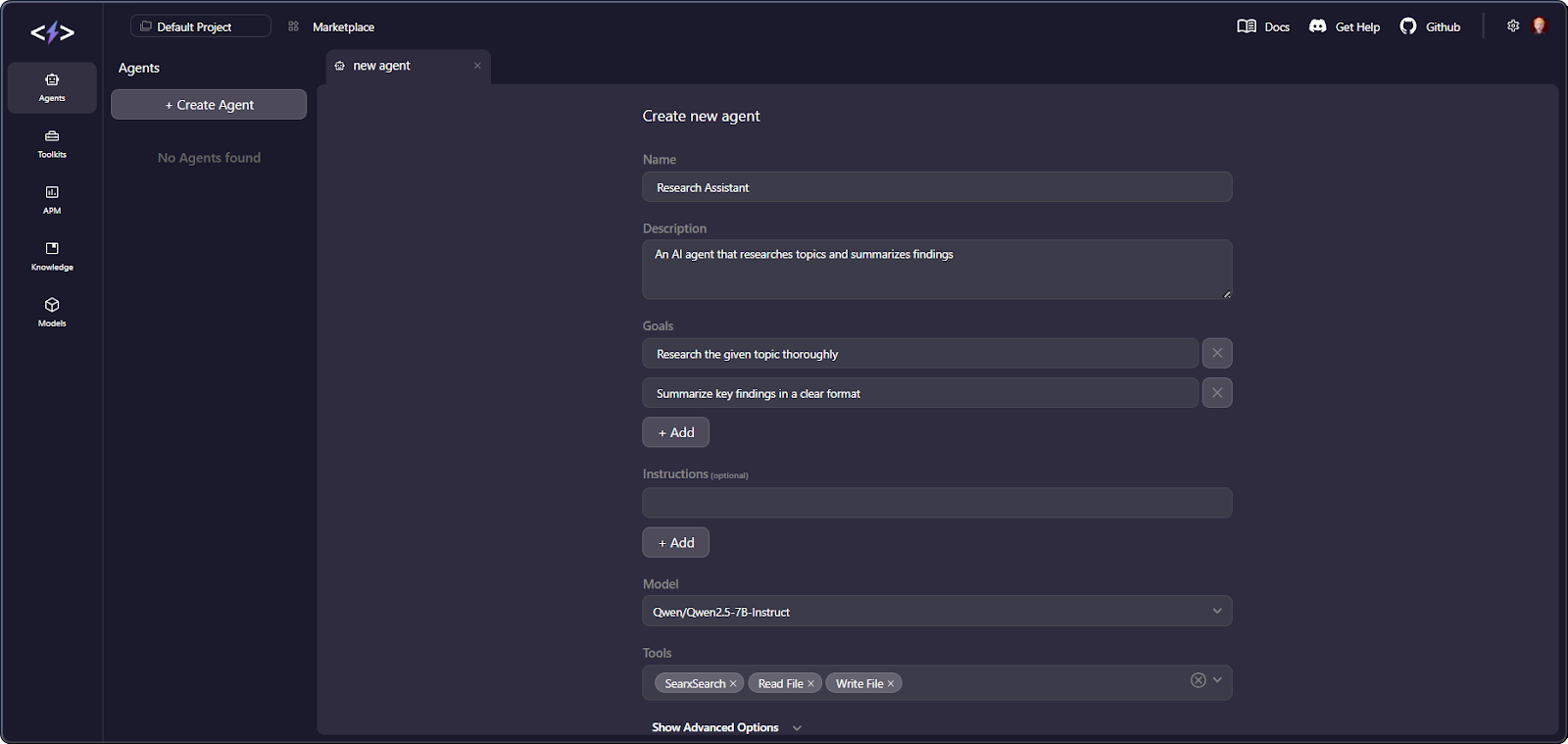
Einen neuen Agenten in der SuperAGI-Oberfläche erstellen. Bild: Autor.
Wenn du lieber mit Code arbeitest als mit der GUI, bist du ebenfalls versorgt.
SuperAGI bietet Python- und Node.js-SDKs, die dieselben Agenten-CRUD-Operationen wie die GUI bereitstellen (Beispiele findest du in der offiziellen Doku).
Tools sind die Schnittstelle der Agenten zur Außenwelt. Du weist sie bei der Agentenerstellung zu, und das LLM entscheidet zur Laufzeit über deren Einsatz.
SuperAGI liefert solide Built-in-Tools und erlaubt eigene Erweiterungen. Das bekommst du out of the box.
Hier eine Zusammenfassung der wichtigsten integrierten Toolkits:
|
Toolkit |
Beschreibung |
API-Schlüssel erforderlich? |
|
Google Search |
Websuche über die Google Custom Search API |
Ja |
|
DuckDuckGo |
Datenschutzfreundliche Websuche |
Nein |
|
Coding Toolkit |
WriteCode, WriteSpec, WriteTest, ImproveCode |
Nein |
|
File Manager |
Dateien lesen, schreiben, anhängen, löschen |
Nein |
|
Web Scraper |
Daten von Webseiten extrahieren |
Nein |
|
GitHub |
Repository-Suche, Dateioperationen, Pull Requests |
Ja |
|
Jira |
Issue-Management (CRUD) |
Ja |
|
|
E-Mails mit Anhängen senden |
Ja |
|
DALL-E |
Bildgenerierung über OpenAI |
Ja |
|
Knowledge Search |
Semantische Suche über Vektorembeddings |
Nein (benötigt Vektor-DB) |
|
Thinking Tool |
Internes Reasoning mit Langzeitgedächtnis |
Nein |
Über die integrierten Optionen hinaus kannst du eigene Toolkits hinzufügen.
Zur Erstellung eigener Tools installierst du das superagi-tools-Paket, erweiterst BaseTool und BaseToolkit, definierst Input-Schemata mit Pydantic und registrierst das Toolkit über die GitHub-Repo-URL in der GUI. Nach dem Hinzufügen eines Custom-Toolkits neu bauen mit docker compose down && docker compose up --build.
Toolzugriff bringt Risiken mit sich, die du ernst nehmen solltest.
Warnung vor unbeschränktem Zugriff: Ein Agent mit E-Mail- und Webzugriff könnte durch Prompt-Injection zur Datenexfiltration missbraucht werden. Schreibzugriff auf Dateien ohne Sandbox kann zu unbeabsichtigten Änderungen führen. Nutze immer den eingeschränkten Modus und weise nur die Tools zu, die für die jeweiligen Ziele nötig sind.
Das ist ein besonders spannender Vergleich, denn beide Frameworks adressieren denselben Problemraum, haben sich aber deutlich auseinanderentwickelt.
|
Dimension |
SuperAGI |
AutoGPT |
|
GitHub-Community |
Tausende Sterne |
Deutlich größere Community |
|
Letztes Release |
v0.0.14 (Jan 2024) |
Laufende Releases bis 2025 |
|
Wartungsstatus |
Minimale Aktivität seit 2024 |
Aktive Entwicklung |
|
Architektur |
ReAct-Agentenframework |
Blockbasiertes Workflow-Portal |
|
UI |
Eingebautes Web-Dashboard mit APM |
Next.js Drag-and-Drop-Builder |
|
Observability |
Integriertes APM (reifer) |
Dashboard mit Sentry-Integration |
|
LLM-Support |
OpenAI, PaLM 2, HuggingFace, Replicate, lokal |
OpenAI, Anthropic, Groq, Ollama u. a. |
|
Lizenz |
MIT |
Dual (MIT + Polyform Shield) |
Vergleich stand Anfang 2026. Prüfe die Repos für aktuelle Infos.
Der wichtigste Unterschied ist philosophisch. SuperAGI ist ein entwicklerzentriertes Agentenframework: Du definierst Ziele, die Agenten finden die Schritte. AutoGPT hat sich zu einer Low-Code-Workflow-Plattform mit visuellen Blöcken entwickelt. SuperAGI punktet mit reifer Observability über das APM-Dashboard, während AutoGPT eine deutlich größere Community, aktive Entwicklung und breiteren LLM-Support bietet. In offenem Autonomiemodus zeigen beide tendenziell Instabilitäten.
Für neue Projekte ist AutoGPT heute meist die aktiver gepflegte Option. Wenn du saubere Agentenarchitektur studieren oder integriertes APM für Forschung brauchst, bietet SuperAGI weiterhin Lernwert.
Die Einordnung "SuperAGI gleich Framework für autonome Agenten versus LangChain gleich Toolkit für LLM-Anwendungen" trifft zu.
|
Dimension |
SuperAGI |
LangChain |
|
Hauptzweck |
Framework für autonome Agenten |
Toolkit für LLM-Orchestrierung |
|
Abstraktionsebene |
Hoch (agentenzentriert, zielgetrieben) |
Niedriger (kettenzentriert, explizite Flows) |
|
Multi-Agent |
Nativ unterstützt |
Über LangGraph-Erweiterung |
|
Visuelle Oberfläche |
Integrierte Web-UI |
Nein (LangSmith für Monitoring) |
|
Vektor-DB-Support |
3 (Pinecone, Weaviate, Qdrant) |
15+ Integrationen |
|
Dokumentation |
Lücken, oft Source-Reading nötig |
Umfassend mit Beispielen |
|
Installation |
Docker Compose (aufwendiger) |
pip install (leichtgewichtig) |
|
Stabilität in Produktion |
Geringer, experimentell |
Höher, reifer |
Wann was wähhlen: Nutze LangChain, wenn du jede LLM-Interaktion präzise steuern willst, für RAG-Pipelines, Dialoginterfaces oder Dokumentenprozesse. Nutze SuperAGI, wenn Agenten möglichst eigenständig arbeiten sollen, du visuelles Management dem Code vorziehst oder eingebaute Multi-Agent-Unterstützung mit GUI willst.
LangChain und LangGraph haben im Oktober 2025 die Version 1.0 erreicht; LangGraph bietet produktionsreife, graphbasierte Agentenorchestrierung mit zustandsbehafteten Workflows und tiefer Observability via LangSmith. Für neue Produktivprojekte ist LangGraph meist der reifere Weg.
Hier spielt SuperAGI seine Stärken aus – basierend auf Dokus und Community-Beispielen.
Das Projekt steckt fest. Das letzte getaggte Release (v0.0.14) kam im Januar 2024. Der letzte Commit auf main war ein Security-Patch im Januar 2025. Nach 2023 ist die Entwicklung stark eingebrochen, wenige neue Features sind sichtbar. Viele Issues bleiben unbeantwortet.
Halluzinationsrisiken von LLMs verstärken sich in Agentenschleifen. Treffen Agenten autonom Entscheidungen auf Basis von LLM-Ausgaben, können halluzinierte Tool-Parameter oder erfundene Fakten reale Aktionen auslösen. Mehrstufige Agenten mit zehn Zyklen verbrauchen deutlich mehr Tokens als eine lineare Ausführung – Kosten und Fehlerrisiko steigen.
Agenten bleiben häufig hängen. Mehrere GitHub-Issues berichten, dass Agenten längere Zeit im Status "Thinking" verharren. Das Iterationslimit setzt zwar einen Hard Stop, aber bis dahin können erhebliche Ressourcen verbraucht werden.
Lücken in der Dokumentation. Bereits bevor Seiten während des kommerziellen Pivots offline gingen, war die Doku weniger umfassend als bei Wettbewerbern wie LangChain. Oft ist Source-Reading nötig.
Token-Kosten steigen schnell. Jeder Schritt in der ReAct-Schleife benötigt mindestens einen LLM-Call. Je nach Komplexität summiert sich das schneller als bei einfacheren Chains.
Das Unternehmen hat gepivotet. Wie erwähnt, fokussiert sich die Firma auf ein SaaS-Produkt. Die Website superagi.com stellt das Open-Source-Projekt nicht mehr prominent dar, einige Doku-Seiten liefern 404.
Bei Security zeigt SuperAGI sein Alter. Agentische Systeme verstärken die Wirkung von Schwachstellen, daher wiegen diese Punkte schwerer als in klassischen Apps. Das solltest du vor dem Einsatz wissen.
API-Schlüssel werden im Klartext in config.yaml gespeichert – ohne Verschlüsselung, Vault-Integration oder Rotation. Die Felder ENCRYPTION_KEY und JWT_SECRET_KEY kommen mit unsicheren Platzhaltern, die du vor jeder Umgebung außer lokal ändern musst.
Docker-Container bieten grundlegende Prozessisolation, aber keine fortgeschrittene Sandbox. Agenten haben unbeschränkten Netzwerkzugriff und können ohne Kontrolle auf das Dateisystem schreiben. Für sicherere Deployments empfiehlt NVIDIAs Sandbox-Leitfaden u. a. die Einschränkung von Netzwerkzugriff und Dateischreiben – beides implementiert SuperAGI nicht.
Mehrere Schwachstellen mit hoher Kritikalität (u. a. Remote Code Execution und Konfigurationsleaks) wurden öffentlich gemeldet und blieben aufgrund der Inaktivität ungepatcht. Berichte sind auf Hunter, einer Plattform für Vulnerability-Disclosure, dokumentiert. Weitere Themen wie SSRF, beliebige Dateischreibvorgänge und CORS-Fehlkonfigurationen wurden ebenfalls gemeldet.
Wenn du auf SuperAGI setzt, prüfe Community-Forks auf Patches und auditiere jeden Fork vor dem Einsatz.
Prompt-Injection-Angriffe sind besonders gefährlich, wenn Agenten reale Aktionen ausführen können. SuperAGI ist sowohl für direkte als auch für indirekte Prompt-Injection anfällig; bösartige Anweisungen in gescrapten Webseiten können das Verhalten übernehmen. Behandle alle untrusted Tool-Ausgaben (vor allem Webinhalte) als potenzielle Angriffsfläche.
SuperAGI hat keine dokumentierten Gegenmaßnahmen jenseits der manuellen Freigaben in der Action Console. Nutze daher immer den eingeschränkten Modus.
Wenn du SuperAGI über lokale Tests hinaus einsetzt, befolge mindestens: alle Default-Secrets ersetzen, hinter Authentifizierung betreiben (VPN oder Reverse Proxy), eingeschränkten Modus nutzen und nur notwendige Tools zuweisen.
Auf Basis von Wartung und Security aktuell: nein. Es erfüllt gängige Kriterien für Produktionsreife nicht. SuperAGI selbst räumt das ein: Das GitHub-README sagt ausdrücklich, das Projekt sei "under active development and may still have issues".
Die Langfassung ist nuancierter: Die Vor-1.0-Version (v0.0.14) signalisiert Experimentstatus. Die Entwicklung zeigte Mitte 2023 einen starken Peak, danach minimale Aktivität. Mehrere Sicherheitslücken wurden gemeldet, mit begrenzter öffentlicher Reaktion. Durch den Unternehmens-Pivot gibt es keine sichtbare Roadmap für neue Investitionen ins Open-Source-Framework.
Das APM-Dashboard ist ein echter Lichtblick. Es ist reifer als vieles, was Wettbewerber out of the box liefern, und bleibt ein Differenzierungsmerkmal für Teams in der Agentenforschung.
SuperAGI war früh und hat Impulse für das Agenten-Ökosystem gesetzt: integriertes APM, Tool-Marktplatz und GUI-first-Management.
Für 2026 gilt aber: Das Projekt ist ins Stocken geraten. Das Unternehmen ist gepivotet, Sicherheitslücken sind offen, neue Entwicklung ist nicht sichtbar. Für Produktion sind aktiv gepflegte Alternativen wie LangGraph, CrewAI und Microsoft Agent Framework die bessere Wahl.
Als nächsten Schritt empfehlen wir unseren Kurs Introduction to AI Agents oder das Tutorial zum Aufbau lokaler KI mit Docker und n8n.
Lernen mit DataCamp
Kurs
Kurs
Kurs
Blog
Blog
Hesam Sheikh Hassani
15 Min.
Blog
Nathaniel Taylor-Leach
4 Min.
Tutorial
Laiba Siddiqui
6 Min.