Cursus
Construire des API en Python
13 h
Dans ce guide, vous allez découvrir ce qu'est l'Universal Commerce Protocol (UCP), pour qui il a été conçu, pourquoi un nouveau standard du commerce est nécessaire et comment son architecture fonctionne.
Vous suivrez également un tutoriel pas à pas pour configurer votre propre serveur d'exemple UCP, explorer son profil de découverte, créer une session de paiement et exécuter localement un parcours complet.
Vous obtiendrez ainsi à la fois une compréhension claire du protocole et un point de départ concret pour tester UCP dans une implémentation réelle.
L'Universal Commerce Protocol est un standard ouvert qui permet aux agents IA, aux applications, aux entreprises et aux prestataires de paiement de collaborer au sein d'un même parcours d'achat. Plutôt que de développer une intégration sur mesure pour chaque nouveau partenaire, UCP fournit un mode de communication commun.
UCP est conçu pour le shopping piloté par des agents, où l'on découvre et achète des produits via des assistants IA et des interfaces conversationnelles. Il couvre tout le parcours : de la découverte de l'offre à l'initiation du paiement, en passant par la gestion de l'achat de manière structurée.

Source : Google Developers Blog
En clair, UCP agit comme un langage commun pour le commerce. Une entreprise publie ce qu'elle prend en charge, et un agent peut lire ces informations et interagir sans créer d'API spécifique au cas par cas. Shopify le présente comme une infrastructure conçue pour généraliser le commerce piloté par des agents.
UCP est également open source et neutre vis-à-vis des éditeurs. Il est conçu pour fonctionner avec les systèmes de commerce existants et il est compatible avec l'Agent Payments Protocol (AP2) pour des paiements sécurisés pilotés par des agents. Il fonctionne aussi sur différents transports, dont les API REST, la communication agent-à-agent et MCP.
L'UCP s'adresse aux principaux acteurs du commerce digital moderne. Son objectif : leur offrir un langage commun pour collaborer sans multiplier les intégrations sur mesure.
Il est principalement conçu pour :
Ce sont les applications, assistants et surfaces de découverte qui aident les utilisateurs à trouver des produits et à acheter. UCP leur permet de comprendre ce qu'une entreprise prend en charge et d'interagir de manière structurée. Google parle d'une connexion fluide entre les surfaces consommateur et les backends des entreprises pour un shopping sans couture.
UCP aide les entreprises à exposer leurs produits, leurs parcours de paiement et leurs fonctionnalités prises en charge dans un format standard. Elles peuvent ainsi collaborer avec différentes plateformes et agents IA sans développer une intégration spécifique à chacune.
Les prestataires de paiement font aussi partie de l'écosystème UCP. Le protocole est conçu pour prendre en charge différents handlers et justificatifs de paiement, afin de traiter les paiements de façon sécurisée à travers divers systèmes.
UCP étant open source, il s'adresse aussi aux développeurs qui souhaitent l'implémenter, l'étendre ou y contribuer. Le projet UCP invite explicitement entreprises, développeurs et prestataires de paiement à façonner ensemble l'avenir du protocole.
En bref, UCP s'adresse à tous les acteurs du commerce dopé à l'IA : la plateforme qui accompagne l'achat, l'entreprise qui vend, le système de paiement qui traite la transaction et les développeurs qui créent les liaisons entre eux.
Un nouveau standard est requis car la plupart des systèmes actuels ont été pensés pour des sites web et applications mobiles traditionnels, et non pour des assistants IA et des parcours conversationnels.
Ce modèle hérité repose souvent sur des APIs sur mesure et des intégrations uniques, lentes à déployer et peu scalables à grande échelle. UCP apporte une solution en offrant aux entreprises, agents et plateformes un langage commun de communication.
Avec la montée des achats via des outils IA, le commerce doit gérer en direct la découverte de produits, le paiement, les remises et le suivi de commande, le tout dans une même conversation.
UCP est conçu pour ce nouveau style d'achat, plus interactif et réparti sur plusieurs surfaces numériques.
Il répond aussi à la fragmentation actuelle de l'écosystème. Entreprises, prestataires de paiement et plateformes utilisent des systèmes différents. UCP les rapproche autour d'un standard commun, évitant de recréer sans cesse les mêmes intégrations.
En un mot, UCP est nécessaire car les outils historiques n'ont pas été pensés pour le shopping piloté par l'IA. Il fournit une base plus moderne et flexible, adaptée à la façon dont les clients vont découvrir et acheter des produits demain.
L'Universal Commerce Protocol (UCP) est un système modulaire pour le commerce agentique. Il offre aux entreprises, agents IA et prestataires de paiement un cadre commun pour gérer le parcours d'achat, de la découverte au paiement et au-delà.
Au lieu de développer une intégration sur mesure pour chaque plateforme, UCP permet à une entreprise de publier ce qu'elle prend en charge, afin qu'un agent lise ces informations et suive un flux standardisé.
UCP est modulaire et extensible, prend en charge des transports comme REST, MCP et A2A, et s'intègre avec des payment handlers pour permettre aux marchands de réutiliser plus facilement leurs configurations de paiement existantes.
Une entreprise compatible UCP expose un profil à /.well-known/ucp. Ce profil présente aux plateformes et aux agents ce que l'entreprise prend en charge avant toute transaction : capacités disponibles et endpoints.
Après la découverte, l'agent vérifie les services et capacités proposés. Le lancement initial d'UCP se concentre sur des briques essentielles comme Checkout, Identity Linking et Order Management, qui constituent les blocs de base du protocole.
UCP garde le flux cœur simple, mais les entreprises peuvent ajouter des extensions facultatives si besoin. Celles-ci s'appuient sur les capacités cœur et permettent de proposer des fonctionnalités plus riches sans modifier l'ensemble du protocole.
Une fois les capacités connues, l'agent interagit avec l'entreprise via un transport comme REST, MCP ou A2A. Le même logique métier devient ainsi accessible via APIs, outils IA et systèmes agent-à-agent.
UCP dissocie le flux commerce de la couche paiement. Les entreprises déclarent les payment handlers pris en charge, et le protocole est conçu pour permettre aux marchands de conserver leurs intégrations de paiement existantes au lieu de tout refondre.
UCP est compatible avec l'Agent Payments Protocol (AP2), qui ajoute une couche de sécurité pour les paiements pilotés par des agents. Cela facilite une autorisation plus sûre lorsque l'agent agit au nom de l'utilisateur.
Ce guide présente un flux Universal Commerce Protocol complet à l'aide de l'implémentation de référence Python. Vous allez configurer le serveur marchand d'exemple, charger le catalogue démo d'une fleuriste, découvrir les capacités de l'entreprise, créer une session de paiement, appliquer une remise, puis arrêter le serveur.
Dans cette étape, vous allez installer uv pour la gestion des dépendances Python, puis cloner le UCP Python SDK et le référentiel du serveur d'exemple. Le README du serveur d'exemple suit le même schéma d'installation et précise que le chemin relatif vers le SDK est important pour les exemples.
Comme notre système d'exploitation est Linux, nous allons utiliser la commande suivante pour installer uv. uv est un gestionnaire de paquets et d'environnements Python rapide et fiable. Il remplit un rôle similaire à des outils comme Anaconda, en beaucoup plus léger et rapide.
curl -LsSf https://astral.sh/uv/install.sh | shUne fois l'installation terminée, rechargez votre session de terminal afin que la commande uv soit disponible dans le shell actuel.
source ~/.bashrcCréez ensuite un nouveau dossier nommé sdk. Il contiendra le Universal Commerce Protocol Python SDK une fois cloné depuis GitHub.
mkdir sdk
git clone https://github.com/Universal-Commerce-Protocol/python-sdk.git
sdk/python
Déplacez-vous maintenant dans le répertoire sdk/python où le dépôt du SDK a été cloné.
pushd sdk/python
Une fois dans le répertoire du SDK, installez les dépendances Python requises avec uv sync.
uv sync
Après l'installation des dépendances, revenez au répertoire de travail précédent.
popdClonez à présent le référentiel d'exemples, qui contient le serveur marchand de référence Python utilisé dans ce tutoriel.
git clone https://github.com/Universal-Commerce-Protocol/samples.git
Allez ensuite dans l'exemple de serveur Python au sein du dépôt d'exemples.
cd samples/rest/python/serverEnfin, installez toutes les dépendances Python nécessaires pour exécuter le serveur d'exemple.
uv sync
Le serveur d'exemple est désormais prêt dans votre espace de travail. Il implémente déjà les capacités d'achat cœur d'UCP.
Dans cette étape, vous allez créer un magasin de démonstration local basé sur SQLite pour l'entreprise d'exemple. L'entreprise de ce tutoriel est une fleuriste ; la commande ci-dessous charge le catalogue de produits et la base de transactions que le serveur utilisera.
Commencez par créer un dossier temporaire qui contiendra les fichiers de base de données.
mkdir /tmp/ucp_testExécutez ensuite le script d'import pour créer et alimenter les bases produits et transactions.
uv run import_csv.py \
  --products_db_path=/tmp/ucp_test/products.db \
  --transactions_db_path=/tmp/ucp_test/transactions.db \
  --data_dir=../test_data/flower_shop
Cette commande effectue les actions suivantes :
--products_db_path crée la base du catalogue produits.--transactions_db_path crée la base des transactions utilisée pour l'état du checkout.--data_dir=../test_data/flower_shop pointe vers les données d'exemple de la fleuriste incluses dans le dépôt.
Une fois cette étape terminée, vos données de démo locales sont prêtes et le serveur peut les utiliser.
Dans cette étape, vous allez démarrer le serveur UCP d'exemple. Il utilisera les bases produits et transactions que vous avez créées et exposera les APIs UCP de shopping sur le port 8182.
Exécutez la commande suivante pour lancer le serveur en arrière-plan.
uv run server.py \
  --products_db_path=/tmp/ucp_test/products.db \
  --transactions_db_path=/tmp/ucp_test/transactions.db \
  --port=8182 &
SERVER_PID=$!
Cette commande effectue les actions suivantes :
uv run server.py lance le serveur Python d'exemple.--products_db_path connecte le serveur à la base produits.--transactions_db_path connecte le serveur à la base transactions.--port=8182 indique d'utiliser le port 8182.SERVER_PID=$! enregistre l'ID du processus pour pouvoir l'arrêter plus tard. Le serveur entreprise est maintenant en cours d'exécution et prêt à recevoir des requêtes d'un agent.
Dans cette étape, vous allez interroger l'endpoint de découverte UCP. Chaque entreprise compatible UCP publie un document de découverte à /.well-known/ucp, qui permet aux agents de comprendre ce qui est pris en charge avant toute requête.
Commencez par enregistrer l'URL du serveur dans une variable pour rendre les commandes suivantes plus lisibles.
export SERVER_URL=http://localhost:8182Récupérez maintenant le document de découverte UCP depuis le serveur.
curl -s $SERVER_URL/.well-known/ucp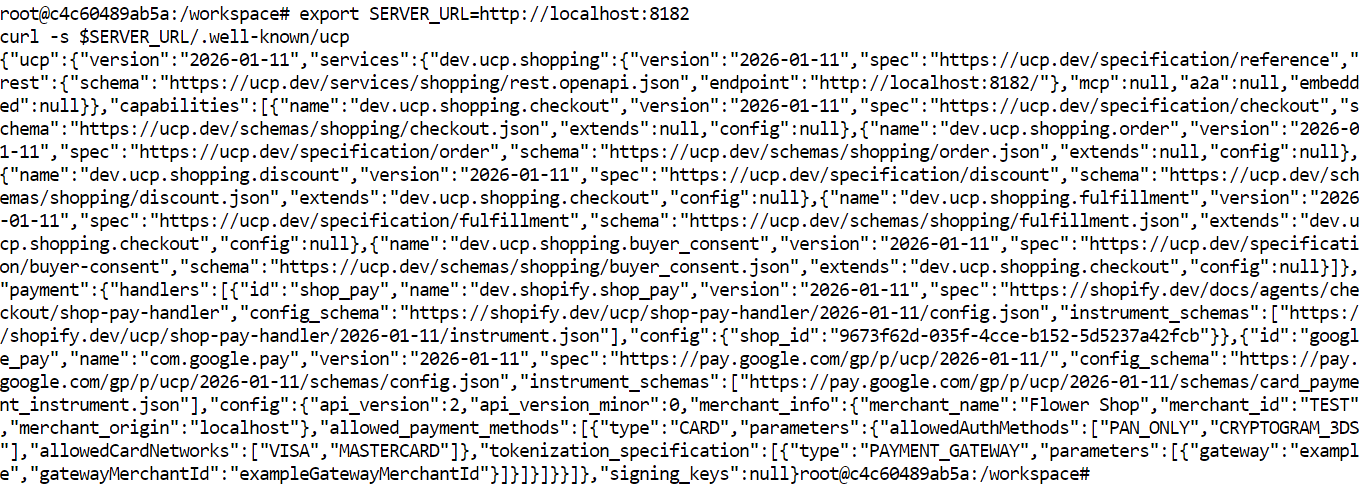
Cette réponse indique à l'agent :
Cette étape de découverte est essentielle : elle évite les intégrations figées et sur mesure. L'agent inspecte d'abord le serveur puis décide comment interagir.
Dans cette étape, vous allez créer une nouvelle session de checkout via la capacité de paiement d'UCP. C'est le moment où l'agent envoie le produit sélectionné, les informations de l'acheteur et la structure de paiement au serveur.
Avant d'envoyer la requête, générez les en-têtes requis. Ils facilitent le traçage, l'idempotence et la validation de signature.
export REQUEST_ID=$(uuidgen 2>/dev/null || cat /proc/sys/kernel/random/uuid)
export IDEMPOTENCY_KEY=$(uuidgen 2>/dev/null || cat /proc/sys/kernel/random/uuid)
export REQUEST_SIGNATURE="dev"
Ces commandes :
REQUEST_ID crée un identifiant unique pour la requête.IDEMPOTENCY_KEY garantissent que la même requête n'est pas traitée deux fois en cas de retry.REQUEST_SIGNATURE fournit l'en-tête de signature requis. En démo locale, "dev" peut être utilisé si la validation stricte n'est pas appliquée.Envoyez maintenant la requête de checkout au serveur.
curl -X POST "$SERVER_URL/checkout-sessions" \
  -H "Content-Type: application/json" \
  -H "UCP-Agent: profile=\"https://agent.example/profile\"" \
  -H "request-id: $REQUEST_ID" \
  -H "idempotency-key: $IDEMPOTENCY_KEY" \
  -H "request-signature: $REQUEST_SIGNATURE" \
  -d '{
    "line_items": [
      { "item": { "id": "bouquet_roses", "title": "Red Rose" }, "quantity": 1 }
    ],
    "buyer": { "full_name": "John Doe", "email": "john.doe@example.com" },
    "currency": "USD",
    "payment": { "handlers": [], "instruments": [] }
  }'
Cette requête inclut :
line_items pour définir l'achat,item.id pour identifier le produit,item.title pour un libellé lisible,quantity pour la quantité,buyer pour les coordonnées client,currency pour la devise,payment pour la structure de paiement requise.La réponse renverra un objet de session de checkout : nouvel ID de checkout, IDs des lignes, totaux, informations acheteur et statut de checkout.
Dans cette étape, vous allez mettre à jour la session existante et appliquer un code promo. Les remises dans UCP sont implémentées comme une extension de la capacité checkout ; elles sont donc ajoutées dans la requête de mise à jour du checkout.
Commencez par enregistrer l'ID réel du checkout et l'ID de ligne renvoyés par la réponse précédente.
export CHECKOUT_ID=5dd08e18-c9c1-4fa1-a0d1-885ca81cda29
export LINE_ITEM_ID=ed72ebe6-2484-4e7b-afc8-a8ff5c8f430e
Générez ensuite un nouveau request ID et une nouvelle clé d'idempotence pour cette mise à jour.
export REQUEST_ID=$(uuidgen 2>/dev/null || cat /proc/sys/kernel/random/uuid)
export IDEMPOTENCY_KEY=$(uuidgen 2>/dev/null || cat /proc/sys/kernel/random/uuid)
export REQUEST_SIGNATURE="dev"
Envoyez à présent la requête de mise à jour avec le code promotionnel.
curl -X PUT "$SERVER_URL/checkout-sessions/$CHECKOUT_ID" \
  -H "Content-Type: application/json" \
  -H "UCP-Agent: profile=\"https://agent.example/profile\"" \
  -H "request-id: $REQUEST_ID" \
  -H "idempotency-key: $IDEMPOTENCY_KEY" \
  -H "request-signature: $REQUEST_SIGNATURE" \
  -d "{
    \"id\": \"$CHECKOUT_ID\",
    \"line_items\": [
      {
        \"id\": \"$LINE_ITEM_ID\",
        \"item\": { \"id\": \"bouquet_roses\", \"title\": \"Red Rose\" },
        \"quantity\": 1
      }
    ],
    \"buyer\": {
      \"full_name\": \"John Doe\",
      \"email\": \"john.doe@example.com\"
    },
    \"currency\": \"USD\",
    \"discounts\": {
      \"codes\": [\"10OFF\"]
    },
    \"payment\": {
      \"handlers\": [],
      \"instruments\": []
    }
  }"
Cette requête :
PUT,discounts,10OFF.
La réponse doit renvoyer l'objet checkout mis à jour avec :
Le code promo est valide : vous devriez voir l'évolution des prix dans la réponse.
Dans cette dernière étape, vous allez arrêter le serveur d'exemple lancé plus tôt. Comme vous avez enregistré l'ID de processus au démarrage, vous pouvez le stopper d'une simple commande.
Exécutez la commande suivante pour arrêter le serveur.
kill $SERVER_PIDDe bout en bout, vous avez construit et testé un flux UCP complet sur votre machine locale.
Vous avez :
uv,En résumé, vous avez mis en place une entreprise compatible UCP, interagi avec elle comme un agent, créé un checkout et testé la gestion des mises à jour comme les remises. Vous disposez désormais d'un exemple complet de l'interaction entre une entreprise et un agent via l'Universal Commerce Protocol.
L'Universal Commerce Protocol fournit à l'industrie une base commune pour le commerce piloté par l'IA. Il crée un langage standard pour que les entreprises, agents IA et systèmes de paiement communiquent, afin de faciliter la découverte, le checkout, les mises à jour et les paiements sans devoir recréer des intégrations sur mesure à chaque nouvelle plateforme.
Dans ce guide, vous avez vu ce qu'est UCP, pourquoi il compte, comment son architecture fonctionne et comment exécuter localement un exemple complet de bout en bout. En configurant le serveur d'exemple, en découvrant ses capacités, en créant une session de checkout et en appliquant une remise, vous avez constaté comment UCP structure un workflow de commerce adapté aux agents.
La grande opportunité d'UCP est claire : réduire la fragmentation et renforcer l'interopérabilité, alors que les achats se déroulent de plus en plus via des assistants IA et des interfaces conversationnelles.
Le vrai défi sera toutefois l'adoption. Des entreprises pourront continuer à privilégier des APIs sur mesure, des intégrations REST existantes, des outils basés sur MCP ou d'autres workflows agentiques en place. Pour réussir, UCP devra bénéficier d'un fort soutien de l'écosystème : marchands, plateformes, développeurs et prestataires de paiement.
Meilleurs cours DataCamp
Cursus
Cursus
Cours