
कोर्स
Claude मॉडलों का परिचय
3 घंटा
14.6K
कुछ हफ्ते पहले, मैंने अपने सभी प्रोजेक्ट्स में claude-mem इंस्टॉल किया। तब से, इसने 259 सेशन्स में 6,814 ऑब्ज़र्वेशन्स कैप्चर की हैं, दस अलग-अलग कोडबेस को कवर करते हुए—ये सब मेरे लैपटॉप पर 39 MB के एक SQLite फ़ाइल में है।
इससे पहले, हर Claude Code सेशन बिलकुल शुरुआत से शुरू होता था। मैं नया सेशन खोलता और पहले दस मिनट प्रोजेक्ट स्ट्रक्चर दोबारा समझाने में जाते। वही ऑथेंटिकेशन बग जो हमने एक दिन पहले मिलकर ठीक किया था? Claude को कुछ पता नहीं होता। वह वही फ़ाइलें फिर से पढ़ता, फिर उन्हीं गलत मान्यताओं पर पहुंचता जिन्हें हम पहले ही सुधार चुके होते।
claude-mem एक Claude Code प्लगइन है जो सेशन के दौरान होने वाली चीज़ों को कैप्चर करता है और उन्हें भविष्य के सेशन्स के लिए उपलब्ध कराता है।
इस लेख में, मैं बताऊंगा कि यह अंदर से कैसे काम करता है, इसे बिना आम गलतियों में फंसे कैसे इंस्टॉल करें, अपने बजट के अनुरूप कैसे ट्यून करें, और प्रोडक्शन में चलाने से पहले आपको क्या जानना चाहिए।
claude-mem एक Claude Code प्लगइन है जो:
~/.claude-mem/claude-mem.dbयह एक प्लगइन के रूप में चलता है, MCP सर्वर नहीं।
यह फर्क मायने रखता है: प्लगइन्स सेशन स्टार्ट और हर टूल कॉल जैसे लाइफसाइकल इवेंट्स पर स्वत: फायर होते हैं, जबकि MCP सर्वर तब तक निष्क्रिय रहते हैं जब तक Claude उन्हें कॉल करने का निर्णय न ले।
MCP-आधारित तरीके में, रिट्रीवल तभी होता है जब Claude उसे आवश्यक समझे। claude-mem कैप्चर और इंजेक्ट दोनों करता है—बिना Claude के इसे चुनने की जरूरत के।
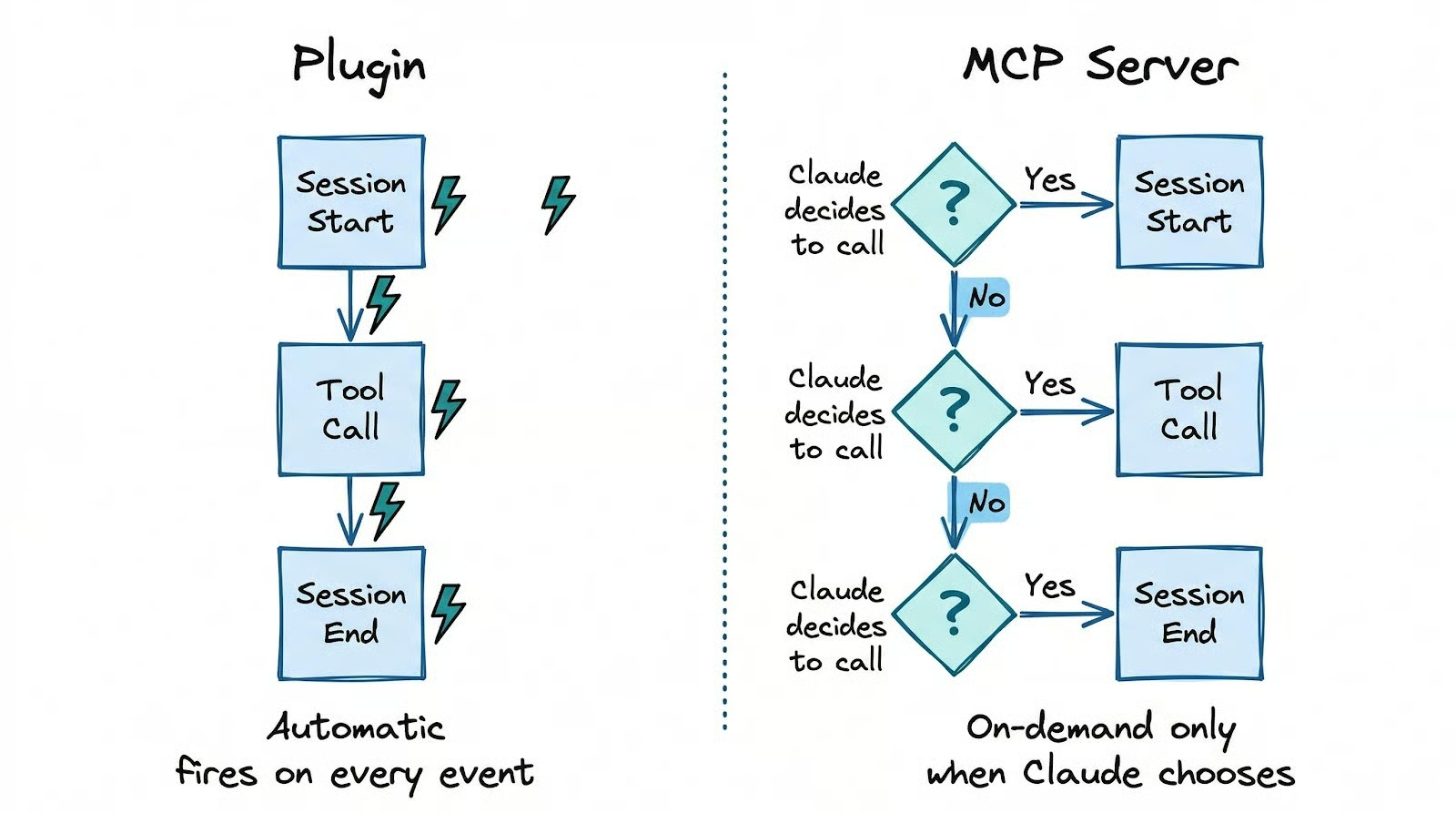
सब कुछ आपकी मशीन पर ही रहता है, और संपीड़न आपके मौजूदा Claude Code ऑथेंटिकेशन पर चलता है, इसलिए कोई अलग API कुंजी या अकाउंट की जरूरत नहीं है।
इसे चलाने के लिए Claude Code सेशन के भीतर दो कमांड्स लगते हैं:
/plugin marketplace add thedotmack/claude-mem
/plugin install claude-mem
इसके बाद Claude Code को रीस्टार्ट करें।
एक आम गलती है npm install -g claude-mem चलाना, जो सिर्फ SDK लाइब्रेरी इंस्टॉल करता है। हुक्स रजिस्टर्ड नहीं होते, वर्कर कभी शुरू नहीं होता, और कुछ काम नहीं करता।
सही सेटअप सिर्फ प्लगइन मार्केटप्लेस वाले पथ से मिलता है। एकमात्र कड़ा पूर्व-आवश्यकता Node.js 18+ है। बाकी सब (Bun, uv, SQLite) पहली रन पर स्वतः इंस्टॉल हो जाते हैं।
पक्का करने के लिए कि इंस्टॉलेशन सच में काम कर रहा है, तीन चीजें जांचें। पहले, curl http://localhost:37777/api/health को {"status":"ok"} लौटाना चाहिए। अगर यह फेल हो, तो बैकग्राउंड वर्कर शुरू नहीं हुआ। सबसे आम वजह Node.js का 18 से नीचे का वर्ज़न है।
दूसरे, देखें कि ~/.claude/hooks.json में claude-mem एंट्रीज़ हैं या नहीं। यदि फ़ाइल में PostToolUse और SessionStart के तहत claude-mem सूचीबद्ध नहीं है, तो हुक्स रजिस्टर्ड नहीं हुए हैं, और वर्कर जिंदा हो या नहीं—कैप्चर नहीं चलेगा।
तीसरे, ब्राउज़र में http://localhost:37777 खोलें और वेब व्यूअर देखें, जो काम करते समय रीयल-टाइम में ऑब्ज़र्वेशन्स दिखाता है।
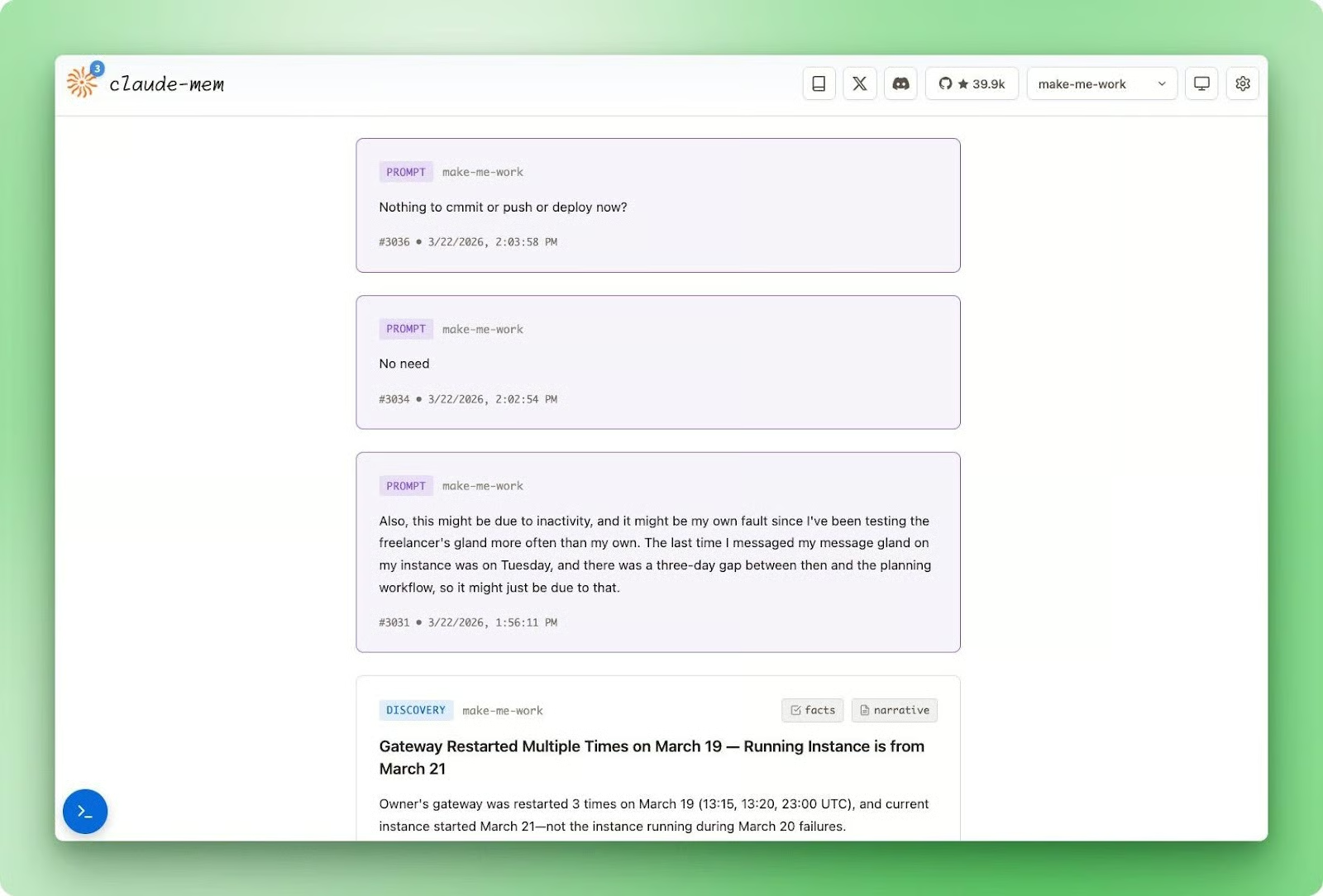
पहला सेशन SessionStart पर कोई इंजेक्टेड कॉन्टेक्स्ट नहीं देता क्योंकि डेटाबेस खाली है, लेकिन ऑब्ज़र्वेशन्स पहली टूल कॉल से जमा होना शुरू हो जाती हैं।
दूसरे सेशन तक, claude-mem के पास इंजेक्ट करने के लिए एक सेशन समरी और ऑब्ज़र्वेशन्स का बैच होता है।
पहले यह वेरिफिकेशन चेकलिस्ट चलाने से आप तीन सेशन्स बाद यह पता चलने से बचते हैं कि कुछ भी कैप्चर नहीं हुआ था। वेब व्यूअर सबसे भरोसेमंद संकेत है: अगर टूल कॉल के बाद ऑब्ज़र्वेशन्स दिख रही हैं, तो सब सही तरह से वायर्ड है।
इंस्टॉलेशन के बाद, claude-mem बैकग्राउंड में पांच लाइफसाइकल हुक्स पर चुपचाप चलता है। हर एक क्या करता है, यह समझने से टूल के बर्ताव का कारण साफ होता है।
ये पांच हुक एक सेशन की प्राकृतिक टाइमलाइन पर मैप होते हैं:
SessionStart डेटाबेस को क्वेरी करता है और हालिया काम का एक संपीड़ित इंडेक्स आपके कॉन्टेक्स्ट विंडो में इंजेक्ट करता हैUserPromptSubmit सेशन को लॉग करता है और आपका प्रॉम्प्ट सेव करता हैPostToolUse हर टूल कॉल के बाद फायर होता है और कच्चा आउटपुट बैकग्राउंड वर्कर को संपीड़न के लिए भेजता हैStop जब आप रुकते हैं या निष्क्रिय होते हैं तो सेशन-स्तरीय सारांश बनाता हैSessionEnd सेशन को पूर्ण के रूप में चिह्नित करता है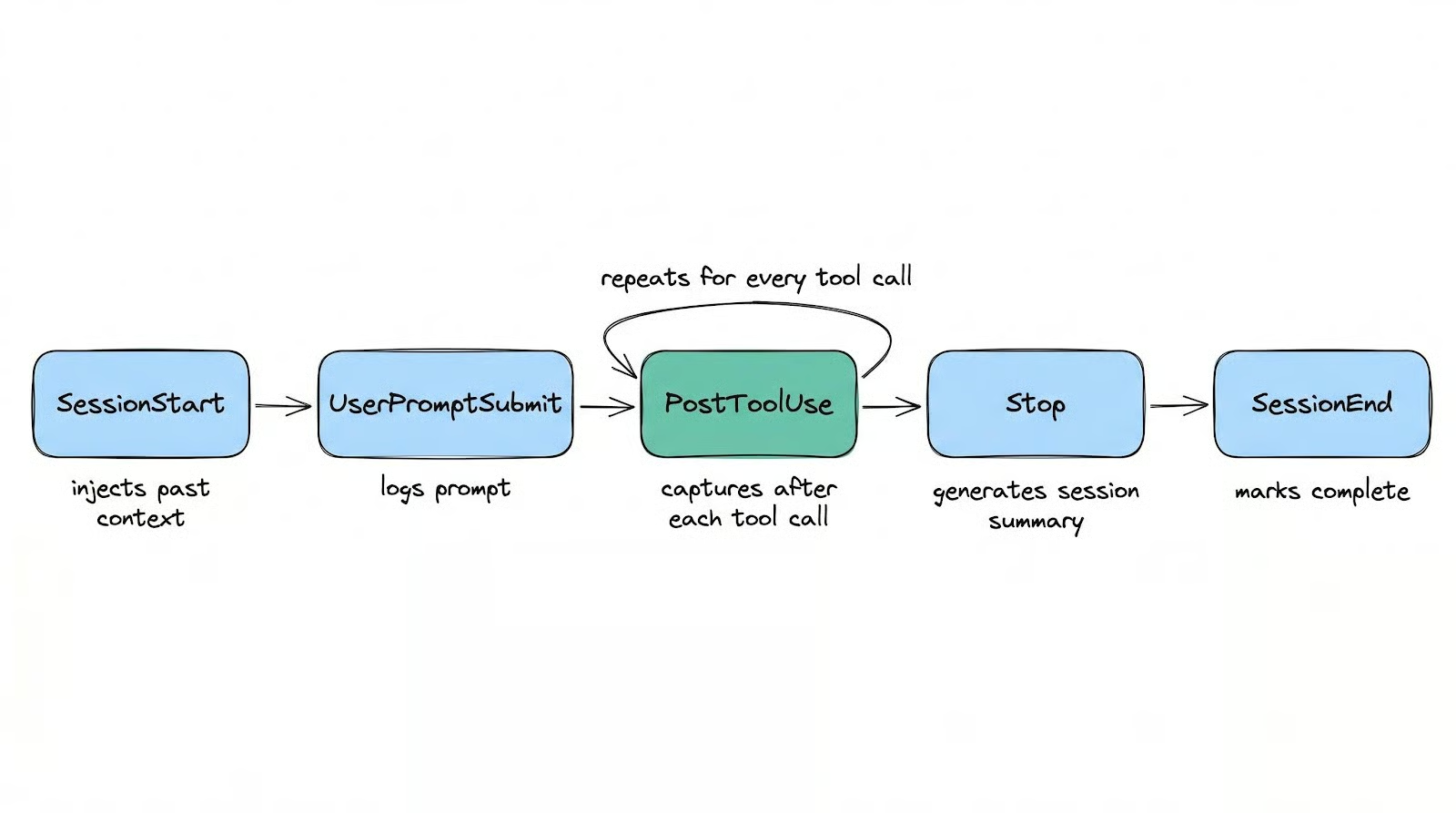
SessionStart यह इंजेक्टेड इंडेक्स सेशन समरीज़, प्रकार के अनुसार समूहित ऑब्ज़र्वेशन शीर्षकों और टाइमस्टैम्प्स से बनाता है: हालिया काम का एक सर्चेबल मानचित्र, जिसे Claude पूरे सेशन में संदर्भित कर सकता है—बिना आपकी किसी कार्रवाई के।
PostToolUse हर टूल कॉल के बाद फायर होता है। यह कच्चा आउटपुट एक नॉन-ब्लॉकिंग HTTP POST (औसतन 8ms) के जरिए बैकग्राउंड वर्कर को भेजता है, और वर्कर Claude Agent SDK का उपयोग करके इसे संरचित ऑब्ज़र्वेशन में संपीड़ित करता है।
उस संरचना का रूप कुछ यूं है:
|
फ़ील्ड |
इसमें क्या होता है |
|
|
|
|
|
संक्षिप्त, सर्चेबल स्ट्रिंग |
|
|
डिस्क्रीट तथ्यों की एक ऐरे (~50 टोकन, लोड करने में सस्ता) |
|
|
गद्य में व्याख्या (~155-500 टोकन, केवल आवश्यकता पर लोड) |
|
|
समानार्थी टैग जैसे how-it-works, problem-solution, gotcha, trade-off |
प्रति-कॉल कैप्चर ही claude-mem को उन टूल्स से अलग करता है जो सेशन के अंत में एकल एआई कॉल से समरी बनाते हैं।
यदि आपका सेशन रिफैक्टर के बीच में क्रैश हो जाए, तो वे टूल्स पिछले पूरे हुए सेशन के बाद से सब कुछ खो देते हैं। claude-mem के पास आखिरी टूल कॉल तक का हर ऑब्ज़र्वेशन रहता है।
Stop हुक कुछ अलग बनाता है: सेशन-स्तरीय समरी, जिसमें request, investigated, learned, completed और next_steps जैसे फ़ील्ड होते हैं। ये Claude को हुए काम का उच्च-स्तरीय नक्शा देते हैं—बिना हर व्यक्तिगत ऑब्ज़र्वेशन लोड किए।
हजारों ऑब्ज़र्वेशन्स स्टोर करना एक बात है। कॉन्टेक्स्ट विंडो में सही वाले लोड करना—वह भी टोकन बर्बाद किए बिना—कुछ और ही चुनौती है।
सीधी-सादी विधि है पिछले संदर्भ को प्रॉम्प्ट में उंडेल देना। claude-mem के दस्तावेज़ इस पर संख्याएँ देते हैं: एक सामान्य भोला लोड 35,000 टोकन कॉन्टेक्स्ट विंडो में भेजता है, जिनमें से लगभग 2,000 ही प्रासंगिक निकलते हैं। यह 6% सिग्नल रेट है।
तीन-स्तरीय रिट्रीवल सिस्टम इसे 80% से ऊपर ले जाता है—Claude को claude-mem के जरिए क्रमिक रूप से कॉन्टेक्स्ट लोड करने देता है:
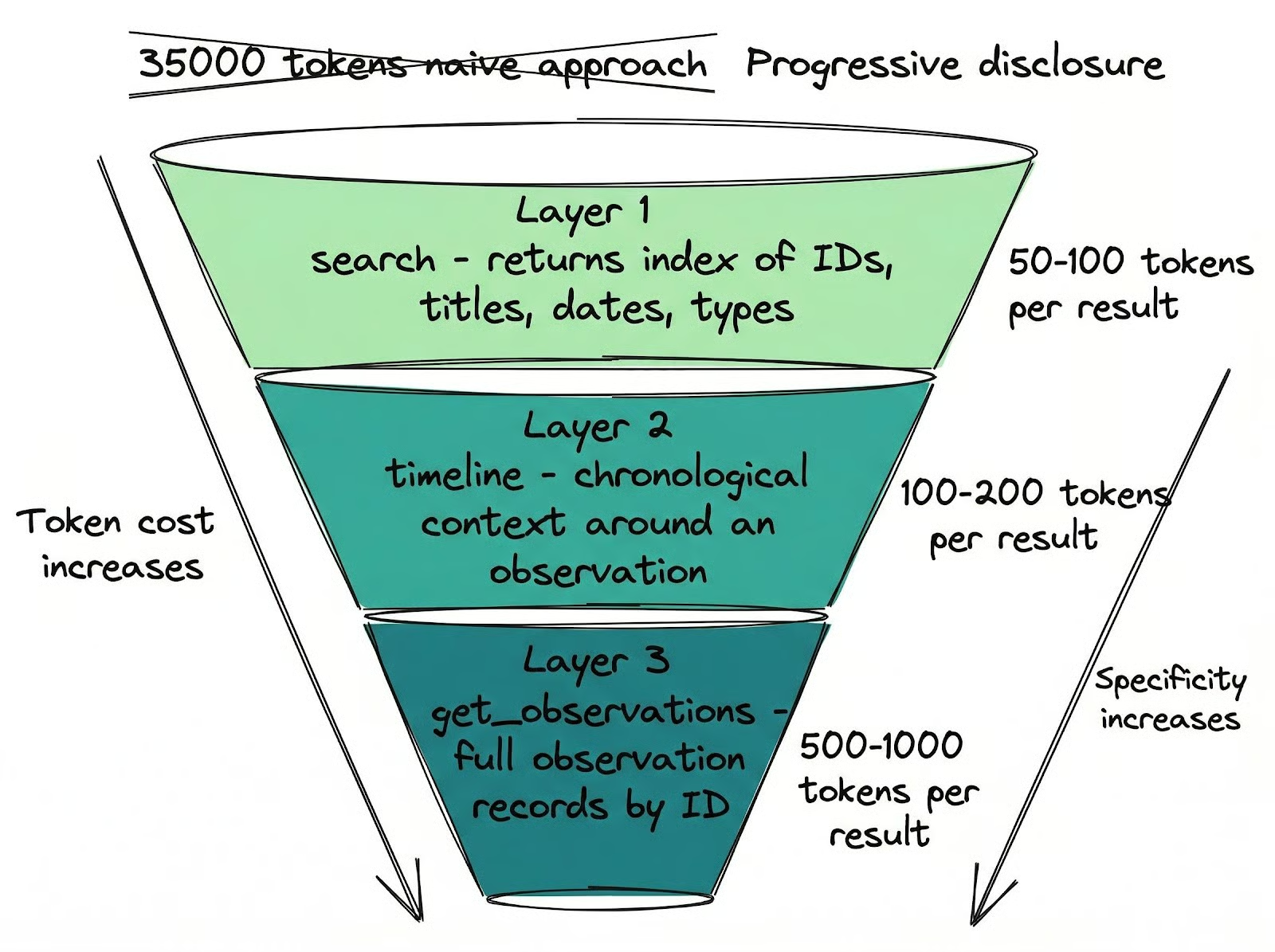
get_observations IDs द्वारा पूरे ऑब्ज़र्वेशन रिकॉर्ड्स बैच में फ़ेच करता है। लागत: प्रति परिणाम 500-1,000 टोकन। सिर्फ वही खींचें जिसकी सच में जरूरत है।यह रिट्रीवल अनुशासन खुद-ब-खुद लागू नहीं हो जाता।
claude-mem एक MCP टूल रजिस्टर करता है जिसका नाम शाब्दिक रूप से __IMPORTANT है—जिसका एकमात्र उद्देश्य Claude को यही तीन-चरणीय पैटर्न अपनाने की याद दिलाना है।
इसके बिना, Claude सस्ते लेयर्स छोड़कर सब कुछ पूरे विवरण में फ़ेच कर लेता है—और पूरी आर्किटेक्चर ध्वस्त हो जाती है। यह तथ्य कि केवल रिट्रीवल अनुशासन लागू कराने के लिए एक नामित टूल जोड़ना पड़ा—आपको यथार्थ चित्र देता है कि सिस्टम को Claude के वास्तविक बर्ताव के इर्द-गिर्द कैसे डिज़ाइन करना पड़ा।
ये रिट्रीवल टूल्स सिर्फ सेशन स्टार्ट पर ही नहीं चलते।
सेशन के दौरान, जब आप Claude से पिछले काम के बारे में कुछ पूछते हैं, तो वह सीधे मेमोरी सर्च करता है।
आप इसे अपने सेशन-पार वर्किंग पैटर्न का विश्लेषण करने, भूली हुई जानकारियाँ ढूंढने ("वह API कुंजी मैंने कहाँ सेव की थी?", "हमने auth फ्लो कैसे इम्प्लीमेंट किया?") या किसी प्रोजेक्ट को फिर से वहीं से उठाने के लिए कह सकते हैं जहाँ आप हफ्तों पहले छोड़ आए थे।
जब आप कई कोडबेस और सेशन्स को संभाल रहे होते हैं, तो आपकी अपनी मेमोरी से विवरण उम्मीद से तेज़ लीक होते हैं। claude-mem उस गैप को भरता है—Claude को हर वो चीज़ उपलब्ध कराकर जो हुई, चाहे आप खुद उसे भूल ही क्यों न गए हों।
तीन हफ्तों बाद, मेरी 61% ऑब्ज़र्वेशन्स का टाइप discovery है। Claude ज़्यादातर यह कैप्चर करता है कि वह कोडबेस के बारे में क्या सीखता है—सिर्फ वह नहीं जो वह बदलता है।
259 सेशन्स में, मेरे पास 1,729 सेशन समरीज़ हैं—औसतन हर सेशन में 6-7। यह मल्टी-सेशन निरंतरता इसलिए संभव है क्योंकि कैप्चर लगातार चलता है, सिर्फ अंत में नहीं।
यही फर्क है—सेशन का सारांश बनाने और सच में उसे याद रखने के बीच।
claude-mem की सभी सेटिंग्स वेब UI http://localhost:37777 के Settings टैब में उपलब्ध हैं। आप इन्हें environment variables के रूप में भी सेट कर सकते हैं या सीधे ~/.claude-mem/settings.json एडिट कर सकते हैं।
पहली महत्वपूर्ण सेटिंग है CLAUDE_MEM_MODEL, जो तय करती है कि संपीड़न कौन-सा मॉडल संभालेगा। डिफ़ॉल्ट है haiku, जो Claude के मॉडल लाइनअप में सबसे सस्ता विकल्प है।
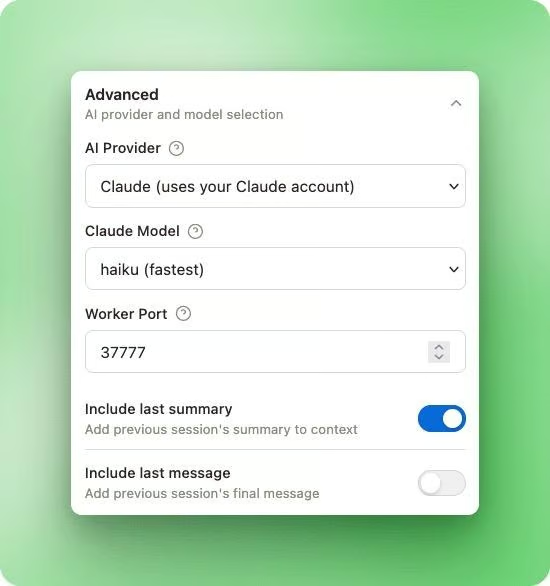
आप संपीड़न प्रोवाइडर को पूरी तरह बदल भी सकते हैं CLAUDE_MEM_PROVIDER से—यह claude, gemini या openrouter स्वीकार करता है।
Gemini Flash Lite या xiaomi/mimo-v2-flash:free जैसे किसी मुफ्त OpenRouter मॉडल पर संपीड़न चलाने से अतिरिक्त लागत शून्य हो जाती है—आपकी मौजूदा Claude Code सदस्यता से परे नहीं।
मैं इसे haiku पर 30 ऑब्ज़र्वेशन्स प्रति सेशन के साथ चलाता हूँ। लगभग 400 इनपुट टोकन और 150 आउटपुट टोकन प्रति संपीड़न कॉल के हिसाब से, यह प्रति सेशन करीब 16,500 टोकन बनता है। haiku रेट्स पर, भारी उपयोग का एक महीना एक डॉलर से भी बहुत कम बैठता है।
तीन हफ्तों और दस प्रोजेक्ट्स में, संपीड़न गुणवत्ता कोई समस्या नहीं रही है।
दो सेटिंग्स नियंत्रित करती हैं कि सेशन स्टार्ट पर कितना कॉन्टेक्स्ट लोड हो:
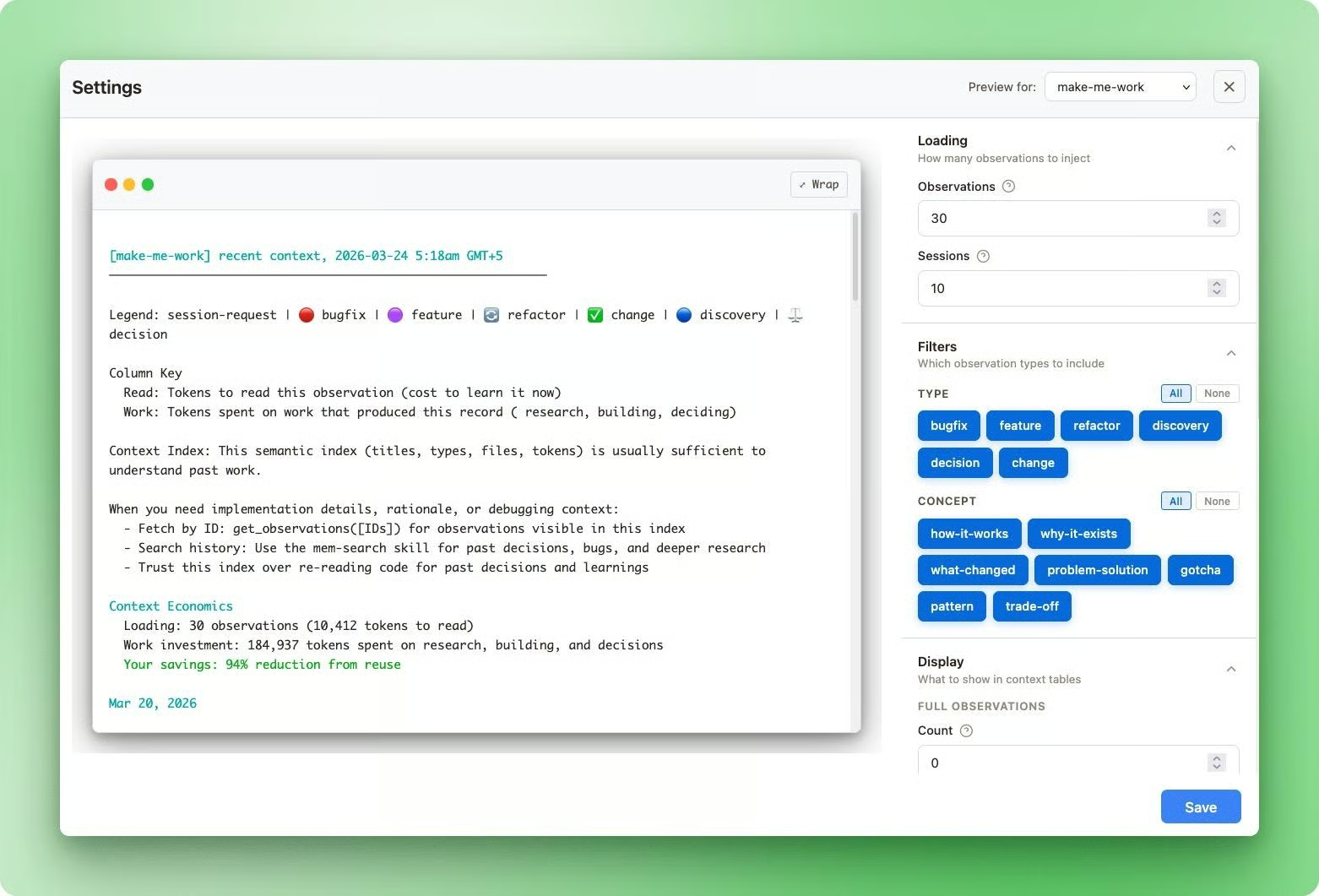
CLAUDE_MEM_CONTEXT_OBSERVATIONS: SessionStart पर इंजेक्ट होने वाली कुल ऑब्ज़र्वेशन संख्या (डिफ़ॉल्ट 50, दायरा 1-200)CLAUDE_MEM_CONTEXT_FULL_COUNT: इनमें से कितनी विस्तृत विवरण के साथ पूर्ण narrative फ़ील्ड दिखाएँ (डिफ़ॉल्ट 5, दायरा 0-20)बाकी में सिर्फ शीर्षक, प्रकार और तिथि दिखती है। सारा कॉन्टेक्स्ट इंजेक्शन उसी प्रोजेक्ट डायरेक्टरी तक सीमित रहता है जिस पर आप काम कर रहे हैं, इसलिए अन्य प्रोजेक्ट्स की ऑब्ज़र्वेशन्स आपका कॉन्टेक्स्ट नहीं भरतीं।
आप वेब UI के जरिए प्रति-प्रोजेक्ट इन काउंट्स को समायोजित कर सकते हैं और ठीक-ठीक देख सकते हैं कि क्या इंजेक्ट होगा।
एक बात अपेक्षित रखें: नए प्रोजेक्ट के पहले हफ्ते में आपका कॉन्टेक्स्ट विंडो सामान्य से तेज़ भर सकता है।
मैंने लगभग उसी शुरुआती चरण में claude-mem हटाने का सोच लिया था क्योंकि सेशन्स पहले से जल्दी कॉन्टेक्स्ट सीमा छू रहे थे।
हो यह रहा था कि claude-mem प्रोजेक्ट को शून्य से सीख रहा था—नई ऑब्ज़र्वेशन्स की उच्च मात्रा रिकॉर्ड कर रहा था—जो सेशन स्टार्ट पर सब इंजेक्ट हो जा रही थीं।
करीब एक हफ्ते बाद, नई खोजों की मात्रा घट गई क्योंकि Claude पहले ही कोडबेस का नक्शा बना चुका था—और सेशन्स, प्लगइन इंस्टॉल करने से पहले की तुलना में, लंबा चलने लगे।
यदि आपको वह शुरुआती ओवरहेड लगे, तो CLAUDE_MEM_CONTEXT_OBSERVATIONS अस्थायी रूप से कम कर दें और शुरुआती लर्निंग पीरियड स्थिर होने पर फिर बढ़ा दें।
CLAUDE_MEM_SKIP_TOOLS आपको विशिष्ट टूल्स को कैप्चर से बाहर रखने देता है।
डिफ़ॉल्ट में पहले से ही TodoWrite, AskUserQuestion और BashTool जैसे उच्च-शोर टूल्स स्किप होते हैं। शायद आपको इसे छूने की जरूरत नहीं होगी—जब तक कोई कस्टम टूल ऐसा आउटपुट न बना रहा हो जिसे आप स्टोर नहीं करना चाहते। यह कॉमा-सेपरेटेड लिस्ट है, इसलिए टूल्स जोड़ना आसान है।
यदि आप API कीज़ या क्रेडेंशियल्स के साथ काम करते हैं, तो उन्हें अपने प्रॉम्प्ट्स में <private> टैग्स में लपेटें—ताकि वह कंटेंट स्टोरेज से बाहर रहे।
claude-mem ऑब्ज़र्वेशन बनाने से पहले इन टैग्स के अंदर की किसी भी चीज़ को हटा देता है।
यह फ़ाइल कंटेंट्स को प्रैक्टिवली स्कैन नहीं करता, इसलिए डिस्क से लोड हुए environment variables जोखिम में नहीं हैं—पर जो भी आप सीधे प्रॉम्प्ट में पेस्ट करते हैं, वह है। <private> टैग का तरीका ऑप्ट-इन सुरक्षा है: आपको इसे याद रखकर इस्तेमाल करना होगा।
Claude Code पहले से मेमोरी फीचर्स के साथ आता है, लेकिन उनमें से कोई भी कॉन्टेक्स्ट स्वतः कैप्चर नहीं करता।
CLAUDE.md फ़ाइलें स्थिर मार्कडाउन हैं जो सेशन स्टार्ट पर लोड होती हैं—प्रोजेक्ट नियमों और वरीयताओं के लिए उपयोगी—पर लगभग 200 लाइनों से आगे पालन घटने लगता है। न सर्च, न रिट्रीवल। आप एक बार निर्देश लिखते हैं और उम्मीद करते हैं कि Claude उनका पालन करेगा।
Auto Memory, Claude Code v2.1.59 में जोड़ा गया, यह तय करने की जिम्मेदारी Claude पर डालता है कि सेशन्स के बीच क्या सेव हो। यह अनस्ट्रक्चर्ड नोट्स ~/.claude/projects/<project>/memory/ में सेव करता है और स्टार्टअप पर MEMORY.md की पहली 200 लाइनों को लोड करता है।
व्यवहार में, जो सेव होता है, वह हमेशा आपकी चाहत से मेल नहीं खाता, और बाद में उसे सर्च या फ़िल्टर करने का कोई तरीका नहीं है। आपके पास निर्णयों की एक टेक्स्ट फ़ाइल रह जाती है—जिन पर Claude ध्यान दे भी सकता है, नहीं भी।
बिल्ट-इन विकल्पों को /compact कमांड पूरा करता है—जो बातचीत का सारांश बनाकर कॉन्टेक्स्ट स्पेस खाली करता है। CLAUDE.md फ़ाइलें इसलिए बच जाती हैं क्योंकि वे डिस्क से फिर पढ़ी जाती हैं, पर बाकी सब गायब हो जाता है: संवाद में दिए निर्देश, सेशन के बीच का कॉन्टेक्स्ट, वह सब जो आपने कहा पर कहीं लिखा नहीं।
claude-mem उस गैप को भरता है जिसे इनमें से कोई नहीं भरता: संरचित संपीड़न के साथ स्वतः, लगातार कैप्चर—और टोकन-सचेत रिट्रीवल। यह इस काम को करने वाला इकलौता प्लगइन भी नहीं है।
|
टूल |
आर्किटेक्चर |
स्टोरेज |
सर्च |
कैप्चर समय |
प्राइसिंग |
क्रॉस-मशीन |
टीम मेमोरी |
|
Claude बिल्ट-इन |
नेटिव |
लोकल मार्कडाउन |
नहीं |
मैनुअल |
मुफ़्त |
git sync के जरिए |
शेयर्ड CLAUDE.md के जरिए |
|
claude-mem |
प्लगइन (हुक्स) |
लोकल SQLite + FTS5 |
FTS5 कीवर्ड |
प्रति टूल कॉल |
मुफ़्त |
नहीं |
नहीं |
|
memsearch |
प्लगइन (हुक्स + स्किल) |
लोकल मार्कडाउन + Milvus |
हाइब्रिड डेंस + BM25 |
सेशन के अंत में |
मुफ़्त |
नहीं |
नहीं |
|
supermemory |
प्लगइन (हुक्स + क्लाउड) |
क्लाउड |
सामान्यार्थक + टेम्पोरल |
सेशन के अंत में |
पेड |
हाँ |
हाँ |
|
mem0 (सेल्फ-होस्टेड) |
MCP सर्वर |
लोकल Qdrant + Ollama |
सामान्यार्थक वेक्टर |
सेशन के अंत में |
मुफ़्त |
नहीं |
नहीं |
memsearch सबसे नज़दीकी मुफ़्त विकल्प है—यदि आप डेटाबेस की जगह मार्कडाउन फ़ाइलें चाहते हैं और बैकग्राउंड प्रोसेस नहीं चलाना चाहते। यह रिट्रीवल को एक आइसोलेटेड सबएजेंट में चलाता है, इसलिए सर्च परिणाम आपके मुख्य कॉन्टेक्स्ट विंडो में नहीं मिलते-जुलते। इसे तब उपयोग करें जब आप सरल सेटअप पसंद करते हों और प्रति-कॉल कैप्चर की जरूरत न हो।
supermemory सही विकल्प है यदि आपको क्रॉस-मशीन सिंक और साझा टीम मेमोरी चाहिए—हालाँकि इसके लिए पेड सदस्यता आवश्यक है।
सेल्फ-होस्टेड mem0 स्टैक बिल्कुल अलग रास्ता लेता है: एंटिटी ट्रैकिंग के लिए Qdrant और Neo4j—अतिरिक्त लागत शून्य—पर सेटअप भारी है, जो तभी सार्थक है जब आप पहले से यह इन्फ्रास्ट्रक्चर चला रहे हों।
claude-mem बीच में बैठता है। पूरी तरह लोकल, मुफ़्त, संरचित संपीड़न के साथ प्रति-कॉल कैप्चर। समझौता है—पोर्ट 37777 पर एक बैकग्राउंड वर्कर प्रोसेस, और कुछ खुरदरे किनारे जो अभी तराशे नहीं गए हैं।
सबसे बड़ा मुद्दा सुरक्षा परिदृश्य है।
एक कम्युनिटी ऑडिट, फ़रवरी 2026 में—जोखिम को HIGH रेट किया गया, और मुद्दे अब भी खुले हैं।
पोर्ट 37777 पर HTTP API में शून्य ऑथेंटिकेशन है: आपकी मशीन पर कोई भी प्रोसेस हर स्टोर की गई ऑब्ज़र्वेशन पढ़ सकता है, आपकी सेटिंग्स (किसी भी API कुंजी सहित, स्पष्ट-पाठ में) देख सकता है, और डेटाबेस में मनमानी मेमोरी इंजेक्ट कर सकता है।
डिफ़ॉल्ट होस्ट बाइंडिंग 0.0.0.0 थी, 127.0.0.1 के बजाय—जो क्लाउड VMs या फायरवॉल-रहित मशीनों पर API को नेटवर्क पर उजागर कर देती है।
smart_unfold और smart_outline टूल्स में भी पाथ ट्रैवर्सल की कमजोरी है—किसी डायरेक्टरी बाउंड्री चेक के बिना।
इसे सिर्फ निजी डेवलपमेंट मशीन पर चलाएँ।
विश्वसनीयता में भी कुछ नुकीले किनारे हैं।
ChromaDB इंटीग्रेशन में ज्ञात subprocess लीक है: एक उपयोगकर्ता ने 19 घंटों में 184 अनाथ प्रोसेसेज़ तक ट्रेस किया—लगभग 16 GB RAM खा गए।
रूट कारण था—एक करप्टेड ONNX मॉडल, जो अनंत रिट्राई लूप ट्रिगर कर रहा था। FTS5 (SQLite का बिल्ट-इन फुल-टेक्स्ट सर्च इंजन) से चिपके रहें—जो ChromaDB के बिना काम करता है—और मेरे अनुभव में भरोसेमंद रहा है।
macOS (Apple Silicon) पर, जब ChromaDB सक्षम हो, तो वर्कर का कोल्ड स्टार्ट हार्डकोडेड 5-सेकंड टाइमआउट से अधिक हो सकता है—जिससे SessionStart हुक फेल हो जाता है। यह FTS5-ओनली सेटअप्स को प्रभावित नहीं करता। एक सक्रिय बग भी है जहाँ search और timeline MCP टूल्स में खाली पैरामीटर स्कीमा हैं—इसलिए Claude क्वेरी पास नहीं कर पाता। get_observations ठीक काम करता है।
ये निजी मशीन पर लोकल डेवलपमेंट के लिए डीलब्रेकर्स नहीं हैं। लेकिन इंस्टॉल करने से पहले इन्हें जानना जरूरी है—क्योंकि यह आपके पूरे सेशन इतिहास तक पहुंच रखता है।
तीन हफ्तों बाद, मुख्य फर्क वह है—जो मैं अब नहीं करता। मैं हर सेशन की शुरुआत में प्रोजेक्ट स्ट्रक्चर दोबारा नहीं समझाता। हम जिस डिबगिंग पथ पर चल चुके हैं, उसे फिर नहीं दोहराता। Claude कॉन्टेक्स्ट के साथ आता है—और हम वहीं से शुरू करते हैं जहाँ छोड़ा था।
यह आर्किटेक्चर इसे संभव बनाता है—ऐसे तरीकों से जो सरल दृष्टिकोण नहीं कर पाते। सेशन के अंत में एक बार कैप्चर करने का मतलब है—सेशन क्रैश होने पर बीच का सब कुछ खो देना। रिट्रीवल लेयर्स के बिना इतिहास उंडेलने का मतलब है—टोकन शोर पर खर्च करना। यहाँ किए गए डिज़ाइन चुनाव सोचे-समझे हैं—और इन्हें जानना आपको टूल को ट्यून करने में मदद करता है—सिर्फ भरोसा करने में नहीं।
ऊपर बताई गई सुरक्षा खामियाँ वास्तविक हैं—और अब भी खुली हैं। यह निजी डेवलपमेंट मशीन पर चलाने लायक है। क्लाउड VM या साझा मशीन पर तब तक नहीं—जब तक इन्हें पैच नहीं किया जाता। लेकिन लोकल सोलो डेवलपमेंट के लिए—ये समझौते संभालने योग्य हैं।
यदि आप और गहराई में जाना चाहते हैं, तो DataCamp का Introduction to Claude एक ठोस शुरुआती बिंदु है—समझने के लिए कि Claude Code कैसे काम करता है—उस पर प्लगइन्स लेयर करने से पहले।
शीर्ष DataCamp कोर्स
कोर्स
कोर्स
कोर्स