
Course
Designing Agentic Systems with LangChain
3 hr
14.4K
You tell your chatbot you're a vegetarian. The next day, it suggests a steak recipe. This isn't a bug. It's just how LLMs work. They have no memory between sessions, treating every conversation as a blank slate.
For casual use, this is fine. But if you're building real-world applications with actual users, this statelessness becomes a real problem. Your users expect the AI to remember them.
Mem0 solves this by adding a memory layer to any LLM. It stores, retrieves, and updates information about users across sessions, so your AI can actually learn and adapt over time.
In this tutorial, you'll build a personal AI assistant that remembers user preferences, tracks conversation history, and gets smarter with each interaction. We'll cover both cloud and self-hosted setups so you can choose what fits your project.
If you haven’t used it before, take this course to learn how to work with the OpenAI API.
Mem0 is an open-source memory layer that sits between your application and the LLM. It automatically extracts relevant information from conversations, stores it, and retrieves it when needed. The project raised $24M in October 2025 and works with any LLM provider: OpenAI, Anthropic, Ollama, or your own models.
Mem0 organizes memories into three scopes:
User memory: Persists across all conversations with a specific person. If someone mentions they prefer morning study sessions, that fact stays available in every future session.
Session memory: Tracks context within a single conversation, like the current recipe being discussed.
Agent memory: Stores information specific to a particular AI agent instance.
You can combine these scopes to build complex applications where different agents share (or isolate) what they know about users.
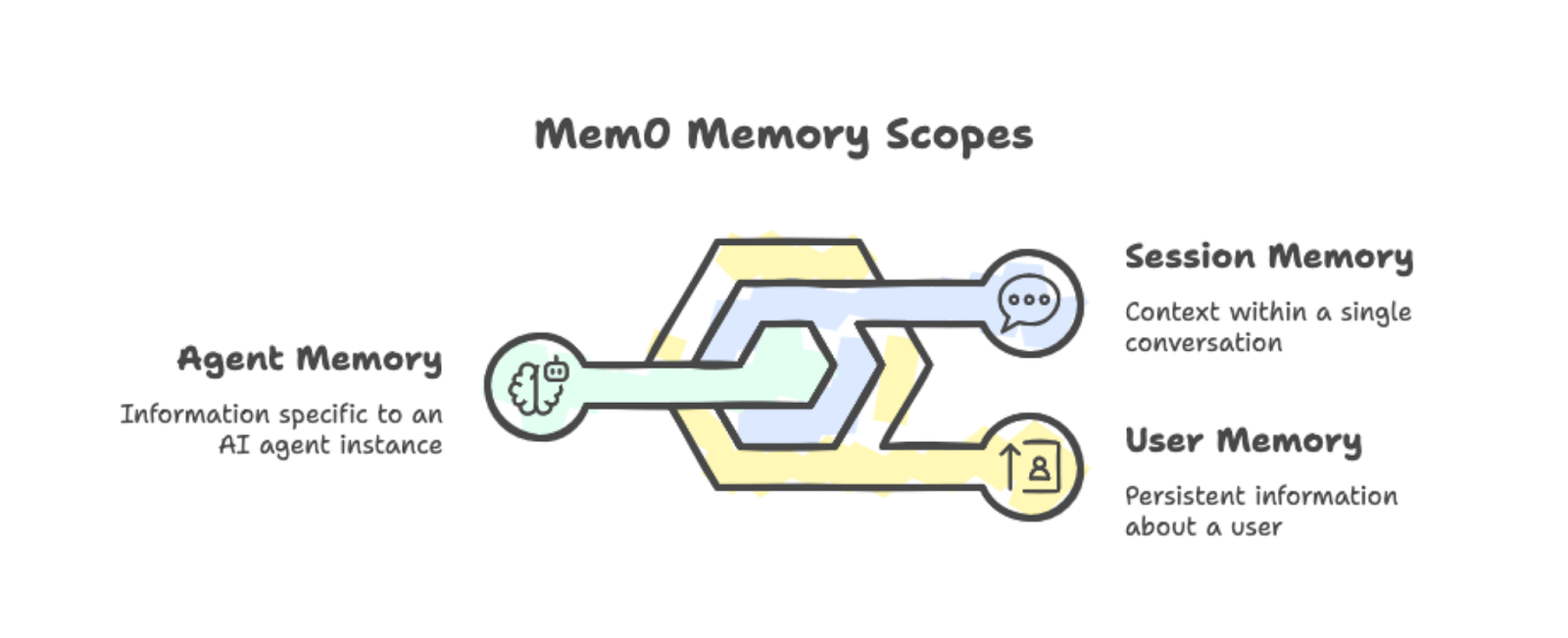
The three memory scopes: user, session, and agent, with examples.
Under the hood, Mem0 combines vector search with graph relationships. When you add a conversation to memory, it automatically extracts the important bits. You don't need to manually tag what should be remembered.
When your app needs context, Mem0 fetches relevant memories based on the current query and injects them into the prompt. This beats the alternative of stuffing your entire conversation history into every request.
You can run Mem0 in two ways:
Platform: The cloud-based managed service at app.mem0.ai offers quick setup and an API.
Self-hosted: Gives you full control over your infrastructure, letting you pick your vector database and embedding model.
Both options use the same Python SDK, so switching between them is straightforward.
The performance gains are real, as Mem0’s research paper reveals. On the LOCOMO benchmark, Mem0 scored 26% higher than OpenAI's built-in memory feature. It also responds 91% faster by selectively retrieving relevant memories instead of processing the full conversation history. Token usage drops by about 90% compared to full-context approaches.
Now that you know what Mem0 does, let's set it up.
Install the package along with python-dotenv for managing API keys:
pip install mem0ai python-dotenvSign up at app.mem0.ai and grab your API key from the dashboard. Create a .env file in your project directory:
MEM0_API_KEY=your-api-key-hereNow, initialize the client using the API key:
from mem0 import MemoryClient
from dotenv import load_dotenv
import os

load_dotenv()

client = MemoryClient(api_key=os.getenv("MEM0_API_KEY"))
To store a memory, pass a conversation in the OpenAI chat format. The user_id parameter scopes memories to a specific user:
messages = [
	{"role": "user", "content": "I'm a vegetarian and allergic to nuts."},
	{"role": "assistant", "content": "Got it! I'll remember that."}
]
client.add(messages, user_id="user123")
Memory processing happens in the background. The add() method returns immediately with a pending status while Mem0 extracts and stores the relevant facts.
To retrieve memories, use search() with a natural language query:
results = client.search("dietary restrictions", filters={"user_id": "user123"})The response contains the extracted memories with relevance scores:
{'results': [
	{'memory': 'User is allergic to nuts', 'user_id': 'user123', 'score': 0.66},
	{'memory': 'User is a vegetarian', 'user_id': 'user123', 'score': 0.65}
]}
Notice that Mem0 automatically split "vegetarian” and “allergic to nuts" into two separate facts. The system handles extraction, and when you search, it returns the most relevant memories based on semantic similarity.
With the basics covered, let's build something more practical.
The basic add/search workflow is useful, but real applications need more sophistication. Let's build a learning companion agent that autonomously decides when to store, retrieve, and update memories. We'll use the OpenAI Agents SDK to give our agent memory tools it can call on its own.
If you're new to building agents with LLMs, check out our tutorial on building LangChain agents for background on the concepts. For a deeper dive into the OpenAI Agents SDK specifically, see the OpenAI Agents SDK tutorial.
Install the OpenAI Agents SDK alongside Mem0:
pip install openai-agents mem0ai python-dotenvAdd your OpenAI API key to the .env file:
MEM0_API_KEY=your-mem0-key
OPENAI_API_KEY=your-openai-key
Now, initialize both clients and create a context class for passing user information to tools:
import os
from dataclasses import dataclass
from agents import Agent, Runner, function_tool, RunContextWrapper
from mem0 import MemoryClient
from dotenv import load_dotenv

load_dotenv()

mem0 = MemoryClient(api_key=os.getenv("MEM0_API_KEY"))

@dataclass
class UserContext:
	user_id: str
The UserContext dataclass holds user-specific data that tools require. The RunContextWrapper lets us pass this context to any tool the agent calls.
The agent needs three tools: search, save, and update. We use the @function_tool decorator to expose these to the agent.
First, the search tool retrieves relevant memories. We include memory IDs in the output so the agent can reference them for updates:
@function_tool
def search_memory(ctx: RunContextWrapper[UserContext], query: str) -> str:
	"""Search through past learning history and memories."""
	memories = mem0.search(
    	query,
    	filters={"user_id": ctx.context.user_id},
    	limit=5
	)
	if memories and memories.get("results"):
    	return "\n".join([
         	f"- [ID: {m['id']}] {m['memory']}" for m in memories["results"]
     	])
 	return "No relevant memories found."
Next, the save tool stores new information:
@function_tool
def save_memory(ctx: RunContextWrapper[UserContext], content: str) -> str:
 	"""Save new information about the user's learning journey."""
 	mem0.add(
     	[{"role": "user", "content": content}],
     	user_id=ctx.context.user_id
 	)
 	return "Memory saved successfully."
Finally, the update tool modifies existing memories when information changes:
@function_tool
def update_memory(ctx: RunContextWrapper[UserContext], memory_id: str, new_text: str) -> str:
 	"""Update an existing memory with new information."""
 	mem0.update(memory_id=memory_id, text=new_text)
return f"Memory {memory_id} updated."Now we create the agent with instructions on when to use each tool:
agent = Agent(
 	name="Learning Companion",
 	instructions="""You are a helpful learning companion with memory.
            Use search_memory to recall what the user is learning and their level.
            Search results include memory IDs in format [ID: xxx].
            Use save_memory to store new topics, preferences, or progress.
            Use update_memory when information changes. First search to find the memory ID, then call update_memory with that ID and the new text.
            Always check memory before responding to personalize your answers.""",
 	tools=[search_memory, save_memory, update_memory],
 	model="gpt-4o"
)
We use gpt-4o here, but for improved tool-use reasoning, I recommend using GPT-5. Feel free to check out our GPT-5 API tutorial to see its new features in action.
The chat function passes the user context to the agent:
def chat(user_input: str, user_id: str) -> str:
	result = Runner.run_sync(
     	agent,
     	user_input,
         context=UserContext(user_id=user_id)
	)
	return result.final_output
Each call to Runner.run_sync() is completely independent of all other calls. The OpenAI Agents SDK does not maintain conversation history between calls by default.
This is intentional for our demo: when the agent remembers user information across calls, that memory must come from Mem0, not from any hidden agent state.
Let's test with queries that require actual memory retrieval. The agent cannot guess answers correctly without accessing stored information.
First, store some user information:
response = chat(
	"My name is Alex. I am learning data visualization with matplotlib. "
	"I am at intermediate level.",
	"student_01"
)
print(response)
Got it, Alex! You're learning data visualization with Matplotlib at an intermediate level. How can I assist you today?After waiting a few seconds for async processing, test the recall:
response = chat("What is my name and what library am I learning?", "student_01")
print(response)
Your name is Alex, and you're learning data visualization using Matplotlib at an intermediate level.Now, test the update functionality:
response = chat(
	"I switched from matplotlib to seaborn. Please update your memory.",
	"student_01"
)
print(response)
Got it! I've updated your learning preference to Seaborn for data visualization at an intermediate level. If you need help with anything specific, just let me know!Verify the update worked:
response = chat("What visualization library am I using now?", "student_01")
print(response)
You are currently using Seaborn for data visualization at an intermediate level.Finally, test persistence across conversations:
response = chat("Give me a summary of everything you know about me.", "student_01")
print(response)
Here's what I know about you:
- Your name is Alex.
- You are learning data visualization with Seaborn at an intermediate level.
Is there anything else you'd like to update or add?The agent picks which tool to call based on the conversation.
When the user asks about their profile, it calls search_memory. When they share new information, it calls save_memory. When they say information changed, it searches first to get the memory ID, then calls update_memory.
We never explicitly tell it which tool to use for each message.
This differs from the manual add/search workflow in Section 3. There, we explicitly called methods. Here, the agent makes those decisions. This pattern scales better for complex applications where you cannot predict every interaction type.

Comparison of manual and agent-driven workflows for scalability
One important note: memory processing is asynchronous. After calling save_memory, there's a brief delay before the new memory becomes searchable. In production, you'll want to account for this in your user interface.
The basic agent handles memory operations, but production applications need finer control over what gets stored and how it's retrieved. Mem0 offers project-level settings that improve memory quality, including custom categories for organization, user-defined instructions for filtering, targeted searches, and cleanup operations.
By default, Mem0 uses generic categories like food, travel, and hobbies. For specific applications like our learning companion, these don't help much. You can define your own categories that match your domain:
client.project.update(custom_categories=[
	{"name": "topics", "description": "Programming languages, frameworks, or subjects"},
	{"name": "skill_levels", "description": "Proficiency: beginner, intermediate, advanced"},
	{"name": "goals", "description": "Learning objectives and targets"},
	{"name": "progress", "description": "Completed courses, chapters, or milestones"},
	{"name": "preferences", "description": "Learning style, schedule, or format preferences"}
])
Once set, Mem0's classifier automatically tags incoming memories with your categories. When Alex says, "I'm learning Python at a beginner level," the system tags it with both topics and skill_levels. You don't need to change your agent code. The categorization happens during memory extraction.
Custom instructions allow you to control exactly what gets extracted from conversations. You write natural language guidelines, and Mem0 follows them when processing new memories:
client.project.update(custom_instructions="""
Extract and remember:
- Programming topics and technologies mentioned
- Current skill level for each topic
- Learning goals and deadlines
- Progress updates and completions
- Preferred learning resources (videos, docs, exercises)

Do not store:
- Personal identifiers beyond the user_id
- Payment or financial information
- Off-topic conversation that isn't about learning
""")
This matters for production apps. Without instructions, Mem0 might store irrelevant details or sensitive information. Custom instructions act as a filter, keeping memories focused on what your application actually needs. For compliance scenarios like GDPR, you can explicitly exclude personal data categories.
With categorized memories, your search tool can be more precise. Instead of searching all memories, filter by category to get exactly what you need:
@function_tool
def search_memory(
	ctx: RunContextWrapper[UserContext],
	query: str,
	category: str = None
) -> str:
	"""Search learning history. Optionally filter by category."""
	filters = {"user_id": ctx.context.user_id}
	if category:
    	filters["categories"] = {"contains": category}

	memories = mem0.search(query, filters=filters, limit=5)
	if memories and memories.get("results"):
    	return "\n".join([
        	f"- [ID: {m['id']}] {m['memory']}" for m in memories["results"]
     	])
	return "No relevant memories found."
When the agent needs to answer "What topics have I learned?", it can search with category="topics" and skip unrelated memories about preferences or goals. The agent instructions should mention these categories, so it knows when to use filtered searches.
Users may want to remove outdated or incorrect memories. Add a delete tool to give the agent this ability:
@function_tool
def delete_memory(ctx: RunContextWrapper[UserContext], memory_id: str) -> str:
	"""Delete a specific memory by ID."""
	mem0.delete(memory_id=memory_id)
	return f"Memory {memory_id} deleted."
For bulk operations, you can clear all memories for a user directly:
mem0.delete_all(user_id="student_01")Deletion is useful when information changes completely rather than updates. If a user says, "forget everything about my Python learning," the agent can search for relevant memories and delete them one by one, or you can offer a reset option that clears their profile entirely.
These four configuration options take the agent from a demo to something you could ship. Categories organize memories automatically, instructions ensure only relevant information gets stored, filtered searches retrieve precisely what's needed, and deletion handles cleanup. The agent code changes are minimal since most of this happens at the project configuration level.
For more details on these features, see the official Mem0 documentation.
Standard memory stores isolated facts, such as "Alex is learning Seaborn" and "Alex knows matplotlib." But it doesn't capture that Alex learned matplotlib first, then switched to Seaborn. Graph memory adds this relationship layer. When order, progression, or connections between entities matter, graph memory gives your agent a richer context.
Note: Graph memory is only available with a Pro plan ($249/month) or higher.
You can activate graph memory at the project level:
client.project.update(enable_graph=True)Another option is to pass enable_graph=True on individual requests:
client.add(messages, user_id="student_01", enable_graph=True)Once active, Mem0 automatically extracts entities (people, topics, tools, dates) and the relationships between them from natural conversation.
When you search with graph memory, Mem0 returns both memories and a relations array showing how entities connect:
results = client.search(
	"What has Alex learned?",
	filters={"user_id": "student_01"},
	enable_graph=True
)

# Results include both memories and relations
print(results.get("relations"))
The relations show connections like "Alex → learned → matplotlib" and "Alex → switched to → seaborn." Your agent can now answer questions about progression without you having to store those relationships explicitly.
Graph memory adds processing overhead, so use it when relationships matter:
Learning platforms tracking skill progression
Customer support analyzing interaction history
Project management mapping task dependencies
Healthcare connecting symptoms and treatments over time
For simple fact recall, standard memory is faster. Turn on graph memory when your agent needs to reason about sequences or connections between stored information.
Mem0 comes in two versions: Platform and open source.
Throughout this tutorial, we used the Platform version, which is the managed cloud service accessed via MemoryClient and an API key from app.mem0.ai. Both versions share core memory operations (add(), search(), update(), delete()), but they differ in setup, pricing, and control.
Platform is Mem0's hosted service. You sign up, get an API key, and start adding memories in minutes. Mem0 handles infrastructure, scaling, and security certifications (such as SOC 2 Type II or GDPR).
There are four pricing tiers:
Free: 10,000 memories, good for prototyping.
Starter: $19/month, with higher limits.
Pro: $249/month, for production workloads.
Enterprise: Custom pricing with dedicated support.
Platform includes features that aren't available in open source: graph memory for relationship tracking, webhooks for real-time notifications, group chat with speaker attribution, and built-in analytics.
You pay per usage but save on infrastructure and DevOps time.
The open source version runs on your own servers. You install the mem0ai package, configure your vector database, and manage the deployment yourself. This requires more setup but gives you complete control.
Several choices are available for infrastructure:
Vector databases: 24+ options including Qdrant, Chroma, Pinecone, PostgreSQL (pgvector), and MongoDB
LLM providers: 16+ options including OpenAI, Anthropic, Ollama, Groq, and local models
Embedding models: OpenAI, HuggingFace, or custom embedders
Open source uses the Memory class instead of MemoryClient.
Your costs are whatever you pay for infrastructure (cloud VMs, database hosting, API calls to LLM providers). At scale, this can be cheaper than Platform pricing, but you are responsible for handling maintenance, backups, and compliance yourself.
Consult the following table for a comparison between the hosted and open-source versions of Mem0:
|
Aspect |
Platform |
Open Source |
|
Setup time |
Minutes |
Hours to days |
|
Infrastructure |
Fully managed |
Self-managed |
|
Pricing |
$0-249+/month |
Your infrastructure costs |
|
Vector DB options |
Managed |
24+ choices |
|
LLM options |
Managed |
16+ choices |
|
Compliance certs |
SOC 2, GDPR included |
You implement |
|
Data location |
Mem0's servers |
Your servers |
My recommendation is to choose Platform for fast prototyping, production apps without DevOps overhead, or when you need built-in compliance.
If your focus is on data sovereignty, custom model configurations, or cost optimization at high volume, open source is the right choice.
For detailed setup guides, see the Platform quickstart or open source overview.
This tutorial covered adding persistent memory to LLM applications with Mem0. You started with basic memory operations, then built a learning companion agent that autonomously manages its own memory using the OpenAI Agents SDK. From there, you configured memory behavior with custom categories, instructions, and filtered searches. Finally, you compared Platform and open source deployment options.
For production use, add error handling around memory operations and account for brief delays after saving new memories. Consider rate limits if you're on the Platform free tier.
Ready to go beyond individual components and master the full stack of AI application development? Enroll in the AI Engineer for Developers career track.
AI Agent Courses
Course
Track
Course
blog
Benito Martin
15 min
blog
Javier Canales Luna
10 min
Tutorial
Marie Fayard
12 min
Tutorial
Vaibhav Mehra
Tutorial
Tim Lu
15 min
Tutorial
Abid Ali Awan
15 min