%22%3E%3Cpath%20d%3D%22m-369%200h408v79h-408z%22%20fill%3D%22%237933ff%22%2F%3E%3Cpath%20d%3D%22m-148%200h306v45h-306z%22%20fill%3D%22%23974dff%22%2F%3E%3C%2Fg%3E%3C%2Fsvg%3E)
%22%2F%3E%3C%2FclipPath%3E%3Cg%20clip-path%3D%22url(%23a)%22%3E%3Cpath%20d%3D%22m76%200h484v36h-484z%22%20fill%3D%22%23974dff%22%2F%3E%3Cpath%20d%3D%22m0%200h384v24h-384z%22%20fill%3D%22%2306bdfc%22%20transform%3D%22matrix(1%200%200%20-1%200%2060)%22%2F%3E%3C%2Fg%3E%3C%2Fsvg%3E)
फ़ंक्शन कॉलिंग के बिना OpenAI का उपयोग
इस खंड में, हम GPT-3.5-Turbo मॉडल का उपयोग बिना फ़ंक्शन कॉलिंग के करेंगे ताकि देख सकें कि आउटपुट लगातार मिलता है या नहीं।
OpenAI Python API इंस्टॉल करने से पहले, आपको API कुंजी प्राप्त करनी होगी और इसे अपनी लोकल प्रणाली पर सेट करना होगा। API कुंजी कैसे प्राप्त करें और सेट करें, यह जानने के लिए Python में OpenAI API के माध्यम से GPT-3.5 और GPT-4 ट्यूटोरियल का पालन करें। इस ट्यूटोरियल में DataCamp के AI-सक्षम डेटा नोटबुक DataLab में एनवायरनमेंट वेरिएबल्स सेट करने के उदाहरण भी शामिल हैं।
OpenAI Python API को V1 में अपग्रेड करें:
उसके बाद, API कुंजी का उपयोग करके OpenAI क्लाइंट इनिशियलाइज़ करें।
import os
from openai import OpenAI
client = OpenAI(
api_key=os.environ['OPENAI_API_KEY'],
)नोट: OpenAI अब नए उपयोगकर्ताओं को मुफ़्त क्रेडिट नहीं देता, इसलिए API का उपयोग करने के लिए आपको क्रेडिट खरीदने होंगे।
हम एक रैंडम छात्र विवरण लिखेंगे। आप अपना टेक्स्ट खुद बना सकते हैं या ChatGPT से जनरेट करवा सकते हैं।
student_1_description = "David Nguyen is a sophomore majoring in computer science at Stanford University. He is Asian American and has a 3.8 GPA. David is known for his programming skills and is an active member of the university's Robotics Club. He hopes to pursue a career in artificial intelligence after graduating."अगले भाग में, हम एक प्रॉम्प्ट लिखेंगे जो टेक्स्ट से छात्र की जानकारी निकाले और आउटपुट JSON ऑब्जेक्ट के रूप में लौटाए। हम छात्र विवरण से name, major, school, grades, और club निकालेंगे।
# A simple prompt to extract information from "student_description" in a JSON format.
prompt1 = f'''
Please extract the following information from the given text and return it as a JSON object:
name
major
school
grades
club
This is the body of text to extract the information from:
{student_1_description}
'''OpenAI API के चैट कम्प्लीशन मॉड्यूल में प्रॉम्प्ट जोड़ें ताकि प्रतिक्रिया जनरेट हो।
# Generating response back from gpt-3.5-turbo
openai_response = client.chat.completions.create(
model = 'gpt-3.5-turbo',
messages = [{'role': 'user', 'content': prompt_1}]
)
openai_response.choices[0].message.contentप्रतिक्रिया काफ़ी अच्छी है। आइए इसे बेहतर समझने के लिए JSON में बदलते हैं।
'{\n "name": "David Nguyen",\n "major": "computer science",\n "school": "Stanford University",\n "grades": "3.8 GPA",\n "club": "Robotics Club"\n}'हम `json` लाइब्रेरी का उपयोग करके टेक्स्ट को JSON ऑब्जेक्ट में बदलेंगे।
import json
# Loading the response as a JSON object
json_response = json.loads(openai_response.choices[0].message.content)
json_responseअंतिम परिणाम लगभग परफ़ेक्ट है। तो फिर हमें फ़ंक्शन कॉलिंग की ज़रूरत क्यों है?
{'name': 'David Nguyen',
'major': 'computer science',
'school': 'Stanford University',
'grades': '3.8 GPA',
'club': 'Robotics Club'}
आइए वही प्रॉम्प्ट अलग छात्र विवरण के साथ आज़माते हैं।
student_2_description="Ravi Patel is a sophomore majoring in computer science at the University of Michigan. He is South Asian Indian American and has a 3.7 GPA. Ravi is an active member of the university's Chess Club and the South Asian Student Association. He hopes to pursue a career in software engineering after graduating."हम प्रॉम्प्ट में केवल छात्र विवरण का टेक्स्ट बदल देंगे।
prompt2 = f'''
Please extract the following information from the given text and return it as a JSON object:
name
major
school
grades
club
This is the body of text to extract the information from:
{student_2_description}
'''और, दूसरे प्रॉम्प्ट का उपयोग करके चैट कम्प्लीशन फ़ंक्शन चलाएँ।
# Generating response back from gpt-3.5-turbo
openai_response = client.chat.completions.create(
model = 'gpt-3.5-turbo',
messages = [{'role': 'user', 'content': prompt_2}]
)
# Loading the response as a JSON object
json_response = json.loads(openai_response.choices[0].message.content)
json_responseजैसा कि आप देख सकते हैं, यह सुसंगत नहीं है। एक क्लब लौटाने की बजाय, इसने रवि द्वारा जॉइन किए गए क्लबों की सूची लौटा दी। यह पहले छात्र से अलग भी है।
{'name': 'Ravi Patel',
'major': 'computer science',
'school': 'University of Michigan',
'grades': '3.7 GPA',
'club': ['Chess Club', 'South Asian Student Association']}
OpenAI फ़ंक्शन कॉलिंग उदाहरण
इस समस्या को हल करने के लिए, अब हम Function Calling नामक हाल ही में पेश की गई सुविधा का उपयोग करेंगे। OpenAI API को इसकी कार्यक्षमता समझाने के लिए यह आवश्यक है कि आप एक कस्टम फ़ंक्शन बनाएँ और आवश्यक जानकारी को डिक्शनरी की सूची में जोड़ें।
- name: हाल में बनाया गया Python फ़ंक्शन का नाम लिखें।
- description: फ़ंक्शन की कार्यक्षमता।
- parameters: “properties” के भीतर, हम आर्ग्युमेंट्स का नाम, प्रकार, और विवरण लिखेंगे। इससे OpenAI API को यह पहचानने में मदद मिलेगी कि हम किन सूचनाओं की तलाश कर रहे हैं।
नोट: सुनिश्चित करें कि आप सही पैटर्न का पालन कर रहे हैं। फ़ंक्शन कॉलिंग के बारे में अधिक जानने के लिए आधिकारिक दस्तावेज़ पढ़ें।
student_custom_functions = [
{
'name': 'extract_student_info',
'description': 'Get the student information from the body of the input text',
'parameters': {
'type': 'object',
'properties': {
'name': {
'type': 'string',
'description': 'Name of the person'
},
'major': {
'type': 'string',
'description': 'Major subject.'
},
'school': {
'type': 'string',
'description': 'The university name.'
},
'grades': {
'type': 'integer',
'description': 'GPA of the student.'
},
'club': {
'type': 'string',
'description': 'School club for extracurricular activities. '
}
}
}
}
]अगले चरण में, हम "functions" आर्ग्युमेंट में जोड़े गए कस्टम फ़ंक्शन का उपयोग करके दो छात्र विवरणों के लिए प्रतिक्रियाएँ जनरेट करेंगे। इसके बाद, हम टेक्स्ट प्रतिक्रिया को JSON ऑब्जेक्ट में बदलकर प्रिंट करेंगे।
student_description = [student_1_description,student_2_description]
for i in student_description:
response = client.chat.completions.create(
model = 'gpt-3.5-turbo',
messages = [{'role': 'user', 'content': i}],
functions = student_custom_functions,
function_call = 'auto'
)
# Loading the response as a JSON object
json_response = json.loads(response.choices[0].message.function_call.arguments)
print(json_response)जैसा कि हम देख सकते हैं, हमें एकरूप आउटपुट मिला। हमें ग्रेड्स स्ट्रिंग की बजाय संख्यात्मक रूप में भी मिले। सुसंगत आउटपुट बग-रहित AI एप्लिकेशन बनाने के लिए आवश्यक है।
{'name': 'David Nguyen', 'major': 'computer science', 'school': 'Stanford University', 'grades': 3.8, 'club': 'Robotics Club'}
{'name': 'Ravi Patel', 'major': 'computer science', 'school': 'University of Michigan', 'grades': 3.7, 'club': 'Chess Club'}एकाधिक कस्टम फ़ंक्शंस
आप चैट कम्प्लीशन फ़ंक्शन में कई कस्टम फ़ंक्शंस जोड़ सकते हैं। इस खंड में, हम OpenAI API की जादुई क्षमताओं को देखेंगे और यह कैसे अपने-आप सही फ़ंक्शन चुनकर उपयुक्त आर्ग्युमेंट्स लौटाता है।
Python सूची में डिक्शनरी के भीतर, हम “extract_school_info” नामक एक और फ़ंक्शन जोड़ेंगे, जो टेक्स्ट से विश्वविद्यालय की जानकारी निकालने में मदद करेगा।
इसे करने के लिए, आपको नाम, विवरण और पैरामीटर्स सहित एक और फ़ंक्शन की डिक्शनरी जोड़नी होगी।
custom_functions = [
{
'name': 'extract_student_info',
'description': 'Get the student information from the body of the input text',
'parameters': {
'type': 'object',
'properties': {
'name': {
'type': 'string',
'description': 'Name of the person'
},
'major': {
'type': 'string',
'description': 'Major subject.'
},
'school': {
'type': 'string',
'description': 'The university name.'
},
'grades': {
'type': 'integer',
'description': 'GPA of the student.'
},
'club': {
'type': 'string',
'description': 'School club for extracurricular activities. '
}
}
}
},
{
'name': 'extract_school_info',
'description': 'Get the school information from the body of the input text',
'parameters': {
'type': 'object',
'properties': {
'name': {
'type': 'string',
'description': 'Name of the school.'
},
'ranking': {
'type': 'integer',
'description': 'QS world ranking of the school.'
},
'country': {
'type': 'string',
'description': 'Country of the school.'
},
'no_of_students': {
'type': 'integer',
'description': 'Number of students enrolled in the school.'
}
}
}
}
]हम अपने फ़ंक्शन का परीक्षण करने के लिए ChatGPT से “Stanford University” का विवरण जनरेट करेंगे।
school_1_description = "Stanford University is a private research university located in Stanford, California, United States. It was founded in 1885 by Leland Stanford and his wife, Jane Stanford, in memory of their only child, Leland Stanford Jr. The university is ranked #5 in the world by QS World University Rankings. It has over 17,000 students, including about 7,600 undergraduates and 9,500 graduates23. "छात्र और स्कूल विवरणों की सूची बनाएँ और प्रतिक्रिया जनरेट करने के लिए इसे OpenAI चैट कम्प्लीशन फ़ंक्शन से पास करें। सुनिश्चित करें कि आपने अपडेटेड कस्टम फ़ंक्शन प्रदान किया है।
description = [student_1_description, school_1_description]
for i in description:
response = client.chat.completions.create(
model = 'gpt-3.5-turbo',
messages = [{'role': 'user', 'content': i}],
functions = custom_functions,
function_call = 'auto'
)
# Loading the response as a JSON object
json_response = json.loads(response.choices[0].message.function_call.arguments)
print(json_response)GPT-3.5-Turbo मॉडल ने अलग-अलग विवरण प्रकारों के लिए अपने-आप सही फ़ंक्शन चुना। हमें छात्र और स्कूल दोनों के लिए परफ़ेक्ट JSON आउटपुट मिला।
{'name': 'David Nguyen', 'major': 'computer science', 'school': 'Stanford University', 'grades': 3.8, 'club': 'Robotics Club'}
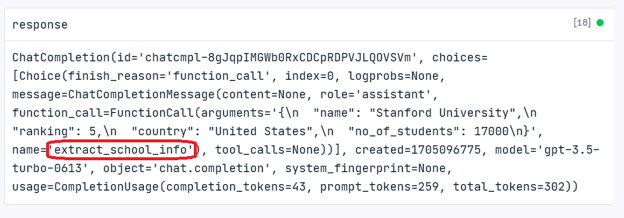
{'name': 'Stanford University', 'ranking': 5, 'country': 'United States', 'no_of_students': 17000}हम यह भी देख सकते हैं कि प्रतिक्रिया “extract_school_info” फ़ंक्शन का उपयोग करके जनरेट हुई है।
फ़ंक्शन कॉलिंग के उपयोग
इस खंड में, हम एक स्थिर टेक्स्ट समरीज़र बनाएँगे जो स्कूल और छात्र जानकारी को एक निश्चित तरीके से संक्षेपित करेगा।
पहले, हम दो Python फ़ंक्शंस, extract_student_info और extract_school_info, बनाएँगे जो फ़ंक्शन कॉलिंग से आर्ग्युमेंट्स लेते हैं और एक संक्षिप्त स्ट्रिंग लौटाते हैं।
def extract_student_info(name, major, school, grades, club):
"""Get the student information"""
return f"{name} is majoring in {major} at {school}. He has {grades} GPA and he is an active member of the university's {club}."
def extract_school_info(name, ranking, country, no_of_students):
"""Get the school information"""
return f"{name} is located in the {country}. The university is ranked #{ranking} in the world with {no_of_students} students."- Python सूची बनाएँ, जिसमें छात्र-एक का विवरण, एक रैंडम प्रॉम्प्ट, और स्कूल-एक का विवरण हो। रैंडम प्रॉम्प्ट स्वचालित फ़ंक्शन कॉलिंग यांत्रिकी को मान्य करने के लिए जोड़ा गया है।
- हम `descriptions` सूची के प्रत्येक टेक्स्ट का उपयोग करके प्रतिक्रिया जनरेट करेंगे।
- यदि कोई फ़ंक्शन कॉल उपयोग होती है, तो हमें फ़ंक्शन का नाम मिलेगा और उसके आधार पर प्रतिक्रिया से संबंधित आर्ग्युमेंट्स फ़ंक्शन पर लागू करेंगे। अन्यथा, सामान्य प्रतिक्रिया लौटाएँगे।
- सभी तीन सैंपल्स के आउटपुट प्रिंट करें।
descriptions = [
student_1_description,
"Who was a Abraham Lincoln?",
school_1_description
]
for i, sample in enumerate(descriptions):
response = client.chat.completions.create(
model = 'gpt-3.5-turbo',
messages = [{'role': 'user', 'content': sample}],
functions = custom_functions,
function_call = 'auto'
)
response_message = response.choices[0].message
if dict(response_message).get('function_call'):
# Which function call was invoked
function_called = response_message.function_call.name
# Extracting the arguments
function_args = json.loads(response_message.function_call.arguments)
# Function names
available_functions = {
"extract_school_info": extract_school_info,
"extract_student_info": extract_student_info
}
fuction_to_call = available_functions[function_called]
response_message = fuction_to_call(*list(function_args .values()))
else:
response_message = response_message.content
print(f"\nSample#{i+1}\n")
print(response_message)- Sample#1: GPT मॉडल ने “extract_student_info” चुना, और हमें छात्र के बारे में एक छोटा सारांश मिला।
- Sample#2: GPT मॉडल ने कोई फ़ंक्शन नहीं चुना और प्रॉम्प्ट को सामान्य प्रश्न की तरह माना, परिणामस्वरूप हमें Abraham Lincoln की जीवनी मिली।
- Sample#3: GPT मॉडल ने “extract_school_info” चुना, और हमें Stanford University के बारे में एक छोटा सारांश मिला।
Sample#1
David Nguyen is majoring in computer science at Stanford University. He has 3.8 GPA and he is an active member of the university's Robotics Club.
Sample#2
Abraham Lincoln was the 16th President of the United States. He served as president from March 1861 until his assassination in April 1865. Lincoln led the country through its greatest internal crisis, the American Civil War, and his Emancipation Proclamation declared slaves in Confederate territory to be free. He is known for his leadership, his commitment to preserving the Union, and his efforts to abolish slavery. Lincoln's presidency is widely regarded as one of the most transformative in American history.
Sample#3
Stanford University is located in the United States. The university is ranked #5 in the world with 17000 students.निष्कर्ष
इस ट्यूटोरियल में, हमने OpenAI की फ़ंक्शन कॉलिंग के बारे में सीखा। हमने यह भी जाना कि इससे सुसंगत आउटपुट कैसे जनरेट करें, एकाधिक फ़ंक्शंस कैसे बनाएँ, और एक भरोसेमंद टेक्स्ट समरीज़र कैसे तैयार करें।
यदि आप OpenAI API के बारे में और सीखना चाहते हैं, तो Working with OpenAI API कोर्स करने पर विचार करें और अपना पहला AI-संचालित प्रोजेक्ट बनाने के लिए OpenAI API in Python चीट शीट का उपयोग करें।
FAQs
OpenAI फ़ंक्शन कॉलिंग जटिल नेस्टेड JSON आउटपुट को कैसे संभालती है?
OpenAI फ़ंक्शन कॉलिंग आपको फ़ंक्शन स्कीमा में नेस्टेड JSON संरचनाएँ परिभाषित करने देती है। parameters प्रॉपर्टी के भीतर पदानुक्रमित संबंध निर्दिष्ट करके, आप सुनिश्चित कर सकते हैं कि मॉडल जटिल डेटा आवश्यकताओं के लिए सही तरह से नेस्टेड और संरचित JSON आउटपुट जनरेट करे।
क्या OpenAI फ़ंक्शन कॉलिंग बाहरी APIs या डेटाबेस के साथ इस्तेमाल की जा सकती है?
हाँ, OpenAI फ़ंक्शन कॉलिंग को बाहरी APIs या डेटाबेस के साथ एकीकृत किया जा सकता है, इसके लिए आप ऐसे कस्टम फ़ंक्शंस बनाते हैं जो मॉडल से पास किए गए आर्ग्युमेंट्स के आधार पर API कॉल्स या डेटाबेस क्वेरीज़ चलाएँ। इससे बाहरी प्रणालियों के साथ गतिशील इंटरैक्शन संभव होता है, जबकि प्रतिक्रियाएँ सुसंगत और संरचित रहती हैं।
अगर मॉडल की फ़ंक्शन कॉल किसी परिभाषित फ़ंक्शन से मेल नहीं खाती तो क्या होता है?
यदि मॉडल की फ़ंक्शन कॉल किसी परिभाषित फ़ंक्शन या दिए गए स्कीमा से मेल नहीं खाती, तो फ़ंक्शन कॉल ट्रिगर नहीं होती और मॉडल इनपुट को सामान्य टेक्स्ट-आधारित प्रॉम्प्ट की तरह मानता है, और सामान्य टेक्स्ट-आधारित प्रतिक्रिया लौटाता है। इससे विविध इनपुट प्रकारों को संभालने में लचीलापन बना रहता है।

एक प्रमाणित डेटा साइंटिस्ट के रूप में, मैं अत्याधुनिक तकनीक का उपयोग करके नवाचारी मशीन लर्निंग अनुप्रयोग बनाने के लिए उत्साहित रहता/रहती हूँ। स्पीच रिकॉग्निशन, डेटा विश्लेषण और रिपोर्टिंग, MLOps, संवादात्मक AI और NLP में मजबूत पृष्ठभूमि के साथ, मैंने ऐसे बुद्धिमान सिस्टम विकसित करने में अपनी विशेषज्ञता निखारी है जो वास्तविक प्रभाव डाल सकें। तकनीकी दक्षता के अलावा, मैं जटिल अवधारणाओं को स्पष्ट और संक्षिप्त भाषा में प्रस्तुत करने में भी निपुण हूँ। परिणामस्वरूप, मैं डेटा साइंस पर एक मांग में रहने वाला/वाली ब्लॉगर बन गया/गई हूँ, और डेटा प्रोफेशनलों के बढ़ते समुदाय के साथ अपने अनुभव और विचार साझा करता/करती हूँ। वर्तमान में, मैं कंटेंट निर्माण और संपादन पर केंद्रित हूँ, बड़े भाषा मॉडलों के साथ काम करते हुए ऐसा प्रभावशाली और आकर्षक कंटेंट विकसित कर रहा/रही हूँ जो व्यवसायों और व्यक्तियों दोनों को अपने डेटा का अधिकतम लाभ उठाने में मदद कर सके।
OpenAI फ़ंक्शन कॉलिंग क्या है?
OpenAI API व्यवस्थित तरीके से प्रतिक्रियाएँ जनरेट करने में बहुत अच्छा है। आप अपने प्रॉम्प्ट्स को प्रबंधित कर सकते हैं, मॉडल आउटपुट को अनुकूलित कर सकते हैं, और कुछ पंक्तियों के कोड से भाषा-आधारित एप्लिकेशन बना और चला सकते हैं।
इन सभी खूबियों के बावजूद, OpenAI API डेवलपर्स और इंजीनियरों के लिए एक सिरदर्द रहा है। क्यों? वे संरचित डेटा प्रकारों के साथ काम करने के अभ्यस्त होते हैं, जबकि स्ट्रिंग जैसे असंरचित डेटा के साथ काम करना कठिन होता है।
संगत परिणाम पाने के लिए, डेवलपर्स को टेक्स्ट स्ट्रिंग से जानकारी निकालने हेतु रेगुलर एक्सप्रेशन (RegEx) या प्रॉम्प्ट इंजीनियरिंग का सहारा लेना पड़ता है।
यहीं पर OpenAI की फ़ंक्शन कॉलिंग क्षमता काम आती है। यह GPT-3.5 और GPT-4 मॉडल्स को यूज़र-परिभाषित फ़ंक्शंस को इनपुट के रूप में लेने और संरचित आउटपुट जनरेट करने देती है। इसके साथ, आपको RegEx लिखने या प्रॉम्प्ट इंजीनियरिंग करने की ज़रूरत नहीं रहती।
इस ट्यूटोरियल में, मैं चरण-दर-चरण समझाऊँगा कि OpenAI फ़ंक्शन कॉलिंग अनियमित मॉडल आउटपुट से पैदा होने वाली आम डेवलपर समस्याओं को कैसे सुलझाने में मदद कर सकती है।