

TL;DR
- Power BI and Tableau are the two leading business intelligence tools in 2026, with Power BI holding the top market position according to Gartner.
- Power BI is more cost-effective (starting at $14/user/month) and integrates deeply with the Microsoft ecosystem, including Microsoft Fabric and Copilot AI.
- Tableau excels in advanced visualizations, handles larger datasets better, and works on both Mac and Windows.
- Choose Power BI for scalable, governed reporting within a Microsoft environment. Choose Tableau for exploratory, analyst-driven analysis with greater visual flexibility.
- Both tools now include AI features: Power BI Copilot for natural language queries and Tableau Pulse with Einstein AI for automated insights.
A Background on Business Intelligence Tools
Business intelligence is a practice that pre-dates the digital age. The first usage of the term dates back to the 1860s, referring to an American banker who gathered and analyzed data to gain actionable insights and get ahead of the competition.
Things have come a long way since then, with ever-increasing amounts of data being accessible for modern businesses. As a result of such an influx of data, various organizations have produced software to help businesses make sense of the vast swathes of information. There are now many excellent BI tools on the market today.
Tableau first launched in 2004, providing a drag-and-drop way for users to create interactive visuals and dashboards. In reality, Tableau has a variety of products that help businesses store, analyze, and visualize data.
Microsoft Power BI arrived on the scene several years later, first launching to the public in 2011. Again, the focus was to create an easy-to-use interface to enable non-programmers to organize and visualize data. Like Tableau, Power BI comprises several different components. You can find out more about what you can do with Tableau and what you can do with Power BI in separate articles, as well as discover some Power BI projects and Tableau projects.
Power BI vs Tableau - Similarities
Let’s take a look at some of the ways Tableau and Power BI are similar:
They’re extremely popular
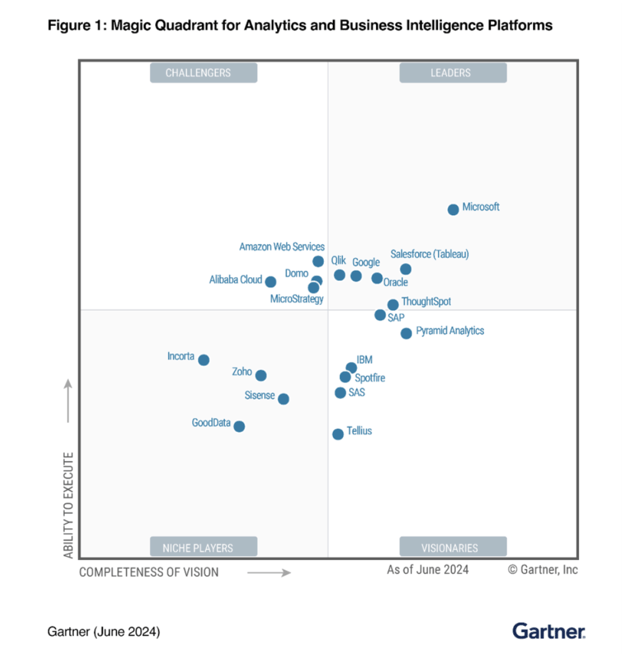
According to data from Gartner, Power BI (Microsoft) and Tableau (Salesforce) are the two most popular business intelligence tools on the market, with Power BI being the number one. With an average 4.4-star rating from over 3000 reviews, both platforms are rated similarly in 2026.
They produce a variety of different visualizations
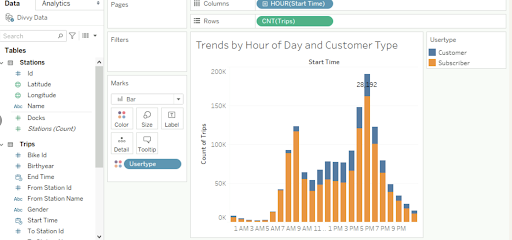
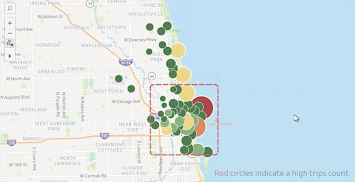
Both Tableau and Power BI can help you showcase your data in a variety of different ways.You have options for visualizations, including bar and line charts, treemaps, and geographical maps. Check out our Tableau dashboard examples for inspiration.On both platforms, you can interact with these visualizations, such as by hovering over them to get more information and applying filters, and you can also combine them to create interactive dashboards.
They can connect to a variety of data sources
It’s one thing visualizing the data you have, but it’s important to have an array of inputs. After all, businesses tend to gather data from multiple channels. When comparing Tableau and Power BI, we see that both can connect to a wide range of sources. These include MS Excel, CSV, and JSON, and the paid version of both platforms gives you access to 50+ additional data connectors such asGoogle BigQuery, Amazon Redshift, and Salesforce. Visualizations are updated if the underlying data changes.
They’re both code-free and user-friendly
Part of the appeal of using business intelligence tools is that everything you need is at your fingertips. This makes both Tableau and Power BI ideal tools to learn if you are new to data analytics. If you are a business analyst, they are two of the main data visualization tools you will need to work with data. You can learn to become a data analyst with Power BI or Tableau.
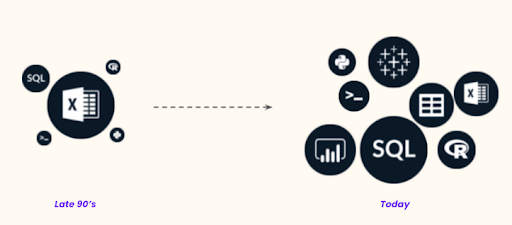
Of course, there are other tools you can work with, as the graph below demonstrates. SQL, R, and Python are also valuable tools, and adding one or more to your skill set is extremely valuable.
Other similarities
Thanks to recent updates, Tableau and Power BI have become increasingly similar.
For example, Power BI used to excel in data preparation, as users have always been able to model, clean, and add calculated columns to datasets through Power Query. However, Tableau has recently made its own inroads with the launch of Tableau Prep.
Power BI vs Tableau - Differences
When comparing, Tableau and Power BI, there are a few points of difference that you should consider, and if you are thinking about using them within your business or in your career, these can make the choice easier.
Power BI only works on Microsoft Windows
This can make the choice of the two platforms a whole lot easier. If you will mostly be using a Mac for your work, Tableau would be the better choice, as you can’t use Power BI on a Mac.
Certifications
Tableau offers a wider range of options designed for specific professions. You can find out more about these on the Tableau website, but essentially, there are associate, specialist, and analyst levels.
At DataCamp, you can also become a data analyst with Tableau, taking a series of courses that can prepare you for Tableau certification. The official Tableau certification costs from $100 to $250, depending on the level.
Power BI has one certification that covers all the main functionalities of the platform.There is the PL-300: Microsoft Power BI Data Analyst exam, which costs $165.
Another key difference between certifications is that, while Power BI offers its exam in multiple languages, Tableau currently only offers its Certified Professional Exam in English. The Tableau Associate exam is available in multiple languages.
Ease of integration
As Power BI was developed by Microsoft, it will be easier to integrate into your workspace if you use Office software. Likewise,Tableau is owned by Salesforce (acquired in 2019), making it worth considering thanks to its native Salesforce integration.However, both are capable of connecting to tools like Excel and Salesforce, so this is more a question of which would run more smoothly for your setup.
Programming languages
When it comes to using each with different programming languages, there are further differences:
- Power BI:You can use DAX (Data Analysis Expressions) and M language in Power BI for data manipulation and data modeling. Power BI also supports R and Python scripts for advanced analytics.
- Tableau: You’ll find more choice and flexibility with Tableau. As well as easier integration with R, you can implement the Tableau Software Development Kit with Python, Java, C, and C++.
Tableau vs Power BI - Price
It’s worth looking in more detail at the prices of these two business intelligence tools, as this is where perhaps the most differences exist between Power BI and Tableau.
Power BI
-
- Power BI Free: This gives you individual access to Power BI on your own desktop. It’s suitable for home users but not so much for businesses. This type of account is included in the Microsoft Fabric free account.
- Power BI Pro - $14 per user/month: Although this is included for free with Microsoft 365 E5, for those without, this fee gives you a single license to their self-service analytics, allowing you to visualize data with live dashboards and reports, and share insights across your organization.
- Power BI Premium - $24 per user/month: For those at enterprise level, this fee gives you their big data analytics tools and simplified data management.
- Power BI Embedded - Variable price: For those who want to create reports, dashboards and analytics in their own applications.
Tableau
- Tableau Public - Free: This one is for at-home users and can be used to create visualizations connected to Excel, CSV, and JSON files. All visualizations will be publicly viewable.
- Tableau Creator - $75 per month/user: This option is for individuals and team members, and it provides access to Tableau Desktop, Tableau Prep Builder, and one Creator license for Tableau Server or Tableau Cloud. This gives you the visualization and analytics tools you need.
- Tableau Explorer - $42 per month/user: This option allows you to explore data with self-serve analytics. It comes with one Tableau Cloud explorer license.
- Tableau Viewer - $15 per month/user: With this option, you can only view existing Tableau dashboards and visualizations. It comes with one Tableau Cloud view license.
Tableau offers the same packages described above, but with Enterprise features. There's also Tableau+, which includes AI-powered analytics.
As a quick reference, we’ve included these details in the table below:
| Name of License | Cost (Monthly) | Description | |
|---|---|---|---|
| Power BI Free | Free | Allows you to use all basic Power BI functions on your local machine. | |
| Tableau Public | Free | Can be used to create visualizations connected to Excel, CSV, and JSON files. All visualizations will be publicly viewable. | |
| Power BI Pro | $14 (free if you have Microsoft 365 E5) | Provides access to individual users and enables them to build their own dashboards and connect to a wide range of data sources. | |
| Tableau Explorer | $42 per user | Allows the holder to build dashboards and visualizations based on a dataset provided by colleagues. | |
| Power BI Premium | $24 per user | Similar to Power BI Pro, but has increased storage capacity, allows you to refresh dashboards more often, and offers some additional features. | |
| Microsoft Fabric SKU | Varies by capacity | Combines capabilities of Power BI Premium with Azure Synapse Analytics and Azure Data Factory, offering a comprehensive SaaS platform for data analytics. | |
| Tableau Creator | $75 | Provides all Explorer permissions, plus the ability to create connections to data sources. Recommended for individual users. |
The licenses above are designed for individual data analysts who are creating dashboards. For a detailed breakdown, see our guide to Power BI license types.If your company is interested in rolling out Tableau or Microsoft Fabric for enterprise-wide use, you will also need to consider viewer licenses:
| Name of License | Cost (Monthly) | Description |
|---|---|---|
| Microsoft Fabric SKU | Varies by capacity | Replaces Power BI Premium (per capacity) and combines capabilities of Power BI Premium, Azure Synapse Analytics, and Azure Data Factory. Includes scalability, Azure-only features, and MACC eligibility. Read Microsoft's announcement for more information about the transition from Power BI Premium per capacity to Microsoft Fabric SKU. |
| Tableau Viewer | $20 per viewer | An enterprise-specific license that allows the holder to view dashboards created by colleagues and apply filters. Also offers custom enterprise subscription plans. |
Tableau vs Power BI - Performance
Power BI and Tableau are both built to handle large amounts of data. Both tools have various storage and connection types. Some are built to handle large amounts of data, while others are built to ensure real-time dashboard updates.
However, Tableau tends to perform better than Power BI when it comes to significantly large data sets. Power BI is faster when data sets are more limited. Again, it depends on what you’re going to be using the tools for as to which is most suitable for you.
Power BI vs Tableau - User Interface
There is very little to separate these two when it comes to the UI and UX, only personal preference. Both are designed to be intuitive and easy to use, giving users the chance to explore their data in a way that feels familiar. You’ll be able to pick up either with similar levels of ease.
Power BI vs Tableau - AI and Advanced Features
In 2026, AI capabilities have become a key differentiator between business intelligence tools. Both Power BI and Tableau have introduced AI-powered features that enhance data analysis and reporting.
Power BI Copilot
Microsoft has integrated Copilot into Power BI through Microsoft Fabric, allowing users to generate reports, create DAX measures, and summarize data using natural language prompts. Copilot can automatically build visuals from plain English requests and provide narrative summaries of dashboard data, making it useful for business users who want quick insights without deep technical expertise.
Tableau Pulse and Einstein AI
Tableau has introduced Tableau Pulse, an AI-powered experience that delivers automated, personalized insights to users based on their data interests. Built on Salesforce's Einstein AI platform, Tableau Pulse proactively surfaces trends, anomalies, and key metrics without users needing to build dashboards manually. Tableau also offers Einstein Copilot for Tableau, enabling natural language queries and AI-assisted data exploration.
AI comparison
| Feature | Power BI | Tableau |
|---|---|---|
| AI assistant | Copilot (via Microsoft Fabric) | Einstein Copilot for Tableau |
| Automated insights | Quick Insights, Key Influencers | Tableau Pulse (proactive alerts) |
| Natural language queries | Q&A visual + Copilot | Ask Data + Einstein Copilot |
| AI report generation | Copilot builds reports from prompts | Einstein generates visualizations |
| Availability | Requires Microsoft Fabric license | Requires Tableau+ or Enterprise |
Tableau vs Power BI: Advantages and Disadvantages
Now that we've had a look at the two tools in more details, let's look at the advantages and disadvantages of each:
Power BI Advantages
- Cost-effective: Power BI is generally more affordable, especially for small to medium-sized businesses.
- Integration with Microsoft products: Seamless integration with Microsoft tools like Excel, Azure, and SQL Server, making it a natural choice for organizations already using Microsoft products.
- Ease of use: Known for its user-friendly interface, making it ideal for beginners or those who are not deeply technical.
- Strong BI and data warehousing capabilities: Power BI excels in data preparation and business intelligence capabilities.
Power BI Disadvantages
- Limited to Windows: Power BI does not natively support macOS, which can be a limitation for some users.
- Performance with large datasets: Can experience performance issues with extremely large datasets.
- Less flexibility with advanced analytics: Not as robust as Tableau in handling complex analytical tasks.
Tableau Advantages
- Advanced visualizations and analytics: Offers greater flexibility and advanced options for data visualization and analytics.
- Better handling of large datasets: Tends to perform better than Power BI with very large datasets.
- Cross-platform support: Available on multiple platforms, including Windows and macOS.
- Strong community and support: Has a large, active community and extensive support resources.
Tableau Disadvantages
- Cost: Generally more expensive than Power BI, which might be a concern for individuals or small businesses.
- Steeper learning curve: Might be more challenging for beginners or non-technical users to master.
- Less seamless integration with Microsoft products: While it can connect to various data sources, it doesn't integrate as seamlessly with Microsoft products compared to Power BI.
Which is better, Power BI or Tableau?
You’re probably wondering which comes up top in the Tableau vs Power BI comparison. However, in reality, the best choice is really up to the individual. It depends on your needs and what you’ll be using it for, as well as what’s required of your business.
If you are looking to upskill and enhance your value to potential employers, having a working knowledge of either Power BI or Tableau is great. Additionally, both are available to learn here on DataCamp, and once you learn how to use one, learning how to use the other is simple.You can start with an introduction to Power BI or introduction to Tableau and progress from there. For a structured learning plan, see our Power BI learning roadmap.
Which should I choose?
So, should you choose Power BI or Tableau? There is certainly a lot of overlap between the two, and ultimately both are useful tools to have. For some users, choosing to learn both can be the best option. However, for those who wish to decide between one or the other, there are differences in cost and accessibility that must be considered.
Think about the system you’ll be using it on, the amount of data you’ll be working with, whether you need to use programming languages with your work, and whether you want to become certified.
DataCamp offers a range of courses in both Tableau and Power BI. Our courses enable you to practice with each tool’s interface without any installation involved and cover functions such as connecting data and building dashboards.
In summary
| Tableau | Power BI | |
|---|---|---|
| Market leaders? | ✅ | ✅ |
| Variety of different visualizations? | ✅ | ✅ |
| Can connect to various data sources? | ✅ | ✅ |
| User friendly? | ✅ | ✅ |
| Type of machine it can work on? | Macs and Windows Computers | Windows Computers only |
| Certifications? | Multiple | One |
| Easier to integrate with... | Salesforce | Microsoft |
| Cost | Varies, but Tableau is generally more expensive | Varies, but Tableau is generally more expensive |
Power BI vs Tableau Comparison
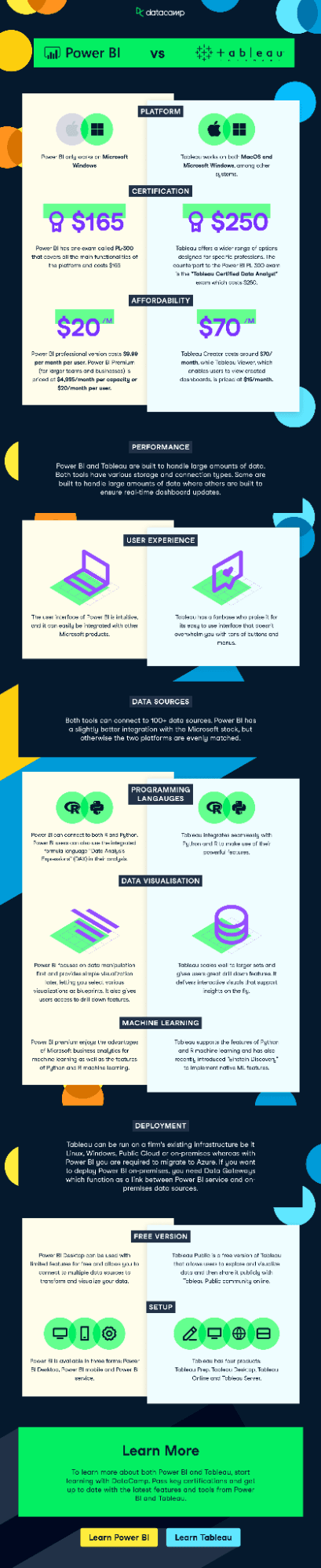
If you’re looking for a handy guide to the differences between these two fantastic tools, we’ve prepared an infographic that deals with the key comparison points.
Want a career in data? Discover our Data Analyst in Microsoft Power BI career track and you'll be job ready in no time.

Power BI vs Tableau FAQs
Which is better, Power BI vs Tableau?
The answer to this depends entirely on your personal or business needs. Both of these tools can create useful data insights and visualizations, and each has a range of features that make them suited to different environments.
Is Power BI or Tableau easier?
There isn’t much between them, but a lot of people consider Power BI to be marginally more beginner-friendly than Tableau. If you’re not a data analyst, Tableau may have a slightly steeper learning curve. However, both are intuitive and have excellent UIs.
Should I learn Power BI or Tableau?
Both are strong options to learn. If you’re totally new to the concept of business intelligence, Power BI might be a gentler introduction. However, if you want to build custom dashboards, Tableau is as good a choice.
Does Tableau require coding?
No, neither Tableau nor Power BI requires coding skills. However, if you want to get the most out of your data and visualizations, then it’s always useful to have knowledge of R Programming, Python and SQL.
How long will it take to learn Tableau or Power BI?
You can get the fundamentals of both tools in around 3-4 hours with one of our introductory courses. However, to gain fluency, it can take considerably longer, usually a few months. Our Data Analyst in Tableau track takes around 42 hours to complete, while our Data Analyst in Power BI takes roughly 51 hours.
Should I instead consider Looker Studio?
Looker Studio (formerly known as Google Data Studio) is another popular BI tool used for data analysis and visualization. See our following guides:
What is happening to Power BI Premium (per capacity)?
Power BI Premium (per capacity) is being retired as of January 1, 2025. Microsoft is transitioning to Microsoft Fabric SKU, a unified platform that integrates Power BI Premium with Azure Synapse Analytics and Azure Data Factory. New sales of Power BI Premium (per capacity) stopped on July 1, 2024.
%22%3E%0A%20%20%20%20%20%20%20%20%3Crect%20fill%3D%22%23EFEBE4%22%20height%3D%22180%22%20width%3D%22336%22%20%2F%3E%0A%20%20%20%20%20%20%20%20%3Crect%0A%20%20%20%20%20%20%20%20%20%20fill%3D%22%23DD3400%22%0A%20%20%20%20%20%20%20%20%20%20height%3D%22106.6%22%0A%20%20%20%20%20%20%20%20%20%20transform%3D%22rotate(-30%20-208.588%20220.18)%22%0A%20%20%20%20%20%20%20%20%20%20width%3D%22456.125%22%0A%20%20%20%20%20%20%20%20%20%20x%3D%22-208.588%22%0A%20%20%20%20%20%20%20%20%20%20y%3D%22220.18%22%0A%20%20%20%20%20%20%20%20%2F%3E%0A%20%20%20%20%20%20%20%20%3Crect%0A%20%20%20%20%20%20%20%20%20%20fill%3D%22%23FFEC3C%22%0A%20%20%20%20%20%20%20%20%20%20height%3D%2235.875%22%0A%20%20%20%20%20%20%20%20%20%20transform%3D%22rotate(-30%20-208.588%20220.18)%22%0A%20%20%20%20%20%20%20%20%20%20width%3D%22347.576%22%0A%20%20%20%20%20%20%20%20%20%20x%3D%22-208.588%22%0A%20%20%20%20%20%20%20%20%20%20y%3D%22220.18%22%0A%20%20%20%20%20%20%20%20%2F%3E%0A%20%20%20%20%20%20%20%20%3Crect%0A%20%20%20%20%20%20%20%20%20%20fill%3D%22%23FF931E%22%0A%20%20%20%20%20%20%20%20%20%20height%3D%2235.875%22%0A%20%20%20%20%20%20%20%20%20%20transform%3D%22rotate(-30%20-226.525%20189.111)%22%0A%20%20%20%20%20%20%20%20%20%20width%3D%22347.576%22%0A%20%20%20%20%20%20%20%20%20%20x%3D%22-226.525%22%0A%20%20%20%20%20%20%20%20%20%20y%3D%22189.111%22%0A%20%20%20%20%20%20%20%20%2F%3E%0A%20%20%20%20%20%20%20%20%3Crect%0A%20%20%20%20%20%20%20%20%20%20fill%3D%22%23DD3400%22%0A%20%20%20%20%20%20%20%20%20%20height%3D%22106.6%22%0A%20%20%20%20%20%20%20%20%20%20transform%3D%22rotate(-30%2085.5879%20256.055)%22%0A%20%20%20%20%20%20%20%20%20%20width%3D%22456.125%22%0A%20%20%20%20%20%20%20%20%20%20x%3D%2285.5879%22%0A%20%20%20%20%20%20%20%20%20%20y%3D%22256.055%22%0A%20%20%20%20%20%20%20%20%2F%3E%0A%20%20%20%20%20%20%20%20%3Crect%0A%20%20%20%20%20%20%20%20%20%20fill%3D%22%23FFEC3C%22%0A%20%20%20%20%20%20%20%20%20%20height%3D%2235.875%22%0A%20%20%20%20%20%20%20%20%20%20transform%3D%22rotate(-30%2085.5879%20256.055)%22%0A%20%20%20%20%20%20%20%20%20%20width%3D%22184.5%22%0A%20%20%20%20%20%20%20%20%20%20x%3D%2285.5879%22%0A%20%20%20%20%20%20%20%20%20%20y%3D%22256.055%22%0A%20%20%20%20%20%20%20%20%2F%3E%0A%20%20%20%20%20%20%20%20%3Crect%0A%20%20%20%20%20%20%20%20%20%20fill%3D%22%23FF931E%22%0A%20%20%20%20%20%20%20%20%20%20height%3D%2235.875%22%0A%20%20%20%20%20%20%20%20%20%20transform%3D%22rotate(-30%20227.432%20132.736)%22%0A%20%20%20%20%20%20%20%20%20%20width%3D%22271.625%22%0A%20%20%20%20%20%20%20%20%20%20x%3D%22227.432%22%0A%20%20%20%20%20%20%20%20%20%20y%3D%22132.736%22%0A%20%20%20%20%20%20%20%20%2F%3E%0A%20%20%20%20%20%20%3C%2Fg%3E%0A%20%20%20%20%20%20%3Cdefs%3E%0A%20%20%20%20%20%20%20%20%3CclipPath%20id%3D%22clip%22%3E%0A%20%20%20%20%20%20%20%20%20%20%3Crect%20fill%3D%22white%22%20height%3D%22180%22%20width%3D%22336%22%20%2F%3E%0A%20%20%20%20%20%20%20%20%3C%2FclipPath%3E%0A%20%20%20%20%20%20%3C%2Fdefs%3E%0A%20%20%20%20%3C%2Fsvg%3E)


%22%3E%0A%20%20%20%20%20%20%20%20%3Crect%20fill%3D%22%2305192D%22%20height%3D%22180%22%20width%3D%22336%22%20%2F%3E%0A%20%20%20%20%20%20%20%20%3Crect%0A%20%20%20%20%20%20%20%20%20%20fill%3D%22%23B08EFF%22%0A%20%20%20%20%20%20%20%20%20%20height%3D%22106.6%22%0A%20%20%20%20%20%20%20%20%20%20transform%3D%22rotate(-30%20-208.588%20220.18)%22%0A%20%20%20%20%20%20%20%20%20%20width%3D%22456.125%22%0A%20%20%20%20%20%20%20%20%20%20x%3D%22-208.588%22%0A%20%20%20%20%20%20%20%20%20%20y%3D%22220.18%22%0A%20%20%20%20%20%20%20%20%2F%3E%0A%20%20%20%20%20%20%20%20%3Crect%0A%20%20%20%20%20%20%20%20%20%20fill%3D%22%237933FF%22%0A%20%20%20%20%20%20%20%20%20%20height%3D%2235.875%22%0A%20%20%20%20%20%20%20%20%20%20transform%3D%22rotate(-30%20-208.588%20220.18)%22%0A%20%20%20%20%20%20%20%20%20%20width%3D%22347.576%22%0A%20%20%20%20%20%20%20%20%20%20x%3D%22-208.588%22%0A%20%20%20%20%20%20%20%20%20%20y%3D%22220.18%22%0A%20%20%20%20%20%20%20%20%2F%3E%0A%20%20%20%20%20%20%20%20%3Crect%0A%20%20%20%20%20%20%20%20%20%20fill%3D%22%2372E5FE%22%0A%20%20%20%20%20%20%20%20%20%20height%3D%2235.875%22%0A%20%20%20%20%20%20%20%20%20%20transform%3D%22rotate(-30%20-226.525%20189.111)%22%0A%20%20%20%20%20%20%20%20%20%20width%3D%22347.576%22%0A%20%20%20%20%20%20%20%20%20%20x%3D%22-226.525%22%0A%20%20%20%20%20%20%20%20%20%20y%3D%22189.111%22%0A%20%20%20%20%20%20%20%20%2F%3E%0A%20%20%20%20%20%20%20%20%3Crect%0A%20%20%20%20%20%20%20%20%20%20fill%3D%22%235EB1FF%22%0A%20%20%20%20%20%20%20%20%20%20height%3D%22106.6%22%0A%20%20%20%20%20%20%20%20%20%20transform%3D%22rotate(-30%2085.5879%20256.055)%22%0A%20%20%20%20%20%20%20%20%20%20width%3D%22456.125%22%0A%20%20%20%20%20%20%20%20%20%20x%3D%2285.5879%22%0A%20%20%20%20%20%20%20%20%20%20y%3D%22256.055%22%0A%20%20%20%20%20%20%20%20%2F%3E%0A%20%20%20%20%20%20%20%20%3Crect%0A%20%20%20%20%20%20%20%20%20%20fill%3D%22%23B08EFF%22%0A%20%20%20%20%20%20%20%20%20%20height%3D%2235.875%22%0A%20%20%20%20%20%20%20%20%20%20transform%3D%22rotate(-30%2085.5879%20256.055)%22%0A%20%20%20%20%20%20%20%20%20%20width%3D%22184.5%22%0A%20%20%20%20%20%20%20%20%20%20x%3D%2285.5879%22%0A%20%20%20%20%20%20%20%20%20%20y%3D%22256.055%22%0A%20%20%20%20%20%20%20%20%2F%3E%0A%20%20%20%20%20%20%20%20%3Crect%0A%20%20%20%20%20%20%20%20%20%20fill%3D%22%2372E5FE%22%0A%20%20%20%20%20%20%20%20%20%20height%3D%2235.875%22%0A%20%20%20%20%20%20%20%20%20%20transform%3D%22rotate(-30%20227.432%20132.736)%22%0A%20%20%20%20%20%20%20%20%20%20width%3D%22271.625%22%0A%20%20%20%20%20%20%20%20%20%20x%3D%22227.432%22%0A%20%20%20%20%20%20%20%20%20%20y%3D%22132.736%22%0A%20%20%20%20%20%20%20%20%2F%3E%0A%20%20%20%20%20%20%3C%2Fg%3E%0A%20%20%20%20%20%20%3Cdefs%3E%0A%20%20%20%20%20%20%20%20%3CclipPath%20id%3D%22clip%22%3E%0A%20%20%20%20%20%20%20%20%20%20%3Crect%20fill%3D%22white%22%20height%3D%22180%22%20width%3D%22336%22%20%2F%3E%0A%20%20%20%20%20%20%20%20%3C%2FclipPath%3E%0A%20%20%20%20%20%20%3C%2Fdefs%3E%0A%20%20%20%20%3C%2Fsvg%3E)




%22%3E%0A%20%20%20%20%20%20%20%20%3Crect%20fill%3D%22%23EFEBE4%22%20height%3D%22180%22%20width%3D%22336%22%20%2F%3E%0A%20%20%20%20%20%20%20%20%3Crect%0A%20%20%20%20%20%20%20%20%20%20fill%3D%22%2372E5FE%22%0A%20%20%20%20%20%20%20%20%20%20height%3D%22106.6%22%0A%20%20%20%20%20%20%20%20%20%20transform%3D%22rotate(-30%20-208.588%20220.18)%22%0A%20%20%20%20%20%20%20%20%20%20width%3D%22456.125%22%0A%20%20%20%20%20%20%20%20%20%20x%3D%22-208.588%22%0A%20%20%20%20%20%20%20%20%20%20y%3D%22220.18%22%0A%20%20%20%20%20%20%20%20%2F%3E%0A%20%20%20%20%20%20%20%20%3Crect%0A%20%20%20%20%20%20%20%20%20%20fill%3D%22%23000820%22%0A%20%20%20%20%20%20%20%20%20%20height%3D%2235.875%22%0A%20%20%20%20%20%20%20%20%20%20transform%3D%22rotate(-30%20-208.588%20220.18)%22%0A%20%20%20%20%20%20%20%20%20%20width%3D%22347.576%22%0A%20%20%20%20%20%20%20%20%20%20x%3D%22-208.588%22%0A%20%20%20%20%20%20%20%20%20%20y%3D%22220.18%22%0A%20%20%20%20%20%20%20%20%2F%3E%0A%20%20%20%20%20%20%20%20%3Crect%0A%20%20%20%20%20%20%20%20%20%20fill%3D%22%235EB1FF%22%0A%20%20%20%20%20%20%20%20%20%20height%3D%2235.875%22%0A%20%20%20%20%20%20%20%20%20%20transform%3D%22rotate(-30%20-226.525%20189.111)%22%0A%20%20%20%20%20%20%20%20%20%20width%3D%22347.576%22%0A%20%20%20%20%20%20%20%20%20%20x%3D%22-226.525%22%0A%20%20%20%20%20%20%20%20%20%20y%3D%22189.111%22%0A%20%20%20%20%20%20%20%20%2F%3E%0A%20%20%20%20%20%20%20%20%3Crect%0A%20%20%20%20%20%20%20%20%20%20fill%3D%22%23000820%22%0A%20%20%20%20%20%20%20%20%20%20height%3D%22106.6%22%0A%20%20%20%20%20%20%20%20%20%20transform%3D%22rotate(-30%2085.5879%20256.055)%22%0A%20%20%20%20%20%20%20%20%20%20width%3D%22456.125%22%0A%20%20%20%20%20%20%20%20%20%20x%3D%2285.5879%22%0A%20%20%20%20%20%20%20%20%20%20y%3D%22256.055%22%0A%20%20%20%20%20%20%20%20%2F%3E%0A%20%20%20%20%20%20%20%20%3Crect%0A%20%20%20%20%20%20%20%20%20%20fill%3D%22%23D87300%22%0A%20%20%20%20%20%20%20%20%20%20height%3D%2235.875%22%0A%20%20%20%20%20%20%20%20%20%20transform%3D%22rotate(-30%2085.5879%20256.055)%22%0A%20%20%20%20%20%20%20%20%20%20width%3D%22184.5%22%0A%20%20%20%20%20%20%20%20%20%20x%3D%2285.5879%22%0A%20%20%20%20%20%20%20%20%20%20y%3D%22256.055%22%0A%20%20%20%20%20%20%20%20%2F%3E%0A%20%20%20%20%20%20%20%20%3Crect%0A%20%20%20%20%20%20%20%20%20%20fill%3D%22%235646A5%22%0A%20%20%20%20%20%20%20%20%20%20height%3D%2235.875%22%0A%20%20%20%20%20%20%20%20%20%20transform%3D%22rotate(-30%20227.432%20132.736)%22%0A%20%20%20%20%20%20%20%20%20%20width%3D%22271.625%22%0A%20%20%20%20%20%20%20%20%20%20x%3D%22227.432%22%0A%20%20%20%20%20%20%20%20%20%20y%3D%22132.736%22%0A%20%20%20%20%20%20%20%20%2F%3E%0A%20%20%20%20%20%20%3C%2Fg%3E%0A%20%20%20%20%20%20%3Cdefs%3E%0A%20%20%20%20%20%20%20%20%3CclipPath%20id%3D%22clip%22%3E%0A%20%20%20%20%20%20%20%20%20%20%3Crect%20fill%3D%22white%22%20height%3D%22180%22%20width%3D%22336%22%20%2F%3E%0A%20%20%20%20%20%20%20%20%3C%2FclipPath%3E%0A%20%20%20%20%20%20%3C%2Fdefs%3E%0A%20%20%20%20%3C%2Fsvg%3E)

A good decision-making process finds a balance between decisiveness and due diligence, so conveying information quickly is highly valued in all kinds of businesses. This concept is at the heart of data visualization; often, a single graphic or chart can effortlessly show and explain what would otherwise have been thousands of numbers and words. You can create such charts using Business Intelligence tools such as Tableau and Microsoft Power BI.
In this article, we look at Power BI vs Tableau, exploring their similarities and differences, as well as their pros and cons. After reading, you should have an idea of which is right for your needs.
Get started with our Introduction to Power BI and Introduction to Tableau courses today.