AI coding agents improve with every new model release, but you can also improve their performance without upgrading the model. Even with a strong model and well-written prompts, an agent can struggle when its tools, instructions, memory, and workflows aren't tuned for the task.
Google's new Harness^2 research (also written Harness2) takes this approach. It leaves the underlying model unchanged and automatically refines the harness around it, letting agents test changes and learn from previous executions. Google reports gains of up to 11.5 points on WorkBuddy-Bench and 4.5 points on JobBench with a single refinement step.
In this article, I'll cover how Harness^2 works, run Google's official offline demo, and then use DeepSeek V4.1 Flash with OpenCode on a JobBench task. I'll then compare the original and refined harnesses to see whether Harness^2 improved the agent's performance in our test. You can also see our guide to OpenCode and our AI agents guide.
In a Nutshell
- Harness^2 is a framework from Google Cloud AI Research that refines an agent's harness (prompts, memory, skills, scripts, and more) without retraining the model.
- It uses a Propose–Probe–Compose process and doesn't need the correct answer during refinement.
- Google reports gains of up to 11.5 points on WorkBuddy-Bench and 4.5 points on JobBench with 1 refinement step.
- In our test on 1 JobBench task with DeepSeek, the refined harness scored 23.91%, down from 58.70% for the original.
- That is a single task and a single run, so it shows that refinement isn't guaranteed to help, not that Harness^2 doesn't work.
What Is Google's Harness^2 Framework?
Harness^2 is a framework from Google Cloud AI Research that automatically refines the harness around an AI agent, without changing the underlying model.
When you use an AI coding agent like OpenCode, the model is only one part of the system. It also relies on prompts, tools, memory, skills, and scripts to complete tasks. Together, these components are called an AI agent harness.
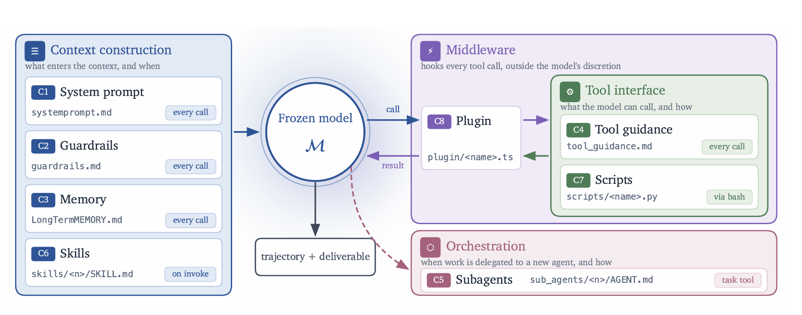
Source: Harness^2: Recursive Agent Harnessing for an Open World
The same model can perform differently depending on how its harness is configured. Harness^2 takes this idea further and experiments with improving the harness around the model, rather than training a better model.
It uses a process called Propose–Probe–Compose, where the agent runs a task, suggests changes to its harness, tests those changes, and combines useful improvements.
Here's how it works:
| Stage | What happens |
|---|
| Run | Execute the task using the original harness. |
| Propose | Suggest improvements to prompts, tools, or scripts. |
| Probe | Test the proposed changes through new executions. |
| Compose | Combine useful changes into a refined harness. |
| Select | Execute the refined harness and select an output. |
| Reflect | Save lessons that can help with future tasks. |
What makes Harness^2 different is that it doesn't need the correct answer during refinement. Instead, it compares executions to decide which changes might help. The final output can then be evaluated separately.
The framework also introduces 2 levels of recursion: task-level recursion, which improves the harness for the current task, and harnessing-level recursion, which carries lessons into future tasks.
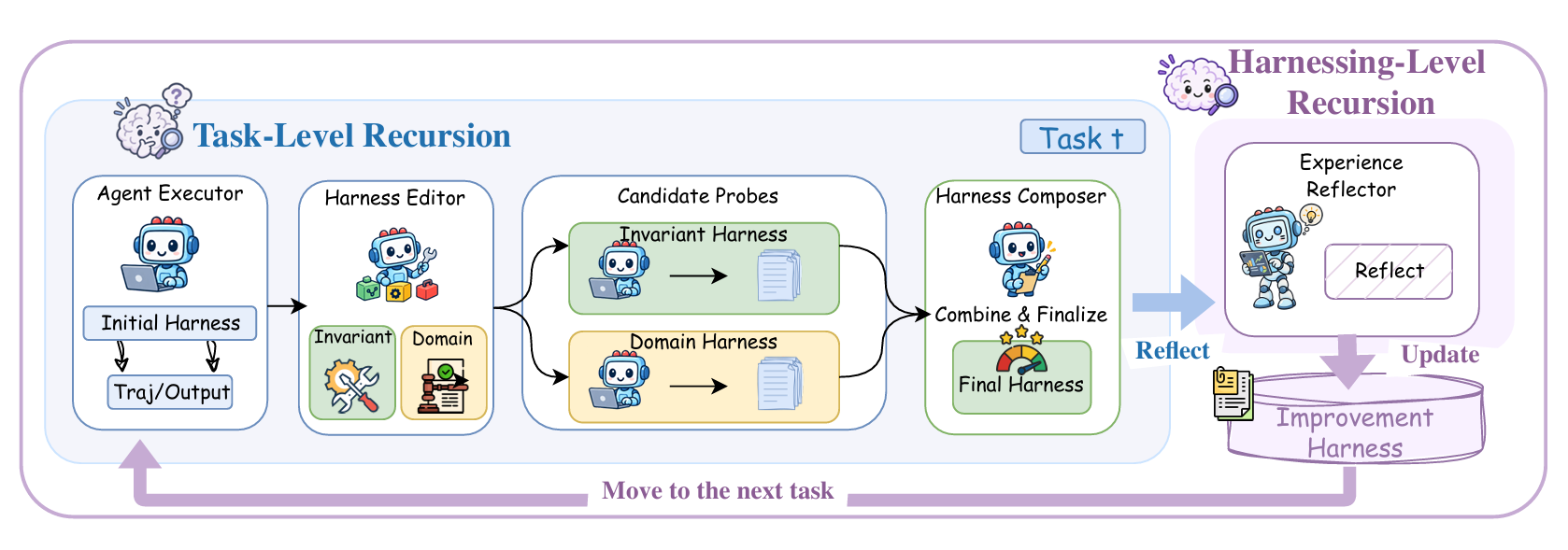
Source: Harness^2: Recursive Agent Harnessing for an Open World
You can run these refinements in parallel or sequential mode, with the --k parameter controlling the refinement budget. More steps mean more experimentation, but also additional model calls and costs.
According to Google's research paper, Harness^2 improved overall performance by up to 11.5 points on WorkBuddy-Bench and 4.5 points on JobBench with 1 refinement step. WorkBuddy-Bench is Tencent's multi-domain benchmark covering code, web, and office tasks, and JobBench tests end-to-end professional job tasks. However, individual changes can also make results worse.
How to Install and Run Google's Harness^2
Harness^2 runs on Linux with Python 3.12 and uv, and Google's offline demo needs no API key. Now that we understand how it works, let's run the framework ourselves.
For this tutorial, we'll use:
- Linux (Ubuntu or WSL2)
- Python 3.12
- uv for Python environment management
- Node.js 20 or newer for model-backed experiments
- OpenCode as the agent executor
- DeepSeek API as our AI model provider
We'll start with Google's local demo because it doesn't require an API key or paid model calls.
Install Harness^2 with uv
First, clone the official Google repository:
git clone https://github.com/google-research/harness2.git
cd harness2
Next, create a Python 3.12 environment and install the project:
uv venv --python 3.12 .venv
source .venv/bin/activate
uv pip install -e '.[render]'
If you haven't installed uv yet, follow the official installation guide. Restart your terminal after installing it if the command isn't recognized.
Run your first Harness^2 demo and understand the results
Google provides a simple accounting demo to show how Harness^2 improves a harness by identifying and fixing problems.
Run the following command:
harness2-demo --output runs/demo --k 2
This demo runs entirely locally using scripted editors and Python executions. You don't need an API key or an AI model.
The experiment contains 2 accounting tasks, where the goal is to add positive and negative ledger entries to calculate the correct totals. However, there is a deliberate bug in the starting script: it only adds positive numbers and ignores negative ones.
Harness^2 tests changes to the script, including removing the restriction that causes negative values to be ignored. It then runs the tasks again to check the results.
Output:
[accounting] 1/2 ok          ledger-1
[accounting] 2/2 ok          ledger-2
Local demo: 2 tasks completed; 0 failed.
The output shows that both accounting tasks completed successfully, with correct totals of 85.15 and 20.25.
What happened behind the scenes matters more than the output itself. The experiment recorded 28 local executions and 32 scripted editor calls across both recursion modes, so Harness^2 didn't simply run the accounting script once. It went through multiple executions and refinement steps to demonstrate how changes to a harness can be tested and carried forward.
The experiment shows how Harness^2 can test and refine the components around a task without modifying the underlying model. In this case, correcting a faulty Python script allowed the accounting tasks to produce the expected results.
However, this is a controlled demo using scripted improvements, not an AI model independently discovering and fixing the bug. To see how Harness^2 works with an actual AI model making improvement suggestions, we'll use OpenCode and DeepSeek in the next experiment.
How to Run Harness^2 with OpenCode and DeepSeek on JobBench
Running Harness^2 with OpenCode and DeepSeek means using DeepSeek as the model behind OpenCode while Harness^2 refines the harness around it. Instead of scripted improvements, we'll use DeepSeek as the AI model and OpenCode to execute tasks.
We'll also use JobBench, a benchmark containing real-world professional tasks, to see how Harness^2 affects the agent's workflow. The goal is to find out whether Harness^2 can improve how an AI agent completes a task without changing the underlying model.
Normally, a coding agent receives instructions, uses tools, generates files, and finishes the task. Harness^2 adds another layer around that process. It runs the original agent, proposes changes to its harness, tests those changes, and combines useful improvements before producing a final result.
Here is how everything works together:
| Component | Purpose |
|---|
| DeepSeek | AI model that powers the agent |
| OpenCode | Executes tasks and uses tools |
| Harness^2 | Proposes, tests, and combines harness improvements |
| JobBench | Provides real-world tasks for testing |
| Judge | Evaluates the quality of the final output |
We're not permanently adding Harness^2 to our regular OpenCode workspace. We're running Google's experimental framework around OpenCode to understand how automated harness improvement works.
We'll start by connecting OpenCode to DeepSeek using its OpenAI-compatible API. First, set the API configuration in your terminal:
export LLM_BASE_URL='https://api.deepseek.com'
export LLM_API_KEY='YOUR_API_KEY'
export LLM_MODEL='deepseek-chat'
Replace YOUR_API_KEY with your actual DeepSeek API key.
Next, create a file named opencode-deepseek.json inside the Harness^2 project directory:
{
  "provider": {
    "deepseek": {
      "npm": "@ai-sdk/openai-compatible",
      "name": "DeepSeek",
      "options": {
        "baseURL": "{env:LLM_BASE_URL}",
        "apiKey": "{env:LLM_API_KEY}"
      },
      "models": {
        "deepseek-chat": {
          "name": "DeepSeek",
          "tool_call": true
        }
      }
    }
  }
}
This tells OpenCode which model to use and where to send API requests. You can also configure other supported providers using the OpenCode documentation.
Now, configure Harness^2 to use the same model for executing tasks, suggesting improvements, and evaluating results:
export OPENCODE_CONFIG="$PWD/opencode-deepseek.json"
export HARNESS2_SOLVER_MODEL="deepseek/$LLM_MODEL"
export HARNESS2_IMPROVER_MODEL="$HARNESS2_SOLVER_MODEL"
export HARNESS2_JUDGE_MODEL="$LLM_MODEL"
export HARNESS2_JUDGE_BASE_URL="$LLM_BASE_URL"
export HARNESS2_JUDGE_API_KEY="$LLM_API_KEY"
We're using the same model for all 3 roles to keep things simple. However, you can use different models for execution, improvement, and evaluation.
The original experiment results shown later came from a separate OpenAI-compatible endpoint and model identifier, so they shouldn't be treated as verified results for this exact direct DeepSeek configuration.
Step 2: Set up JobBench for AI agent evaluation
Now we need a task that lets us see how Harness^2 works with a real agent. For this, we'll use JobBench, which contains professional tasks involving data entry, document processing, auditing, and other workplace activities.
Instead of asking the agent to write a simple Python function, we'll give it a task where it needs to work with multiple files and produce several deliverables. Install the benchmark dependencies and task data:
Then check that everything is ready:
harness2-check --bench jb
Output:
Ready: jb/oc; 65 tasks. Model access is not exercised; the first real run is the first model call.
Harness^2 found 65 available tasks and confirmed that the required local benchmark components are ready.
It hasn't called DeepSeek yet. It has only checked the local environment, so the actual model connection will be tested during execution.
Step 3: Run Harness^2 on a real-world task
For this experiment, we'll use a single data-entry task rather than running the entire benchmark. This keeps the experiment manageable and reduces API costs.
First, preview the selected task:
harness2 --bench jb --k 1 --mode parallel \
  --only-domains data_entry_keyers --max-tasks 1 --dry-run
The command selected:
Now run the actual experiment by removing --dry-run:
harness2 --bench jb --k 1 --mode parallel \
  --only-domains data_entry_keyers --max-tasks 1
Here, --bench jb selects JobBench, --k 1 sets 1 refinement step, and --mode parallel tells Harness^2 to explore candidate improvements in parallel. We also limit the run to 1 task in the data_entry_keyers domain.
First, OpenCode attempts the task using its starting harness, just like a regular AI agent would. It reads the provided materials, uses its tools, and generates the requested files.
Then Harness^2 examines that execution and proposes changes to the harness. These might involve improving instructions, modifying how tools are used, or introducing a better process for completing the task.
Harness^2 doesn't accept those suggestions immediately. It tests them through additional executions, uses the evidence to compose a refined harness, and runs the task again.
Harness^2 also experiments with how the agent completes the task, which a regular coding agent doesn't do.
Step 4: Understand the Harness^2 experiment output
In our experiment, OpenCode worked on a data-entry and auditing task that required several professional deliverables. The original harness generated an error log, a reconciled dataset, a compliance checklist, and an audit report.
Harness^2 then proposed 2 changes, ran 2 probe executions, composed a refined harness, and executed the task again. The final execution produced these 4 files:
Executive_Audit_Findings_Report_Q3_2025.docxCompliance_Checklist_Q3_2025.xlsxReconciled_Master_Dataset_Q3_2025.xlsxData_Entry_Error_Log_Q3_2025.xlsx
These files cover auditing, compliance checks, data reconciliation, and error tracking.
Output:
[data_entry_keyers] 1/1 ok  data_entry_keyers/task1
sweep jb-oc-agg1: 1 tasks ok, 0 failed, 0 domain(s) died
This tells us that the selected task completed without an execution failure. The more useful detail is how Harness^2 arrived at that result.
With a regular OpenCode agent, we would usually get the generated files after a single agent execution. With Harness^2, we also get a record of the original execution, proposed harness changes, probe executions, and the composed harness used for the final run.
However, the output doesn't tell us exactly which proposed changes were beneficial or whether the final files are better than the originals. We would need to examine the saved execution traces and compare the outputs to understand those differences.
For now, we can see that the refinement process ran successfully. Next, we need to check the quality of the result.
Now that our experiment is complete, let's see whether Harness^2 improved the agent's performance. Run the following commands to evaluate both the original and refined harnesses:
harness2-judge --bench jb --k 1 --mode parallel --bases
harness2-judge --bench jb --k 1 --mode parallel
harness2-report --bench jb --k 1 --mode parallel
Here are the results from our experiment:
Baseline: 54.0 / 92.0 = 58.70%
Refined:  22.0 / 92.0 = 23.91%
parallel k=1: n=1 | score 23.91% | picked output: final 1 / candidate 0 / base 0
improver spend across reported modes: $0.37
Our refined harness performed worse than the original, dropping by 34.79 percentage points.
The picked output: final 1 line means Harness^2 used the final refined execution. Since we used k=1, there was no separate final selection stage comparing multiple refined outputs. It doesn't mean the refined harness was better.
The experiment also reported $0.37 in improver-related spending, which doesn't necessarily include the full execution and evaluation costs.
So, our experiment successfully demonstrated automated harness refinement, but it didn't improve the result on this particular task.
Step 6: Compare our Harness^2 results with Google's research
Our results might seem surprising, especially considering the improvements reported in Google's Harness^2 research paper.
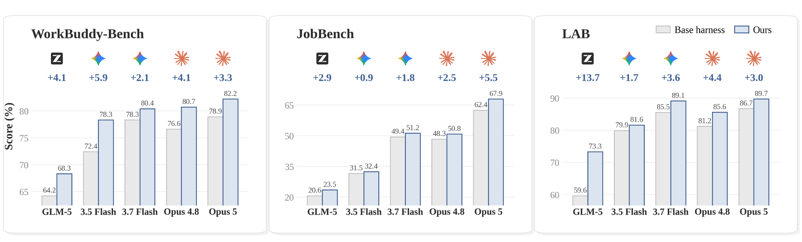
Source: Harness^2: Recursive Agent Harnessing for an Open World
Here are some of Google's published results using OpenCode with 1 refinement step:
| Benchmark | Model | Baseline | Harness^2 | Improvement |
|---|
| WorkBuddy-Bench | GLM-5 | 64.2 | 75.7 | +11.5 points |
| WorkBuddy-Bench | Gemini 3.5 Flash | 72.4 | 77.5 | +5.1 points |
| JobBench | Gemini 3.5 Flash | 31.5 | 36.0 | +4.5 points |
| JobBench | GLM-5 | 20.6 | 24.2 | +3.6 points |
Google's results show improvements across broader benchmark evaluations, while we tested only 1 task with a different model configuration. So these numbers shouldn't be compared directly.
Harness^2 also doesn't use ground-truth benchmark scores during refinement. It proposes changes, tests executions, and uses the resulting evidence to refine the harness, so an individual refinement can still make performance worse.
My main takeaway is that Harness^2 offers a way to automatically improve the system around an AI model without retraining it, but those improvements aren't guaranteed.
Can You Use Google's Harness^2 with Your Existing Coding Agent?
Harness^2 is released as research code, so using it inside an everyday coding workflow takes extra work. After going through the research and running the experiments, I wanted to know whether I could use it with my existing coding agent.
I searched for implementations that bring Google's Harness^2 into tools like OpenCode, Claude Code, or Codex, but I haven't found a straightforward solution that fully implements the original framework.
Several similar projects explore self-improving agents, automatic prompt optimization, memory updates, and skill improvements, such as Meta-Harness, ReasoningBank, and TTHE. However, these don't necessarily use Google's exact Propose–Probe–Compose approach and its 2 levels of recursion.
Google has released the research code, scripts, and experiments, so we can run the framework and see how it works. Using it as part of an everyday coding workflow is a different story.
You can't simply install Harness^2 as a plugin and have your coding agent automatically improve its instructions, tools, and skills after every task. That would require additional integration, proper evaluation, and a way to safely apply the improvements to future tasks.
For now, the best way to experience Harness^2 is through Google's local demo and model-backed benchmark experiments, like the ones in this tutorial.
The real potential is in making this process work automatically inside existing coding agents: an agent that learns from previous tasks, tests improvements to its own harness, and keeps the changes that work.
Final Thoughts
Harness^2 is a promising way to improve an AI agent without retraining the model, but our test shows that a refined harness isn't guaranteed to beat the original.
When an AI coding agent produces a bad result, we usually blame the model or the prompt, so we switch models or rewrite our instructions. Google's Harness^2 research points at another suspect: a harness that isn't suited to your specific project.
The framework explores how the harness can be refined using previous executions and experience. Google reports gains of up to 11.5 points on WorkBuddy-Bench and 4.5 points on JobBench without retraining the underlying models.
Our experiment went the other way. The original harness scored 58.70%, while the refined version dropped to 23.91%.
After looking into the research and other independent experiments, I found that regressions aren't unusual. Google's paper also discusses cases where harness changes make results worse, and independent testing has reported both improvements and regressions.
I think this suggests that sometimes your existing harness is already doing a good job, and changing it can make things worse. Our experiment used DeepSeek on a single task, so we can't draw broad conclusions or know exactly what caused the drop without further testing.
Still, I think Google is exploring something valuable. Rather than constantly switching models or rewriting prompts, we can start thinking about how to make our harnesses better suited to the projects we're building.
The next big improvement in AI coding may come from harnesses that adapt to our projects and are tested before their changes are kept, as much as from smarter models.
If you're keen to learn more about building AI agents, I recommend checking out the Google: Optimize Agent Behavior course.









AI coding agents improve with every new model release, but you can also improve their performance without upgrading the model. Even with a strong model and well-written prompts, an agent can struggle when its tools, instructions, memory, and workflows aren't tuned for the task.
Google's new Harness^2 research (also written Harness2) takes this approach. It leaves the underlying model unchanged and automatically refines the harness around it, letting agents test changes and learn from previous executions. Google reports gains of up to 11.5 points on WorkBuddy-Bench and 4.5 points on JobBench with a single refinement step.
In this article, I'll cover how Harness^2 works, run Google's official offline demo, and then use DeepSeek V4.1 Flash with OpenCode on a JobBench task. I'll then compare the original and refined harnesses to see whether Harness^2 improved the agent's performance in our test. You can also see our guide to OpenCode and our AI agents guide.
In a Nutshell
What Is Google's Harness^2 Framework?
Harness^2 is a framework from Google Cloud AI Research that automatically refines the harness around an AI agent, without changing the underlying model.
When you use an AI coding agent like OpenCode, the model is only one part of the system. It also relies on prompts, tools, memory, skills, and scripts to complete tasks. Together, these components are called an AI agent harness.
Source: Harness^2: Recursive Agent Harnessing for an Open World
The same model can perform differently depending on how its harness is configured. Harness^2 takes this idea further and experiments with improving the harness around the model, rather than training a better model.
It uses a process called Propose–Probe–Compose, where the agent runs a task, suggests changes to its harness, tests those changes, and combines useful improvements.
Here's how it works:
What makes Harness^2 different is that it doesn't need the correct answer during refinement. Instead, it compares executions to decide which changes might help. The final output can then be evaluated separately.
The framework also introduces 2 levels of recursion: task-level recursion, which improves the harness for the current task, and harnessing-level recursion, which carries lessons into future tasks.
Source: Harness^2: Recursive Agent Harnessing for an Open World
You can run these refinements in parallel or sequential mode, with the
--kparameter controlling the refinement budget. More steps mean more experimentation, but also additional model calls and costs.According to Google's research paper, Harness^2 improved overall performance by up to 11.5 points on WorkBuddy-Bench and 4.5 points on JobBench with 1 refinement step. WorkBuddy-Bench is Tencent's multi-domain benchmark covering code, web, and office tasks, and JobBench tests end-to-end professional job tasks. However, individual changes can also make results worse.
How to Install and Run Google's Harness^2
Harness^2 runs on Linux with Python 3.12 and uv, and Google's offline demo needs no API key. Now that we understand how it works, let's run the framework ourselves.
For this tutorial, we'll use:
We'll start with Google's local demo because it doesn't require an API key or paid model calls.
Install Harness^2 with uv
First, clone the official Google repository:
Next, create a Python 3.12 environment and install the project:
If you haven't installed
uvyet, follow the official installation guide. Restart your terminal after installing it if the command isn't recognized.Run your first Harness^2 demo and understand the results
Google provides a simple accounting demo to show how Harness^2 improves a harness by identifying and fixing problems.
Run the following command:
This demo runs entirely locally using scripted editors and Python executions. You don't need an API key or an AI model.
The experiment contains 2 accounting tasks, where the goal is to add positive and negative ledger entries to calculate the correct totals. However, there is a deliberate bug in the starting script: it only adds positive numbers and ignores negative ones.
Harness^2 tests changes to the script, including removing the restriction that causes negative values to be ignored. It then runs the tasks again to check the results.
Output:
The output shows that both accounting tasks completed successfully, with correct totals of 85.15 and 20.25.
What happened behind the scenes matters more than the output itself. The experiment recorded 28 local executions and 32 scripted editor calls across both recursion modes, so Harness^2 didn't simply run the accounting script once. It went through multiple executions and refinement steps to demonstrate how changes to a harness can be tested and carried forward.
The experiment shows how Harness^2 can test and refine the components around a task without modifying the underlying model. In this case, correcting a faulty Python script allowed the accounting tasks to produce the expected results.
However, this is a controlled demo using scripted improvements, not an AI model independently discovering and fixing the bug. To see how Harness^2 works with an actual AI model making improvement suggestions, we'll use OpenCode and DeepSeek in the next experiment.
How to Run Harness^2 with OpenCode and DeepSeek on JobBench
Running Harness^2 with OpenCode and DeepSeek means using DeepSeek as the model behind OpenCode while Harness^2 refines the harness around it. Instead of scripted improvements, we'll use DeepSeek as the AI model and OpenCode to execute tasks.
We'll also use JobBench, a benchmark containing real-world professional tasks, to see how Harness^2 affects the agent's workflow. The goal is to find out whether Harness^2 can improve how an AI agent completes a task without changing the underlying model.
Normally, a coding agent receives instructions, uses tools, generates files, and finishes the task. Harness^2 adds another layer around that process. It runs the original agent, proposes changes to its harness, tests those changes, and combines useful improvements before producing a final result.
Here is how everything works together:
We're not permanently adding Harness^2 to our regular OpenCode workspace. We're running Google's experimental framework around OpenCode to understand how automated harness improvement works.
Step 1: Configure DeepSeek with OpenCode
We'll start by connecting OpenCode to DeepSeek using its OpenAI-compatible API. First, set the API configuration in your terminal:
Replace
YOUR_API_KEYwith your actual DeepSeek API key.Next, create a file named
opencode-deepseek.jsoninside the Harness^2 project directory:This tells OpenCode which model to use and where to send API requests. You can also configure other supported providers using the OpenCode documentation.
Now, configure Harness^2 to use the same model for executing tasks, suggesting improvements, and evaluating results:
We're using the same model for all 3 roles to keep things simple. However, you can use different models for execution, improvement, and evaluation.
The original experiment results shown later came from a separate OpenAI-compatible endpoint and model identifier, so they shouldn't be treated as verified results for this exact direct DeepSeek configuration.
Step 2: Set up JobBench for AI agent evaluation
Now we need a task that lets us see how Harness^2 works with a real agent. For this, we'll use JobBench, which contains professional tasks involving data entry, document processing, auditing, and other workplace activities.
Instead of asking the agent to write a simple Python function, we'll give it a task where it needs to work with multiple files and produce several deliverables. Install the benchmark dependencies and task data:
Then check that everything is ready:
Output:
Harness^2 found 65 available tasks and confirmed that the required local benchmark components are ready.
It hasn't called DeepSeek yet. It has only checked the local environment, so the actual model connection will be tested during execution.
Step 3: Run Harness^2 on a real-world task
For this experiment, we'll use a single data-entry task rather than running the entire benchmark. This keeps the experiment manageable and reduces API costs.
First, preview the selected task:
The command selected:
Now run the actual experiment by removing
--dry-run:Here,
--bench jbselects JobBench,--k 1sets 1 refinement step, and--mode paralleltells Harness^2 to explore candidate improvements in parallel. We also limit the run to 1 task in thedata_entry_keyersdomain.First, OpenCode attempts the task using its starting harness, just like a regular AI agent would. It reads the provided materials, uses its tools, and generates the requested files.
Then Harness^2 examines that execution and proposes changes to the harness. These might involve improving instructions, modifying how tools are used, or introducing a better process for completing the task.
Harness^2 doesn't accept those suggestions immediately. It tests them through additional executions, uses the evidence to compose a refined harness, and runs the task again.
Harness^2 also experiments with how the agent completes the task, which a regular coding agent doesn't do.
Step 4: Understand the Harness^2 experiment output
In our experiment, OpenCode worked on a data-entry and auditing task that required several professional deliverables. The original harness generated an error log, a reconciled dataset, a compliance checklist, and an audit report.
Harness^2 then proposed 2 changes, ran 2 probe executions, composed a refined harness, and executed the task again. The final execution produced these 4 files:
Executive_Audit_Findings_Report_Q3_2025.docxCompliance_Checklist_Q3_2025.xlsxReconciled_Master_Dataset_Q3_2025.xlsxData_Entry_Error_Log_Q3_2025.xlsxThese files cover auditing, compliance checks, data reconciliation, and error tracking.
Output:
This tells us that the selected task completed without an execution failure. The more useful detail is how Harness^2 arrived at that result.
With a regular OpenCode agent, we would usually get the generated files after a single agent execution. With Harness^2, we also get a record of the original execution, proposed harness changes, probe executions, and the composed harness used for the final run.
However, the output doesn't tell us exactly which proposed changes were beneficial or whether the final files are better than the originals. We would need to examine the saved execution traces and compare the outputs to understand those differences.
For now, we can see that the refinement process ran successfully. Next, we need to check the quality of the result.
Step 5: Evaluate Harness^2 performance and results
Now that our experiment is complete, let's see whether Harness^2 improved the agent's performance. Run the following commands to evaluate both the original and refined harnesses:
Here are the results from our experiment:
Our refined harness performed worse than the original, dropping by 34.79 percentage points.
The
picked output: final 1line means Harness^2 used the final refined execution. Since we usedk=1, there was no separate final selection stage comparing multiple refined outputs. It doesn't mean the refined harness was better.The experiment also reported $0.37 in improver-related spending, which doesn't necessarily include the full execution and evaluation costs.
So, our experiment successfully demonstrated automated harness refinement, but it didn't improve the result on this particular task.
Step 6: Compare our Harness^2 results with Google's research
Our results might seem surprising, especially considering the improvements reported in Google's Harness^2 research paper.
Source: Harness^2: Recursive Agent Harnessing for an Open World
Here are some of Google's published results using OpenCode with 1 refinement step:
Google's results show improvements across broader benchmark evaluations, while we tested only 1 task with a different model configuration. So these numbers shouldn't be compared directly.
Harness^2 also doesn't use ground-truth benchmark scores during refinement. It proposes changes, tests executions, and uses the resulting evidence to refine the harness, so an individual refinement can still make performance worse.
My main takeaway is that Harness^2 offers a way to automatically improve the system around an AI model without retraining it, but those improvements aren't guaranteed.
Can You Use Google's Harness^2 with Your Existing Coding Agent?
Harness^2 is released as research code, so using it inside an everyday coding workflow takes extra work. After going through the research and running the experiments, I wanted to know whether I could use it with my existing coding agent.
I searched for implementations that bring Google's Harness^2 into tools like OpenCode, Claude Code, or Codex, but I haven't found a straightforward solution that fully implements the original framework.
Several similar projects explore self-improving agents, automatic prompt optimization, memory updates, and skill improvements, such as Meta-Harness, ReasoningBank, and TTHE. However, these don't necessarily use Google's exact Propose–Probe–Compose approach and its 2 levels of recursion.
Google has released the research code, scripts, and experiments, so we can run the framework and see how it works. Using it as part of an everyday coding workflow is a different story.
You can't simply install Harness^2 as a plugin and have your coding agent automatically improve its instructions, tools, and skills after every task. That would require additional integration, proper evaluation, and a way to safely apply the improvements to future tasks.
For now, the best way to experience Harness^2 is through Google's local demo and model-backed benchmark experiments, like the ones in this tutorial.
The real potential is in making this process work automatically inside existing coding agents: an agent that learns from previous tasks, tests improvements to its own harness, and keeps the changes that work.
Final Thoughts
Harness^2 is a promising way to improve an AI agent without retraining the model, but our test shows that a refined harness isn't guaranteed to beat the original.
When an AI coding agent produces a bad result, we usually blame the model or the prompt, so we switch models or rewrite our instructions. Google's Harness^2 research points at another suspect: a harness that isn't suited to your specific project.
The framework explores how the harness can be refined using previous executions and experience. Google reports gains of up to 11.5 points on WorkBuddy-Bench and 4.5 points on JobBench without retraining the underlying models.
Our experiment went the other way. The original harness scored 58.70%, while the refined version dropped to 23.91%.
After looking into the research and other independent experiments, I found that regressions aren't unusual. Google's paper also discusses cases where harness changes make results worse, and independent testing has reported both improvements and regressions.
I think this suggests that sometimes your existing harness is already doing a good job, and changing it can make things worse. Our experiment used DeepSeek on a single task, so we can't draw broad conclusions or know exactly what caused the drop without further testing.
Still, I think Google is exploring something valuable. Rather than constantly switching models or rewriting prompts, we can start thinking about how to make our harnesses better suited to the projects we're building.
The next big improvement in AI coding may come from harnesses that adapt to our projects and are tested before their changes are kept, as much as from smarter models.
If you're keen to learn more about building AI agents, I recommend checking out the Google: Optimize Agent Behavior course.