

Course
Understanding Artificial Intelligence
2 hr
432.6K
Practice and track your progress.
Continue with GoogleOpenCode is built to carry out a task. It is an open-source agent that connects an AI model to your repository, terminal, and development tools. Ask it to fix a bug, and it can find the relevant files, draft a plan, edit the code, run tests, and respond to errors. Autocomplete cannot do that on its own.
That wider role drew attention. At the time of writing, the active OpenCode repository had around 189,000 GitHub stars. I would not treat stars as proof of code quality, but they do show how much interest the project has drawn.
The reality is less tidy. OpenCode gives you a choice of models, then asks you to manage that choice. A provider policy change in January 2026 showed how quickly those options can shift. I'll cover that alongside how OpenCode works and where it fits.
One quick naming note before we go on: if you search for OpenCode, you may find the archived, Go-based opencode-ai/opencode repository. That project stopped being maintained in September 2025. We'll focus on the active project at github.com/anomalyco/opencode, built by the team behind the Serverless Stack (SST) framework.
OpenCode is an open-source AI coding agent released under the MIT license. It is model-agnostic, meaning it is not limited to one model provider. Users can read the source and modify it. They can also self-host the tool. The software is free. Model billing is separate, as I will cover under features.
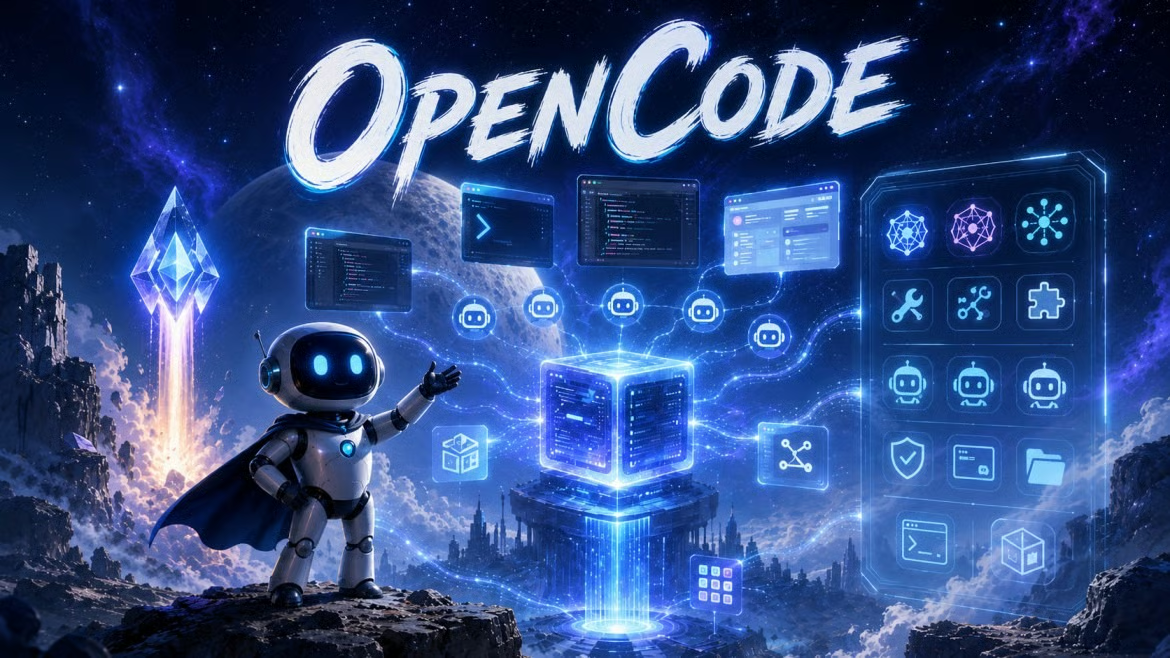
OpenCode is not a large language model (LLM). The chosen model reads prompts and produces responses. OpenCode supplies the file tools, shell access, session history, permission rules, and interface around that model. I find this distinction useful because changing the model does not require changing the rest of the tool.
It is built by Anomaly, formerly SST, and runs primarily on TypeScript and Bun.
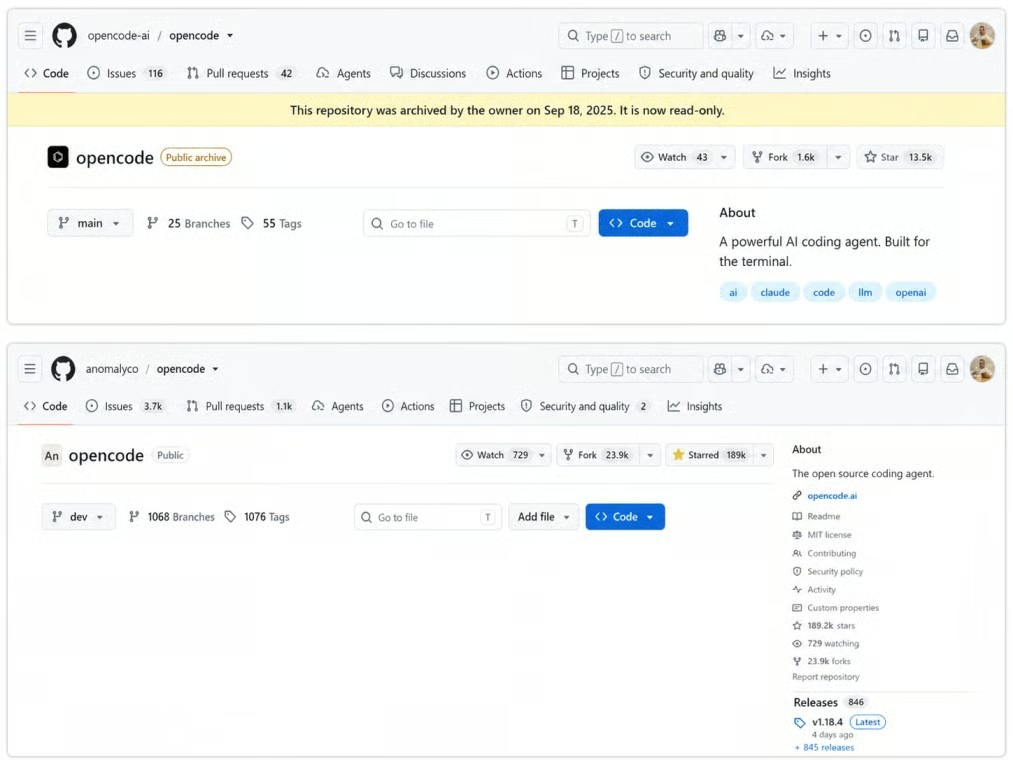
Archived and current OpenCode repositories compared. Image by Author.
OpenCode is not tied to one model family. Through the Models.dev registry, it connects to more than 75 providers, including Anthropic, OpenAI, Google, DeepSeek, Groq, and local models through Ollama. Some existing subscription accounts can also be connected, as I will cover in the features section.
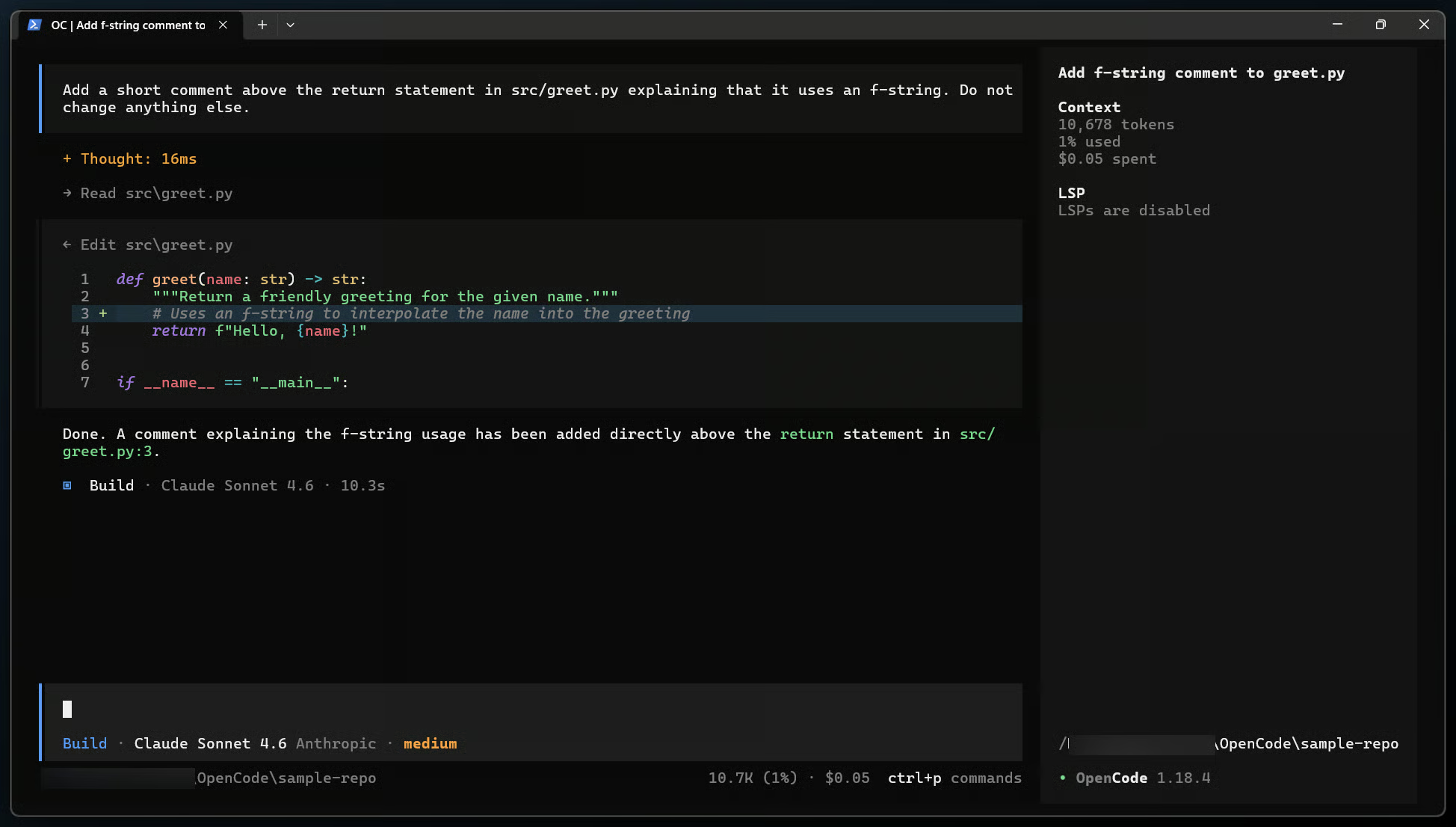
OpenCode terminal session showing file changes. Image by Author.
Although OpenCode started in the terminal, it now ships as a terminal interface (TUI), a beta desktop app for macOS, Windows, and Linux, and extensions for editors like VS Code. The latest stable release at the time of writing is v1.18.8.
As I mentioned earlier, OpenCode supports models from many providers. It was built this way because model quality and prices change, and a tool tied to one provider gives users fewer options.
The documentation states that OpenCode is not coupled to any provider. The Models.dev registry mentioned above supplies the model details and prices that OpenCode uses.
This choice affects more than billing. Different models have different context limits, tool-call formats, and input types. OpenCode uses one interface for those differences. A developer can change the selected model in the same project without moving the session to another coding tool.
The team also favors terminal-first tools that users can inspect. Project instructions live in a plain file called AGENTS.md. I will explain how OpenCode creates and uses this file later.
The official project notes three design choices. The first is the provider support covered above. The second keeps the main controls in the terminal. The third separates the client and server. That split comes next.
In January 2026, Anthropic blocked third-party tools from using consumer Claude subscriptions through unofficial channels. OpenCode then added other subscription options and used its own gateway. Users could still connect through other providers.
That episode explains why provider choice gets so much attention in OpenCode. To see what users do with that choice, the next step is to look at a session.
OpenCode runs as a client and a local server. The TUI, desktop app, IDE extensions, and SDK all talk to that server over HTTP. The same server supports remote attachment with opencode attach <url> and headless use with opencode serve.
Inside a session, the agent reads relevant files, may draft a plan, edits code, and runs commands when needed. Its Language Server Protocol (LSP) integration then feeds compiler and linter diagnostics back to the model so it can respond to type and syntax errors.
For example, a task may begin with glob or grep to locate files. The agent can use read to inspect them and edit to change selected lines. It can then use bash to run a test or build command. The output becomes part of the next model request.
I find the Build and Plan split easiest to understand as a permission switch. Build is the default and can read, write, and run commands. Plan asks before editing files or running bash commands. Pressing Tab switches between them.
Permission checks apply when a tool is called. A project can allow a tool, block it, or ask the user each time. Rules can also vary by command pattern. A team might allow routine tests but ask before other shell commands.
Sessions are stored locally on disk under OpenCode's data directory. OpenCode compacts long conversations automatically. The /undo and /redo commands move through Git-based file snapshots.
OpenCode groups its main functions into model access, project context, task execution, and local use. The sections below explain what each group changes during a coding session.
As mentioned earlier, OpenCode gets its provider list through Models.dev. In practice, users can connect a hosted service, a cloud platform, or an OpenAI-compatible endpoint. GitHub Copilot and ChatGPT Plus/Pro logins provide alternatives to managing a separate API key.
Provider choice does not mean that every model behaves the same way. Tool use, context limits, response time, and price still depend on the selected model and provider. Calls to hosted models also send the required code context to that provider under its own data rules.
OpenCode also offers two optional ways to access models. OpenCode Zen is a pay-as-you-go gateway with a selected model list. OpenCode Go is a subscription that costs $5 for the first month, then $10 per month, for selected open-weight models. Users can still supply their own API keys. Prices may change.
This is the annoying part: a free tool can still produce a provider bill.
Run /init and OpenCode generates an AGENTS.md summary of the project's structure and conventions. Teams can commit that file so sessions begin with shared instructions.
The file can include test commands, folder names, naming rules, and notes about the project. A global AGENTS.md can hold instructions used across projects. The project file holds rules for one repository.
The LSP checks described earlier run after edits. Repository context also includes file references: the @ symbol pulls a selected file into a prompt.
Beyond the Build and Plan agents described earlier, OpenCode includes subagents for multistep searches, codebase scanning, and outside documentation. Custom agents can have their own model, prompt, and tool permissions.
Each subagent works in a child session, so its messages do not fill the main session in the same way. A custom agent can be limited to reading files, assigned a lower-cost model, or given instructions for one type of task.
Model Context Protocol (MCP) servers add external services. They are defined in opencode.json, and the permission checks covered earlier also apply to the tools they add.
The term "local-first" needs a qualification. I would not read it as a promise that nothing ever leaves the machine. As noted in the provider section, OpenCode can connect to Ollama. That setup keeps code and prompts on local infrastructure. Hosted models, /share, and OpenCode Zen send data outside the local machine.
Local use still depends on the model. Small models may return invalid tool calls or miss links between files. A local server also needs enough memory for the selected model and enough context space for the files sent with each request.
Its permission system is a workflow safeguard, not a security sandbox. Networked server mode should use OPENCODE_SERVER_PASSWORD and bind to localhost. An earlier unauthenticated exposure issue was patched, but server mode still should not be exposed publicly without authentication.
As I mentioned earlier, OpenCode separates its clients from its local server. That split affects configuration and stored state. The API adds another way to use the server.
If you only plan to use the TUI, you can skip the API details. The configuration paragraph at the end is the part you will use.
The TypeScript and Bun server talks to model providers and runs tools. It also manages state. Its OpenAPI 3.1 specification generates the official @opencode-ai/sdk. Scripts and custom clients can use this documented API.
The API includes sessions, messages, files, providers, tools, agents, and configuration. This is the same server used by OpenCode's own clients. A script can create a session or send a message without trying to control the TUI.
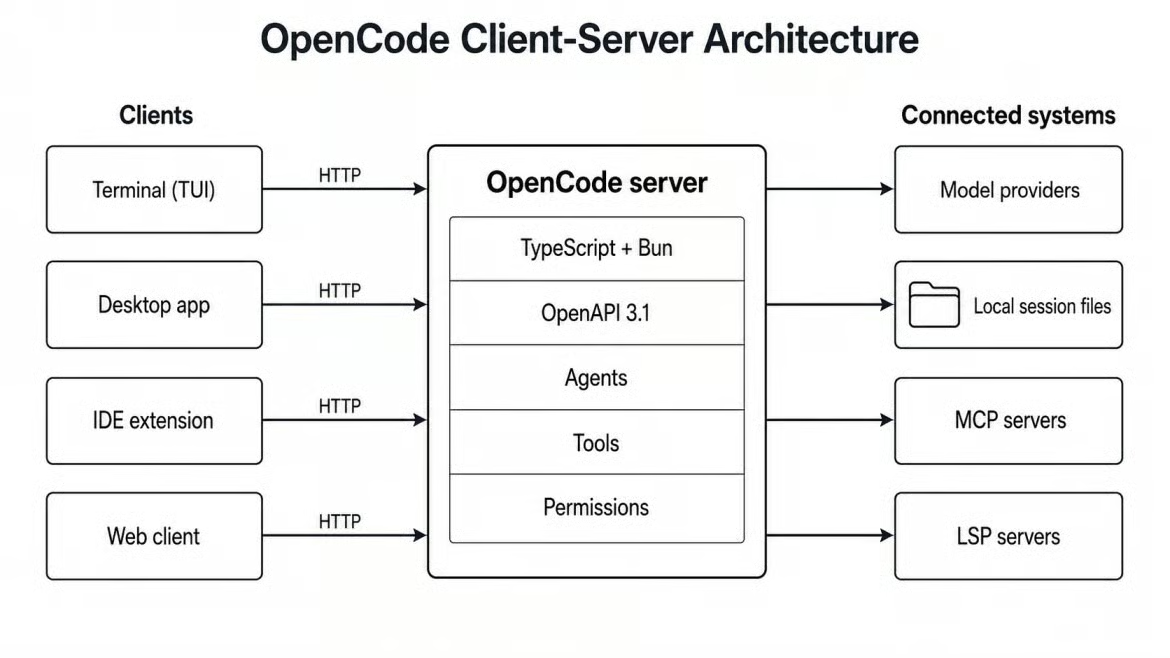
OpenCode clients connecting to one server. Image by Author.
The interfaces listed earlier act as clients: the TUI, desktop app, IDE extension, and opencode web. Each talks to the same server process. A separate device can attach to an existing session through that process.
Running opencode serve starts the server without the normal TUI. Running opencode web adds a browser client. Both commands need authentication if the server can be reached from another device.
Configuration lives in project-level opencode.json or opencode.jsonc, with a global fallback at ~/.config/opencode/opencode.json. It controls models, permissions, MCP servers, and custom agents. As covered in the workflow section, session history and tool logs stay in local files unless the user shares them.
The same parts of OpenCode can be used for several common software tasks. The examples below show where human review still matters in each one.
Using the Plan-to-Build process described earlier, a developer can request a feature and review the proposed steps before any edit. Pressing Tab then moves the task to Build mode for code changes and tests.
The plan can be revised before any file changes. I would use that review to correct the scope, name files that should not change, or add test requirements.
The same Plan-to-Build process works for refactoring. Plan mode can identify dependencies and call sites before Build mode applies the edits. If the result is wrong, /undo restores the earlier snapshot. The user still needs to review the diff because passing tests do not confirm that every public interface stayed the same.
For debugging, OpenCode can combine a stack trace with type information from the language server. It can propose a change, repeat the steps that caused the error, and check the result. Without clear reproduction steps, it may only confirm that the code builds or that existing tests pass.
As covered earlier, Build mode can edit files and run commands. For test writing, that means it can create a test, read the result, and make another change. A full test suite gives it more feedback but takes longer.
Test quality still needs human review. A generated test may repeat the implementation instead of checking the behavior that users depend on.
The repository section explained how /init creates project notes. After that step, a question such as "How does authentication work here?" can guide the search. The @general subagent can search several parts of the repository.
Specific questions usually produce clearer results than requests to explain the whole repository. File references with @ can narrow the search further.
These tools differ in license, model support, interface, and billing. I compare them on those points rather than treating one tool as the default choice.
We have a separate OpenCode versus Claude Code article with more detail. Claude Code is proprietary and uses Anthropic's model and account system. OpenCode uses the MIT license and asks the user to select a provider. It also gives users access to its source code and configuration. As mentioned in the history section, consumer Claude subscriptions no longer work through OpenCode, so Claude use requires a metered Anthropic API key.
Both tools can read files, make changes, run commands, and use MCP servers. Model access is the main difference: Claude Code keeps to the Anthropic setup described above, while OpenCode can connect other providers or a local endpoint.
Cursor is a VS Code-based IDE that also offers CLI and cloud agents. Its main workflow keeps suggestions, file changes, and agent actions inside the editor. OpenCode uses the terminal, desktop, and editor interfaces listed earlier. Cursor uses paid subscription plans. OpenCode's software is free, but users may pay a model provider for tokens. The main differences are the working interface, model choice, and billing method.
Cursor also includes inline completion while the developer types. OpenCode focuses on tasks given to an agent and does not replace that form of completion. Some developers may use both types of tool for different work.
Cline's core project is an open-source, BYOK agent with VS Code and CLI interfaces. It also has a JetBrains client, though that client is not open source at the time of writing. Both Cline and OpenCode support MCP and let users set approval rules. Cline places its editor controls in a sidebar. OpenCode uses terminal sessions that can run separately from an editor. The choice depends mainly on where a developer wants to review and approve changes.
Cline uses the Apache 2.0 license. OpenCode uses the MIT license noted earlier. Both allow source review and changes, but their interfaces and project files differ.
Aider and Codex CLI are also terminal-based coding agents. OpenCode covers terminal, desktop, and IDE use in the same project and supports models from several providers.
The official install script works on most Unix-like systems. It provides one way to install the command-line tool:
The command downloads the OpenCode binary and adds it to the user's environment. A package manager may be a better fit when updates are managed with the rest of the system.
curl -fsSL https://opencode.ai/install | bashPackage-manager options include npm i -g opencode-ai@latest, brew install anomalyco/tap/opencode on macOS and Linux, and scoop install opencode or choco install opencode on Windows. A desktop app is available for macOS, Windows, and Linux. On Windows, the OpenCode documentation recommends WSL because some file-system and shell functions work better there.
Installation does not include model access. The first session still needs one of the access methods covered in the multi-model section.
Learn with DataCamp
Course
Course
Practice and track your progress.
Continue with Googleblog
Derrick Mwiti
8 min
blog
Khalid Abdelaty
15 min
blog
Tom Farnschläder
15 min
Tutorial
Dario Radečić
15 min
Tutorial
Tim Lu
15 min
Tutorial
Abid Ali Awan
8 min


