Kurs
AWS Bulut Teknolojisi ve Hizmetleri Kavramları
3 sa
22.3K
AWS Lambda, altyapıyı yönetmeden kod çalıştırmanıza olanak tanıyan güçlü bir sunucusuz bilişim hizmetidir; böylece sunucuları sağlama veya bakımıyla uğraşmadan yalnızca kod yazmaya odaklanabilirsiniz.
Bu eğitimde, ilk fonksiyonunuzu kurmaktan diğer AWS hizmetleriyle entegrasyona kadar AWS Lambda’yı inceleyeceğiz. İster veri akışlarını işleyin ister API’ler oluşturun, bu rehber AWS Lambda ile sunucusuz dağıtımlara başlamanıza yardımcı olacak.
AWS Lambda, Amazon Web Services (AWS) tarafından sağlanan ve geliştiricilerin sunucu sağlama veya yönetme işi olmadan kod çalıştırmasına imkan veren bir sunucusuz bilişim platformudur. AWS Lambda, fonksiyonlarınızı yalnızca gerektiğinde çalıştırmak için kaynakları dinamik olarak ayırarak, önceden ayrılmış sunucu kapasitesi yerine kullanım bazlı ücretlendirme sağlar.
Bu yaklaşım, uygulama geliştirirken geleneksel altyapı kurulum ihtiyacını ortadan kaldırır ve yalnızca kod yazmaya ve dağıtmaya odaklanmanıza olanak tanır.
AWS Lambda olay odaklıdır; yani, diğer AWS hizmetlerinden gelen belirli olaylarla tetiklenir. Bu da onu duyarlı, ölçeklenebilir ve maliyet etkin çözümler için ideal kılar.
Geleneksel dağıtım yöntemleri gerektirir sunucuları kurmayı ve yönetmeyi, bu da ölçekleme, güncelleme ve yamalama işlemlerini kapsar. Bu görevler zaman alıcı, maliyetli olabilir ve düzensiz yükler için verimsiz kalabilir. Buna karşın, sunucusuz dağıtım bu yükleri ortadan kaldırır; kutudan çıkar ölçekleme ve yüksek erişilebilirlik sunar.
AWS Lambda, olay odaklı bir model üzerinden çalışır; yani belirli tetikleyicilere veya olaylara yanıt olarak kod yürütür. Lambda’nın işlevselliğinin anahtarı; diğer AWS hizmetleriyle derin entegrasyonu ve fonksiyonları talep üzerine çalıştırabilmesidir. AWS Lambda’nın adım adım nasıl çalıştığına yakından bakalım:
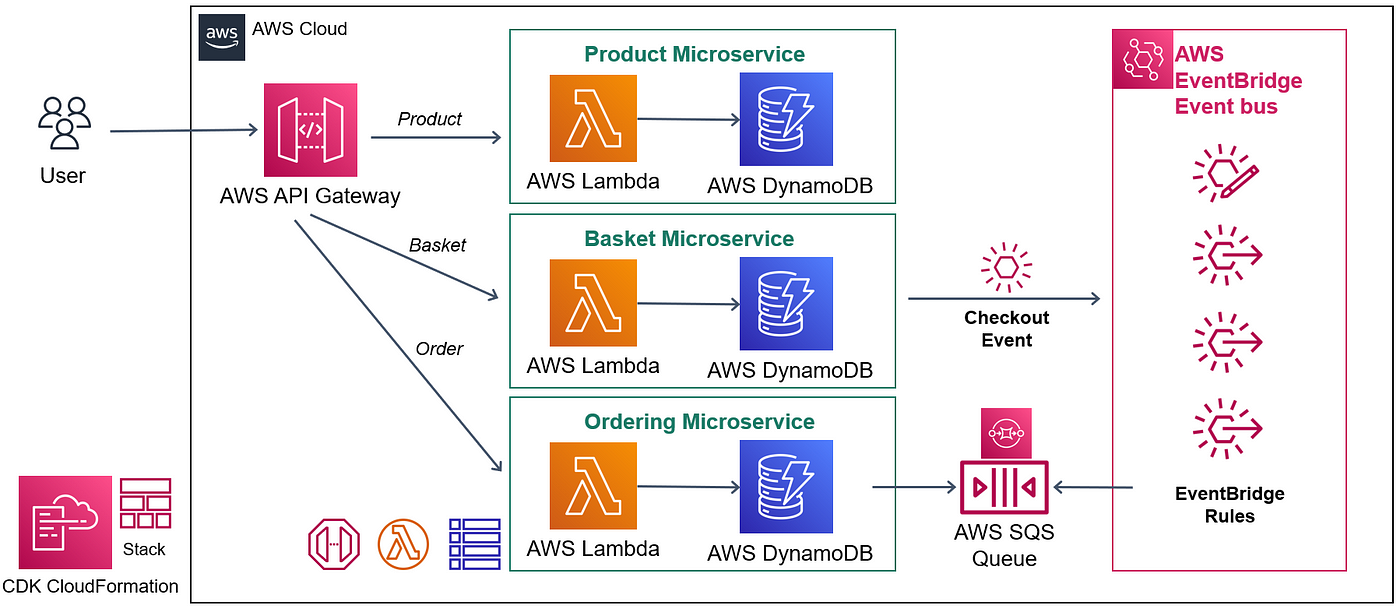
An example architecture diagram using Lambda and other core AWS services. Image source: AWS.
AWS Lambda functions are initiated by events from various AWS services or external systems. Common examples of event sources include:
When an event triggers a Lambda function, AWS automatically creates an execution environment to run the code. This environment includes:
AWS Lambda supports automatic scaling by running multiple instances of your function in parallel. It manages to scale transparently without any configuration. Here’s how concurrency works:
AWS Lambda integrates deeply with AWS services to build robust, end-to-end solutions:
Now, let’s get started with setting up your first Lambda function!
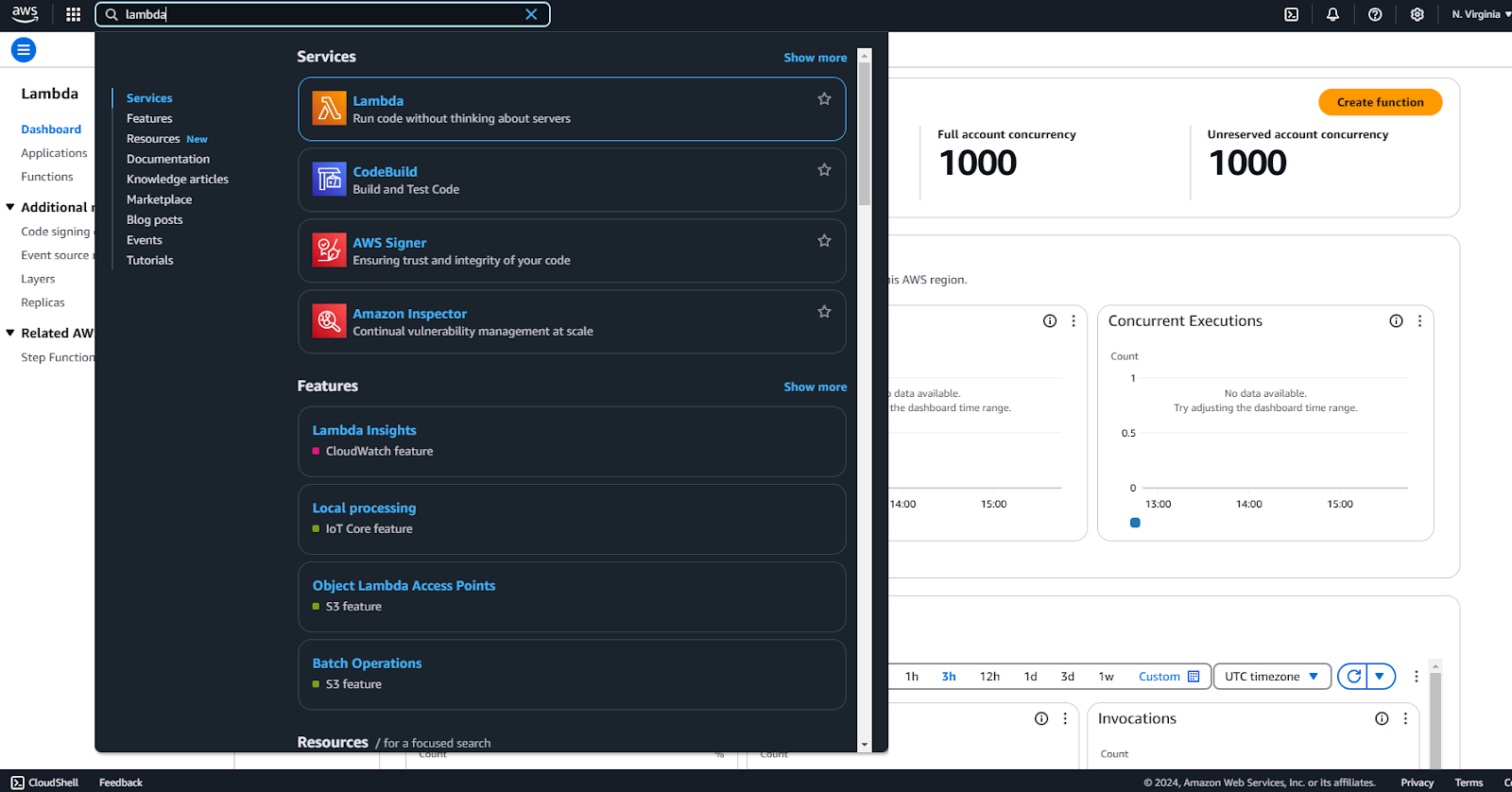
Navigation dashboard in AWS console.
Click on Lambda in the navigation menu to see the dashboard:
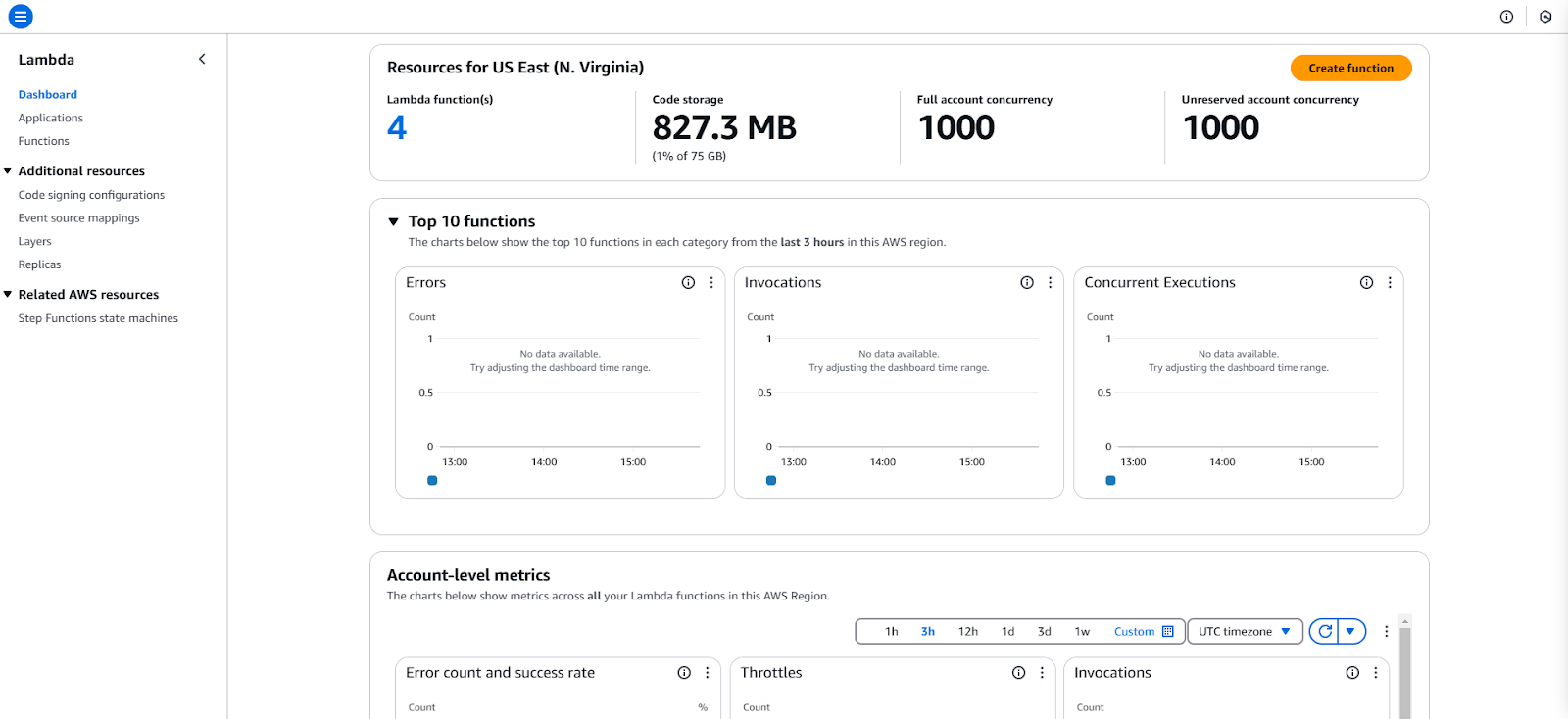
AWS Lambda Dashboard in AWS Console.
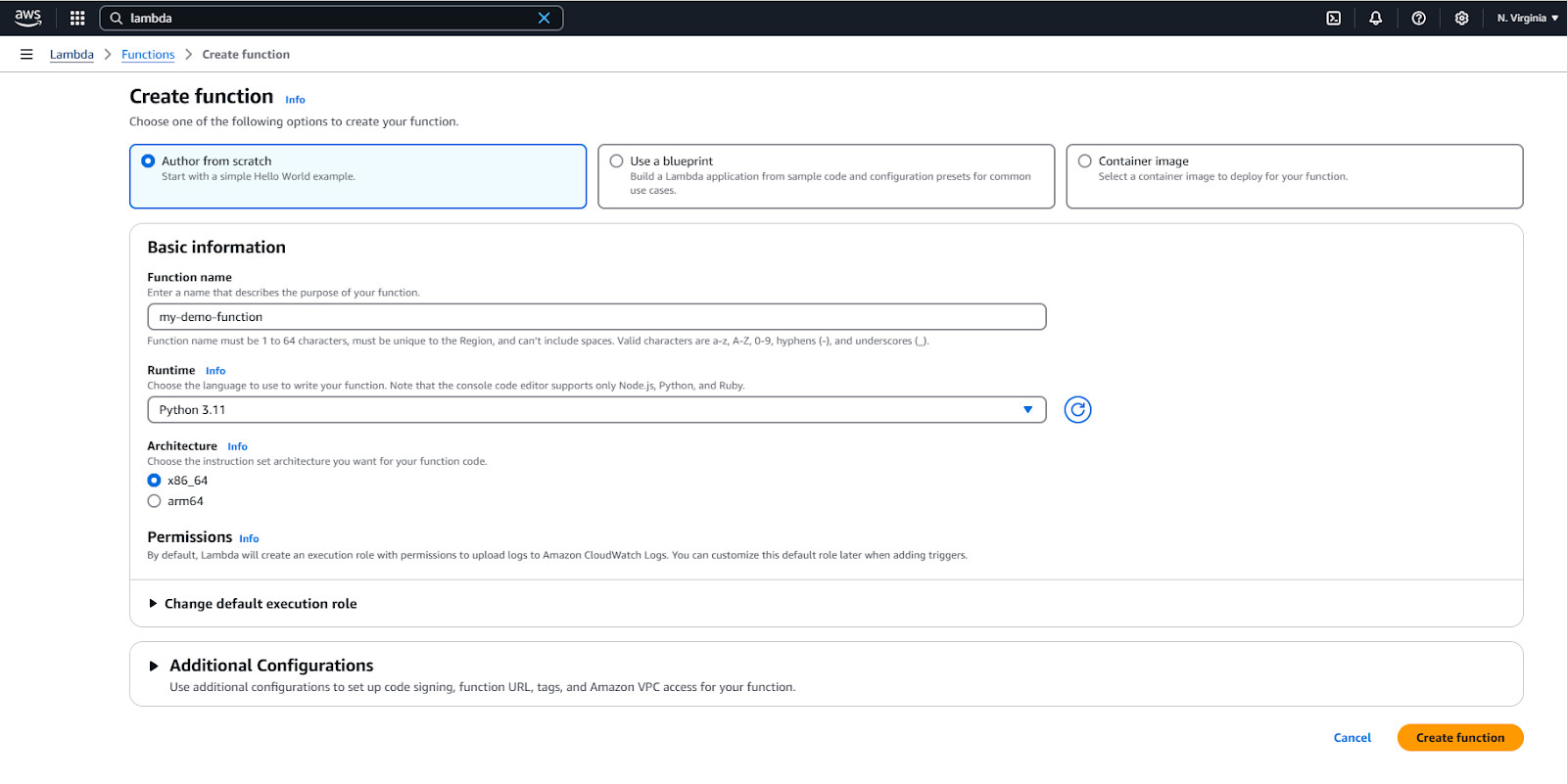
Create a new AWS Lambda function.
It will take a few seconds. Once the function is created, you will see a successful message on the top.
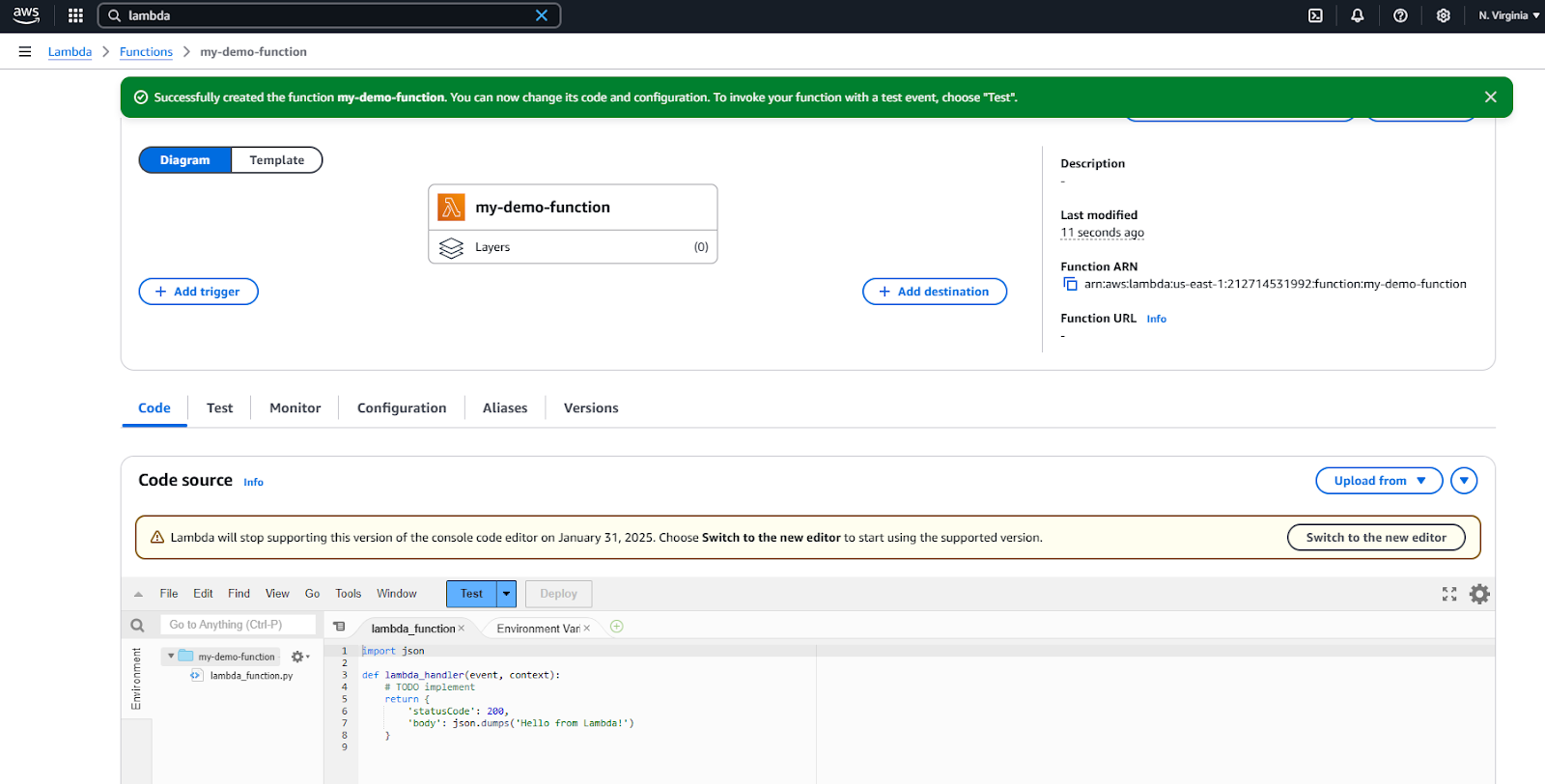
AWS Lambda browser IDE for simple code editing.
At this point, this function just returns the string “Hello from Lambda!”.
There is no logic, no dependencies, nothing.
We have a Python script called lambda_function.py that contains the function named lambda_handler() that returns a string.
We can now test it by simply clicking the Test button.
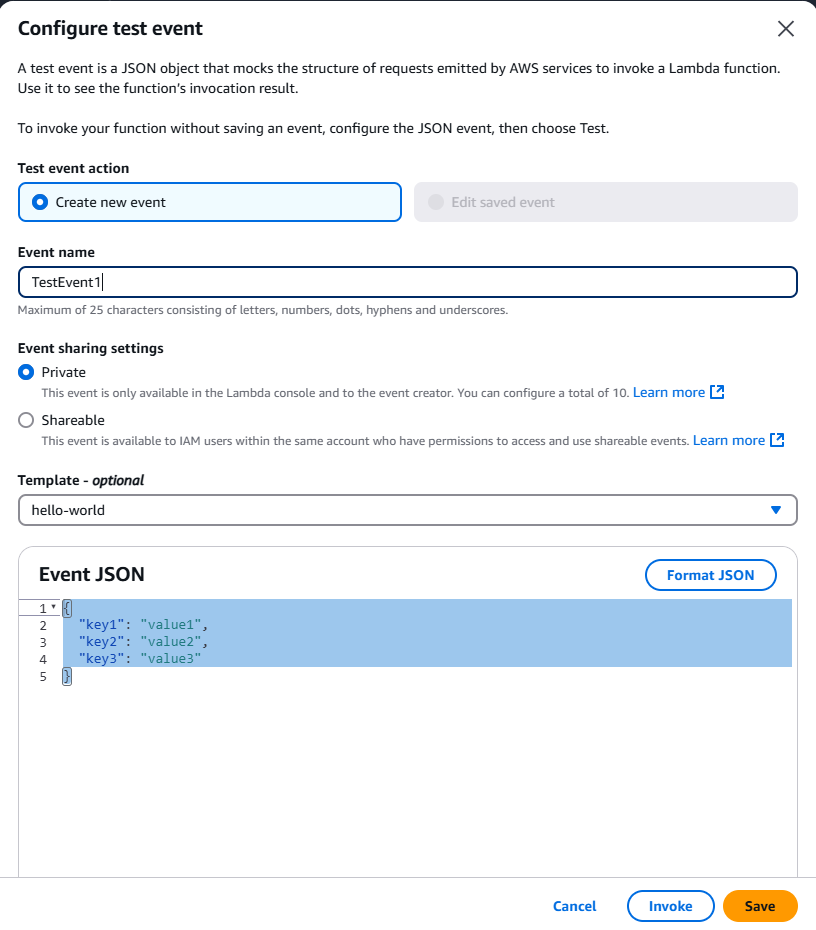
Test your AWS lambda function in browser.
You can remove the “Event JSON” as our function takes no input. Give an event name and click on the Invoke button.
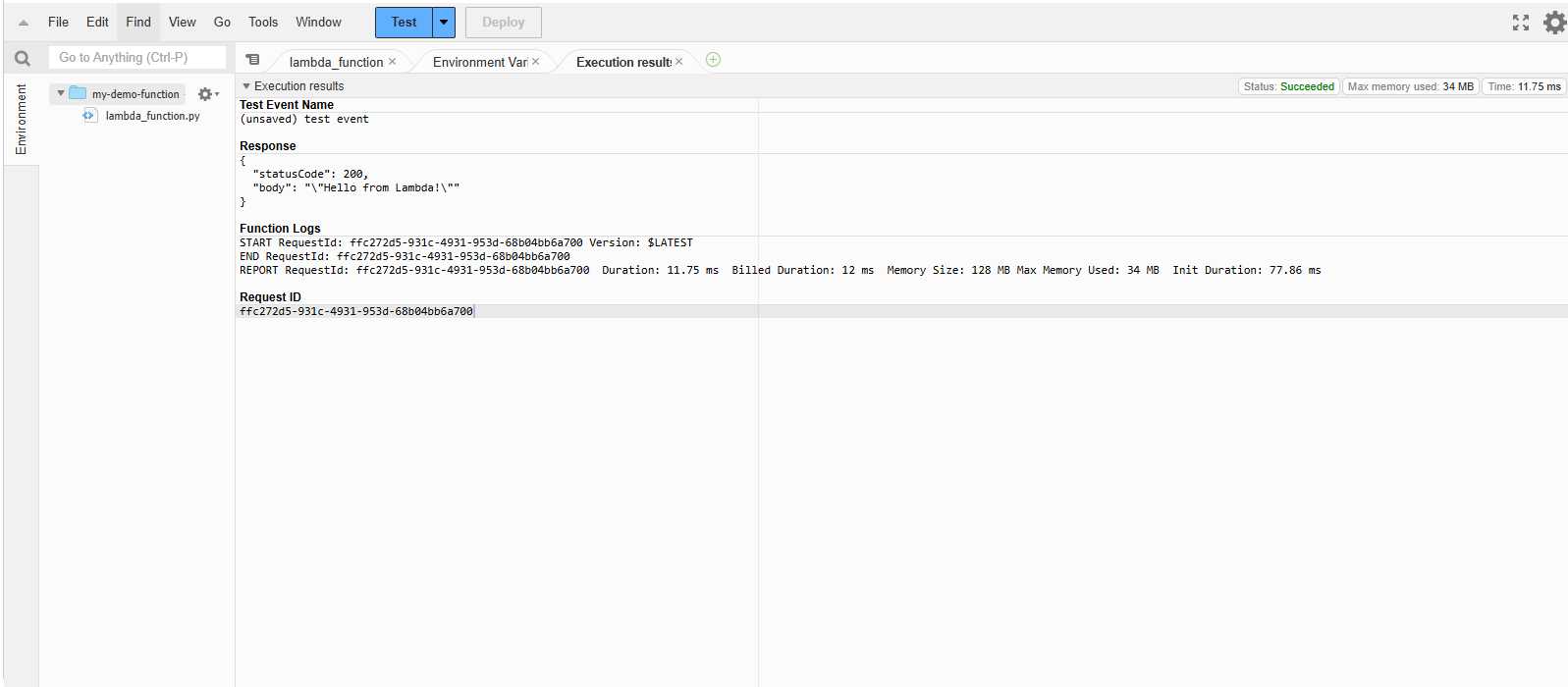
Successful test of AWS Lambda function.
The function was successfully executed, and the message was returned.
Yayy! We just deployed a serverless function using AWS Lambda. It doesn’t do much at the moment, but it is up and running. Every time this function is invoked, it returns a simple string.
As mentioned, the AWS Lambda architecture allows you to trigger functions in response to specific events from various AWS services, making it a versatile tool for automating workflows and integrating systems.
Events like file uploads to an S3 bucket, updates in a DynamoDB table, or API calls through API Gateway can invoke Lambda functions, enabling real-time processing and scalable execution.
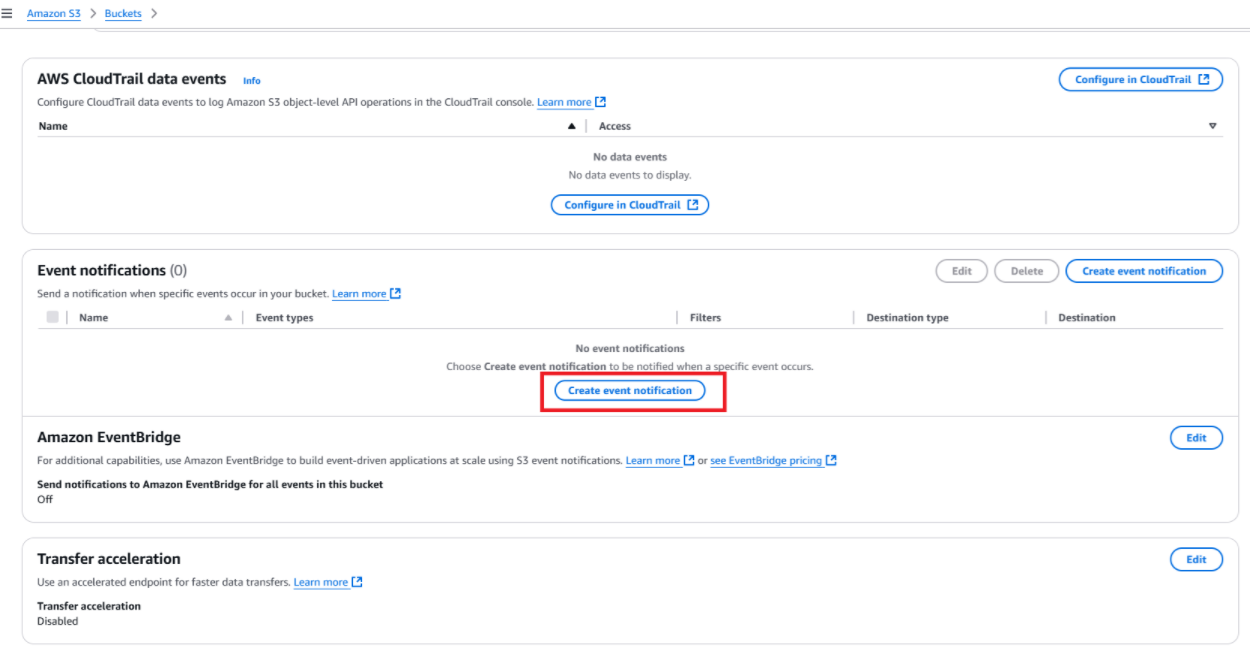 Create event notification in the AWS S3 bucket.
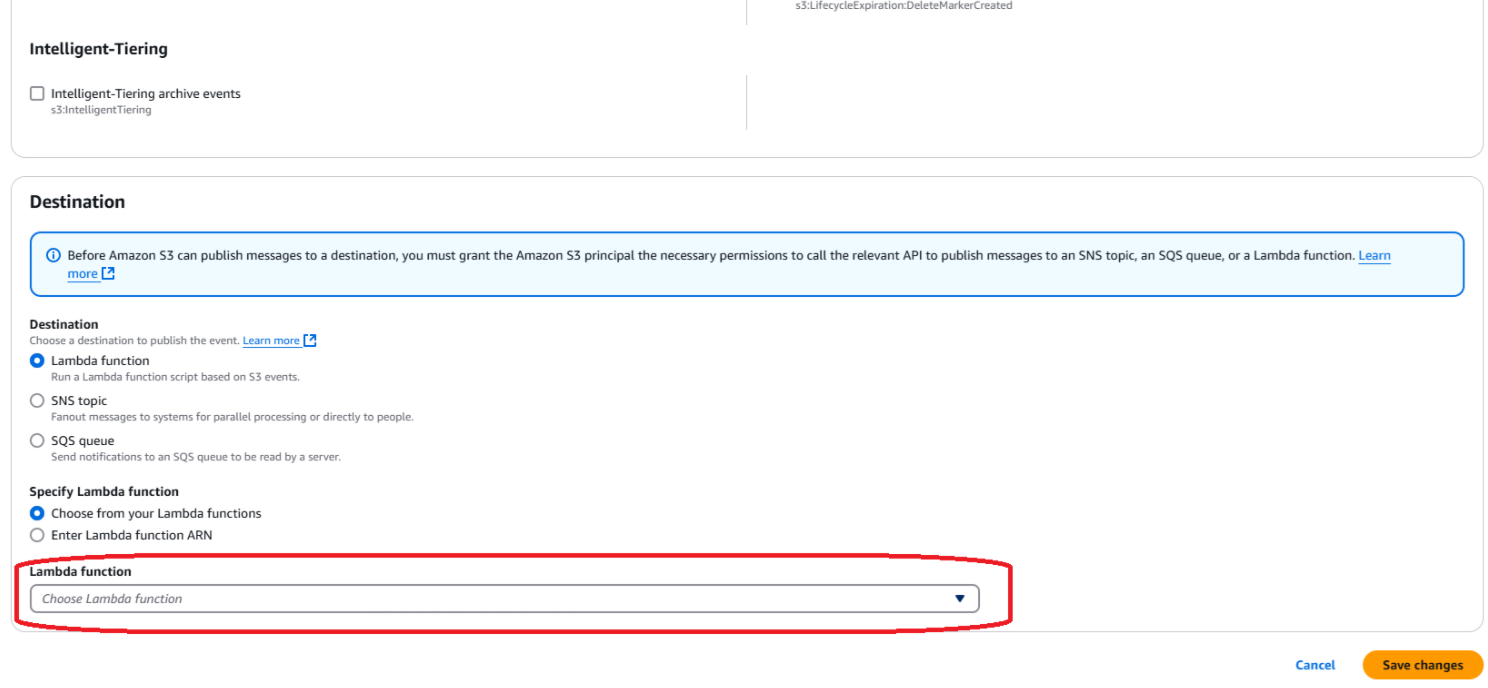 Select the Lambda function to trigger in S3.
Example use cases:
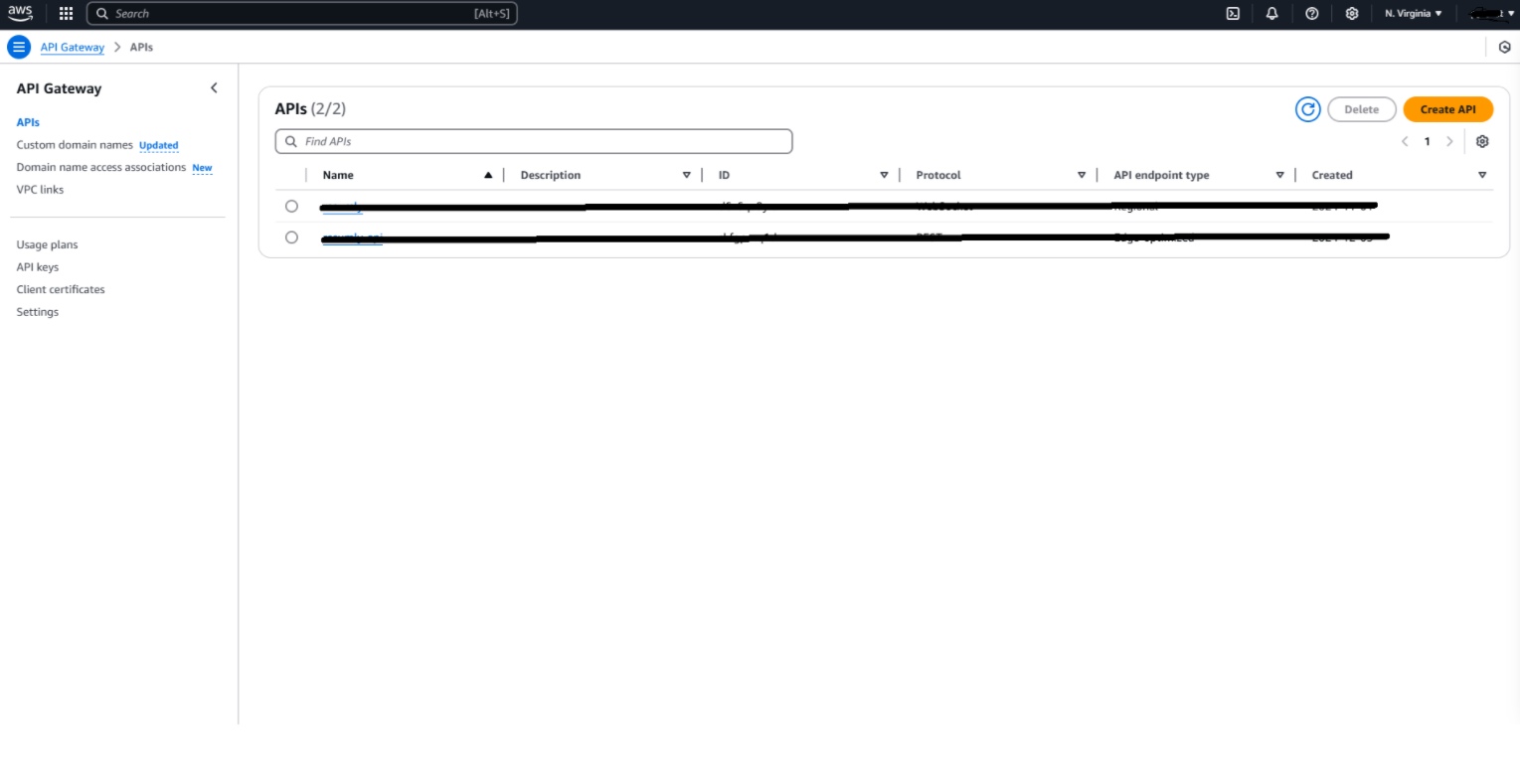
The API Gateway Service Dashboard in AWS Console.
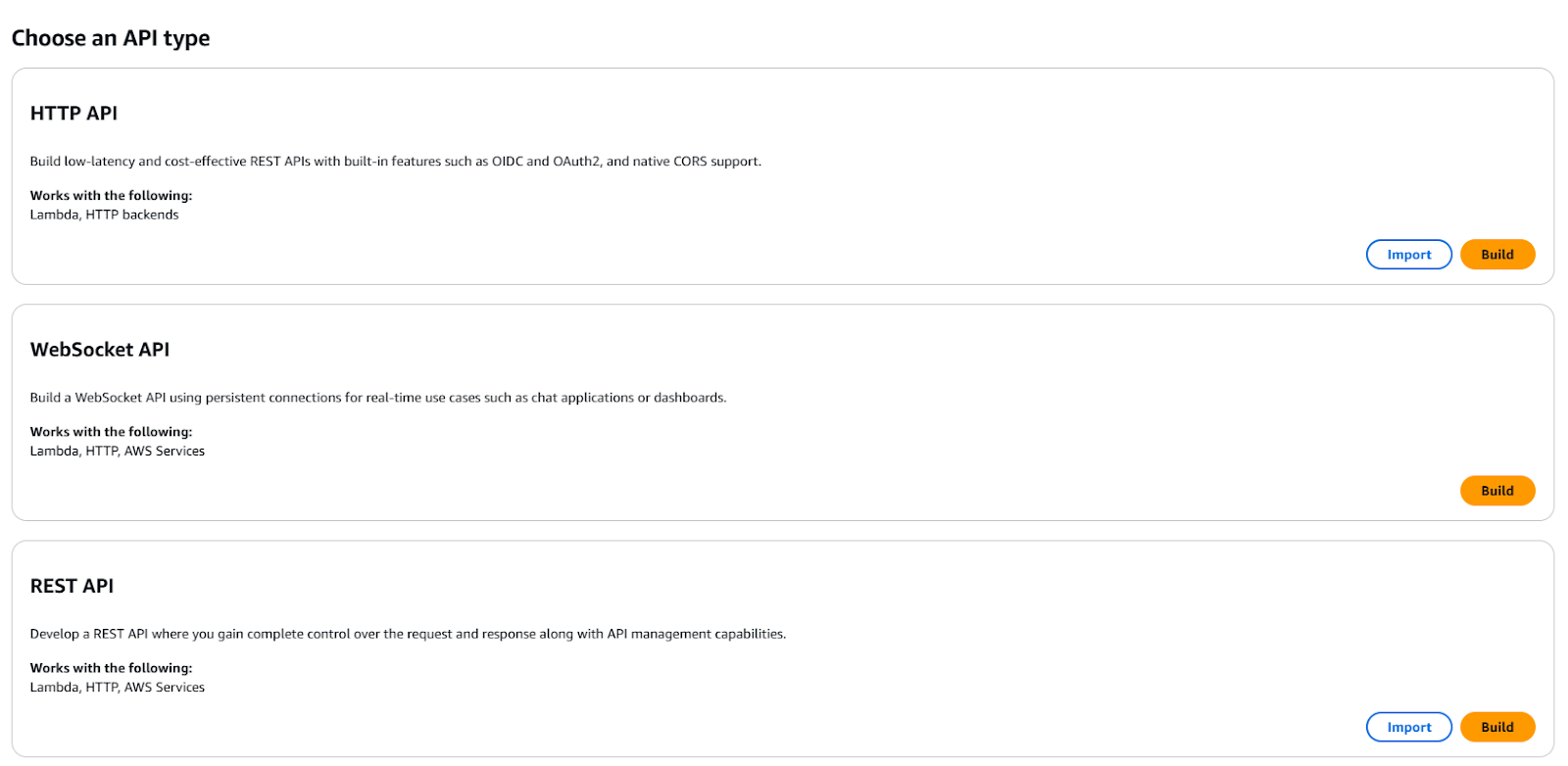
Create a new REST API via API Gateway.
Example use cases:
Deploying AWS Lambda functions is straightforward and can be done using different methods depending on your needs, such as the AWS Management Console for manual deployments or the AWS CLI for automated deployments.
The AWS Management Console provides an intuitive web interface for deploying Lambda functions. This method is ideal for small projects or quick changes. Here’s how to deploy a Lambda function using the console:
The AWS CLI is an efficient way to deploy and update Lambda functions for automation or frequent updates. It ensures consistency and reduces manual errors, especially in larger projects or CI/CD pipelines.
Package your code and dependencies into a .zip file. For example:
zip -r my-deployment-package.zip .update-function-code command to upload the new code to AWS Lambda:aws lambda update-function-code \
--function-name MyFunction \
--zip-file fileb://my-deployment-package.zipAfter deployment, verify the status of the function using:
aws lambda get-function --function-name MyFunctionThis command retrieves the function's configuration and confirms the deployment.
Monitoring is critical to ensuring your Lambda functions run efficiently, handle errors gracefully, and meet performance expectations. AWS Lambda integrates with Amazon CloudWatch to provide monitoring and logging capabilities.
Amazon CloudWatch automatically collects and displays key metrics for your Lambda functions. These metrics help you analyze your function's performance and troubleshoot issues.
Accessing metrics:
Now that you have deployed your first Lambda function, knowing some best practices for future, more complex projects is useful. In this section, I provide some best practices to keep in mind.
Cold starts occur when a Lambda function is invoked after being idle, leading to slight latency as AWS provisions the execution environment. While AWS minimizes this overhead, there are steps you can take to reduce cold start time:
Move resource-intensive initialization (e.g., database connections, API clients, or third-party libraries) outside the function handler. This ensures the code is executed only once per environment and reused across invocations.
For critical, latency-sensitive functions, use Provisioned Concurrency to keep the execution environment ready to serve requests. While it incurs additional costs, it guarantees low latency for high-priority workloads.
Statelessness is a fundamental principle of serverless architecture, ensuring your application scales seamlessly:
Lambda functions are ephemeral, meaning their execution environment is temporary and may not persist across invocations. Instead of relying on in-memory variables, store state information in external systems like DynamoDB, S3, or Redis.
Design your functions to handle duplicate events gracefully. Use unique identifiers for requests and check logs or databases to ensure the same event isn’t processed multiple times.
Environment variables are a secure and convenient way to configure your Lambda functions:
Use environment variables to manage configurations like log levels, region settings, or third-party service URLs. This eliminates the need for hardcoded values, making your function more portable across environments (e.g., dev, staging, prod).
This tutorial has provided a guide to starting with AWS Lambda, from understanding its features and use cases to deploying and monitoring functions effectively. You can create robust and maintainable serverless applications by adhering to best practices, such as optimizing cold starts, keeping functions stateless, and using environment variables.
AWS Lambda is a way to build modern, event-driven architectures that integrate with the AWS ecosystem. If you want to learn more about it, I recommend checking out DataCamp's AWS courses.
Learn more about AWS with these courses!
Kurs
Kurs
Kurs
blog
Dario Radečić
15 dk.
blog
Abid Ali Awan
14 dk.
Eğitim
Adel Nehme
Eğitim
Kurtis Pykes
8 dk.