Course
Large Language Models (LLMs) Concepts
2 hr
112K
xAI released Voice Agent Builder, a console for creating voice agents. You describe the call flow, attach documents and tools, and choose a voice.
When I test a voice agent console, I care less about the launch note and more about the parts I have to wire into code: how the WebSocket session is configured, how audio moves, where tool calls happen, what the call costs, and how another app would call the workflow.
The code below rebuilds that flow directly against the Voice Agent API. Specifically, we'll use a clinic appointment assistant that checks availability, replies by voice, tracks cost, handles tool failures, and exposes a FastAPI endpoint.
For more information on the new transcription model underneath the Voice Agent Builder, read our Grok Voice Transcribe 2.0 guide.
Voice Agent Builder is xAI's console for creating and deploying voice agents on Grok Voice. It launched in beta on July 1, 2026. Instead of using separate speech-to-text, language model, and text-to-speech services, it uses one voice model path.
The console includes telephony, document retrieval, tools and connectors, guardrails, remote MCP servers, and call logs with recordings, transcripts, and traces.
Audio is billed by the minute. The console is still beta, so we use the API directly.
Under the console is the Voice Agent API, a realtime WebSocket API that exposes the same runtime used by the Builder.
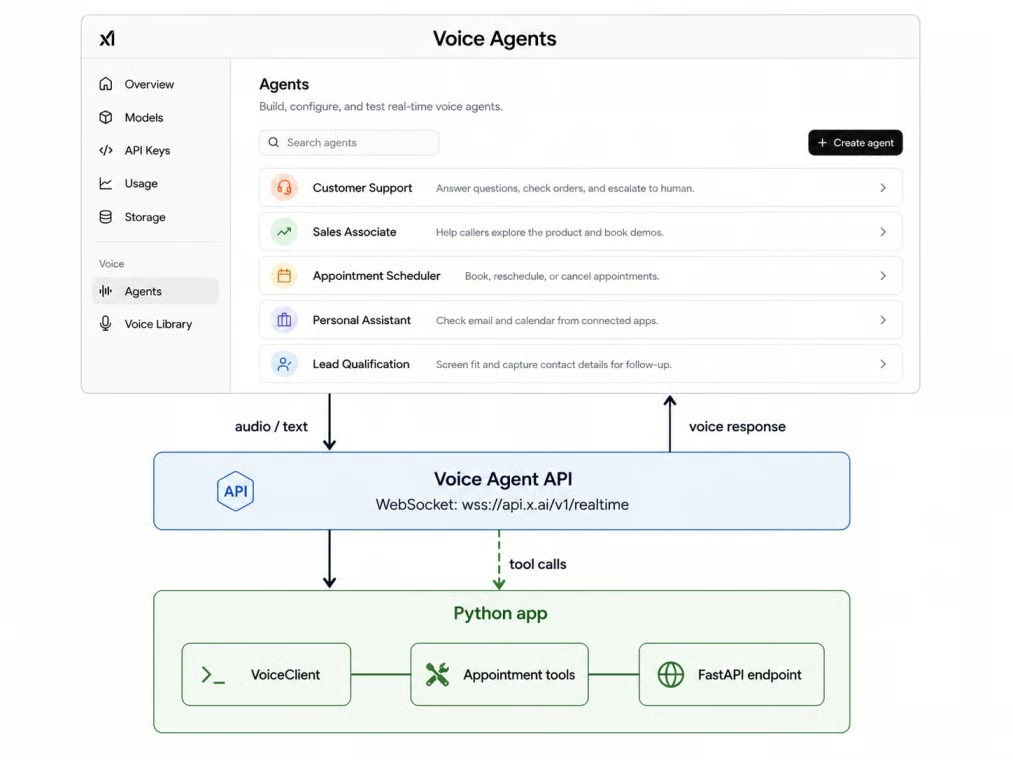
Builder sits atop the Voice API. Image by Author.
The model used here is grok-voice-think-fast-1.0. The grok-voice-latest alias points at the newest model. I use it here, but for a deployed app I would pin the versioned name. xAI reports a 67.3% score for this model on the τ-voice Bench leaderboard; I treat that as one data point, not a guarantee.
Compatibility note: the API is compatible with the OpenAI Realtime API. If you have code that talks to OpenAI's realtime endpoint, you mostly change the base URL and the key.
The clinic assistant takes spoken input, replies in a generated voice, asks follow up questions, checks availability before offering a slot, and hands off to a human when needed. The core example uses one tool; the Streamlit demo adds booking, transfer, and end call actions.
The core tutorial splits into four files, each with one job:
voice_client.py holds the WebSocket client, audio helpers, and cost tracking
tools.py holds check_availability, plus extra demo tools used by Streamlit
assistant.py holds the system prompt, session config, and the workflow
app.py serves the whole thing through FastAPI
Those four files are the path through the article. The repo also includes app_streamlit.py for the visual demo and run.py as a Windows launcher, but we will come back to those after the core flow works.
Before the code runs, you need Python 3.10 or newer, an xAI account, an API key from console.x.ai, prepaid credits, and basic comfort with environment variables, JSON, and WebSockets.
Create a folder and a virtual environment, then install the packages:
mkdir appointment-agent
cd appointment-agent
python -m venv .venv
.venv\Scripts\activate       # macOS/Linux: source .venv/bin/activate
pip install websockets python-dotenv fastapi uvicorn pydantic httpx numpy streamlit
Pin these packages in a requirements.txt so a fresh checkout uses the same setup.
Create a .env file next to the Python files:
XAI_API_KEY=xai-your-key-hereAdd .env to .gitignore. The API key should stay on the server.
Let's start building.
The first step is opening the connection. Pass the model as a query parameter and your key as a bearer token on the handshake:
import asyncio
import json
import os
import websockets

async def voice_agent():
    url = "wss://api.x.ai/v1/realtime?model=grok-voice-latest"
    async with websockets.connect(
        url,
        additional_headers={"Authorization": f"Bearer {os.environ['XAI_API_KEY']}"},
    ) as ws:
        async for message in ws:
            print(json.loads(message)["type"])

asyncio.run(voice_agent())
Against a live key, the first event you see is session.created, which means the socket is open and ready to configure.
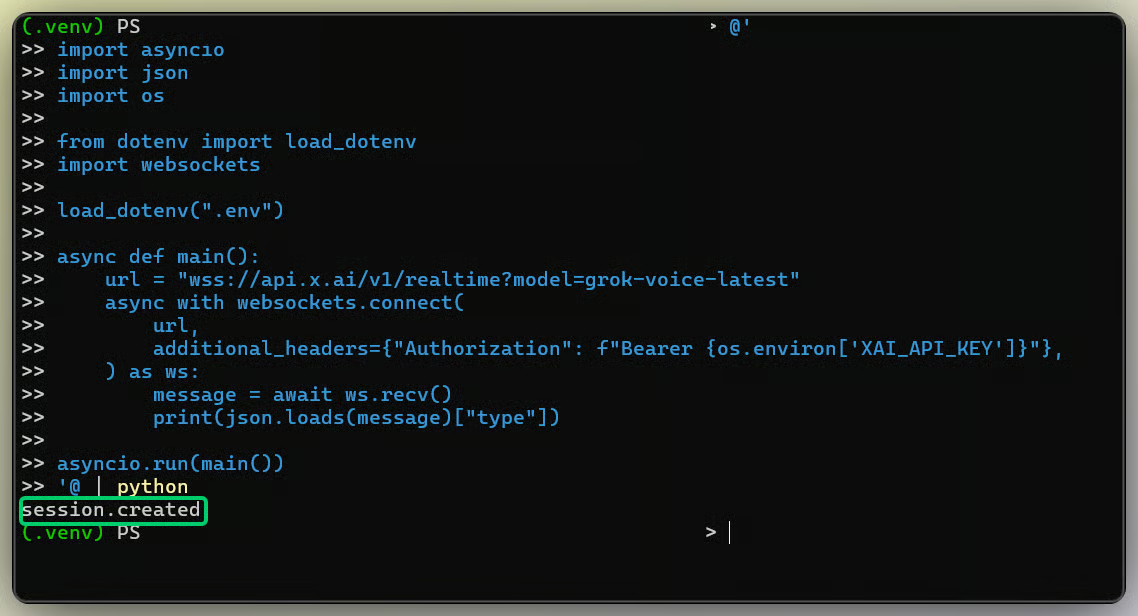
Session created event confirms the connection. Image by Author.
A live socket is not a configured agent. You shape it by sending a session.update event with a session object.
The three settings you touch most are the voice, the audio format, and the system prompt. The realtime API exposes five named voices, eve, ara, rex, sal, and leo, plus any custom clone. Audio defaults to audio/pcm at 24000 Hz, with input and output configured separately.
Here is the session config the assistant uses, assembled in assistant.py:
def build_session_config(voice="ara", instructions=SYSTEM_PROMPT, sample_rate=24000):
    # The model needs to know "today" or it guesses the year for a date like "July 6th".
    instructions = f"{instructions}\nToday's date is {date.today().isoformat()}."
    return {
        "voice": voice,
        "instructions": instructions,
        "turn_detection": None,  # manual turns for file-based input
        "audio": {
            "input": {"format": {"type": "audio/pcm", "rate": sample_rate}},
            "output": {"format": {"type": "audio/pcm", "rate": sample_rate}},
        },
        "tools": [CHECK_AVAILABILITY_TOOL],
    }
The instructions field is the system prompt. This clinic prompt stays short because long voice replies are hard to follow:
You are a voice appointment assistant for a small clinic. Help callers book,
reschedule, cancel, or ask questions about appointments, services, and hours.
Answer whatever the caller asks that relates to the clinic. Keep responses short
and natural for a phone conversation. Ask one question at a time. Confirm
important details before taking action. Use the availability tool before offering
a time slot. Escalate to a human for medical, urgent, sensitive, or unclear
requests. If a caller asks about something unrelated to the clinic, say briefly
that it is outside what you can help with, then steer back to booking. If you
cannot make out what the caller said, ask them to repeat it instead of repeating
your last message.
The escalation line keeps the clinic agent out of medical advice. The last two lines keep it on scope and stop loops when the caller is unclear. The config also appends today's date because, in my live tests, the model could guess the wrong year for dates like "July 6th."
Turn detection is how the agent decides you have stopped speaking. Set turn_detection.type to server_vad and the server ends the turn on silence. Leave it null and you control turns by committing the audio buffer, which is what I use for the file flow.
Server VAD has three settings worth knowing: threshold sets how loud audio must be to count as speech, silence_duration_ms sets how long a pause ends the turn, and prefix_padding_ms keeps a little audio before speech starts. If your agent interrupts people, raise silence_duration_ms first.
Now we send the caller's voice. The audio must match the session format: mono 16 bit PCM at 24000 Hz, encoded as base64 and sent in chunks.
The client streams the file in slices, then commits the buffer to mark the end of the turn:
async def send_audio(self, pcm_bytes, chunk_ms=100, commit=True):
    bytes_per_chunk = int(self._sample_rate * 2 * chunk_ms / 1000)
    for start in range(0, len(pcm_bytes), bytes_per_chunk):
        chunk = pcm_bytes[start:start + bytes_per_chunk]
        await self._t.send({
            "type": "input_audio_buffer.append",
            "audio": base64.b64encode(chunk).decode(),
        })
    if commit:
        await self._t.send({"type": "input_audio_buffer.commit"})
    self.cost.audio_seconds += pcm_seconds(pcm_bytes, self._sample_rate)
If your sample rate or encoding does not match session.update, you may get static or silence instead of a clean error. Audio goes through input_audio_buffer.append, so it bills by duration rather than per message.
After you request a response, audio arrives as response.output_audio.delta, the transcript arrives as response.output_audio_transcript.delta, and response.done closes the turn.
The client collects all of that in one async loop:
async def _collect_response(self):
    audio = bytearray()
    transcript, calls = [], []
    while True:
        event = await self._recv()
        etype = event["type"]
        if etype == "response.output_audio.delta":
            audio += base64.b64decode(event["delta"])
        elif etype == "response.output_audio_transcript.delta":
            transcript.append(event.get("delta", ""))
        elif etype == "response.function_call_arguments.done":
            calls.append(event)
        elif etype == "response.done":
            break
    return bytes(audio), "".join(transcript), calls
Decode the audio deltas, append them in order, and write the result to a response.wav file. To capture the caller's own words, set audio.input.transcription and read conversation.item.input_audio_transcription.completed.
Now the pieces become a conversation: booking request, clarifying question, availability check, offered slots, confirmation. To carry context across turns, each new turn reconnects with the conversation id and opts into session resumption.
For the clinic, the agent must check availability before promising a time. Custom tools are how the model reaches your code: it emits a request, your application runs the function, and you send the result back.
The tool is a plain function plus a JSON schema that goes into the session config. Here is the schema from tools.py:
CHECK_AVAILABILITY_TOOL = {
    "type": "function",
    "name": "check_availability",
    "description": "Look up open appointment slots for a service on a given date. "
                   "Always call this before offering the caller a time.",
    "parameters": {
        "type": "object",
        "properties": {
            "service": {"type": "string", "description": "Service requested."},
            "date": {"type": "string", "description": "Requested date as YYYY-MM-DD."},
        },
        "required": ["service", "date"],
    },
}
The loop has a fixed shape. When the model wants the tool, it sends response.function_call_arguments.done with the arguments. You run the function, return a function_call_output, and then send response.create so the agent can continue. Miss that final response.create and the agent goes silent.
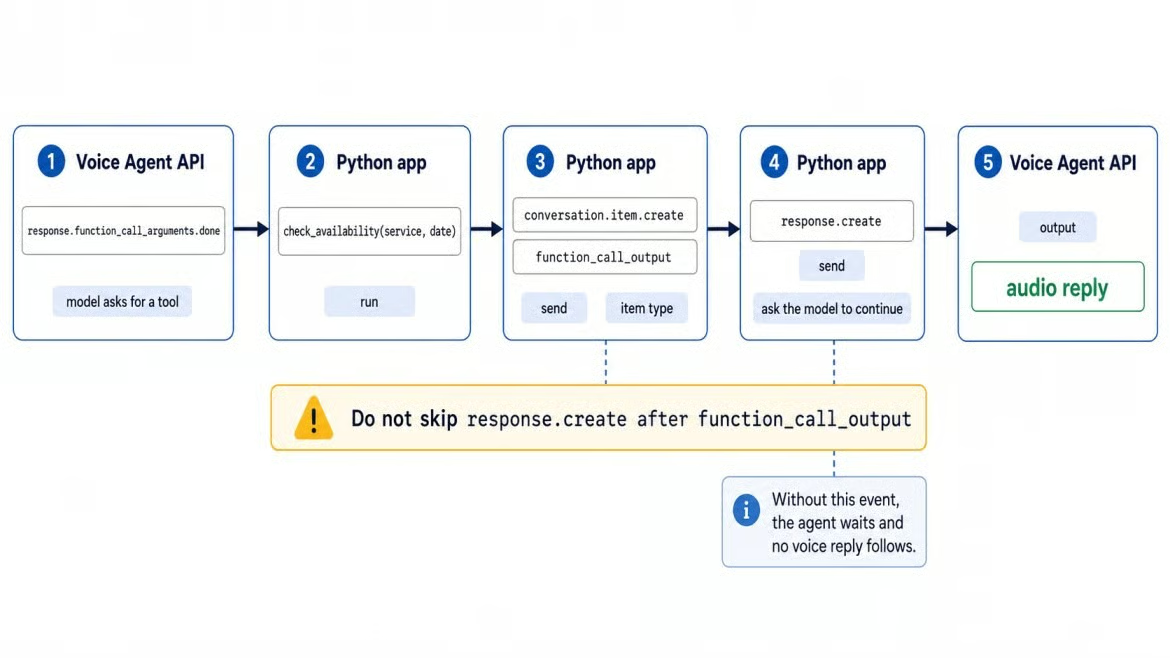
The tool call round trip explained. Image by Author.
Custom functions like this run in your code. The Streamlit demo registers three more from the same file: book_appointment, transfer_to_human, and end_call. Built-in tools, such as web search, X search, collections search, and remote MCP tools, execute on xAI's servers.
Tools fail, and a voice agent that assumes success can promise a slot that does not exist. My ToolRegistry.execute never raises: a failed lookup comes back as an {"error": ...} dict.
def execute(self, name, arguments):
    handler = self._handlers.get(name)
    if handler is None:
        return {"error": f"unknown tool: {name}"}
    try:
        return handler(**arguments)
    except ToolError as exc:
        return {"error": str(exc)}
An explicit error state stops the agent from treating failed tool calls as success.
Before you serve this to anyone, know what a call costs. Audio bills at $0.05 per minute, counting both what you send and what you receive. Text input events bill at $0.004 each. function_call_output results and response.create events are not billed.
The client tracks it as it goes, so cost is a property you read at any point:
@property
def audio_usd(self):
    rate = 0.05 + (0.01 if self.telephony else 0.0)
    return self.audio_seconds / 60 * rate

@property
def total_usd(self):
    return self.audio_usd + self.text_usd + self.tool_usd
An xAI provisioned number adds the $0.01 per minute telephony surcharge, which the helper applies when you set telephony=True. Tools hosted by xAI bill separately: web search and X search run about $5 per thousand calls, and file search is about $2.50.
Most failures fall into a short list:
Missing or invalid API key returns 401 at the handshake, so check the key first
A blocked team returns 403, and a rate limit returns 429, which you retry with backoff
Malformed session config returns 400, usually a typo in a field name
Unsupported audio format gives static, not an error, so match the session rate
A missing response.create after a tool result leaves the agent hanging
A duplicate booking attempt can cause real problems, so do not retry blindly
Retrying a failed read like check_availability is safe, but retrying a failed write like an actual booking can double book a caller. Any action that changes data needs an idempotency check first.
Everything so far assumes the code runs on your server, where the API key belongs. If a browser or mobile app connects directly, use ephemeral tokens.
Your server calls POST https://api.x.ai/v1/realtime/client_secrets with your key, gets back a token response, and passes the token value to the client. In my run, the response included value and expires_at:
@app.post("/session")
async def create_session():
    async with httpx.AsyncClient() as client:
        response = await client.post(
            CLIENT_SECRETS_URL,
            headers={"Authorization": f"Bearer {os.environ['XAI_API_KEY']}"},
            json={"expires_after": {"seconds": 300}},
        )
    return response.json()
Browsers cannot set custom WebSocket headers, so the token rides in the sec-websocket-protocol header with an xai-client-secret. prefix.
An endpoint lets a frontend or another service call the workflow. The route validates the request body with a Pydantic model, takes a typed message or an audio path, and returns the transcript, response audio, tool log, latency, and estimated cost.
@app.post("/appointments/voice")
async def appointments_voice(body: VoiceRequest):
    fail = {"check_availability"} if body.simulate_tool_failure else None
    assistant = AppointmentAssistant(voice=body.voice, telephony=body.telephony, fail_tools=fail)
    if body.text:
        result = await assistant.run_live(text=body.text, conversation_id=body.conversation_id)
    else:
        pcm = load_wav_as_pcm(body.audio_path, 24000)
        result = await assistant.run_live(pcm, conversation_id=body.conversation_id)
    return {
        "transcript": result.transcript,
        "audio_wav_base64": base64.b64encode(encode_wav_bytes(result.audio, 24000)).decode(),
        "tool_calls": result.tool_calls,
        "latency_seconds": round(result.latency_s, 3),
        "estimated_cost_usd": round(result.cost.total_usd, 6),
        "audio_seconds": round(result.cost.audio_seconds, 2),
        "conversation_id": result.conversation_id,
    }
Run it with uvicorn app:app --reload and open http://localhost:8000/docs. Read XAI_API_KEY from the server environment and never accept it from a request body.
Learn with DataCamp
Course
Course
Track
Tutorial
Khalid Abdelaty
15 min
Tutorial
François Aubry
8 min
Tutorial
François Aubry
14 min
Tutorial
Abid Ali Awan
9 min
Tutorial
Khalid Abdelaty
15 min
Tutorial
Tom Farnschläder
12 min