
Track
xAI just released the Grok Imagine API, which generates AI videos using their Grok Imagine model. It claims to be on par with other current top models, even though it was optimized for low latency and cost.
In this article, we will see whether Grok Imagine can live up to these promises. In this comprehensive guide, I will show you how to set up the API locally and how to use Grok Imagine with text, images, or video input to generate videos in Python.
If you want to learn more about the latest releases in this space, check out our guide to the top video generation models.
What is Grok Imagine?
Grok Imagine is a video generation model from xAI. It accepts text, image, and video input and generates a video with native sound. Being able to receive video input is especially interesting, since it allows us to perform prompt-driven edits.
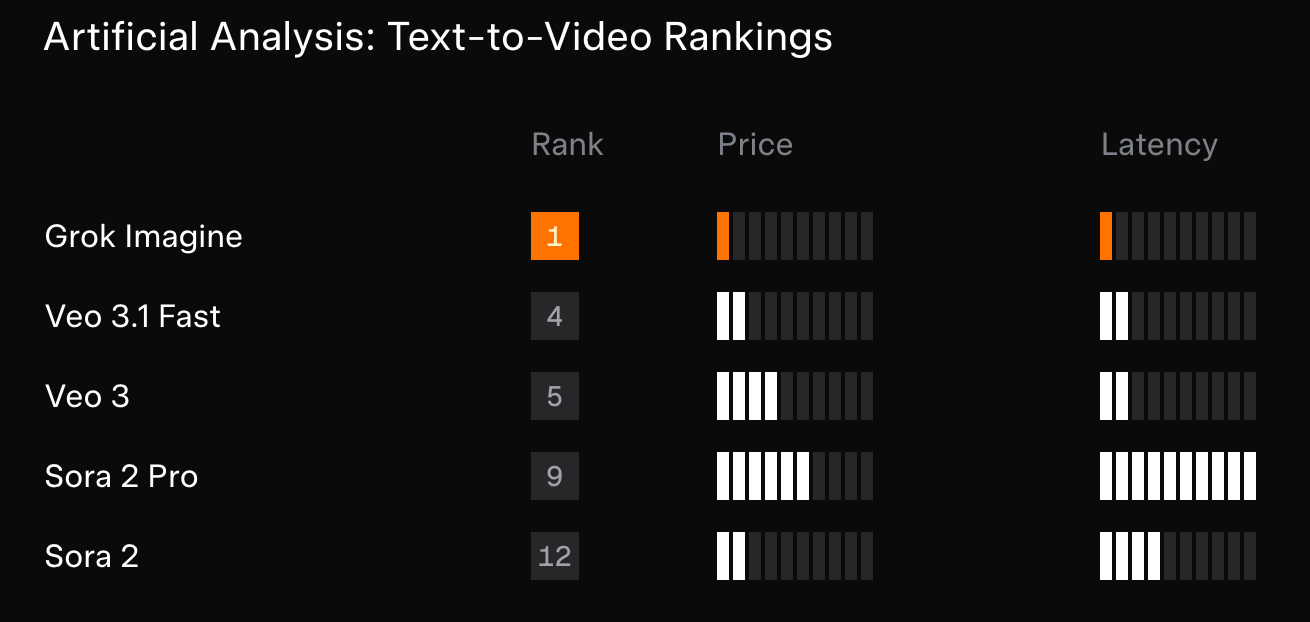
Their model outperforms the latest Veo models from Google and Sora from OpenAI, both in price and in time to generate a video.
The above comparison chart focuses only on price and speed. As we can see, Grok Imagine takes the first place in both categories.
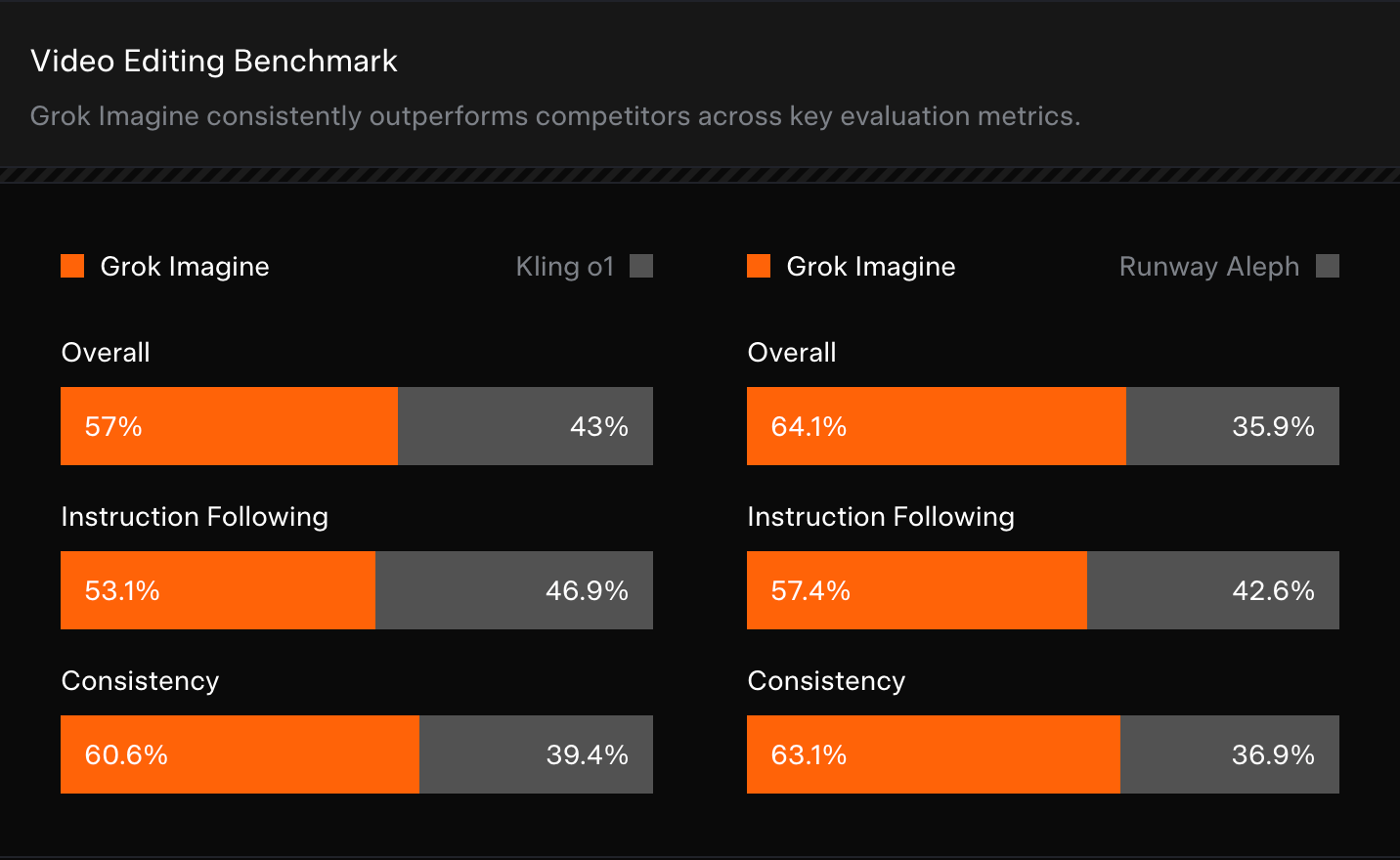
When it comes to the videos themselves, the announcement only compares Grok Imagine with Kling o1 and Runway Aleph. The experiment consisted of sending the same prompt to all models and having human evaluators select their preferred result.
Apart from not comparing the results with Sora and Veo, I found it odd that Runway Aleph isn't even the latest model released by Runway ML. Still, Grok Imagine takes the first spot in the ELO-based Artificial Analysis text-to-video ranking, even outranking Runway Gen 4.5.
How to Access Grok Imagine
Grok Imagine can be accessed either via its web interface or its API. In this tutorial, we focus on using Grok Imagine with the API using Python.
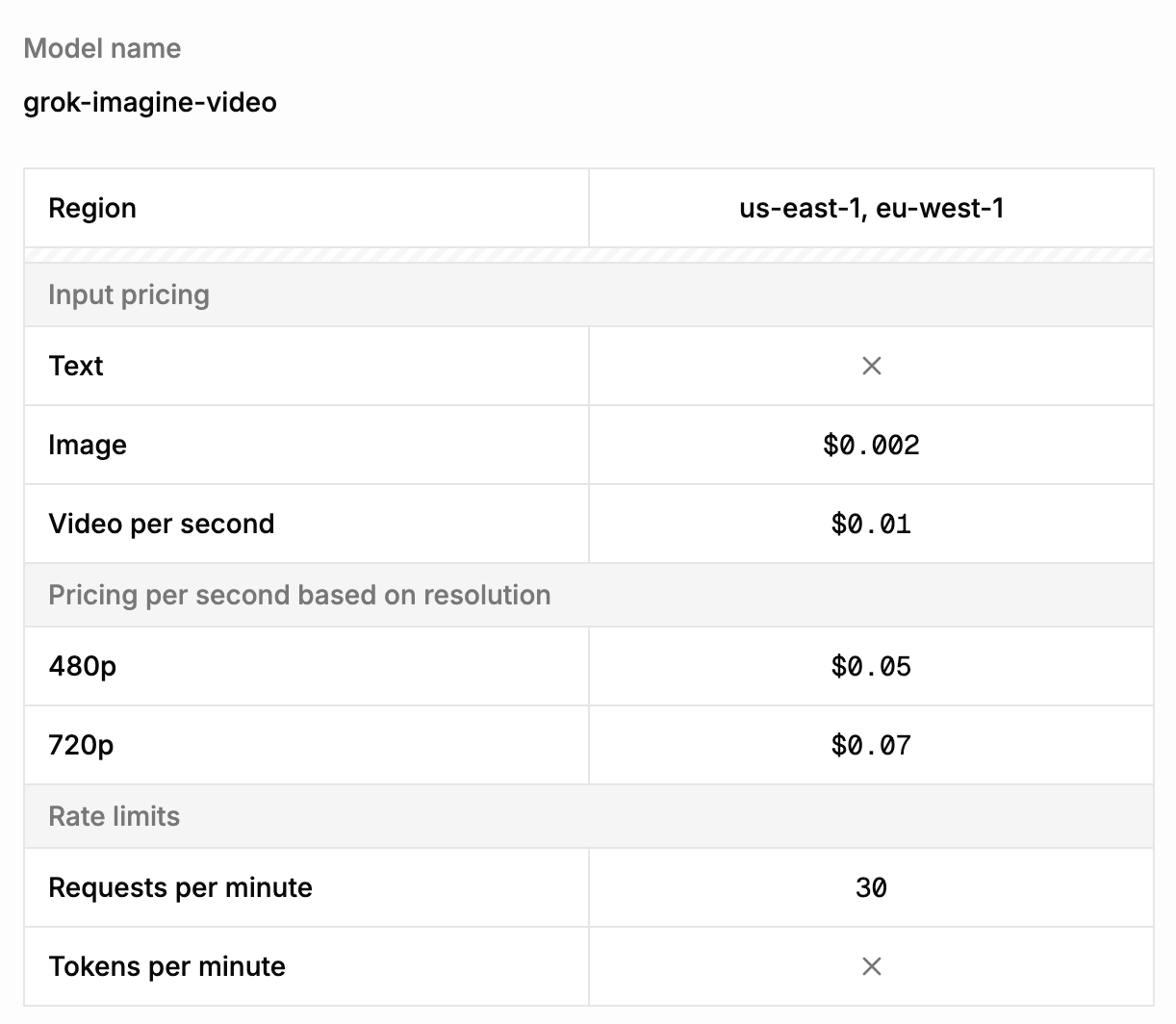
When using a model via the API, we need an account but not a subscription. Instead, we create an API key in our account that charges us on a per-video basis. Below, you can see the pricing structure of the Grok Imagine API:
Grok Imagine API Setup
Before creating our first Grok Imagine video, we need to generate an API key and install the necessary dependencies.
Generating an API key
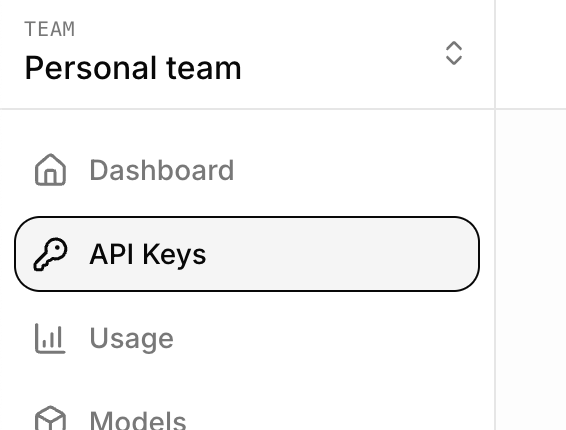
The first step in setting up the Grok Imagine API is to generate an API key. To create one, go to the xAI console and log in with your xAI account. You will need a team, so create one for your account if none exists yet.
Next, navigate to the API Keys tab and click the Create API Key button on the right.

We copy the key into a file named .env that we create in the same folder where we'll write our Python code. The file should have the following format:
XAI_API_KEY="your_api_key"
Installing Python xAI packages
To interact with the Grok Imagine API, we install two Python packages:
-
xai-sdk: The official xAI package that allows us to make API requests. -
python-dotenv: A helper package that makes it easy to load the API key from the.envfile.
We install these packages using the command:
pip install xai-sdk python-dotenv
Generating our first video with Grok Imagine
With the steps above complete, we can now generate a video. To do so, we import the two packages we just installed, load the API key, initialize the xAI client, and finally, send a video generation request.
Here's a sample Python script for doing so:
from xai_sdk import Client
from dotenv import load_dotenv
# Load the API key
load_dotenv()
# Initialize the xAI client
client = Client()
# Sending a video generation request
prompt = """
A pixel art cat playing with a ball.
"""
response = client.video.generate(
prompt=prompt,
model="grok-imagine-video",
)
# Display the URL of the video
print(f"Video URL: {response.url}")
Here’s the video that was generated:
Note: All the code for this article can be found in this GitHub repository.
Downloading the video
The code above will wait for the video to finish generating, then print the video's URL. We can also download the video using this download_video() function:
import requests
from pathlib import Path
from urllib.parse import urlparse
def download_video(url: str, output_dir: str = "."):
# Extract filename from URL
filename = Path(urlparse(url).path).name
if not filename:
raise ValueError("Could not determine filename from URL")
output_path = Path(output_dir) / filename
with requests.get(url, stream=True) as r:
r.raise_for_status()
with open(output_path, "wb") as f:
for chunk in r.iter_content(chunk_size=8192):
if chunk:
f.write(chunk)
print(f"Video saved to {output_path.resolve()}")
After defining this function, calling download_video(response.url) will download the video to your working directory.
A full example with video download can be found in the repository.
Generating Videos With the Grok Imagine API
We learned how to generate videos from text using the xAI API. Next, we’ll explore the full capabilities of the model. For more information, you can always consult the xAI documentation.
Exploring video generation options
Grok Imagine provides three main options when generating videos:
-
duration: The video duration in seconds, provided as a number from1to15. -
aspect_ratio: The aspect ratio of the video. The model supports the following aspect ratios:"1:1","16:9","9:16","4:3","3:4","3:2", and"2:3". -
resolution: The resolution for the video, either"720p"or"480p".
Here's an example of how we can set the above options in the API request:
prompt = """
A person stands holding their phone, gazing at a stunning landscape
photo on the screen. The image begins to subtly move and glow.
Suddenly, the phone pulls them in, and they are sucked through the screen,
transitioning seamlessly into the vast, breathtaking landscape itself.
"""
response = client.video.generate(
prompt=prompt,
model="grok-imagine-video",
duration=15,
aspect_ratio="9:16",
resolution="480p",
)
Here's the result:
I find this result to be underwhelming, to say the least.
Generating a video from an image
One of the most powerful features of AI image generation models is their ability to generate videos from an image. This workflow makes it much easier to create consistent videos, provided we have a base image, as the model only needs to generate motion.
Imagine wanting to create a video with a specific character or person. Providing an image, in theory, at least guarantees character accuracy.
To generate an image from an image, use the image_url parameter with a URL to the image we want to use. According to their documentation, when an image is provided, it will be used as the first frame of the video. We need to make sure, however, that it matches the requested aspect ratio.
I tried generating an FPV drone shot of people riding horses at the beach from the photo below, which I took a while back. Note that because the image needs to be provided as a URL, we first need to upload it somewhere. In my case, I used the GitHub repository associated with this article.
prompt = """
A FPV drone shot of the people riding the horses on the beach.
"""
response = client.video.generate(
prompt=prompt,
model="grok-imagine-video",
image_url="https://raw.githubusercontent.com/fran-aubry/grok-imagine-tutorial/refs/heads/main/resources/horses.jpeg",
)
This is the video Grok Imagine generated:
There are clear AI artifacts in the video, like object duplication. Despite that, the model understood the shot we wanted to generate.
Here's another example where I try to convert an image into a timelapse. I tried it twice because the first result added a building that didn't exist in the original image.
The second attempt was more successful than the first, but it's still full of AI artifacts.
As a third example, I tried to see how Grok Imagine handled camera movement by asking it to animate a photo zooming into the subject. This one worked the best in my opinion.
Editing Videos With the Grok Imagine API
Grok Imagine allows you to edit an existing video based on a text prompt. The way it works is similar to generating a video based on an image. We provide the video we want to edit as a URL using the video_url parameter and describe the changes with the prompt.
Note that when editing a video, the maximum duration the input video is allowed to have is 8.7 seconds.
To test this, I generated a video using Grok Imagine of a person juggling three balls.
Then, I used that video’s URL to ask the model to add fire to the balls. Below is the request for editing the video. The full code can be found in the GitHub repository.
prompt = """
Add fire to the balls.
"""
response = client.video.generate(
prompt=prompt,
model="grok-imagine-video",
video_url="https://vidgen.x.ai/xai-vidgen-bucket/xai-video-2109c762-efcb-415b-ab3c-661b1df113cd.mp4",
)
I also did a third edit where I asked to replace the person with a cat. Here are the results:
Here’s a final example where I started with a photo I took of a starry sky. I asked Grok Imagine to add two hikers walking down the path who stopped to admire the stars. Finally, I used that video as input and asked it to be edited to make it snowy.
This is another example where the results are quite bad. In the first video, a new path was created that is inconsistent with the scene. The snow edit looked good at first, but then I realized it left the background unchanged, making it inconsistent with the now snowy foreground.
Conclusion
It’s encouraging to see more video models arrive with API access, since that genuinely expands what we can build and automate, from quick prototypes to full pipelines.
Grok Imagine’s API is refreshingly simple to set up and call, but it does come with friction points. Most notably, the requirement to pass images and videos by URL makes basic workflows (like iterating on local assets) more cumbersome than necessary.
In practice, my results were underwhelming compared to the lofty claims: text-to-video often missed the mark, and image-to-video introduced noticeable artifacts and inconsistencies. The one area where it did shine was editing, where prompt-driven changes felt more reliable and controllable.
One very strong point of Grok Imagine is its speed. I've used a lot of AI video generation models, and from my experience, Grok Image is by far the fastest.
I’m optimistic about where this space is headed, but for now Grok Imagine feels more like a promising editor than a best-in-class generator, and I hope future updates broaden input options and boost core generation quality.
To those of you who want to learn more about the techniques used in AI video generation, I recommend enrolling in our AI Fundamentals skill track.
Grok Imagine API FAQs
How can I access the Grok Imagine API?
To use the Grok Imagine API, you only need an xAI account. You can generate an API key from the xAI console.
How much does video generation with the Grok Imagine API cost?
Pricing depends both on the input ($0.002 per image, $0.01 per video) and the output. Per second, a video costs $0.05 at 480p resolution and $0.07 at 720p.
What capabilities does the Grok Imagine API support?
The Grok Imagine API supports text-to-video, image-to-video, and video editing. You can generate clips up to 15 seconds in length with native audio generation.
How can you create videos from images or other videos in the Grok Imagine API?
Input images and videos have to be provided as URLs and are added using the image_url and video_url parameters, respectively.


