If you have ever hit the token usage limit on your AI coding plan after only a few requests, you might wonder where all those tokens went.
You ask the agent to fix a bug, refactor a feature, or inspect a repository, and suddenly a large portion of your coding allowance is gone.
This is not necessarily a problem with your provider or subscription.
AI coding agents are simply much more token-intensive than normal chatbots. They do not just answer your prompt. They may read multiple files, search the codebase, inspect logs, run tests, call tools, generate code, review their own changes, and repeat the process several times before completing a task.
The good news is that you can reduce a lot of this unnecessary token usage.
There are tools that make coding agents less verbose, stop them from over-engineering simple tasks, compress noisy terminal output, and prevent large tool responses from filling the context window.
In this guide, we will look at four tools for reducing token usage in AI coding agents: Caveman, Ponytail, RTK, and Context Mode.
We will see what each one does, how to set it up, and how you can combine them to get more coding done from subscriptions such as Claude Code and Codex before hitting your usage limits.
Why Do Agentic Workflows Use So Many Tokens?
A normal chatbot might take one prompt and return one answer. An agent usually does much more.
It may read files, call tools, inspect logs, retrieve documents, write code, and repeat this process several times before finishing.
Each step adds more information to the context, and much of that context may be sent to the model again on later calls.
A simplified agent loop looks like this:
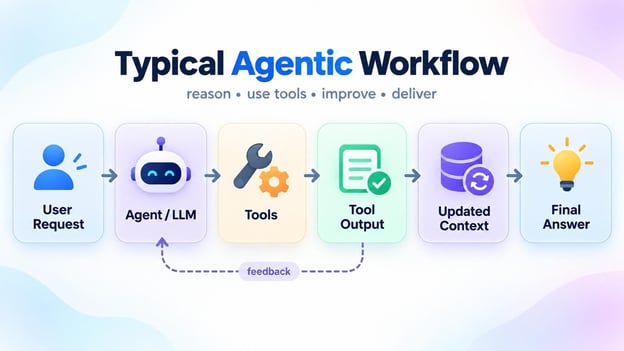
The request goes to the model, the model calls a tool, the tool returns output, and that output is folded back into the context before the next step. The feedback arrow is where the cost sits: every pass carries the previous results forward, so a task that takes six tool calls sends most of that history to the model six times.
This creates a few common sources of token waste:
- Verbose responses: The agent explains too much when a short answer would do.
- Over-engineered code: A small task turns into extra files, abstractions, and dependencies.
- Large tool outputs: Logs, tests, Git diffs, and terminal commands can return thousands of tokens.
- Too much context: Retrieved documents, tool definitions, and previous results can quickly fill the context window.
- Long-running sessions: The longer the agent works, the more history and intermediate results it has to carry around.
So the real challenge is not just how many tokens an agent generates, but how many it reads, carries forward, and processes again as the workflow continues.
That is exactly what tools like Caveman, Ponytail, RTK, and Context Mode are designed to reduce, each targeting a different source of token waste.
1. Caveman: Make Your Agent Say Less
Caveman is a simple way to make coding agents more concise.
Instead of letting the agent narrate every step, repeat obvious details, or add unnecessary filler, it pushes responses toward the information that actually matters.
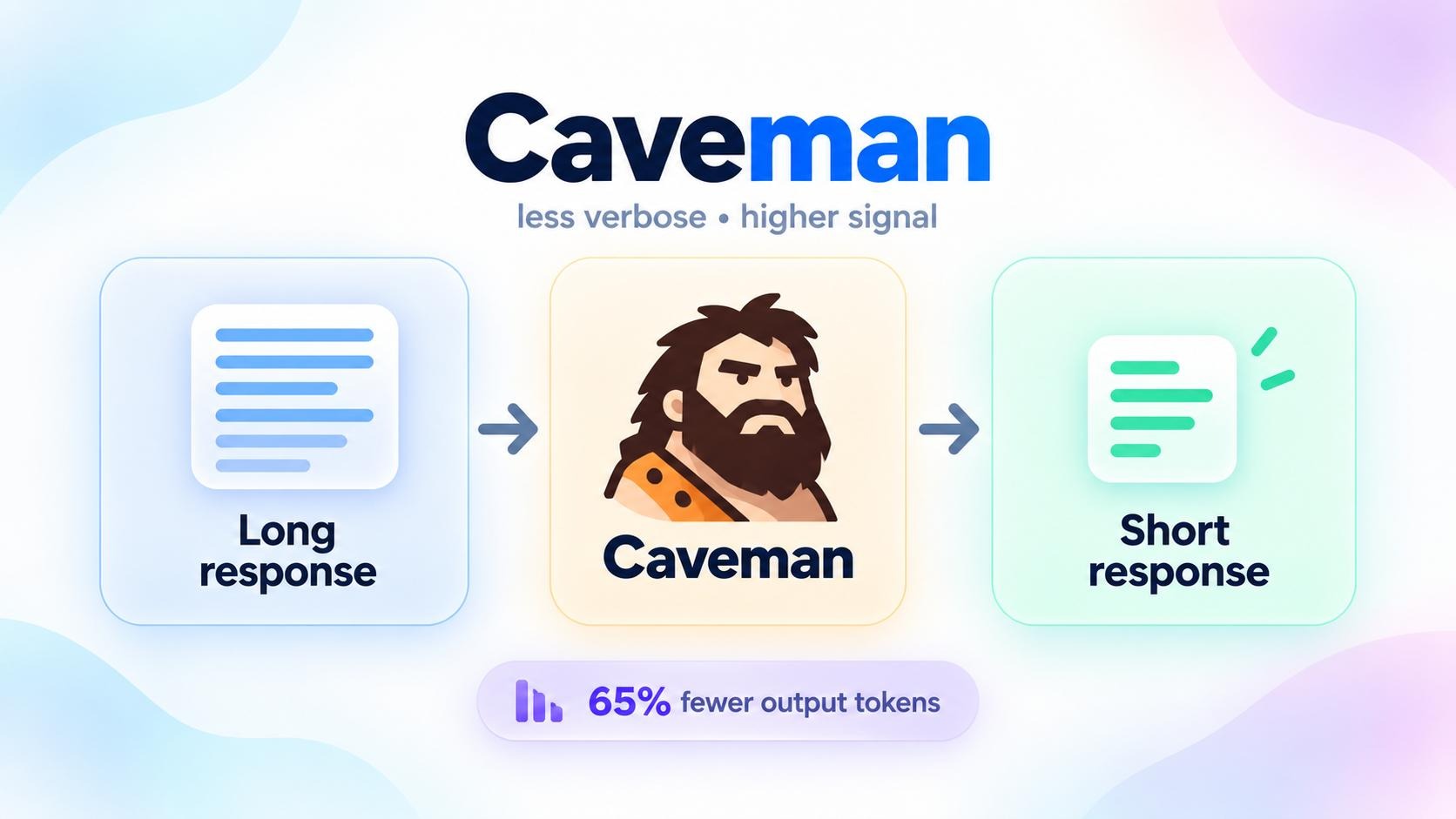
It is especially useful for long coding sessions, where verbose responses do more than just increase output tokens.
Those responses can also become part of the conversation history and get carried into later turns.
How Caveman works
Caveman has two separate parts.
The Caveman skill changes how the agent writes.
It removes filler, pleasantries, hedging, and unnecessary narration while leaving important details such as code blocks, commands, API names, and exact error messages untouched.
It also relaxes the terse style when clarity matters, such as around security warnings or irreversible actions.
There is also an optional local proxy that tackles the other side of the problem: what the agent reads.
It sits between the coding agent and the model provider and compresses eligible context before the request is sent.
The skill and proxy work independently, so you can start with the lightweight skill and add the proxy later if you need more aggressive context reduction.
A simple way to think about it is explained in the diagram below:
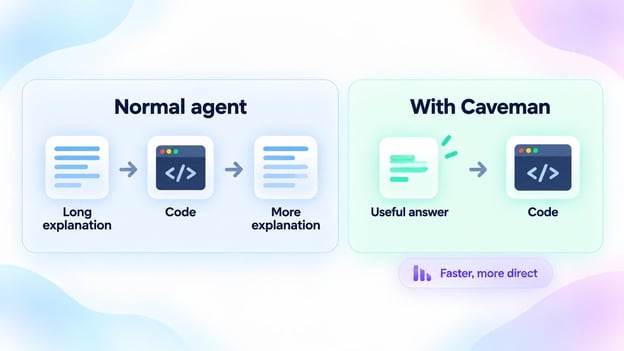
On the left, the agent wraps its code in a preamble and then explains the same code again afterward. On the right, you get the useful answer and the code, and nothing else. Same work, far fewer tokens spent narrating it.
Getting started with Caveman
The easiest way to install the skill is:
npx skills add JuliusBrussee/caveman
Then activate it inside your coding agent with:
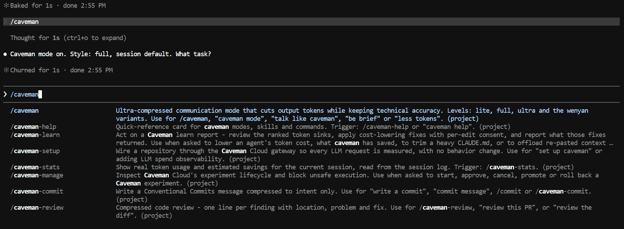
You can switch back to normal responses with:
Caveman also provides native installation options for tools such as Claude Code, Codex, Gemini CLI, Cursor, and OpenCode.
If you also want to reduce the context being sent to the model, install the CLI:
npm install -g @caveman-ai/cli
caveman setup --install
Then launch a supported agent through it, for example:
This starts Caveman's local proxy and routes the agent through its context-compression layer.
For most users, I would start with the skill first.
It is easy to add, does not change your normal coding workflow, and directly addresses one of the simplest sources of wasted tokens: an agent saying far more than it needs to.
2. Ponytail: Stop Your Agent From Over-Engineering
Ponytail is designed for a different kind of token waste: coding agents writing more code than the task actually needs.
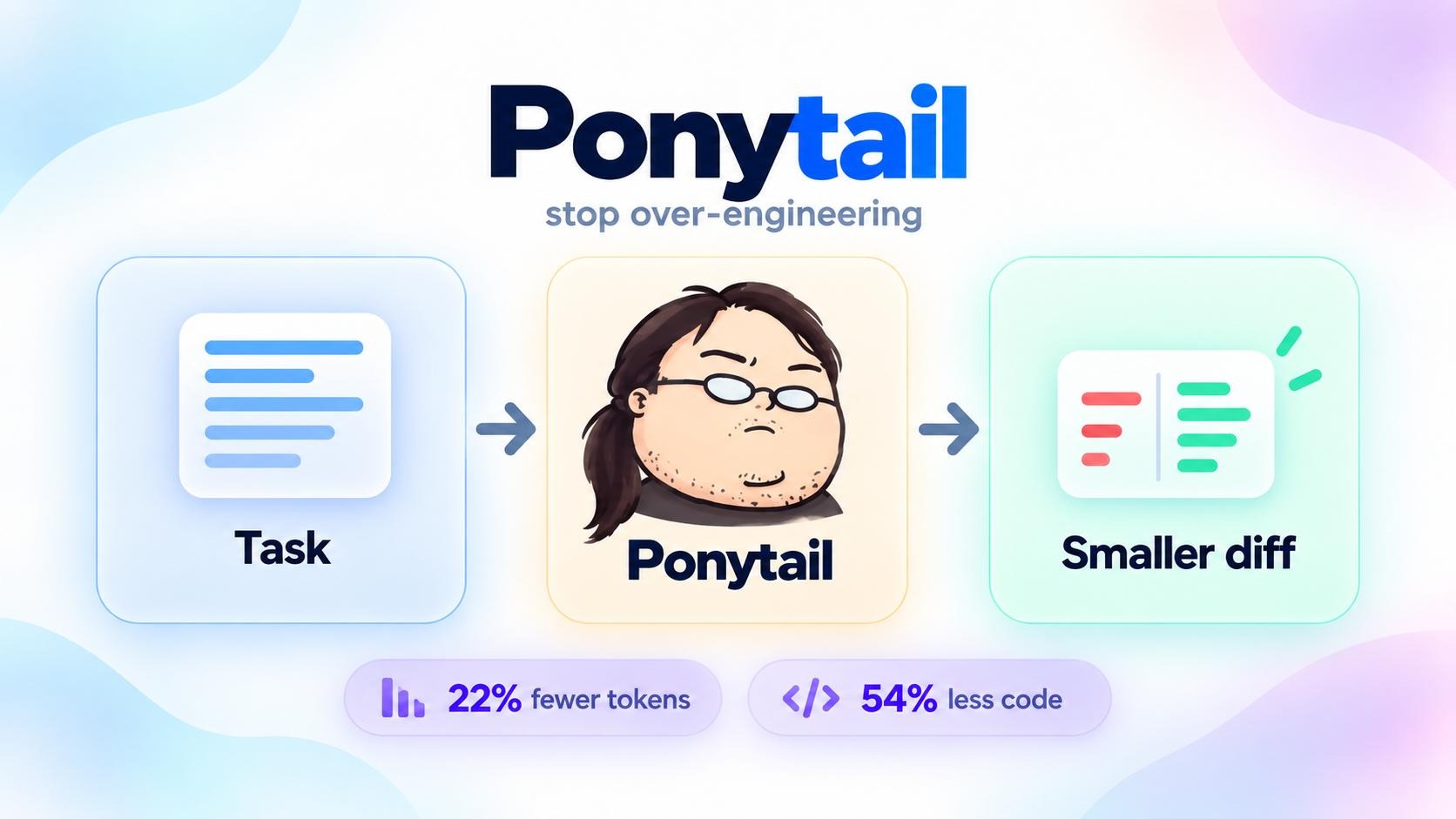
A simple request can sometimes turn into new dependencies, helper classes, wrapper components, and extra configuration.
Ponytail tries to stop that by pushing the agent toward the smallest sensible solution first.
How Ponytail works
Before writing code, Ponytail makes the agent work through a simple decision ladder:
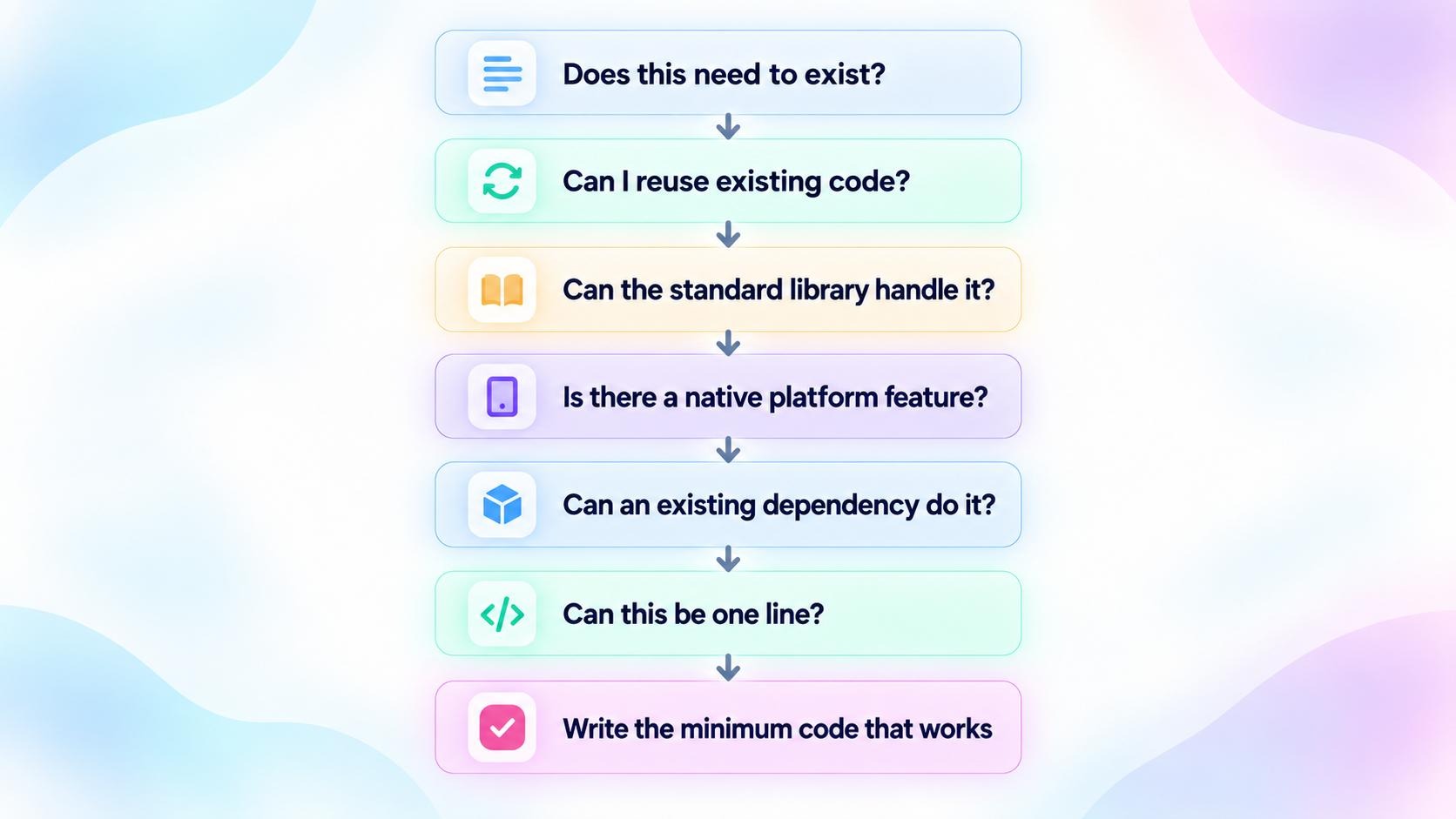
Each rung gives the agent a chance to stop before it writes anything new. It only reaches the bottom step, writing the minimum code that works, once the standard library, native platform features, and existing dependencies have all been ruled out.
For example, instead of installing a date-picker library and building a wrapper component, Ponytail may decide that the browser already has:
The goal is not to blindly make everything shorter.
Ponytail explicitly keeps things like validation, security, accessibility, and data-loss protection out of the cutting process.
It is meant to be lazy about implementation, not careless about correctness.
In Ponytail's own agentic benchmark, it produced around 54% less code and 22% fewer tokens across 12 coding tasks compared with the same agent without the skill.
An independent benchmark also found substantially smaller implementations, although it noted that aggressive settings can sometimes trade away robustness on unstated edge cases.
Getting started with Ponytail
For Claude Code, add the marketplace:
/plugin marketplace add DietrichGebert/ponytail
Then install Ponytail:
/plugin install ponytail@ponytail
Send those as two separate commands.
Once installed, you can control how aggressively Ponytail simplifies things:
/ponytail lite
/ponytail full
/ponytail ultra
/ponytail off
full is the default and is probably the best place to start. lite still builds what you ask for, but points out simpler alternatives, while ultra applies YAGNI much more aggressively.
You can also review an existing change for unnecessary complexity:
Or scan a larger codebase:
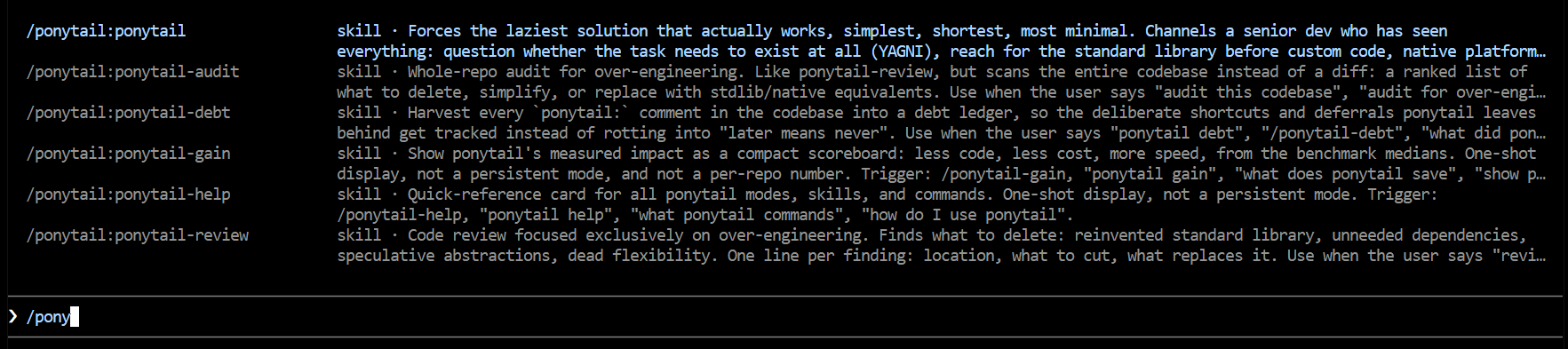
Ponytail works particularly well for coding agents because reducing unnecessary code has a knock-on effect: the agent writes fewer tokens now, creates smaller diffs, and leaves less code for itself to read again later.
RTK, short for Rust Token Killer, focuses on a different source of token waste: everything your coding agent gets back from the terminal.
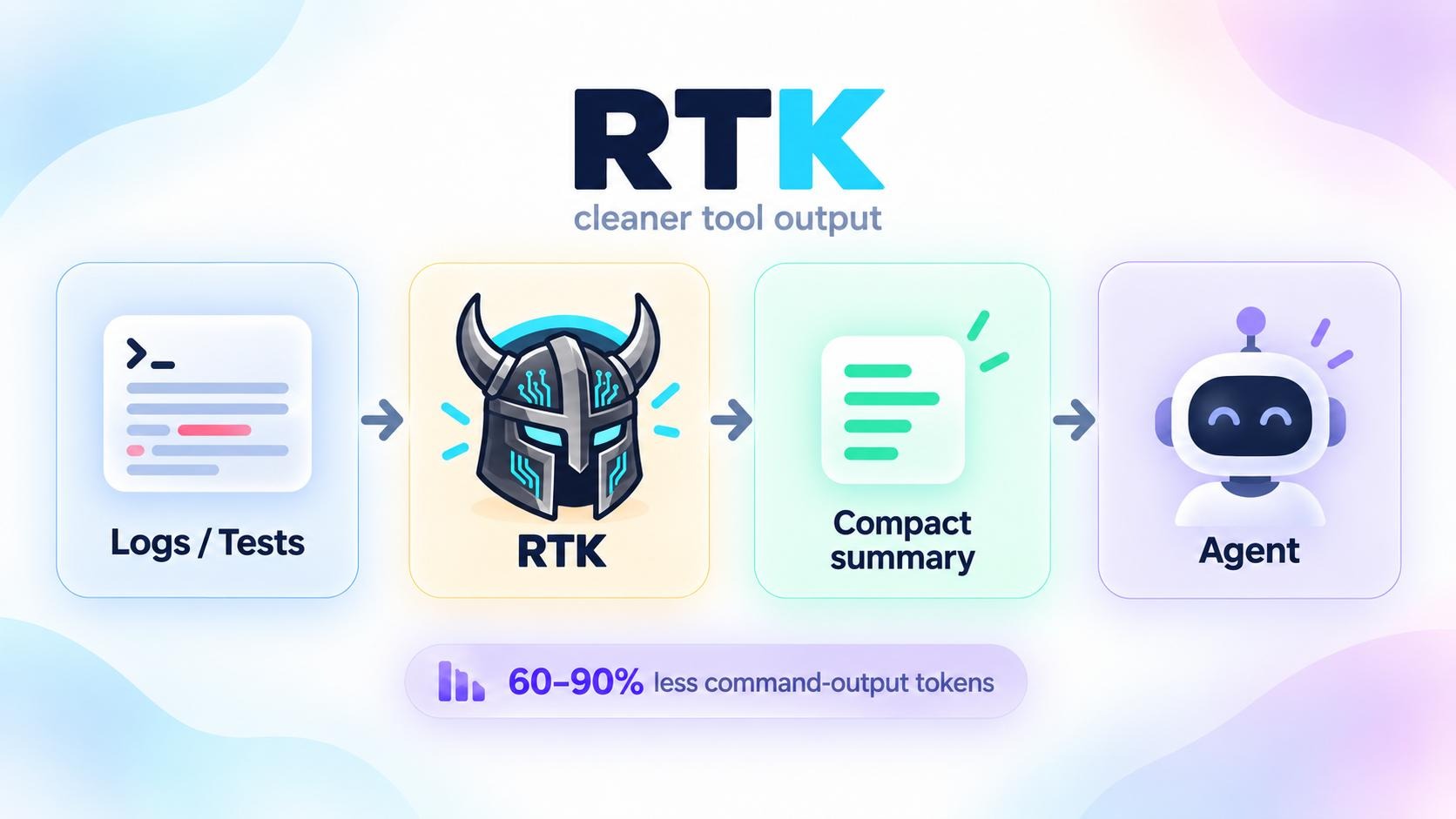
Commands like git status, test runs, logs, searches, and package-manager output can return hundreds or thousands of lines.
Most of that information is useful to a human looking at a terminal, but an agent often only needs the important parts.
RTK sits between the command and the agent and compresses the output before the model sees it.
How RTK works
RTK uses command-specific filtering, grouping, truncation, and deduplication to remove noise while keeping useful information such as errors, failures, changed files, and summaries.
For example:
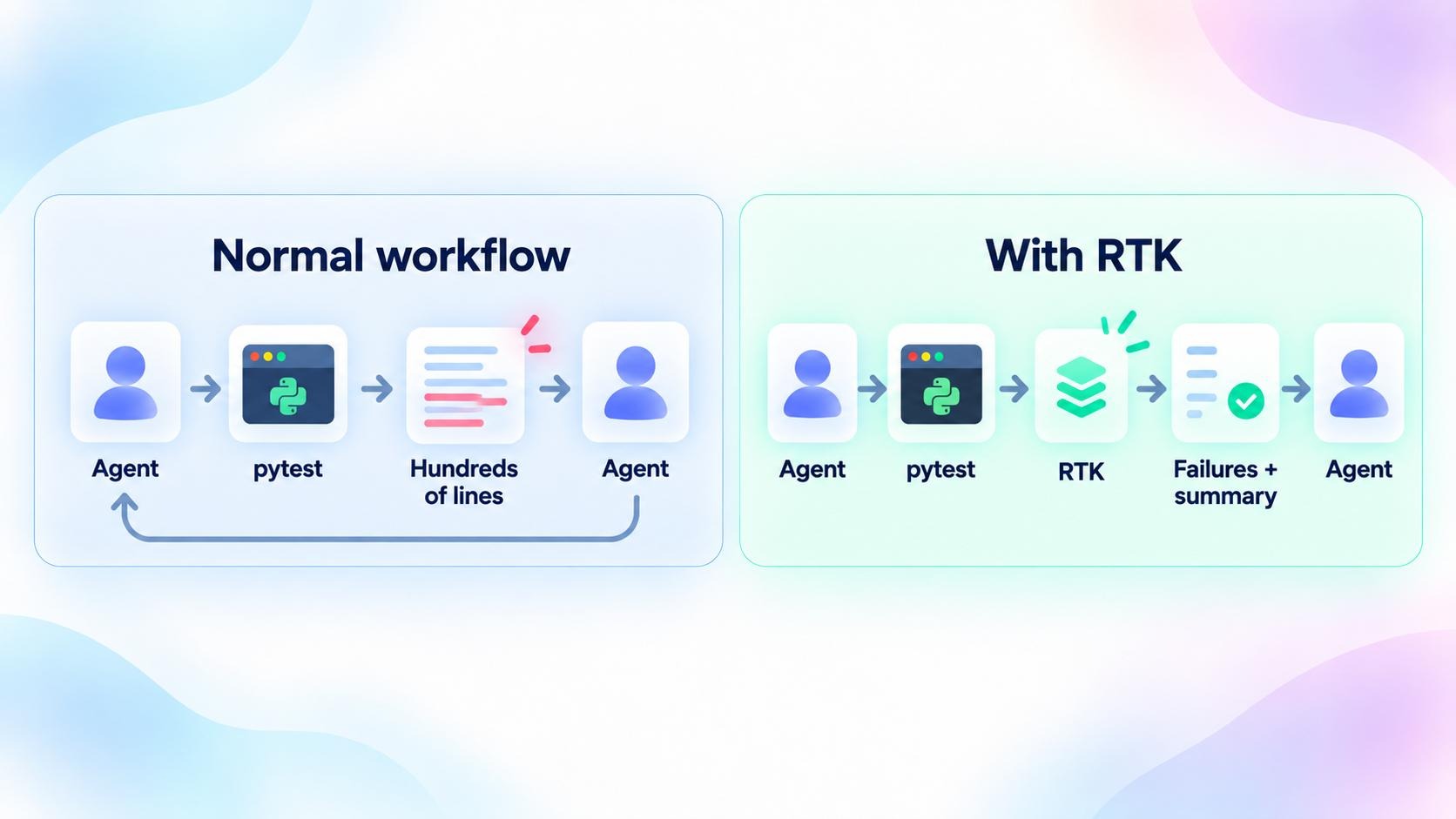
In the normal flow, the agent runs pytest and reads back every line it printed, most of which is passing tests it does not need to see. With RTK in the middle, the same run comes back as the failures plus a summary, so the agent reads a few dozen lines instead of several hundred.
With supported coding agents, RTK can hook into shell calls automatically. A command such as:
can be rewritten behind the scenes to:
The agent then receives the smaller output without having to explicitly ask for RTK each time.
RTK reports around 60–90% less command-output token usage for common development commands. That does not mean your total LLM bill drops by 60–90%; it only refers to the terminal output RTK compresses.
Getting started with RTK
On macOS or Linux, you can install it with Homebrew:
brew install rtk-ai/tap/rtk
Or use the installation script:
curl -fsSL https://raw.githubusercontent.com/rtk-ai/rtk/master/install.sh | sh
Then verify that you installed the correct RTK:
The rtk gain command shows the token-savings dashboard. This check is useful because another unrelated project also uses the rtk name.
For Claude Code, initialize RTK globally with:
For Codex:
And for Gemini CLI:
RTK also supports Cursor, OpenCode, Copilot, Cline, Windsurf, and several other coding agents.
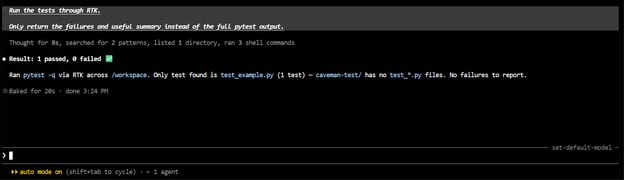
Once configured, you can continue using your normal terminal commands.
RTK handles the compression in the background, which makes it especially useful for agents that spend a lot of time running tests, searching code, inspecting Git changes, and reading logs.
4. Context Mode: Keep Large Tool Outputs Out of Context
Context Mode focuses on what happens after an agent starts using tools.
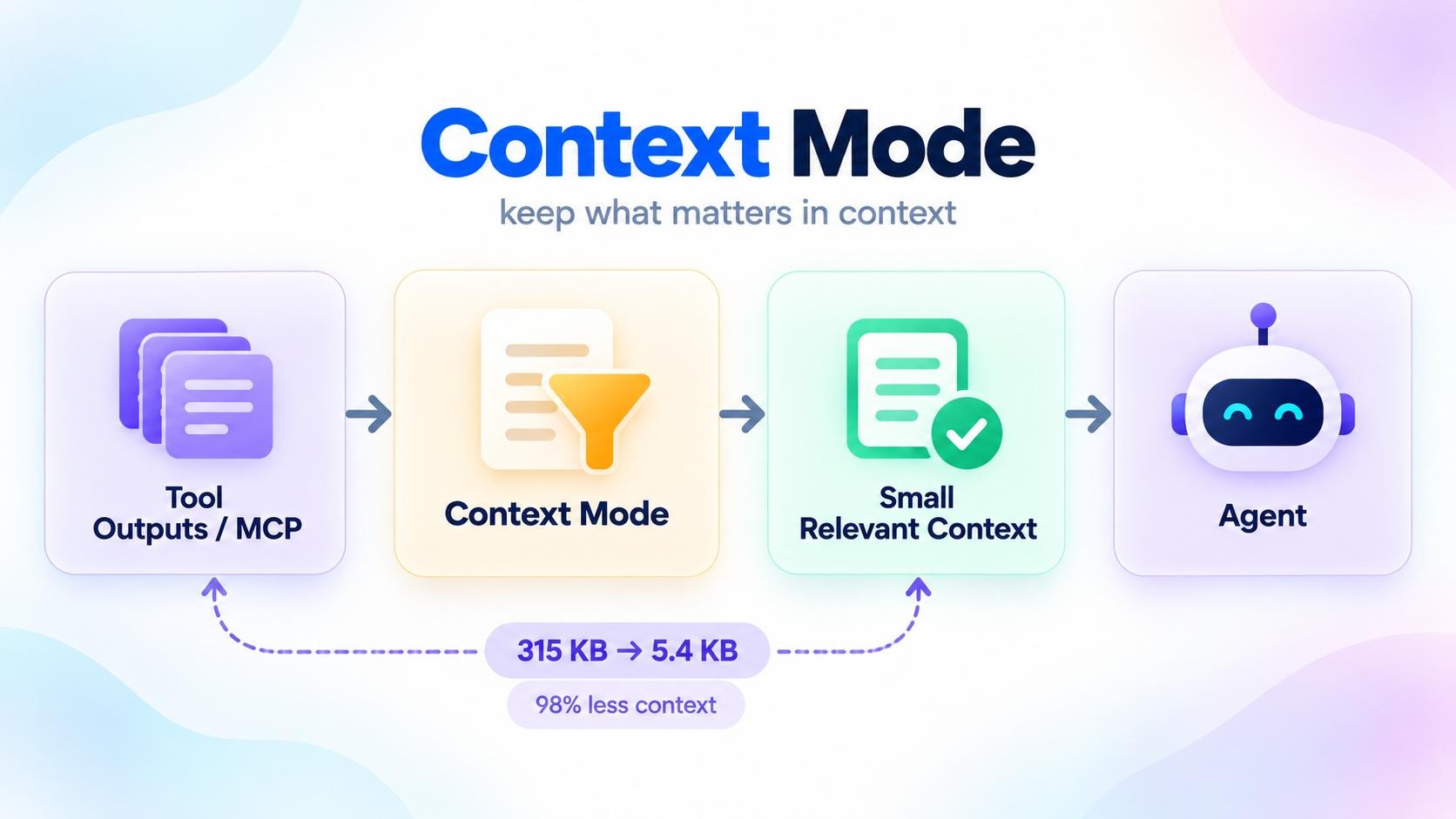
A browser snapshot, GitHub issue list, file search, or large command output can dump a huge amount of information directly into the context window.
Even worse, that information can then get carried through later turns.
Context Mode tries to avoid that by keeping bulky raw data outside the active LLM context and only bringing back the parts the agent actually needs.
How Context Mode works
Context Mode runs as an MCP server and provides sandboxed tools for operations that would normally generate large outputs.
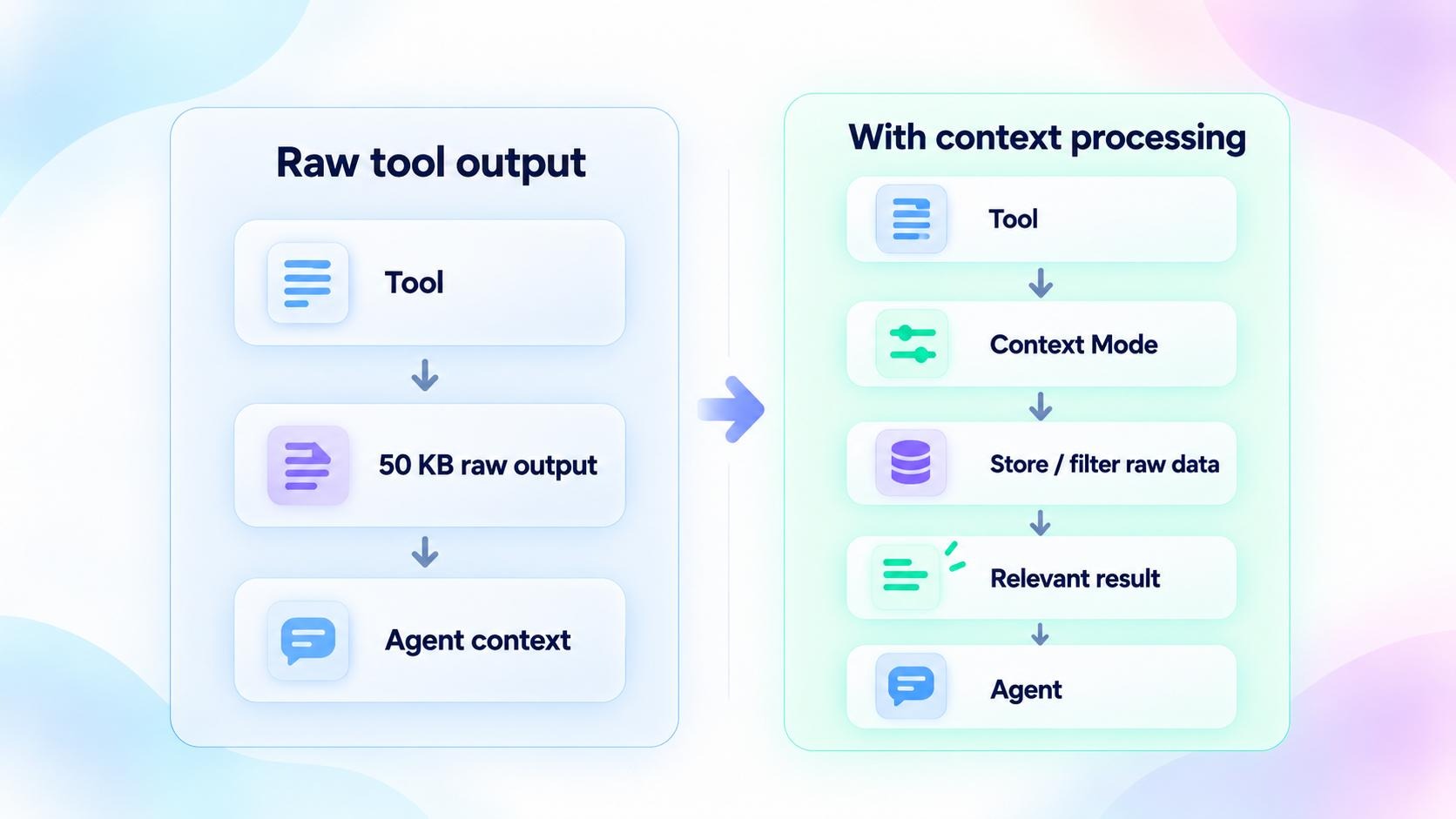
The raw information can be stored locally in an FTS5-backed search index, so the agent can search it again later without dumping the entire result back into the conversation.
In one example from the project, 315 KB of raw tool output was reduced to 5.4 KB of context, which it reports as a 98% reduction.
That is an example from the project's own workload rather than a guarantee for every tool call.
Getting started with Context Mode
For Claude Code, the easiest setup is through the plugin marketplace:
/plugin marketplace add mksglu/context-mode
/plugin install context-mode@context-mode
Restart Claude Code, then verify the setup with:
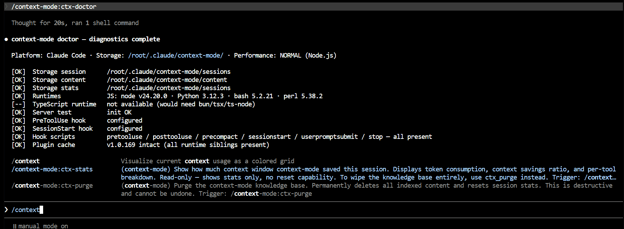
The doctor checks that the plugin, hooks, runtimes, and local search components are working correctly.
You can also install Context Mode globally:
npm install -g context-mode
and register it as an MCP server in supported clients such as Cursor, Gemini CLI, GitHub Copilot CLI, JetBrains, and others.
Once it is running, you can inspect how much context it is saving with its stats tools.
Context Mode is most useful for long-running, tool-heavy agents where browser results, logs, file reads, MCP responses, and other intermediate data would otherwise keep filling the context window.
These four tools target different parts of the coding-agent workflow, from what the agent writes to how much tool output it carries in context.
|
Tool
|
Main problem
|
What it reduces
|
Best suited for
|
Project-reported result
|
|
Caveman
|
Verbose agent responses
|
Agent output and, with the optional proxy, repeated input context
|
Coding agents that talk too much
|
Up to 65% fewer output tokens in its skill benchmark
|
|
Ponytail
|
Over-engineered solutions
|
Unnecessary code, abstractions, and resulting agent work
|
Coding agents that generate more code than needed
|
54% less code and 22% fewer tokens in its benchmark
|
|
RTK
|
Noisy terminal output
|
Shell commands, Git output, tests, logs, and searches
|
CLI-heavy coding-agent workflows
|
60–90% fewer command-output tokens on supported commands
|
|
Context Mode
|
Context pollution
|
Large MCP and tool outputs entering the active context
|
Long-running and tool-heavy coding agents
|
315 KB → 5.4 KB, or 98% less context, in a documented example
|
The easiest way to think about the difference is:
- Caveman reduces what the agent says
- Ponytail reduces what it builds
- RTK reduces what the terminal sends back
- Context Mode reduces what tool results stay in context.
Yes, but I would not stack everything from the start.
A better approach is to start with Ponytail.
It is simple to add to coding agents and, for many workflows, reducing unnecessary code is already enough. I use it with tools like Zcode, Claude Code, and Codex, and I am happy with the reduction it gives me.
If you want to go further, try Ponytail + Caveman. Ponytail reduces unnecessary code, while Caveman reduces unnecessary explanation, so they complement each other well.
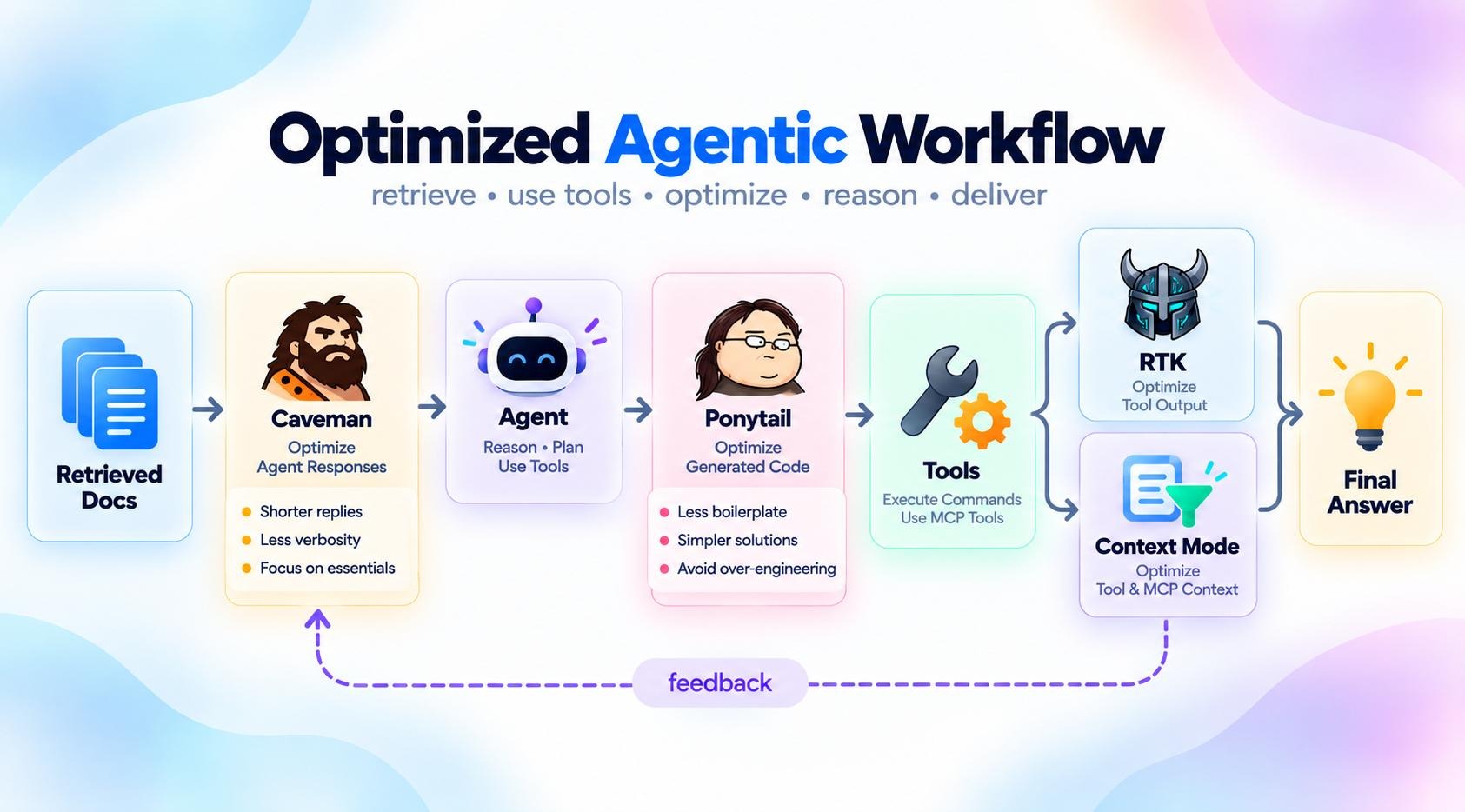
If your workflow still produces a lot of token-heavy output from tests, logs, Git, or terminal commands, try Ponytail + Caveman + RTK.
If RTK does not fit your workflow, especially if you use lots of MCP tools, browser tools, APIs, or other large tool outputs, try Ponytail + Caveman + Context Mode instead.
There is no perfect combination that works for everyone.
The goal is to experiment and find the setup that gives you lower token usage without hurting the performance of your coding agent. For some people, Ponytail alone will be enough. For others, combining two or three of these tools will work better.
Other Ways to Reduce Token Usage and Cost
You do not always need another tool.
Claude Code already includes several features that can help you keep context smaller and reduce unnecessary spending.
Disable memory when you do not need it
Claude Code can automatically store and reload memories from previous sessions. For short or isolated tasks, this may add context you do not need.
Run:
From there, you can disable auto-memory or remove information that is no longer useful.
Compact long sessions
As a session grows, Claude carries conversation history, file contents, and tool outputs with it. Claude Code compacts automatically, but you can trigger it earlier:
You can also tell it what matters:
/compact keep the implementation plan and latest test results
This is especially useful when you have finished one part of a task but want to continue in the same session.
Start fresh when the task changes
Sometimes compaction is not worth it. If you are moving to a completely different task, run:
This starts with an empty conversation context instead of carrying unrelated work forward. Anthropic also notes that starting fresh can sometimes be better than repeatedly compacting a long-running session.
Disable MCP servers you are not using
MCP tools also consume context. Claude Code now defers full MCP tool schemas by default, but unused servers can still add overhead.
Use: /mcpto review your connected servers and disable ones you do not currently need.
You can also run /context to see how much space different parts of the session are consuming.
Keep CLAUDE.md small
CLAUDE.md is loaded into Claude's context, so avoid turning it into a giant project manual.
Keep only instructions that Claude genuinely needs across tasks, such as important conventions, commands, and project rules.
Use /context to check how much space your memory and instruction files are taking. For instructions relevant only to certain folders, Claude Code supports more targeted rules rather than putting everything in the main CLAUDE.md.
Use a cheaper model for simpler tasks
You probably do not need the most expensive model for every edit.
Claude Code's documentation recommends Sonnet for most coding tasks and reserving Opus for more difficult architectural or reasoning-heavy work.
You can switch with:
For simple subagent tasks, you can also configure them to use Haiku.
Final Thoughts
One of the best things about these tools is how little effort they require once they are set up.
Depending on the tool, you may not need to remember a slash command or manually activate it for every task.
Ponytail can guide the agent toward simpler implementations, Caveman can keep responses concise, RTK can compress terminal output, and Context Mode can keep large tool results from flooding the active context.
After configuration, much of this optimization happens as part of your normal coding workflow.
You can often see the effect in your agent's run summary, generated code, terminal output, or context statistics.
The agent may be doing the same job, but with less unnecessary code, less narration, smaller tool responses, or less information carried from one step to the next.
The best part is that you can also combine these tools.
However, stacking all four does not automatically mean you will get the lowest possible token usage. They target different parts of the agentic coding workflow, and the benefit depends heavily on your coding agent, model, repository, and the kinds of tasks you run.
I would recommend experimenting with them on your own coding harness. Start with one tool, measure the difference, and then add another if you still see obvious sources of token waste.
You may find that a single tool is enough for your workflow, while another setup benefits from two or three working together.
Personally, I use Ponytail across most of my coding workflows because it is simple to set up and the coding agent quickly understands how to work with it.
I mostly use it with Zcode by Z.ai, where it helps keep implementations focused without requiring me to change the way I normally prompt the agent.
Ultimately, reducing token usage is not about forcing an agent to do less useful work. It is about removing the waste around that work.
Try Caveman, Ponytail, RTK, and Context Mode individually and in different combinations, measure what changes in your own workflow, and keep the setup that gives you the best balance between token usage, code quality, and agent performance.
To learn more about how AI agents work, I recommend checking out the AI Agent Fundamentals skill track.
%22%3E%3Cpath%20d%3D%22m-369%200h408v79h-408z%22%20fill%3D%22%237933ff%22%2F%3E%3Cpath%20d%3D%22m-148%200h306v45h-306z%22%20fill%3D%22%23974dff%22%2F%3E%3C%2Fg%3E%3C%2Fsvg%3E)
%22%2F%3E%3C%2FclipPath%3E%3Cg%20clip-path%3D%22url(%23a)%22%3E%3Cpath%20d%3D%22m76%200h484v36h-484z%22%20fill%3D%22%23974dff%22%2F%3E%3Cpath%20d%3D%22m0%200h384v24h-384z%22%20fill%3D%22%2306bdfc%22%20transform%3D%22matrix(1%200%200%20-1%200%2060)%22%2F%3E%3C%2Fg%3E%3C%2Fsvg%3E)


%22%3E%0A%20%20%20%20%20%20%20%20%3Crect%20fill%3D%22%23EFEBE4%22%20height%3D%22180%22%20width%3D%22336%22%20%2F%3E%0A%20%20%20%20%20%20%20%20%3Crect%0A%20%20%20%20%20%20%20%20%20%20fill%3D%22%23FF931E%22%0A%20%20%20%20%20%20%20%20%20%20height%3D%22106.6%22%0A%20%20%20%20%20%20%20%20%20%20transform%3D%22rotate(-30%20-208.588%20220.18)%22%0A%20%20%20%20%20%20%20%20%20%20width%3D%22456.125%22%0A%20%20%20%20%20%20%20%20%20%20x%3D%22-208.588%22%0A%20%20%20%20%20%20%20%20%20%20y%3D%22220.18%22%0A%20%20%20%20%20%20%20%20%2F%3E%0A%20%20%20%20%20%20%20%20%3Crect%0A%20%20%20%20%20%20%20%20%20%20fill%3D%22%23F7F3EB%22%0A%20%20%20%20%20%20%20%20%20%20height%3D%2235.875%22%0A%20%20%20%20%20%20%20%20%20%20transform%3D%22rotate(-30%20-208.588%20220.18)%22%0A%20%20%20%20%20%20%20%20%20%20width%3D%22347.576%22%0A%20%20%20%20%20%20%20%20%20%20x%3D%22-208.588%22%0A%20%20%20%20%20%20%20%20%20%20y%3D%22220.18%22%0A%20%20%20%20%20%20%20%20%2F%3E%0A%20%20%20%20%20%20%20%20%3Crect%0A%20%20%20%20%20%20%20%20%20%20fill%3D%22%23000820%22%0A%20%20%20%20%20%20%20%20%20%20height%3D%2235.875%22%0A%20%20%20%20%20%20%20%20%20%20transform%3D%22rotate(-30%20-226.525%20189.111)%22%0A%20%20%20%20%20%20%20%20%20%20width%3D%22347.576%22%0A%20%20%20%20%20%20%20%20%20%20x%3D%22-226.525%22%0A%20%20%20%20%20%20%20%20%20%20y%3D%22189.111%22%0A%20%20%20%20%20%20%20%20%2F%3E%0A%20%20%20%20%20%20%20%20%3Crect%0A%20%20%20%20%20%20%20%20%20%20fill%3D%22%23000820%22%0A%20%20%20%20%20%20%20%20%20%20height%3D%22106.6%22%0A%20%20%20%20%20%20%20%20%20%20transform%3D%22rotate(-30%2085.5879%20256.055)%22%0A%20%20%20%20%20%20%20%20%20%20width%3D%22456.125%22%0A%20%20%20%20%20%20%20%20%20%20x%3D%2285.5879%22%0A%20%20%20%20%20%20%20%20%20%20y%3D%22256.055%22%0A%20%20%20%20%20%20%20%20%2F%3E%0A%20%20%20%20%20%20%20%20%3Crect%0A%20%20%20%20%20%20%20%20%20%20fill%3D%22%23D87300%22%0A%20%20%20%20%20%20%20%20%20%20height%3D%2235.875%22%0A%20%20%20%20%20%20%20%20%20%20transform%3D%22rotate(-30%2085.5879%20256.055)%22%0A%20%20%20%20%20%20%20%20%20%20width%3D%22184.5%22%0A%20%20%20%20%20%20%20%20%20%20x%3D%2285.5879%22%0A%20%20%20%20%20%20%20%20%20%20y%3D%22256.055%22%0A%20%20%20%20%20%20%20%20%2F%3E%0A%20%20%20%20%20%20%20%20%3Crect%0A%20%20%20%20%20%20%20%20%20%20fill%3D%22%23FF931E%22%0A%20%20%20%20%20%20%20%20%20%20height%3D%2235.875%22%0A%20%20%20%20%20%20%20%20%20%20transform%3D%22rotate(-30%20227.432%20132.736)%22%0A%20%20%20%20%20%20%20%20%20%20width%3D%22271.625%22%0A%20%20%20%20%20%20%20%20%20%20x%3D%22227.432%22%0A%20%20%20%20%20%20%20%20%20%20y%3D%22132.736%22%0A%20%20%20%20%20%20%20%20%2F%3E%0A%20%20%20%20%20%20%3C%2Fg%3E%0A%20%20%20%20%20%20%3Cdefs%3E%0A%20%20%20%20%20%20%20%20%3CclipPath%20id%3D%22clip%22%3E%0A%20%20%20%20%20%20%20%20%20%20%3Crect%20fill%3D%22white%22%20height%3D%22180%22%20width%3D%22336%22%20%2F%3E%0A%20%20%20%20%20%20%20%20%3C%2FclipPath%3E%0A%20%20%20%20%20%20%3C%2Fdefs%3E%0A%20%20%20%20%3C%2Fsvg%3E)

%22%3E%0A%20%20%20%20%20%20%20%20%3Crect%20fill%3D%22%2305192D%22%20height%3D%22180%22%20width%3D%22336%22%20%2F%3E%0A%20%20%20%20%20%20%20%20%3Crect%0A%20%20%20%20%20%20%20%20%20%20fill%3D%22%23B08EFF%22%0A%20%20%20%20%20%20%20%20%20%20height%3D%22106.6%22%0A%20%20%20%20%20%20%20%20%20%20transform%3D%22rotate(-30%20-208.588%20220.18)%22%0A%20%20%20%20%20%20%20%20%20%20width%3D%22456.125%22%0A%20%20%20%20%20%20%20%20%20%20x%3D%22-208.588%22%0A%20%20%20%20%20%20%20%20%20%20y%3D%22220.18%22%0A%20%20%20%20%20%20%20%20%2F%3E%0A%20%20%20%20%20%20%20%20%3Crect%0A%20%20%20%20%20%20%20%20%20%20fill%3D%22%237933FF%22%0A%20%20%20%20%20%20%20%20%20%20height%3D%2235.875%22%0A%20%20%20%20%20%20%20%20%20%20transform%3D%22rotate(-30%20-208.588%20220.18)%22%0A%20%20%20%20%20%20%20%20%20%20width%3D%22347.576%22%0A%20%20%20%20%20%20%20%20%20%20x%3D%22-208.588%22%0A%20%20%20%20%20%20%20%20%20%20y%3D%22220.18%22%0A%20%20%20%20%20%20%20%20%2F%3E%0A%20%20%20%20%20%20%20%20%3Crect%0A%20%20%20%20%20%20%20%20%20%20fill%3D%22%2372E5FE%22%0A%20%20%20%20%20%20%20%20%20%20height%3D%2235.875%22%0A%20%20%20%20%20%20%20%20%20%20transform%3D%22rotate(-30%20-226.525%20189.111)%22%0A%20%20%20%20%20%20%20%20%20%20width%3D%22347.576%22%0A%20%20%20%20%20%20%20%20%20%20x%3D%22-226.525%22%0A%20%20%20%20%20%20%20%20%20%20y%3D%22189.111%22%0A%20%20%20%20%20%20%20%20%2F%3E%0A%20%20%20%20%20%20%20%20%3Crect%0A%20%20%20%20%20%20%20%20%20%20fill%3D%22%235EB1FF%22%0A%20%20%20%20%20%20%20%20%20%20height%3D%22106.6%22%0A%20%20%20%20%20%20%20%20%20%20transform%3D%22rotate(-30%2085.5879%20256.055)%22%0A%20%20%20%20%20%20%20%20%20%20width%3D%22456.125%22%0A%20%20%20%20%20%20%20%20%20%20x%3D%2285.5879%22%0A%20%20%20%20%20%20%20%20%20%20y%3D%22256.055%22%0A%20%20%20%20%20%20%20%20%2F%3E%0A%20%20%20%20%20%20%20%20%3Crect%0A%20%20%20%20%20%20%20%20%20%20fill%3D%22%23B08EFF%22%0A%20%20%20%20%20%20%20%20%20%20height%3D%2235.875%22%0A%20%20%20%20%20%20%20%20%20%20transform%3D%22rotate(-30%2085.5879%20256.055)%22%0A%20%20%20%20%20%20%20%20%20%20width%3D%22184.5%22%0A%20%20%20%20%20%20%20%20%20%20x%3D%2285.5879%22%0A%20%20%20%20%20%20%20%20%20%20y%3D%22256.055%22%0A%20%20%20%20%20%20%20%20%2F%3E%0A%20%20%20%20%20%20%20%20%3Crect%0A%20%20%20%20%20%20%20%20%20%20fill%3D%22%2372E5FE%22%0A%20%20%20%20%20%20%20%20%20%20height%3D%2235.875%22%0A%20%20%20%20%20%20%20%20%20%20transform%3D%22rotate(-30%20227.432%20132.736)%22%0A%20%20%20%20%20%20%20%20%20%20width%3D%22271.625%22%0A%20%20%20%20%20%20%20%20%20%20x%3D%22227.432%22%0A%20%20%20%20%20%20%20%20%20%20y%3D%22132.736%22%0A%20%20%20%20%20%20%20%20%2F%3E%0A%20%20%20%20%20%20%3C%2Fg%3E%0A%20%20%20%20%20%20%3Cdefs%3E%0A%20%20%20%20%20%20%20%20%3CclipPath%20id%3D%22clip%22%3E%0A%20%20%20%20%20%20%20%20%20%20%3Crect%20fill%3D%22white%22%20height%3D%22180%22%20width%3D%22336%22%20%2F%3E%0A%20%20%20%20%20%20%20%20%3C%2FclipPath%3E%0A%20%20%20%20%20%20%3C%2Fdefs%3E%0A%20%20%20%20%3C%2Fsvg%3E)

%22%3E%0A%20%20%20%20%20%20%20%20%3Crect%20fill%3D%22%23F7F3EB%22%20height%3D%22180%22%20width%3D%22336%22%20%2F%3E%0A%20%20%20%20%20%20%20%20%3Crect%0A%20%20%20%20%20%20%20%20%20%20fill%3D%22%23000820%22%0A%20%20%20%20%20%20%20%20%20%20height%3D%22106.6%22%0A%20%20%20%20%20%20%20%20%20%20transform%3D%22rotate(-30%20-208.588%20220.18)%22%0A%20%20%20%20%20%20%20%20%20%20width%3D%22456.125%22%0A%20%20%20%20%20%20%20%20%20%20x%3D%22-208.588%22%0A%20%20%20%20%20%20%20%20%20%20y%3D%22220.18%22%0A%20%20%20%20%20%20%20%20%2F%3E%0A%20%20%20%20%20%20%20%20%3Crect%0A%20%20%20%20%20%20%20%20%20%20fill%3D%22%2300C74E%22%0A%20%20%20%20%20%20%20%20%20%20height%3D%2235.875%22%0A%20%20%20%20%20%20%20%20%20%20transform%3D%22rotate(-30%20-208.588%20220.18)%22%0A%20%20%20%20%20%20%20%20%20%20width%3D%22347.576%22%0A%20%20%20%20%20%20%20%20%20%20x%3D%22-208.588%22%0A%20%20%20%20%20%20%20%20%20%20y%3D%22220.18%22%0A%20%20%20%20%20%20%20%20%2F%3E%0A%20%20%20%20%20%20%20%20%3Crect%0A%20%20%20%20%20%20%20%20%20%20fill%3D%22%23FF931E%22%0A%20%20%20%20%20%20%20%20%20%20height%3D%2235.875%22%0A%20%20%20%20%20%20%20%20%20%20transform%3D%22rotate(-30%20-226.525%20189.111)%22%0A%20%20%20%20%20%20%20%20%20%20width%3D%22347.576%22%0A%20%20%20%20%20%20%20%20%20%20x%3D%22-226.525%22%0A%20%20%20%20%20%20%20%20%20%20y%3D%22189.111%22%0A%20%20%20%20%20%20%20%20%2F%3E%0A%20%20%20%20%20%20%20%20%3Crect%0A%20%20%20%20%20%20%20%20%20%20fill%3D%22%23D87300%22%0A%20%20%20%20%20%20%20%20%20%20height%3D%22106.6%22%0A%20%20%20%20%20%20%20%20%20%20transform%3D%22rotate(-30%2085.5879%20256.055)%22%0A%20%20%20%20%20%20%20%20%20%20width%3D%22456.125%22%0A%20%20%20%20%20%20%20%20%20%20x%3D%2285.5879%22%0A%20%20%20%20%20%20%20%20%20%20y%3D%22256.055%22%0A%20%20%20%20%20%20%20%20%2F%3E%0A%20%20%20%20%20%20%20%20%3Crect%0A%20%20%20%20%20%20%20%20%20%20fill%3D%22%23000820%22%0A%20%20%20%20%20%20%20%20%20%20height%3D%2235.875%22%0A%20%20%20%20%20%20%20%20%20%20transform%3D%22rotate(-30%2085.5879%20256.055)%22%0A%20%20%20%20%20%20%20%20%20%20width%3D%22184.5%22%0A%20%20%20%20%20%20%20%20%20%20x%3D%2285.5879%22%0A%20%20%20%20%20%20%20%20%20%20y%3D%22256.055%22%0A%20%20%20%20%20%20%20%20%2F%3E%0A%20%20%20%20%20%20%20%20%3Crect%0A%20%20%20%20%20%20%20%20%20%20fill%3D%22%2300C74E%22%0A%20%20%20%20%20%20%20%20%20%20height%3D%2235.875%22%0A%20%20%20%20%20%20%20%20%20%20transform%3D%22rotate(-30%20227.432%20132.736)%22%0A%20%20%20%20%20%20%20%20%20%20width%3D%22271.625%22%0A%20%20%20%20%20%20%20%20%20%20x%3D%22227.432%22%0A%20%20%20%20%20%20%20%20%20%20y%3D%22132.736%22%0A%20%20%20%20%20%20%20%20%2F%3E%0A%20%20%20%20%20%20%3C%2Fg%3E%0A%20%20%20%20%20%20%3Cdefs%3E%0A%20%20%20%20%20%20%20%20%3CclipPath%20id%3D%22clip%22%3E%0A%20%20%20%20%20%20%20%20%20%20%3Crect%20fill%3D%22white%22%20height%3D%22180%22%20width%3D%22336%22%20%2F%3E%0A%20%20%20%20%20%20%20%20%3C%2FclipPath%3E%0A%20%20%20%20%20%20%3C%2Fdefs%3E%0A%20%20%20%20%3C%2Fsvg%3E)
%22%3E%0A%20%20%20%20%20%20%20%20%3Crect%20fill%3D%22%2372E5FE%22%20height%3D%22180%22%20width%3D%22336%22%20%2F%3E%0A%20%20%20%20%20%20%20%20%3Crect%0A%20%20%20%20%20%20%20%20%20%20fill%3D%22%237933FF%22%0A%20%20%20%20%20%20%20%20%20%20height%3D%22106.6%22%0A%20%20%20%20%20%20%20%20%20%20transform%3D%22rotate(-30%20-208.588%20220.18)%22%0A%20%20%20%20%20%20%20%20%20%20width%3D%22456.125%22%0A%20%20%20%20%20%20%20%20%20%20x%3D%22-208.588%22%0A%20%20%20%20%20%20%20%20%20%20y%3D%22220.18%22%0A%20%20%20%20%20%20%20%20%2F%3E%0A%20%20%20%20%20%20%20%20%3Crect%0A%20%20%20%20%20%20%20%20%20%20fill%3D%22%235EB1FF%22%0A%20%20%20%20%20%20%20%20%20%20height%3D%2235.875%22%0A%20%20%20%20%20%20%20%20%20%20transform%3D%22rotate(-30%20-208.588%20220.18)%22%0A%20%20%20%20%20%20%20%20%20%20width%3D%22347.576%22%0A%20%20%20%20%20%20%20%20%20%20x%3D%22-208.588%22%0A%20%20%20%20%20%20%20%20%20%20y%3D%22220.18%22%0A%20%20%20%20%20%20%20%20%2F%3E%0A%20%20%20%20%20%20%20%20%3Crect%0A%20%20%20%20%20%20%20%20%20%20fill%3D%22%23000820%22%0A%20%20%20%20%20%20%20%20%20%20height%3D%2235.875%22%0A%20%20%20%20%20%20%20%20%20%20transform%3D%22rotate(-30%20-226.525%20189.111)%22%0A%20%20%20%20%20%20%20%20%20%20width%3D%22347.576%22%0A%20%20%20%20%20%20%20%20%20%20x%3D%22-226.525%22%0A%20%20%20%20%20%20%20%20%20%20y%3D%22189.111%22%0A%20%20%20%20%20%20%20%20%2F%3E%0A%20%20%20%20%20%20%20%20%3Crect%0A%20%20%20%20%20%20%20%20%20%20fill%3D%22%237933FF%22%0A%20%20%20%20%20%20%20%20%20%20height%3D%22106.6%22%0A%20%20%20%20%20%20%20%20%20%20transform%3D%22rotate(-30%2085.5879%20256.055)%22%0A%20%20%20%20%20%20%20%20%20%20width%3D%22456.125%22%0A%20%20%20%20%20%20%20%20%20%20x%3D%2285.5879%22%0A%20%20%20%20%20%20%20%20%20%20y%3D%22256.055%22%0A%20%20%20%20%20%20%20%20%2F%3E%0A%20%20%20%20%20%20%20%20%3Crect%0A%20%20%20%20%20%20%20%20%20%20fill%3D%22%235EB1FF%22%0A%20%20%20%20%20%20%20%20%20%20height%3D%2235.875%22%0A%20%20%20%20%20%20%20%20%20%20transform%3D%22rotate(-30%2085.5879%20256.055)%22%0A%20%20%20%20%20%20%20%20%20%20width%3D%22184.5%22%0A%20%20%20%20%20%20%20%20%20%20x%3D%2285.5879%22%0A%20%20%20%20%20%20%20%20%20%20y%3D%22256.055%22%0A%20%20%20%20%20%20%20%20%2F%3E%0A%20%20%20%20%20%20%20%20%3Crect%0A%20%20%20%20%20%20%20%20%20%20fill%3D%22%23000820%22%0A%20%20%20%20%20%20%20%20%20%20height%3D%2235.875%22%0A%20%20%20%20%20%20%20%20%20%20transform%3D%22rotate(-30%20227.432%20132.736)%22%0A%20%20%20%20%20%20%20%20%20%20width%3D%22271.625%22%0A%20%20%20%20%20%20%20%20%20%20x%3D%22227.432%22%0A%20%20%20%20%20%20%20%20%20%20y%3D%22132.736%22%0A%20%20%20%20%20%20%20%20%2F%3E%0A%20%20%20%20%20%20%3C%2Fg%3E%0A%20%20%20%20%20%20%3Cdefs%3E%0A%20%20%20%20%20%20%20%20%3CclipPath%20id%3D%22clip%22%3E%0A%20%20%20%20%20%20%20%20%20%20%3Crect%20fill%3D%22white%22%20height%3D%22180%22%20width%3D%22336%22%20%2F%3E%0A%20%20%20%20%20%20%20%20%3C%2FclipPath%3E%0A%20%20%20%20%20%20%3C%2Fdefs%3E%0A%20%20%20%20%3C%2Fsvg%3E)


If you have ever hit the token usage limit on your AI coding plan after only a few requests, you might wonder where all those tokens went.
You ask the agent to fix a bug, refactor a feature, or inspect a repository, and suddenly a large portion of your coding allowance is gone.
This is not necessarily a problem with your provider or subscription.
AI coding agents are simply much more token-intensive than normal chatbots. They do not just answer your prompt. They may read multiple files, search the codebase, inspect logs, run tests, call tools, generate code, review their own changes, and repeat the process several times before completing a task.
The good news is that you can reduce a lot of this unnecessary token usage.
There are tools that make coding agents less verbose, stop them from over-engineering simple tasks, compress noisy terminal output, and prevent large tool responses from filling the context window.
In this guide, we will look at four tools for reducing token usage in AI coding agents: Caveman, Ponytail, RTK, and Context Mode.
We will see what each one does, how to set it up, and how you can combine them to get more coding done from subscriptions such as Claude Code and Codex before hitting your usage limits.
Why Do Agentic Workflows Use So Many Tokens?
A normal chatbot might take one prompt and return one answer. An agent usually does much more.
It may read files, call tools, inspect logs, retrieve documents, write code, and repeat this process several times before finishing.
Each step adds more information to the context, and much of that context may be sent to the model again on later calls.
A simplified agent loop looks like this:
The request goes to the model, the model calls a tool, the tool returns output, and that output is folded back into the context before the next step. The feedback arrow is where the cost sits: every pass carries the previous results forward, so a task that takes six tool calls sends most of that history to the model six times.
This creates a few common sources of token waste:
So the real challenge is not just how many tokens an agent generates, but how many it reads, carries forward, and processes again as the workflow continues.
That is exactly what tools like Caveman, Ponytail, RTK, and Context Mode are designed to reduce, each targeting a different source of token waste.
1. Caveman: Make Your Agent Say Less
Caveman is a simple way to make coding agents more concise.
Instead of letting the agent narrate every step, repeat obvious details, or add unnecessary filler, it pushes responses toward the information that actually matters.
It is especially useful for long coding sessions, where verbose responses do more than just increase output tokens.
Those responses can also become part of the conversation history and get carried into later turns.
How Caveman works
Caveman has two separate parts.
The Caveman skill changes how the agent writes.
It removes filler, pleasantries, hedging, and unnecessary narration while leaving important details such as code blocks, commands, API names, and exact error messages untouched.
It also relaxes the terse style when clarity matters, such as around security warnings or irreversible actions.
There is also an optional local proxy that tackles the other side of the problem: what the agent reads.
It sits between the coding agent and the model provider and compresses eligible context before the request is sent.
The skill and proxy work independently, so you can start with the lightweight skill and add the proxy later if you need more aggressive context reduction.
A simple way to think about it is explained in the diagram below:
On the left, the agent wraps its code in a preamble and then explains the same code again afterward. On the right, you get the useful answer and the code, and nothing else. Same work, far fewer tokens spent narrating it.
Getting started with Caveman
The easiest way to install the skill is:
Then activate it inside your coding agent with:
You can switch back to normal responses with:
Caveman also provides native installation options for tools such as Claude Code, Codex, Gemini CLI, Cursor, and OpenCode.
If you also want to reduce the context being sent to the model, install the CLI:
Then launch a supported agent through it, for example:
This starts Caveman's local proxy and routes the agent through its context-compression layer.
For most users, I would start with the skill first.
It is easy to add, does not change your normal coding workflow, and directly addresses one of the simplest sources of wasted tokens: an agent saying far more than it needs to.
2. Ponytail: Stop Your Agent From Over-Engineering
Ponytail is designed for a different kind of token waste: coding agents writing more code than the task actually needs.
A simple request can sometimes turn into new dependencies, helper classes, wrapper components, and extra configuration.
Ponytail tries to stop that by pushing the agent toward the smallest sensible solution first.
How Ponytail works
Before writing code, Ponytail makes the agent work through a simple decision ladder:
Each rung gives the agent a chance to stop before it writes anything new. It only reaches the bottom step, writing the minimum code that works, once the standard library, native platform features, and existing dependencies have all been ruled out.
For example, instead of installing a date-picker library and building a wrapper component, Ponytail may decide that the browser already has:
The goal is not to blindly make everything shorter.
Ponytail explicitly keeps things like validation, security, accessibility, and data-loss protection out of the cutting process.
It is meant to be lazy about implementation, not careless about correctness.
In Ponytail's own agentic benchmark, it produced around 54% less code and 22% fewer tokens across 12 coding tasks compared with the same agent without the skill.
An independent benchmark also found substantially smaller implementations, although it noted that aggressive settings can sometimes trade away robustness on unstated edge cases.
Getting started with Ponytail
For Claude Code, add the marketplace:
Then install Ponytail:
Send those as two separate commands.
Once installed, you can control how aggressively Ponytail simplifies things:
fullis the default and is probably the best place to start.litestill builds what you ask for, but points out simpler alternatives, whileultraapplies YAGNI much more aggressively.You can also review an existing change for unnecessary complexity:
Or scan a larger codebase:
Ponytail works particularly well for coding agents because reducing unnecessary code has a knock-on effect: the agent writes fewer tokens now, creates smaller diffs, and leaves less code for itself to read again later.
3. RTK: Cut Down Noisy Tool Output
RTK, short for Rust Token Killer, focuses on a different source of token waste: everything your coding agent gets back from the terminal.
Commands like
git status, test runs, logs, searches, and package-manager output can return hundreds or thousands of lines.Most of that information is useful to a human looking at a terminal, but an agent often only needs the important parts.
RTK sits between the command and the agent and compresses the output before the model sees it.
How RTK works
RTK uses command-specific filtering, grouping, truncation, and deduplication to remove noise while keeping useful information such as errors, failures, changed files, and summaries.
For example:
In the normal flow, the agent runs pytest and reads back every line it printed, most of which is passing tests it does not need to see. With RTK in the middle, the same run comes back as the failures plus a summary, so the agent reads a few dozen lines instead of several hundred.
With supported coding agents, RTK can hook into shell calls automatically. A command such as:
can be rewritten behind the scenes to:
The agent then receives the smaller output without having to explicitly ask for RTK each time.
RTK reports around 60–90% less command-output token usage for common development commands. That does not mean your total LLM bill drops by 60–90%; it only refers to the terminal output RTK compresses.
Getting started with RTK
On macOS or Linux, you can install it with Homebrew:
Or use the installation script:
Then verify that you installed the correct RTK:
The
rtk gaincommand shows the token-savings dashboard. This check is useful because another unrelated project also uses thertkname.For Claude Code, initialize RTK globally with:
For Codex:
And for Gemini CLI:
RTK also supports Cursor, OpenCode, Copilot, Cline, Windsurf, and several other coding agents.
Once configured, you can continue using your normal terminal commands.
RTK handles the compression in the background, which makes it especially useful for agents that spend a lot of time running tests, searching code, inspecting Git changes, and reading logs.
4. Context Mode: Keep Large Tool Outputs Out of Context
Context Mode focuses on what happens after an agent starts using tools.
A browser snapshot, GitHub issue list, file search, or large command output can dump a huge amount of information directly into the context window.
Even worse, that information can then get carried through later turns.
Context Mode tries to avoid that by keeping bulky raw data outside the active LLM context and only bringing back the parts the agent actually needs.
How Context Mode works
Context Mode runs as an MCP server and provides sandboxed tools for operations that would normally generate large outputs.
The raw information can be stored locally in an FTS5-backed search index, so the agent can search it again later without dumping the entire result back into the conversation.
In one example from the project, 315 KB of raw tool output was reduced to 5.4 KB of context, which it reports as a 98% reduction.
That is an example from the project's own workload rather than a guarantee for every tool call.
Getting started with Context Mode
For Claude Code, the easiest setup is through the plugin marketplace:
Restart Claude Code, then verify the setup with:
The doctor checks that the plugin, hooks, runtimes, and local search components are working correctly.
You can also install Context Mode globally:
and register it as an MCP server in supported clients such as Cursor, Gemini CLI, GitHub Copilot CLI, JetBrains, and others.
Once it is running, you can inspect how much context it is saving with its stats tools.
Context Mode is most useful for long-running, tool-heavy agents where browser results, logs, file reads, MCP responses, and other intermediate data would otherwise keep filling the context window.
Comparing the Four Token-Saving Tools
These four tools target different parts of the coding-agent workflow, from what the agent writes to how much tool output it carries in context.
Tool
Main problem
What it reduces
Best suited for
Project-reported result
Caveman
Verbose agent responses
Agent output and, with the optional proxy, repeated input context
Coding agents that talk too much
Up to 65% fewer output tokens in its skill benchmark
Ponytail
Over-engineered solutions
Unnecessary code, abstractions, and resulting agent work
Coding agents that generate more code than needed
54% less code and 22% fewer tokens in its benchmark
RTK
Noisy terminal output
Shell commands, Git output, tests, logs, and searches
CLI-heavy coding-agent workflows
60–90% fewer command-output tokens on supported commands
Context Mode
Context pollution
Large MCP and tool outputs entering the active context
Long-running and tool-heavy coding agents
315 KB → 5.4 KB, or 98% less context, in a documented example
The easiest way to think about the difference is:
Can You Use These Tools Together?
Yes, but I would not stack everything from the start.
A better approach is to start with Ponytail.
It is simple to add to coding agents and, for many workflows, reducing unnecessary code is already enough. I use it with tools like Zcode, Claude Code, and Codex, and I am happy with the reduction it gives me.
If you want to go further, try Ponytail + Caveman. Ponytail reduces unnecessary code, while Caveman reduces unnecessary explanation, so they complement each other well.
If your workflow still produces a lot of token-heavy output from tests, logs, Git, or terminal commands, try Ponytail + Caveman + RTK.
If RTK does not fit your workflow, especially if you use lots of MCP tools, browser tools, APIs, or other large tool outputs, try Ponytail + Caveman + Context Mode instead.
There is no perfect combination that works for everyone.
The goal is to experiment and find the setup that gives you lower token usage without hurting the performance of your coding agent. For some people, Ponytail alone will be enough. For others, combining two or three of these tools will work better.
Other Ways to Reduce Token Usage and Cost
You do not always need another tool.
Claude Code already includes several features that can help you keep context smaller and reduce unnecessary spending.
Disable memory when you do not need it
Claude Code can automatically store and reload memories from previous sessions. For short or isolated tasks, this may add context you do not need.
Run:
From there, you can disable auto-memory or remove information that is no longer useful.
Compact long sessions
As a session grows, Claude carries conversation history, file contents, and tool outputs with it. Claude Code compacts automatically, but you can trigger it earlier:
You can also tell it what matters:
This is especially useful when you have finished one part of a task but want to continue in the same session.
Start fresh when the task changes
Sometimes compaction is not worth it. If you are moving to a completely different task, run:
This starts with an empty conversation context instead of carrying unrelated work forward. Anthropic also notes that starting fresh can sometimes be better than repeatedly compacting a long-running session.
Disable MCP servers you are not using
MCP tools also consume context. Claude Code now defers full MCP tool schemas by default, but unused servers can still add overhead.
Use:
/mcpto review your connected servers and disable ones you do not currently need.You can also run
/contextto see how much space different parts of the session are consuming.Keep CLAUDE.md small
CLAUDE.mdis loaded into Claude's context, so avoid turning it into a giant project manual.Keep only instructions that Claude genuinely needs across tasks, such as important conventions, commands, and project rules.
Use
/contextto check how much space your memory and instruction files are taking. For instructions relevant only to certain folders, Claude Code supports more targeted rules rather than putting everything in the mainCLAUDE.md.Use a cheaper model for simpler tasks
You probably do not need the most expensive model for every edit.
Claude Code's documentation recommends Sonnet for most coding tasks and reserving Opus for more difficult architectural or reasoning-heavy work.
You can switch with:
For simple subagent tasks, you can also configure them to use Haiku.
Final Thoughts
One of the best things about these tools is how little effort they require once they are set up.
Depending on the tool, you may not need to remember a slash command or manually activate it for every task.
Ponytail can guide the agent toward simpler implementations, Caveman can keep responses concise, RTK can compress terminal output, and Context Mode can keep large tool results from flooding the active context.
After configuration, much of this optimization happens as part of your normal coding workflow.
You can often see the effect in your agent's run summary, generated code, terminal output, or context statistics.
The agent may be doing the same job, but with less unnecessary code, less narration, smaller tool responses, or less information carried from one step to the next.
The best part is that you can also combine these tools.
However, stacking all four does not automatically mean you will get the lowest possible token usage. They target different parts of the agentic coding workflow, and the benefit depends heavily on your coding agent, model, repository, and the kinds of tasks you run.
I would recommend experimenting with them on your own coding harness. Start with one tool, measure the difference, and then add another if you still see obvious sources of token waste.
You may find that a single tool is enough for your workflow, while another setup benefits from two or three working together.
Personally, I use Ponytail across most of my coding workflows because it is simple to set up and the coding agent quickly understands how to work with it.
I mostly use it with Zcode by Z.ai, where it helps keep implementations focused without requiring me to change the way I normally prompt the agent.
Ultimately, reducing token usage is not about forcing an agent to do less useful work. It is about removing the waste around that work.
Try Caveman, Ponytail, RTK, and Context Mode individually and in different combinations, measure what changes in your own workflow, and keep the setup that gives you the best balance between token usage, code quality, and agent performance.
To learn more about how AI agents work, I recommend checking out the AI Agent Fundamentals skill track.