
Course
Retrieval Augmented Generation (RAG) with LangChain
3 hr
21.3K
How many times have you built a RAG demo that works great on a couple of clean PDFs, but can't seem to answer anything from actual enterprise documents?
What happens is that tables get flattened, scanned pages disappear, a slide deck loses its headings, and the chunking logic splits a section header from its body. A production RAG system is far from an LLM with a vector database. It needs document parsing, chunking strategy, hybrid retrieval, reranking, citation tracking, agent orchestration, and half a dozen other pieces you need to configure yourself.
RAGFlow is an open-source platform that combines those pieces into one stack. It handles deep document parsing, template-based chunking, hybrid retrieval, agent workflows, and MCP integration behind a single UI and API, which means you can spend time on your knowledge base and nothing else.
In this article, I'll walk you through how RAGFlow works under the hood, what its architecture looks like, how it compares to LangChain and LlamaIndex, and how to deploy it.
If you need a refresher on how RAG works, enroll in our Retrieval Augmented Generation (RAG) with LangChain course - you'll understand the fundamentals in one afternoon.
RAGFlow is an open-source RAG engine built by InfiniFlow and released under the Apache 2.0 license in April 2024.
It's designed for production AI applications where retrieval quality makes or breaks the app. The project's focus is deep document understanding, which means it treats parsing and chunking as the foundation for everything that follows. If your PDFs, spreadsheets, and slide decks are a mess, no reranker or bigger LLM will help you - you need to work on the document quality first.
What makes RAGFlow different from most RAG tools is that it's a full stack. You get document parsing, template-based chunking, hybrid retrieval, reranking, citation tracking, an agent workflow builder, and MCP support in one system. You don't have to pick a vector database, configure a parser, add in a reranker, and build a UI on top - it's all there behind a single web interface and API.
That makes RAGFlow closer to a platform than a framework.
RAGFlow follows the standard RAG pipeline, but each step is a component you can configure instead of code you have to write.
Here's what happens from the moment you upload a document to the moment the LLM sends a response back:
The order is nothing new. What matters is that each step is a configurable piece of the platform, and you can inspect the output at every stage.
RAGFlow's architecture has four layers, and each one solves a specific problem in the RAG pipeline. Here's a quick visual overview:
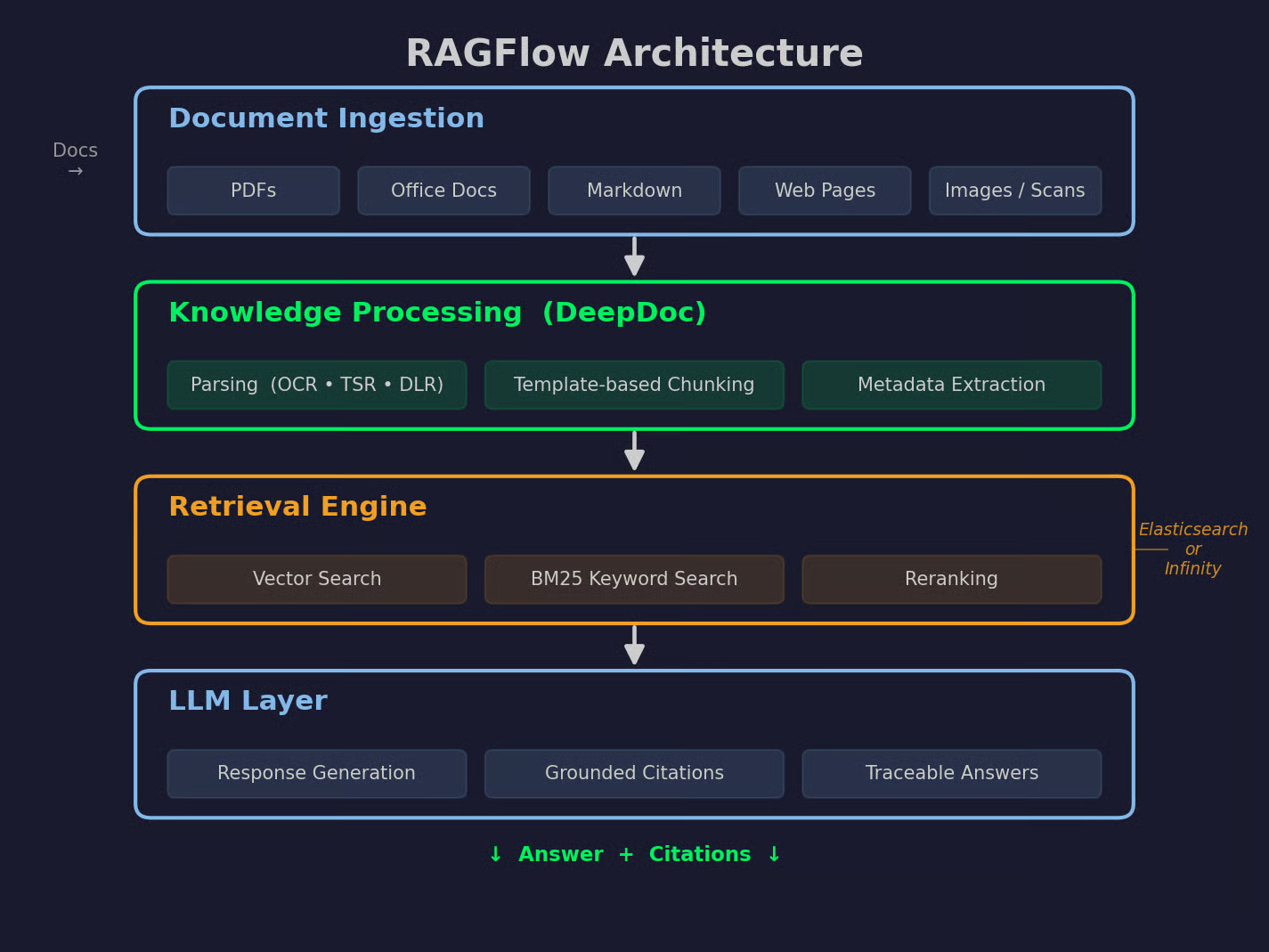
RAGFlow architecture visualized
Now let me walk you through each layer.
This is the entry point. RAGFlow accepts PDFs, Office documents like Word, Excel, and PowerPoint, Markdown files, and web pages. Scanned documents and images work too, since OCR is built in.
You can upload files directly through the UI, connect a cloud source, or push documents through the API. The ingestion layer normalizes everything into a common format before taking it to the next stage.
This is where DeepDoc comes in.
Parsing turns raw files into structured content with headings, paragraphs, tables, and figures. Chunking splits that content into retrieval units based on a template you pick (General, Paper, Book, Q&A, Manual, Table, or Naive). Metadata extraction attaches context to each chunk, such as page numbers, section titles, and position on the page.
The chunks that come out of this layer keep their structure. This means that a table stays a table, a heading stays with its section, and a figure caption stays with its figure. It doesn't feel random like traditional RAG chunking strategies.
The retrieval engine is on top of Elasticsearch or Infinity, depending on which document engine you configure.
It runs three types of search in parallel:
This layer gives you a small set of high-quality chunks that go into the LLM prompt.
The LLM layer sends the retrieved chunks to whichever model you've connected - OpenAI, DeepSeek, Gemini, Claude, a local Ollama model, or anything else RAGFlow supports.
The response comes back with citations. Every claim in the answer points to a specific chunk, and every chunk points to a specific location in the source document. This is what RAGFlow calls grounded answers - the user can click a citation and see the exact passage it came from, which makes hallucinations easy to catch.
The four layers work as a pipeline. Ingestion feeds knowledge processing, knowledge processing feeds the retrieval engine, and the retrieval engine feeds the LLM layer.
Here are the features that matter most when you're building a RAG system on real-world, messy documents.
RAGFlow's parser is called DeepDoc, and it's the reason the platform exists.
DeepDoc runs three vision models on each document: OCR for text extraction, TSR for table structure recognition, and DLR for document layout recognition. So instead of treating a PDF as a stream of characters, it reads the file the way a human would - it sees where the tables are, where the columns break, which text is a heading, and which is a footnote.
That structure flows into the chunks. Tables stay with their headers, multi-column layouts get read in the right order, and figures keep their captions.
If you've tried to do this manually, you know how hard it is to do this part well on different document types and at scale.
Semantic search often misses queries where the exact word matters. Keyword search by itself misses queries where the meaning matters but the wording is different.
RAGFlow runs both at the same time:
The workflow builder is a visual canvas where you configure the pipeline instead of writing code.
You drag components onto a canvas - retrieval, rerank, LLM, code execution, HTTP calls, iterations, switches - and connect them into a flow. RAGFlow comes with prebuilt templates for common patterns like Retrieve - Rerank - Answer, Deep Research, and Data Analytics.
For teams consisting of mostly non-engineers, this is how they can create a working prototype in a week.
From v0.20, RAGFlow supports full agentic workflows on the same canvas as regular workflows.
An agent component can plan, reflect, call tools, and delegate to sub-agents. You configure a prompt and a list of tools, and the agent decides at runtime which tool to call and in what order. Tools can be built-in components, MCP servers you've connected, or other agents.
The value is reasoning over retrieved knowledge.
A support agent can retrieve from a knowledge base, call an external API to check ticket status, and decide whether to escalate. It does that all in one flow, with citations attached to the parts that came from documents.
Retrieval quality starts with parsing quality. If you get this part wrong, no reranker or bigger LLM can help you.
Most RAG failures happen at the document level, meaning a PDF full of tables gets extracted as comma-separated values or a slide deck loses its visual hierarchy. By the time those chunks reach the vector database, there's no value in them.
RAGFlow's approach is to treat parsing as a first-class problem.
Tables are the hardest part of document parsing. A standard PDF parser reads a table row by row and turns it into a stream of numbers with no headers attached. You lose the structure.
DeepDoc runs Table Structure Recognition (TSR) before chunking. It identifies the table boundaries, the header row, the columns, and the cell relationships. When the chunker splits the document, tables stay intact with their headers, and each row keeps its context.
DeepDoc uses OCR to extract text from scanned pages, and from v0.19 onwards, it can use a vision-language model to make sense of images inside PDFs and DOCX files.
That means a diagram, a chart, or a photo of a receipt can become searchable content.
Academic papers and financial reports use multi-column layouts. A naive parser reads them left to right, line by line, which mixes columns together and produces content that doesn't make sense.
DeepDoc uses Document Layout Recognition (DLR) to figure out the reading order first. It knows column 1 comes before column 2, and that a header spans both columns.
Every chunk comes with metadata, such as page number, section title, position on the page, and the source file it came from.
This is what allows citations. When the LLM cites a passage, RAGFlow can point back to the exact page and location in the source document. It's also what makes chunk-level filtering possible - you can search inside a specific section or a specific document.
The final piece is chunking itself. RAGFlow uses template-based chunking, which means you pick a template that matches your document type (General, Paper, Book, Q&A, Manual, Table, or Naive).
Each template applies different rules for where to split. A Paper template keeps abstracts, methods, and results as separate units. A Q&A template keeps each question with its answer. A Manual template respects headings and procedures. You get the idea.
The result is chunks that make sense on their own. When they're added to LLM's context window, they have enough meaning to answer the question.
Once your documents are parsed and chunked, the retrieval step will decide if the LLM sees the right context. RAGFlow's retrieval engine has three parts working together.
Vector search catches semantic similarity. You embed the query and each chunk with the same model, and the engine returns the chunks whose vectors are the closest to the query vector.
This is what lets a search for "revenue growth" find a chunk about "sales increase" even when neither term appears in the other. RAGFlow lets you choose the embedding model - OpenAI, Cohere, Voyage, BGE, or a local one - and change it later without rebuilding the whole system.
Vector search isn't the best for exact terms. Things like a product code or a legal reference might not have a strong semantic signal, but the exact string match matters a lot.
RAGFlow runs BM25 keyword search alongside vector search and combines the results. You get the semantic recall of embeddings and the precision of keyword matching in the same query.
The first round of retrieval gives you a candidate set - usually the top 30 or 50 chunks. That's too many for the LLM's context window, and the top of the list is often noisy.
Reranking takes those candidates and reorders them with a dedicated model that reads the query and each chunk together. The reranker knows what's relevant to the query, not just what's similar to it. The top 5 or 10 chunks after reranking are the ones that go into the prompt.
The final step is deciding what goes into the LLM's context. RAGFlow lets you set the number of chunks, the similarity threshold, and the minimal reranker score.
You can also use advanced options like RAPTOR (hierarchical summarization for multi-hop questions) or long-context RAG (auto-generated document-level tables of contents that give the LLM a map of the source material). These options exist for cases where flat chunk retrieval isn't enough.
The whole point of the retrieval engine is to give the LLM exactly the context it needs and nothing more.
Traditional RAG pipelines are built from independent tools. You pick a parser (Unstructured, LlamaParse, PyMuPDF), a chunker (LangChain text splitters, custom code), an embedding model, a vector database (Pinecone, Weaviate, Chroma, Qdrant), a reranker (Cohere, BGE), an LLM client, and a UI. Then you write the code that uses all of them.
This approach gives you the most control, but takes a lot of engineering effort.
Every integration point is code you have to plan, write, test, and maintain. When you want to add citation tracking, you have to build it. Similarly, when a component changes its API, you fix the pipeline.
RAGFlow takes the opposite approach.
It's an integrated platform where parsing, chunking, retrieval, reranking, citation, workflow orchestration, and a web UI come out of the box. You configure through a web interface instead of code, and the pieces are already connected.
What you give in return is flexibility. If you want to change a novel chunking algorithm or a research reranker, you're working within RAGFlow's plugin model instead of writing Python. For most production use cases, that's fine, but for experimental use it can feel quite restrictive.
Here's a summary of differences:
| Traditional RAG | RAGFlow | |
|---|---|---|
| Setup | Assemble multiple tools | One platform, one deploy |
| Orchestration | Custom code | Visual workflow builder |
| Engineering effort | High | Low to medium |
| Flexibility | Full control | Constrained by the platform |
| Time to first result | Days to weeks | Hours |
| Best for | Custom or experimental pipelines | Production systems working on messy documents |
Neither approach is universally better. If you have the engineering time and need full control, a traditional pipeline is the right call. If you want to focus on the knowledge base, RAGFlow will be faster.
If you're even considering RAGFlow, you've likely heard of LangChain and LlamaIndex. I'll now show you how these compare.
LangChain is an application framework for LLM apps. Its main job is orchestration, so chaining prompts, tools, memory, and models into workflows. LangChain doesn't care much about how your documents are parsed or how your retrieval is set up. It cares about what happens after retrieval.
If your project is agent-heavy - tool calling, multi-step reasoning, branching logic, human-in-the-loop - LangChain (and its state-machine layer LangGraph) is what most teams end up using.
LlamaIndex is a data framework for LLMs. It focuses on ingesting data, building indexes over that data, and querying it well. LlamaIndex has 160+ data connectors, several index types (vector, keyword, tree, knowledge graph), and reasonable defaults for chunking and retrieval.
If your project is retrieval-heavy, so lots of documents, deep search requirements, and a range of source systems, LlamaIndex is the strongest code-first choice.
RAGFlow is an integrated RAG platform. It's not a library you import and use in Python - it's a system you deploy. Parsing, chunking, retrieval, reranking, citations, workflows, agents, and a web UI come with it.
If your priority is getting a production RAG system running on messy documents without writing pipeline code from scratch, RAGFlow is the fastest path.
The three tools also mix. A common pattern is LlamaIndex for ingestion, LangChain or LangGraph for agent orchestration, and RAGFlow when you want a complete, self-hosted stack instead of hand-built code.
Here's a recap:
| LangChain | LlamaIndex | RAGFlow | |
|---|---|---|---|
| Type | Application framework | Data framework | Integrated platform |
| Main focus | Orchestration, agent | Ingestion, indexing, retrieval | End-to-end RAG stack |
| Interface | Python / JavaScript library | Python library | Web UI + API |
| Document parsing | Basic (with integrations) | Good | Best (DeepDoc) |
| Agent support | Strong (LangGraph) | Basic (workflows) | Strong (v0.20+) |
| Best for | Agent-heavy apps | Retrieval-heavy apps | Production RAG working on messy documents |
| Language | Code-first | Code-first | Config-first (with API) |
Once RAGFlow is running, building a RAG application follows five steps. Once again, you don't write pipeline code, you just configure each step through the UI or the API.
Start by uploading your documents. You can add files through the web UI, connect a data source like Google Drive, S3, Notion, Confluence, or Discord, or add files through the API.
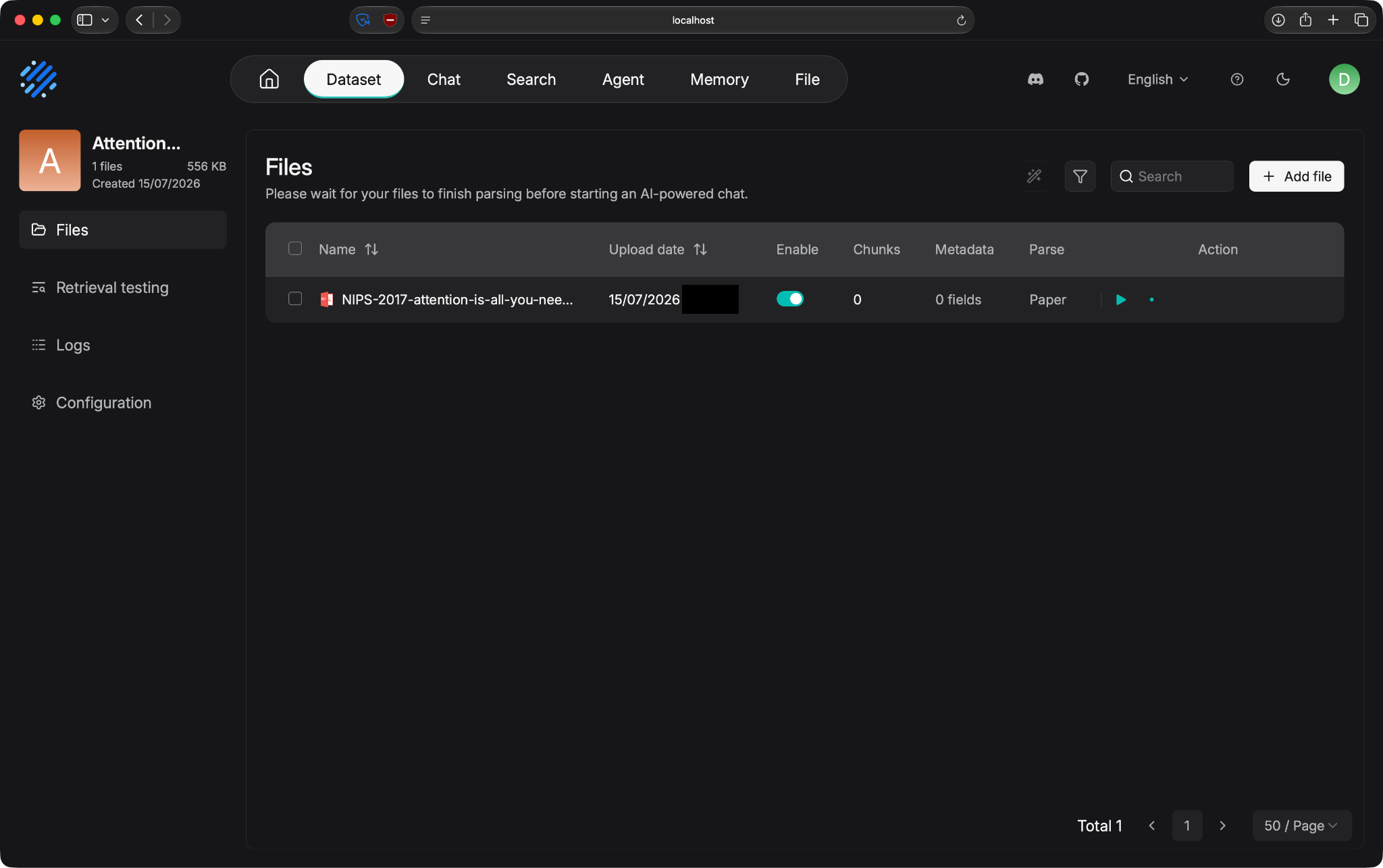
Document ingestion example
RAGFlow accepts most common formats, so you don't have to convert anything up front.
A knowledge base in RAGFlow is a container for your documents, chunks, and settings. You pick the chunk template that matches your document type (General for mixed content, Paper for research, Manual for technical docs, Q&A for support tickets, and so on), pick the embedding model, and choose the parser.
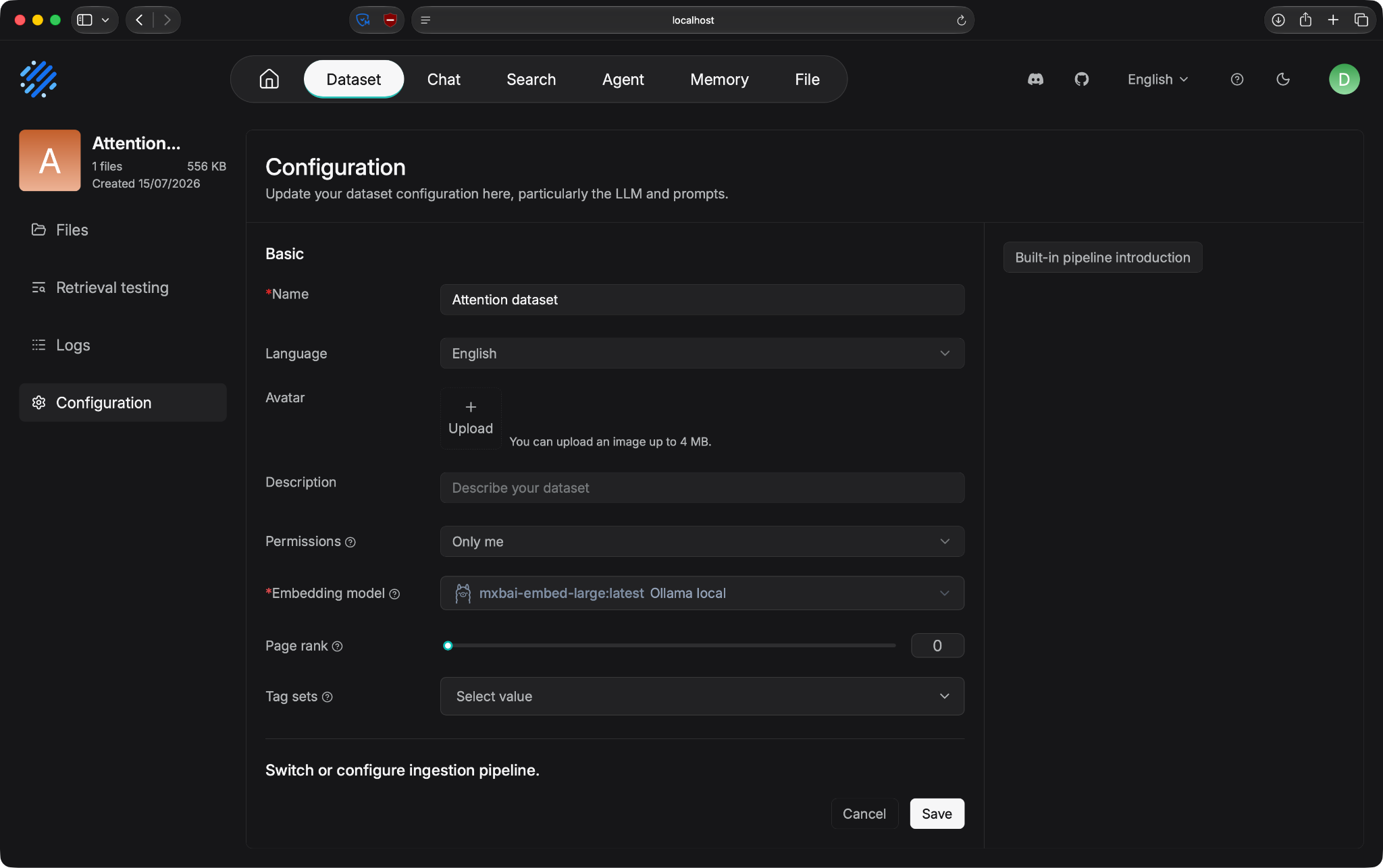
Knowledge base configuration
Keep in mind that this step is important, as a good template choice removes a lot of headache later.
Next, decide how retrieval should work. You set the number of top chunks to return, the similarity threshold, and whether to use hybrid search or vector search alone. You can also turn on reranking and pick a reranker model.
For advanced cases, RAGFlow supports RAPTOR for hierarchical summarization and knowledge graphs for entity-based retrieval. You can turn these on inside the knowledge base config.
RAGFlow doesn't include an LLM. You bring your own - OpenAI, DeepSeek, Gemini, Claude, a local model through Ollama, or anything else RAGFlow supports.
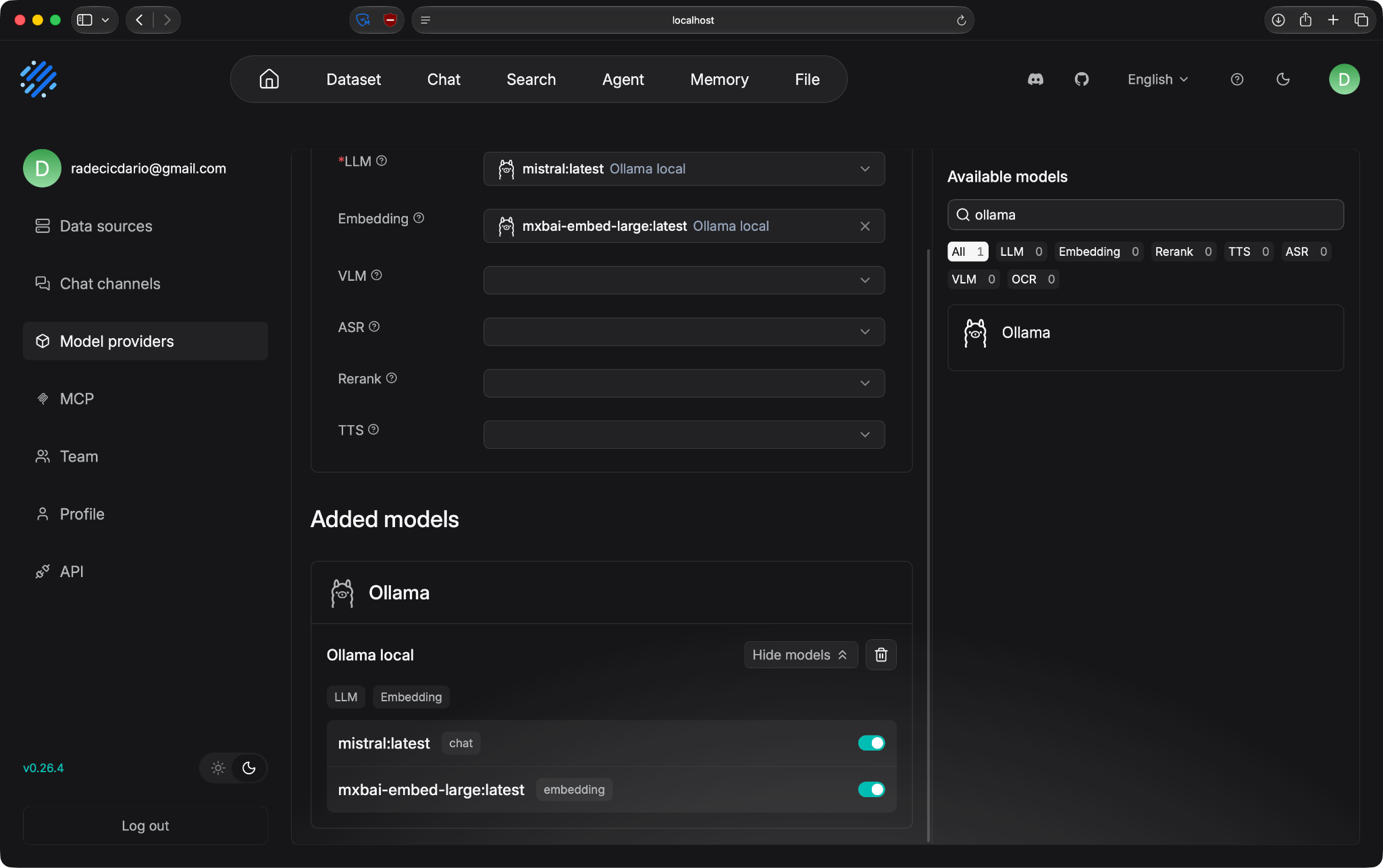
Model options
You add your API key in the settings, pick the model, and set the system prompt.
The last step is testing. RAGFlow has a chat interface where you can query the knowledge base and see the answer with citations attached.
Click any citation, and you get to the exact chunk with its position in the source document highlighted.
Most teams go through this loop a few times before the answers are usable. That's normal for any RAG system, but with RAGFlow you're changing settings in a UI instead of rewriting Python code.
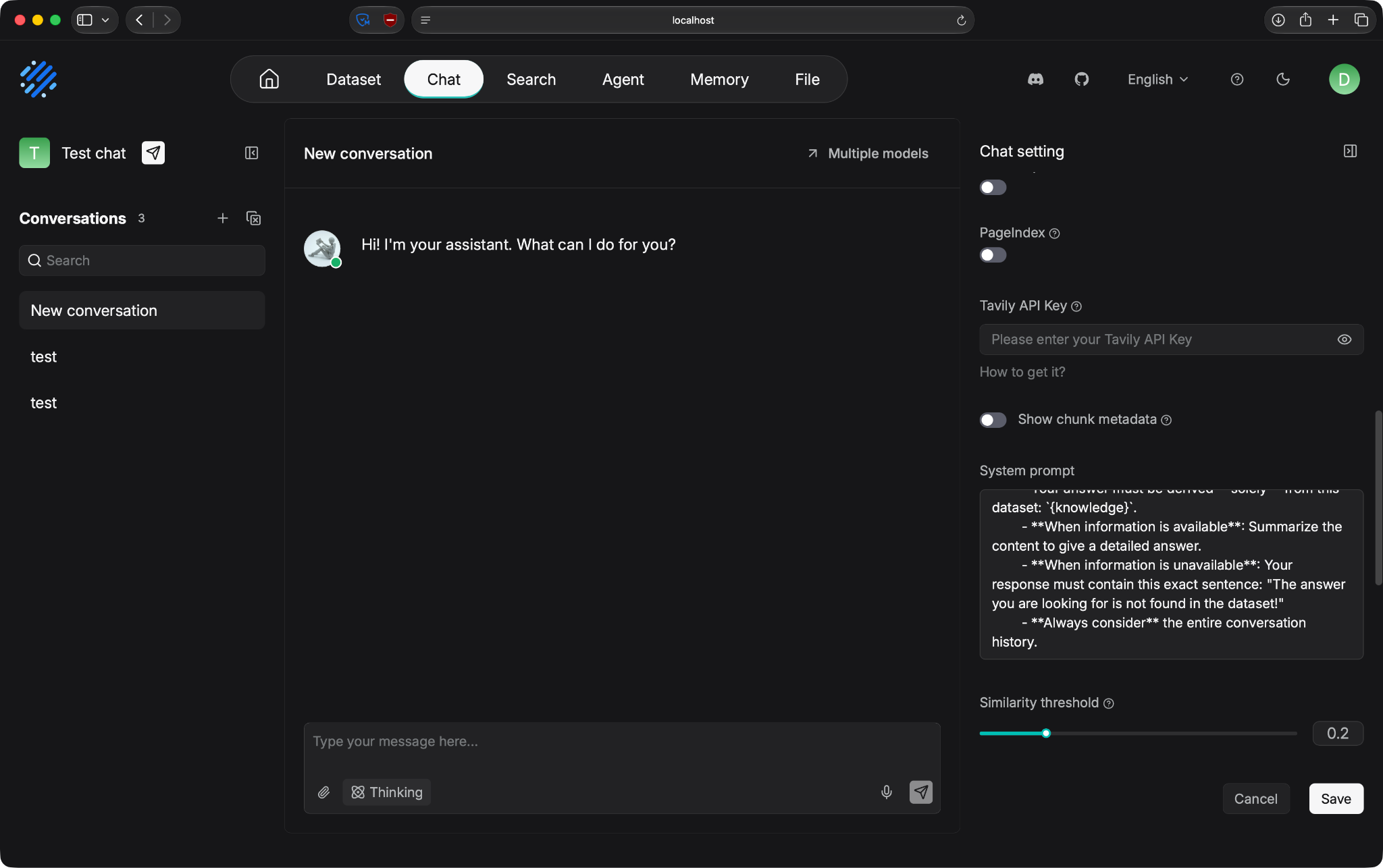
Chat configuration example
You'll see RAGFlow used in production for a specific set of use cases, mostly for the ones where document quality and citation tracking matter the most.
Large companies have thousands of documents spread across shared drives, Confluence, SharePoint, and PDFs in email attachments. Employees usually can't find what they need, and asking the LLM without RAG gets you hallucinations.
RAGFlow works well here.
Old PDFs, scanned policy docs, Excel sheets with pivot tables, PowerPoint decks from years ago - they all get parsed. And with citations, the legal and compliance teams can trust the answers, and the web UI means non-engineers can maintain the knowledge base.
Support teams have years of tickets, FAQs, product manuals, and internal runbooks. A support assistant needs to search all of that, find the right passage, and know when to escalate.
RAGFlow's Q&A chunk template is created for exactly this. You give it your ticket history and it treats each question-answer pair as a retrieval unit. If you add an agent layer on top, connect an API for order lookups, and you have an assistant that handles routine questions and gives the tricky ones with full context.
Engineering teams have runbooks, architecture docs, incident postmortems, and API references scattered across Notion, Confluence, and GitHub. Grep works for keywords, but doesn't help with "how did we handle the last time this alert was raised?"
RAGFlow gives you semantic search over the whole corpus with citations back to the source. This means engineers can get the passage and the link to the original page in one click.
Research teams work with papers, patents, reports, and internal experiments. The Deep Research template in RAGFlow is designed for this, as it has multi-turn retrieval with chain-of-thought reasoning, where the agent breaks down a question, searches for pieces of the answer, and synthesizes them.
For finance, legal, and pharma research, the ability to trace every claim to a source is what makes the assistant usable at all.
The common thread across these use cases is that the documents are the hard part. If your source material is clean and simple, most RAG tools work. If it's messy and structured, RAGFlow's parsing layer will probably get you further than writing the pipeline from scratch.
RAGFlow gives you three deployment paths. Let me show you what these are.
Docker Compose is the primary path. You clone the repo, cd into the docker folder, and run docker compose up -d. That starts the RAGFlow server along with Elasticsearch, MinIO, MySQL, and Redis.
The minimum specs are 4 CPU cores, 16 GB of RAM, and 50 GB of disk. In practice you'll want more RAM if you're running large document collections, since Elasticsearch and Infinity need a lot of memory.
The Docker images target x86, so that's something to keep in mind. If you're on Apple Silicon or another ARM64 machine, the translation layer will get you running, but you'll want to build the image yourself using the ARM64 guide in the RAGFlow docs for better performance.
If you want to modify RAGFlow's source code, you can run the backend and frontend from source. You use uv for Python dependencies, run docker compose -f docker/docker-compose-base.yml up -d to bring up just the supporting services (MinIO, Elasticsearch, MySQL, Redis), then start the backend with a shell script and the frontend with npm run dev.
This path is only worth it if you're contributing to the project or debugging. For most users, the Docker Compose path is faster.
InfiniFlow runs a hosted version at cloud.ragflow.io. It has a free tier with 5 apps and 500 credits a month, and paid tiers at $29, $129, and enterprise pricing.
The cloud version is fine for prototypes and small teams. For serious production use with sensitive data, most teams self-host on their own infrastructure, either on a single VM for smaller deployments or on Kubernetes using the Helm chart for larger ones.
RAGFlow's default deployment runs everything on one machine. That's fine up to a point, but after that you'll hit a limit either on document count, query load, or team size.
The pieces that scale independently are the document engine (Elasticsearch or Infinity), the object storage (MinIO), and the RAGFlow app itself. For larger deployments, you split those services across machines, use a managed Elasticsearch or S3-compatible object store, and run multiple RAGFlow app instances behind a load balancer.
GPU acceleration for DeepDoc is another thing to explore. As you know, parsing is CPU-heavy by default, but you can enable GPU mode in the config, which makes a big difference on large document ingestion runs.
The rest is standard infrastructure work, and RAGFlow doesn't get in the way of any of it.
Every tool has tradeoffs, and RAGFlow is no different. Here's what you need to know before using it.
None of these are dealbreakers if RAGFlow fits your use case. Think of them as the cost of getting a platform instead of a library.
RAGFlow isn't ideal for every project. Here's who it fits and who's better off with something lighter.
AI engineers building production RAG systems. If your job is creating a working RAG app and not writing another chunking library, RAGFlow removes most of the plumbing work.
Enterprise AI teams. Legal, compliance, finance, and support teams need citations, traceability. A UI that non-engineers can use is also a plus.
Developers working with messy documents. PDFs full of tables, scanned files, multi-column layouts, and mixed formats are where DeepDoc is better from the competition. If your source material is anything other than clean text, RAGFlow's parsing quality is hard to match.
Organizations with large document collections. Once you cross a few thousand documents, you need a system that can ingest, index, and search at scale. RAGFlow is the right tool for the job here.
Simple chatbot prototypes. If you just need to answer questions from a couple of Markdown files, RAGFlow is overkill. A LlamaIndex script or a simple LangChain pipeline gets you there faster.
Very small projects. For personal Q&A over a few PDFs, the infrastructure cost is too heavy. You'll spend more time working on Docker commands than on your actual project.
Teams that want zero setup. If you want to sign up and get a working RAG in five minutes, a hosted service or a lightweight library is a better fit. RAGFlow has a cloud version, but the self-hosted path (which is where most of the value is) needs some setup work.
The rule of thumb is simple. If retrieval quality on messy documents is the hard part of your project, RAGFlow is worth the setup cost. If it isn't, use something lighter.
RAGFlow is a full-stack platform for building production RAG applications on real-world documents.
Its biggest strength is that document processing, retrieval, reranking, and generation live in one workflow instead of being combined from separate tools. You get DeepDoc parsing, hybrid retrieval, grounded citations, and agent workflows behind a single UI and API.
If your documents are messy and retrieval quality matters, RAGFlow is worth the setup cost.
Start with the free cloud tier or a local Docker deploy, upload a few of your worst documents, and see how the answers come back. That's the fastest way to know if it fits your use case.
RAG architecture is simple by design, but that doesn't mean it doesn't work for complex use cases. Read our Advanced RAG Techniques blog post to learn about dense retrieval, reranking, and multi-step reasoning.
Learn with DataCamp
Course
Course
Course
blog
Oluseye Jeremiah
10 min
blog
Natassha Selvaraj
10 min
Tutorial
Abid Ali Awan
12 min
Tutorial
Dr Ana Rojo-Echeburúa
15 min
Tutorial
Ryan Ong
12 min
Tutorial
Bhavishya Pandit
12 min