%22%3E%3Cpath%20d%3D%22m-369%200h408v79h-408z%22%20fill%3D%22%237933ff%22%2F%3E%3Cpath%20d%3D%22m-148%200h306v45h-306z%22%20fill%3D%22%23974dff%22%2F%3E%3C%2Fg%3E%3C%2Fsvg%3E)
%22%2F%3E%3C%2FclipPath%3E%3Cg%20clip-path%3D%22url(%23a)%22%3E%3Cpath%20d%3D%22m76%200h484v36h-484z%22%20fill%3D%22%23974dff%22%2F%3E%3Cpath%20d%3D%22m0%200h384v24h-384z%22%20fill%3D%22%2306bdfc%22%20transform%3D%22matrix(1%200%200%20-1%200%2060)%22%2F%3E%3C%2Fg%3E%3C%2Fsvg%3E)
什么是 DeepSeek V4?
DeepSeek V4 是 DeepSeek AI 最新一代的 专家混合(MoE) 语言模型。该系列包含两个变体:
- DeepSeek-V4-Pro:总参数量 1.6T(激活 49B),支持 100 万 token 的上下文长度。
- DeepSeek-V4-Flash:较小版本总参数量 284B(激活 13B),同样支持 100 万 token 的上下文窗口。
与前代相比,V4 具有多项架构改进:
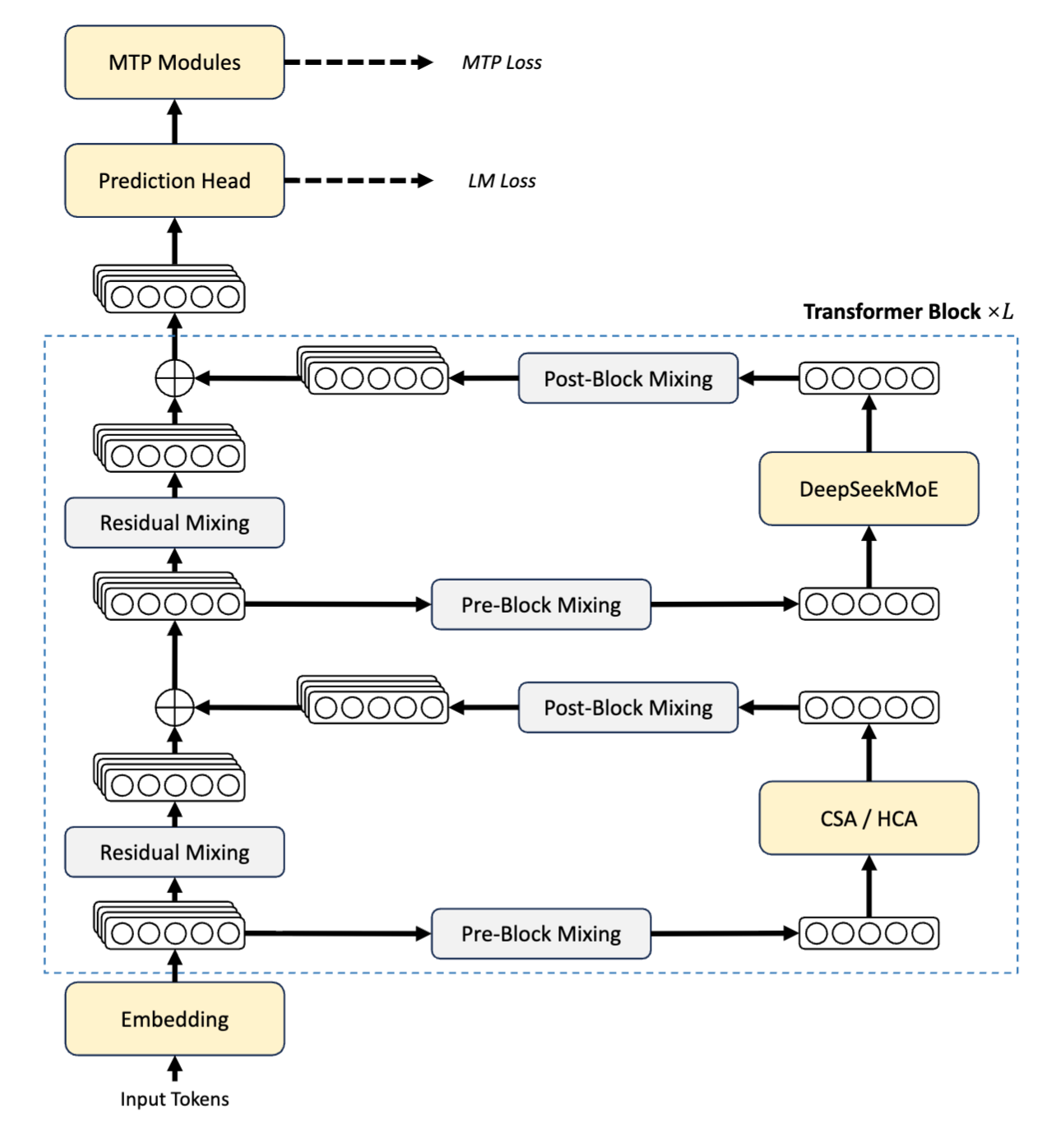
图:DeepSeek V4 系列架构(DeepSeek 技术报告)
- 混合注意力架构(CSA / HCA):每个块中右侧路径(如上图)以压缩稀疏注意力(CSA)与高度压缩注意力(HCA)起始。该机制并非在每一层关注所有 token,而是选择性压缩注意力计算。在 100 万 token 的上下文中,这意味着 DeepSeek-V4-Pro 相比 DeepSeek-V3.2 仅需 27% 的单 token 推理 FLOPs 和 10% 的 KV 缓存。注意力输出经由 Pre-Block 与 Post-Block Mixing,再通过残差连接加回主隐状态。
- DeepSeekMoE:注意力之后,同一路径进入 DeepSeekMoE 层,MoE 组件对每个 token 仅激活部分参数。这使 V4-Flash 的 284B 总参数在推理时表现如 13B 模型,而 V4-Pro 的 1.6T 表现如 49B 模型。
- 流形约束超连接(mHC):左侧路径(如上图)展示堆叠的隐状态表示在每个块的底部与顶部通过 Residual Mixing 流动。这些即为 mHC 层,用一种替代标准残差连接的方式,将更新约束在一个可学习流形上,从而在不牺牲表达能力的情况下,提升深堆叠中的梯度信号稳定性。
- Muon 优化器:Muon(架构图中未显示)以受二阶启发的更新规则,在 V4 的训练规模下相较 AdamW 提供更快的收敛与更稳定的损失曲线,并在大多数参数上替代 AdamW。
两种模型均支持三种不同的推理投入模式:Non-think、Think High 与 Think Max,我们将在本教程中进行探讨与对比。
DeepSeek V4 基准成绩
DeepSeek 团队将 V4 的性能与同类模型进行了对比,结论如下:
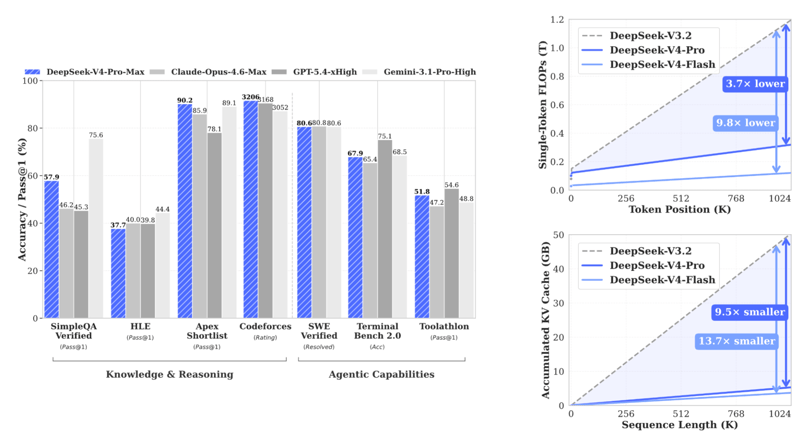
图:DeepSeek V4 系列基准表现(DeepSeek 技术报告)
左侧柱状图展示了 V4-Pro-Max 在知识、推理与代理任务上相较前沿闭源模型所处的位置。右侧两幅图说明了效率提升为何重要,也更出人意料。DeepSeek-V4-Pro-Max(即 Think Max 推理模式)在与前沿闭源模型的对比中取得了有竞争力的成绩:
|
基准 |
DeepSeek-V4-Pro Max |
Claude Opus 4.6 Max |
Gemini-3.1-Pro High |
|
LiveCodeBench(Pass@1) |
93.5 |
88.8 |
91.7 |
|
Codeforces 评级 |
3206 |
— |
3052 |
|
GPQA Diamond(Pass@1) |
90.1 |
91.3 |
94.3 |
|
SWE Verified(Resolved) |
80.6 |
80.8 |
80.6 |
3206 的 Codeforces 评级将 V4-Pro-Max 置于传奇特级大师(Legendary Grandmaster)级别,使得我们对战场中的编码任务成为真正有趣的压力测试。
理解三种思考模式
在构建应用前,先了解每种模式的实际行为:
Non-think:模型直接作答,不进行内部思维链。这一模式适合速度优先于深度的任务,例如格式转换、简单查找与一句话总结。Think High:模型在给出答案前进行逐步推理。适合中等复杂度任务,在深度与成本上取得良好平衡,如调试、系统设计与规划。Think Max:模型将推理推进至最大限度,探索多种路径,严格校验逻辑,仅在确信时给出最终答案。因此,Think Max最适合高难度数学证明、复杂的多文件重构,或任何错误而自信的答案比较慢但已验证的答案更糟的任务。
本教程要展示的关键洞见是:Think Max 并非总能取胜。在琐碎任务中,它会在质量相同的情况下浪费算力。对战场的目标是基于真实时延、token 计数、成本与用户评分,找出针对每类任务真正值得使用的模式。
如果您想了解该模型与其他最先进 LLM 的对比,推荐阅读我们的文章:Claude Opus 4.7 vs DeepSeek V4 与 GPT-5.5 vs DeepSeek V4。
教程:用 DeepSeek V4 构建思考模式对战场
本教程将构建一个 Streamlit 应用,能够:
-
接收用户的提示与任务类别
-
使用 Python 的
ThreadPoolExecutor并行发起三次 API 调用(每种推理模式各一次) -
从模型输出中的
<think>...</think>块解析思考轨迹 -
按模式跟踪时延、token 数与预估成本
-
以并排对比的方式呈现指标、用户评分系统与胜者总结
完整可运行的应用仅为一个 app.py 文件,无需外部数据库或后台服务。
本教程的完整代码见 我的 GitHub 仓库。
步骤 1:项目设置与依赖
先创建项目文件夹并安装两个必需的包:
mkdir deepseek-arena && cd deepseek-arena
pip install streamlit>=1.32.0 openai>=1.12.0这里使用 openai 库,因为 DeepSeek 的 API 与 OpenAI 兼容,这意味着我们只需将 OpenAI 客户端指向 DeepSeek 的基础 URL,其他无需更改。不需要特定的 DeepSeek SDK。
从 platform.deepseek.com 获取 API 密钥,并将其设置为环境变量:
export DEEPSEEK_API_KEY="sk-..."环境就绪后,我们可以开始配置模型及其模式。
步骤 2:配置——模型、模式与定价
在编写逻辑之前,先定义导入、模型标识符、推理模式配置以及定价常量。这些字典控制整个应用的行为,如模型下拉列表、驱动各推理模式的 API 参数、UI 配色方案,以及在对比面板中展示的成本预估。
import os
import time
import concurrent.futures
from dataclasses import dataclass
from typing import Optional, Dict
import streamlit as st
from openai import OpenAI
DEEPSEEK_BASE_URL = "https://api.deepseek.com"
DEEPSEEK_API_KEY_ENV = "DEEPSEEK_API_KEY"
MODELS = {
"DeepSeek-V4-Flash (default)": "deepseek-v4-flash",
"DeepSeek-V4-Pro": "deepseek-v4-pro",
}
MODES: Dict[str, dict] = {
"Non-think": {
"icon": "",
"color": "#10b981",
"badge": "green",
"desc": "Fast, direct answers — no internal reasoning",
"thinking_type": "disabled",
"reasoning_effort": None,
},
"Think High": {
"icon": "",
"color": "#3b82f6",
"badge": "blue",
"desc": "Careful step-by-step reasoning before responding",
"thinking_type": "enabled",
"reasoning_effort": "high",
},
"Think Max": {
"icon": "",
"color": "#ef4444",
"badge": "red",
"desc": "Exhaustive reasoning — push analysis to the limit",
"thinking_type": "enabled",
"reasoning_effort": "max",
},
}
PRICING = {
"deepseek-v4-flash": {
"input_cache_hit": 0.0028,
"input_cache_miss": 0.14,
"output": 0.28,
},
"deepseek-v4-pro": {
"input_cache_hit": 0.003625,
"input_cache_miss": 0.435,
"output": 0.87,
},
}这里有些设计取舍值得展开:
-
思考模式参数:
MODES中的每个条目使用两个 API 字段而非系统提示,包括thinking_type与reasoning_effort(“high”、"max"或None)。thinking_type通过extra_body={"thinking": {"type": ...}}传入,reasoning_effort是顶层请求参数。Non-think 将thinking_type设为 "disabled",并将reasoning_effort留空None,因此完全不发送 thinking body。 -
默认选择 Flash 模型:Flash 每个 token 激活 13B 参数,而 Pro 为 49B,使三路并行调用成本足够低,便于反复试验。需要前沿性能时可在下拉列表中选择 Pro,但在 Pro 上使用
Think Max会快速消耗配额,将其设为选择项而非默认值,是有意的成本护栏。
注意:上述代码中的数值反映了 V4-Pro 目前的促销折扣。因此,在发布成本对比前请务必于 api-docs.deepseek.com/quick_start/pricing 核实当前费率,因为基础费率与促销折扣在新模型发布后会频繁变化。
步骤 3:任务模板
任务设计是在构建推理对比时最容易被低估的部分。如果所有任务都很难且开放式,Think Max 每次都会赢,而 demo 将失去教学意义。任务集必须覆盖完整的难度范围,使每种模式至少在一个类别中能取胜。
TASKS = {
"Trivial / Lookup": {
"prompt": (
"Complete both tasks below:\n\n"
"Task A — Convert this JSON to YAML:\n"
'{"name": "Alice", "age": 30, "skills": ["Python", "ML", "LLMs"],\n'
' "address": {"city": "San Francisco", "zip": "94105"}}\n\n'
"Task B — Summarize this paragraph in exactly one sentence:\n"
'"Large language models have rapidly transformed natural language processing '
"by demonstrating unprecedented capabilities across translation, summarization, "
"reasoning, and code generation, driven by scale and alignment techniques like RLHF "
'that bring model outputs closer to human intent."'
),
"expected_winner": "Non-think",
"tip": "Non-think should dominate here. No reasoning is required.",
},
"Coding / Debugging": {
"prompt": (
"Find every bug in the Python code below, explain each bug clearly, "
"and provide a fully corrected version:\n\n"
"```python\n"
"def binary_search(arr, target):\n"
" left, right = 0, len(arr)\n"
" while left < right:\n"
" mid = (left + right) // 2\n"
" if arr[mid] == target:\n"
" return mid\n"
" elif arr[mid] < target:\n"
" left = mid\n"
" else:\n"
" right = mid - 1\n"
" return -1\n\n"
"print(binary_search([1, 3, 5, 7, 9], 7))\n"
"```"
),
"expected_winner": "Think High",
"tip": "Think High usually finds the bugs and explains them well.",
},
"System Design": {
"prompt": (
"Design a scalable vector search system for 100 million documents.\n\n"
"Address each of the following:\n"
"1. Indexing strategy and pipeline\n"
"2. ANN algorithm selection (HNSW vs IVF-PQ vs ScaNN — justify your choice)\n"
"3. Sharding and replication strategy\n"
"4. p99 query latency target (< 50 ms) — how do you hit it?\n"
"5. Real-time document update handling\n"
"6. Top 3 failure modes and their mitigations"
),
"expected_winner": "Think High",
"tip": "Think High often gives the best quality-per-dollar design answer.",
},
"Planning": {
"prompt": (
"Create a detailed 6-month roadmap for deploying an enterprise RAG system.\n\n"
"Include:\n"
"- Month-by-month phases with concrete, measurable milestones\n"
"- Top 5 risks and mitigation strategies\n"
"- Team roles and headcount required per phase\n"
"- Evaluation metrics for each phase (how do you know it's working?)\n"
"- Go / no-go production checklist"
),
"expected_winner": "Think High",
"tip": "Think High should produce a more structured, complete roadmap.",
},
"Math (IMO-style)": {
"prompt": (
"Solve this problem completely and verify your answer:\n\n"
"Find all positive integers n such that n² + 1 is divisible by n + 1.\n\n"
"Your answer must include:\n"
"1. A complete proof with clear logical steps\n"
"2. Verification with at least 3 concrete numerical examples\n"
"3. A rigorous argument for why your solution set is complete "
"(i.e., there are no other solutions)"
),
"expected_winner": "Think Max",
"tip": "Think Max earns its cost when thorough verification matters.",
},
}这五个任务与三种预期胜者形成了清晰映射:
|
任务 |
预期胜者 |
理由 |
|
Trivial / Lookup |
Non-think |
无需任何推理开销;思考只是在浪费时间 |
|
Coding / Debugging |
Think High |
有条理的一次遍历能抓全漏洞;Max 的增益边际有限 |
|
System Design |
Think High |
更深的思考提升质量;穷尽并不带来更好的架构 |
|
Planning |
Think High |
结构性优于纯算力;路线图不是证明题 |
|
Math (IMO-style) |
Think Max |
验证是承重环节;错误的证明比缓慢但正确的解更糟 |
每个任务还包含一个 expected_winner 字段。应用会在结果出来后展示它,方便用户检查预期胜者是否成立或被击败。
步骤 4:数据类
定义好任务模板后,我们需要一个结构来承载每次 API 调用的结果。与其在应用中传递原始响应对象,不如定义一个 RunResult 数据类,捕获对比面板需要的全部指标。
@dataclass
class RunResult:
mode: str
answer: str = ""
thinking: str = ""
latency: float = 0.0
input_tokens: int = 0
output_tokens: int = 0
cost_usd: float = 0.0
error: Optional[str] = None
@property
def tokens_per_second(self) -> Optional[float]:
if self.latency > 0 and self.output_tokens > 0:
return self.output_tokens / self.latency
return None
@property
def thinking_word_count(self) -> int:
return len(self.thinking.split()) if self.thinking else 0thinking 字段独立于 answer,因为 DeepSeek V4 API 将思维链返回在一个专门的 reasoning_content 字段,与响应结构中的 content 同级。将二者分开有助于 UI 将可折叠推理轨迹与干净的最终答案并排呈现,使模式差异一目了然,尤其在数学任务中,Think Max 的轨迹可能长达数千字。
属性 tokens_per_second 度量生成吞吐,与提示长度无关。这在输出 token 数差异较大时,比较各模式效率很有用。需注意 Think Max 自然会生成更多 token,因此仅比较原始时延可能具有误导性,必须结合各模式的生成速度来看。
步骤 5:成本估算辅助函数
在编写 API 调用逻辑前,我们定义两个小辅助函数,处于原始 SDK 响应与 RunResult 之间。它们容易被忽略,但对成本精度非常关键。
def get_cached_prompt_tokens(usage) -> int:
prompt_details = getattr(usage, "prompt_tokens_details", None)
if prompt_details is None:
return 0
cached_tokens = getattr(prompt_details, "cached_tokens", None)
if cached_tokens is not None:
return cached_tokens or 0
if isinstance(prompt_details, dict):
return prompt_details.get("cached_tokens", 0) or 0
return 0
def estimate_cost_usd(
model: str,
prompt_tokens: int,
completion_tokens: int,
cached_prompt_tokens: int,
) -> float:
pricing = PRICING.get(model, PRICING["deepseek-v4-flash"])
cached_tokens = min(cached_prompt_tokens, prompt_tokens)
uncached_tokens = max(prompt_tokens - cached_tokens, 0)
return (
cached_tokens / 1_000_000 * pricing["input_cache_hit"]
+ uncached_tokens / 1_000_000 * pricing["input_cache_miss"]
+ completion_tokens / 1_000_000 * pricing["output"]
)get_cached_prompt_tokens() 不直接使用字段访问,因为 prompt_tokens_details 的结构在不同 SDK 版本间不保证一致。它先检查类型化属性,再回退到字典访问,最后返回 0 而非抛出异常。这在 ThreadPoolExecutor 环境下尤为重要,否则某个线程中静默错误会导致该模式的成本估算异常偏低,却不会显式暴露失败。
estimate_cost_usd() 将提示 token 分成缓存命中与未命中两部分,再应用不同费率。由于 DeepSeek 将缓存命中价降至未命中的十分之一,冷启动与热启动的差异会非常大。在重复运行的任务上,Non-think 可能看起来几乎免费,并非因为它生成更少的 token,而是因为其更短的提示极有可能已处于缓存热状态。
步骤 6:并行 API 执行
这是对战场的架构核心。三种模式通过 ThreadPoolExecutor 同时触发,因此总壁钟时间等于最慢模式的时间,而非三者之和。
def call_mode(client: OpenAI, model: str, mode_name: str, user_prompt: str) -> RunResult:
result = RunResult(mode=mode_name)
mode_cfg = MODES[mode_name]
start = time.perf_counter()
try:
request_kwargs = {
"model": model,
"messages": [{"role": "user", "content": user_prompt}],
"max_tokens": 4096,
"extra_body": {"thinking": {"type": mode_cfg["thinking_type"]}},
}
if mode_cfg["reasoning_effort"]:
request_kwargs["reasoning_effort"] = mode_cfg["reasoning_effort"]
response = client.chat.completions.create(**request_kwargs)
result.latency = time.perf_counter() - start
message = response.choices[0].message
result.thinking = (getattr(message, "reasoning_content", None) or "").strip()
result.answer = (message.content or "").strip()
usage = response.usage
result.input_tokens = getattr(usage, "prompt_tokens", 0) or 0
result.output_tokens = getattr(usage, "completion_tokens", 0) or 0
result.cost_usd = estimate_cost_usd(
model=model,
prompt_tokens=result.input_tokens,
completion_tokens=result.output_tokens,
cached_prompt_tokens=get_cached_prompt_tokens(usage),
)
except Exception as exc:
result.latency = time.perf_counter() - start
result.error = str(exc)
return result
def run_parallel(client: OpenAI, model: str, prompt: str) -> Dict[str, RunResult]:
results: Dict[str, RunResult] = {}
with concurrent.futures.ThreadPoolExecutor(max_workers=3) as pool:
futures = {
pool.submit(call_mode, client, model, mode_name, prompt): mode_name
for mode_name in MODES
}
for fut in concurrent.futures.as_completed(futures):
results[futures[fut]] = fut.result()
return results这里有几处设计点值得强调:
-
有条件构建
request_kwargs:Non-think模式发送thinking_type: "disabled",且不包含reasoning_effort键。Think High与Think Max发送thinking_type: "enabled"及各自的 effort 等级。if mode_cfg["reasoning_effort"]这一判断确保对Non-think完全省略该参数,而非以None发送,以免触发 API 校验错误。 -
直接读取
reasoning_content:通过getattr()从message.reasoning_content读取思维链,并在缺失时回退为空串。这比从内容字符串中解析<think>...</think>标签更健壮。它使用官方响应字段,能处理未产出轨迹的情况(Non-think),且不会因输出中恰好出现“think”一词而误判。 -
对 usage 字段进行防御式
getattr():通过getattr(..., 0) or 0访问 usage 字段。这样当旧版 SDK 或异常响应缺失字段时,会回退为 0,而不是抛出AttributeError导致整次运行失败。 -
错误处理:若调用失败,
RunResult会保存错误字符串而非抛出异常。UI 会检查result.error并渲染提示卡片,不会让三模式的整次运行崩溃。
步骤 7:Streamlit UI 与 CSS
此步骤涵盖展示层:页面布局、CSS 设计系统、每个模式的结果列,以及在不压垮首次加载体验的前提下组织对比的标签页结构。
应用通过 st.set_page_config 设置 layout="wide",为三列对比提供充足的横向空间:
def main():
st.set_page_config(
page_title="DeepSeek V4 Think Mode Arena",
layout="wide",
initial_sidebar_state="expanded",
)
inject_css()inject_css() 函数通过 st.markdown 注入完整设计系统。它使用温暖的羊皮纸背景,Space Mono 用于等宽标题与指标芯片,DM Sans 用于正文文本。
def render_mode_column(result: RunResult, mode_name: str):
cfg = MODES[mode_name]
badge_cls = f"mode-{cfg['badge']}"
st.markdown(
f'<div class="mode-header {badge_cls}">{mode_name}</div>',
unsafe_allow_html=True,
)
st.markdown(f'<div class="subtle-copy">{cfg["desc"]}</div>', unsafe_allow_html=True)
if result.error:
st.error(f"**API Error:** {result.error}")
return
chips = [
("Latency", f"{result.latency:.1f}s"),
("Output tokens", f"{result.output_tokens:,}"),
("Cost", f"${result.cost_usd:.5f}"),
]
if result.tokens_per_second:
chips.append(("Tok/s", f"{result.tokens_per_second:.0f}"))
chip_html = "".join(
f'<span class="metric-chip">{label} <span>{val}</span></span>'
for label, val in chips
)
st.markdown(chip_html, unsafe_allow_html=True)
if result.thinking:
with st.expander(f" Thinking trace — {result.thinking_word_count:,} words"):
preview = result.thinking[:5000]
if len(result.thinking) > 5000:
preview += "\n\n[… truncated for display …]"
st.text(preview)
elif mode_name != "Non-think":
st.caption("_No thinking trace emitted_")
st.markdown('<div class="answer-label">Final answer</div>', unsafe_allow_html=True)
st.markdown(result.answer if result.answer else "_No answer returned._")思考轨迹的折叠面板尤其有用,它让模式差异直观可感:在高难数学题上,Think Max 的轨迹可能长达数千字的自我修正与验证,而 Non-think 模式可能完全没有轨迹。
主布局使用 Streamlit 标签页分隔关注点,避免把所有内容挤在同一屏:
overview_tab, answers_tab, ratings_tab = st.tabs(
["Overview", "Full Responses", "Ratings"]
)“Overview” 标签展示胜者总结与指标表;“Full Responses” 标签展示三列并排对比与思考轨迹;“Ratings” 标签提供每种模式的用户质量评分滑块(1–5)。
步骤 8:指标与评分
最后一步构建 Overview 标签内的两个组件:一是将所有维度并列展示的平面指标表,二是突出四个独立类别胜者的总结。
def render_metrics_table(results: Dict[str, RunResult], ratings: Dict[str, int]):
rows = []
for mode_name, res in results.items():
ok = not res.error
rows.append({
"Mode": mode_name,
"Latency (s)": f"{res.latency:.2f}" if ok else "—",
"Input Tokens": f"{res.input_tokens:,}" if ok else "—",
"Output Tokens": f"{res.output_tokens:,}" if ok else "—",
"Tok/s": f"{res.tokens_per_second:.0f}" if (ok and res.tokens_per_second) else "—",
"Est. Cost (USD)": f"${res.cost_usd:.5f}" if ok else "—",
"Thinking Words": f"{res.thinking_word_count:,}" if ok else "—",
"User Rating": f"{ratings.get(mode_name)}/5" if ratings.get(mode_name) else "—",
})
st.table(rows)
def render_winner_summary(results: Dict[str, RunResult], ratings: Dict[str, int], expected: str):
valid = {k: v for k, v in results.items() if not v.error}
fastest = min(valid, key=lambda k: valid[k].latency)
cheapest = min(valid, key=lambda k: valid[k].cost_usd)
most_efficient = max(
valid,
key=lambda k: valid[k].output_tokens / max(valid[k].cost_usd, 1e-9),
)
top_rated = max(ratings, key=ratings.get) if ratings else None这两段函数的作用简述如下:
-
render_metrics_table()遍历每个RunResult,为每种模式构建一行字典。八列覆盖完整对比:时间(时延、tok/s)、规模(输入与输出 token、思考字数)、金钱(预估成本)、人工判断(用户评分)。 -
render_winner_summary()在计算胜者前先过滤掉失败的运行,避免单次 API 错误扭曲结果。随后在四个独立维度中找出优胜者:壁钟速度、原始成本、输出效率与用户评分。
我们有意将这四类结果分开,而非合成一个分数,因为加权综合意味着应用需要裁决“时延比成本更重要”等偏好——那是产品决策,不是框架决策。
应用还会展示每个任务的预测胜者,提示用户确认是否一致:
st.markdown(
f"> **Expected winner for this task type:** {expected} — "
"does your result match? Rate answers to confirm.",
)步骤 9:运行应用
整个应用仅一个 app.py 文件、两个依赖,启动只需两条命令:
# Set your API key
export DEEPSEEK_API_KEY="sk-..."
# Run
streamlit run app.py应用会在浏览器打开 localhost:8501。在下拉列表中选择一个任务模板,按需编辑提示,然后点击“Run Arena”。 进度条会随着各模式完成而更新。结果存储在 st.session_state 中,您可以切换标签页并为答案评分,而不会触发重新运行。
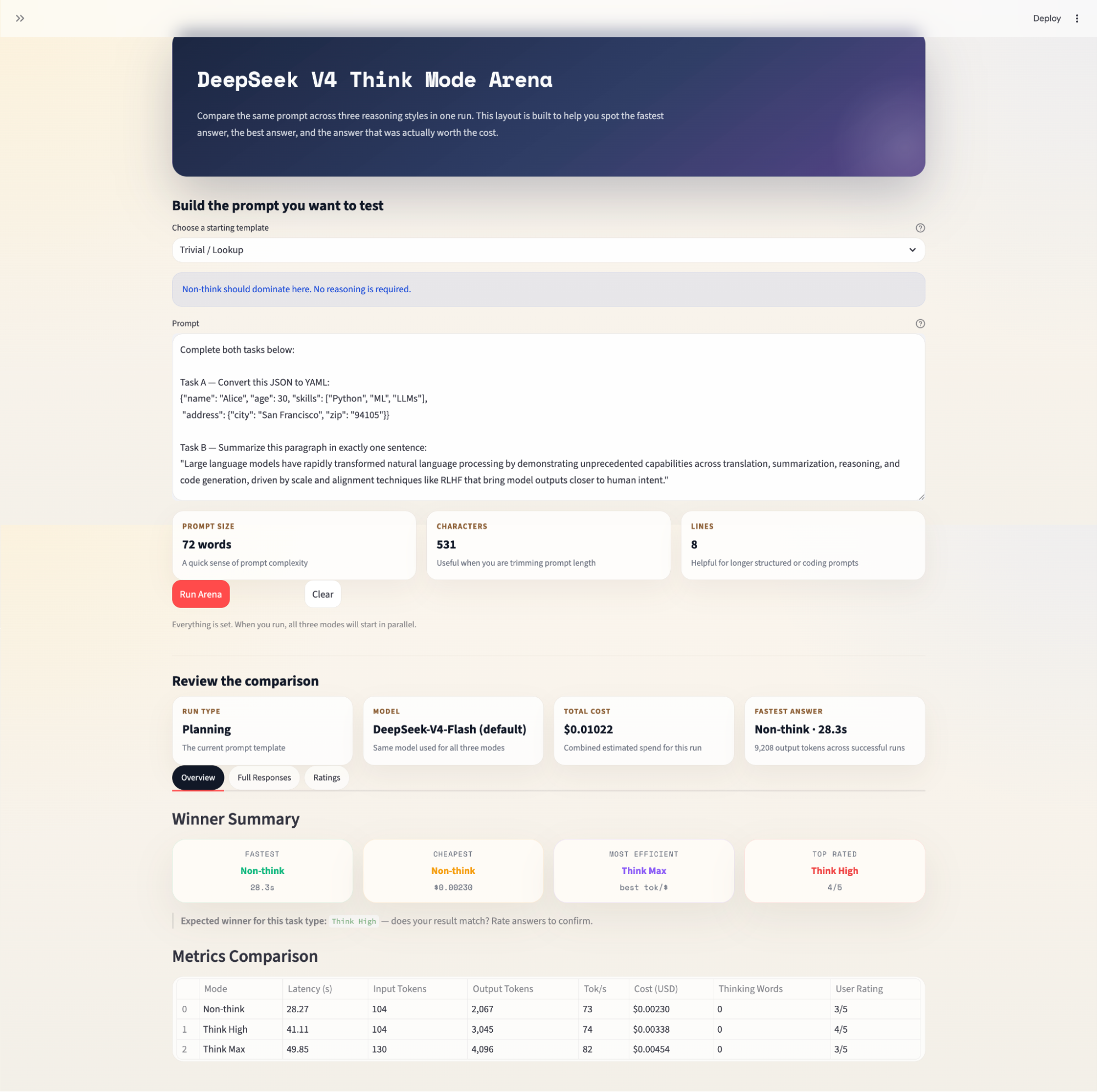
关于定价的说明: DeepSeek 自发布以来已显著调整 V4 API 费率。V4-Pro 目前处于促销折扣期,且在 2026 年 4 月将缓存命中价降至未命中的十分之一。应用中展示的成本数字反映当前费率,但可能变化。使用任何模型前请始终在 api-docs.deepseek.com/quick_start/pricing 核实。
结语
在本教程中,我们构建了一个 Streamlit 应用,将相同提示并行运行在 DeepSeek V4 的三种推理模式上,并从时延、成本、token 使用、思考轨迹深度与用户评分质量等方面进行对比。关键的架构选择包括:
-
使用
ThreadPoolExecutor实现真正的并行,总壁钟时间等于最慢模式耗时,而非三者之和 -
使用
thinking与reasoning_effortAPI 参数,确保模式控制干净、明确,并与 DeepSeek 的 API 对齐,而非依赖系统提示来引导 -
考虑缓存的成本估算,将输入 token 拆分为缓存命中与未命中部分,显著提升成本准确度,尤其在重复运行中,热缓存折扣可能让
Non-think看起来几乎免费
若要进一步扩展本项目,可考虑加入 LLM-as-judge 层(使用独立模型如 Claude 或 GPT-4 自动评分)、基于提示哈希缓存响应以避免重复运行,或增加跨模型对比维度,如将 Flash 的 Think Max 与 Pro 的 Think High 对打——这是 V4 论文提出但未完全解答、关于成本持平的一个颇具兴趣的问题。
DeepSeek V4 API 思考模式对战场常见问答
为什么要用 OpenAI,而不是 DeepSeek 的 SDK?
DeepSeek 的 API 与 OpenAI 兼容,这意味着我们可以使用 DeepSeek 的 API 密钥,将 OpenAI 客户端指向 https://api.deepseek.com。这也意味着只需更改基础 URL 和模型字符串,应用即可适配任何托管 DeepSeek V4 的 OpenAI 兼容服务商。
为什么 Non-think 模式要省略 reasoning_effort,而不是设为 None?
call_mode() 中的 if mode_cfg["reasoning_effort"] 判断会在其为 None 时完全省略该参数,而非传递 reasoning_effort=None。一些 API 校验器会拒绝带显式 null 值的未知参数;因此在对接新发布的端点时,彻底省略更安全。
为何 Think High 有时不显示思考轨迹?
思考轨迹从 message.reasoning_content 读取。若模型在某次运行中返回空或 null(在较短、较简单的提示下 Think High 可能很快收敛),则 result.thinking 会是空字符串。

我是一名 Google Developers 机器学习(生成式 AI)领域的专家、Kaggle 三项专家,以及 Women Techmakers 大使,拥有 3 年以上的技术从业经验。2020 年我共同创办了一家健康科技初创公司,目前在佐治亚理工学院攻读计算机科学硕士,专攻机器学习。
大语言模型正变得越来越“有主见”——关于它们如何思考。随着 DeepSeek V4 的三种显式推理模式:
Non-think、Think High和Think Max,您现在可以在 API 层控制推理深度,而正确的选择完全取决于任务本身。在本教程中,我将向您展示如何使用 Streamlit 构建一个 DeepSeek V4 思考模式对战场。该应用会并行向三种推理模式发送相同的提示,并并排展示答案、时延、token 使用、成本以及推理轨迹深度。完成本教程后,您将拥有一个可用工具,可以:
通过并行 API 调用同时运行三种 DeepSeek V4 推理模式
解析并展示来自
<think>...</think>块的可折叠思考轨迹按模式跟踪时延、输出 token、吞吐以及预估成本
在四个维度上给出胜者总结,包括最快、最省、最高效以及人工评分最高
本教程的完整代码见 我的 GitHub 仓库。