
Course
Developing AI Systems with the OpenAI API
3 hr
22.7K
DeepSeek V4 is DeepSeek AI's latest generation of Mixture-of-Experts (MoE) language models. The series includes two variants:
Several architectural improvements distinguish V4 from its predecessors:
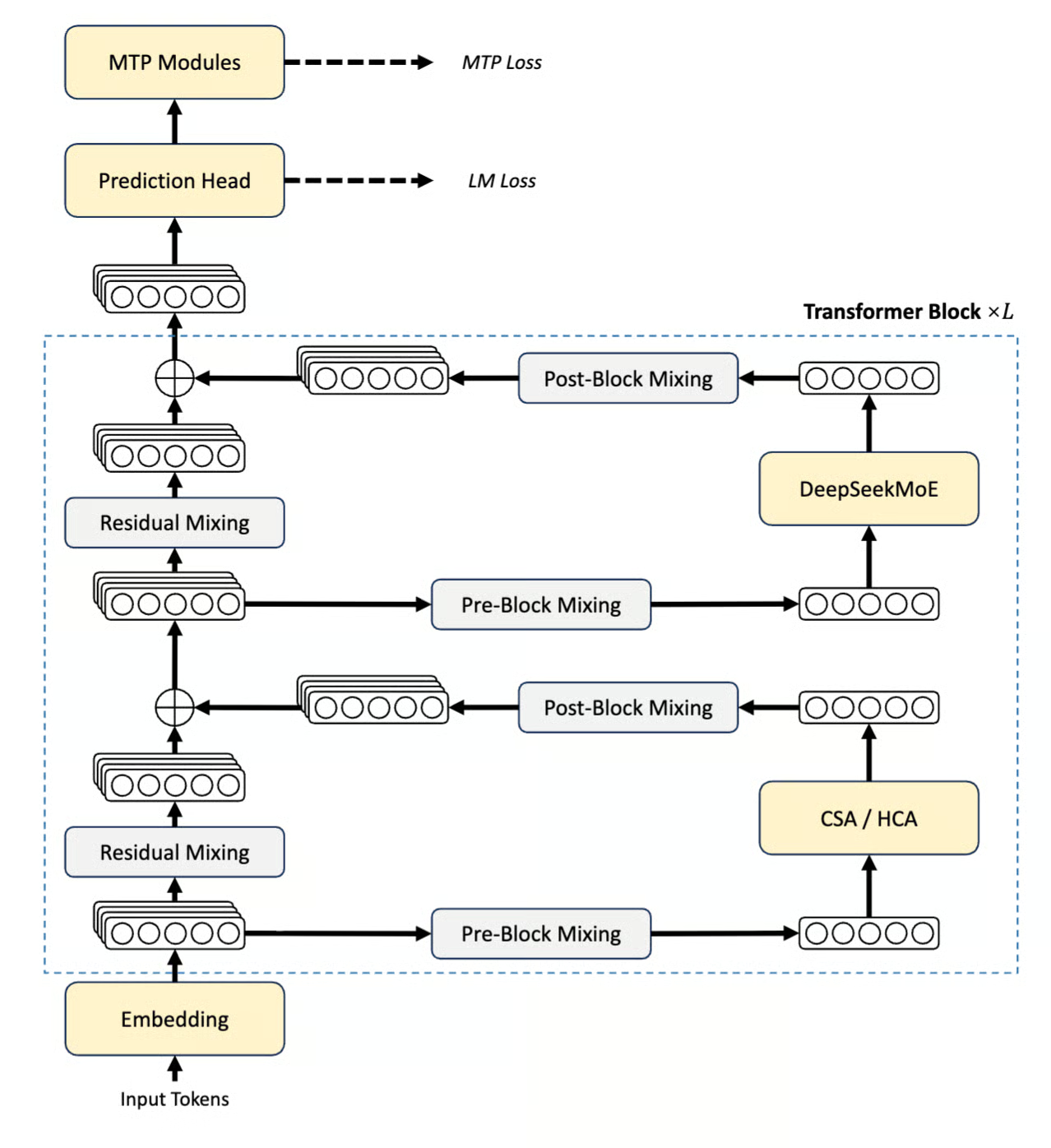
Figure: DeepSeek V4 Series Architecture (DeepSeek Technical report)
Both models support three distinct reasoning effort modes, Non-think, Think High, and Think Max, which we’ll explore and compare in this tutorial.
The DeepSeek team compared the performance of the V4 model with its counterparts, and here is what they found:
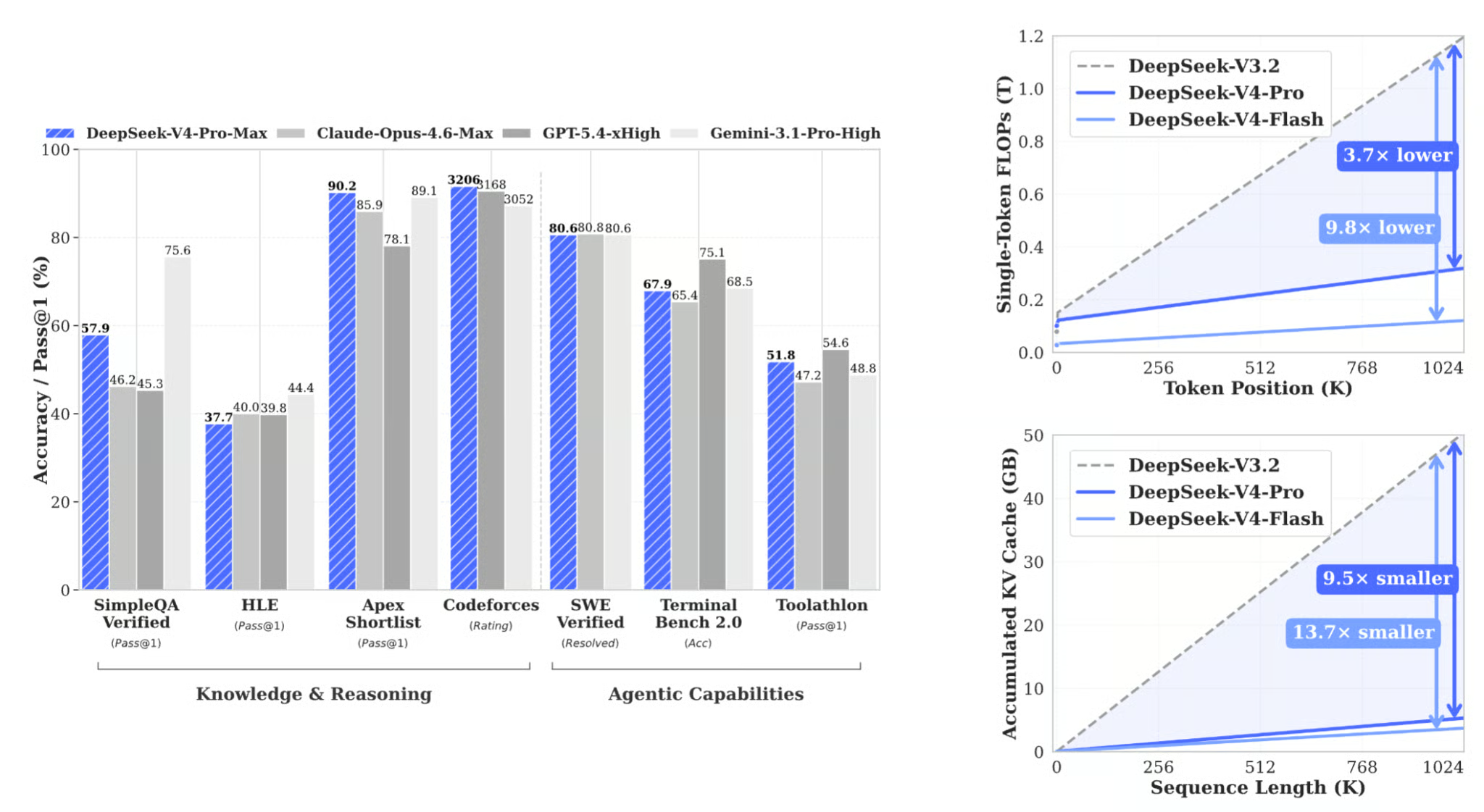
Figure: Benchmark performance of DeepSeek V4 series (DeepSeek Technical report)
The bar chart on the left shows where V4-Pro-Max lands relative to frontier closed-source models across knowledge, reasoning, and agentic tasks. The two plots on the right show why the efficiency gains matter, and they are the more surprising results. DeepSeek-V4-Pro-Max (the Think Max reasoning mode) achieves competitive results against frontier closed-source models:
|
Benchmark |
DeepSeek-V4-Pro Max |
Claude Opus 4.6 Max |
Gemini-3.1-Pro High |
|
LiveCodeBench (Pass@1) |
93.5 |
88.8 |
91.7 |
|
Codeforces Rating |
3206 |
— |
3052 |
|
GPQA Diamond (Pass@1) |
90.1 |
91.3 |
94.3 |
|
SWE Verified (Resolved) |
80.6 |
80.8 |
80.6 |
The Codeforces rating of 3206 places V4-Pro-Max at Legendary Grandmaster level, making the coding tasks in our arena a genuinely interesting stress test.
Before building the app, it is worth understanding what each mode actually does:
Non-think: The model responds directly, so without an internal chain of thought. This mode is ideal for tasks where speed matters more than depth, such as format conversion, simple lookups, and one-sentence summaries.Think High: The model reasons step-by-step before committing to an answer. This mode is a good balance of depth and cost for moderately complex tasks such as debugging, system design, and planning.Think Max: The model pushes reasoning to its fullest extent, explores multiple approaches, verifies its logic rigorously, and only commits to a final answer when it is certain. Thus, Think Max mode is best for hard math proofs, complex multi-file refactors, or any task where an incorrect confident answer is worse than a slower verified one.The critical insight this tutorial demonstrates is that Think Max does not always win. On trivial tasks, it wastes compute for identical quality. The goal of the arena is to surface which mode is actually worth using for each task type, based on real latency, token counts, cost, and user ratings.
If you’re interested in seeing how the model compares to other state-of-the-art LLMs, I recommend reading our articles covering Claude Opus 4.7 vs DeepSeek V4 and GPT-5.5 vs DeepSeek V4.
In this tutorial, we will build a Streamlit application that:
Accepts a prompt and a task category from the user
Fires three parallel API calls, one per reasoning mode, using Python's ThreadPoolExecutor
Parses thinking traces from <think>...</think> blocks in the model's output
Tracks latency, token counts, and estimated cost per mode
Presents a side-by-side comparison with metrics, a user rating system, and a winner summary
The full working app is a single app.py file with no external databases or background services required.
The complete code for this tutorial is available in my GitHub repository.
Start by creating a project folder and installing the two required packages:
mkdir deepseek-arena && cd deepseek-arena
pip install streamlit>=1.32.0 openai>=1.12.0
The openai library is used here because DeepSeek's API is OpenAI-compatible, which means we can point the OpenAI client at DeepSeek's base URL with no other changes. No DeepSeek-specific SDK is needed.
Get an API key from platform.deepseek.com and set it as an environment variable:
export DEEPSEEK_API_KEY="sk-..."Now that the environment is set, we can jump to configuring models and their modes.
Before writing any logic, we define the imports, model identifiers, reasoning mode configurations, and pricing constants. These dictionaries control the behavior of the entire app, like model dropdown, API parameters that drive each reasoning mode, UI color scheme, and cost estimates shown in the comparison panel.
import os
import time
import concurrent.futures
from dataclasses import dataclass
from typing import Optional, Dict
import streamlit as st
from openai import OpenAI
DEEPSEEK_BASE_URL = "https://api.deepseek.com"
DEEPSEEK_API_KEY_ENV = "DEEPSEEK_API_KEY"
MODELS = {
    "DeepSeek-V4-Flash (default)": "deepseek-v4-flash",
    "DeepSeek-V4-Pro": "deepseek-v4-pro",
}
MODES: Dict[str, dict] = {
    "Non-think": {
        "icon": "",
        "color": "#10b981",
        "badge": "green",
        "desc": "Fast, direct answers — no internal reasoning",
        "thinking_type": "disabled",
        "reasoning_effort": None,
    },
    "Think High": {
        "icon": "",
        "color": "#3b82f6",
        "badge": "blue",
        "desc": "Careful step-by-step reasoning before responding",
        "thinking_type": "enabled",
        "reasoning_effort": "high",
    },
    "Think Max": {
        "icon": "",
        "color": "#ef4444",
        "badge": "red",
        "desc": "Exhaustive reasoning — push analysis to the limit",
        "thinking_type": "enabled",
        "reasoning_effort": "max",
    },
}
PRICING = {
    "deepseek-v4-flash": {
        "input_cache_hit":  0.0028,
        "input_cache_miss": 0.14,
        "output":           0.28,
    },
    "deepseek-v4-pro": {
        "input_cache_hit":  0.003625,
        "input_cache_miss": 0.435,
        "output":           0.87,
    },
}
Some design choices are worth unpacking here:
Parameters for thinking mode: Each entry in MODES carries two API fields rather than a system prompt. These include thinking_type and reasoning_effort (”high”, "max", or None). The thinking_type is passed via extra_body={"thinking": {"type": ...}}, and reasoning_effort is a top-level request parameter. Non-think sets thinking_type to "disabled" and leaves reasoning_effort as None, so no thinking body is sent at all.
Flash as the default model: Flash activates 13B parameters per token versus Pro's 49B, which makes three-way parallel calls cheap enough to run repeatedly during experimentation. Pro is available via the dropdown for when you need frontier performance, but Think Max on Pro burns quota fast, so keeping it as opt-in rather than the default is a deliberate cost guardrail.
Note: The values used in the code above reflect V4-Pro at its current promotional discount. So, always verify current rates at api-docs.deepseek.com/quick_start/pricing before publishing cost comparisons, as both base rates and promotional discounts change frequently after a new model release.
The task design is the most underappreciated part of building a reasoning comparison. If all tasks are hard and open-ended, Think Max wins every time, and the demo teaches nothing. The task set must span the full difficulty range so each mode has at least one category where it wins.
TASKS = {
    "Trivial / Lookup": {
        "prompt": (
            "Complete both tasks below:\n\n"
            "Task A — Convert this JSON to YAML:\n"
            '{"name": "Alice", "age": 30, "skills": ["Python", "ML", "LLMs"],\n'
            ' "address": {"city": "San Francisco", "zip": "94105"}}\n\n'
            "Task B — Summarize this paragraph in exactly one sentence:\n"
            '"Large language models have rapidly transformed natural language processing '
            "by demonstrating unprecedented capabilities across translation, summarization, "
            "reasoning, and code generation, driven by scale and alignment techniques like RLHF "
            'that bring model outputs closer to human intent."'
        ),
        "expected_winner": "Non-think",
        "tip": "Non-think should dominate here. No reasoning is required.",
    },
    "Coding / Debugging": {
        "prompt": (
            "Find every bug in the Python code below, explain each bug clearly, "
            "and provide a fully corrected version:\n\n"
            "```python\n"
            "def binary_search(arr, target):\n"
            "    left, right = 0, len(arr)\n"
            "    while left < right:\n"
            "        mid = (left + right) // 2\n"
            "        if arr[mid] == target:\n"
            "            return mid\n"
            "        elif arr[mid] < target:\n"
            "            left = mid\n"
            "        else:\n"
            "            right = mid - 1\n"
            "    return -1\n\n"
            "print(binary_search([1, 3, 5, 7, 9], 7))\n"
            "```"
        ),
        "expected_winner": "Think High",
        "tip": "Think High usually finds the bugs and explains them well.",
    },
    "System Design": {
        "prompt": (
            "Design a scalable vector search system for 100 million documents.\n\n"
            "Address each of the following:\n"
            "1. Indexing strategy and pipeline\n"
            "2. ANN algorithm selection (HNSW vs IVF-PQ vs ScaNN — justify your choice)\n"
            "3. Sharding and replication strategy\n"
            "4. p99 query latency target (< 50 ms) — how do you hit it?\n"
            "5. Real-time document update handling\n"
            "6. Top 3 failure modes and their mitigations"
        ),
        "expected_winner": "Think High",
        "tip": "Think High often gives the best quality-per-dollar design answer.",
    },
    "Planning": {
        "prompt": (
            "Create a detailed 6-month roadmap for deploying an enterprise RAG system.\n\n"
            "Include:\n"
            "- Month-by-month phases with concrete, measurable milestones\n"
            "- Top 5 risks and mitigation strategies\n"
            "- Team roles and headcount required per phase\n"
            "- Evaluation metrics for each phase (how do you know it's working?)\n"
            "- Go / no-go production checklist"
        ),
        "expected_winner": "Think High",
        "tip": "Think High should produce a more structured, complete roadmap.",
    },
    "Math (IMO-style)": {
        "prompt": (
            "Solve this problem completely and verify your answer:\n\n"
            "Find all positive integers n such that n² + 1 is divisible by n + 1.\n\n"
            "Your answer must include:\n"
            "1. A complete proof with clear logical steps\n"
            "2. Verification with at least 3 concrete numerical examples\n"
            "3. A rigorous argument for why your solution set is complete "
            "(i.e., there are no other solutions)"
        ),
        "expected_winner": "Think Max",
        "tip": "Think Max earns its cost when thorough verification matters.",
    },
}
The five tasks map cleanly to the three expected winners:
|
Task |
Expected Winner |
Reasoning |
|
Trivial / Lookup |
Non-think |
Zero reasoning overhead needed; thinking time is pure waste |
|
Coding / Debugging |
Think High |
One pass of methodical logic catches all bugs; Max adds marginal value |
|
System Design |
Think High |
Depth improves quality; exhaustion does not add useful architecture |
|
Planning |
Think High |
Structure wins over raw compute; a roadmap is not a proof |
|
Math (IMO-style) |
Think Max |
Verification is load-bearing; a wrong proof is worse than a slow correct one |
Each task also carries an expected_winner field. The app displays this after results arrive, so users can check whether the expected winner held or was defeated.
With the task templates defined, we now need a structure to hold the results from each API call. Rather than passing raw response objects around the app, we define a single RunResult dataclass that captures all the metrics the comparison panel needs.
@dataclass
class RunResult:
    mode: str
    answer: str = ""
    thinking: str = ""
    latency: float = 0.0
    input_tokens: int = 0
    output_tokens: int = 0
    cost_usd: float = 0.0
    error: Optional[str] = None
    @property
    def tokens_per_second(self) -> Optional[float]:
        if self.latency > 0 and self.output_tokens > 0:
            return self.output_tokens / self.latency
        return None
    @property
    def thinking_word_count(self) -> int:
        return len(self.thinking.split()) if self.thinking else 0
The thinking field is separate from answer because the DeepSeek V4 API returns the chain-of-thought in a dedicated reasoning_content field, at the same level as content in the response structure. Keeping them separate lets the UI render a collapsible reasoning trace alongside the clean final answer, which makes the mode difference immediate and tangible, especially on the math task where the Think Max trace can run to thousands of words.
The tokens_per_second property measures generation throughput independent of prompt length. This is useful for comparing efficiency across modes when the output token counts differ significantly. Note that Think Max naturally produces more tokens, so raw latency comparisons alone can be misleading without also seeing how fast each mode was generating.
Before writing the API call logic, we define two small helpers that sit between the raw SDK response and the RunResult. They are easy to overlook but matter significantly for cost accuracy.
def get_cached_prompt_tokens(usage) -> int:
    prompt_details = getattr(usage, "prompt_tokens_details", None)
    if prompt_details is None:
        return 0
    cached_tokens = getattr(prompt_details, "cached_tokens", None)
    if cached_tokens is not None:
        return cached_tokens or 0
    if isinstance(prompt_details, dict):
        return prompt_details.get("cached_tokens", 0) or 0
    return 0
def estimate_cost_usd(
    model: str,
    prompt_tokens: int,
    completion_tokens: int,
    cached_prompt_tokens: int,
) -> float:
    pricing = PRICING.get(model, PRICING["deepseek-v4-flash"])
    cached_tokens = min(cached_prompt_tokens, prompt_tokens)
    uncached_tokens = max(prompt_tokens - cached_tokens, 0)
    return (
        cached_tokens   / 1_000_000 * pricing["input_cache_hit"]
        + uncached_tokens / 1_000_000 * pricing["input_cache_miss"]
        + completion_tokens / 1_000_000 * pricing["output"]
    )
The get_cached_prompt_tokens() function does not provide direct field access because the prompt_tokens_details structure is not guaranteed to be consistent across SDK versions. It checks for a typed attribute first, then falls back to dict access, then returns zero rather than raising an exception. This matters inside a ThreadPoolExecutor where a silent error in one thread would produce a misleadingly low cost estimate for that mode without surfacing any visible failure.
The estimate_cost_usd() helper function separates the prompt token count into cached and uncached portions before applying rates. Since DeepSeek cut cache-hit pricing to one-tenth of the miss rate, the difference between a cold and warm prompt can be dramatic. On a repeated run-over task, Non-think may appear nearly free compared to Think Max, not because it generated fewer tokens, but because its shorter prompt is overwhelmingly likely to be cache-warm.
This is the arena's architectural core. All three modes fire simultaneously using a ThreadPoolExecutor, so total wall-clock time equals the slowest single mode rather than the sum of all three.
def call_mode(client: OpenAI, model: str, mode_name: str, user_prompt: str) -> RunResult:
    result = RunResult(mode=mode_name)
    mode_cfg = MODES[mode_name]
    start = time.perf_counter()
    try:
        request_kwargs = {
            "model": model,
            "messages": [{"role": "user", "content": user_prompt}],
            "max_tokens": 4096,
            "extra_body": {"thinking": {"type": mode_cfg["thinking_type"]}},
        }
        if mode_cfg["reasoning_effort"]:
            request_kwargs["reasoning_effort"] = mode_cfg["reasoning_effort"]
        response = client.chat.completions.create(**request_kwargs)
        result.latency = time.perf_counter() - start
        message = response.choices[0].message
        result.thinking = (getattr(message, "reasoning_content", None) or "").strip()
        result.answer   = (message.content or "").strip()
        usage = response.usage
        result.input_tokens  = getattr(usage, "prompt_tokens", 0) or 0
        result.output_tokens = getattr(usage, "completion_tokens", 0) or 0
        result.cost_usd = estimate_cost_usd(
            model=model,
            prompt_tokens=result.input_tokens,
            completion_tokens=result.output_tokens,
            cached_prompt_tokens=get_cached_prompt_tokens(usage),
        )
    except Exception as exc:
        result.latency = time.perf_counter() - start
        result.error = str(exc)
    return result
def run_parallel(client: OpenAI, model: str, prompt: str) -> Dict[str, RunResult]:
    results: Dict[str, RunResult] = {}
    with concurrent.futures.ThreadPoolExecutor(max_workers=3) as pool:
        futures = {
            pool.submit(call_mode, client, model, mode_name, prompt): mode_name
            for mode_name in MODES
        }
        for fut in concurrent.futures.as_completed(futures):
            results[futures[fut]] = fut.result()
    return results
Several design decisions are worth highlighting here:
Building request_kwargs conditionally: The Non-think mode sends thinking_type: "disabled" and no reasoning_effort key. Think High and Think Max send thinking_type: "enabled" and their respective effort level. The if mode_cfg["reasoning_effort"] guard ensures the parameter is omitted entirely for Non-think rather than sent as None, which could trigger an API validation error.
Reading reasoning_content directly: The chain-of-thought trace is read from message.reasoning_content using getattr() with a fallback to an empty string. This is more robust than parsing <think>...</think> tags from the content string. It uses the official response field, handles the case where no trace was emitted (Non-think), and does not break if the model's output happens to contain the word "think" for other reasons.
Defensive getattr() on usage fields: Usage fields are accessed with getattr(..., 0) or 0 rather than direct attribute access. This means that if the usage object is missing a field in an older SDK version or an unusual response, the fallback produces a zero rather than an AttributeError that would mark the whole run as failed.
Error handling: If a call fails, then the RunResult dataclass stores the error string rather than raising. The UI checks result.error and renders an informative card without crashing the entire three-mode run.
This step covers the presentation layer: the page layout, the CSS design system, the per-mode result column, and the tab structure that organizes the comparison without overwhelming the user on first load.
The app uses st.set_page_config with layout="wide" to give the three-column comparison enough horizontal space:
def main():
    st.set_page_config(
        page_title="DeepSeek V4 Think Mode Arena",
        layout="wide",
        initial_sidebar_state="expanded",
    )
    inject_css()
The inject_css() function injects a full design system via st.markdown. It uses a warm parchment background with Space Mono for monospace headers and metric chips, and DM Sans for body text.
def render_mode_column(result: RunResult, mode_name: str):
    cfg = MODES[mode_name]
    badge_cls = f"mode-{cfg['badge']}"
    st.markdown(
        f'<div class="mode-header {badge_cls}">{mode_name}</div>',
        unsafe_allow_html=True,
    )
    st.markdown(f'<div class="subtle-copy">{cfg["desc"]}</div>', unsafe_allow_html=True)
    if result.error:
        st.error(f"**API Error:** {result.error}")
        return
    chips = [
        ("Latency", f"{result.latency:.1f}s"),
        ("Output tokens", f"{result.output_tokens:,}"),
        ("Cost", f"${result.cost_usd:.5f}"),
    ]
    if result.tokens_per_second:
        chips.append(("Tok/s", f"{result.tokens_per_second:.0f}"))
    chip_html = "".join(
        f'<span class="metric-chip">{label} <span>{val}</span></span>'
        for label, val in chips
    )
    st.markdown(chip_html, unsafe_allow_html=True)
    if result.thinking:
        with st.expander(f" Thinking trace — {result.thinking_word_count:,} words"):
            preview = result.thinking[:5000]
            if len(result.thinking) > 5000:
                preview += "\n\n[… truncated for display …]"
            st.text(preview)
    elif mode_name != "Non-think":
        st.caption("_No thinking trace emitted_")
    st.markdown('<div class="answer-label">Final answer</div>', unsafe_allow_html=True)
    st.markdown(result.answer if result.answer else "_No answer returned._")
The thinking trace expander is particularly useful as it makes the mode difference visceral, because the Think Max trace may run to thousands of words of self-correction and verification on a hard math problem, while the Non-think mode may have no trace at all.
The main layout uses Streamlit tabs to separate concerns without cramming everything onto one scroll:
overview_tab, answers_tab, ratings_tab = st.tabs(
    ["Overview", "Full Responses", "Ratings"]
)
The “Overview” tab shows the winner summary and the metrics table. The “Full Responses” tab shows the three-column side-by-side comparison with thinking traces, while the “Ratings” tab shows sliders for user quality ratings (1–5) per mode.
This final step builds the two components that live in the Overview tab, i.e., a flat metrics table that puts every measured dimension side by side, and a winner summary that calls out the winner in four distinct categories.
def render_metrics_table(results: Dict[str, RunResult], ratings: Dict[str, int]):
    rows = []
    for mode_name, res in results.items():
        ok = not res.error
        rows.append({
            "Mode":            mode_name,
            "Latency (s)":     f"{res.latency:.2f}" if ok else "—",
            "Input Tokens":    f"{res.input_tokens:,}" if ok else "—",
            "Output Tokens":   f"{res.output_tokens:,}" if ok else "—",
            "Tok/s":           f"{res.tokens_per_second:.0f}" if (ok and res.tokens_per_second) else "—",
            "Est. Cost (USD)": f"${res.cost_usd:.5f}" if ok else "—",
            "Thinking Words":  f"{res.thinking_word_count:,}" if ok else "—",
            "User Rating":     f"{ratings.get(mode_name)}/5" if ratings.get(mode_name) else "—",
        })
    st.table(rows)
def render_winner_summary(results: Dict[str, RunResult], ratings: Dict[str, int], expected: str):
    valid = {k: v for k, v in results.items() if not v.error}
    fastest        = min(valid, key=lambda k: valid[k].latency)
    cheapest       = min(valid, key=lambda k: valid[k].cost_usd)
    most_efficient = max(
        valid,
        key=lambda k: valid[k].output_tokens / max(valid[k].cost_usd, 1e-9),
    )
    top_rated = max(ratings, key=ratings.get) if ratings else None
Here is a quick look at what these two functions do:
The render_metrics_table() function iterates over every RunResult and builds a row dictionary for each mode. The eight columns cover the full comparison, including time (latency, tok/s), scale (input and output tokens, thinking words), money (estimated cost), and human judgment (user rating).
The render_winner_summary() function first filters out any failed runs before computing winners, so a single API error never skews the results. It then finds the champion in four independent dimensions like wall-clock speed, raw cost, output efficiency, and user rating.
These four categories are intentionally kept separate rather than combined into a single score because a weighted composite would require the app to decide that latency matters more than cost, which is a product decision, not a framework decision.
The app also surfaces the predicted winner per task, prompting the user to confirm whether it matched:
st.markdown(
    f"> **Expected winner for this task type:** {expected} — "
    "does your result match? Rate answers to confirm.",
)The entire app lives in a single app.py file with two dependencies, and starting it takes two commands:
# Set your API key
export DEEPSEEK_API_KEY="sk-..."
# Run
streamlit run app.py
The app opens in your browser at localhost:8501. Select a task template from the dropdown, optionally edit the prompt, and click Run Arena. A progress bar updates as each mode completes. Results are stored in st.session_state so you can switch tabs and rate answers without triggering a re-run.
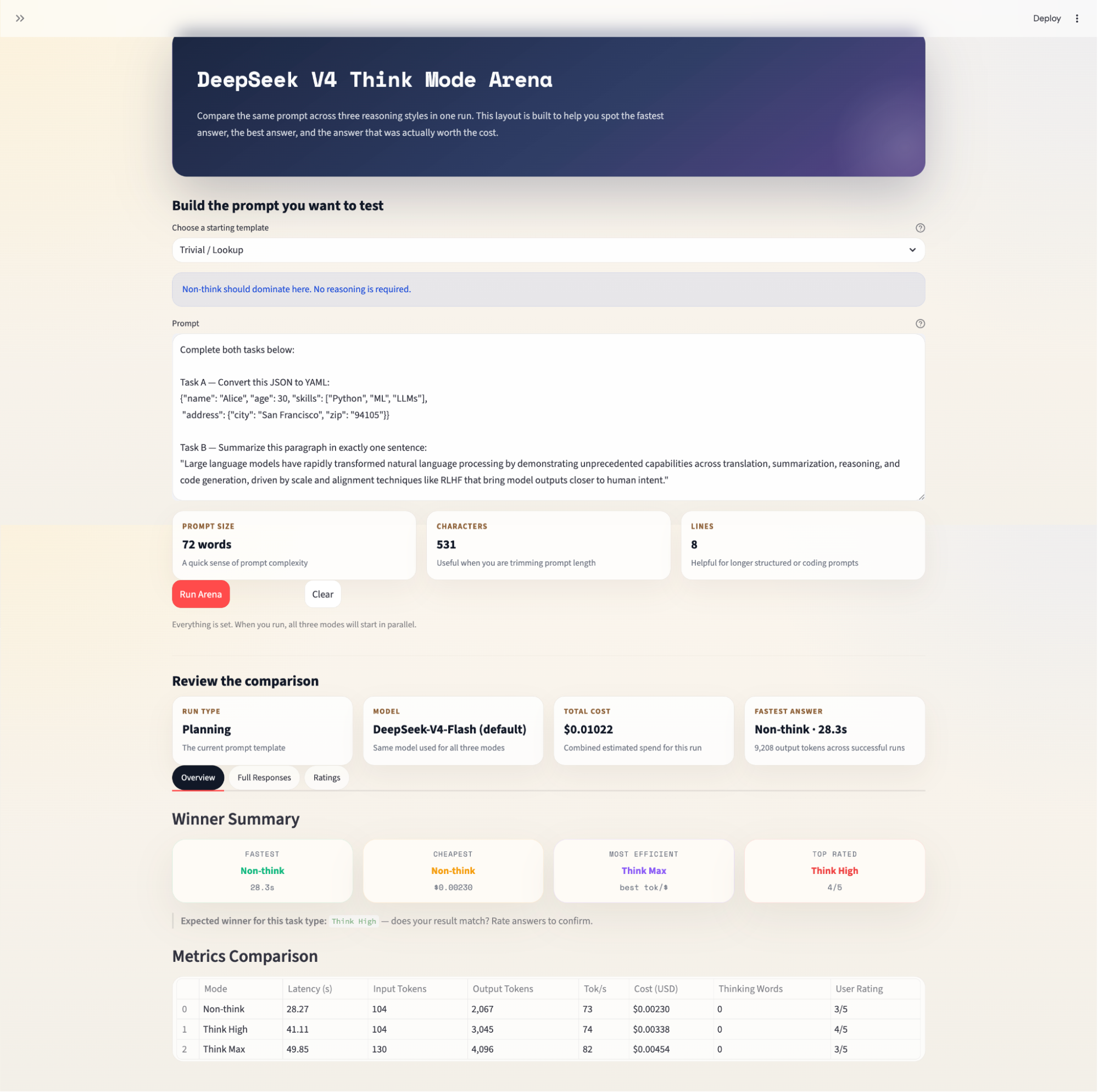
Note on pricing: DeepSeek has adjusted V4 API rates significantly since launch. V4-Pro is currently on a promotional discount, and cache-hit prices were cut to one-tenth of the miss rate in April 2026. The cost figures shown in the app reflect these current rates but may change. Always verify at api-docs.deepseek.com/quick_start/pricing before using any model.
In this tutorial, we built a Streamlit application that runs the same prompt across DeepSeek V4's three reasoning modes in parallel and compares the results across latency, cost, token usage, thinking trace depth, and user-rated quality. The key architectural choices were:
ThreadPoolExecutor for true parallelism, which means that the total wall-clock time equals the slowest mode rather than the sum of all three
thinking and reasoning_effort API parameters help to make sure that the mode control is clean, explicit, and aligned with DeepSeek's API rather than relying on system prompt steering
Cache-aware cost estimation helps in splitting input tokens into cache-hit and cache-miss portions, producing materially more accurate cost figures, especially on repeated runs where warm-cache discounts can make Non-think appear nearly free
To extend this project further, consider adding an LLM-as-judge layer (using a separate model such as Claude or GPT-4 to score answers automatically), caching responses on prompt hash to avoid re-running identical queries, or adding a cross-model axis that pits Flash Think Max against Pro Think High, which is a genuinely interesting cost-parity question the V4 paper raises but does not fully answer.
Top AI Courses
Course
Track
Course
blog
François Aubry
8 min
Tutorial
Bex Tuychiev
12 min
Tutorial
Aashi Dutt
12 min
Tutorial
Aashi Dutt
12 min
Tutorial
Aashi Dutt
8 min
Tutorial
Aashi Dutt
11 min


