Cursus
Imagine a world where you don't just watch a video, you step inside it. Today, we are exploring Genie 3, a breakthrough from Google DeepMind that is redefining how we build and interact with digital environments. You will learn how this foundation world model works, why it is a major milestone for artificial intelligence, and how you can get your hands on it.
What is Project Genie?
Project Genie is not a traditional video generator like OpenAI’s Sora. While Sora creates high-quality but passive video clips, Project Genie is a Foundation World Model. This means it doesn't just predict pixels; it predicts how a world should behave based on user input.
The engine behind this prototype is Genie 3, the latest iteration of DeepMind’s generative AI family. It is designed to understand the underlying physics of an environment. If you move a character left, the model calculates what the next frame should look like from that new perspective.
This matters because it represents a significant leap toward Artificial General Intelligence (AGI) and pushes forward the world of frontier models. The model must grasp concepts like cause and effect, object permanence, and spatial consistency.
Genie 3 demonstrates these capabilities by maintaining a stable environment even as you move through it. Explore historical landmarks, fantasy lands, and become different characters easily with just some prompting.
Let’s take a look at an example:
World Prompt: A rolling hilly landscape filled with Hobbit-like homes. Each home has its own little garden with a wooden fence and vegetables. THe region is idyllic with small meadows and wildflowers all around.
Character: A ranger venturing across the landsKey Features of Project Genie
Let’s look at some of the key features of Project Genie.
- Interactive world generation: Unlike a video, you are in the driver's seat. You control the camera or a character, and the model generates the next frame in real time based on your specific actions.
- World sketching: You can seed a world using a simple text prompt (e.g., "A neon-lit cyberpunk city") or an uploaded image. The AI then generates a playable 3D version of that static input.
- World remixing: This allows you to take an existing world and transform it. You can change the art style, add new elements, or alter the atmosphere while keeping the core layout the same.
- Action controllability: The model is trained to recognize inputs like jumping, flying, or walking. It maps these commands to logical visual changes, creating a sense of agency within the simulation.
Hands-on With Project Genie
Let’s get into some basic use cases of Project Genie to bring our ideas to life.
World sketching
Creating a world starts with the World Sketching phase. You enter a prompt or upload a photo, and the system uses Nano Banana Pro (Google's latest high-fidelity image engine) to refine the initial visual.
This integration ensures that the starting frame has the architectural depth and texture necessary for a complex 3D environment.
You can even "sketch" the logic of the world by defining how your character moves through the space before the simulation begins.
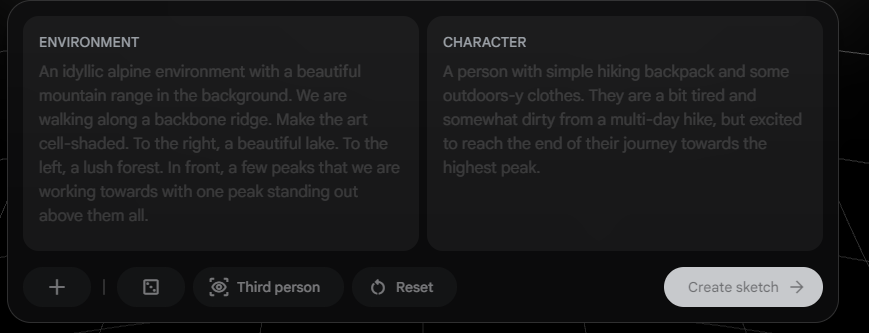
Below, you’ll see me write a sample environment and description of a character. This lets the model generate the initial world that it will start in.
World remixing
The World Remixing feature is a standout for creative workflows. For example, you can take a realistic photo of a local park and prompt the model to "Remix this into a Studio Ghibli cartoon style."
The resulting playable world retains the physical layout of the park (the trees, the paths) but overlays a completely new artistic aesthetic. The transitions are generally smooth, though complex textures can sometimes melt slightly during the transformation.
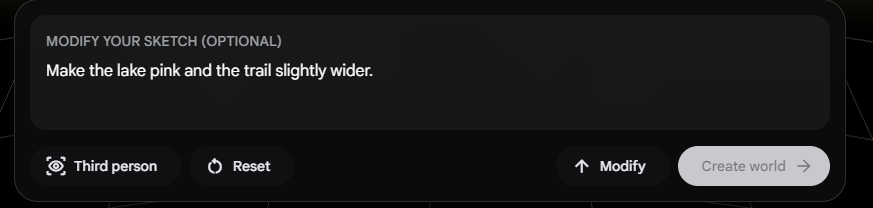
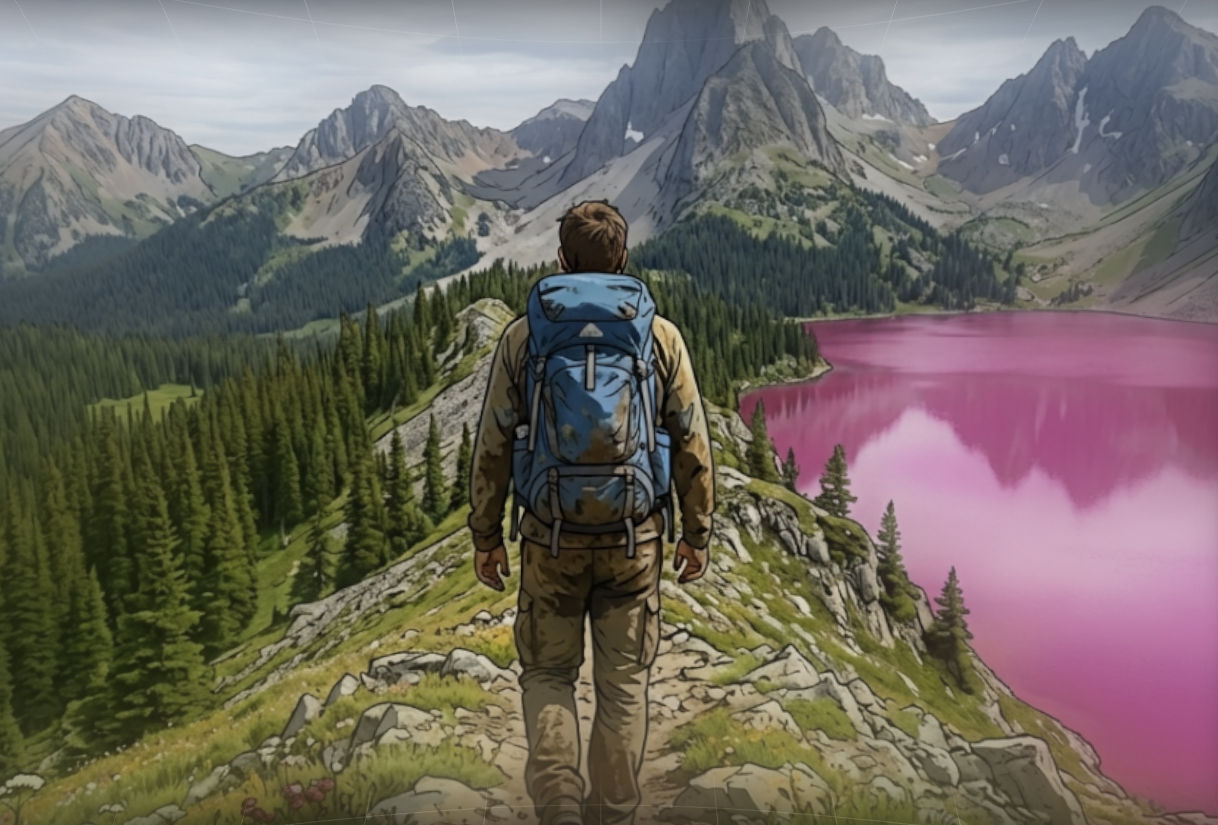
For instance, I ask the model to make the lake pink, and it reacts accordingly. The art style and overall physical layout remain the same, while it updates the lake.
3D exploration
Once the world is generated, you enter 3D Exploration mode. This allows you to navigate the world in either first person or third person.
You use the WASD keys to move your character around the world while using the arrow keys to look around. You can even use your space bar to jump and ascend over obstacles.
Each session gives you 60 seconds to explore the world.
In my experience, the overall environment feels remarkable. As you move, the AI generates new terrain that matches the established style. There are definitely some limitations when playing with complex textures, and you feel that the model generates ideas live, so the framerate is not always the smoothest.
However, to think that I wrote a simple prompt in less than a minute and having that become a generated, explorable world in mere minutes is absolutely mind-blowing.
How Can I Access Project Genie?
As of early 2026, Project Genie remains an experimental research prototype. It is not yet available to the general public.
Currently, access is limited to Google AI Ultra subscribers located in the United States.
If you have an active subscription, you can find the tool within the Google Labs FX portal.
Note that users must be 18 or older to participate in the research program.
How Good is Project Genie?
Navigating a world generated in real time is pretty different from playing a video game of pre-rendered graphics.
Of course, we can’t judge it the same way we would with a standard LLM since we can’t test a “world” by asking questions. We can only evaluate it through the visual and interactive experience.
First, the technical bits. The video is capped at 720p with a frame rate of around 24 fps. This makes it less “crisp” than Sora since the focus on generating smooth video is different from generating an interactive world.
It takes a lot more computational intensity to generate a world in real time.
Visually, the experience is quite nice. Again, I experienced some slightly stuttered frames due to the lower frame rate. But, generally, the world is pretty consistent.
However, I noticed in some runs that objects that were generated sometimes disappear or change when you walk past and turn around to view them. This tends to happen with unique objects (like characters) as opposed to static objects like trees.
The interaction with the world worked most of the time. When you press a button to move or look around, the camera pans and moves accordingly.
In that sense, the world is fairly interactive. I did run into some delays with jumping, and I think that tends to happen when you are on a flat surface and the model does not expect you to jump.
It works more consistently when there are obstacles on the ground, and it “makes sense” for you to jump over them.
Generally speaking, it did feel a lot like the real world (aside from the stylized art style). For the most part, object distance and sizing made sense. Things like motion parallax were consistent throughout the experience as well.
I will say that I was able to consistently break the model by asking it to add multiple actions, like swimming and walking at the same time. I think that prompt wording has to be pretty precise to get what you want.
All in all, though, it was an amazing experience and hard to believe how easy it is to generate simple interactive worlds.
Use Cases of Project Genie
I can think of a lot of ways people of all kinds can use Project Genie.
- Rapid game prototyping: Designers can bypass months of environment modeling to test a level's "feel" instantly. Feed it precise information about your game's physics, art style, and provide sketches of a level to see how it might play out.
- Training AI agents: World models provide a safe, infinite gym for robots to learn navigation and object manipulation before being deployed in the physical world.
- Education: Students could generate a historical setting, such as Ancient Rome, and walk through the streets to understand the scale and architecture in a way a textbook cannot provide.
Here’s a little visit to the Globe Theater in London. Although not quite 100%, with further prompt refinement, we can start building a more perfect rendition of the world.
Here’s the prompt I used:
World Prompt:
A hyper realistic 360-degree immersive recreation of London's Southbank. Focus on the Globe Theater, a massive three-story open-air polygonal wooden structure with a thatched roof. The exterior is white lim-wash with dark oak timber framing. Nearby, include the Rose Theatre.
The streets are narrow, unpaved, and muddy. Include the River Thames and the distance silhouette of Old London Bridge.
Character: A person that wears a doublet of velvet and stained leather breeches. He has ink stains and a small jagged scar across his eyebrow.Final Thoughts
Project Genie marks the beginning of the shift from Generative Media to Generative Simulation. We are moving past an era of simply looking at AI-generated content and into an era of living inside it. We are beginning to see a growth of large action models that understand your goals as a human and provide the environment and actions for those goals. We’re also seeing next-level video creation from tools like ByteDance’s Seedance 2.0, which we cover in a separate guide.
To dive deeper into what it takes to create these models, I recommend the following resources:
Project Genie FAQs
What is a Foundation World Model?
Unlike a standard AI that predicts text or pixels, a Foundation World Model understands the "rules" of an environment. It simulates physics, spatial consistency, and cause and effect, allowing users to interact with the generated space rather than just watching it.
How does Project Genie differ from OpenAI Sora?
Sora is a video generator that creates high quality, passive video clips. Project Genie is a simulation engine. While Sora's output is static, Genie allows you to control a character or camera to navigate the world in real time.
What is the technology powering Project Genie?
The prototype is powered by the Genie 3 model family. It utilizes advanced latent action models to predict how the environment should change based on user inputs like moving or jumping.
Who can access Project Genie in 2026?
Access is currently limited to Google AI Ultra subscribers located in the United States. It is hosted within the Google Labs FX research portal for users 18 and older.
What are the main limitations of Genie 3?
Because the model must render frames in real time to respond to user actions, the visual fidelity is lower than "offline" video generators. It currently tops out at 720p resolution and may show occasional visual glitches during complex movements.
I am a data scientist with experience in spatial analysis, machine learning, and data pipelines. I have worked with GCP, Hadoop, Hive, Snowflake, Airflow, and other data science/engineering processes.