Course
Is this the “DeepSeek moment” for video generation? ByteDance just silently released its Seedance 2.0 video generation model, and the first video examples created with it are going viral.
In this guide, I will walk you through what Seedance is, its key features, and how it works under the hood. I will also show you examples of the new video generation model in action and compare its strengths and weaknesses with other prominent models. Can it challenge Google's Veo 3.1, OpenAI’s Sora 2, and Kuaishou's Kling 3.0?
What is Seedance 2.0?
Seedance 2.0 is ByteDance’s newest text-to-video and image-to-video generative AI model, which was released on February 10, 2026.
Source: Aleena Amir on X
Because ByteDance hasn’t published a canonical English release note for Seedance 2.0, most public specs and feature claims are reconstructed from Chinese reporting about Jimeng’s rollout. Many “spec sheets” on third‑party wrapper sites appear to echo the same sources rather than official ByteDance documentation.
According to testing by Chinese media and early partner documentation, Seedance 2.0 promises 2K cinema-grade video output with excellent character consistency.
How Does Seedance Work?
Like Sora 2 and Veo 3.1, Seedance 2.0 is a diffusion model. That means, it generates video by starting with frames of static noise and gradually transforming them over many steps to reveal a coherent video sequence.
However, unlike earlier text-to-video models that treated video as a silent, single-shot clip, Seedance 2.0 is architected as a "multimodal director" capable of handling sound, story structure, and complex visual references in a single pass.
Directing the scene with quad-modal inputs
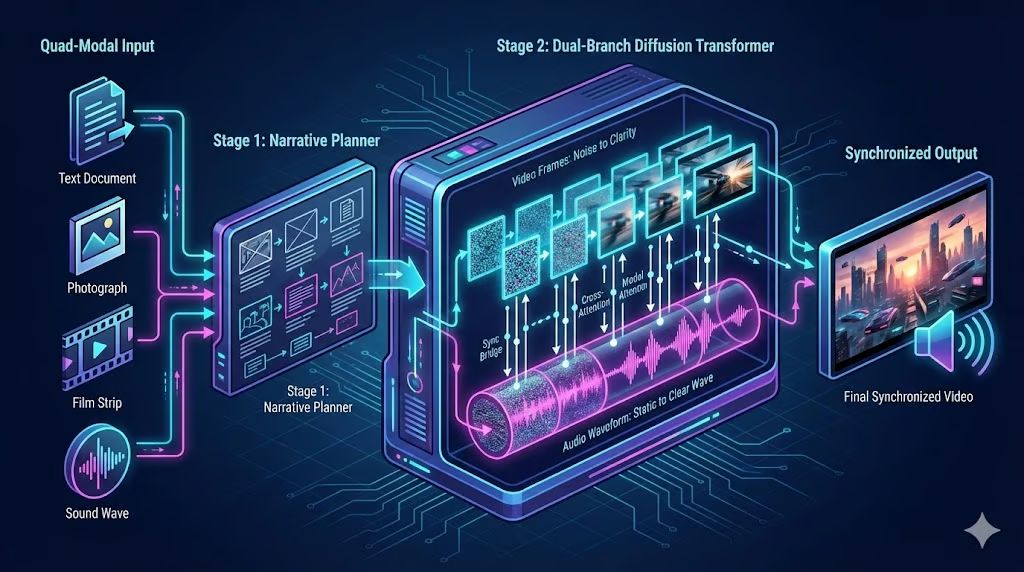
In the past, getting an AI to create exactly what you wanted required “prompt engineering”, which meant typing long, complex text descriptions and hoping the AI understood. Seedance 2.0 replaces this guesswork by directing the scene with a quad-modal input system.
“Quad-modal” means that Seedream can handle text, image, video, and audio input. The quad-modal encoder is not one big funnel, but rather a set of pre-trained encoders for each data type:
- Text is processed by an LLM-based encoder to extract semantic meaning
- Images are encoded into visual feature tokens (patches)
- Video reference clips are encoded into spatiotemporal tokens (3D patches)
- Audio is encoded into waveform or spectrogram tokens
As a result, all four raw inputs are converted into a unified language of latent vectors to mathematically represent the inputs.
Planning narratives with multi-shot logic
Another of the biggest frustrations with older AI video tools was the single-shot limit. If you asked for a story, the AI would try to cram everything into one continuous, unedited take. With video durations usually limited to a few seconds, this often resulted in weird warping or parts of the prompt being ignored.
Seedance 2.0 introduces a narrative planner to fix this with multi-shot logic. Before it generates a single pixel, this planner acts like a storyboard artist. It reads your prompt and breaks it down into a sequence of distinct camera shots.
For example, it might start with a wide shot of a city, then cut to a medium shot of a person, and finally a close-up of their face, all without needing detailed instructions. It then orchestrates the generation of these shots in sequence.
It uses shared consistency data to ensure the person’s face, clothes, and lighting stay exactly the same across every cut. The result feels like an edited movie sequence rather than a raw, hallucinated video clip.
Combining diffusion with two transformer models
Most AI video models work like a silent film camera: they generate the video first, and you have to add sound later using a separate tool. This often leads to "drift," where the sound of footsteps or a slamming door doesn't quite match the action on screen.
Seedance 2.0 solves this with a dual-branch diffusion transformer with one transformer dedicated to video and the other to audio.
Think of this as like a brain with two hemispheres working in perfect sync. One hemisphere focuses entirely on generating the video frames, while the other generates the audio waveform. Because they communicate constantly during the creation process, the model ensures that when a visual event happens (like a glass breaking), the corresponding sound is generated at the exact same millisecond.
Seedance 2.0 Key Features
Now that we know how it works, let’s see what Seedance 2.0 can do. Two of the most exciting features are its quad-modal all-around reference system and its native multi-shot storyboarding.
Multimodal all-round reference system
Seedream 2.0 lets you show it what you want, rather than just telling it. You can upload up to 12 files (9 images, 3 videos, and 3 audio clips) and assign them specific roles using an @ reference system.
- Need a specific actor? Upload their photo and tag it as the character reference.
- Want a specific camera movement? Upload a sample video and tag it as the motion reference.
- Have a specific beat? Upload a song and tag it as the rhythm reference.
The model separates these inputs and combines them, allowing you to "direct" the scene using concrete assets rather than relying on luck.
To give you a clearer picture of what it can look like in action, here’s an example:
Prompt: “Replace the model in the promotional video @Video1 with a Western model, referencing the appearance in @Image2. Change all spoken language to English.” (Source: SD AI Animation Storyteller on X)
The result is very impressive. Seedance followed the instructions completely, captured the referenced model's look almost perfectly, and adjusted the lip sync when translating the audio into English. As a special note, the glasses' reflection behavior is completely preserved.
Multi-shot storyboarding
The multi-shot storyboarding feature puts Seedance 2.0 in the role of both director and editor at the same time. Here’s how it works:
- The model automatically breaks a single narrative into several connected shots
- For each shot, it selects the appropriate camera type.
- Finally, it composes the shots and adds transitions between them.
Prompt: “Avenger's Endgame during the big fight scene, but Thanos stops everything and tells all the superheroes that he's sorry. All the superheroes immediately accept this and start to walk away, but then Spiderman says, "Oh hell no, he killed like a bajillion people!" And so they all rush back and kick him while he's down.” (Source: Christopher Fryant on X)
This is a good example of the storyboarding in action. The wide shot in the beginning, the zoom-in on Thanos, the tilt towards Thor, and the hard cut to Spiderman–all those look very coherent and in line with the Avengers feel, without the need to explicitly ask for any of those camera movements.
Native sound effect generation and voice cloning
Until not long ago, native audio generation would’ve already been a killer feature in itself, but nowadays, it is more of an expected standard. Still, Seedance 2.0 not only generates synchronized video and audio together, but also includes multilingual dialogue, ambient sounds, and action‑linked sound effects.
One very cool feature enabled by the audio input capabilities is voice cloning, which is supposedly multi-speaker, so you can have up to 3 custom character voices per scene (since that’s the audio file limit). It lets users upload real voices to guide accent, tone, and even multi‑character conversations.
While we’ve already seen the language and lip-syncing skills in action in the translation examples, let’s look at how Seedance creates background music and sound effects from scratch.
Prompt (using reference files): “The woman in @Image1 walks up to the mirror and looks at her reflection. Her pose should reference @Image2. After a moment of contemplation, she suddenly breaks down and starts screaming. The action of grabbing the mirror, as well as the emotions and facial expressions during the breakdown and scream, should fully reference @Video1.” (Source: Feyber on X)
The example shows that the model can handle several conflicting emotions within the same scene, not only visually, but also acoustically.
The sad background music at the beginning of the scene reflects the character's facial expression well, and turns into a more horror-like tune as she angrily screams into the mirror. The background music does not interfere with her scream or the sound of her grabbing the mirror, but nicely complements it.
High-resolution cinematic visuals
Seedance supports up to 2K outputs, multiple aspect ratios, and frame rates of 24–60 fps, depending on the platform. It emphasizes cinematic aesthetics by paying attention to details such as:
- Detailed textures
- Robust global lighting
- Film‑like color grading
Another focus in the development of Seedance 2.0 was on respecting physics. These two features go hand in hand, as we can see from our next example:
Prompt: “A high-energy cinematic action sequence at night in a neon-lit city, the camera tracking a lone character sprinting through rain-soaked streets as police drones and headlights blur past, quick cuts between close-ups of determined eyes, boots splashing through puddles, and wide shots of traffic narrowly missing him, the camera whip-panning as he vaults over barriers, slides across car hoods, and dodges explosions sparking behind him, intense motion blur and dynamic lighting, handheld camera feel with aggressive push-ins, dramatic contrast, fast choreography, sharp impacts, and a final slow-motion beat as he leaps off a rooftop into darkness while city lights streak beneath him.” (Source: Txori on X)
This result looks like a scene straight out of an action movie. Camera movement, lighting, and even the physics of water splashing from a puddle are on point. What doesn’t check out is that the character jumps from a building roof right after running through a street.
One obvious but interesting quirk is that while the character was only described as “lone”, he turned out to be an exact carbon copy of Keanu Reeves.
If you consider the action-heavy prompt featuring a dystopian scenery (“neon-lit city”, “rain-soaked”, “police drones”), you can definitely see where that is coming from. The only question left is whether the inspiration comes from The Matrix, John Wick, or Cyberpunk 2077 (or a combination of the three).
How Good is Seedance 2.0?
Honestly, the videos we saw during the feature introduction speak for themselves. In this section, I want to focus on two problems with video generation that Seedance 2.0’s strengths mitigate.
Ending the reliance on “magic prompts”
One major pain point for first-generation AI video was black‑box prompt engineering: Creators had to discover “magic prompts” and hacky phrasing to get usable results from models with weak semantic understanding and limited controls.
This is where both the all-round reference system and the multi-shot storyboarding come in very handy. The combination of being able to map assets to roles and a model that excels at understanding context across different shots of a scene yields impressive results without the need for “prompt-maxxing.” It also avoids overloading the prompt (and overburdening the model).
One good example is the use of 3x3 image grids. Given 9 reference images representing different shots within a scene, you can get decent outputs, even if you put no effort into the prompt at all. Let’s see what the model returned from the following grid as input, combined with a prompt as simple as it gets:
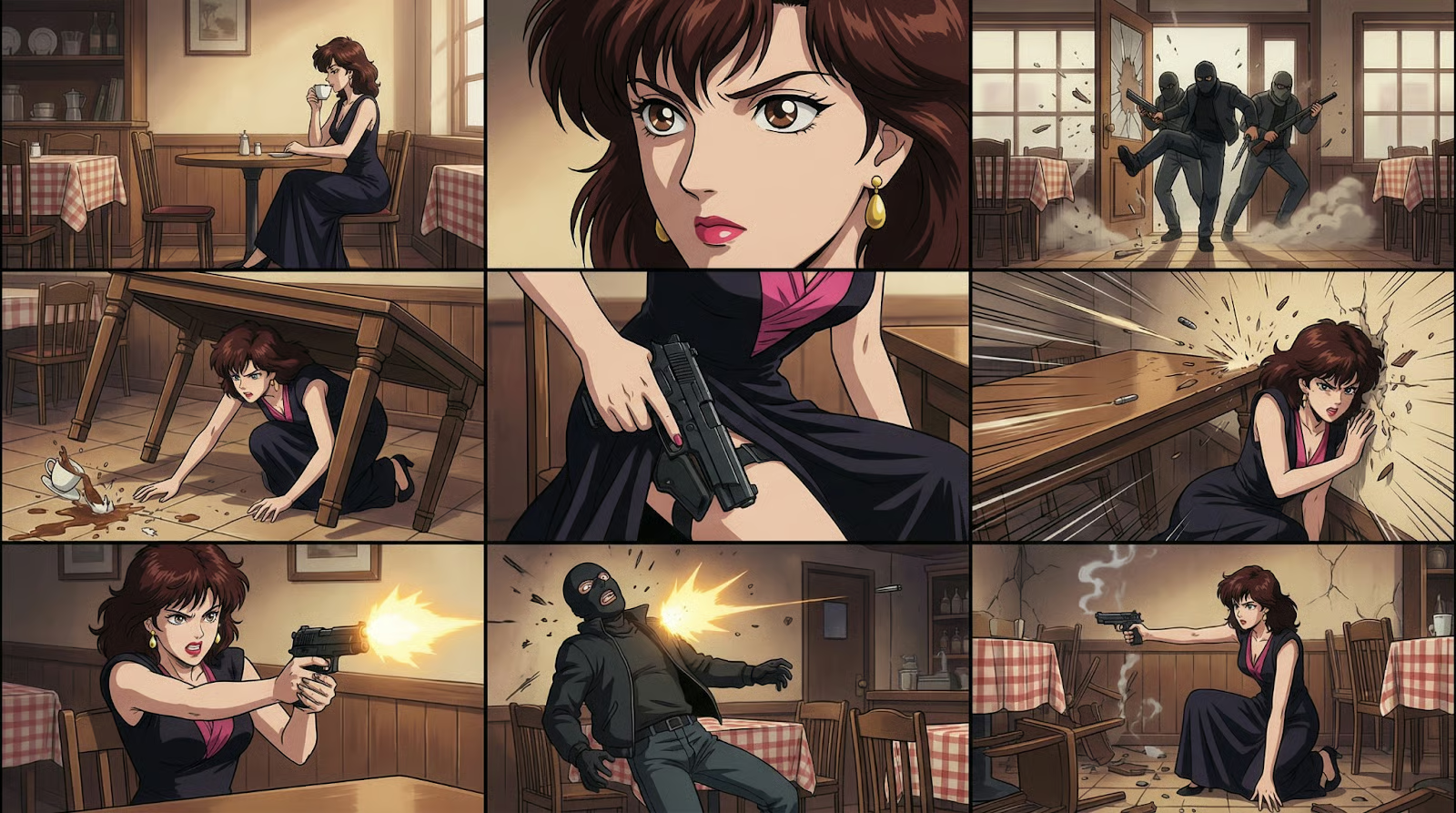
Prompt: “Generate video from storyboard.” (Source: Mr.Iancu on X)
Again, a very impressive result. The model naturally understands the scene's context and fills in the gaps between individual frames. One thing that does not make sense is that mid-video, one of the attackers seems to be standing in the corner behind her for a few frames.
Another minor mistake that (I thought) I noticed was that the table was standing upright, which wouldn’t give the character any cover–but if you look closely into the lower-left corner, you can see that the mistake was already part of the image grid, which was generated by Nano Banana Pro.
Solving the “throwaway clip” problem
With earlier models, video generation often turned into a lottery to get the right clip by accident, with lots of (expensive) “throwaway” tries along the way. The automatic multi-shot storyboarding tackles this and does a great job at decomposing narrative prompts into multiple shots.
Seedance 2.0 delivers significantly enhanced identity and scene consistency compared to earlier models. This drastically reduces annoying visual artifacts such as character drift, sudden appearance changes, or flickering that frequently made otherwise promising clips unusable.
Prompt: “A nature documentary about an otter piloting an airplane.” (Source: ChinaTechTrend on X)
What Are the Limitations of Seedance 2.0?
With all the strengths we talked about in mind, let’s look at a few limitations of the Seedance 2.0 model.
Complex, layered scenes involving glass
It was reported that Seedance 2.0 has a hard time dealing with multiple moving layers behind glass, which, admittedly, is quite a challenging task for any video generation model (and is, besides, a not-too-common edge case).
However, the only example that I could find is discussed in this YouTube review. It shows "a typical exterior scene for a diner scene, Cyberpunkish, looking through the glass, character inside, moving cars outside." The output partly looked very natural, with raindrops on the window and breathing animation, but the entire scene moved unnaturally (as if "tied to a car").
It seemed like a scene with glass on both sides of the character, with additional background scenery behind the second glass layer, was too much for Seedream 2.0, and it couldn’t distinguish between the static background and moving cars anymore.
In our earlier example featuring the model showing her glasses, the transparency and reflection of the glasses were both on point, but it has to be noted that a) it was a much simpler example, and b) it used a reference video which served as a template for the model.
Minor inconsistencies and background text
Some inconsistencies are rather the consequence of a misinterpretation of the encoded context than a poor video generation in itself. To name one example, when tasked to create a Game of Thrones and Friends crossover scene, it inserted one character from How I Met Your Mother by accident:
Prompt: “The cast of Friends stars in the Game of Thrones sitcom. Chandler plays King Joffrey. Joey is the Hand.” (Source: Gavin Purcell on X)
Like with the Keanu Reeves example, you can guess where it comes from: Both shows are very similar sitcoms, so their vector representations will be extremely close to each other.
While background texts are generally readable even in scenes with fast movements (think of the Keanu Reeves example), in some cases, they appear a bit pixelated. For instance, look at the advertisement boards in this basketball video of a kid scoring against Lebron James that went viral:
Prompt unknown (Source: Serge Bulaev on X)
Again, this is an overall very impressive result: the player movements are very realistic, the camera keeps the focus on the dribbling girl, and both the shadows and the background noise correspond to what we can see. Unfortunately, the prompt used in this example wasn’t shared.
Music-performance scenarios
It’s hard to pin down the reason, but I’ve found that scenes involving music performances, such as concerts, still have a bit of that good-old uncanny valley vibe. Here’s one example of a K-pop concert scene:
Prompt: “Epic K-pop concert scene - Dramatic stage with lights, effects, and energy, without depicting real individuals.” (Source: Ankit Patel on X)
There are a few things to notice here. First of all, the sound involves the song (including proper echo and crowd noise). However, it sounds a bit wooden to me. The movement of the band members looks slightly odd, too, with the background singer to the left morphing into the stage.
How Can I Access Seedance 2.0?
Officially, Seedance 2.0 is live inside ByteDance’s Jimeng in mainland China, where it’s available to paying members (e.g., ≥69 RMB tiers reported by Chinese media). In practice, Jimeng access is China‑centric, and account verification and local payment rails are typical friction points.
The Seedance 2.0 landing page is already visible. However, actual access is currently gated: most users will see a "Coming Soon" message until the full rollout, which industry sources expect around February 24, 2026.
In the meantime, the most popular workaround among international users is ChatCut, a third-party AI video app that has integrated Seedance 2.0 directly and provides early global access without requiring a Chinese phone number. At the moment, there is a waitlist to sign up.
Seedance 2.0 vs Competitors
Let’s see how Seedance 2.0 compares to its three main competitors.
|
Feature Category |
Seedance 2.0 |
OpenAI Sora 2 |
Google Veo 3.1 |
Kuaishou Kling 3.0 |
|
Cinematic Quality & Resolution |
Commercial 2K: Optimized for a sharp, digital aesthetic; best for short, punchy clips. |
World Sim Fidelity: Focuses on long-term coherence (20s) and high-fidelity simulation. |
Cinematographer’s Choice: Superior film-like color science, HDR, and professional depth-of-field. |
High-Quality 1080p: Excellent prompt adherence, though lower resolution than Seedance. |
|
Motion Realism & Physics |
Learned Priors: Stable character motion derived from video references. |
Physics Leader: Best at gravity, fluids, collisions, and object permanence (even off-screen). |
Camera Mastery: Excels at realistic cinematic movements (pans, dollies) and temporal consistency (60s). |
Motion Master: Handles complex human actions (eating, fighting) and physical interactions (seesaws). |
|
Director Control & Inputs |
Quad-Modal Reference: Unique graph system to assign specific roles to Text, Photo, Video, and Audio inputs. |
Text-Driven: Primarily text-based prompts with limited image support; lacks multi-file assignment. |
Masked Editing: Offers precise control via masking and text-based iteration. |
Omni Mode & Brush: Features "Motion Brush" for pathing and binds multiple characters/elements. |
|
Audio Capabilities |
Dual-Branch Sync: Generates audio/video simultaneously for tight, frame-accurate synchronization. |
Post-Process: Generates video first with audio added later; lacks tight sync. |
External Tools: Relies on separate tech (e.g., AudioSet), resulting in less precise synchronization. |
Native Audio: Generates audio with distinct character tones and languages. |
|
Production Speed & Access |
High Throughput: <60s for 5s clips. Official availability is limited to China. |
Premium/Slow: Computationally heavy and slower; positioned as a research/premium tool. |
Restricted: Slower generation (minutes); access limited to trusted testers/partners. |
Accessible: Fast web platform with better global access, though ~30% slower than Seedance. |
Seedance 2.0 vs Sora 2
One of Sora 2’s main selling points is that it is architected as a "reality simulator" with deep physical understanding, excelling at modeling gravity, fluid dynamics, and object permanence. While it is not one of the main focuses of Seedance 2.0, the first results show that it is not significantly lagging behind Sora 2 in this regard and can compete.
Seedance’s quad-modal reference system, on the other hand, is something that’s missing in Sora, which only serves as a text-to-video and image-to-video model. Therefore, cloning specific styles or characters is quite static in Sora, compared to the ability to copy the movement of whole scenes or clone voices in Seedance.
While Sora 2 can generate high-quality video, it treats audio as a separate, secondary process. Seedance 2.0’s dual-branch transformer architecture is fundamentally different, as it generates video and audio simultaneously in a single pass. This allows for tighter, more frame-accurate synchronization (like footsteps hitting the ground exactly when the foot lands) than in Veo.
Seedance 2.0 vs Google Veo 3.1
Veo 3.1 gives directors precise control through its Masked Editing tool, which allows users to select and modify specific regions of a video (e.g., changing a character's clothes) while leaving the rest untouched. It also offers specific camera commands (pan, tilt, zoom) to mimic traditional filmmaking techniques.
Seedance 2.0 takes a different approach to control with its Quad-Modal Reference system. Instead of editing masks, Seedance users can clone styles or motions by uploading reference videos and images. If Veo is a digital editing suite, Seedance is a "style transfer" engine on steroids, which makes it even better suited for replicating a specific vibe or movement.
Similar to Sora 2, Veo 3.1 cannot compete with Seedance 2.0 when it comes to the synchronization of audio and video output.
Seedance 2.0 vs Kling 3.0
Both models excel at keeping characters consistent, but they achieve it differently. Kling 3.0 uses Omni Mode to "bind" specific characters (faces, clothes) and reuse them across multiple shots or scenes. It essentially creates a library of assets you can call upon with an @ reference.
If you compare it to Seedance 2.0’s quad-modal reference system, the difference lies in whether you want to clone something from the outside or keep generated artifacts intact. Kling is better for building a reusable cast for a series, while Seedance is better for "style transferring" a specific vibe or camera move from an existing video clip onto a new subject.
Kling 3.0 offers precise control over the tone and emotion of generated dialogue (e.g., "whispering," "excited," "sarcastic") and supports multilingual speech natively, which returns impressive results. While its audio-video synchronization outperforms Veo 3.1 and Sora 2, Seedance 2.0 still has a slight edge here.
Final Thoughts
The first results of ByteDance’s Seedance 2.0 model are very impressive and promise a leap forward in AI video generation. Especially the combination of its quad-modal input and the automatic multi-shot storyboarding has the potential to be a true game-changer in use cases spanning from advertising and prototyping to film and gaming.
However, this power comes with immediate friction. The model’s ability to clone voices from a single photo and inadvertently generate copyrighted figures (like the unprompted Keanu Reeves lookalike) has already forced ByteDance to urgently suspend specific "real-person" reference features and tighten identity verification.
It will be interesting to see how major players like Google and OpenAI react to Seedance’s release and whether global access restrictions will eventually lift, freeing users from reliance on third-party API wrappers. We’re monitoring the situation closely and will provide a full hands-on review as soon as we secure direct access to test the model's capabilities ourselves.
If you are interested in the concepts that enable advanced tools like Seedream 2.0, I recommend enrolling in our AI Fundamentals skill track.
Seedance 2.0 FAQs
Is Seedance 2.0 free to use?
No. Currently, Seedance 2.0 is available via ByteDance’s "Jimeng" platform in China, which requires a paid subscription (reported tiers start around 69 RMB). International users typically access it through third-party API aggregators or wrappers, which set their own pricing models.
How can I access Seedance 2.0 outside of China?
Direct access to the Jimeng platform often requires a Chinese phone number and payment method. Most users outside China currently rely on third-party AI wrapper sites or API services that integrate the Seedance model, though these are unofficial and may have different usage limits or costs. Access via CapCut's Dreamina platform is expected for late February 2026.
Can I clone a specific person or style in Seedance 2.0?
Yes, but with caveats. You can upload reference images to "clone" a character's appearance or a video to copy a specific camera movement. However, following the accidental generation of celebrity lookalikes, ByteDance has reportedly tightened restrictions on using real-person references to prevent deepfakes and copyright infringement.
Does Seedance 2.0 generate sound?
Yes. Unlike many competitors that generate video first and add sound later, Seedance 2.0 uses a Dual-Branch Diffusion Transformer to generate video frames and audio waveforms simultaneously. This results in tighter synchronization, where sound effects (like footsteps or glass breaking) are frame-accurate to the visual action.
What makes Seedance 2.0 different from OpenAI’s Sora 2?
While Sora 2 focuses on simulating real-world physics and long-duration video, Seedance 2.0 prioritizes "commercial speed" and director control. Its standout feature is the quad-modal reference system, which allows users to upload up to 12 specific images, videos, and audio files to assign precise roles (like character reference or camera motion), offering more direct control than Sora’s primarily text-based prompting.

Data Science Editor @ DataCamp | Forecasting things and building with APIs is my jam.