
Kursus
Fine-Tuning dengan Llama 3
2 jam
4.1K
Meta baru saja meluncurkan seri Llama 4, yang mencakup dua model tingkat lanjut: Llama 4 Scout dan Llama 4 Maverick. Keduanya berbobot terbuka (open-weight), namun fine-tuning Llama 4 Scout memerlukan empat GPU H100, dan Llama 4 Maverick memerlukan delapan. Ini berarti hanya perusahaan dengan sumber daya besar yang mampu melakukan fine-tuning.
Di blog ini, saya akan menunjukkan cara melakukan fine-tuning Llama 4 Scout hanya dengan $10 menggunakan platform RunPod. Anda akan mempelajari:
Kami terus memperbarui pembaca tentang yang terbaru di AI melalui The Median, buletin gratis tiap Jumat yang merangkum berita utama pekan ini. Berlangganan dan tetap tajam hanya dalam beberapa menit setiap minggu:
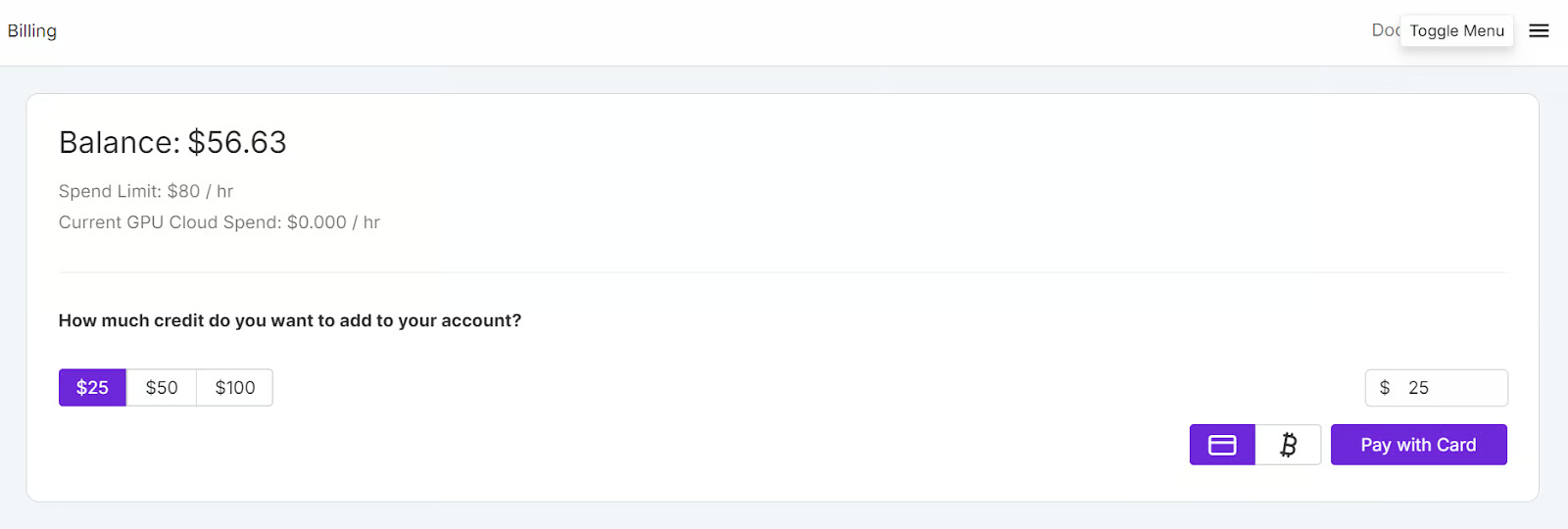
Buka situs web RunPod dan buat akun. Setelah itu, buka menu Runpod Billing dan tambahkan $25 menggunakan kartu kredit. Anda juga dapat membayar dengan mata uang kripto.
Arahkan ke menu My Pods untuk mulai mengonfigurasi pod Anda. Pod berfungsi sebagai server virtual yang menyediakan CPU, GPU, memori, dan penyimpanan yang diperlukan untuk tugas Anda.
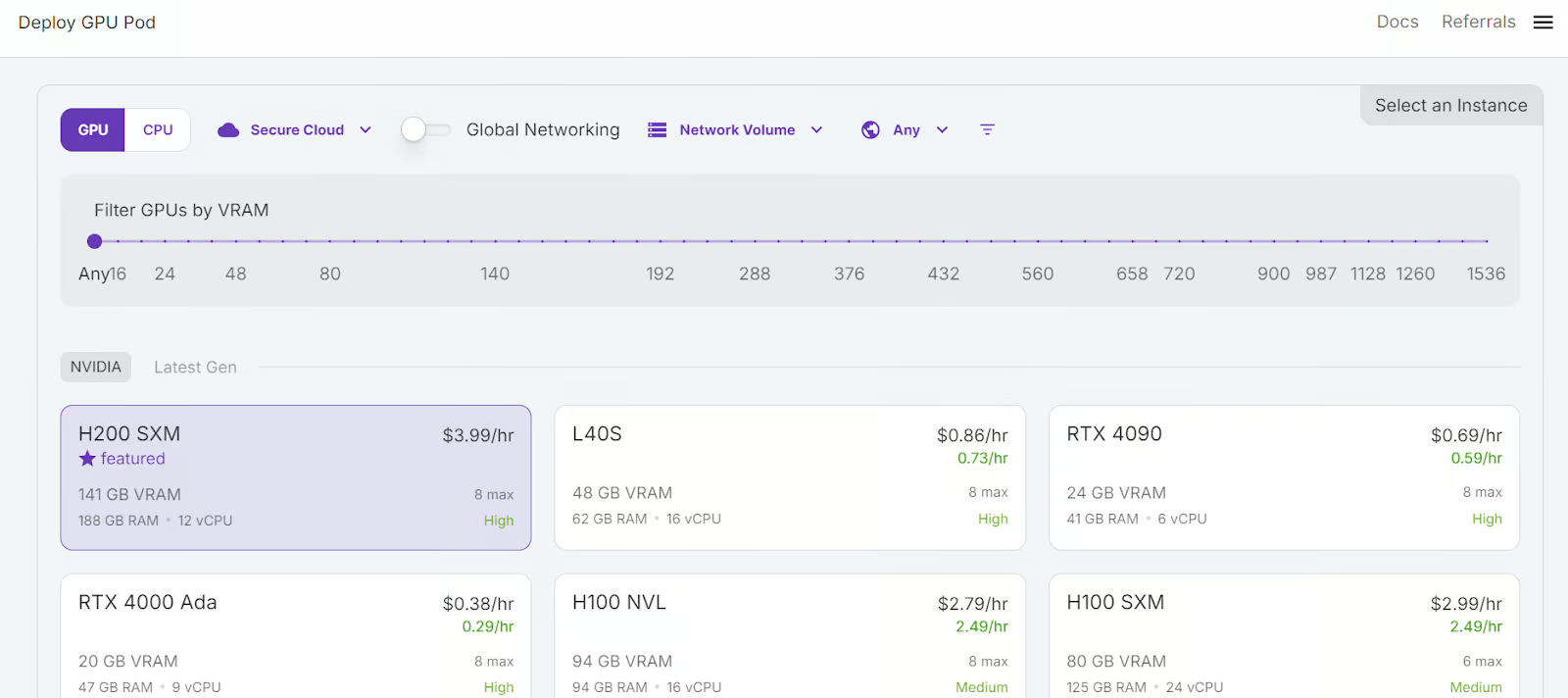
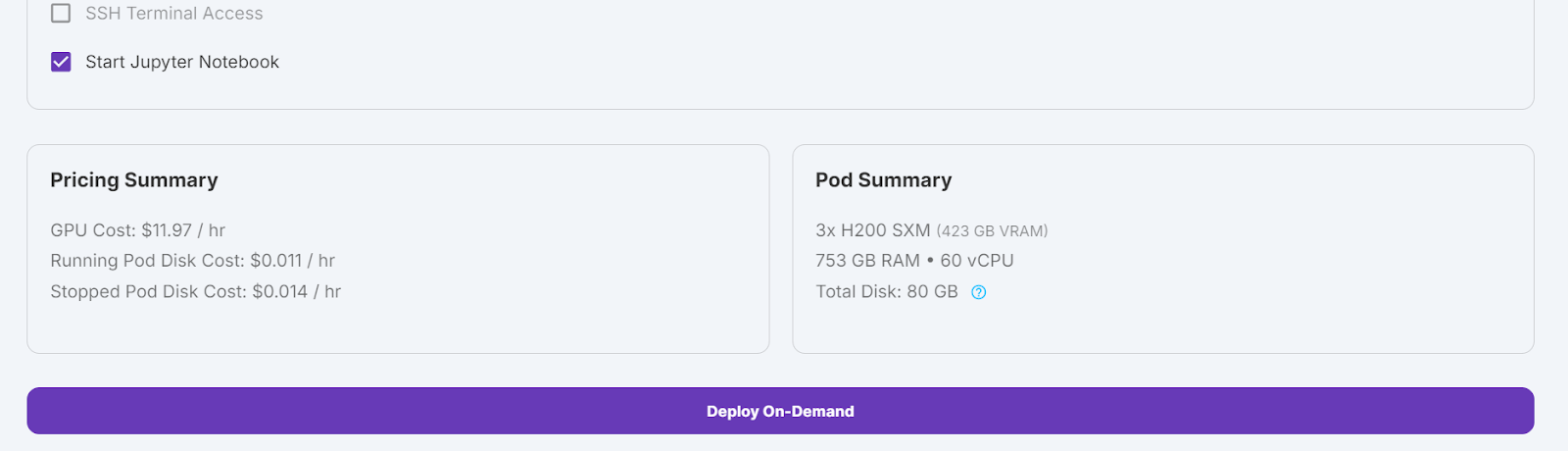
Kita akan memilih GPU 3x H200 SXM, yang akan menyediakan memori yang cukup untuk memuat model, melakukan kuantisasi, dan melakukan fine-tuning pada dataset baru. Sebagai alternatif, Anda dapat menggunakan kerangka kerja Unsloth untuk menjalankan model pada satu H100—namun, pendekatan ini tidak bekerja efektif bagi saya.
Untuk menyiapkan pod Anda, ikuti langkah-langkah berikut:
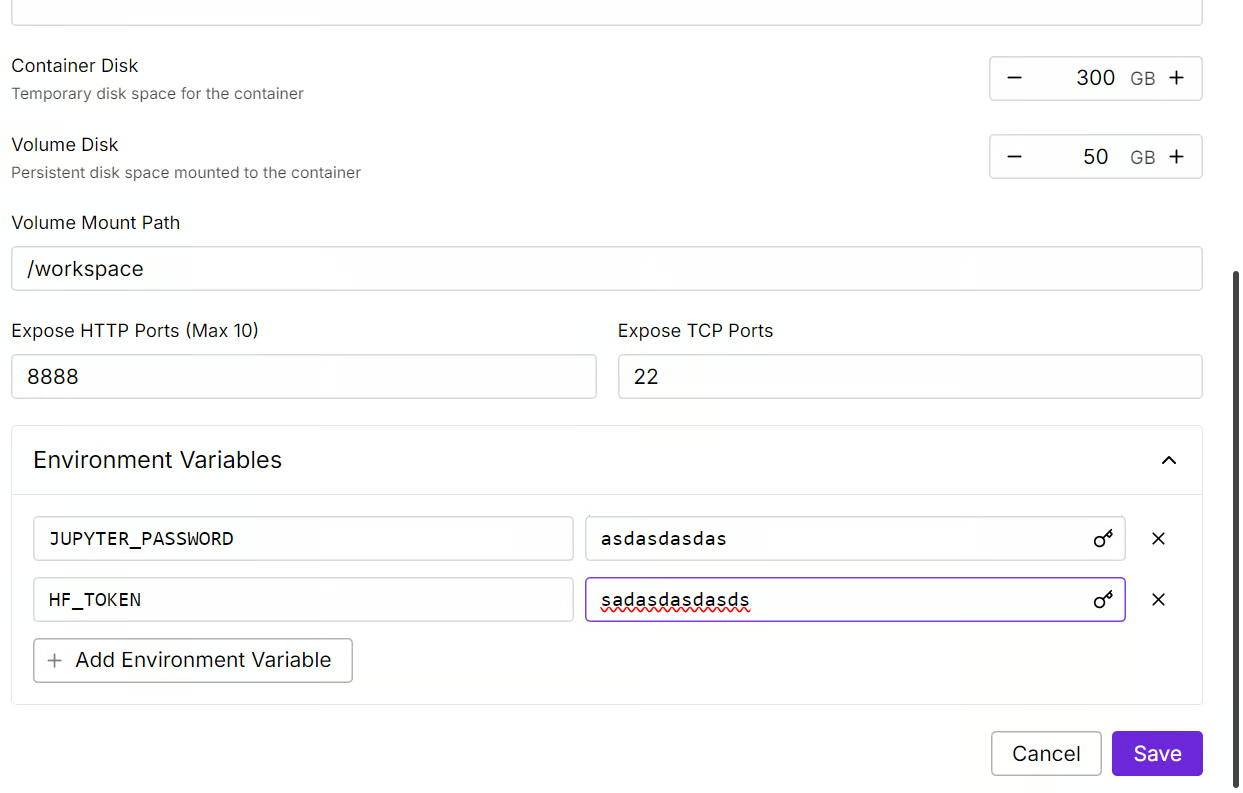
Kita akan mengedit pod dengan meningkatkan ukuran disk container menjadi 300GB dan menambahkan variabel lingkungan HF_TOKEN, yaitu token akses Hugging Face Anda. Token ini penting untuk memuat dan menyimpan model secara efektif.
Menyiapkan container akan memerlukan waktu. Setelah semuanya siap, klik tombol “Connect” dan luncurkan JupyterLab Instance.
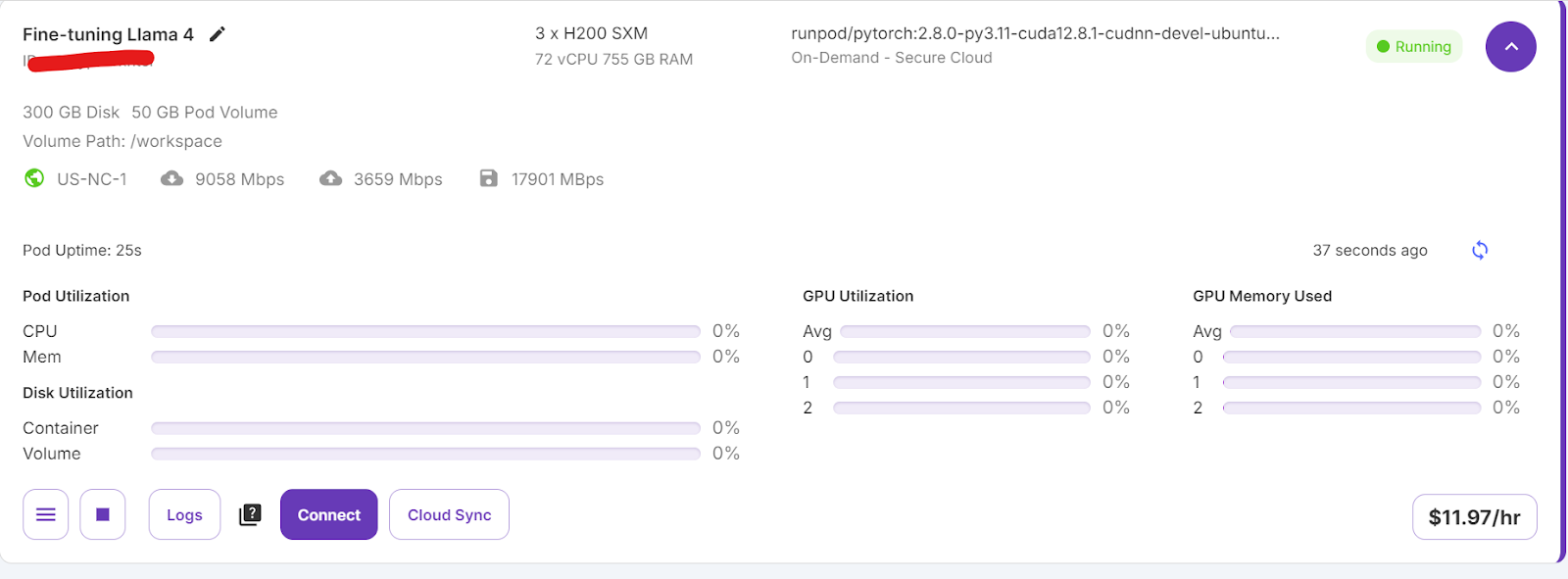
Buat notebook baru dan mulai gunakan lingkungan baru ini, mirip dengan pengaturan lokal Anda.
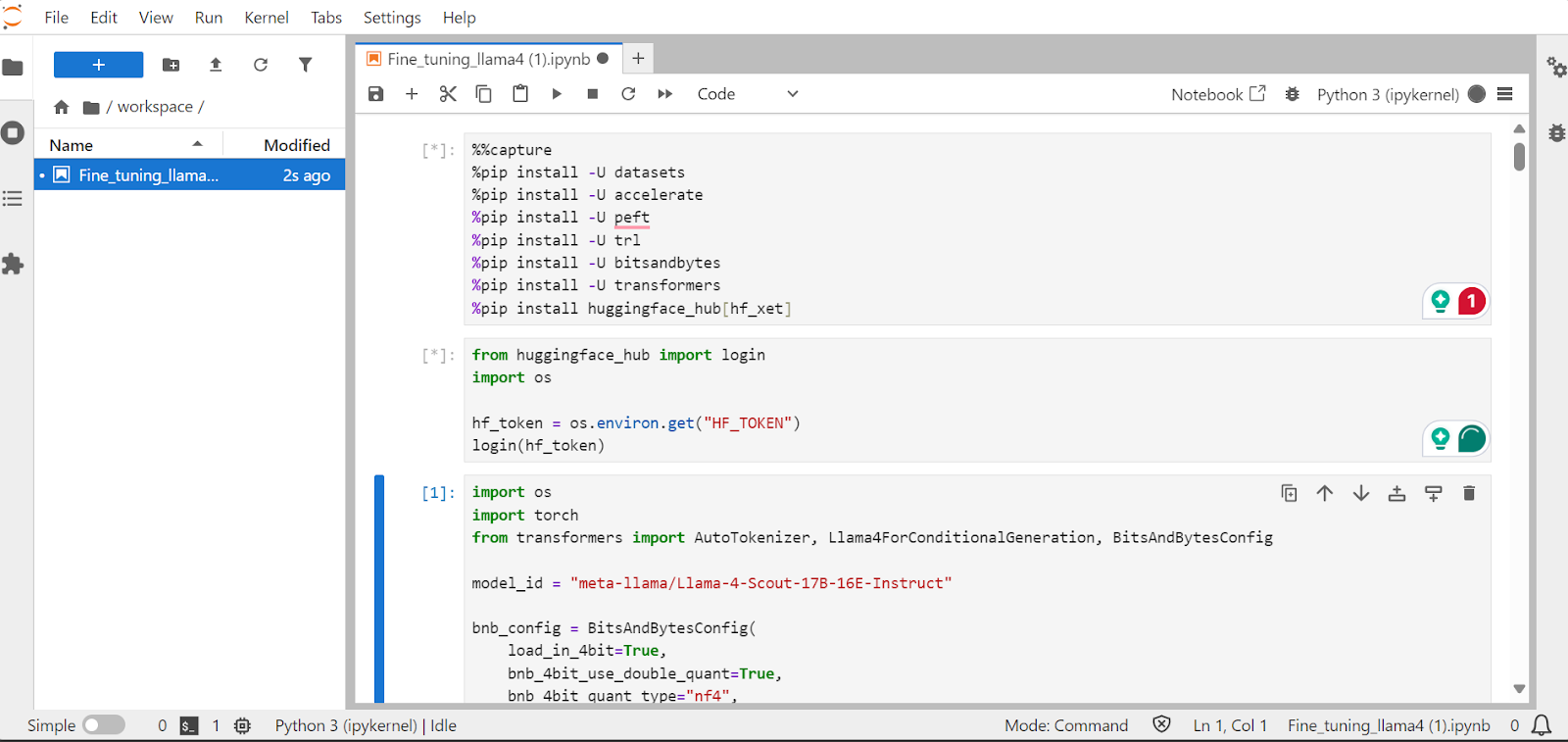
Di bagian ini, kita akan mempelajari cara mengatasi tantangan umum saat melakukan fine-tuning model Llama 4 baru, seperti masalah kehabisan memori dan bug di library Transformers. Kita juga akan membahas cara memuat, melakukan fine-tuning, dan menyimpan adaptor LoRA secara mulus. Dengan mengikuti langkah-langkah ini, Anda dapat fokus pada proses fine-tuning tanpa khawatir tentang hambatan teknis.
Kita akan memasang paket-paket Python yang diperlukan untuk melakukan fine-tuning model bahasa besar.
Catatan:
xet yang lebih cepat daripada Git-LFS. Integrasi ini akan meningkatkan kecepatan unduh hingga tiga kali.%%capture
!pip install transformers==4.51.0
%pip install -U datasets
%pip install -U accelerate
%pip install -U peft
%pip install -U trl
%pip install -U bitsandbytes
%pip install huggingface_hub[hf_xet]Muat kunci API dari variabel lingkungan untuk masuk ke Hugging Face. Dengan masuk, Anda dapat mengakses model berpagar (gated) dan juga menyimpan model serta tokenizer yang telah di-fine-tune.
from huggingface_hub import login
import os

hf_token = os.environ.get("HF_TOKEN")
login(hf_token)Muat model Llama-4-Scout-17B-16E-Instruct dengan kuantisasi 4-bit untuk pemakaian memori yang efisien. Pastikan Anda mengatur device_map ke auto untuk menggunakan ketiga GPU H200.
Catatan: Pastikan Anda memiliki akses ke model, karena model ini berpagar dan mengharuskan Anda mengisi formulir dengan membuka URL meta-llama/Llama-4-Scout-17B-16E-Instruct.
import os
import torch
from transformers import AutoTokenizer, Llama4ForConditionalGeneration, BitsAndBytesConfig


model_id = "meta-llama/Llama-4-Scout-17B-16E-Instruct"

bnb_config = BitsAndBytesConfig(
    load_in_4bit=True,
    bnb_4bit_use_double_quant=False,
    bnb_4bit_quant_type="nf4",
    bnb_4bit_compute_dtype=torch.bfloat16,
)


model = Llama4ForConditionalGeneration.from_pretrained(
    model_id,
    device_map="auto",
    torch_dtype=torch.bfloat16,
    quantization_config=bnb_config,
    trust_remote_code=True,
)

model.config.use_cache = False
model.config.pretraining_tp = 1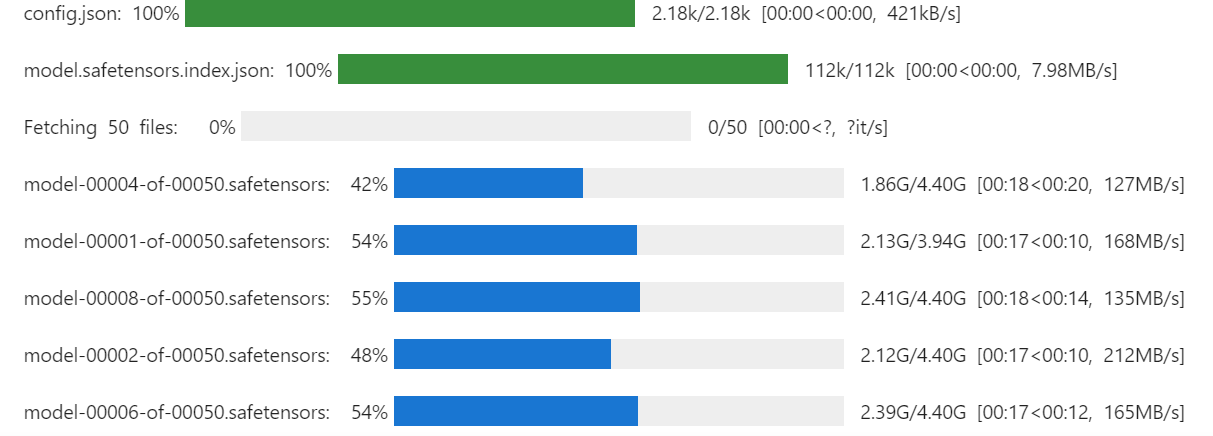
Kita juga akan memuat tokenizer menggunakan ID model yang sama.
# Load tokenizer
tokenizer = AutoTokenizer.from_pretrained(model_id, trust_remote_code=True)
Dengan menjalankan perintah di bawah, Anda dapat memeriksa berapa banyak memori yang tersisa untuk menyiapkan trainer dan melakukan fine-tuning model.
!nvidia-smi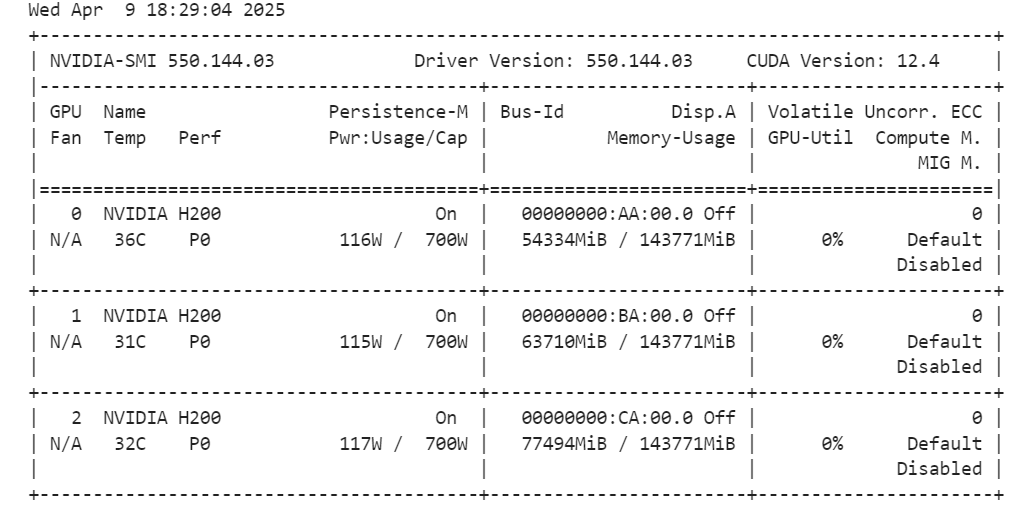
Kita akan membuat gaya prompt untuk model, termasuk prompt sistem dengan placeholder untuk pertanyaan, rantai pemikiran (chain of thought), dan respons. Prompt ini akan membantu model berpikir selangkah demi selangkah dan memberikan jawaban yang jelas serta akurat.
train_prompt_style = """Below is an instruction that describes a task, paired with an input that provides further context.
Write a response that appropriately completes the request.
Before answering, think carefully about the question and create a step-by-step chain of thoughts to ensure a logical and accurate response.

### Instruction:
You are a medical expert with advanced knowledge in clinical reasoning, diagnostics, and treatment planning.
Please answer the following medical question.

### Question:
{}

### Response:
<think>
{}
</think>
{}"""
Selanjutnya, kita akan membuat fungsi Python untuk menghasilkan kolom “text” menggunakan gaya prompt pelatihan dan kolom dari dataset.
EOS_TOKEN = tokenizer.eos_token  # Must add EOS_TOKEN

def formatting_prompts_func(examples):
    inputs = examples["Question"]
    complex_cots = examples["Complex_CoT"]
    outputs = examples["Response"]
    texts = []
    for question, cot, response in zip(inputs, complex_cots, outputs):
        # Append the EOS token to the response if it's not already there
        if not response.endswith(tokenizer.eos_token):
            response += tokenizer.eos_token
        text = train_prompt_style.format(question, cot, response)
        texts.append(text)
    return {"text": texts}
Kita akan memuat 500 sampel pertama dari dataset FreedomIntelligence/medical-o1-reasoning-SFT yang tersedia di Hugging Face Hub dan kemudian menerapkan fungsi formatting_prompts_func untuk membuat kolom “text”.
from datasets import load_dataset


dataset = load_dataset("FreedomIntelligence/medical-o1-reasoning-SFT","en", split = "train[0:500]",trust_remote_code=True)
dataset = dataset.map(formatting_prompts_func, batched = True,)
dataset["text"][0]
Kolom “text” memiliki prompt sistem, instruksi, pertanyaan, rantai pemikiran, dan respons.
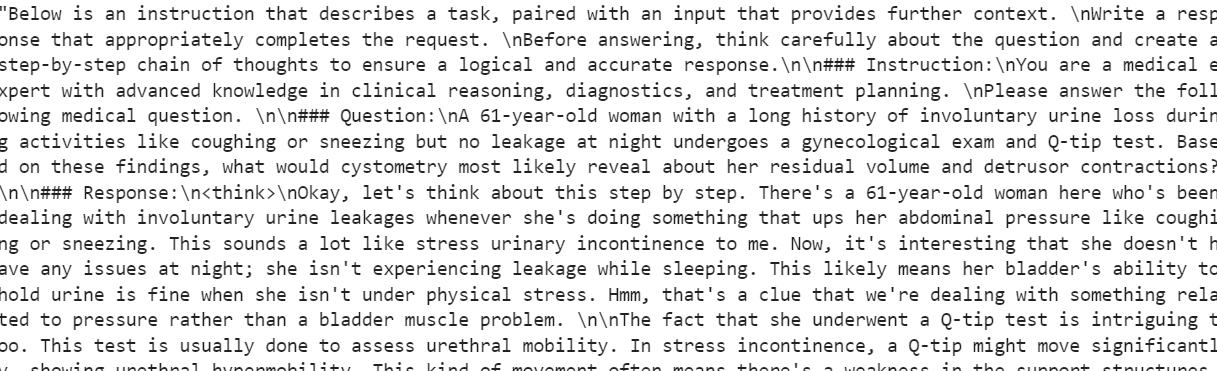
Trainer STF baru tidak menerima tokenizer, jadi kita akan mengonversi tokenizer menjadi data collator dan memberikan trainer data collator alih-alih tokenizer.
from transformers import DataCollatorForLanguageModeling

data_collator = DataCollatorForLanguageModeling(
    tokenizer=tokenizer,
    mlm=False
)Sekarang kita akan membuat gaya prompt pengujian yang mencakup semua dari gaya prompt pelatihan kecuali rantai pemikiran dan respons.
prompt_style = """Below is an instruction that describes a task, paired with an input that provides further context.
Write a response that appropriately completes the request.
Before answering, think carefully about the question and create a step-by-step chain of thoughts to ensure a logical and accurate response.

### Instruction:
You are a medical expert with advanced knowledge in clinical reasoning, diagnostics, and treatment planning.
Please answer the following medical question.

### Question:
{}

### Response:
<think>{}"""
Kita akan mengambil pertanyaan pertama dari dataset, mengonversinya menjadi prompt menggunakan gaya prompt pengujian, lalu menyiapkannya agar model menghasilkan respons.
question = dataset[0]['Question']
inputs = tokenizer(
    [prompt_style.format(question, "") + tokenizer.eos_token],
    return_tensors="pt"
).to("cuda")

outputs = model.generate(
    input_ids=inputs.input_ids,
    attention_mask=inputs.attention_mask,
    max_new_tokens=1200,
    eos_token_id=tokenizer.eos_token_id,
    use_cache=True,
)
response = tokenizer.batch_decode(outputs, skip_special_tokens=True)
print(response[0].split("### Response:")[1])
Rantai pemikiran model panjang, dan jawaban yang diberikan cukup singkat, berbeda signifikan dari dataset.
<think>assistant

To approach this question, let's break down the key elements provided and analyze them step by step:

1. **Symptoms**: The patient experiences involuntary urine loss during activities like coughing or sneezing but has no leakage at night. This pattern of urinary incontinence is suggestive of stress urinary incontinence (SUI), which is characterized by the involuntary leakage of urine on effort or exertion, or on sneezing or coughing.

2. **Diagnostic Tests Mentioned**:
   - **Gynecological Exam**: This is likely performed to assess the pelvic anatomy, including the position and support of the urethra and bladder neck, and to check for any pelvic organ prolapse.
   - **Q-tip Test**: This test is used to assess urethral mobility. A Q-tip (cotton swab) is inserted into the urethra, and its angle of movement is measured. Increased mobility (an angle change of more than 30 degrees) is often associated with stress urinary incontinence.

3. **Cystometry (Cystometrogram)**: This test measures the pressure within the bladder during filling and helps assess bladder function, including the residual volume and detrusor muscle contractions. The detrusor muscle is the smooth muscle in the wall of the bladder that contracts to allow urine to be expelled.

Given that the patient likely has stress urinary incontinence (SUI) based on her symptoms:
- **Residual Volume**: In patients with SUI, the bladder usually functions normally, and thus, the residual volume (the amount of urine left in the bladder after urination) is typically not significantly affected. Therefore, one would expect the residual volume to be normal or near-normal.

- **Detrusor Contractions**: In SUI, the problem primarily lies with the urethral sphincter mechanism and support rather than with the detrusor muscle itself. Hence, detrusor contractions are usually normal. The patient does not have symptoms suggestive of an overactive bladder (like urgency, urge incontinence, or nocturia), which would be more indicative of detrusor overactivity.

Based on this analysis, cystometry in this patient would most likely reveal:
- A **normal residual volume**, as her symptoms do not suggest a problem with bladder emptying.
- **Normal detrusor contractions**, as her condition (stress urinary incontinence) primarily involves issues with urethral support and continence mechanisms rather than detrusor function.

Therefore, cystometry would likely show that she has a normal residual volume and normal detrusor contractions.

</think>

The final answer is: $\boxed{Normal residual volume and normal detrusor contractions}$Sekarang kita akan menerapkan LoRA (Low-Rank Adaptation) untuk fine-tuning yang efisien parameter dan menerapkannya pada model. LoRA adalah teknik yang dirancang untuk melakukan fine-tuning model bahasa besar dengan membekukan sebagian besar parameter model dan hanya melatih subset kecil parameter tambahan.
Pendekatan ini hemat memori, lebih cepat, dan hemat biaya sekaligus tetap mempertahankan akurasi tinggi yang sebanding dengan fine-tuning penuh.
from peft import LoraConfig, get_peft_model

# LoRA config
peft_config = LoraConfig(
    lora_alpha=16,                           # Scaling factor for LoRA
    lora_dropout=0.05,                       # Add slight dropout for regularization
    r=64,                                    # Rank of the LoRA update matrices
    bias="none",                             # No bias reparameterization
    task_type="CAUSAL_LM",                   # Task type: Causal Language Modeling
    target_modules=[
        "q_proj",
        "k_proj",
        "v_proj",
        "o_proj",
        "gate_proj",
        "up_proj",
        "down_proj",
    ],  # Target modules for LoRA
)

model = get_peft_model(model, peft_config)
Sekarang kita akan mengonfigurasi dan menginisialisasi SFTTrainer (Supervised Fine-Tuning Trainer) dengan memberinya dataset, model, data collator, argumen pelatihan, dan konfigurasi LoRA. SFTTrainer menyederhanakan proses fine-tuning dengan mengintegrasikan semua komponen ini ke dalam satu alur kerja yang terpadu, sehingga lebih mudah melatih model bahasa besar seperti Llama 4 dengan LoRA.
from trl import SFTTrainer
from transformers import TrainingArguments


# Training Arguments
training_arguments = TrainingArguments(
    output_dir="output",
    per_device_train_batch_size=1,
    per_device_eval_batch_size=1,
    gradient_accumulation_steps=2,
    optim="paged_adamw_32bit",
    num_train_epochs=1,
    logging_steps=0.2,
    warmup_steps=10,
    logging_strategy="steps",
    learning_rate=2e-4,
    fp16=False,
    bf16=False,
    group_by_length=True,
    report_to="none"
)

# Initialize the Trainer
trainer = SFTTrainer(
    model=model,
    args=training_arguments,
    train_dataset=dataset,
    peft_config=peft_config,
    data_collator=data_collator,
)Mulai proses pelatihan dengan menjalankan perintah berikut:
trainer.train()Jika Anda beralih ke dasbor Pod, Anda akan melihat bahwa trainer memanfaatkan ketiga GPU untuk pelatihan.
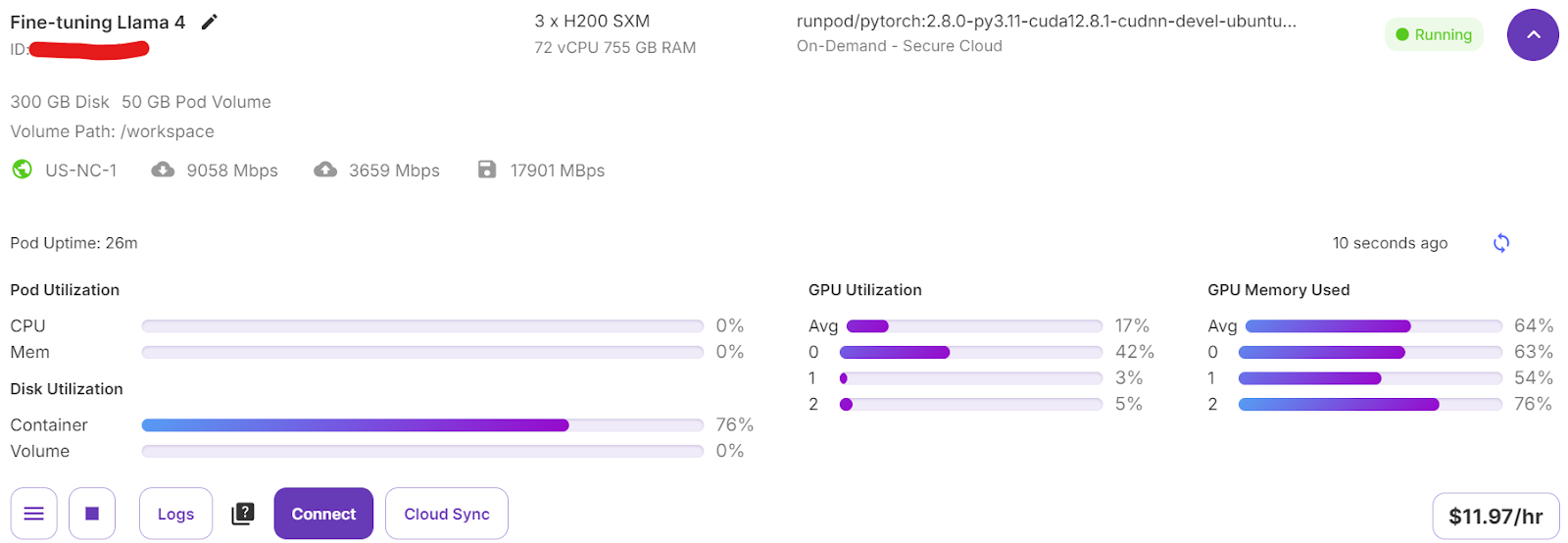
Kita hanya memerlukan 7 menit untuk melakukan fine-tuning model dan total 30 menit untuk menjalankan seluruh proyek dari awal hingga akhir.
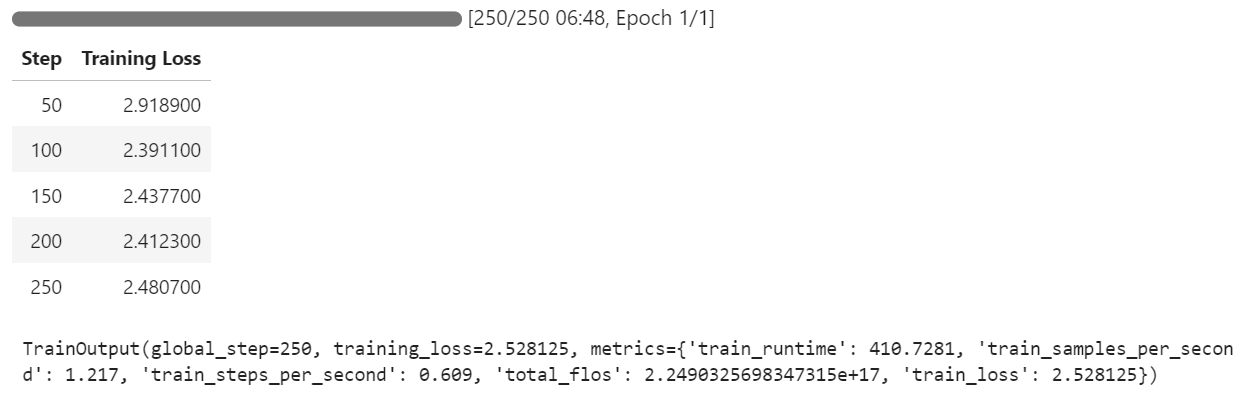
Sekarang kita akan menguji model yang telah di-fine-tune menggunakan sampel yang sama seperti sebelumnya untuk membandingkan performanya setelah fine-tuning. Ini akan membantu kita mengevaluasi seberapa baik peningkatan kemampuan penalaran model dan menghasilkan respons yang terperinci.
question = dataset[0]['Question']
inputs = tokenizer(
    [prompt_style.format(question, "") + tokenizer.eos_token],
    return_tensors="pt"
).to("cuda")

outputs = model.generate(
    input_ids=inputs.input_ids,
    attention_mask=inputs.attention_mask,
    max_new_tokens=1200,
    eos_token_id=tokenizer.eos_token_id,
    use_cache=True,
)
response = tokenizer.batch_decode(outputs, skip_special_tokens=True)
print(response[0].split("### Response:")[1])
Proses penalaran model akurat, dan responsnya terperinci serta logis:
<think>
Alright, let's think about what's going on with this 61-year-old woman. She's experiencing involuntary urine loss when she coughs or sneezes, which is classic for stress urinary incontinence. But there's no leakage at night, which is interesting. That detail might help us rule out other types of incontinence, like overactive bladder.

Now, let's think about the tests she's had. The gynecological exam and the Q-tip test are usually done to check for any anatomical issues that could be causing her symptoms. If the Q-tip test is positive, it means there's some mobility in the urethra, which can be a sign of stress incontinence.

Okay, so we've got stress urinary incontinence in mind. What does cystometry tell us? It's a test that looks at how well the bladder functions by measuring pressure and volume during filling and voiding.

For someone with stress incontinence, the cystometry would probably show that her bladder is doing its job properly. The residual volume, which is the amount of urine left in the bladder after she pees, should be normal. This means her bladder is emptying well enough.

Also, with stress incontinence, you wouldn't expect to see abnormal detrusor contractions. These are like muscle spasms in the bladder that can cause urgency and urge incontinence. But in stress incontinence, the problem is more about the urethral support and pressure control during activities, not the bladder muscle itself.

So, putting it all together, the cystometry should show a normal residual volume and no abnormal detrusor contractions. This fits perfectly with what we know about stress urinary incontinence. Yep, that's what I'd expect to see in this case.
</think>
In this scenario, the cystometry would most likely reveal a normal residual volume and no abnormal detrusor contractions. This is because stress urinary incontinence, as indicated by the patient's symptoms and the positive Q-tip test, is primarily related to issues with urethral support and pressure control during activities, not with the bladder muscle's function or emptying ability.
Mari uji model pada sampel lain dari dataset untuk mengevaluasi performanya lebih lanjut.
question = dataset[10]['Question']
inputs = tokenizer(
    [prompt_style.format(question, "") + tokenizer.eos_token],
    return_tensors="pt"
).to("cuda")

outputs = model.generate(
    input_ids=inputs.input_ids,
    attention_mask=inputs.attention_mask,
    max_new_tokens=1200,
    eos_token_id=tokenizer.eos_token_id,
    use_cache=True,
)
response = tokenizer.batch_decode(outputs, skip_special_tokens=True)
print(response[0].split("### Response:")[1])
Responsnya logis, terperinci, dan menunjukkan kemampuan model dalam menerapkan penalaran medis secara efektif:
<think>
Alright, let's break this down. So, we have a 42-year-old guy who's just recovered from pneumonia, and his T3 levels are low. Now, his TSH is slightly elevated at 4.7 µU/mL, which isn't too high but is definitely not normal. T4 is at 6 µg/dL, which is kind of in the middle range, and T3 is 68 ng/dL, which is low. Hmm, these numbers make me think of a condition called sick euthyroid syndrome. It's like when the body gets sick, the thyroid function tests can get all wonky, even if the thyroid itself is working fine.

In this syndrome, T3 usually drops first, and T4 might stay normal or even rise a bit. This makes sense here because his T3 is low, but T4 is still around 6 µg/dL. Now, the TSH is slightly elevated, which is a bit puzzling, but in sick euthyroid syndrome, TSH can be normal or even slightly elevated. So, this fits.

But wait, what about the other hormones? In sick euthyroid syndrome, we often see an increase in reverse T3 (rT3). This is because the body might convert T4 to rT3 instead of T3 when it's stressed. So, if I were to guess, I'd say the reverse T3 level is probably elevated in this case.

This all makes sense because the clinical picture and lab results are lining up nicely with sick euthyroid syndrome. So, if I had to pick an additional hormone that's likely elevated, it would be the reverse T3. Yeah, that seems to fit the scenario perfectly.
</think>
In this scenario, considering the clinical context of a 42-year-old man recovering from pneumonia with decreased T3 levels and slightly elevated TSH, along with normal T4 levels, the likely condition is sick euthyroid syndrome. In this condition, the body often converts T4 to reverse T3 (rT3) instead of T3 during stress or illness. Therefore, the additional hormone level that is likely to be elevated in this patient is reverse T3 (rT3).Sekarang kita akan mendorong (push) model yang telah di-fine-tune (adaptor LoRA) dan tokenizer ke Hugging Face Hub. Proses ini akan otomatis membuat repositori untuk Anda dan mengunggah semua berkas model yang diperlukan, sehingga model dapat diakses publik untuk digunakan lebih lanjut atau dibagikan.
model.push_to_hub("Llama-4-Scout-17B-16E-Instruct-Medical-ChatBot")
tokenizer.push_to_hub("Llama-4-Scout-17B-16E-Instruct-Medical-ChatBot")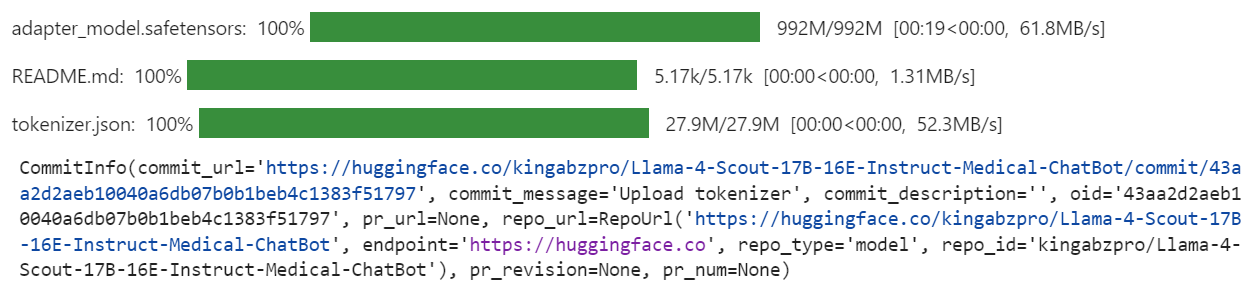
Setelah proses selesai, Anda dapat mengakses repositori model pada tautan berikut: kingabzpro/Llama-4-Scout-17B-16E-Instruct-Medical-ChatBot
Berikut adalah notebook pendamping yang berisi semua kode, keluaran, dan instruksi terperinci untuk membantu Anda melakukan fine-tuning model Llama 4 Anda sendiri.
Membuat tutorial ini merupakan pengalaman yang menantang sekaligus bermanfaat. Saat bekerja dengan Llama 4, saya menemui beberapa masalah yang menyoroti kompleksitas penggunaan model ini. Menurut saya, Llama 4 belum sepenuhnya dioptimalkan untuk penggunaan luas, terutama bagi individu yang mengandalkan GPU kelas konsumen. Berikut beberapa tantangan utama yang saya hadapi:
Terlepas dari tantangan ini, jika Anda mengikuti panduan ini langkah demi langkah, Anda seharusnya dapat melakukan fine-tuning Llama 4 pada dataset apa pun dengan relatif mudah.
Untuk mempelajari lebih lanjut tentang Llama 4, lihat sumber daya berikut:
Pelajari AI dengan kursus-kursus ini!
Kursus
Program
Program
blogs
David Woods
13 mnt
blogs
Javier Canales Luna
14 mnt
blogs
Dario Radečić
15 mnt
blogs
Hugo Bowne-Anderson
13 mnt