
Khóa học
Fine-Tuning với Llama 3
2 giờ
4.1K
Meta vừa ra mắt dòng Llama 4, gồm hai mô hình tiên tiến: Llama 4 Scout và Llama 4 Maverick. Cả hai đều là mô hình mở trọng số, nhưng tinh chỉnh Llama 4 Scout cần bốn GPU H100, còn Llama 4 Maverick cần tám. Điều này đồng nghĩa chỉ những công ty có nguồn lực đáng kể mới đủ khả năng tinh chỉnh chúng.
Trong bài viết này, tôi sẽ chỉ cho bạn cách tinh chỉnh Llama 4 Scout chỉ với 10 đô la bằng nền tảng RunPod. Bạn sẽ học được:
Chúng tôi cập nhật cho độc giả những điều mới nhất trong AI qua The Median, bản tin thứ Sáu miễn phí tóm lược các câu chuyện nổi bật trong tuần. Đăng ký để nắm bắt nhanh chỉ trong vài phút mỗi tuần:
Truy cập trang web RunPod và tạo tài khoản. Sau đó, vào menu Runpod Billing và nạp 25 đô bằng thẻ tín dụng. Bạn cũng có thể thanh toán bằng tiền mã hóa.
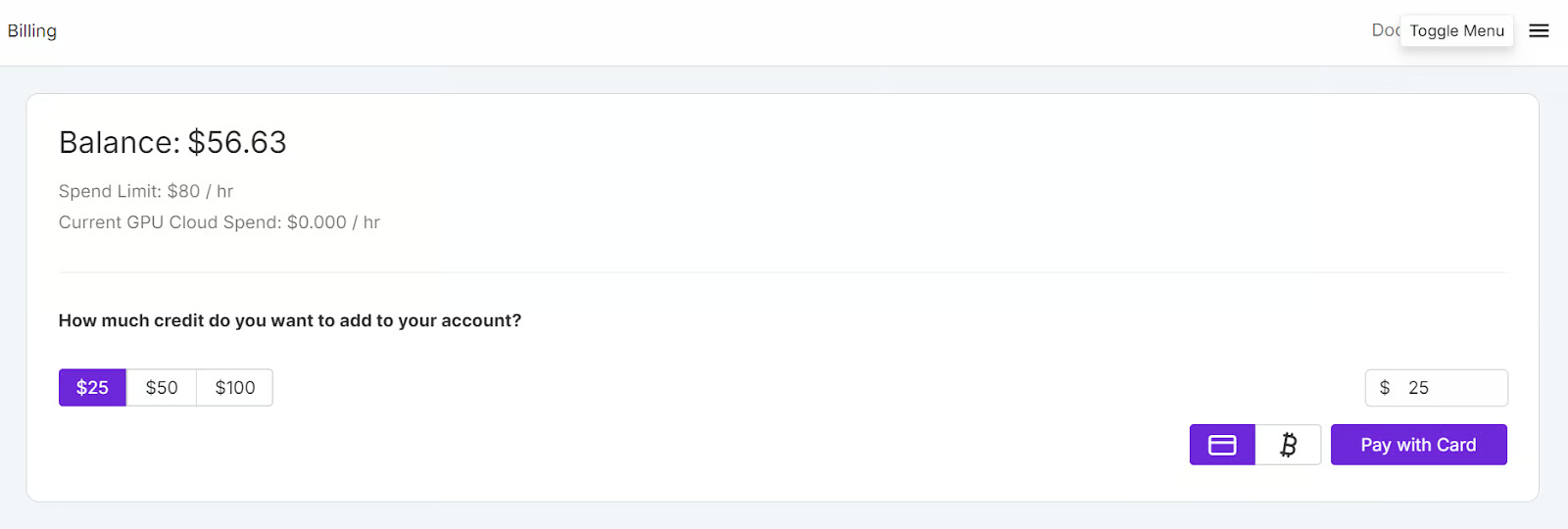
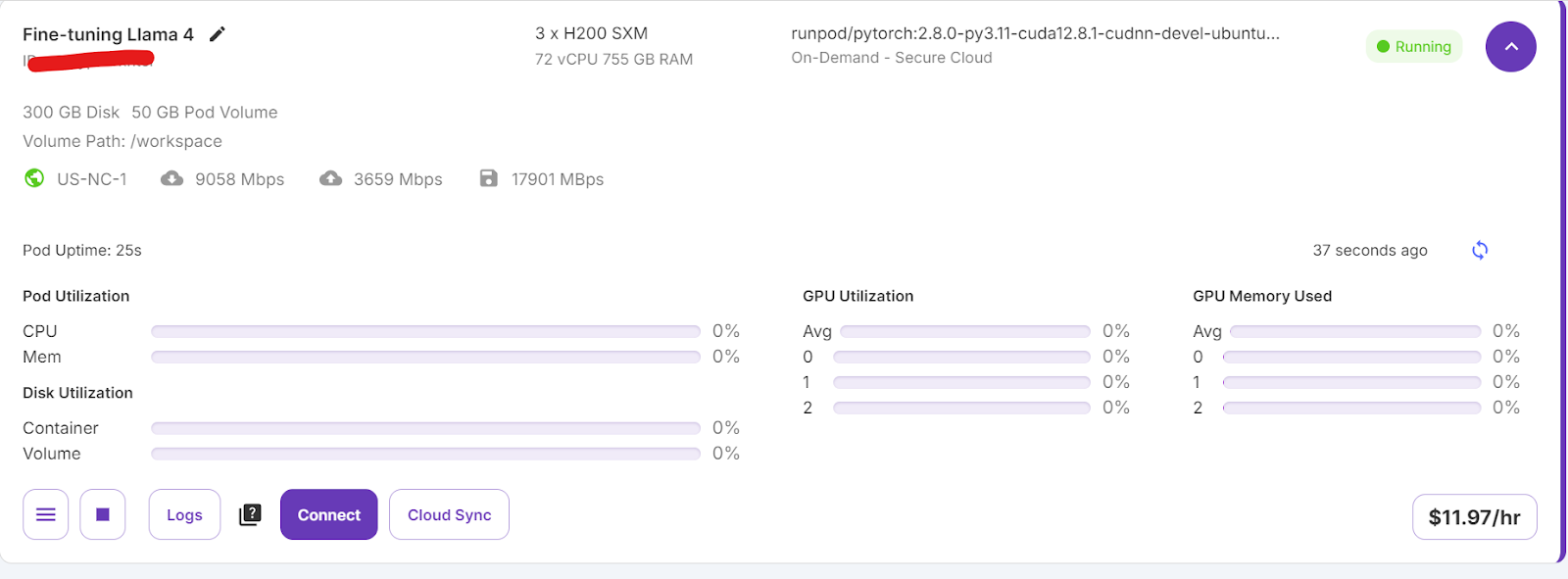
Đi tới menu My Pods để bắt đầu cấu hình pod. Pod hoạt động như một máy chủ ảo, cung cấp CPU, GPU, bộ nhớ và lưu trữ cần thiết cho tác vụ của bạn.
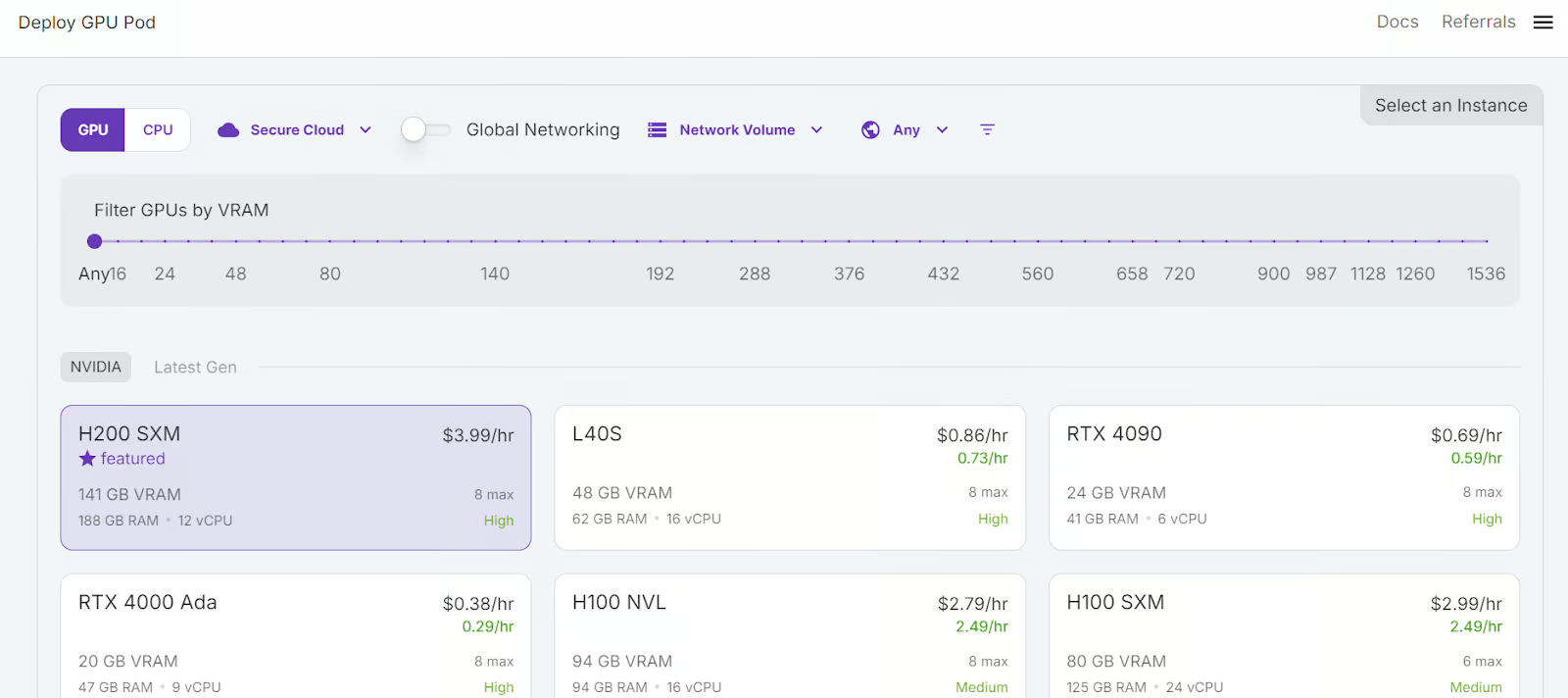
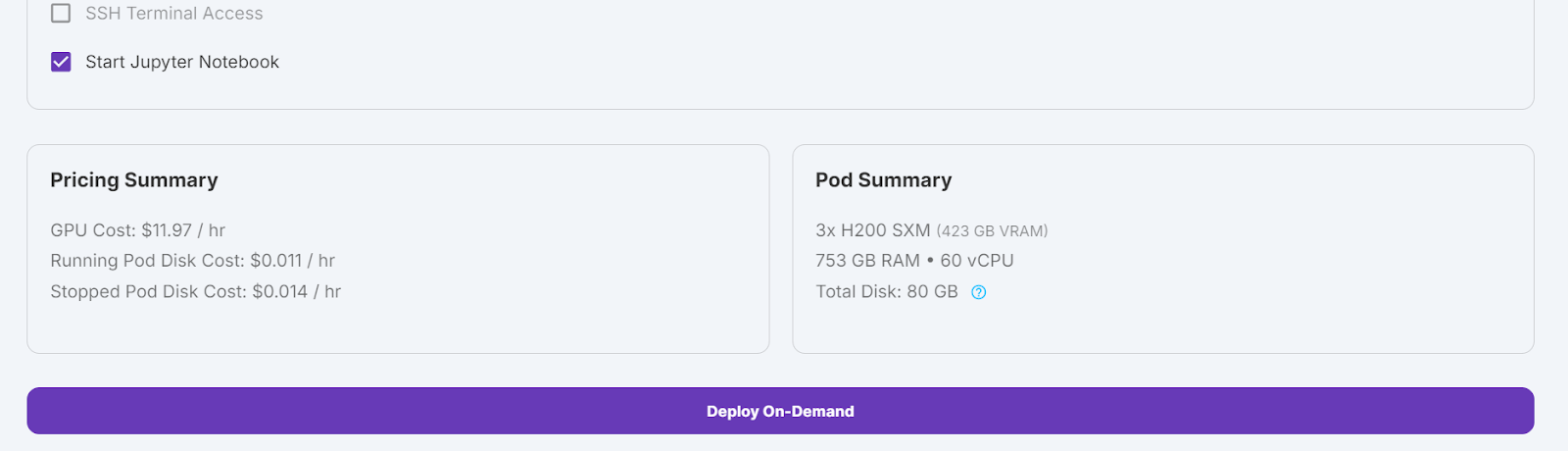
Chúng ta sẽ chọn GPU 3x H200 SXM để có đủ bộ nhớ tải mô hình, lượng tử hóa và tinh chỉnh trên bộ dữ liệu mới. Ngoài ra, bạn có thể dùng khung Unsloth để chạy mô hình trên một H100 duy nhất — tuy nhiên, cách này không hiệu quả với tôi.
Để thiết lập pod, hãy làm theo các bước:
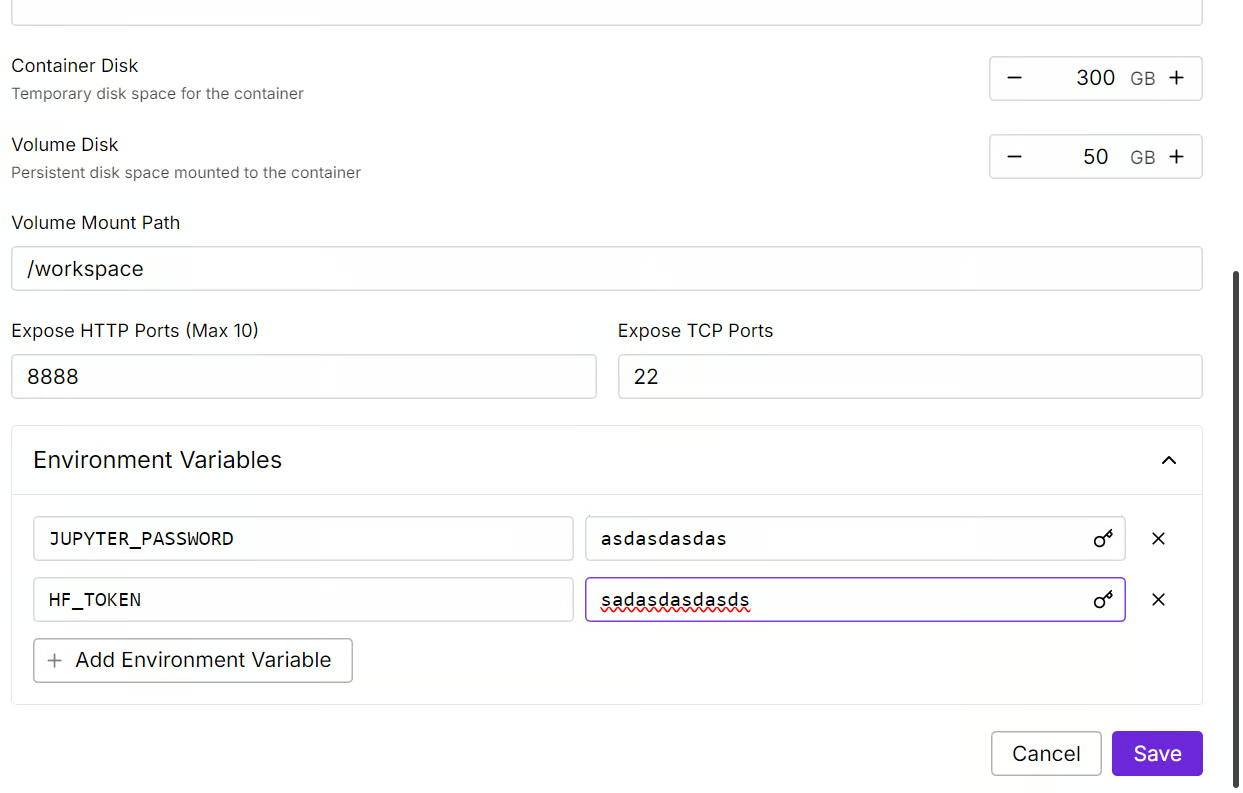
Chúng ta sẽ chỉnh sửa pod bằng cách tăng dung lượng đĩa container lên 300GB và thêm biến môi trường HF_TOKEN, tức mã truy cập Hugging Face của bạn. Mã này rất quan trọng để tải và lưu mô hình hiệu quả.
Việc thiết lập container sẽ mất một lúc. Khi hoàn tất, nhấn nút “Connect” và khởi chạy JupyterLab Instance.
Tạo một notebook mới và bắt đầu dùng môi trường này, tương tự như thiết lập cục bộ của bạn.
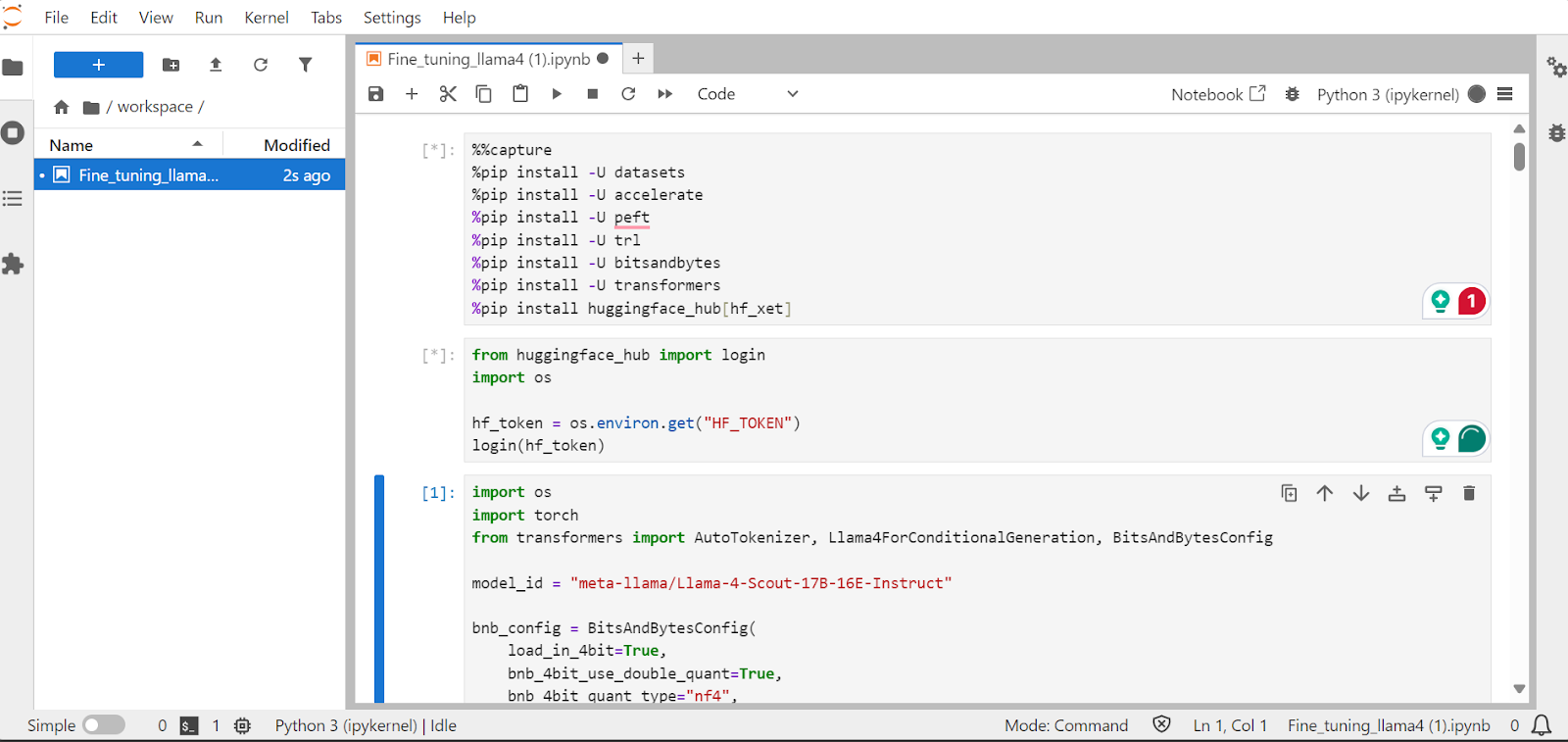
Trong phần này, chúng ta sẽ học cách xử lý những thách thức thường gặp khi tinh chỉnh mô hình Llama 4 mới, như lỗi tràn bộ nhớ và lỗi trong thư viện Transformers. Chúng ta cũng sẽ đề cập cách tải, tinh chỉnh và lưu adapter LoRA một cách trơn tru. Bằng cách làm theo các bước này, bạn có thể tập trung vào quá trình tinh chỉnh mà không phải lo các rào cản kỹ thuật.
Chúng ta sẽ cài các gói Python cần thiết để tinh chỉnh mô hình ngôn ngữ lớn.
Lưu ý:
xet nhanh hơn Git-LFS. Tích hợp này sẽ tăng tốc tải xuống gấp ba lần.%%capture
!pip install transformers==4.51.0
%pip install -U datasets
%pip install -U accelerate
%pip install -U peft
%pip install -U trl
%pip install -U bitsandbytes
%pip install huggingface_hub[hf_xet]Tải khóa API từ biến môi trường để đăng nhập vào Hugging Face. Khi đăng nhập, bạn có thể truy cập các mô hình có kiểm soát và cũng có thể lưu các mô hình, tokenizer đã tinh chỉnh.
from huggingface_hub import login
import os

hf_token = os.environ.get("HF_TOKEN")
login(hf_token)Tải mô hình Llama-4-Scout-17B-16E-Instruct với lượng tử hóa 4-bit để dùng bộ nhớ hiệu quả. Hãy đảm bảo bạn đặt device_map là auto để dùng cả ba GPU H200.
Lưu ý: Hãy đảm bảo bạn có quyền truy cập mô hình, vì mô hình này có kiểm soát và yêu cầu bạn điền biểu mẫu tại URL meta-llama/Llama-4-Scout-17B-16E-Instruct.
import os
import torch
from transformers import AutoTokenizer, Llama4ForConditionalGeneration, BitsAndBytesConfig


model_id = "meta-llama/Llama-4-Scout-17B-16E-Instruct"

bnb_config = BitsAndBytesConfig(
    load_in_4bit=True,
    bnb_4bit_use_double_quant=False,
    bnb_4bit_quant_type="nf4",
    bnb_4bit_compute_dtype=torch.bfloat16,
)


model = Llama4ForConditionalGeneration.from_pretrained(
    model_id,
    device_map="auto",
    torch_dtype=torch.bfloat16,
    quantization_config=bnb_config,
    trust_remote_code=True,
)

model.config.use_cache = False
model.config.pretraining_tp = 1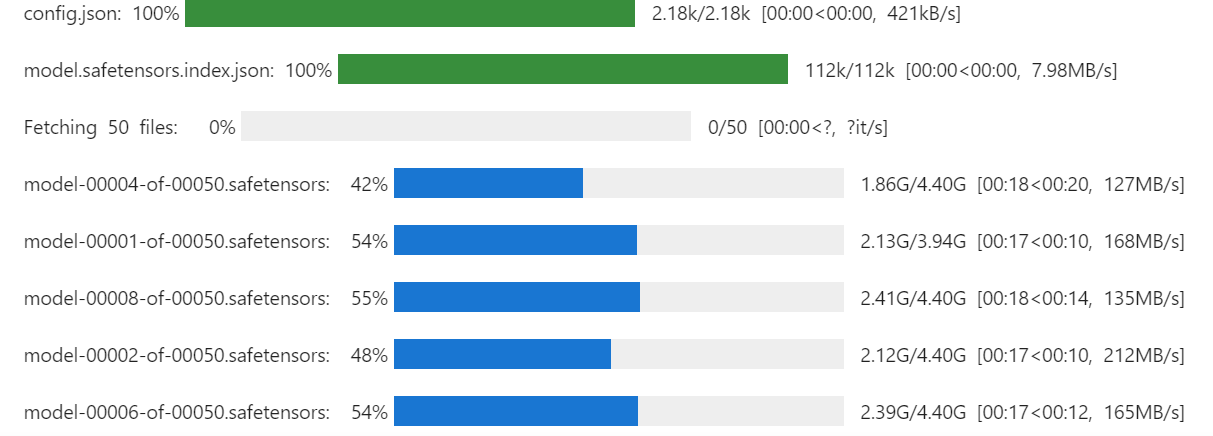
Chúng ta cũng sẽ tải tokenizer dùng cùng ID mô hình.
# Load tokenizer
tokenizer = AutoTokenizer.from_pretrained(model_id, trust_remote_code=True)
Chạy lệnh dưới đây để kiểm tra còn bao nhiêu bộ nhớ cho việc thiết lập trainer và tinh chỉnh mô hình.
!nvidia-smi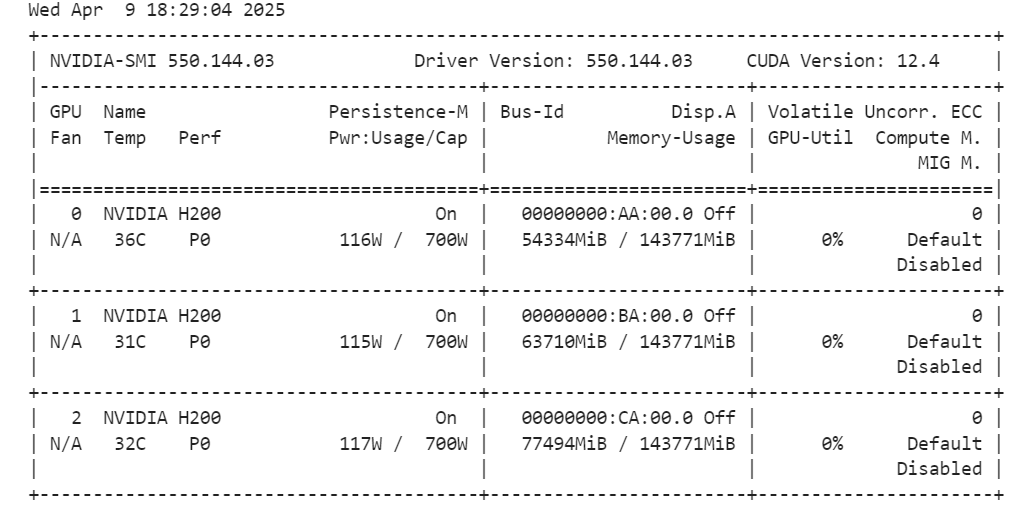
Chúng ta sẽ tạo kiểu prompt cho mô hình, gồm một system prompt với chỗ trống cho câu hỏi, chuỗi suy nghĩ và câu trả lời. Prompt này sẽ giúp mô hình suy nghĩ từng bước và đưa ra câu trả lời rõ ràng, chính xác.
train_prompt_style = """Below is an instruction that describes a task, paired with an input that provides further context.
Write a response that appropriately completes the request.
Before answering, think carefully about the question and create a step-by-step chain of thoughts to ensure a logical and accurate response.

### Instruction:
You are a medical expert with advanced knowledge in clinical reasoning, diagnostics, and treatment planning.
Please answer the following medical question.

### Question:
{}

### Response:
<think>
{}
</think>
{}"""
Tiếp theo, chúng ta sẽ tạo hàm Python để sinh cột “text” dựa trên kiểu prompt huấn luyện và các cột trong bộ dữ liệu.
EOS_TOKEN = tokenizer.eos_token  # Must add EOS_TOKEN

def formatting_prompts_func(examples):
    inputs = examples["Question"]
    complex_cots = examples["Complex_CoT"]
    outputs = examples["Response"]
    texts = []
    for question, cot, response in zip(inputs, complex_cots, outputs):
        # Append the EOS token to the response if it's not already there
        if not response.endswith(tokenizer.eos_token):
            response += tokenizer.eos_token
        text = train_prompt_style.format(question, cot, response)
        texts.append(text)
    return {"text": texts}
Chúng ta sẽ tải 500 mẫu đầu tiên từ bộ dữ liệu FreedomIntelligence/medical-o1-reasoning-SFT trên Hugging Face Hub và áp dụng hàm formatting_prompts_func để tạo cột “text”.
from datasets import load_dataset


dataset = load_dataset("FreedomIntelligence/medical-o1-reasoning-SFT","en", split = "train[0:500]",trust_remote_code=True)
dataset = dataset.map(formatting_prompts_func, batched = True,)
dataset["text"][0]
Cột “text” gồm system prompt, hướng dẫn, câu hỏi, chuỗi suy nghĩ và câu trả lời.
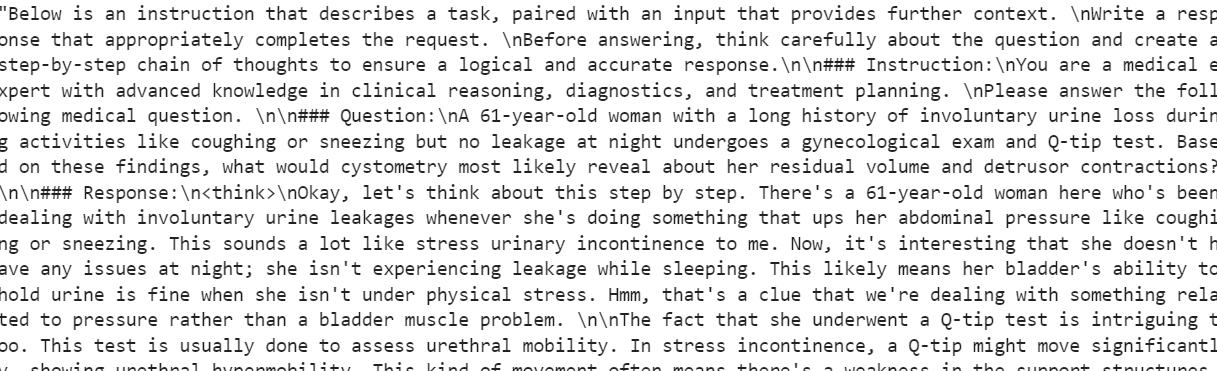
STF trainer mới không chấp nhận tokenizer, nên chúng ta sẽ chuyển tokenizer thành data collator và cung cấp cho trainer thay vì tokenizer.
from transformers import DataCollatorForLanguageModeling

data_collator = DataCollatorForLanguageModeling(
    tokenizer=tokenizer,
    mlm=False
)Giờ chúng ta sẽ tạo kiểu prompt kiểm thử, bao gồm mọi thứ từ prompt huấn luyện trừ phần chuỗi suy nghĩ và câu trả lời.
prompt_style = """Below is an instruction that describes a task, paired with an input that provides further context.
Write a response that appropriately completes the request.
Before answering, think carefully about the question and create a step-by-step chain of thoughts to ensure a logical and accurate response.

### Instruction:
You are a medical expert with advanced knowledge in clinical reasoning, diagnostics, and treatment planning.
Please answer the following medical question.

### Question:
{}

### Response:
<think>{}"""
Chúng ta sẽ lấy câu hỏi đầu tiên từ bộ dữ liệu, chuyển thành prompt theo kiểu kiểm thử và chuẩn bị cho mô hình sinh câu trả lời.
question = dataset[0]['Question']
inputs = tokenizer(
    [prompt_style.format(question, "") + tokenizer.eos_token],
    return_tensors="pt"
).to("cuda")

outputs = model.generate(
    input_ids=inputs.input_ids,
    attention_mask=inputs.attention_mask,
    max_new_tokens=1200,
    eos_token_id=tokenizer.eos_token_id,
    use_cache=True,
)
response = tokenizer.batch_decode(outputs, skip_special_tokens=True)
print(response[0].split("### Response:")[1])
Chuỗi suy nghĩ của mô hình dài, còn câu trả lời khá ngắn và khác đáng kể so với bộ dữ liệu.
<think>assistant

To approach this question, let's break down the key elements provided and analyze them step by step:

1. **Symptoms**: The patient experiences involuntary urine loss during activities like coughing or sneezing but has no leakage at night. This pattern of urinary incontinence is suggestive of stress urinary incontinence (SUI), which is characterized by the involuntary leakage of urine on effort or exertion, or on sneezing or coughing.

2. **Diagnostic Tests Mentioned**:
   - **Gynecological Exam**: This is likely performed to assess the pelvic anatomy, including the position and support of the urethra and bladder neck, and to check for any pelvic organ prolapse.
   - **Q-tip Test**: This test is used to assess urethral mobility. A Q-tip (cotton swab) is inserted into the urethra, and its angle of movement is measured. Increased mobility (an angle change of more than 30 degrees) is often associated with stress urinary incontinence.

3. **Cystometry (Cystometrogram)**: This test measures the pressure within the bladder during filling and helps assess bladder function, including the residual volume and detrusor muscle contractions. The detrusor muscle is the smooth muscle in the wall of the bladder that contracts to allow urine to be expelled.

Given that the patient likely has stress urinary incontinence (SUI) based on her symptoms:
- **Residual Volume**: In patients with SUI, the bladder usually functions normally, and thus, the residual volume (the amount of urine left in the bladder after urination) is typically not significantly affected. Therefore, one would expect the residual volume to be normal or near-normal.

- **Detrusor Contractions**: In SUI, the problem primarily lies with the urethral sphincter mechanism and support rather than with the detrusor muscle itself. Hence, detrusor contractions are usually normal. The patient does not have symptoms suggestive of an overactive bladder (like urgency, urge incontinence, or nocturia), which would be more indicative of detrusor overactivity.

Based on this analysis, cystometry in this patient would most likely reveal:
- A **normal residual volume**, as her symptoms do not suggest a problem with bladder emptying.
- **Normal detrusor contractions**, as her condition (stress urinary incontinence) primarily involves issues with urethral support and continence mechanisms rather than detrusor function.

Therefore, cystometry would likely show that she has a normal residual volume and normal detrusor contractions.

</think>

The final answer is: $\boxed{Normal residual volume and normal detrusor contractions}$Giờ chúng ta sẽ triển khai LoRA (Low-Rank Adaptation) để tinh chỉnh hiệu quả tham số và áp dụng vào mô hình. LoRA là kỹ thuật tinh chỉnh mô hình ngôn ngữ lớn bằng cách đóng băng phần lớn tham số và chỉ huấn luyện một tập nhỏ tham số bổ sung.
Cách này tiết kiệm bộ nhớ, nhanh và chi phí thấp, trong khi vẫn duy trì độ chính xác cao, tương đương tinh chỉnh đầy đủ.
from peft import LoraConfig, get_peft_model

# LoRA config
peft_config = LoraConfig(
    lora_alpha=16,                           # Scaling factor for LoRA
    lora_dropout=0.05,                       # Add slight dropout for regularization
    r=64,                                    # Rank of the LoRA update matrices
    bias="none",                             # No bias reparameterization
    task_type="CAUSAL_LM",                   # Task type: Causal Language Modeling
    target_modules=[
        "q_proj",
        "k_proj",
        "v_proj",
        "o_proj",
        "gate_proj",
        "up_proj",
        "down_proj",
    ],  # Target modules for LoRA
)

model = get_peft_model(model, peft_config)
Tiếp theo, chúng ta cấu hình và khởi tạo SFTTrainer (Supervised Fine-Tuning Trainer) bằng cách cung cấp bộ dữ liệu, mô hình, data collator, tham số huấn luyện và cấu hình LoRA. SFTTrainer giúp đơn giản hóa quá trình tinh chỉnh bằng cách tích hợp tất cả thành một quy trình gọn nhẹ, giúp việc huấn luyện các mô hình lớn như Llama 4 với LoRA trở nên dễ dàng hơn.
from trl import SFTTrainer
from transformers import TrainingArguments


# Training Arguments
training_arguments = TrainingArguments(
    output_dir="output",
    per_device_train_batch_size=1,
    per_device_eval_batch_size=1,
    gradient_accumulation_steps=2,
    optim="paged_adamw_32bit",
    num_train_epochs=1,
    logging_steps=0.2,
    warmup_steps=10,
    logging_strategy="steps",
    learning_rate=2e-4,
    fp16=False,
    bf16=False,
    group_by_length=True,
    report_to="none"
)

# Initialize the Trainer
trainer = SFTTrainer(
    model=model,
    args=training_arguments,
    train_dataset=dataset,
    peft_config=peft_config,
    data_collator=data_collator,
)Bắt đầu quá trình huấn luyện bằng cách chạy lệnh sau:
trainer.train()Nếu bạn chuyển sang bảng điều khiển Pod, bạn sẽ thấy trainer đang sử dụng cả ba GPU để huấn luyện.
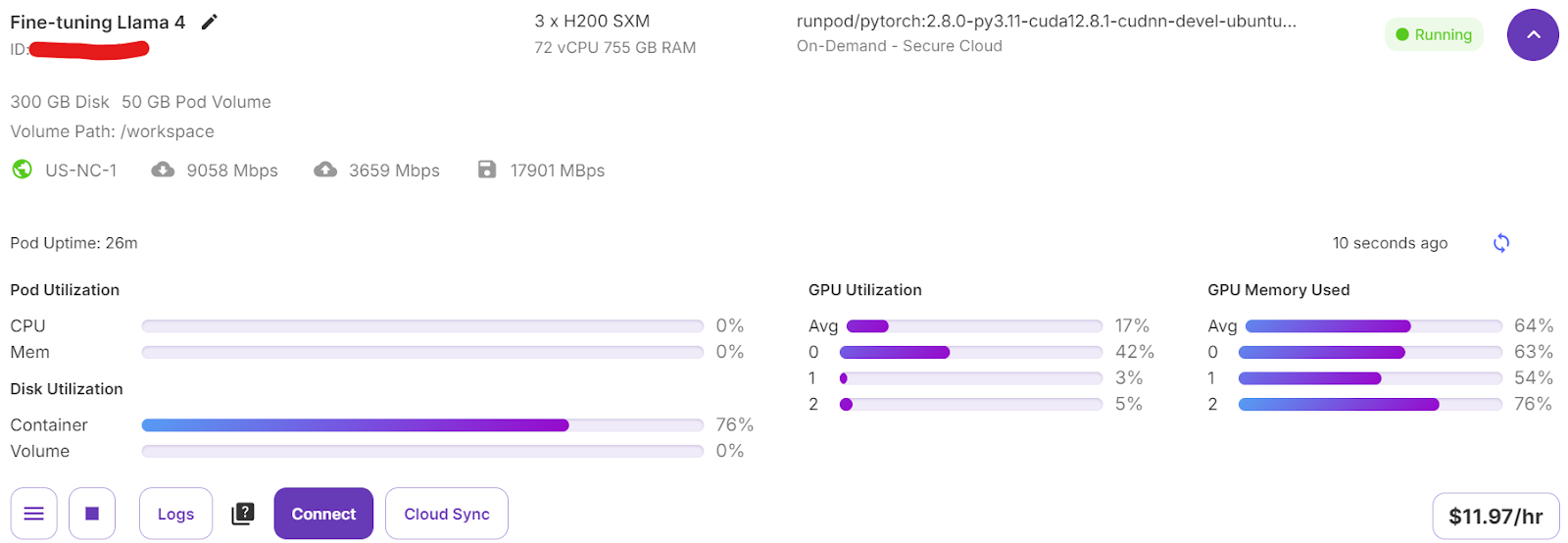
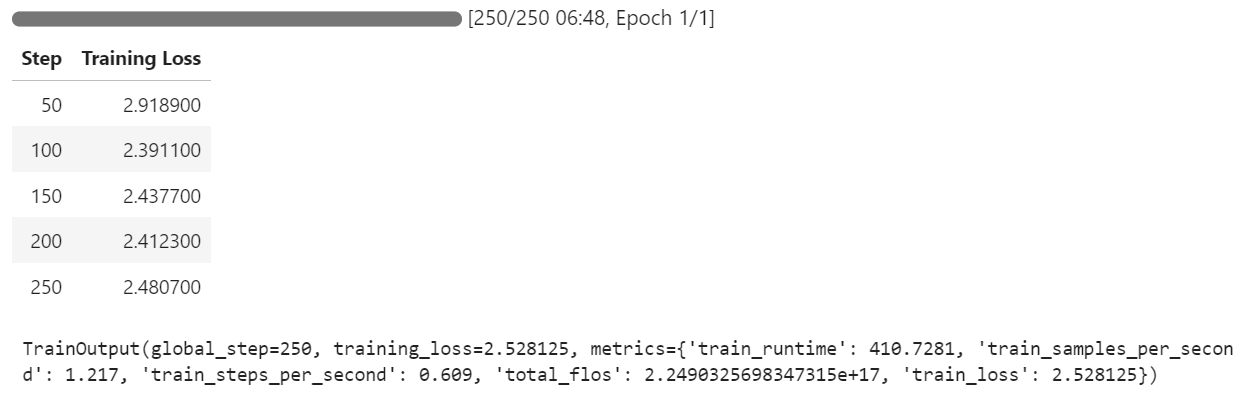
Chúng tôi chỉ mất 7 phút để tinh chỉnh mô hình và tổng cộng 30 phút để chạy toàn bộ dự án từ đầu đến cuối.
Giờ chúng ta sẽ kiểm thử mô hình đã tinh chỉnh bằng cùng mẫu trước đó để so sánh hiệu năng sau tinh chỉnh. Điều này giúp đánh giá mức cải thiện về lập luận và khả năng tạo câu trả lời chi tiết.
question = dataset[0]['Question']
inputs = tokenizer(
    [prompt_style.format(question, "") + tokenizer.eos_token],
    return_tensors="pt"
).to("cuda")

outputs = model.generate(
    input_ids=inputs.input_ids,
    attention_mask=inputs.attention_mask,
    max_new_tokens=1200,
    eos_token_id=tokenizer.eos_token_id,
    use_cache=True,
)
response = tokenizer.batch_decode(outputs, skip_special_tokens=True)
print(response[0].split("### Response:")[1])
Quy trình lập luận của mô hình chính xác, và câu trả lời chi tiết, logic:
<think>
Alright, let's think about what's going on with this 61-year-old woman. She's experiencing involuntary urine loss when she coughs or sneezes, which is classic for stress urinary incontinence. But there's no leakage at night, which is interesting. That detail might help us rule out other types of incontinence, like overactive bladder.

Now, let's think about the tests she's had. The gynecological exam and the Q-tip test are usually done to check for any anatomical issues that could be causing her symptoms. If the Q-tip test is positive, it means there's some mobility in the urethra, which can be a sign of stress incontinence.

Okay, so we've got stress urinary incontinence in mind. What does cystometry tell us? It's a test that looks at how well the bladder functions by measuring pressure and volume during filling and voiding.

For someone with stress incontinence, the cystometry would probably show that her bladder is doing its job properly. The residual volume, which is the amount of urine left in the bladder after she pees, should be normal. This means her bladder is emptying well enough.

Also, with stress incontinence, you wouldn't expect to see abnormal detrusor contractions. These are like muscle spasms in the bladder that can cause urgency and urge incontinence. But in stress incontinence, the problem is more about the urethral support and pressure control during activities, not the bladder muscle itself.

So, putting it all together, the cystometry should show a normal residual volume and no abnormal detrusor contractions. This fits perfectly with what we know about stress urinary incontinence. Yep, that's what I'd expect to see in this case.
</think>
In this scenario, the cystometry would most likely reveal a normal residual volume and no abnormal detrusor contractions. This is because stress urinary incontinence, as indicated by the patient's symptoms and the positive Q-tip test, is primarily related to issues with urethral support and pressure control during activities, not with the bladder muscle's function or emptying ability.
Hãy kiểm thử mô hình trên một mẫu khác từ bộ dữ liệu để đánh giá thêm hiệu năng.
question = dataset[10]['Question']
inputs = tokenizer(
    [prompt_style.format(question, "") + tokenizer.eos_token],
    return_tensors="pt"
).to("cuda")

outputs = model.generate(
    input_ids=inputs.input_ids,
    attention_mask=inputs.attention_mask,
    max_new_tokens=1200,
    eos_token_id=tokenizer.eos_token_id,
    use_cache=True,
)
response = tokenizer.batch_decode(outputs, skip_special_tokens=True)
print(response[0].split("### Response:")[1])
Câu trả lời hợp lý, chi tiết và cho thấy mô hình áp dụng lập luận y khoa hiệu quả:
<think>
Alright, let's break this down. So, we have a 42-year-old guy who's just recovered from pneumonia, and his T3 levels are low. Now, his TSH is slightly elevated at 4.7 µU/mL, which isn't too high but is definitely not normal. T4 is at 6 µg/dL, which is kind of in the middle range, and T3 is 68 ng/dL, which is low. Hmm, these numbers make me think of a condition called sick euthyroid syndrome. It's like when the body gets sick, the thyroid function tests can get all wonky, even if the thyroid itself is working fine.

In this syndrome, T3 usually drops first, and T4 might stay normal or even rise a bit. This makes sense here because his T3 is low, but T4 is still around 6 µg/dL. Now, the TSH is slightly elevated, which is a bit puzzling, but in sick euthyroid syndrome, TSH can be normal or even slightly elevated. So, this fits.

But wait, what about the other hormones? In sick euthyroid syndrome, we often see an increase in reverse T3 (rT3). This is because the body might convert T4 to rT3 instead of T3 when it's stressed. So, if I were to guess, I'd say the reverse T3 level is probably elevated in this case.

This all makes sense because the clinical picture and lab results are lining up nicely with sick euthyroid syndrome. So, if I had to pick an additional hormone that's likely elevated, it would be the reverse T3. Yeah, that seems to fit the scenario perfectly.
</think>
In this scenario, considering the clinical context of a 42-year-old man recovering from pneumonia with decreased T3 levels and slightly elevated TSH, along with normal T4 levels, the likely condition is sick euthyroid syndrome. In this condition, the body often converts T4 to reverse T3 (rT3) instead of T3 during stress or illness. Therefore, the additional hormone level that is likely to be elevated in this patient is reverse T3 (rT3).Chúng ta sẽ đẩy mô hình đã tinh chỉnh (adapter LoRA) và tokenizer lên Hugging Face Hub. Quá trình này sẽ tự động tạo kho cho bạn và tải lên tất cả tệp mô hình cần thiết, giúp mô hình sẵn sàng truy cập công khai để sử dụng hoặc chia sẻ.
model.push_to_hub("Llama-4-Scout-17B-16E-Instruct-Medical-ChatBot")
tokenizer.push_to_hub("Llama-4-Scout-17B-16E-Instruct-Medical-ChatBot")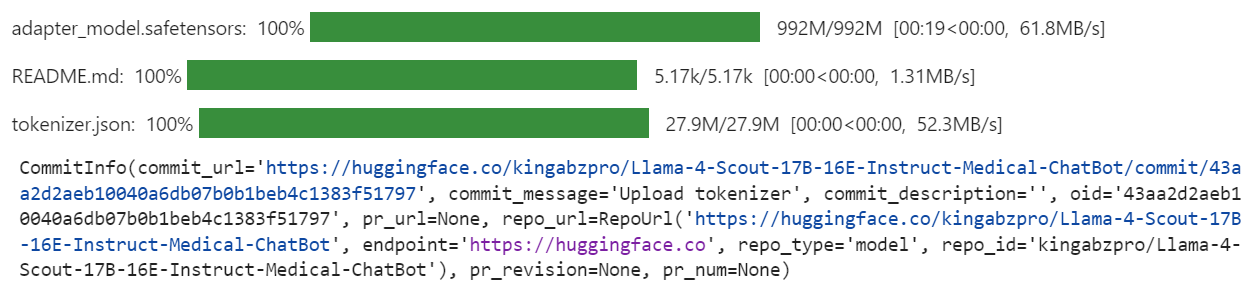
Khi hoàn tất, bạn có thể truy cập kho mô hình tại liên kết: kingabzpro/Llama-4-Scout-17B-16E-Instruct-Medical-ChatBot
Đây là notebook đi kèm chứa toàn bộ mã, kết quả và hướng dẫn chi tiết để bạn tinh chỉnh mô hình Llama 4 của riêng mình.
Việc tạo hướng dẫn này vừa thách thức vừa đáng giá. Khi làm việc với Llama 4, tôi gặp một số vấn đề cho thấy độ phức tạp khi sử dụng mô hình này. Theo tôi, Llama 4 chưa được tối ưu hoàn toàn để phổ cập, đặc biệt với những người dùng dựa vào GPU tiêu dùng. Dưới đây là vài thách thức chính tôi gặp phải:
Dù có những thách thức này, nếu bạn làm theo hướng dẫn từng bước, bạn sẽ có thể tinh chỉnh Llama 4 trên bất kỳ bộ dữ liệu mới nào một cách tương đối dễ dàng.
Để tìm hiểu thêm về Llama 4, hãy xem các tài nguyên sau:
Học AI với các khóa học này!
Khóa học
Lộ trình
Lộ trình
blog
Matt Crabtree
10 phút
