
Cursus
Fijn-afstemmen met Llama 3
2 uur
4.1K
Meta heeft zojuist de Llama 4-serie gelanceerd, met twee geavanceerde modellen: Llama 4 Scout en Llama 4 Maverick. Beide zijn open-weight, maar voor het fine-tunen van Llama 4 Scout zijn vier H100-GPU’s nodig en voor Llama 4 Maverick acht. Dat betekent dat alleen bedrijven met aanzienlijke middelen zich kunnen veroorloven om ze te fine-tunen.
In deze blog laat ik je zien hoe je Llama 4 Scout kunt fine-tunen voor slechts $10 met het RunPod-platform. Je leert:
We houden onze lezers op de hoogte van het laatste AI-nieuws met The Median, onze gratis vrijdagse nieuwsbrief die de belangrijkste verhalen van de week samenvat. Abonneer je en blijf scherp in een paar minuten per week:
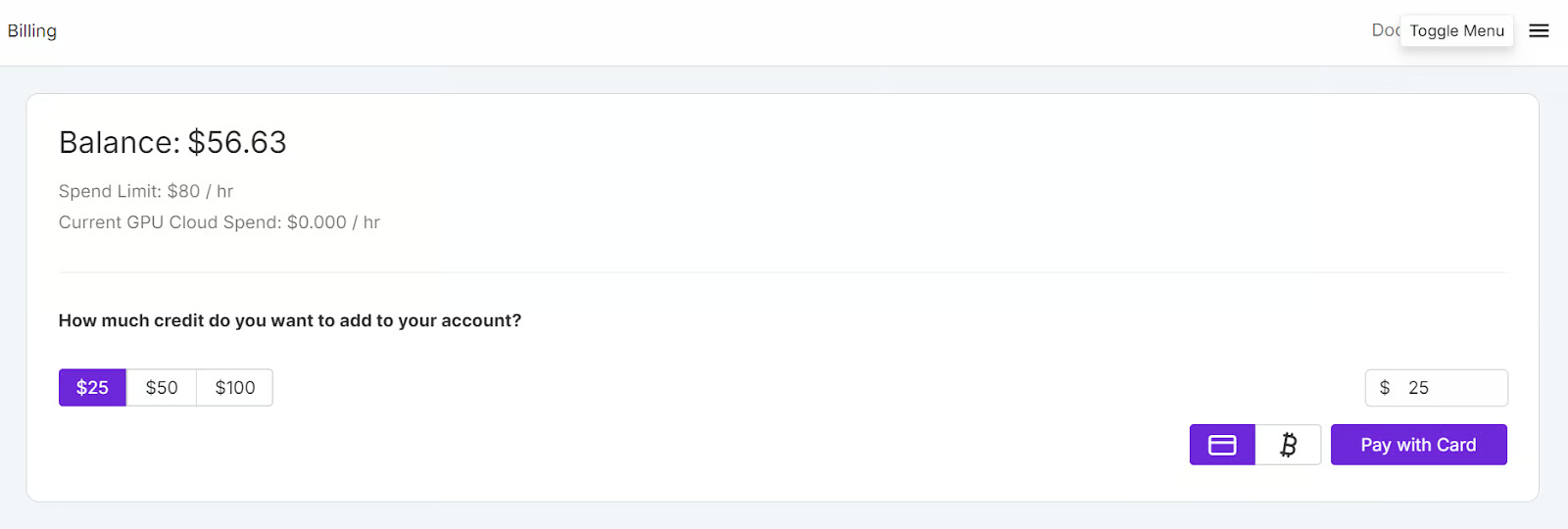
Ga naar de RunPod-website en maak een account aan. Ga daarna naar het menu Runpod Billing en voeg $25 toe met je creditcard. Je kunt ook met cryptocurrency betalen.
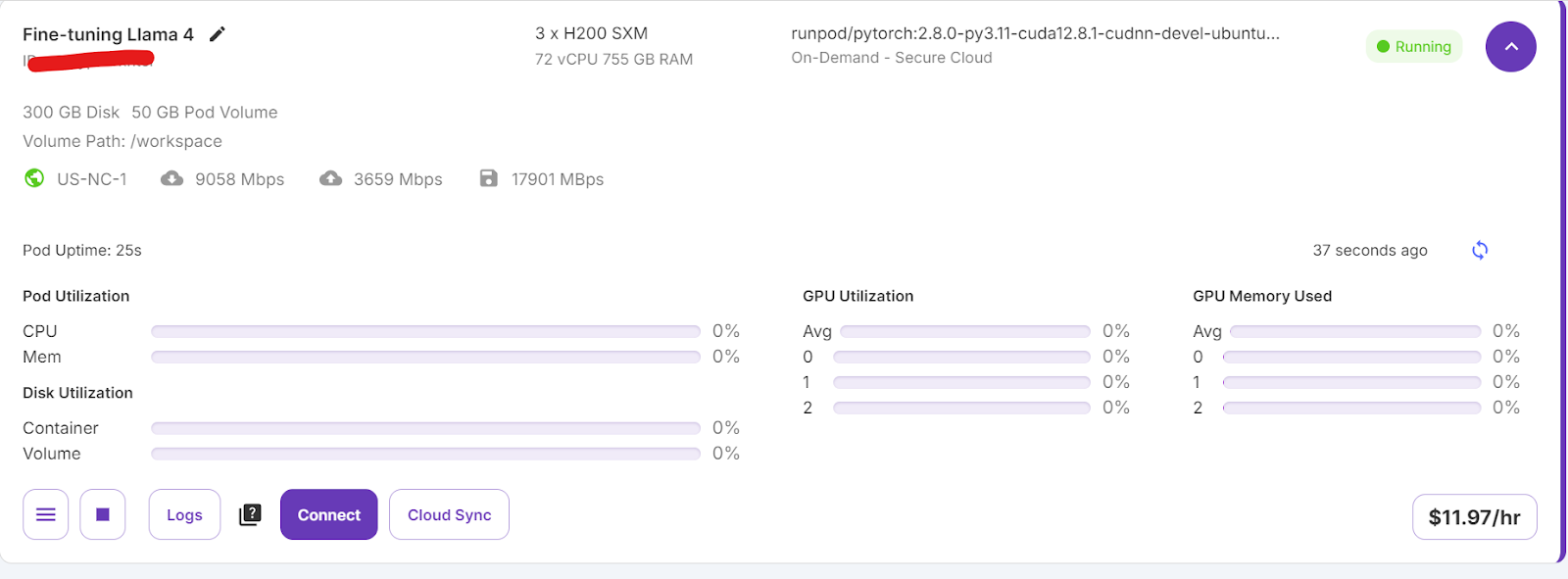
Navigeer naar het menu My Pods om je pod te configureren. De pod fungeert als een virtuele server die je de benodigde CPU’s, GPU’s, geheugen en opslag biedt voor je taken.
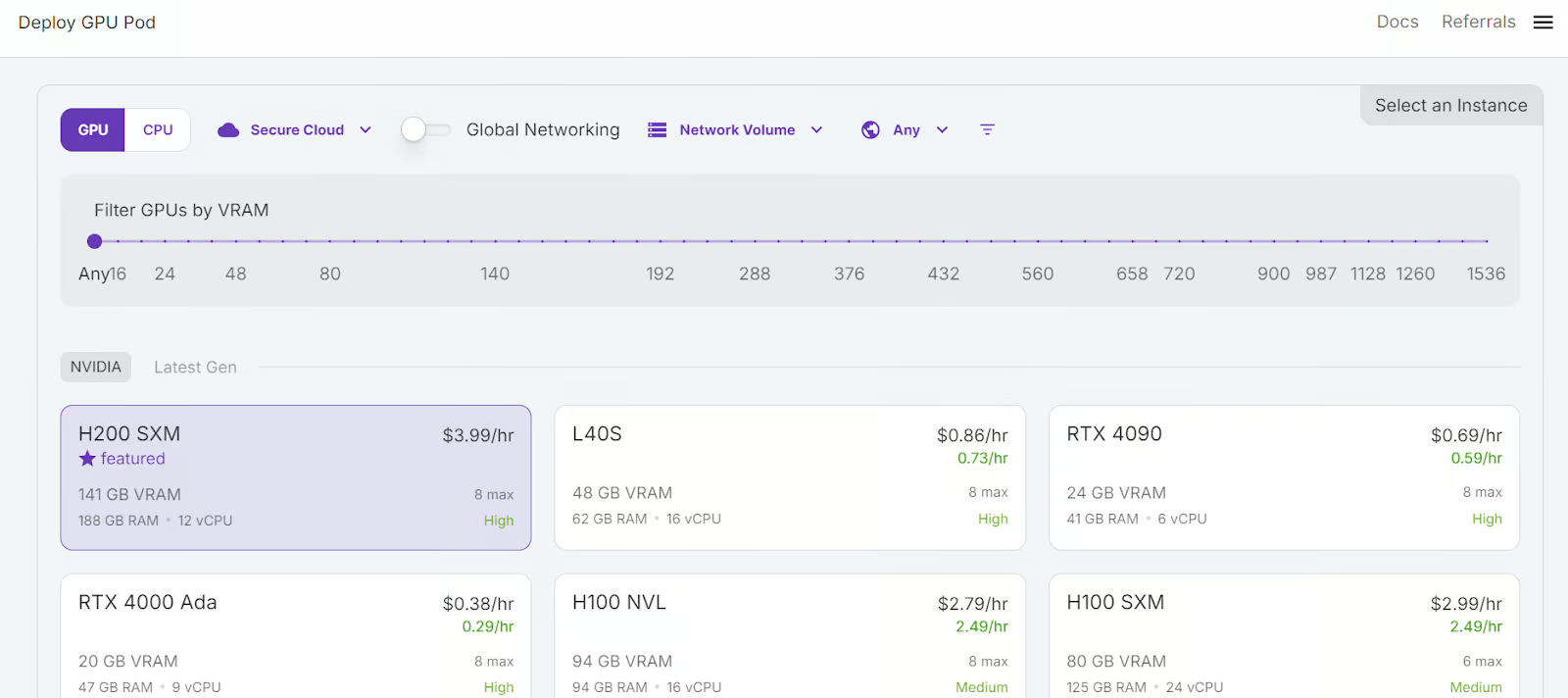
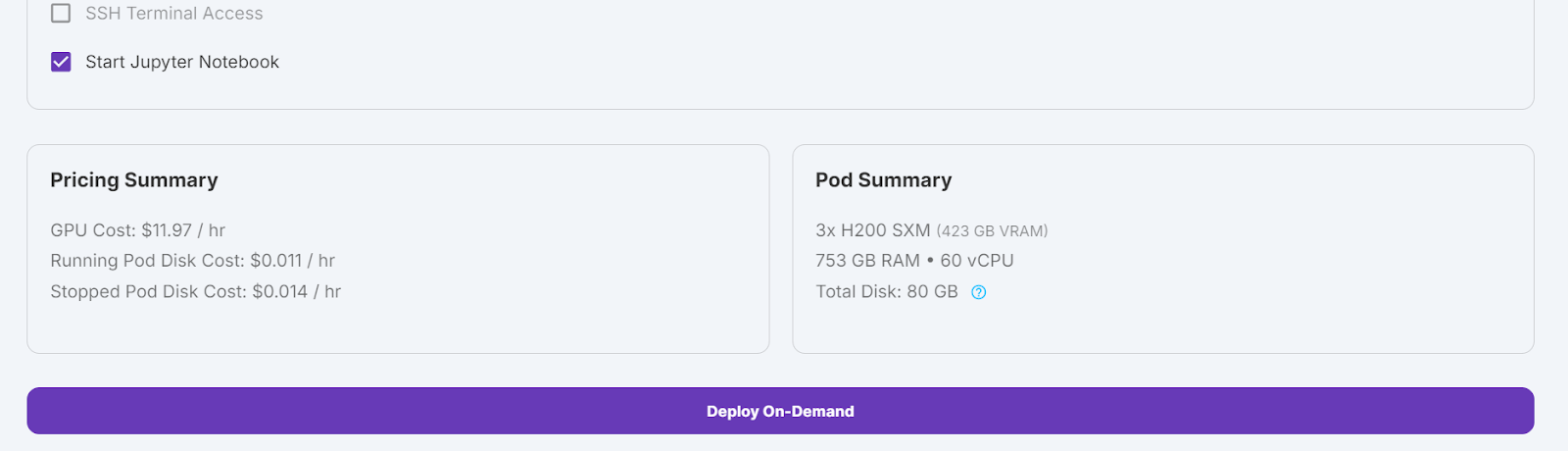
We kiezen 3x H200 SXM-GPU’s, wat voldoende geheugen biedt om het model te laden, het te kwantiseren en het te fine-tunen op de nieuwe dataset. Je kunt ook het Unsloth-framework gebruiken om het model op één H100 te draaien—maar deze aanpak werkte voor mij niet goed.
Volg deze stappen om je pod in te stellen:
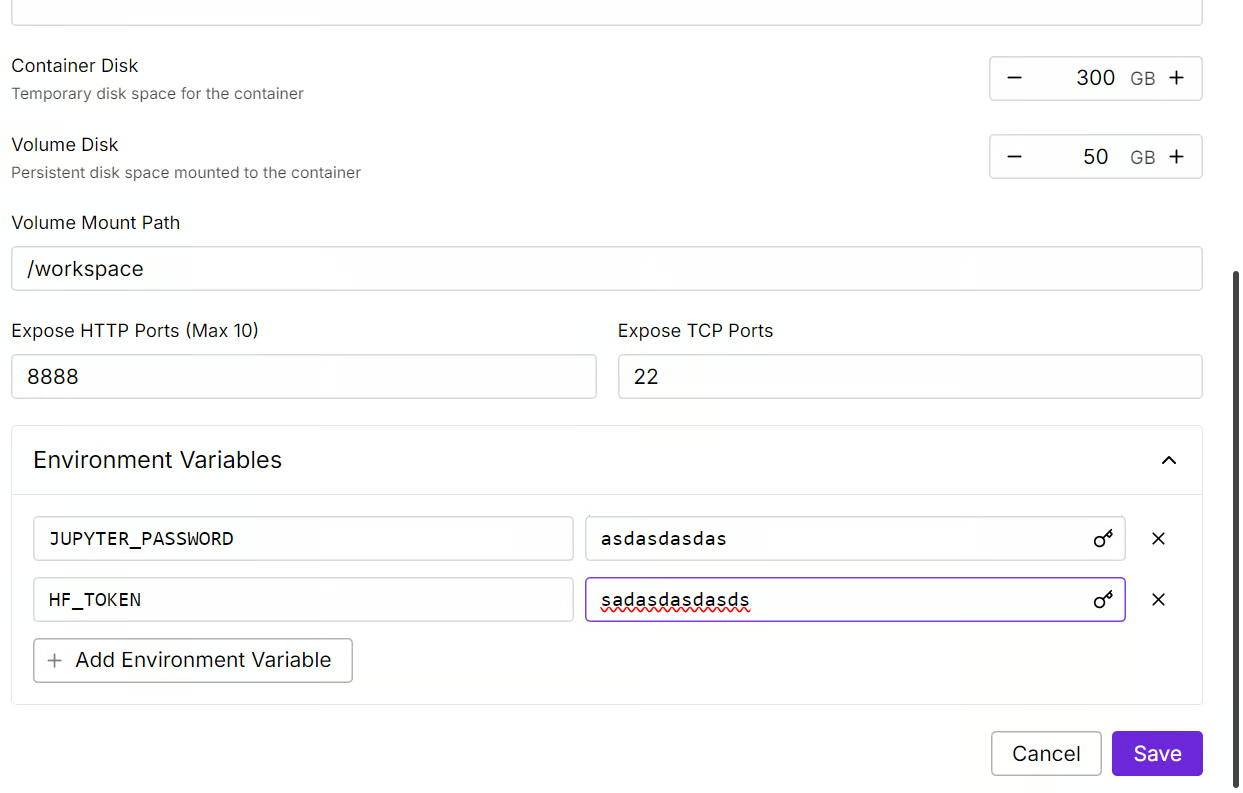
We bewerken onze pod door de containerschijfgrootte te verhogen naar 300GB en de omgevingsvariabele HF_TOKEN toe te voegen, jouw Hugging Face-toegangstoken. Dit token is essentieel om het model effectief te laden en op te slaan.
Het duurt even om de container in te richten. Zodra alles klaar is, klik je op de knop “Connect” en start je de JupyterLab-instantie.
Maak een nieuw notebook en ga aan de slag in deze nieuwe omgeving, net als lokaal.
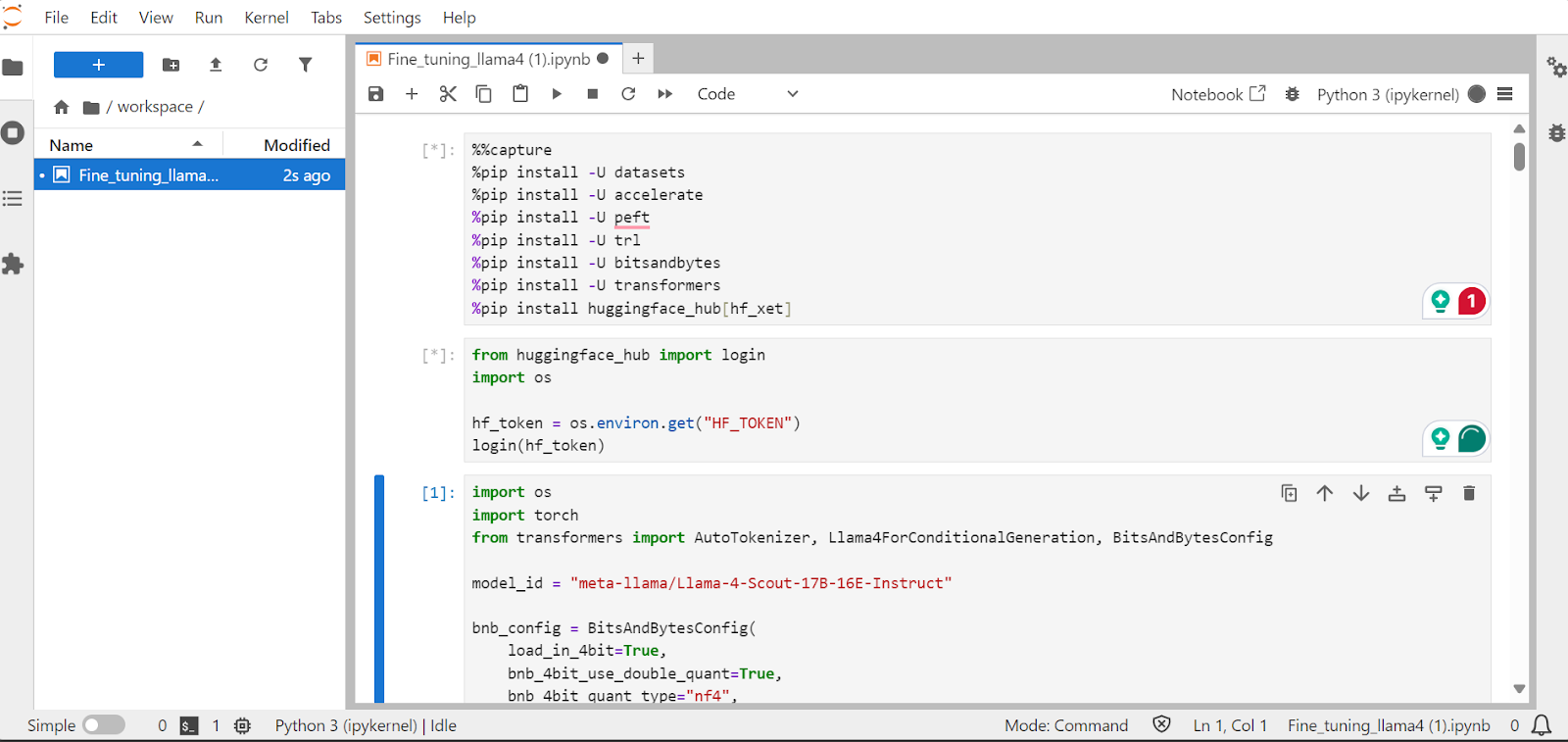
In deze sectie behandelen we veelvoorkomende uitdagingen bij het fine-tunen van het nieuwe Llama 4-model, zoals out-of-memory-problemen en bugs in de Transformers-bibliotheek. We laten ook zien hoe je de LoRA-adapter naadloos laadt, fine-tunet en opslaat. Door deze stappen te volgen, kun je je richten op het fine-tuneproces zonder je zorgen te maken over technische obstakels.
We installeren de benodigde Python-pakketten om grote taalmodellen te fine-tunen.
Opmerking:
xet-integratie, die sneller is dan Git-LFS. Deze integratie versnelt het downloaden met een factor drie.%%capture
!pip install transformers==4.51.0
%pip install -U datasets
%pip install -U accelerate
%pip install -U peft
%pip install -U trl
%pip install -U bitsandbytes
%pip install huggingface_hub[hf_xet]Laad de API-sleutel uit de omgevingsvariabele om in te loggen bij Hugging Face. Door in te loggen krijg je toegang tot gated modellen en kun je ook gefinetunede modellen en tokenizers opslaan.
from huggingface_hub import login
import os

hf_token = os.environ.get("HF_TOKEN")
login(hf_token)Laad het Llama-4-Scout-17B-16E-Instruct-model met 4-bit kwantisatie voor efficiënt geheugengebruik. Zorg dat je device_map op auto zet om alle drie de H200-GPU’s te gebruiken.
Opmerking: Zorg dat je toegang hebt tot het model, want dit model is gated en vereist dat je het formulier invult via de URL meta-llama/Llama-4-Scout-17B-16E-Instruct.
import os
import torch
from transformers import AutoTokenizer, Llama4ForConditionalGeneration, BitsAndBytesConfig


model_id = "meta-llama/Llama-4-Scout-17B-16E-Instruct"

bnb_config = BitsAndBytesConfig(
    load_in_4bit=True,
    bnb_4bit_use_double_quant=False,
    bnb_4bit_quant_type="nf4",
    bnb_4bit_compute_dtype=torch.bfloat16,
)


model = Llama4ForConditionalGeneration.from_pretrained(
    model_id,
    device_map="auto",
    torch_dtype=torch.bfloat16,
    quantization_config=bnb_config,
    trust_remote_code=True,
)

model.config.use_cache = False
model.config.pretraining_tp = 1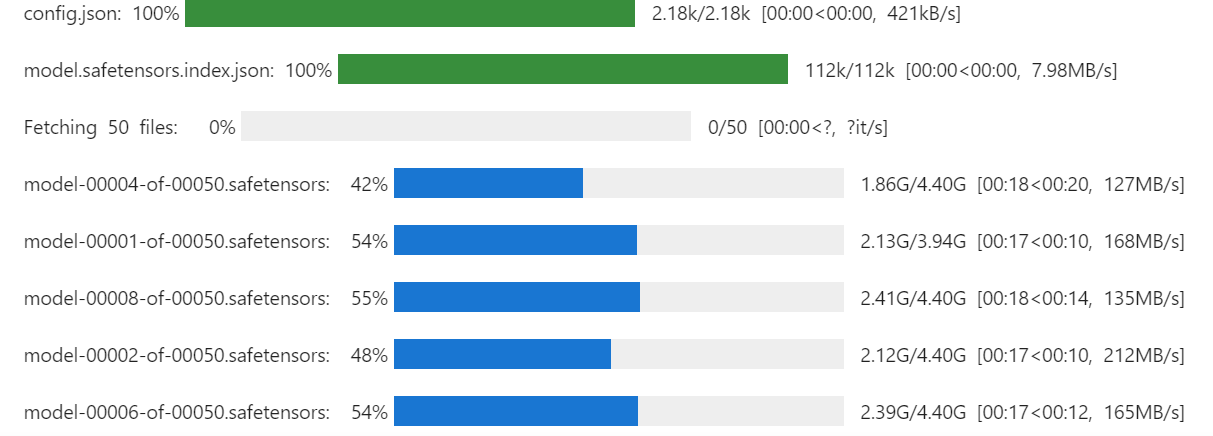
We laden ook de tokenizer met dezelfde model-ID.
# Load tokenizer
tokenizer = AutoTokenizer.from_pretrained(model_id, trust_remote_code=True)
Met het onderstaande commando kun je controleren hoeveel geheugen we over hebben om de trainer in te richten en het model te fine-tunen.
!nvidia-smi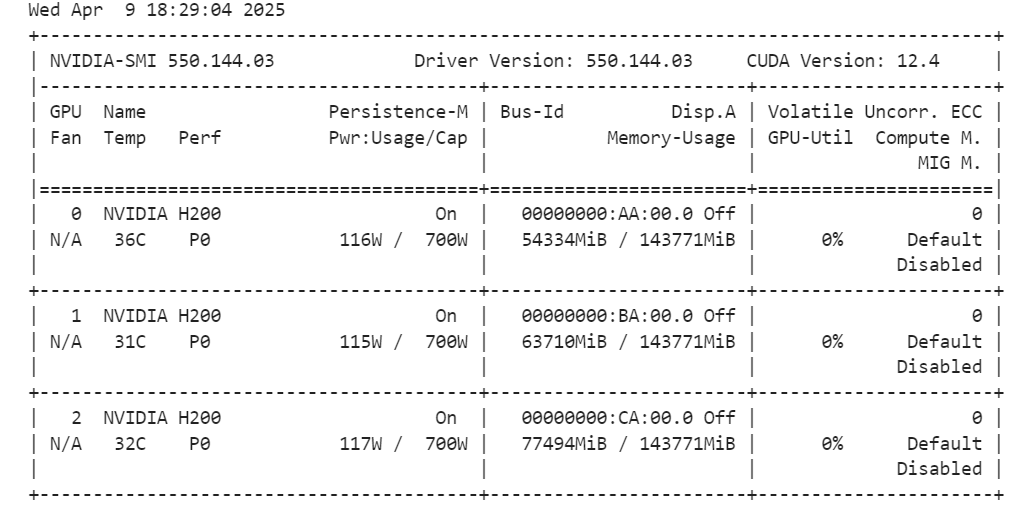
We maken een promptstijl voor het model, inclusief een systeemprompt met placeholders voor de vraag, chain of thought en respons. Deze prompt helpt het model stap voor stap te redeneren en duidelijke, nauwkeurige antwoorden te geven.
train_prompt_style = """Below is an instruction that describes a task, paired with an input that provides further context.
Write a response that appropriately completes the request.
Before answering, think carefully about the question and create a step-by-step chain of thoughts to ensure a logical and accurate response.

### Instruction:
You are a medical expert with advanced knowledge in clinical reasoning, diagnostics, and treatment planning.
Please answer the following medical question.

### Question:
{}

### Response:
<think>
{}
</think>
{}"""
Vervolgens maken we de Python-functie om de kolom “text” te genereren met de trainingspromptstijl en de kolommen uit de dataset.
EOS_TOKEN = tokenizer.eos_token  # Must add EOS_TOKEN

def formatting_prompts_func(examples):
    inputs = examples["Question"]
    complex_cots = examples["Complex_CoT"]
    outputs = examples["Response"]
    texts = []
    for question, cot, response in zip(inputs, complex_cots, outputs):
        # Append the EOS token to the response if it's not already there
        if not response.endswith(tokenizer.eos_token):
            response += tokenizer.eos_token
        text = train_prompt_style.format(question, cot, response)
        texts.append(text)
    return {"text": texts}
We laden de eerste 500 voorbeelden uit de FreedomIntelligence/medical-o1-reasoning-SFT-dataset op de Hugging Face Hub en passen daarna de functie formatting_prompts_func toe om de kolom “text” te maken.
from datasets import load_dataset


dataset = load_dataset("FreedomIntelligence/medical-o1-reasoning-SFT","en", split = "train[0:500]",trust_remote_code=True)
dataset = dataset.map(formatting_prompts_func, batched = True,)
dataset["text"][0]
De kolom “text” bevat een systeemprompt, instructies, vraag, chain of thought en de respons.
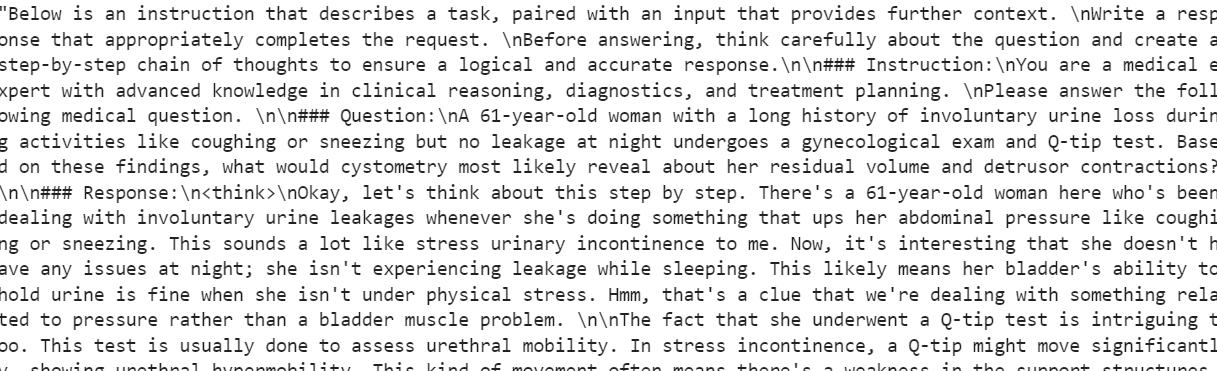
De nieuwe STF-trainer accepteert geen tokenizers, dus we converteren de tokenizer naar een data collator en geven de trainer de data collator in plaats van de tokenizer.
from transformers import DataCollatorForLanguageModeling

data_collator = DataCollatorForLanguageModeling(
    tokenizer=tokenizer,
    mlm=False
)We maken nu een testpromptstijl die alles bevat uit de trainingspromptstijl, behalve de chain of thought en de respons.
prompt_style = """Below is an instruction that describes a task, paired with an input that provides further context.
Write a response that appropriately completes the request.
Before answering, think carefully about the question and create a step-by-step chain of thoughts to ensure a logical and accurate response.

### Instruction:
You are a medical expert with advanced knowledge in clinical reasoning, diagnostics, and treatment planning.
Please answer the following medical question.

### Question:
{}

### Response:
<think>{}"""
We nemen de eerste vraag uit de dataset, zetten die om naar de prompt met de testpromptstijl en bereiden hem vervolgens voor zodat het model de respons kan genereren.
question = dataset[0]['Question']
inputs = tokenizer(
    [prompt_style.format(question, "") + tokenizer.eos_token],
    return_tensors="pt"
).to("cuda")

outputs = model.generate(
    input_ids=inputs.input_ids,
    attention_mask=inputs.attention_mask,
    max_new_tokens=1200,
    eos_token_id=tokenizer.eos_token_id,
    use_cache=True,
)
response = tokenizer.batch_decode(outputs, skip_special_tokens=True)
print(response[0].split("### Response:")[1])
De chain of thought van het model is lang, en het uiteindelijke antwoord is vrij kort en wijkt sterk af van de dataset.
<think>assistant

To approach this question, let's break down the key elements provided and analyze them step by step:

1. **Symptoms**: The patient experiences involuntary urine loss during activities like coughing or sneezing but has no leakage at night. This pattern of urinary incontinence is suggestive of stress urinary incontinence (SUI), which is characterized by the involuntary leakage of urine on effort or exertion, or on sneezing or coughing.

2. **Diagnostic Tests Mentioned**:
   - **Gynecological Exam**: This is likely performed to assess the pelvic anatomy, including the position and support of the urethra and bladder neck, and to check for any pelvic organ prolapse.
   - **Q-tip Test**: This test is used to assess urethral mobility. A Q-tip (cotton swab) is inserted into the urethra, and its angle of movement is measured. Increased mobility (an angle change of more than 30 degrees) is often associated with stress urinary incontinence.

3. **Cystometry (Cystometrogram)**: This test measures the pressure within the bladder during filling and helps assess bladder function, including the residual volume and detrusor muscle contractions. The detrusor muscle is the smooth muscle in the wall of the bladder that contracts to allow urine to be expelled.

Given that the patient likely has stress urinary incontinence (SUI) based on her symptoms:
- **Residual Volume**: In patients with SUI, the bladder usually functions normally, and thus, the residual volume (the amount of urine left in the bladder after urination) is typically not significantly affected. Therefore, one would expect the residual volume to be normal or near-normal.

- **Detrusor Contractions**: In SUI, the problem primarily lies with the urethral sphincter mechanism and support rather than with the detrusor muscle itself. Hence, detrusor contractions are usually normal. The patient does not have symptoms suggestive of an overactive bladder (like urgency, urge incontinence, or nocturia), which would be more indicative of detrusor overactivity.

Based on this analysis, cystometry in this patient would most likely reveal:
- A **normal residual volume**, as her symptoms do not suggest a problem with bladder emptying.
- **Normal detrusor contractions**, as her condition (stress urinary incontinence) primarily involves issues with urethral support and continence mechanisms rather than detrusor function.

Therefore, cystometry would likely show that she has a normal residual volume and normal detrusor contractions.

</think>

The final answer is: $\boxed{Normal residual volume and normal detrusor contractions}$We implementeren nu LoRA (Low-Rank Adaptation) voor parameter-efficiënt fine-tunen en passen het toe op het model. LoRA is een techniek om grote taalmodellen te fine-tunen door het merendeel van de modelparameters te bevriezen en slechts een kleine subset extra parameters te trainen.
Deze aanpak is geheugenefficiënt, sneller en kosteneffectief, terwijl de nauwkeurigheid vergelijkbaar blijft met volledig fine-tunen.
from peft import LoraConfig, get_peft_model

# LoRA config
peft_config = LoraConfig(
    lora_alpha=16,                           # Scaling factor for LoRA
    lora_dropout=0.05,                       # Add slight dropout for regularization
    r=64,                                    # Rank of the LoRA update matrices
    bias="none",                             # No bias reparameterization
    task_type="CAUSAL_LM",                   # Task type: Causal Language Modeling
    target_modules=[
        "q_proj",
        "k_proj",
        "v_proj",
        "o_proj",
        "gate_proj",
        "up_proj",
        "down_proj",
    ],  # Target modules for LoRA
)

model = get_peft_model(model, peft_config)
We configureren en initialiseren nu de SFTTrainer (Supervised Fine-Tuning Trainer) door de dataset, het model, de data collator, trainingsargumenten en LoRA-configuratie aan te leveren. De SFTTrainer vereenvoudigt het fine-tuneproces door al deze componenten te integreren in één gestroomlijnde workflow, zodat je grote taalmodellen zoals Llama 4 eenvoudiger met LoRA kunt trainen.
from trl import SFTTrainer
from transformers import TrainingArguments


# Training Arguments
training_arguments = TrainingArguments(
    output_dir="output",
    per_device_train_batch_size=1,
    per_device_eval_batch_size=1,
    gradient_accumulation_steps=2,
    optim="paged_adamw_32bit",
    num_train_epochs=1,
    logging_steps=0.2,
    warmup_steps=10,
    logging_strategy="steps",
    learning_rate=2e-4,
    fp16=False,
    bf16=False,
    group_by_length=True,
    report_to="none"
)

# Initialize the Trainer
trainer = SFTTrainer(
    model=model,
    args=training_arguments,
    train_dataset=dataset,
    peft_config=peft_config,
    data_collator=data_collator,
)Start het trainingsproces met het volgende commando:
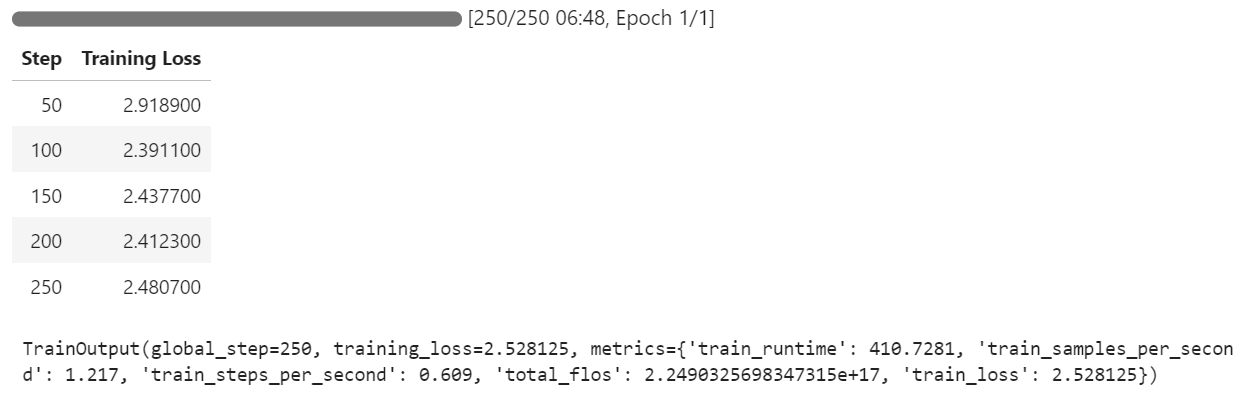
trainer.train()Als je naar je Pod-dashboard schakelt, zie je dat de trainer alle drie de GPU’s gebruikt voor training.
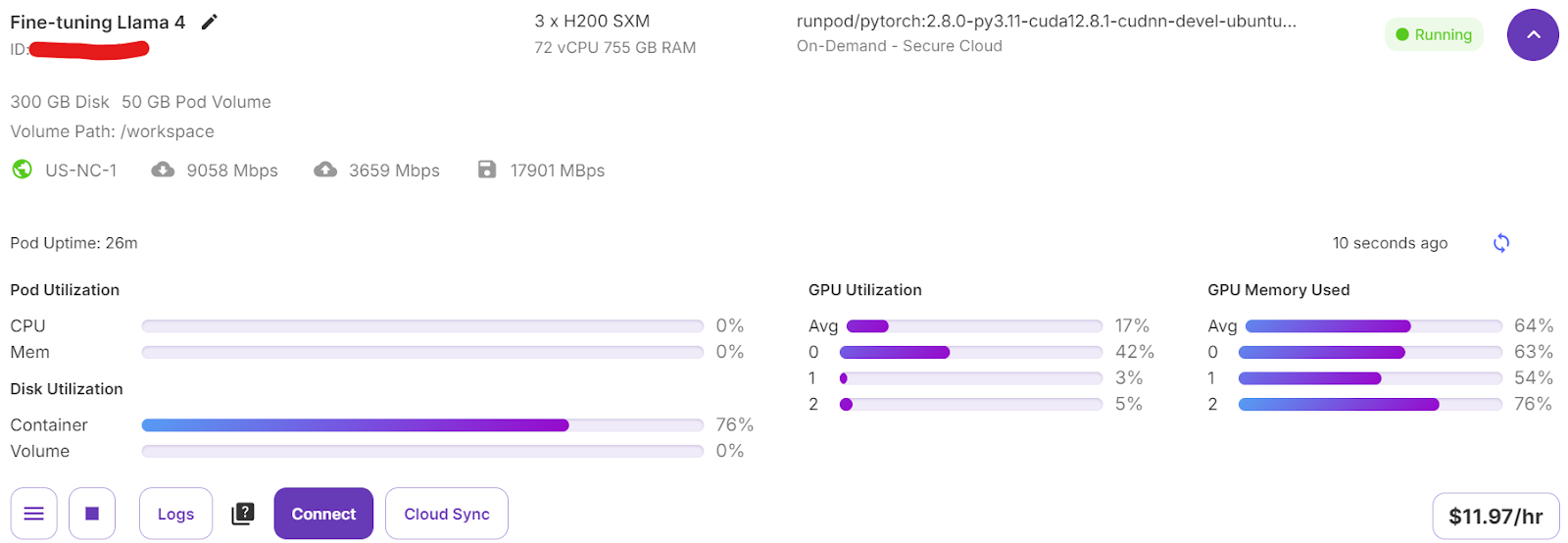
Het kostte ons slechts 7 minuten om het model te fine-tunen en in totaal 30 minuten om het hele project van begin tot eind te draaien.
We testen het gefinetunede model nu met hetzelfde voorbeeld als eerder om de prestaties na het fine-tunen te vergelijken. Zo kunnen we beoordelen hoe goed het model is verbeterd in redeneren en het genereren van gedetailleerde antwoorden.
question = dataset[0]['Question']
inputs = tokenizer(
    [prompt_style.format(question, "") + tokenizer.eos_token],
    return_tensors="pt"
).to("cuda")

outputs = model.generate(
    input_ids=inputs.input_ids,
    attention_mask=inputs.attention_mask,
    max_new_tokens=1200,
    eos_token_id=tokenizer.eos_token_id,
    use_cache=True,
)
response = tokenizer.batch_decode(outputs, skip_special_tokens=True)
print(response[0].split("### Response:")[1])
Het redeneerproces van het model is accuraat en de respons is gedetailleerd en logisch:
<think>
Alright, let's think about what's going on with this 61-year-old woman. She's experiencing involuntary urine loss when she coughs or sneezes, which is classic for stress urinary incontinence. But there's no leakage at night, which is interesting. That detail might help us rule out other types of incontinence, like overactive bladder.

Now, let's think about the tests she's had. The gynecological exam and the Q-tip test are usually done to check for any anatomical issues that could be causing her symptoms. If the Q-tip test is positive, it means there's some mobility in the urethra, which can be a sign of stress incontinence.

Okay, so we've got stress urinary incontinence in mind. What does cystometry tell us? It's a test that looks at how well the bladder functions by measuring pressure and volume during filling and voiding.

For someone with stress incontinence, the cystometry would probably show that her bladder is doing its job properly. The residual volume, which is the amount of urine left in the bladder after she pees, should be normal. This means her bladder is emptying well enough.

Also, with stress incontinence, you wouldn't expect to see abnormal detrusor contractions. These are like muscle spasms in the bladder that can cause urgency and urge incontinence. But in stress incontinence, the problem is more about the urethral support and pressure control during activities, not the bladder muscle itself.

So, putting it all together, the cystometry should show a normal residual volume and no abnormal detrusor contractions. This fits perfectly with what we know about stress urinary incontinence. Yep, that's what I'd expect to see in this case.
</think>
In this scenario, the cystometry would most likely reveal a normal residual volume and no abnormal detrusor contractions. This is because stress urinary incontinence, as indicated by the patient's symptoms and the positive Q-tip test, is primarily related to issues with urethral support and pressure control during activities, not with the bladder muscle's function or emptying ability.
Laten we het model testen op een ander voorbeeld uit de dataset om de prestaties verder te evalueren.
question = dataset[10]['Question']
inputs = tokenizer(
    [prompt_style.format(question, "") + tokenizer.eos_token],
    return_tensors="pt"
).to("cuda")

outputs = model.generate(
    input_ids=inputs.input_ids,
    attention_mask=inputs.attention_mask,
    max_new_tokens=1200,
    eos_token_id=tokenizer.eos_token_id,
    use_cache=True,
)
response = tokenizer.batch_decode(outputs, skip_special_tokens=True)
print(response[0].split("### Response:")[1])
De respons is logisch, gedetailleerd en laat zien dat het model effectief medisch kan redeneren:
<think>
Alright, let's break this down. So, we have a 42-year-old guy who's just recovered from pneumonia, and his T3 levels are low. Now, his TSH is slightly elevated at 4.7 µU/mL, which isn't too high but is definitely not normal. T4 is at 6 µg/dL, which is kind of in the middle range, and T3 is 68 ng/dL, which is low. Hmm, these numbers make me think of a condition called sick euthyroid syndrome. It's like when the body gets sick, the thyroid function tests can get all wonky, even if the thyroid itself is working fine.

In this syndrome, T3 usually drops first, and T4 might stay normal or even rise a bit. This makes sense here because his T3 is low, but T4 is still around 6 µg/dL. Now, the TSH is slightly elevated, which is a bit puzzling, but in sick euthyroid syndrome, TSH can be normal or even slightly elevated. So, this fits.

But wait, what about the other hormones? In sick euthyroid syndrome, we often see an increase in reverse T3 (rT3). This is because the body might convert T4 to rT3 instead of T3 when it's stressed. So, if I were to guess, I'd say the reverse T3 level is probably elevated in this case.

This all makes sense because the clinical picture and lab results are lining up nicely with sick euthyroid syndrome. So, if I had to pick an additional hormone that's likely elevated, it would be the reverse T3. Yeah, that seems to fit the scenario perfectly.
</think>
In this scenario, considering the clinical context of a 42-year-old man recovering from pneumonia with decreased T3 levels and slightly elevated TSH, along with normal T4 levels, the likely condition is sick euthyroid syndrome. In this condition, the body often converts T4 to reverse T3 (rT3) instead of T3 during stress or illness. Therefore, the additional hormone level that is likely to be elevated in this patient is reverse T3 (rT3).We pushen nu het gefinetunede model (LoRA-adapter) en de tokenizer naar de Hugging Face Hub. Dit proces maakt automatisch een repository voor je aan en uploadt alle benodigde modelbestanden, zodat het model publiek toegankelijk is voor verder gebruik of delen.
model.push_to_hub("Llama-4-Scout-17B-16E-Instruct-Medical-ChatBot")
tokenizer.push_to_hub("Llama-4-Scout-17B-16E-Instruct-Medical-ChatBot")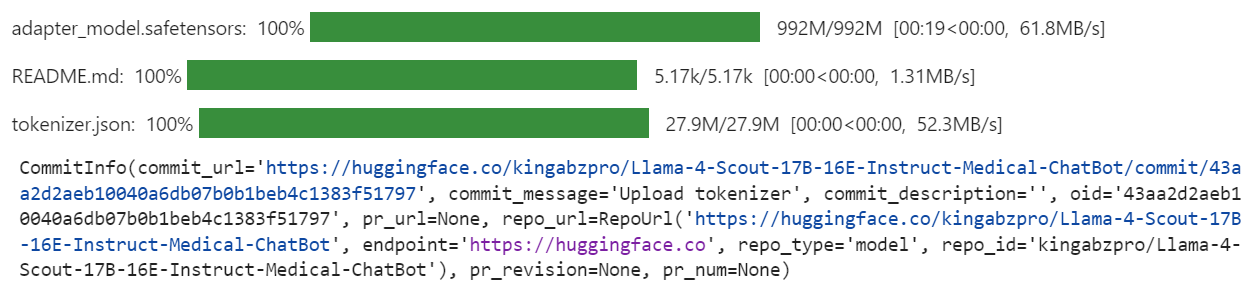
Zodra het proces is voltooid, kun je de modelrepository openen via de volgende link: kingabzpro/Llama-4-Scout-17B-16E-Instruct-Medical-ChatBot
Hier is het bijbehorende notebook met alle benodigde code, uitvoer en gedetailleerde instructies om je eigen Llama 4-model te fine-tunen.
Het maken van deze tutorial was uitdagend maar lonend. Tijdens het werken met Llama 4 kwam ik verschillende problemen tegen die de complexiteit van dit model benadrukken. Naar mijn mening is Llama 4 nog niet volledig geoptimaliseerd voor grootschalig gebruik, vooral niet voor mensen die afhankelijk zijn van consumentengpu’s. Dit zijn enkele belangrijke uitdagingen die ik tegenkwam:
Ondanks deze uitdagingen kun je, als je deze gids stap voor stap volgt, Llama 4 met relatief gemak op elke nieuwe dataset fine-tunen.
Wil je meer weten over Llama 4? Bekijk dan deze resources:
Leer AI met deze cursussen!
Cursus
Leerpad
Leerpad
blog
Adel Nehme
15 min