コース
Graph RAG with LangChain and Neo4j
3時間
2.3K
チャットボット向けの検索拡張生成(RAG)パイプラインは、ノートブック内のスモークテストをすべて通過しました。ところが、誤った回答や妙な回答に関するサポートチケットが届き始め、スモークテストのログには異常が何も出ていません。
この不具合は、メトリクスがなければ見えないため、捉えるのが難しいのです。RAGパイプラインが誤作動する箇所は2つあります。リトリーバーが誤ったチャンクを取得する場合と、ジェネレーターが正しいチャンクを無視して事実を捏造する場合です。単一のエンドツーエンドの正解率だけでは、どちらが起きたか判別できず、直すべき箇所もわかりません。
このチュートリアルでは、PythonとRagas 0.4.3でRAG評価パイプラインを一から構築します。手作りの評価データセット、4つの中核メトリクス(faithfulness、answer relevancy、context precision、context recall)、スコア低下時にビルドを失敗させる継続的インテグレーション(CI)の品質ゲート、合成テストセットの生成器、そしてJSON Lines形式のスコアトラッカーを作ります。
背景から知りたい場合は、まずRAGとは何かのガイド、RAGパイプラインを評価するために大規模言語モデル(LLM)を判定役に使うチュートリアル、そして高度なRAG手法の概観をご覧ください。
必要なのは、Python 3.9以降(ここでは3.12を使用)、uvまたはpip、OpenAI互換の判定モデル用APIキー、そしてRAGパイプラインの大まかな仕組みです。基礎から学びたい場合は、今回スコアリングする種類のパイプラインを構築するRetrieval-Augmented Generation with LangChainコースをおすすめします。
BLEU(Bilingual Evaluation Understudy)やROUGE(Recall-Oriented Understudy for Gisting Evaluation)のようなテキストオーバーラップ系の指標は、RAGには不向きです。Ragasは代わりに判定役のLLMを用い、各回答を4つの軸で採点します。faithfulnessとanswer relevancyはジェネレーターの診断、context precisionとcontext recallはリトリーバーの診断に使います。
この4つの数値にCIでしきい値を設け、コミットごとにログを残せば、一度きりの監査ではなく回帰検知の仕組みになります。
始める前に注意点を一つ。RagasのAPIは過去2年で2度変わっています。v0.2で辞書型データセットがSingleTurnSampleとEvaluationDatasetに置き換えられ、v0.4では(v0.3.9で導入された)コレクション系メトリクスがデフォルトとなり、旧evaluate()関数は非推奨になりました。
多くのオンラインチュートリアルは今でもv0.1やv0.2のコードを紹介しています。本記事の内容はすべて0.4.3(2026年10月時点の現行リリース)で動作します。
RAGに独自指標が必要なのは、従来のテキスト指標が、回答と参照回答の共有語彙数しか数えず、RAGシステムで壊れやすい部分がそこではないからです。
BLEU(Papineniら, 2002)やROUGE(Lin, 2004)は機械翻訳や要約向けに設計され、良い出力は参照と多くの語を共有します。RAGの回答が「14日」ではなく「2週間」と言えば両者のスコアは下がりますし、参照の語を偶然流用すれば、返金ポリシーを捏造する流暢な回答でも高得点になり得ます。
より深い問題として、RAGパイプラインは2箇所で失敗し得ます。リトリーバーが誤った情報を選ぶ、またはジェネレーターが正しい情報を無視して事実を捏造する。回答が誤っていた場合、次のどれが起きたのかを知る必要があります。
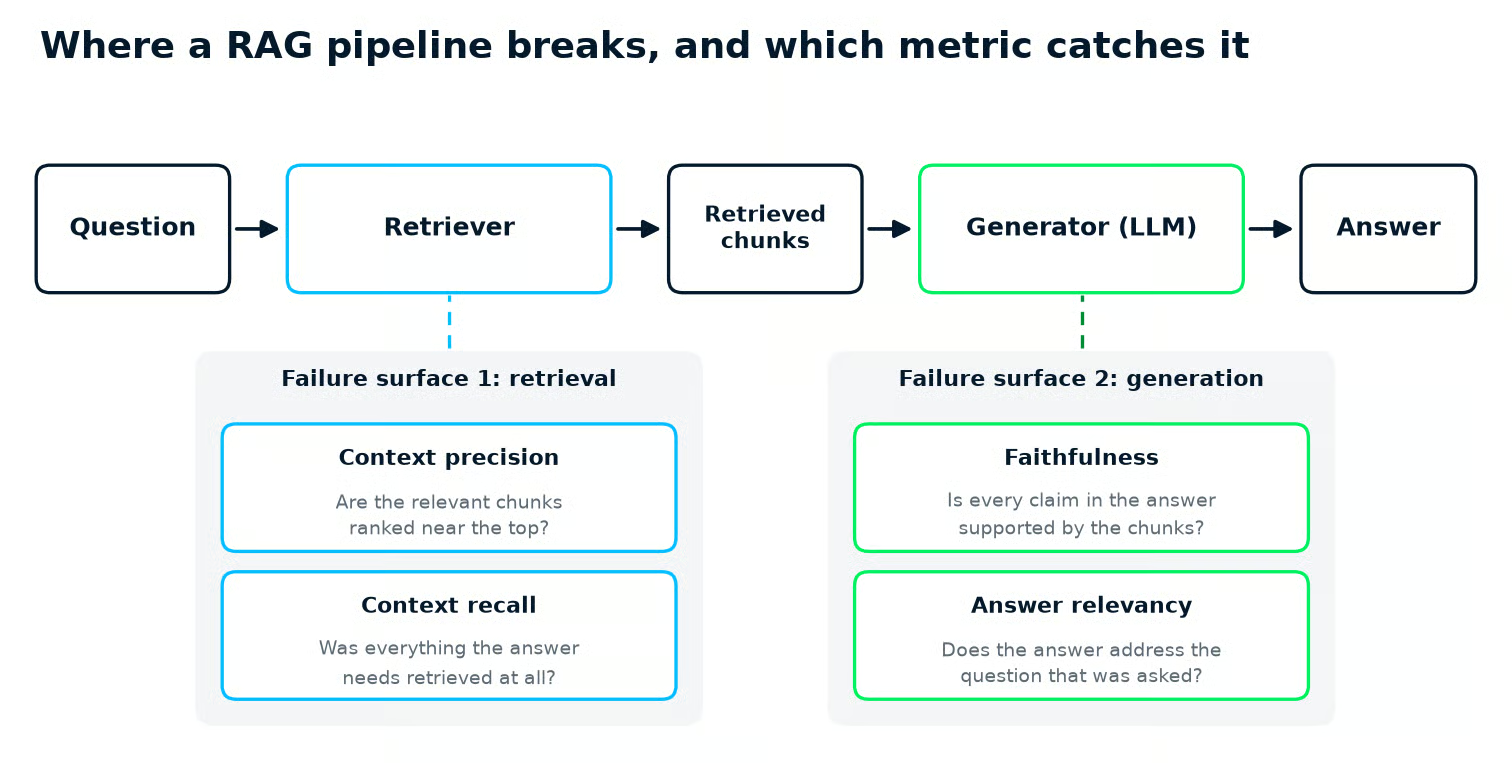
RAGパイプラインの2つの失敗モード:context precisionとrecallはリトリーバーを、faithfulnessとanswer relevancyはジェネレーターを診断します。図:筆者作成。
What Is Retrieval Augmented Generation (RAG)? A Complete Guideでは、これらの不具合が生じるパイプライン各段階を解説しています。
Ragasは、パイプラインの各部分に数値を与えるオープンソースのPythonフレームワークです。他にも選択肢はあります。主な2つは、評価をpytest風のテストケースで包むDeepEvalと、データセットにLLMチェックを列として追加し監視レポートに流し込むEvidentlyです。
| Framework | Best for | RAG-specific metrics built in | Test data from your documents | Config style |
|---|---|---|---|---|
| Ragas | RAGパイプラインの診断 | Faithfulness、answer relevancy、context precision、context recall、context entities recall、noise sensitivity | TestsetGenerator(オープンソース) |
メトリクスオブジェクト+llm_factory()の判定役 |
| DeepEval | CIでのユニットテスト型LLMテスト | Answer relevancy、faithfulness、contextual relevancy、contextual recall、contextual precision | Synthesizer(オープンソース) |
LLMTestCaseオブジェクト、assert_test()をdeepeval test runで実行 |
| Evidently | ダッシュボード監視とドリフト検知 | FaithfulnessLLMEval、ContextRelevance、ContextQualityLLMEval | Evidently CloudでのRAGデータセット生成 | Datasetへのディスクリプター、Reportで集計 |
本チュートリアルでRagasを選んだ理由は、4つの中核メトリクスがリトリーバー向けとジェネレーター向けに明確に分かれており、テストセット生成器も同じオープンソースパッケージに含まれているからです。
すでにpytestがチーム文化なら、DeepEvalのassert_test()の方が自然に感じられるでしょう。ライブトラフィックの品質ダッシュボードが欲しいなら、Evidentlyのレポートが近道です。
Ragasのセットアップは、パッケージのインストール、1つの依存の固定、そしてすべてのメトリクスが共有する判定LLMの選定です。ここではuvを使って厳密なバージョン固定を行いますが、同じバージョンを指定すればpip installでも構いません。
uv init rag-eval --python 3.12 && cd rag-eval
uv add "ragas==0.4.3" "langchain-community<0.4" openai pandas matplotlib rapidfuzz
ここではPython 3.12を使用しています。Ragas 0.4.3はPython 3.9以降をサポートしています。
rapidfuzzは後述の合成テストセット生成器に必要です。Ragasの依存関係には含まれていないため、先に入れておきます。
langchain-community<0.4のピン留めは現時点で必須です。Ragas 0.4.3はChatVertexAIをlangchain-community 0.4で削除されたモジュールパスからインポートするため、ピン留めなしの新規インストールではragasのインポート時に失敗します。
次に判定役です。RagasのLLMベースの各メトリクスは1回以上の判定モデル呼び出しを行うため、判定役は一度構築して全メトリクスで共有します。これをjudge.pyというモジュールに分け、キーは環境変数から読み込んで、認証情報がgitに残らないようにします。
このファイルはOpenAIを直接呼ぶ方法と、GoogleのOpenAI互換エンドポイント経由でGeminiを呼ぶ方法を示しています。
# judge.py
"""Build the judge LLM and embedding model that every metric shares.

Uses OpenAI by default (reads OPENAI_API_KEY). Set GEMINI_API_KEY instead to
judge with Gemini through Google's OpenAI-compatible endpoint.
"""

import os

from openai import AsyncOpenAI
from ragas.embeddings import embedding_factory
from ragas.llms import llm_factory

GEMINI_BASE_URL = "https://generativelanguage.googleapis.com/v1beta/openai/"


def judge_model_name() -> str:
    """The judge model to use (override it with the JUDGE_MODEL variable)."""
    default = "gemini-3.5-flash-lite" if os.environ.get("GEMINI_API_KEY") else "gpt-4o-mini"
    return os.environ.get("JUDGE_MODEL", default)


def build_judge():
    """Return (llm, embeddings), both using one OpenAI-compatible client."""
    if os.environ.get("GEMINI_API_KEY"):
        client = AsyncOpenAI(
            api_key=os.environ["GEMINI_API_KEY"],
            base_url=GEMINI_BASE_URL,
            max_retries=5,
        )
        embedding_model = "gemini-embedding-001"
        # Gemini 3.x models spend output tokens thinking before they answer
        settings = {"max_tokens": 4096, "reasoning_effort": "low"}
    else:
        client = AsyncOpenAI(max_retries=5)
        embedding_model = "text-embedding-3-small"
        settings = {"max_tokens": 4096}

    llm = llm_factory(judge_model_name(), client=client, **settings)
    embeddings = embedding_factory("openai", model=embedding_model, client=client)
    return llm, embeddings
初回でつまずきやすいポイントが2つあります。
llm_factory()にはクライアントオブジェクトの渡し込みが必要で、モデル名だけではエラーになります。llm_factory()に渡した追加設定はモデル呼び出しにそのまま渡るため、上記のようにmax_tokensをデフォルトの1,024より引き上げています。手動で確認したサンプルで安定したスコアを出す、最も安価なモデルを使い、その後ピン留めしてください。評価スイートが大きいと呼び出し回数はすぐに膨らみます。たとえば、faithfulnessはサンプルごとに判定を2回、answer relevancyは判定3回と埋め込み2回、context precisionは取得チャンクごとに1回、context recallは1回です。
4メトリクス×6サンプルで、1回の実行あたり62リクエスト(判定50回+埋め込み12回)になりました。以下は2026年10月19日時点の各ベンダーの掲載価格に基づく、現行の小型判定モデル3種のコストです。
| Judge model | Input per 1M tokens | Output per 1M tokens | Source |
|---|---|---|---|
| gpt-6-luna | $0.10 | $0.50 | OpenAI pricing |
| gemini-3.5-flash-lite | $0.30 | $2.50 | Gemini API pricing |
| claude-haiku-5-5 | $0.10(100Kトークンまでのプロンプト) | $0.50(100Kトークンまでのプロンプト) | Claude API pricing |
judge.pyのデフォルトは依然としてgpt-4o-miniで、OpenAIの価格ページの主要表には掲載されていない古いモデルです。切り替える場合はJUDGE_MODEL変数を設定してください。
判定役にClaudeを使う場合の注意点が1つ。answer relevancyは埋め込みモデルも必要ですが、Anthropicは埋め込みを提供していません。ドキュメントではVoyage AIを案内しているため、埋め込みは他社と組み合わせる必要があります。
選択そのものよりもピン留めが重要です。判定モデルを差し替えると、パイプラインが変わっていなくてもスコアが動くため、後述のトラッキングで作るトレンドラインが崩れます。
モデル名はjudge.pyに入れてバージョン管理し、判定役のアップグレードは他の破壊的変更と同様に扱ってください。新しい判定役のスコアで、すべてのしきい値をリセットします。
データセットの各テストケースはサンプルと呼びます。サンプルは単なる回答ではなく、パイプラインを1往復した記録を次の4フィールドで保持します。
| Field | What it holds |
|---|---|
user_input |
顧客が尋ねた質問 |
retrieved_contexts |
その質問に対しリトリーバーが返したチャンク |
response |
RAGパイプラインが返した回答 |
reference |
人手で書いた正解回答 |
Ragasは各サンプルをSingleTurnSample、集合をEvaluationDatasetとして保持します。referenceは任意ですが、取得系メトリクスはこれを比較に使うため、参照不要のメトリクスが無視するとしても、精選セットには必ず入れることをおすすめします。
ここでは架空のコーヒー焙煎所「Northwind Coffee」向けに6サンプルを用意しました。以降の各メトリクスの節で、そのメトリクスが検出すべきサンプルを追加していきます。
まずはbuild_dataset.pyを3サンプルで始めます。根拠の取れた正解、意図的な幻覚(ハルシネーション)、複数の主張を含む2つ目の正解です。
# build_dataset.py
"""Hand-build a small evaluation set and save it as JSON Lines."""

import json

from ragas import EvaluationDataset, SingleTurnSample

# Chunks of Northwind's help-center pages, exactly as a retriever would
# return them to the generator.
REFUNDS = (
    "If you are not happy with your coffee, contact support within 14 days of "
    "the delivery date for a full refund. You do not need to return the bag."
)
REFUND_TIMING = (
    "Refunds are issued to the original payment method and appear within 5 to "
    "7 business days. Gift orders are refunded as store credit."
)
SHIPPING_US = (
    "Standard shipping within the contiguous United States takes 3 to 5 "
    "business days and costs $6.00. Standard shipping is free on orders of "
    "$40.00 or more."
)
PAUSE = (
    "You can pause a subscription for up to 3 months from your account page. "
    "Paused subscriptions keep their pricing."
)
SUBSCRIPTION_PERKS = (
    "Subscribers save 10% on every bag and always get free standard shipping, "
    "regardless of order size."
)

samples = [
    # 1. Clean: grounded answer, relevant chunks ranked first.
    SingleTurnSample(
        user_input="How long do I have to ask for a refund on a bag of coffee?",
        retrieved_contexts=[REFUNDS, REFUND_TIMING, SHIPPING_US],
        response=(
            "You have 14 days from the delivery date to contact support for a "
            "full refund, and you do not need to send the bag back."
        ),
        reference=(
            "Contact support within 14 days of the delivery date for a full "
            "refund; the bag does not need to be returned."
        ),
    ),
    # 2. Deliberate hallucination: the pause limit is 3 months, not 6, and
    #    the free bag does not exist anywhere in the docs.
    SingleTurnSample(
        user_input="Can I pause my subscription?",
        retrieved_contexts=[PAUSE, SUBSCRIPTION_PERKS],
        response=(
            "Yes. You can pause your subscription for up to 6 months from your "
            "account page, and you get a free bag when you resume."
        ),
        reference=(
            "Yes, a subscription can be paused for up to 3 months from the "
            "account page, and paused subscriptions keep their pricing."
        ),
    ),
    # 3. Clean: multi-fact answer fully supported by the retrieved chunks.
    SingleTurnSample(
        user_input="What do subscribers get that regular customers do not?",
        retrieved_contexts=[SUBSCRIPTION_PERKS, PAUSE],
        response=(
            "Subscribers save 10% on every bag and get free standard shipping "
            "on every order, with no minimum order size."
        ),
        reference=(
            "Subscribers save 10% on every bag and always get free standard "
            "shipping regardless of order size."
        ),
    ),
]

dataset = EvaluationDataset(samples=samples)
dataset.to_jsonl("eval_dataset.jsonl")
print(dataset)

# Save the questions and reference answers separately. The CI section rebuilds
# retrieved_contexts and response from your real pipeline, so it only needs these.
with open("eval_questions.jsonl", "w", encoding="utf-8") as file:
    for sample in samples:
        row = {"user_input": sample.user_input, "reference": sample.reference}
        file.write(json.dumps(row) + "\n")
各retrieved contextは、Northwindのヘルプセンターページの一部で、リトリーバーがジェネレーターに渡すそのままの形でスクリプトに書き込んであります。uv run python build_dataset.pyを実行してeval_dataset.jsonlとeval_questions.jsonlを書き出し、後のセクションでサンプルが増えるたびに再実行してください。
JSON Linesで保存するのは重要です。後続のすべてのスクリプト(メトリクス実行、CIゲート)は、EvaluationDataset.from_jsonl()で同じeval_dataset.jsonlを読み込みます。
実プロジェクトでは、retrieved_contextsとresponseは実際のパイプラインを質問に掛けて得られるもので、手書きするのはuser_inputとreferenceだけです。CIの節でその自動化方法を示します。
この記事の最終的な6サンプルは、メトリクスの学習には十分ですが、しきい値を信頼するには不十分です。依存度を高める前に、およそ100サンプルを目指してください。その理由はトラッキングの節で説明します。必要な数は用途の厳密さに依存するので、具体的な数よりもバランスを重視します。
4つの中核メトリクスは、ジェネレーター向けがfaithfulnessとanswer relevancy、リトリーバー向けがcontext precisionとcontext recallです。いずれも0から1のスコアを返します。重要なのは、それぞれの数値が示す対処方針です。
Faithfulnessは、回答の主張がretrieved contextsで裏付けられている度合いを測ります。判定役は回答を個々の主張に分解し、各主張をチャンクに照らして確認します。1.0は全主張が支持され、0.0は一切支持されないことを意味します。
Faithfulnessは参照回答を必要としないため、テストセットだけでなく本番のライブトラフィックにも適用できます。プロンプト、モデル、モデルに渡すコンテキスト量を変更するたびに再実行してください。これらが最もハルシネーションを招きやすい変更です。
最も手早く挙動を見るには、単一回答に対して実行します。データセットは不要です。
# quick_check.py
"""Score a single response for faithfulness"""

import asyncio

from ragas.metrics.collections import Faithfulness

from judge import build_judge

judge_llm, _ = build_judge()
faithfulness = Faithfulness(llm=judge_llm)

result = asyncio.run(
    faithfulness.ascore(
        user_input="Can I pause my subscription?",
        response=(
            "Yes. You can pause for up to 6 months, and you get a free bag "
            "when you resume."
        ),
        retrieved_contexts=[
            "You can pause a subscription for up to 3 months from your account "
            "page. Paused subscriptions keep their pricing."
        ],
    )
)
print(f"faithfulness = {result.value:.2f}")
uv run python quick_check.pyで実行するとfaithfulness = 0.00と表示されます。回答内の(6か月、無料のバッグ)という主張がコンテキストで支持されていないためです。0.4では、各メトリクスのascore()メソッドで採点し、戻り値の.valueがスコアです。
データセット全体で採点すると、サンプル2に仕込んだハルシネーションは期待どおり0.0、両方の正解サンプルは1.0になります。各メトリクスの完全な結果は、後述のマルチメトリクス節にあります。
Answer relevancyは、回答が実際に質問に答えているかを測ります。判定役が回答を読み、その回答が適切となる質問を3つ作成します。Ragasはそれらの質問と元の質問の意味類似度を埋め込みモデルで計測します。回答がはぐらかしている場合、判定役は非コミット的と判定し、スコアは0になります。
クラス名はAnswerRelevancyです(旧例ではResponseRelevancyと呼ばれ、ドキュメントページのタイトルもResponse Relevancy)。判定LLMと埋め込みモデルの両方が必要です。
faithfulnessが高いのにrelevancyが低い場合、通常はジェネレーターやプロンプトが疑わしいです。正しいコンテキストに基づいているのに、別の質問に答えているからです。ただし先にcontext precisionとrecallを確認してください。オフトピックなチャンクを返すリトリーバーでも同じパターンになります。
以下はジェネレーター側の例です。リトリーバーは正しい配送チャンクを返し、回答は根拠に基づいていますが、配送コストではなく焙煎日について述べています。次のチャンクをbuild_dataset.py上部に追加します。
ROAST_DATE = (
    "Every bag is roasted to order and shipped within 48 hours of roasting. "
    "The roast date is printed on the bottom of the bag."
)次に、samplesリストの末尾に新しいサンプルを追加します。
    # 4. Drift: retrieval was fine and the answer is grounded, but it never
    #    addresses the question that was asked.
    SingleTurnSample(
        user_input="How much does standard shipping cost in the US?",
        retrieved_contexts=[SHIPPING_US, ROAST_DATE],
        response=(
            "Every bag is roasted to order and shipped within 48 hours of "
            "roasting, and the roast date is printed on the bottom of the bag."
        ),
        reference=(
            "Standard shipping in the contiguous United States costs $6.00 and "
            "is free on orders of $40.00 or more."
        ),
    ),
各サンプルは1つのrelevancyスコアを持ちます。判定役が回答から作った質問と、実際にサンプルが尋ねた質問の意味的な一致度を測り、1.0が完全一致です。
Context precisionは、役に立つチャンクがリトリーバーの返却リストの上位に来ているかを検査し、context recallは、正しい回答を書くのに必要な情報をリトリーバーがすべて見つけたかを検査します。
precisionは、役立つチャンクが高順位にあるほど高く評価します。つまり、同じ有用チャンクでも1位は3位より高くカウントされます。recallは、参照回答の事実のうち、少なくとも1つの取得チャンクで支持される割合です。
どちらもreferenceが必要です。コレクションAPIではクラス名はContextPrecisionWithReferenceとContextRecallで、どちらも判定LLMのみを取ります。Ragasのドキュメントでは参照ベース版をContextPrecisionと短く呼ぶこともあり、表記揺れがあります。
ここまでのサンプルはすべて正しいチャンクを上位で取得しているため、どちらのメトリクスも検出対象がありません。次は取得の失敗を2パターンで追加します。正しいチャンクは取得したが最下位にランクされた例と、関連チャンクが全く取得されずモデルが正しく辞退する例です。まず、以下のチャンクをファイル上部に追加します。
SHIPPING_CANADA = (
    "We ship to Canada. Canadian orders take 7 to 10 business days and cost "
    "$18.00. We do not currently ship outside the United States and Canada."
)
BREWING = (
    "For pour-over, we recommend a ratio of 1 gram of coffee to 16 grams of "
    "water, a medium-fine grind, and water at 200 degrees Fahrenheit."
)
続いて、サンプルを末尾に追加します。
    # 5. Ranking problem: the right chunk is retrieved, but it is ranked last.
    SingleTurnSample(
        user_input="Does Northwind ship to Canada, and how long does it take?",
        retrieved_contexts=[BREWING, ROAST_DATE, SHIPPING_CANADA],
        response=(
            "Yes, Northwind ships to Canada. Canadian orders take 7 to 10 "
            "business days and cost $18.00."
        ),
        reference="Yes. Canadian orders take 7 to 10 business days and cost $18.00.",
    ),
    # 6. Retrieval miss: nothing about the warranty was retrieved, so the
    #    model correctly declines. Recall will be 0 here.
    SingleTurnSample(
        user_input="How long is the warranty on the Baratza Encore grinder?",
        retrieved_contexts=[BREWING, SHIPPING_US],
        response=(
            "I do not have information about the grinder warranty in the "
            "documents available to me."
        ),
        reference=(
            "All equipment, including the Baratza Encore grinder, ships with a "
            "2-year manufacturer warranty covering defects in materials and "
            "workmanship."
        ),
    ),
順位は重要です。多くのパイプラインは上位の少数チャンクだけをモデルに渡すため、上位5件しか渡さないリトリーバーで6位の有用チャンクは実質的に存在しないのと同じです。
サンプル5は有用チャンクが3件中の最下位で、precisionは0.333になります(唯一の有用情報が最下位)。サンプル6(取得ミス)はprecisionもrecallも0.0でした。
サンプル6はfaithfulnessについての示唆もあります。モデルは正しく辞退していますが、この辞退は実行によって1.0になったり0.0になったりしました。間に何の変更もありません。「保証について情報がない」といった文は、コンテキストによって支持も反証もされず、判定役はコイン投げになります。
辞退が期待されるパイプラインなら、faithfulnessとは別に辞退を採点してください。Ragas 0.4ではコレクションAPIからAspectCriticが削除されたため、代替は@discrete_metricデコレータによるカスタムチェックです(v0.3からv0.4への移行ガイド参照)。
2つの取得系メトリクスを合わせて読むと、次にどこへ注力すべきかが見えてきます。
| Context precision | Context recall | Diagnosis | What to change |
|---|---|---|---|
| High | High | 検索は健全 | ジェネレーターに注力:プロンプト、モデル、faithfulness |
| Low | High | 正しいチャンクは取得されるが順位が悪い | リランカーの追加・調整 |
| High | Low | 上位チャンクは関連するが不十分 | モデルに渡すチャンク数やチャンクサイズの拡大、分割位置の見直し |
| Low | Low | リトリーバーが広範に失敗 | 埋め込み、インデキシング、クエリリライトの再検討 |
実務で最もよく見るのは「低precision・高recall」で、最も低コストで改善できます。
RankGPTをRAGのリランカーに使うチュートリアルでは既存のリトリーバーにLLMリランカーを重ねる方法を、RAGとリランキングでLLM精度を上げるチュートリアルでは別のリランキング構成を紹介しています。RAG性能を改善する5つの重要手法ガイドでは、他の行に対応するチャンク分割やクエリリライトを扱います。
変更のたびに2つの取得メトリクスを再実行し、表で効果を確認してください。
フル評価では4つのメトリクスを全サンプルに並列で走らせ、失敗分析のための行別スコアと、ダッシュボード用の列平均を集計します。
Ragas 0.2と0.3ではevaluate(dataset, metrics=[...], run_config=RunConfig(max_workers=8))で行いました。0.4.3でも関数自体は残っていますが、非推奨の警告が出るうえ、新しいメトリクスは旧Metricクラスを継承していないため受け付けません。
代替は@experimentデコレータで、Dataset上でパイプラインとメトリクスを一緒に走らせ、結果をCSVに書き出します。パイプラインを呼び出す段になれば、こちらが適切です。
静的データセットのスコアリングには、シンプルなヘルパーの方がわかりやすいと感じます。4つのメトリクスを各スクリプトで一度だけ構築し、並列呼び出しとエラーハンドリングを可読なコードにまとめます。
# score.py
"""Score an EvaluationDataset with the 4 core Ragas metrics."""

import asyncio
import inspect
import math

import pandas as pd
from ragas.metrics.collections import (
    AnswerRelevancy,
    ContextPrecisionWithReference,
    ContextRecall,
    Faithfulness,
)


def build_metrics(judge_llm, judge_embeddings) -> list:
    """The 4 core metrics, all using the same judge."""
    return [
        Faithfulness(llm=judge_llm),
        AnswerRelevancy(llm=judge_llm, embeddings=judge_embeddings),
        ContextPrecisionWithReference(llm=judge_llm),
        ContextRecall(llm=judge_llm),
    ]


async def score_sample(sample, metrics, limit):
    """Run every metric on one sample and return that sample's row of scores."""
    row = {"user_input": sample.user_input}
    for metric in metrics:
        # Each metric needs different fields (recall wants the reference,
        # faithfulness wants the response), so pass only the ones it asks for.
        wanted = inspect.signature(metric.ascore).parameters
        inputs = {field: getattr(sample, field) for field in wanted}
        async with limit:
            try:
                result = await metric.ascore(**inputs)
                row[metric.name] = result.value
            except Exception as error:
                # One failed judge call should not sink the whole run
                print(f"{metric.name} failed on {sample.user_input!r}: {error}")
                row[metric.name] = math.nan
    return row


def score_dataset(dataset, metrics, max_concurrency=8):
    """Score every sample: one row per sample, one column per metric."""

    async def score_all_samples():
        limit = asyncio.Semaphore(max_concurrency)  # cap parallel judge calls
        tasks = [score_sample(sample, metrics, limit) for sample in dataset.samples]
        return await asyncio.gather(*tasks)

return pd.DataFrame(asyncio.run(score_all_samples()))一見わかりづらいのはinspect.signature()の行です。4つのメトリクスは必要とする入力が異なります(faithfulnessはresponse、recallはreferenceが必要)。そこで、各メトリクスのascore()が受け取る引数を読み取り、サンプルからそのフィールドだけを渡すことで、単一のループで全メトリクスを処理できます。
セマフォで同時実行する判定呼び出し数を上限化し、失敗したメトリクスは実行全体を中断させずに空(NaN)セルにします。Jupyterノートブック内で実行する場合、すでにイベントループが動作しているためasyncio.runは失敗します。先にnest_asyncio.apply()を呼ぶ(Ragasはすでに依存に含む)か、コルーチンを直接awaitしてください。
ヘルパーが整えば、フル実行は短いコードで済みます。
# run_all.py
"""Run all four core metrics and save per-sample scores to scores.csv."""

import pandas as pd
from ragas import EvaluationDataset

from judge import build_judge
from score import build_metrics, score_dataset

judge_llm, judge_embeddings = build_judge()
dataset = EvaluationDataset.from_jsonl("eval_dataset.jsonl")
metrics = build_metrics(judge_llm, judge_embeddings)

scores = score_dataset(dataset, metrics, max_concurrency=4)
scores.to_csv("scores.csv", index=False)

pd.set_option("display.max_colwidth", 45)
pd.set_option("display.width", 160)
print(scores.sort_values("faithfulness").round(3))
print("\nMeans:")
print(scores.drop(columns="user_input").mean().round(3))
初回実行のスコアを、faithfulnessでソートし小数3桁に丸めたものと、最後に平均を示します。
| Question | Faithfulness | Answer relevancy | Context precision | Context recall |
|---|---|---|---|---|
| Can I pause my subscription? | 0.000 | 0.883 | 1.000 | 1.000 |
| Does Northwind ship to Canada, and how long does it take? | 0.667 | 0.954 | 0.333 | 1.000 |
| How long do I have to ask for a refund on a bag of coffee? | 1.000 | 0.746 | 1.000 | 1.000 |
| How long is the warranty on the Baratza Encore grinder? | 1.000 | 0.000 | 0.000 | 0.000 |
| How much does standard shipping cost in the US? | 1.000 | 0.572 | 1.000 | 1.000 |
| What do subscribers get that regular customers do not? | 1.000 | 0.852 | 1.000 | 1.000 |
| Mean | 0.778 | 0.668 | 0.722 | 0.833 |
同一データセットの後続実行では、トラッキング節で述べる辞退サンプルの揺れにより、faithfulnessが低く出ることがありました。
faithfulnessでソートすると、最もハルシネーションの疑いが強いものを見つけやすく、仕込んだサンプルが先頭に来ます。最後の行の平均はダッシュボードの数値です。
行を横に読むと、仕込んだ不具合はそれぞれ異なる場所に現れます。ハルシネーションはfaithfulnessのみが低下。取得ミスはrelevancy、precision、recallが一緒にゼロ。ランキングの問題はprecisionが0.333になり、ドリフトは回答済みの中で最も低いrelevancyとして現れます。
1点気になるのは、カナダの回答はチャンクに完全に裏付けられているのに、faithfulnessが0.667になったことです。これは判定役のノイズで、トラッキング節で再度触れます。
answer relevancyは埋め込みで意味を比較するため、良い回答でも1.0に近づくことは稀です。返金の回答は0.746で、オフトピックの配送回答は0.572でした。relevancyは絶対値ではなく、サンプル間の差と時間トレンドで評価してください。
RAGの品質ゲートは、評価を実行してメトリクスごとの平均スコアをしきい値と比較し、いずれかが下回ったらエラーコードで終了するテストスクリプトです。CIはこれを受けてマージをブロックします。
ただし注意が1点。手作りデータセットはresponseとretrieved chunksを手で書いているため、プロンプトやリトリーバーを変更してもスコアに反映されません。CIでは、保存済みの質問に対して実パイプラインを再実行し、その結果をスコアリングする必要があります。小さなスクリプトを2つ用意します。
# pipeline.py
"""The bridge between the evaluation scripts and your own RAG pipeline."""


def answer(question: str) -> tuple[list[str], str]:
    """Return (retrieved_chunks, generated_answer) for one question.

    Replace the body with a call to your own retriever and generator. The
    chunks must be in the order your generator receives them, because context
    precision depends on ranking.
    """
    raise NotImplementedError("Connect this function to your RAG pipeline.")
# refresh_dataset.py
"""Run the real pipeline over the saved questions and rebuild eval_dataset.jsonl."""
import json
from ragas import EvaluationDataset, SingleTurnSample
from pipeline import answer
def main():
samples = []
with open("eval_questions.jsonl", encoding="utf-8") as file:
for line in file:
row = json.loads(line)
retrieved_contexts, response = answer(row["user_input"])
samples.append(
SingleTurnSample(
user_input=row["user_input"],
retrieved_contexts=retrieved_contexts,
response=response,
reference=row["reference"],
)
)
EvaluationDataset(samples=samples).to_jsonl("eval_dataset.jsonl")
print(f"Rebuilt eval_dataset.jsonl with {len(samples)} samples")
if __name__ == "__main__":
main()pipeline.pyだけが自前で実装するファイルです。answer()の中身を、自分のリトリーバーとジェネレーターの呼び出しに置き換えてください。refresh_dataset.pyはbuild_dataset.pyが保存した質問と参照回答を読み、各質問でパイプラインを走らせ、eval_dataset.jsonlを書き換えます。
ゲート本体は、しきい値の辞書とループだけです。以下のしきい値は手作りの例に基づくため、自分のパイプラインの出力で調整し直してから使ってください。
# quality_gate.py
"""Fail the build when any aggregate Ragas score drops below its threshold."""

import os
import random
import sys

import numpy as np
import pandas as pd
from ragas import EvaluationDataset

from judge import build_judge
from score import build_metrics, score_dataset

# Set each threshold just below the lowest mean you have seen across repeated
# runs, not below one lucky run. With a small dataset a single flaky verdict
# moves a mean by 1 / n_samples, so a thin margin makes the build flaky.
THRESHOLDS = {
    "faithfulness": 0.60,
    "answer_relevancy": 0.60,
    "context_precision_with_reference": 0.65,
    "context_recall": 0.75,
}

RUNS = int(os.environ.get("GATE_RUNS", "3"))      # judge runs to average
SAMPLE = int(os.environ.get("GATE_SAMPLE", "0"))  # rows to score, 0 means all


def load_dataset():
    dataset = EvaluationDataset.from_jsonl("eval_dataset.jsonl")
    if 0 < SAMPLE < len(dataset.samples):
        # A fixed seed means every pull request scores the same subset
        rows = random.Random(0).sample(dataset.samples, SAMPLE)
        dataset = EvaluationDataset(samples=rows)
    return dataset


def average_runs(frames):
    """Average each sample's scores across runs. A NaN in any run stays NaN."""
    numbers = [frame.drop(columns="user_input") for frame in frames]
    averaged = np.mean([frame.to_numpy() for frame in numbers], axis=0)
    result = pd.DataFrame(averaged, columns=numbers[0].columns)
    result.insert(0, "user_input", frames[0]["user_input"])
    return result


def main():
    judge_llm, judge_embeddings = build_judge()
    dataset = load_dataset()
    metrics = build_metrics(judge_llm, judge_embeddings)

    frames = [score_dataset(dataset, metrics, max_concurrency=4) for _ in range(RUNS)]
    scores = average_runs(frames)
    scores.to_csv("scores.csv", index=False)  # track_scores.py reads this file

    # skipna=False: a failed judge call must fail the gate, not shrink the sample
    means = scores.drop(columns="user_input").mean(skipna=False)

    failed = []
    for metric_name, threshold in THRESHOLDS.items():
        actual = means[metric_name]
        # Test the pass condition once and fail on everything else. NaN is
        # neither >= nor < a threshold, so a judge outage must fail the gate
        # rather than slip between the two comparisons.
        ok = actual >= threshold
        print(f"{'PASS' if ok else 'FAIL'}  {metric_name:<34} {actual:.3f} (min {threshold:.2f})")
        if not ok:
            failed.append(metric_name)

    if failed:
        print(f"\nQuality gate failed on: {', '.join(failed)}")
        sys.exit(1)
    print("\nQuality gate passed.")


if __name__ == "__main__":
    main()
ベースラインに対しては、4つの平均すべてがしきい値を上回り、終了コード0で終わるためマージが許可されます。
| Metric | Mean | Threshold | Result |
|---|---|---|---|
| Faithfulness | 0.778 | 0.60 | Pass |
| Answer relevancy | 0.668 | 0.60 | Pass |
| Context precision | 0.722 | 0.65 | Pass |
| Context recall | 0.833 | 0.75 | Pass |
faithfulnessのしきい値を0.70ではなく0.60に設定したのは、トラッキング節で述べる判定ノイズのためです。6サンプルでは、1つの不安定な判定で平均が0.17動きます。後の同一パイプラインの実行では0.61というスコアも出ました。ゲートはまた、判定を3回実行して平均化(GATE_RUNS)し、単発の判定反転を平滑化します(判定コストは3倍)。
設計上、actual >= thresholdの否定で失敗としています。NaN(非数)との比較は常にFalseになるため、actual < thresholdで書くと、判定役が落ちているときにビルドが通ってしまいます。
平均のskipna=Falseは部分的な失敗を拾うためです。pandasはデフォルトでNaNをスキップするため、いくつかの失敗がサンプルを暗黙に縮めてしまいます。今は一時的な判定エラーでビルドが失敗するため、デバッグ前にジョブを再実行できます。
しきい値の調整は難題です。繰り返し実行で観測した最小平均値を少しだけ下回る地点に設定してください。理想値の0.9などに置くと、すべてのプルリクをブロックして、チームはCIを信頼しなくなります。判定役を変更したり、サンプルを一度に多数追加したら、必ずリセットしてください。
GitHub Actionsへの配線は短いワークフローで済みます。ワークフロー構文リファレンスでon.pull_requestのパスフィルタと、ここで使っているscheduleのcronを確認してください。
# .github/workflows/rag-eval.yml
name: RAG quality gate

on:
  pull_request:
    paths:
      - "prompts/**"
      - "retriever/**"
      - "judge.py"
      - "eval_questions.jsonl"
  schedule:
    - cron: "0 3 * * *"  # full suite nightly at 03:00 UTC

jobs:
  ragas:
    runs-on: ubuntu-latest
    env:
      # Use the same judge you calibrated the thresholds with
      GEMINI_API_KEY: ${{ secrets.GEMINI_API_KEY }}
      JUDGE_MODEL: gemini-3.5-flash-lite
      # Score a fixed 30-row subset on pull requests, everything on the nightly run
      GATE_SAMPLE: ${{ github.event_name == 'pull_request' && '30' || '0' }}
    steps:
      - uses: actions/checkout@v7
      - uses: astral-sh/setup-uv@v10
      - run: uv sync
      - name: Rebuild the dataset with the current pipeline
        run: uv run python refresh_dataset.py
      - name: Run Ragas quality gate
        run: uv run python quality_gate.py
      - name: Log scores
        if: ${{ always() && hashFiles('scores.csv') != '' }}
        run: uv run python track_scores.py
      - name: Keep the scores
        if: ${{ always() && hashFiles('scores.csv') != '' }}
        uses: actions/upload-artifact@v7
        with:
          name: ragas-scores
          path: |
            scores.csv
            ragas_history.jsonl
いくつかの細部が重要です。
JUDGE_MODELと対応するAPIキーでピン留めします。しきい値のキャリブレーションに使ったのと同じ判定役を使わないと、CIのスコアが履歴と比較できません。GATE_SAMPLEで固定の30行サブセットを採点し、レビューが判定呼び出しで10分待ちにならないようにします。ナイトリーのcronでは全件を採点します。scores.csvとragas_history.jsonlをアーティファクトとしてアップロードします。ジョブ終了後、ランナーのディスクは消えるためです。フルスイートはナイトリーのcronで回し、誰も待っていない時間に実行します。失敗したナイトリー実行はワークフロー失敗として現れ、GitHubの通知設定やSlackステップで担当者に翌朝伝えられます。GitLab CIでもrules: changes:とスケジュールで同様の形になります。
Ragasは、ドキュメントを読み、それらの主要トピックと事実を抽出し、関連するチャンクを結び付け、さまざまな種類の質問をそこから生成することで、合成テスト質問を作ります。
テストデータ生成のドキュメントでは、クエリを単一ホップ(1チャンクで回答可能)と複数ホップ(複数チャンクが必要)に分け、各々に具体・抽象の軸を掛けます。デフォルトのミックスは、これら4組み合わせのうち3つを等分で使います。
Ragasは、ドキュメントが対応可能な合成器だけを使うため、小規模なドキュメント集合ではミックスが異なる場合があります。
生成器には実際のドキュメントが必要です。自分のドキュメントをMarkdownファイルとして指し示してください。この記事では、Northwind向けに短いヘルプセンターページを5本(合計約600語)用意し、各ファイルは以下のようになっています。
<!-- docs/subscription.md -->
# Subscriptions

A Northwind subscription delivers a fresh bag on a schedule you choose: every 1, 2, or 4 weeks. Subscribers save 10% on every bag and always get free standard shipping, regardless of order size.

You can pause a subscription for up to 3 months from your account page. Paused subscriptions keep their pricing. You can also skip a single delivery up to 48 hours before it is scheduled to ship.

Cancel at any time from the account page. Cancellations take effect immediately and no further bags are charged. There is no cancellation fee.

Subscribers can change their roast, grind, or bag size at any time. Changes made less than 48 hours before a scheduled shipment apply to the following delivery.
自分のドキュメントからは、以下とは違う質問が生成されるはずです。それが狙いです。生成器は、実際のナレッジベースに書かれていることについて質問を作ります。
TestsetGeneratorは、ここまでに作った判定LLMと埋め込みモデルをそのまま使います。ドキュメントの読み込みにはLangChainのDirectoryLoaderを使い、TextLoaderを明示指定して、Markdownでunstructuredの重い依存を引き込まないようにします。
ドキュメントのマッピングは多数の判定呼び出しを同時に行うため、RunConfigで並列数を制限します。
# generate_testset.py
"""Generate synthetic question-answer pairs from the documents in ./docs."""

import pandas as pd
from langchain_community.document_loaders import DirectoryLoader, TextLoader
from ragas import RunConfig
from ragas.testset import TestsetGenerator

from judge import build_judge

judge_llm, judge_embeddings = build_judge()

loader = DirectoryLoader(
    "docs", glob="**/*.md", loader_cls=TextLoader, loader_kwargs={"encoding": "utf-8"}
)
docs = loader.load()
print(f"Loaded {len(docs)} documents")

generator = TestsetGenerator(llm=judge_llm, embedding_model=judge_embeddings)
testset = generator.generate_with_langchain_docs(
    docs,
    testset_size=8,
    run_config=RunConfig(max_workers=4),  # keep the knowledge-graph build polite
)

frame = testset.to_pandas()
frame.to_csv("synthetic_testset.csv", index=False)

pd.set_option("display.max_colwidth", 70)
print(frame[["user_input", "synthesizer_name"]])
スクリプトは5ドキュメントを読み込み、次の8つの質問を書き出します。質問はドキュメントに沿っており、一部は意図的にタイポを含みます。
| # | Generated question | Question type |
|---|---|---|
| 1 | how do i brew with a french pres | Single-hop |
| 2 | Northwind equipment warranty | Single-hop |
| 3 | Where is Northwinds roastery located in Portlnd where orders are shipped from? | Single-hop |
| 4 | how do I cancel Nortwind subscription? | Single-hop |
| 5 | Can u tell me about the warranty coverge for equipmet like grinders and how long do i have if i need to ask for refunds? | Multi-hop |
| 6 | What specific equipment does Northwind sell for coffee brewing, and what are the terms of their manufacturer warranty regarding coverage and claims? | Multi-hop |
| 7 | What is the shipping policy for orders and what are the return guidelines if I am not happy with my coffee or espresso equipment? | Multi-hop |
| 8 | What is the shipping policy for orders from Northwind Coffee and what are the conditions for getting refunds? | Multi-hop |
表ではラベルを簡略化しています。出力のsynthesizer_name列には合成器の完全名が入ります。5ドキュメントから8質問の生成に約4.5分かかりました。
タイポや、質問2のキーワード風クエリは意図的です。生成器はクエリの文体や長さを変化させ、試験問題ではなく検索ボックスのトラフィックのように見せます。
質問が使えるものか、関連性があるかは確認したくなるでしょう。私は出力を下書きとして使います。あらゆる合成セットのレビューで、いくつかの質問は不自然(「このドキュメント」への言及や見出しについて尋ねるなど)で、参照回答が原典からずれ、文体が実ユーザーよりも硬い、という傾向を見ています。
ドキュメントにセクションを追加したら生成器を再実行し、新しい内容に対する候補質問を得ます。その代償は判定呼び出しの追加です。
各行にはuser_input、生成されたreference回答、そしてreference_contexts(質問が構成されたチャンク)が入ります。ドリフトはそこに現れるため、referenceをチャンクと照合してください。
レビュー済みの行をSingleTurnSampleにするには、user_inputを自分のパイプラインで実行してretrieved_contextsとresponseを得ます。レビュー済みのuser_inputとreferenceの組をeval_questions.jsonlに追記すれば、refresh_dataset.pyが対応します。
ナレッジベースが文書の集合ではなくグラフであっても、原則は同じで、使うリトリーバーが変わるだけです。Knowledge Graphを使ったRAG実装チュートリアルやGraph RAG with LangChain and Neo4jコースは、上記4メトリクスと全く同じ方法で評価できるパイプラインを構築します。メトリクスは取得テキストだけを見ており、取得手段には依存しません。
Ragasのスコア追跡は、各評価実行後に平均スコア、gitのコミットハッシュ、判定モデル、タイムスタンプをログファイルに追記することです。これにより、回帰は本番での不意打ちではなく、折れ線グラフの下振れとして表れます。
複数人で共有する実験トラッカーが必要になるまでは、JSON Linesファイルが最適でしょう。track_scores.pyはquality_gate.pyとrun_all.pyの両方が書き出すscores.csvを読み込むため、判定呼び出しが二重に走ることはありません。
# track_scores.py
"""Append the latest aggregate scores, commit hash, and timestamp to a log."""

import json
import subprocess
from datetime import datetime, timezone

import pandas as pd

from judge import judge_model_name

HISTORY_FILE = "ragas_history.jsonl"


def current_commit():
    """Return the short git hash, or 'no-git' outside a repository."""
    try:
        return subprocess.check_output(
            ["git", "rev-parse", "--short", "HEAD"],
            text=True, stderr=subprocess.DEVNULL,
        ).strip()
    except (subprocess.CalledProcessError, FileNotFoundError):
        return "no-git"


def main():
    scores = pd.read_csv("scores.csv")
    means = scores.drop(columns="user_input").mean().round(4)

    record = {
        "timestamp": datetime.now(timezone.utc).isoformat(timespec="seconds"),
        "commit": current_commit(),
        "judge_model": judge_model_name(),
        "n_samples": len(scores),
        **means.to_dict(),
    }
    with open(HISTORY_FILE, "a", encoding="utf-8") as history:
        history.write(json.dumps(record) + "\n")
    print(json.dumps(record, indent=2))


if __name__ == "__main__":
    main()
uv run python track_scores.pyを実行すると、ログに1行追記され、同時に表示されます。
{
  "timestamp": "2026-09-18T03:23:51+00:00",
  "commit": "85834f4",
  "judge_model": "gemini-3.5-flash-lite",
  "n_samples": 6,
  "faithfulness": 0.7778,
  "answer_relevancy": 0.6678,
  "context_precision_with_reference": 0.7222,
  "context_recall": 0.8333
}CIの各ジョブは空のディスクから始まるため、ragas_history.jsonlはその実行の記録だけを保持します。トレンドを持続させるには、アップロードしたアーティファクトをダウンロードして1つのファイルに追記するか、メトリクス専用のブランチやオブジェクトストレージにコミットしてください。
履歴の可視化は簡単です。次のスクリプトを試してください。
# plot_history.py
"""Plot every logged Ragas run so regressions show up as a dip in a line."""

import matplotlib.pyplot as plt
import pandas as pd

history = pd.read_json("ragas_history.jsonl", lines=True)
history["timestamp"] = pd.to_datetime(history["timestamp"])
history["run"] = history["commit"] + "\n" + history["timestamp"].dt.strftime("%m-%d %H:%M")

METRICS = {
    "faithfulness": "#2a78d6",
    "answer_relevancy": "#eb6834",
    "context_precision_with_reference": "#1baf7a",
    "context_recall": "#eda100",
}

fig, ax = plt.subplots(figsize=(9, 4.5))
for metric, color in METRICS.items():
    ax.plot(history["run"], history[metric], color=color, linewidth=2,
            marker="o", markersize=6, label=metric)
    ax.annotate(f"{history[metric].iloc[-1]:.2f}",
                (history["run"].iloc[-1], history[metric].iloc[-1]),
                xytext=(6, 0), textcoords="offset points", va="center",
                fontsize=9, color="#333333")

ax.set_ylim(0, 1.05)
ax.set_ylabel("mean score")
ax.set_title("Ragas scores by commit")
ax.grid(axis="y", color="#e5e5e5")
ax.spines[["top", "right"]].set_visible(False)
ax.legend(loc="lower left", frameon=False)
fig.tight_layout()
fig.savefig("ragas_history.png", dpi=150)
print("Saved ragas_history.png")
次のようなチャートが得られます。
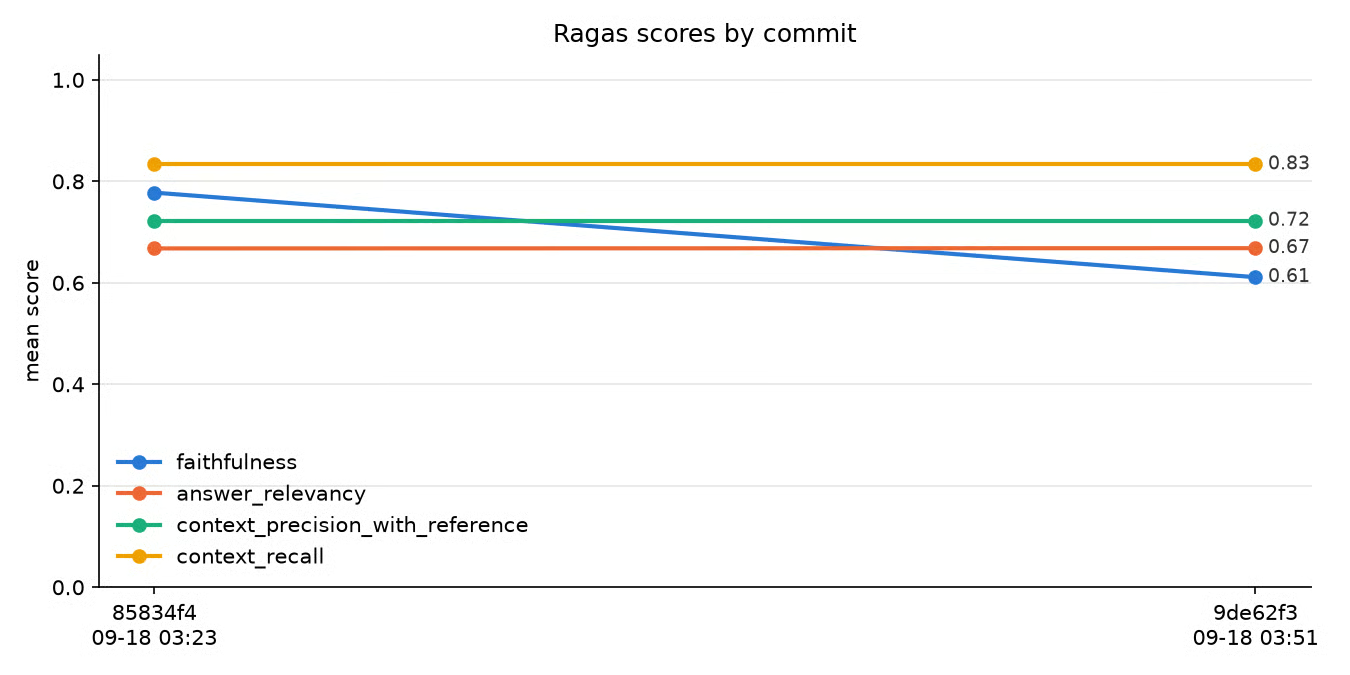
track_scores.pyがコミットごとに記録した平均Ragasスコア。図:筆者作成。
これらのコミット間でパイプラインは何も変えていません(2つ目は判定クライアントの接続設定だけが変更)。それでも、サンプル6の辞退が1.0から0.0に反転したため、faithfulnessは0.78から0.61に落ちました。
つまり、サンプル数が少ないうちは、判定役のノイズが実在します。6サンプルでは、1つの不安定な判定で平均が0.17動きます。100サンプルなら同じ反転で0.01しか動かず、大きな変化は実際の回帰である可能性が高くなります。
これで、各プルリクまたはコミットごとに、ゲートを走らせ、スコアを記録し、チャートを確認できます。
より大きなアーキテクチャの変更を検討しているなら、RAG vs. ファインチューニングのチュートリアルがトレードオフを整理します。どちらの道でも、前後比較の指標は同じ4メトリクスで構いません。
LLM-as-a-judgeのスコアは推定値です。既知のバイアスがあり、実行ごとに変動もしますが、人手では不可能な評価ボリュームにスケールします。
Ragasは決して2つの回答を直接比較させないため、(先に来た回答をひいきする)順序バイアスはほぼ当てはまりません。一方、冗長さバイアス(長い回答を好む)と自己優先バイアス(自分と同じモデルの回答を好む)は影響し得ます。Zhengら(2023)が3つのバイアスを解説しており、自己優先バイアスがあるため、ジェネレーターと判定役に同じモデルは使いません。
実行間の変動は、しきい値設定の仕方を変えるため、ぜひ自分の目で確かめてください。判定役を固定し、同じ6サンプルで繰り返し実行しても、サンプル6の辞退回答はfaithfulnessで0.0になったり1.0になったりし、完全に根拠のあるサンプル5でも0.667になることがありました。
安価な判定役のサンプルごとのスコアはノイジーです。100サンプルの平均ははるかに安定し、CIゲートは必ず平均で判定すべきです。
ノイズを抑える3つの実践:
judge.pyとtrack_scores.py)ことで、判定役の変更をパイプライン変更と取り違えない。RAG以外も含む評価手法の広い概観(判定役が代替している人手評価を含む)は、LLM評価ガイドをご覧ください。LLM as a judgeチュートリアルでは、RAGパイプライン向けの判定役構築をさらに掘り下げています。
このパイプラインの狙いは、「リトリーバーは健全、プロンプトが退行した」や「リランカーでprecisionは直ったがrecallはまだ0.6」といった主張を、数値で裏付けて言えるようにすることです。
faithfulnessとanswer relevancyはジェネレーターを監視します。faithfulnessは捏造の検出、answer relevancyは質問からの逸脱を検出します。context precisionとrecallはリトリーバーを監視し、正しい情報を引けているかを示します。4つのうち2つは参照回答を必要としないため、参照のない本番トラフィックでも実行できます。
標準的なテキスト指標は語の重なりを測るだけで、捏造された返金ポリシーを検出できません。単一のエンドツーエンドスコアは、パイプラインのどちら側が壊れたかも隠してしまいます。2つの失敗点を別々に検査するフレームワークならそれを見抜けます。そして、それを単発の監査ではなく、履歴付きのCIゲートにすることで、チームが数値に基づいて行動できるようになります。
まだパイプラインを構築していない場合は、Retrieval-Augmented Generation with LangChainコースから始め、本記事のpipeline.pyを構築物に向けてください。
プレーンテキスト取得を超えるパイプラインについては、End-to-End RAG with Weaviateコース、マルチモーダルRAGガイド、エージェント型RAGチュートリアルをご覧ください。ただし注意点が1つ。4つの中核メトリクスはテキストのみを読みます。画像を取得するパイプラインはRagasの別のマルチモーダルメトリクスが必要で、エージェント型パイプラインは各取得ステップを、独立した質問・チャンク・回答として採点する必要があります。
DataCamp人気コース
コース
コース
コース