Course
Introduction to AI Agents
1 hr 30 min
137.1K
Before we look at the code, let me explain why we needed a new protocol in the first place. It comes down to the fundamental difference between a function and an agent.
In traditional web development, interactions are transactional. You ask for a user profile, and the server sends it. It's a one-off exchange.
Agents, however, are unpredictable and take time. When you ask an agent to "debug why your CI pipeline suddenly started failing after a teammate's merge," it doesn't return a JSON object right away. Instead, it might:
I'll explain this later in the "Event Types" section, but for now, just know that a standard HTTP request would time out waiting for all this to happen. You need a way to stream these partial updates so the user isn't staring at a frozen screen.
Agents require a bi-directional flow of information that goes beyond text. They need to synchronize the State.
Imagine an agent helping you write a report. It's not just chatting; it's editing a document. Both you and the agent might be typing at the same time. AG-UI handles this by treating the "document" as a shared state, using efficient updates to keep your screen and the agent's memory in sync without overwriting each other's work.
AG-UI replaces the old Remote Procedure Call (RPC) model with an Event-Sourcing model. Instead of waiting for a final answer, the agent sends out a steady stream of events that describe what it's doing.
Think of the AG-UI stream as a news ticker for your agent's brain. The client application (your frontend) subscribes to this ticker and updates the UI based on what it sees. This approach decouples the logic: your React frontend doesn't need to know how the agent is thinking, it just needs to know what to display.
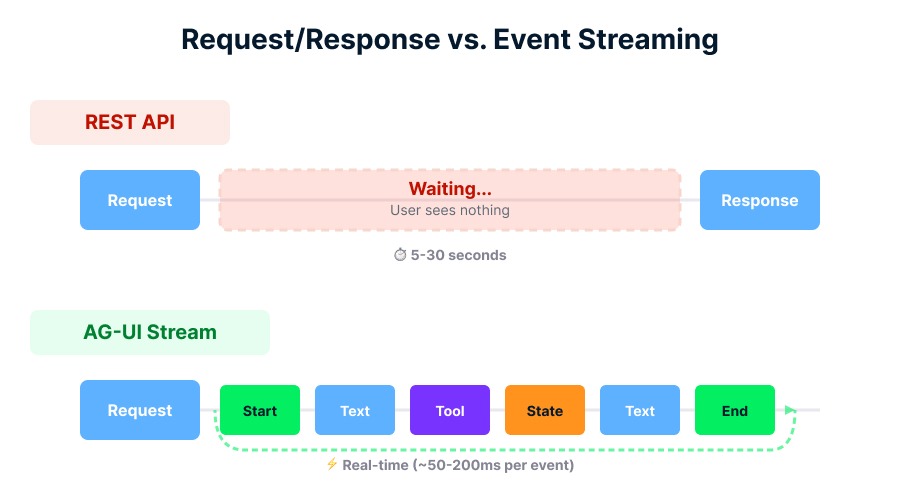
AG-UI avoids the waiting gap. Image by Author.
The protocol defines standard event types that cover almost every interaction scenario. Here are the big ones you'll see:
TEXT_MESSAGE_*: Events that stream generated text piece by piece. This typically involves _START, _CONTENT (the token stream), and _END events, which together create the familiar "typing" effect.
TOOL_CALL: Signals that the agent wants to do something, like check the weather or query a database. Crucially, AG-UI can stream the arguments of the tool call, allowing your UI to pre-fill forms before the agent even finishes "speaking."
STATE_DELTA: This is the heavy lifter for collaboration. Instead of resending the whole document every time a letter changes, the agent sends a tiny "diff" (like "add 'hello' at index 5").
INTERRUPT: The safety valve. If an agent hits a sensitive action (like "Delete Database"), it emits an interrupt event. The flow pauses until the user sends back an approval event.
The protocol isn't limited to text. It handles multimodality, by which I mean streaming images, audio, and file attachments alongside the conversation. It also standardizes Thinking Steps, separating the agent's internal thoughts (reasoning traces) from the final public response. You might have noticed a similar pattern when using tools like ChatGPT, where progress indicators or intermediate steps are surfaced separately from the final response. This lets you decide whether to show users execution progress or simply the end result.
Now that you understand the flow, let's look at the specific features that make AG-UI powerful for developers.
Text is great, but sometimes a chart is better. Generative UI allows an agent to decide at runtime that it should show you a UI component instead of text.
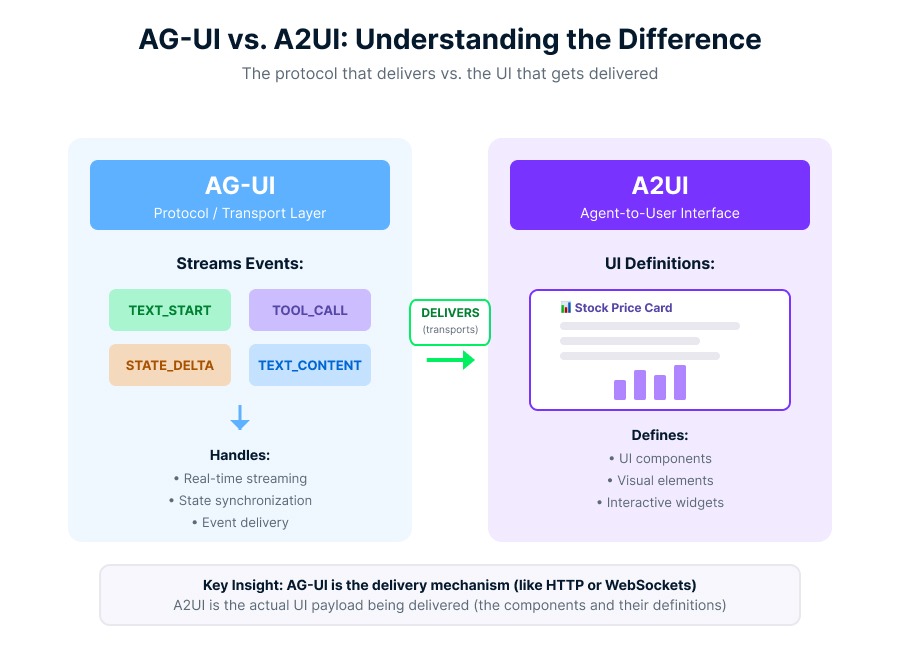
AG-UI streams events; A2UI defines components. Image by Author.
There is a distinction here that often trips people up (I'll touch on this again in the framework section): AG-UI is the delivery mechanism (transport layer), and A2UI (Agent-to-User Interface) is the UI definition (payload). An agent can use an AG-UI TOOL_CALL event to transport an A2UI payload, a declarative JSON tree that describes a UI component (like a "Stock Price Card"). Your frontend receives this and renders the actual chart.
Handling shared state is tricky. If the agent sends a massive 5MB context object every second, your app will crawl.
AG-UI solves this with JSON Patch (RFC 6902). As I mentioned earlier regarding state synchronization, when the agent changes a value in its memory, it calculates the difference and sends a STATE_DELTA event.
[
  {
    "op": "replace",
    "path": "/user/status",
    "value": "active"
  }
]
The client receives this lightweight instruction and applies it to its local state. This efficiency is what makes real-time collaboration with agents possible.
You might have heard of other protocols like MCP (Model Context Protocol). It's important to know where AG-UI fits in the stack so you don't use the wrong tool for the job.
I like to think of it as a triangle of communication:
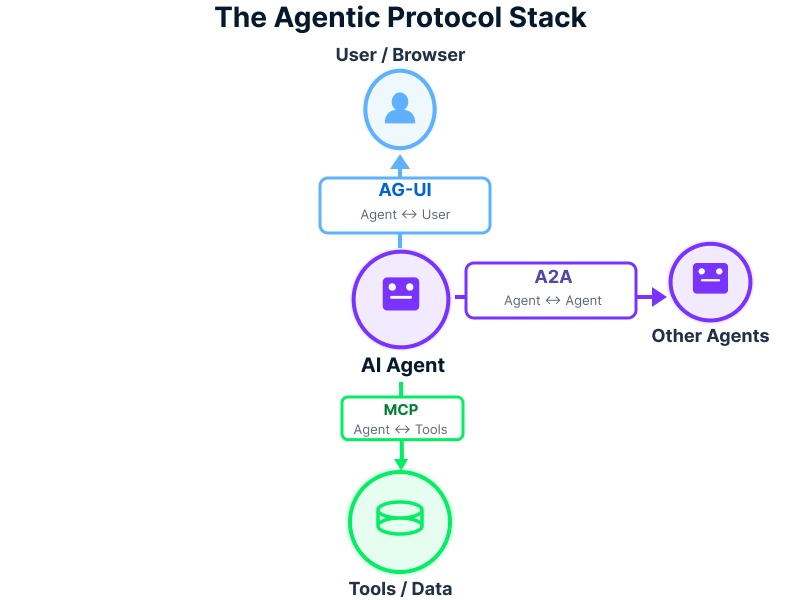
The Protocol Trinity connecting agents. Image by Author.
AG-UI doesn't care how the agent got the data (that's MCP's job, as I mentioned above); it only cares about how to show that data to you.
Let's look at what this actually looks like in practice. Developers typically engage with AG-UI in one of three ways: building 1) Agentic Apps (connecting a frontend to an agent), building 2) Integrations (making a framework compatible), or building 3) Clients (creating new frontends). Most of you will be in the first category.
I'll explain the code in a moment, but first, understand that you typically won't write the raw protocol handlers yourself. Libraries handle the packaging. But understanding the flow is needed for debugging.
Most implementations use Server-Sent Events (SSE) because they are simple, firewall-friendly, and perfect for one-way streaming from server to client. I hinted at this earlier, but SSE is the key that makes this protocol so lightweight compared to WebSockets.
In a typical setup (like with the Microsoft Agent Framework or CopilotKit), your server exposes an endpoint that upgrades the connection to a stream.
Here is a conceptual example of how a frontend client listens to the stream. Notice how we handle different event types to update the UI.
// Connect to the AG-UI stream
const eventSource = new EventSource('/api/agent/stream');

eventSource.onmessage = (event) => {
  const data = JSON.parse(event.data);

  switch (data.type) {
    case 'TEXT_MESSAGE_CONTENT':
      // Append text to the chat window
      updateChatLog(data.content);
      break;

    case 'TOOL_CALL_START':
      // Show a "Processing..." indicator or the specific tool UI
      showToolIndicator(data.tool_name);
      break;

    case 'STATE_DELTA':
      // Apply the JSON patch to our local state store
      applyPatch(localState, data.patch);
      break;

    case 'INTERRUPT':
      // Prompt the user for permission
      showApprovalModal(data.message);
      break;
  }
};
This pattern hides the complexity of the agent's internal logic. Your frontend is just a "player" for the events the agent sends.
You don't have to build all this from scratch. The ecosystem is maturing rapidly, with major platforms and frameworks converging on similar event-driven interaction patterns.
Microsoft describes a "Golden Triangle" for agent development:
The ecosystem is expanding rapidly. Beyond the major players, support is growing across the board:
Microsoft Agent Framework: Has native middleware for ASP.NET Core (Microsoft.Agents.AI.Hosting.AGUI).
CopilotKit: Acts as the "Browser" for AG-UI, providing a full React frontend that knows how to render these events out of the box.
Python Ecosystem: Frameworks like LangGraph, CrewAI, Mastra, Pydantic AI, Agno, and LlamaIndex can all be exposed as AG-UI endpoints.
SDKs: While TypeScript and Python are dominant, SDKs are active or in development for Kotlin, Go, Dart, Java, and Rust.
Opening a direct line of communication between an AI and a browser introduces risks. Here is how to keep your application safe.
Never let a client connect directly to your raw agent runtime. As I stressed in the "Why Agentic Apps Need AG-UI" section, always use a Trusted Frontend Server (BFF pattern). This server acts as a gatekeeper. It adds authentication, rate limiting, and input validation before passing the user's message to the agent.
Malicious users might try to override your agent's instructions through prompt injection attacks. As I mentioned earlier, your middleware should sanitize inputs.
Just because an agent can delete a file doesn't mean the current user should be allowed to. Your trusted server must filter the tools available to the agent based on the user's permissions.
Since state is shared via JSON patches, be wary of prototype pollution. Ensure your patching library forbids modifications to protected properties like __proto__.
If your agent is acting weird, use the AG-UI Dojo. It's a test suite that lets you visualize the raw event stream. It helps you catch issues like malformed JSON patches or tool calls that are firing but not returning results.
We've covered the architecture, the event types, and the implementation patterns of AG-UI.
Now, I recognize that the average solo developer or someone at a small company isn't realistically going to "adopt AG-UI" and suddenly "decouple their frontend from their backend." All this would require significant architectural decisions, buy-in from multiple teams, and resources most people don't have.
But understanding AG-UI matters even if you're not implementing it. When you're evaluating agent frameworks or deciding whether to build in-house or use a platform, knowing what "good" agent-UI communication looks like gives you better judgment. You'll recognize when a tool is forcing you into brittle patterns.
If you want to dive deeper into building these systems, check out our Introduction to AI Agents and Building Scalable Agentic Systems courses to take your skills to the next level.
Learn with DataCamp
Course
Course
Course
blog
Aashi Dutt
5 min
blog
Joyce Chiu
6 min
blog
Bhavishya Pandit
6 min
Tutorial
Aashi Dutt
12 min
Tutorial
Richie Cotton
12 min
Tutorial
Bhavishya Pandit
12 min