
Course
In relational databases, data is usually spread across multiple tables, each storing a specific aspect of a larger system. This separation is a good design choice, but it does introduce a challenge in that data can quickly become difficult to interpret.
To address this challenge, relational databases rely on rules that enforce relationships between tables. One of the most important mechanisms for maintaining this structure and reliability is the use of foreign keys, which are used to make sure that related data stays aligned.
In this tutorial, I will explain how foreign keys work. If you are starting as a database engineer, I recommend taking our Introduction to Relational Databases in SQL and Database Design courses to learn how to create relationships when defining your database schema.
Primary Key vs. Foreign Key
Both the primary key, which we have another article on, and the foreign key help maintain the structure and integrity of a relational database. Let me explain both:
What is a foreign key?
A foreign key is a field or set of fields in one table that refers to the primary key in another table. This foreign key creates a link between tables to ensure that the data in the referencing table matches valid entries in the referenced table.
Let’s assume you have a database with a users table and an orders table. The orders table might include a user_id column, which must match an existing user_id in the users table. The foreign key constraint ensures you can’t create an order tied to a non-existent user.
Understanding foreign keys also requires understanding primary keys, as foreign keys depend on primary keys to establish and maintain these relationships.
What is a primary key?
A primary key is a column or combination of columns that uniquely identifies each record in a table. No two rows can share the same primary key value, and it can never be NULL. Therefore, a table must have one primary key which is the unique identifier that references all the foreign keys in other tables.
For example, the query below creates the users table, with the user_id column as the primary key:
-- Create users table with user_id as primary key
CREATE TABLE users (
user_id INT PRIMARY KEY,
username VARCHAR(100),
email VARCHAR(255)
);
The main differences between primary keys and foreign keys
I have summarized the differences between the primary and foreign keys in the table below:
|
Aspect |
Primary Key |
Foreign Key |
|
Purpose |
Uniquely identifies each record within a table |
Creates a relationship by referencing a primary key in another table |
|
Uniqueness |
Must be unique |
Can contain duplicate values |
|
NULL Values |
Cannot be NULL |
Can be NULL (unless restricted) |
|
Location |
Defined in the same table |
References another table’s primary key |
From the above explanation, we see that primary and foreign keys are important for creating structured and reliable databases. They work together to ensure that data is consistent, relationships are maintained, and the integrity of the database is preserved.
Building and Managing Foreign Keys in SQL
Now that you have understood what foreign keys are and why they are important in databases, let’s learn how to define, manage, and control their behavior when designing your database.
Defining foreign keys with SQL
You can set up a foreign key in SQL in two ways; when you create the table or you can add it afterwards if the table already exists.
The example below shows the first option of how to define a foreign key when creating a table in SQL Server.
-- Create parent table: users
CREATE TABLE users (
user_id INT IDENTITY(1,1) PRIMARY KEY,
username NVARCHAR(100),
email NVARCHAR(255)
);
-- Create child table: orders
CREATE TABLE orders (
order_id INT IDENTITY(1,1) PRIMARY KEY,
user_id INT,
order_date DATE,
CONSTRAINT fk_orders_users FOREIGN KEY (user_id)
REFERENCES users(user_id)
);
The syntax is the same for PostgreSQL, although we use SERIAL for auto-increments for the primary key.
-- Create parent table: users
CREATE TABLE users (
user_id SERIAL PRIMARY KEY, -- SERIAL auto-increments
username VARCHAR(100),
email VARCHAR(255)
);
-- Create child table: orders
CREATE TABLE orders (
order_id SERIAL PRIMARY KEY,
user_id INT,
order_date DATE,
CONSTRAINT fk_orders_users FOREIGN KEY (user_id)
REFERENCES users(user_id)
);
When setting up a foreign key in MySQL, you must use InnoDB as shown below.
-- Create parent table: users
CREATE TABLE users (
user_id INT AUTO_INCREMENT PRIMARY KEY,
username VARCHAR(100),
email VARCHAR(255)
) ENGINE=InnoDB; -- Must use InnoDB for FK support
-- Create child table: orders
CREATE TABLE orders (
order_id INT AUTO_INCREMENT PRIMARY KEY,
user_id INT,
order_date DATE,
CONSTRAINT fk_orders_users FOREIGN KEY (user_id)
REFERENCES users(user_id)
) ENGINE=InnoDB;
If you are using an Oracle database, you can define the foreign key, but ensure the data types match exactly for both tables.
-- Create parent table: users
CREATE TABLE users (
user_id NUMBER GENERATED BY DEFAULT AS IDENTITY PRIMARY KEY,
username VARCHAR2(100),
email VARCHAR2(255)
);
-- Create child table: orders
CREATE TABLE orders (
order_id NUMBER GENERATED BY DEFAULT AS IDENTITY PRIMARY KEY,
user_id NUMBER,
order_date DATE,
CONSTRAINT fk_orders_users FOREIGN KEY (user_id)
REFERENCES users(user_id)
);
To add a foreign key to an existing table, use the following query:
-- Assuming orders table already exists
ALTER TABLE orders
ADD CONSTRAINT fk_orders_users
FOREIGN KEY (user_id)
REFERENCES users(user_id);
I recommend taking our Introduction to SQL Server and Creating PostgreSQL Databases courses to learn more about the differences in the SQL dialects when creating databases.
Managing constraints and naming conventions
Foreign keys are a type of constraint, a rule enforced by the database management system (DBMS) to validate data during operations like inserts, updates, and deletes. When a foreign key constraint is active, the database ensures that any value entered in the foreign key column must already exist in the referenced primary key column.
A common practice is to name constraints following the pattern fk_<child>_<parent>. From our examples, the foreign key becomes fk_orders_users. If you name your foreign keys this way, it makes schemas readable, helps with debugging constraint violations, and works well with migration tools. The constraint validation works if you perform the following operations:
-
INSERT: Rejects a row if the referenced parent value doesn’t exist -
UPDATE: Prevents modification that would break relationships. -
DELETE: Blocks delete operations when dependent child rows exist.
Referential integrity and cascading actions
Referential integrity is the core principle enforced by the foreign key constraint. Foreign keys help enforce this by preventing orphaned records, which occur when rows in a child table point to non-existent rows in a parent table.
SQL also lets you set up cascading actions. These are automatic instructions that tell the database management system (DBMS) exactly how to handle changes made to the record being referenced. For example, you can use these cascading operations to do things like:
|
Action |
Behavior |
|
|
Delete child rows when the parent row is deleted |
|
|
Update the child key when the parent key changes |
|
|
Child foreign key becomes |
|
|
Child receives default value |
|
|
Prevent changes that break relationships |
For example, the following query adds the cascading operations to delete a user record if they remove their order, and updates automatically if their user_id changes.
-- Adds cascading rules to enforce hierarchical cleanup
ALTER TABLE orders
ADD CONSTRAINT fk_orders_users
FOREIGN KEY (user_id)
REFERENCES users(user_id)
ON DELETE CASCADE -- deleting a user deletes their orders
ON UPDATE CASCADE; -- if user_id changes, update automatically
Designing Relationships Between Tables
Foreign keys are the building blocks used in data modeling that define the relationships between tables in a database. In this section, we will look at the different methods by which foreign keys ensure data consistency when linking tables.
One-to-many and many-to-many relationships
In a one-to-many (1:N) relationship, one row in a parent table can be linked to many records in a child table. This relationship is enforced by placing the primary key of the parent table, such as users.user_id, as a foreign key in the child table, like orders.customer_id.
For example, one user can have many orders, or one department can have many employees.
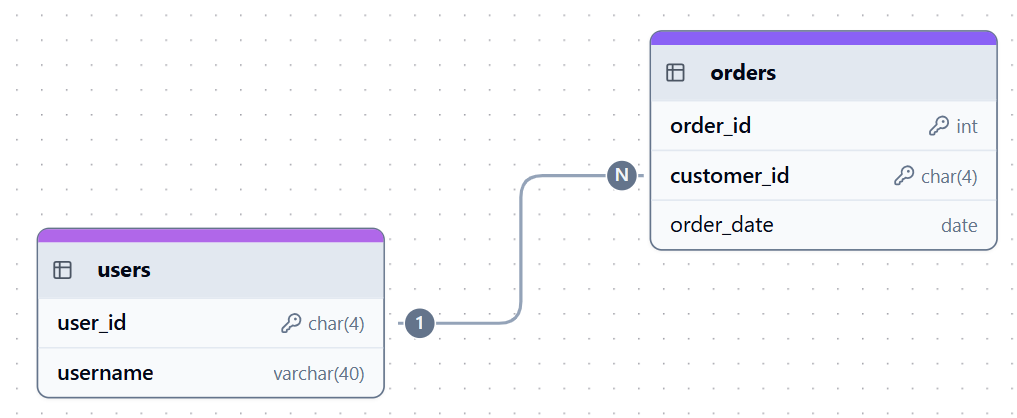
One-to-many relationship example. Image by Author.
On the other hand, a many-to-many (M:N) relationship occurs when multiple records in one table can be related to multiple records in another. Since you cannot directly implement a many-to-many relationship in a normalized database, we use a junction table (bridge table) containing two foreign keys.
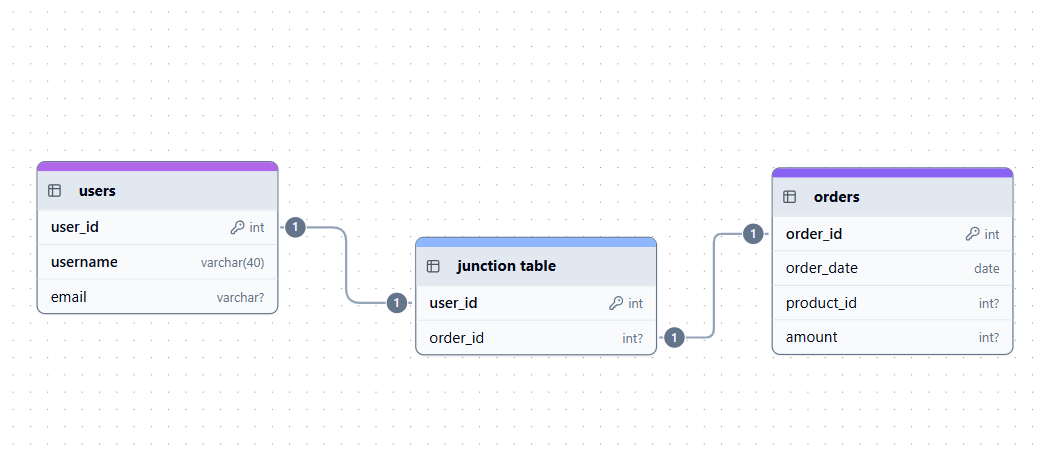
Many-to-many relationship example. Image by Author.
Composite and self-referencing foreign keys
A composite key consists of two or more columns that uniquely identify a record and must be referenced together. This pattern is used when the natural key spans multiple fields, or if you want to prevent duplicate relationships. For example, you may have a course offering identified by (course_id, semester) or a junction table with student_id and course_id as the composite primary key.
-- Defines courses table
CREATE TABLE course_offerings (
course_id INT,
semester VARCHAR(10),
-- Composite primary key ensures a course can only be offered once per semester
PRIMARY KEY (course_id, semester)
);
-- Create enrollment table
CREATE TABLE enrollment (
student_id INT,
course_id INT,
semester VARCHAR(10),
-- This foreign key links enrollment records to a valid course offering
FOREIGN KEY (course_id, semester)
REFERENCES course_offerings(course_id, semester)
);
A self-referencing foreign key or recursive foreign key is a foreign key that references the primary key within the same table. This pattern is common in hierarchical data like Employee → Manager. This allows a way to represent recursive relationships without creating additional tables.
In the query below, the manager_id references employee_id in the same table.
CREATE TABLE employees (
employee_id INT PRIMARY KEY,
name VARCHAR(100),
-- manager_id references employee_id in the same table
manager_id INT,
FOREIGN KEY (manager_id) REFERENCES employees(employee_id)
);
Working with Data and Ensuring Integrity
We now know that foreign keys are used to ensure data integrity in databases. In this section, we will look at the practical considerations when working with foreign keys for SQL operations, common challenges, and how to manage constraints.
INSERT, UPDATE, and DELETE operations
Let’s look at how these operations interact with foreign keys.
Insert operations with foreign keys
To insert a child record, the referenced parent value must exist. If it doesn’t, the insert fails. For example, the query below will insert the record in the orders table if the users table contains a record where user_id is 1.
-- users table contains user_id = 1
INSERT INTO orders (order_id, user_id, order_date)
VALUES (100, 1, '2024-02-01');
If you try to insert a record for a user that does not exist in the parent table, you will get an error showing a violation of the foreign key constraint.
-- user_id = 999 does NOT exist in users table
INSERT INTO orders (order_id, user_id, order_date)
VALUES (101, 999, '2024-02-01');
ERROR: insert or update on table "orders" violates foreign key constraint "fk_orders_users"
Update operations and cascading behavior
Updates can affect either the foreign key or the primary key table. For example, if you update the foreign key in the orders table, it will succeed only if the primary key exists in the parent table. For example, the update below will succeed only if users.user_id = 5 exists.
-- updating foreign key value
UPDATE orders
SET user_id = 5
WHERE order_id = 100;
From the above example, you cannot update the primary key without an ON UPDATE CASCADE because child rows still reference 1. To avoid this, we first drop existing foreign key constraint, then recreate it with ON UPDATE CASCADE enabled. With this method, the related orders.user_id values update automatically.
-- Drop existing foreign key constraint
ALTER TABLE orders
DROP CONSTRAINT fk_orders_users;
-- Recreate FK with ON UPDATE CASCADE enabled
ALTER TABLE orders
ADD CONSTRAINT fk_orders_users
FOREIGN KEY (user_id)
REFERENCES users(user_id)
ON UPDATE CASCADE; -- Automatically update child rows when parent key changes
UPDATE users
SET user_id = 500
WHERE user_id = 1;
Delete operations and cascades
If you try to remove a parent row without any cascade rule in place, the delete will fail, and you’ll get an error. When you add an ON DELETE CASCADE clause, it tells the database to automatically remove any related child rows when the parent record is deleted, to keep everything consistent.
In the example below, we create a foreign key on orders.user_id that references users.user_id. With ON DELETE CASCADE, if a user is deleted from the users table, all related orders will be deleted automatically.
-- Add a new foreign key constraint to the orders table
ALTER TABLE orders
ADD CONSTRAINT fk_orders_users
FOREIGN KEY (user_id)
REFERENCES users(user_id)
ON DELETE CASCADE; -- Delete orders automatically when user is deleted
Sometimes you may want the database to handle the deletions automatically. You can enforce this with ON DELETE SET NULL when creating the table. This will set the foreign key columns in the child table to NULL if the parent record changes or is deleted.
CREATE TABLE orders (
order_id INT PRIMARY KEY,
user_id INT, -- FK referencing users.user_id
order_date DATE,
FOREIGN KEY (user_id)
REFERENCES users(user_id)
ON DELETE SET NULL -- If a user is deleted, set user_id in orders to NULL
);
Handling common challenges
As you design complex databases, you are likely to encounter challenges with the foreign keys. The following are the common problems I have experienced with foreign keys and practical solutions to each.
-
Mismatched data types: If your foreign key and referenced primary key columns have incompatible data types, the constraint cannot be created. To avoid this, always standardize types across related tables.
-
Circular dependencies: Occur when two tables reference each other, potentially causing insertion deadlocks. To resolve this issue, you should re-evaluate the schema design or create the table without foreign keys first, load the base data, and then use
ALTER TABLEto add the constraints. -
Dangling foreign keys: This problem occurs when a child’s foreign key points to a non-existing parent table. To fix this, use cascading actions to validate the data during delete and update operations.
Managing modifications and dropping constraints
Sometimes you might want to modify the foreign key constraints when redesigning your database schema. The following are ways to drop the foreign key with slight syntax variations across the different SQL dialects.
In PostgreSQL, SQL Server, and Oracle databases, we use the DROP CONSTRAINT statement.
-- Drop foreign key
ALTER TABLE orders
DROP CONSTRAINT fk_orders_users;
However, in MySQL, we use the DROP FOREIGN KEY statement to remove the foreign key.
-- Drop foreign key
ALTER TABLE orders
DROP FOREIGN KEY fk_orders_users;
You should note that removing a foreign key constraint removes the database's enforcement of referential integrity. After removal, you can insert or update data that violates the relationship, which can lead to data or inconsistency.
Performance and Optimization
From the above examples, we have seen how foreign keys ensure effective data design by maintaining data integrity. However, you should understand how to optimize the foreign keys to improve the performance of your databases. Below are tips I’ve found helpful when working with foreign keys:
Indexing and query performance
When you index a foreign key, the database can quickly validate changes during insert, update, or delete operations by locating corresponding keys in the parent table. Similarly, indexes speed up join operations that link child and parent tables by allowing the database engine to match rows based on foreign key values.
As a best practice, I recommend you explicitly index foreign key columns if the DBMS does not handle it automatically.
Query optimization techniques
Some SQL engines use the existence of foreign keys to apply join elimination, a technique that identifies and removes unnecessary joins from the query execution plan. For example, if a query only accesses columns from the child table but includes a join on a parent table for filtering that is guaranteed by the foreign key constraint, the join operation can be optimized away.
You can always view the execution plans to see how the query optimizer handles foreign keys and joins. These optimizations and their efficiencies vary across SQL engines, such as PostgreSQL, MySQL, and SQL Server. Understanding your specific database’s optimizer behavior helps in writing performant queries that take full advantage of foreign key constraints.
For example, you can use the following query to view the execution plan in PostgreSQL:
-- View execution plan
EXPLAIN ANALYZE
SELECT o.order_id, u.email
FROM orders o
JOIN users u ON o.user_id = u.user_id;
This table summarizes how to view the execution plan in different databases:
|
Database |
Command |
|
PostgreSQL |
|
|
MySQL |
|
|
SQL Server |
Estimated / Actual Execution Plan |
|
Oracle |
|
I recommend taking our Joining Data in SQL course to learn the different types of joins in SQL and how to work with different related tables in the database.
Advanced Use Cases and Best Practices
Beyond basic implementation, you can use foreign keys to build robust, scalable, and maintainable database architecture. In this section, I will explain the specialized scenarios and high-level design principles to consider when using foreign keys.
Cross-database or cross-schema relationships
While foreign keys are designed to enforce integrity within a single database or schema, more complex enterprise environments often require relationships across these boundaries. The table below summarizes cross-schema support and cross-database support for different SQL dialects.
|
Database |
Cross-Schema Support |
Cross-Database Support |
Limitations |
|
PostgreSQL |
Yes |
No |
Limited to a single database cluster. |
|
SQL Server |
Yes |
Yes |
Cross-database integrity is managed by application logic or triggers rather than native FKs. |
|
Oracle |
Yes |
Yes |
Database links are for data access; native FK constraints are typically not enforced across links. |
|
MySQL |
No |
No |
Strictly limited to tables within the same database and storage engine, such as InnoDB. |
|
SQLite |
No |
No |
Limited to the specific file/database connection. |
Maintenance and auditing
As you build foreign keys, you will notice that they change every time your business logic shifts. Consider the following ways to audit and maintain the foreign keys to ensure they are updated:
- Review constraints: Periodically audit foreign key constraints to ensure they remain aligned with evolving business rules and schema changes.
- Regular index audit: Always verify that indexes exist on all foreign key columns to maintain optimal join and validation performance, especially after large data imports or system upgrades.
- Documentation and visualization: Use Entity-Relationship (ER) diagrams or schema visualization tools to document relationships. These visual aids will ensure that all developers and analysts understand the relationships and the integrity rules enforced by your foreign keys.
Best practices for robust database design
To ensure you get the most out of how foreign keys work, adhere to the following guidelines:
-
Align your keys with real business logic: Make sure primary and foreign keys actually represent real entities and the relationships between them, rather than relying on artificial or unstable identifiers.
-
Use clear, consistent names: Choose descriptive constraint names, like
fk_orders_user_idso your schema is easier to maintain, debug, and work on with others. -
Balance strictness and flexibility: Constraints should protect data quality, but your design should still allow for practical edge cases or validations handled in the application layer.
-
Avoid circular relationships: Structure your schema so foreign key dependencies don’t loop back on each other, as these make inserts, updates, and deletes unnecessarily complex.
-
Optimize performance: Index your foreign keys properly, and apply cascading actions carefully so you maintain integrity without slowing down your system.
Conclusion
As with any skill, mastering foreign keys comes through practice. I encourage you to experiment with schema modeling, testing cascading actions, and understanding how constraints behave in real-world scenarios. Over time, you’ll learn how to balance strict rules with the flexibility your applications need, creating databases that are both resilient and adaptable as requirements evolve.
Now that you understand how to use foreign keys in database design, I recommend you try our Associate Data Engineer in SQL career track to learn the fundamentals of data engineering and data warehousing. Finally, if you are looking to advance your database management skills for big data, I recommend taking our Introduction to Data Modeling in Snowflake course to learn more about dimensional modeling.
FAQs
What is the difference between a primary key and a foreign key?
A primary key uniquely identifies records in its own table, while a foreign key references a primary key in another table to establish a relationship.
Can a table have multiple foreign keys?
Yes, a table can have multiple foreign keys, each linking to different parent tables.
Must a table have unique foreign key columns?
No, foreign key columns can contain duplicate values but must reference valid rows in the parent table.
What happens if you delete a record referenced by a foreign key?
Depending on constraints, the database may restrict deletion, cascade delete related rows, or set foreign key values to NULL.
Are foreign keys mandatory in relational databases?
While not mandatory, foreign keys are essential for enforcing relational integrity and reliable database design.