Course
Database Design
4 hr
131.2K
In this tutorial, I will explain what the one-to-many relationship is, how to implement it in database design, and the best practices to follow to keep your databases scalable and efficient.
If you are starting as a database engineer, I recommend taking our Introduction to Relational Databases in SQL and Database Design courses to learn how to create relationships when defining your database schema.
A one-to-many relationship (1:N) describes the scenario where one record in a table can be linked to multiple records in another table. In plain terms, it means one thing exists once but can be connected to many related things.
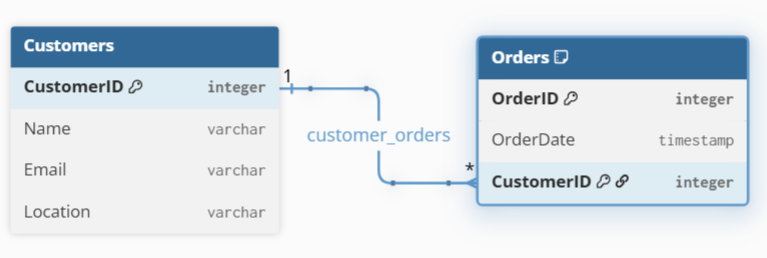
For example, a single customer can place many orders, but each order belongs to only one customer.
You’ll often see one-to-many relationships described using these terminologies:
From our example, the customer record will be in the parent table, and the orders table will be in the child table.
Cardinality describes how many records can be connected between two tables. It answers questions like:
One-to-many relationships are asymmetric, meaning the rules are different on each table. On the parent table, a single record can relate to many records, while on the child table, each record can relate to only one record.
Cardinality also includes minimum and maximum limits, where:
For example, a customer may have zero or many orders, but an order must belong to exactly one customer.
These rules influence table design by indicating whether certain fields can be empty, and how strictly the database enforces relationships.
In database design, an Entity-Relationship (ER) diagram is a visual way to show tables (entities), how they are connected (relationships), and how many records can be linked (cardinality).
Most ER diagrams use specific symbols at the ends of the lines connecting your tables to tell you exactly what the relationship is. Below are the commonly used visual ideas for:
Customers or Orders.1 or a single line represents the one, while ∞, *, or a crow’s foot, represents the many relationship.The example below shows the relationship between the Customers and the Orders table. The one-to-many relationship shows that one customer can have many orders, but each order belongs to one customer. The CustomerID appears in the Orders table to link it back to the Customers table.
The following are examples of one-to-many relationship scenarios you may come across:
One-to-many relationships are implemented using primary keys and foreign keys. In this section, I will show you how these constraints help enforce data integrity in databases.
The primary key is a column that uniquely identifies each row in a table, while the foreign key is a field or set of fields in one table that refers to the primary key in another table.
In a one-to-many relationship, the “one” side has a primary key, and the “many” table stores that key as a foreign key. The foreign key then creates the link between the two tables and ensures that each record on the “many” side points to a valid record on the “one” side.
Let’s look at how you would build a one-to-many relationship in SQL using the example below.
You will create the Customers table where CustomerID uniquely identifies each customer. This is the parent table.
-- Create Customers table with CustomerID as primary key
CREATE TABLE Customers (
    CustomerID INT PRIMARY KEY,
    CustomerName VARCHAR(100)
);
Now create the Orders table where the CustomerID is a foreign key. In this table, each order references exactly one customer and is the child table.
-- Create Orders table with CustomerID as a foreign key
CREATE TABLE Orders (
    OrderID INT PRIMARY KEY,
    OrderDate DATE,
    CustomerID INT,
    FOREIGN KEY (CustomerID) REFERENCES Customers(CustomerID)
);Understanding the difference between one-to-many and many-to-many relationships is important for correct database design. The table below summarizes these differences:
|
Aspect |
One-to-Many Relationship |
Many-to-Many Relationship |
|
Definition |
One record in Table A can relate to many records in Table B |
Records in Table A can relate to many records in Table B, and vice versa |
|
Relationship Direction |
One → Many (one-way) |
Many ↔ Many (two-way) |
|
Rule on Table B |
Each record in Table B relates to only one record in Table A |
Each record in Table B can relate to many records in Table A |
|
Common Examples |
Customer → OrdersDepartment → Employees |
Students ↔ CoursesProducts ↔ Orders |
|
Real-World Meaning |
A customer can place many orders, but each order belongs to one customer |
A student can enroll in many courses, and each course can have many students |
|
Implementation |
Single foreign key on the many side |
Requires a join (junction) table |
|
Foreign Key Location |
Stored in the “many” table |
Stored in the join table (two foreign keys) |
It’s important to note that relational databases cannot directly store many-to-many relationships using a single foreign key. Instead, they use a join table (also called a junction or bridge table).
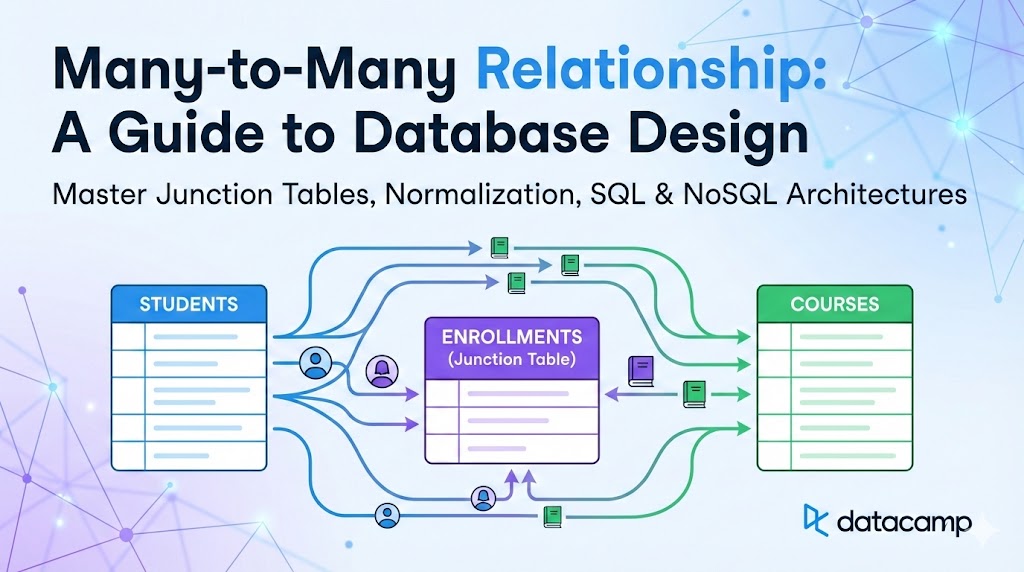
For example, you can safely relate records in the Students table to the Courses table using the Enrollments table as the join table. The join table breaks the many-to-many relationship into two one-to-many relationships, hence stores foreign keys to both tables. This design helps in database normalization, maintaining efficiency.
I recommend taking our Joining Data in SQL course to learn the different types of joins in SQL and how to work with different related tables in the database.
The following are some of the common issues you may encounter in one-to-many relationships, and how to troubleshoot:
I recommend the following best practices as a guide to help you design efficient and scalable one-to-many relationships:
Use clear and consistent naming: Name primary keys predictably, such as CustomerID and OrderID. Clear naming makes relationships obvious without diagrams and is helpful when matching foreign key names to the referenced primary key.
Enforce foreign key constraints: Use foreign keys to let the database protect data integrity and prevent invalid or orphaned records, especially as your data grows.
Think about deletion behavior early: You can decide what should happen to child records when a parent is deleted to avoid accidental data loss or broken references. For example, CASCADE ensures all the child records are deleted when the parent record is deleted.
Keep designs simple: Always avoid unnecessary tables or complex relationships, and keep your design to the model that you need now, not hypothetical future cases. Remember that simple designs are easier to maintain, explain, and extend.
A one-to-many relationship describes how a single record in one table can be associated with multiple records in another, while each of those related records belongs to only one parent. This pattern is foundational in relational database design because it keeps data organized and prevents unnecessary duplication.
I recommend our Associate Data Engineer in SQL career track to learn to design databases in SQL to process, store, and organize data efficiently. Also, if you are looking to advance your database management skills for big data, our Introduction to Data Modeling in Snowflake course will help you with dimensional modeling.
Learn with DataCamp
Course
Course
Course
blog
Tim Lu
12 min
Tutorial
Allan Ouko
13 min
Tutorial
Austin Chia
10 min
Tutorial
Oluseye Jeremiah
9 min
Tutorial
Dario Radečić
15 min
Tutorial
Laiba Siddiqui
9 min