Tracks
面向开发者的 AI 工程师助理
26小时
Google 的 Gemini 3.8 Live 是一款原生语音到语音模型,专为实时流式和交互式音频应用打造。Gemini 3.8 Live 通过持久的 WebSocket 连接直接处理多模态输入。
这种双向流式能力使开发者能够创建全双工的对话式智能体,能够同时聆听和说话,并支持自然的用户打断以及实时音频转写等功能。
在应用开发方面,Gemini 3.8 Live 引入了异步工具调用和后台推理,使智能体在与用户保持主动对话的同时,执行外部函数调用或进行数据检索。
如需了解其功能、基准和定价的完整概览,请参阅我们的 Gemini 3.8 Live 指南。
在动手写代码之前,先理解一下实时语音助手的底层工作方式。
在标准 Python 脚本中,代码按顺序逐行运行:函数 A 完成后再运行函数 B。但在实时语音对话中,等待不可行:
为实现这一点且不发生卡顿,我们使用 Python 的 asyncio 来运行 4 个轻量级后台任务(“工作协程”),它们通过两个 asyncio.Queue 缓冲区(把它们想象成传送带)进行通信:
input_queue):audio_recorder():持续监听麦克风,并将音频切片投到传送带上。
send_audio_loop():从传送带取走音频切片,并将其流式发送到 Gemini。
audio_queue):receive_loop():监听 Gemini。当文本到达时打印;当语音到达时,将音频分片投到传送带上。
audio_player():从传送带取出音频分片,并通过扬声器或耳机播放。
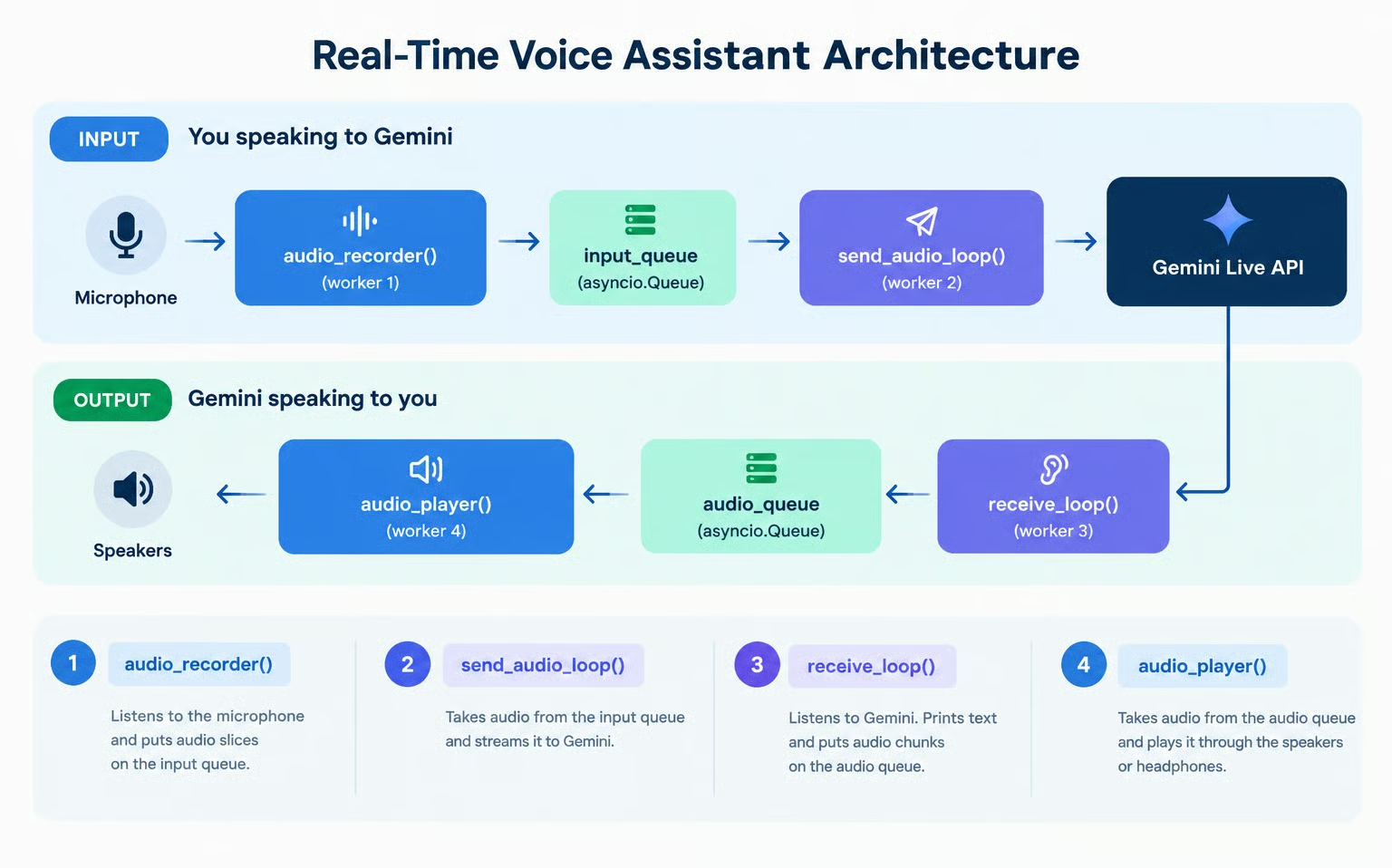
由于每个工作协程都只专注于自己的一小块工作,这四个协程可以在 Python 事件循环上并发运行,互不干扰。
本教程使用的完整代码可在 此 GitHub 仓库获取。
要使用 Gemini API,我们需要创建并设置一个 API 密钥,使我们的代码能够与 API 通信。
最简单的方法是:
访问 Google 的 AI Studio API 密钥页面并登录。
点击右上角的“Create API key”按钮。
将 API 密钥复制到与 Python 代码同一文件夹下名为 .env 的文件中,格式如下:
GEMINI_API_KEY=replace_with_api_key请注意,使用 API 通常会产生费用。免费层覆盖对两种 Gemini 3.8 Live 模型的限量访问,但免费层数据将用于改进 Google 的产品。用于生产或需要更高限额时,需要在 Google 的 AI Studio 结算页面配置支付方式。
以下步骤设计为在本地 Jupyter 笔记本中运行,每段代码对应一个单元格。由于需要访问麦克风和扬声器,因此无法在 Google Colab 等在线笔记本中开箱即用。
首先,确保安装所需软件包:
pip install google-genai sounddevice python-dotenv这些包的作用如下:
google-genai:用于与 Gemini 模型交互的官方 Google 包。
sounddevice:用于处理音频硬件,从麦克风录音并通过扬声器播放。
python-dotenv:用于从 .env 文件加载 Gemini API 密钥的工具包。
现在我们可以加载环境变量、校验 API 密钥,并初始化 genai.Client。
import asyncio
import os
import sys
from dotenv import load_dotenv
from google import genai
from google.genai import types
import sounddevice as sd

# Load environment variables from .env file
load_dotenv()

api_key = os.getenv("GEMINI_API_KEY")
if not api_key:
    raise ValueError("GEMINI_API_KEY not found. Please set it in your .env file or environment.")

# Initialize the Gemini Client
client = genai.Client(api_key=api_key)
print("Gemini Client initialized successfully!")我们先通过发送一个文本轮次并接收流式语音与转写,来了解 Gemini Live 连接生命周期的核心流程。我们会发送文本提示并接收文本与音频响应。不过我们暂时不播放音频,只专注于收集音频分片。
Gemini Live API 使用持久的 WebSocket 连接,通过 client.aio.live.connect() 访问。要配置语音输出和实时转写,我们提供一个 config 字典:
# Session configuration
config = {
    "response_modalities": ["AUDIO"],
    "output_audio_transcription": {},
}response_modalities:使用 ["AUDIO"] 指示 Gemini 用语音音频进行回应。
output_audio_transcription:值 {} 指示 Gemini 同步流式输出其语音内容的文本转写。
现在我们可以使用 session.send_client_content() 发送文本提示,并流式读取传入的文本转写。
print("Connecting to Gemini 3.8 Live API...")
async with client.aio.live.connect(model="gemini-3.8-live", config=config) as session:
    print("Connected! Sending text prompt...")

    await session.send_client_content(
        turns={"role": "user", "parts": [{"text": "Hello! In one short sentence, introduce yourself."}]},
        turn_complete=True,
    )

    print("\n[Gemini Transcription]: ", end="", flush=True)
    audio_chunks_received = 0
    total_audio_bytes = 0

    async for response in session.receive():
        server_content = response.server_content
        if server_content:
            # 1. Print real-time transcription as tokens arrive
            if server_content.output_transcription:
                print(server_content.output_transcription.text, end="", flush=True)

            # 2. Inspect audio chunks
            if server_content.model_turn:
                for part in server_content.model_turn.parts:
                    if part.inline_data and part.inline_data.data:
                        audio_chunks_received += 1
                        total_audio_bytes += len(part.inline_data.data)

    print(f"\n\nReceived {audio_chunks_received} audio chunks ({total_audio_bytes:,} bytes total).")
运行此代码时,我们应能看到类似输出:
Connecting to Gemini 3.8 Live API...
Connected! Sending text prompt...

[Gemini Transcription]: Hello, I am your helpful AI assistant designed to assist you with various tasks and answer your questions.

Received 22 audio chunks (304,800 bytes total).
代码捕获了音频分片,但我们尚未设置音频播放器,因此听不到。接下来学习如何定义音频播放器。
在步骤 2 中,我们收到了成千上万字节的音频数据,但并未听到任何声音。如果在接收循环内直接写入音频硬件,任何网络延迟都会导致音频卡顿,而任何播放延迟又会阻塞网络接收。
为防止音频播放阻塞网络接收器,我们实现第一个工作协程:audio_player()。
您无需关心底层音频实现细节。建议将其视为黑盒即可。
OUTPUT_SAMPLE_RATE = 24000
CHANNELS = 1

async def audio_player(audio_queue: asyncio.Queue):
    """Plays raw 24kHz audio chunks from audio_queue through the speakers."""
    loop = asyncio.get_running_loop()
    with sd.RawOutputStream(
        samplerate=OUTPUT_SAMPLE_RATE, channels=CHANNELS, dtype="int16"
    ) as stream:
        while True:
            chunk = await audio_queue.get()
            if chunk is None:  # Sentinel value signaling end of stream
                audio_queue.task_done()
                break
            await loop.run_in_executor(None, stream.write, chunk)
            audio_queue.task_done()

print("Audio player defined!")
为了测试它,我们将 audio_player() 接到我们的请求上。这一次,我们会在观察流式转写的同时,实时听到 Gemini 大声说话:
audio_queue = asyncio.Queue()
player_task = asyncio.create_task(audio_player(audio_queue))

prompt_text = "Hello! In one short sentence, introduce yourself."
print(f"[User]: {prompt_text}")

async with client.aio.live.connect(model="gemini-3.8-live", config=config) as session:
    await session.send_client_content(
        turns={"role": "user", "parts": [{"text": prompt_text}]},
        turn_complete=True,
    )

    print("[Gemini]: ", end="", flush=True)
    async for response in session.receive():
        server_content = response.server_content
        if server_content:
            if server_content.output_transcription:
                print(server_content.output_transcription.text, end="", flush=True)

            if server_content.model_turn:
                for part in server_content.model_turn.parts:
                    if part.inline_data and part.inline_data.data:
                        await audio_queue.put(part.inline_data.data)

print()
# Signal the player to shut down and await completion
await audio_queue.put(None)
await player_task
print("Playback complete!")
运行该代码片段后,我们现在可以听到 Gemini 的响应。
要与 Gemini 实时对话,我们需要持续地从麦克风捕获我们的声音。
第二个工作协程是 audio_recorder()。它在后台监听您的麦克风,将输入语音切分为小分片,并放入 input_queue。我们将采样率设置为 16 kHz,这是 Gemini 期望的标准语音格式。
INPUT_SAMPLE_RATE = 16000  # Gemini Live expects 16kHz audio input
CHUNK_SIZE = 1024          # Number of samples per audio chunk

async def audio_recorder(input_queue: asyncio.Queue, stop_event: asyncio.Event):
    """Captures microphone input and puts raw audio chunks into the input queue."""
    loop = asyncio.get_running_loop()

    def record_loop():
        with sd.RawInputStream(
            samplerate=INPUT_SAMPLE_RATE,
            channels=CHANNELS,
            dtype="int16",
            blocksize=CHUNK_SIZE,
        ) as stream:
            while not stop_event.is_set():
                data, _ = stream.read(CHUNK_SIZE)
                loop.call_soon_threadsafe(input_queue.put_nowait, bytes(data))

    await asyncio.to_thread(record_loop)

print("Audio recorder defined!")在步骤 2 中,我们使用 send_client_content() 发送了静态文本轮次。对于连续语音流式传输,Live API 提供了 session.send_realtime_input()。
第三个工作协程是 send_audio_loop()。它监听 input_queue,一旦有来自麦克风的音频分片到达,就通过已打开的 WebSocket 转发给 Gemini。
请注意,我们无需手动告知 Gemini 何时开始或停止说话:Gemini 使用内置的语音活动检测(VAD)自动检测您开始与结束说话的时刻。
async def send_audio_loop(session, input_queue: asyncio.Queue, stop_event: asyncio.Event):
    """Continuously streams microphone chunks from input_queue to Gemini."""
    while not stop_event.is_set():
        try:
            chunk = await asyncio.wait_for(input_queue.get(), timeout=0.1)
            await session.send_realtime_input(
                audio=types.Blob(data=chunk, mime_type=f"audio/pcm;rate={INPUT_SAMPLE_RATE}")
            )
            input_queue.task_done()
        except asyncio.TimeoutError:
            continue

print("send_audio_loop defined!")
就像我们在步骤 3 中用文本提示测试音频播放一样,现在可以用一次口述问题来端到端测试我们的麦克风流式传输。
当运行下面的单元格时,请对着麦克风说出一个问题(例如:“法国的首都是哪里?”)。Gemini 会直接处理我们的语音,并用合成语音及实时转写进行回复:
audio_queue = asyncio.Queue()
input_queue = asyncio.Queue()
stop_event = asyncio.Event()

player_task = asyncio.create_task(audio_player(audio_queue))

print("Connecting to Gemini Live API...")
async with client.aio.live.connect(model="gemini-3.8-live", config=config) as session:
    print("Connected! Speak a question into your microphone (e.g. 'What is the capital of France?')...")
    recorder_task = asyncio.create_task(audio_recorder(input_queue, stop_event))
    sender_task = asyncio.create_task(send_audio_loop(session, input_queue, stop_event))

    print("\n[Gemini]: ", end="", flush=True)
    async for response in session.receive():
        server_content = response.server_content
        if server_content:
            # 1. As soon as Gemini starts replying, mute the microphone
            # so speaker audio cannot loop back into the mic and interrupt Gemini
            if not stop_event.is_set() and (server_content.output_transcription or server_content.model_turn):
                stop_event.set()

            # 2. Print transcription text as it streams
            if server_content.output_transcription:
                print(server_content.output_transcription.text, end="", flush=True)

            # 3. Queue audio parts for playback
            if server_content.model_turn:
                for part in server_content.model_turn.parts:
                    if part.inline_data and part.inline_data.data:
                        await audio_queue.put(part.inline_data.data)

            # 4. Turn complete
            if server_content.turn_complete:
                break

    # Clean up mic tasks cleanly
    stop_event.set()
    recorder_task.cancel()
    sender_task.cancel()
    await asyncio.gather(recorder_task, sender_task, return_exceptions=True)

# 5. Wait for playback queue to drain, then allow the soundcard buffer to finish playing
await audio_queue.join()
await asyncio.sleep(0.8)  # Prevents clipping the final syllables
await audio_queue.put(None)
await player_task

print("\nSingle-turn voice test complete!")注意上面测试中发生了什么:我们通过麦克风提出了问题,Gemini 直接理解了我们的语音并大声回复。然而,如果我们尝试追问,当前会话已经结束。
为了解决这个问题,我们需要处理构建真实语音助手的两个关键点:多轮持久化与打断。
在 google-genai SDK 中,session.receive() 是单轮的异步生成器。当 Gemini 说完答案,session.receive() 就结束了。如果不将其包裹在外层循环中,助手会在首次响应后终止。
为支持连续的多轮对话,我们将 session.receive() 包裹在外层的 while not stop_event.is_set(): 循环中:
while not stop_event.is_set():
    async for response in session.receive():
...Gemini 3.8 Live 具有原生语音活动检测与插话支持。如果当 Gemini 在说话时您开始说话,Gemini 会立刻停止生成音频并发送标志:server_content.interrupted == True。
即使 Gemini 停止发送新音频,我们本地的 audio_queue 里可能仍有一些等待播放的音频分片。如果不清空该队列,扬声器会继续播放之前的回答。
因此,一旦收到 server_content.interrupted,我们就清空队列,让播放立刻停止:
if server_content.interrupted:
    print("\n[Interrupted!]")
    while not audio_queue.empty():
        audio_queue.get_nowait()
audio_queue.task_done()下面是第四个也是最后一个工作协程:receive_loop()。它融合了多轮持久化、实时转写以及即时打断:
async def receive_loop(session, audio_queue: asyncio.Queue, stop_event: asyncio.Event):
    """Receives transcription and audio output from Gemini across multiple turns."""
    first_chunk_received = False
    try:
        while not stop_event.is_set():
            async for response in session.receive():
                if stop_event.is_set():
                    break

                server_content = response.server_content
                if server_content:
                    # 1. Handle user interruption (barge-in)
                    if server_content.interrupted:
                        print("\n[Interrupted!]")
                        # Flush remaining unplayed audio so speakers go silent immediately
                        while not audio_queue.empty():
                            try:
                                audio_queue.get_nowait()
                                audio_queue.task_done()
                            except asyncio.QueueEmpty:
                                break
                        first_chunk_received = False
                        print("\n[Listening... Speak now]")

                    # 2. Print real-time transcription
                    if server_content.output_transcription:
                        if not first_chunk_received:
                            print("\n[Gemini]: ", end="", flush=True)
                            first_chunk_received = True
                        print(server_content.output_transcription.text, end="", flush=True)

                    # 3. Enqueue synthesized audio for playback
                    if server_content.model_turn:
                        for part in server_content.model_turn.parts:
                            if part.inline_data and part.inline_data.data:
                                await audio_queue.put(part.inline_data.data)

                    # 4. Interaction complete: wait for audio to finish playing before prompt
                    # In Gemini 3.8, interaction_status tracks when the overall exchange is finished
                    is_done = False
                    if server_content.interaction_status is not None:
                        is_done = str(server_content.interaction_status).endswith("IDLE") or server_content.interaction_status == "IDLE"
                    elif server_content.turn_complete:
                        is_done = True

                    if is_done:
                        print()
                        await audio_queue.join()
                        first_chunk_received = False
                        print("\n[Listening... Speak now]")
    except asyncio.CancelledError:
        pass
    except Exception as e:
        print(f"\n[Receive Error]: {e}", file=sys.stderr)
        stop_event.set()

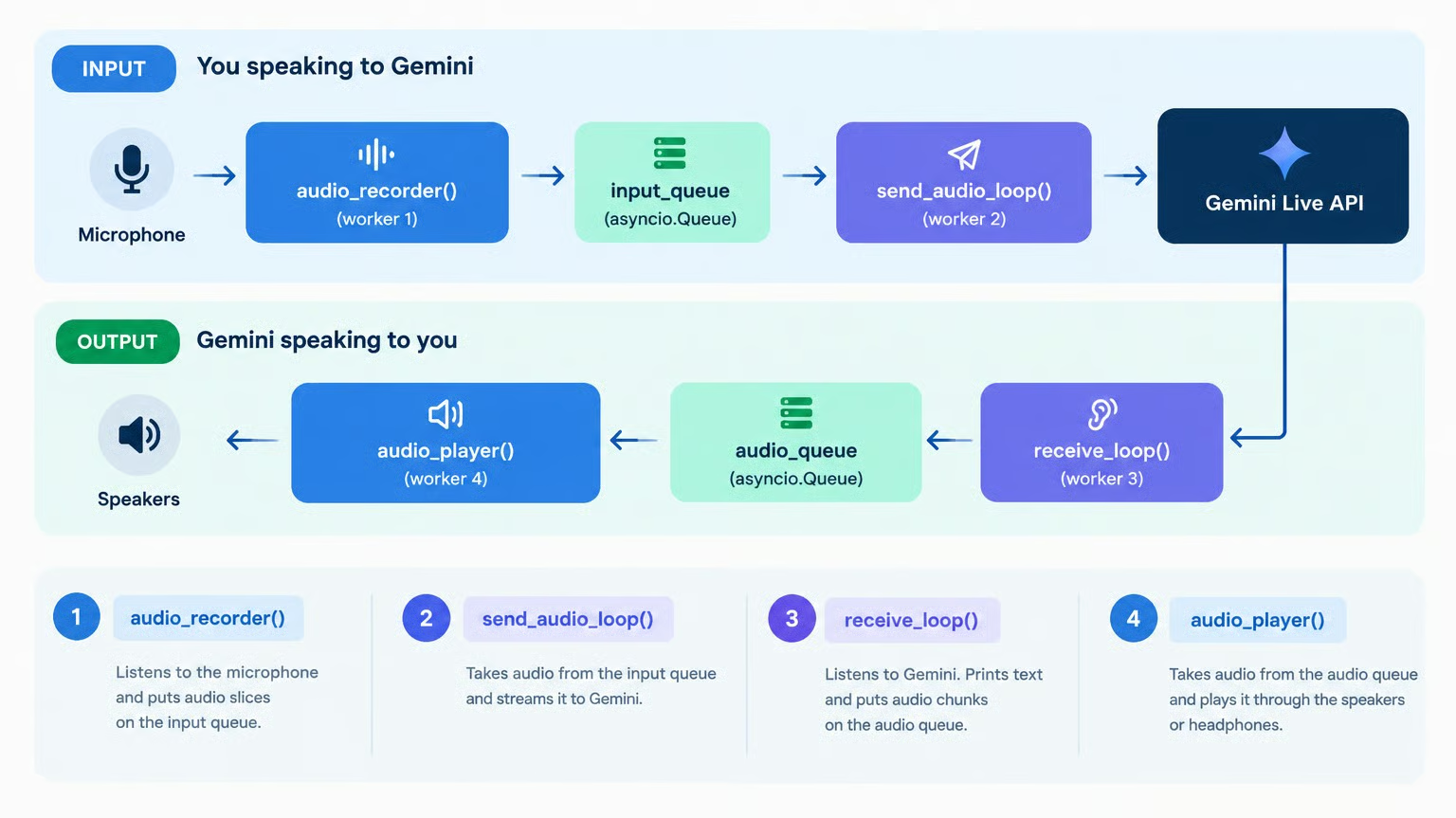
print("receive_loop defined!")现在我们在 run_voice_assistant 中编排四个并发工作协程:
audio_player():从 audio_queue 消费并写入扬声器。
audio_recorder():读取麦克风并将音频推入 input_queue。
send_audio_loop():从 input_queue 消费并通过 session.send_realtime_input() 流式发送给 Gemini。
receive_loop():通过 session.receive() 消费 Gemini 输出,打印转写并将音频推送到 audio_queue 进行播放。
async def run_voice_assistant():
    """Runs the full-duplex interactive voice assistant."""
    audio_queue: asyncio.Queue[bytes | None] = asyncio.Queue()
    input_queue: asyncio.Queue[bytes] = asyncio.Queue()
    stop_event = asyncio.Event()

    player_task = asyncio.create_task(audio_player(audio_queue))

    print("Connecting to Gemini Live API...")
    async with client.aio.live.connect(model="gemini-3.8-live", config=config) as session:
        print("[Listening... Speak now]")

        recorder_task = asyncio.create_task(audio_recorder(input_queue, stop_event))
        sender_task = asyncio.create_task(send_audio_loop(session, input_queue, stop_event))
        receiver_task = asyncio.create_task(receive_loop(session, audio_queue, stop_event))

        try:
            while not stop_event.is_set():
                await asyncio.sleep(0.5)
        except (asyncio.CancelledError, KeyboardInterrupt):
            print("\nStopping voice assistant...")
        finally:
            stop_event.set()
            recorder_task.cancel()
            sender_task.cancel()
            receiver_task.cancel()
            await asyncio.gather(recorder_task, sender_task, receiver_task, return_exceptions=True)

    # Terminate player
    await audio_queue.put(None)
    await player_task
    print("\nSession finished cleanly.")

print("run_voice_assistant is ready to run!")在笔记本中这样运行语音助手:
await run_voice_assistant()注意事项:
Gemini 3.8 Live 提供两个版本:
标准版(gemini-3.8-live):针对超低时延的直接语音对话进行优化。调用工具时,会在工具返回前保持沉默。
Extended Thinking(gemini-3.8-live-extended-thinking):具备后台推理与并行对话填充。它可以在后台执行工具时,用自然的提示语(如“让我为您查一下……”)持续交流。
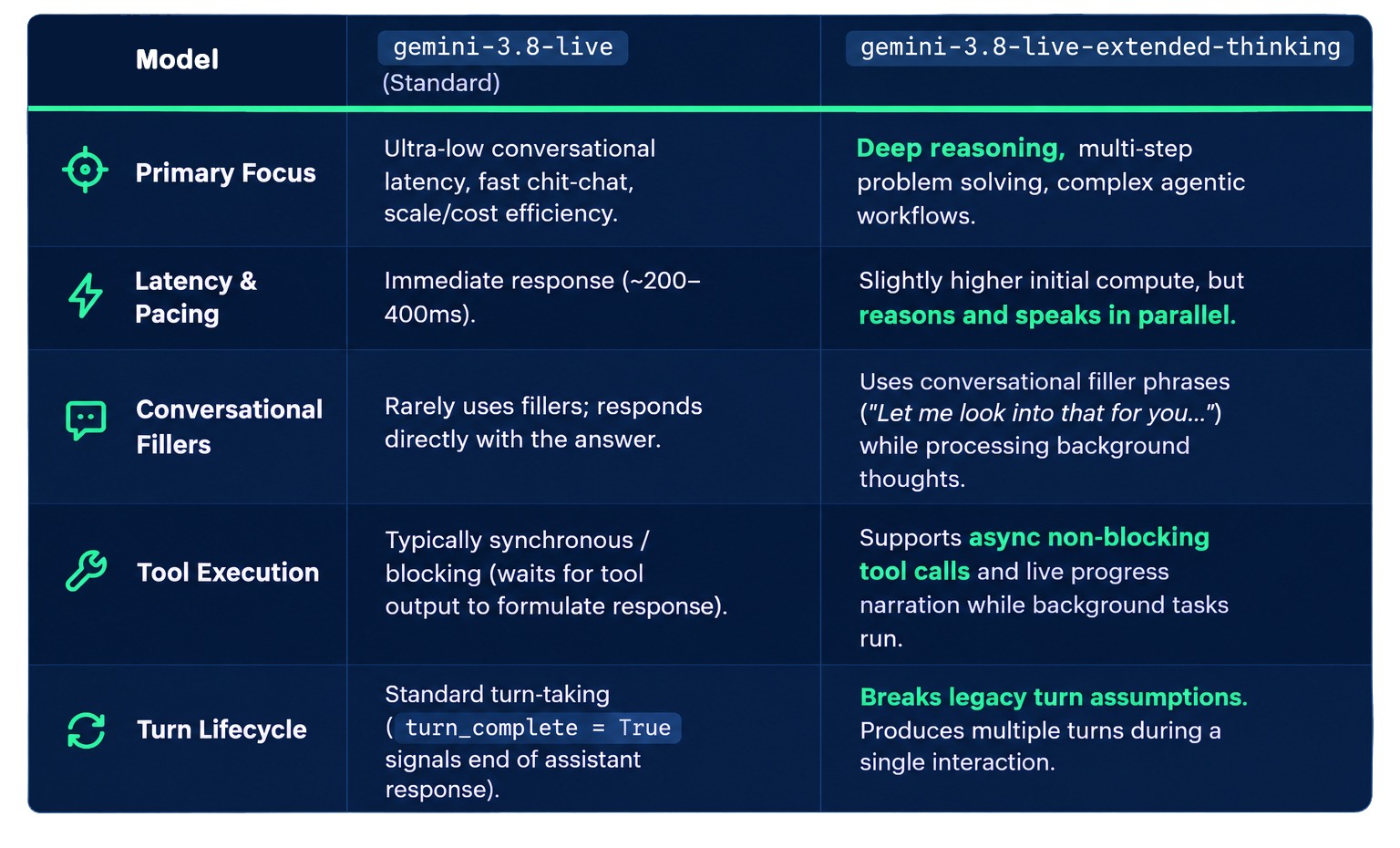
以下是两者差异的拆解:
如果您不确定该使用哪一个版本,以下是我的决策框架。构建对话式智能体时:
对于直接问答与快速语音指令,且以最小化时延为首要目标,使用 gemini-3.8-live。
对于需要多步推理、外部数据检索或 API 调用,同时与用户保持自然主动对话的富交互助手与智能体,使用 gemini-3.8-live-extended-thinking。
扩展思考版模型的一大优势是它可以在保持对话的同时,在后台进行推理并执行工具。
在深入代码之前,先看看实际效果。我为基础模型配置了一个查询天气的工具。这里有一段我询问纽约天气的视频;请注意模型在计算答案时是保持沉默的:
与 DataCamp 一起学习 AI!
Tracks
Courses
Courses