
Course
Working with Hugging Face
2 hr
37.8K
The format also fits naturally into modern ML pipelines because it focuses on what most checkpoints already contain:
Instead of acting like a general-purpose Python serialization system, SafeTensors act like a dedicated storage layer for model parameters.
Although Hugging Face originally developed SafeTensors for its ecosystem, the format itself is framework-agnostic. It joined the PyTorch Foundation recently (in April 2026) and supports PyTorch, TensorFlow, JAX, Flax, NumPy, and other ML frameworks.
Python’s Pickle format was built for general Python applications, where developers often need to save and restore entire Python objects along with their internal state, methods, and reconstruction logic.
Machine learning checkpoints usually do not need that level of storage. Most model files mainly store tensors: weight matrices, embeddings, biases, and other numerical parameters. In practice, that means the checkpoint is mostly just structured numerical data.
But a .pkl file does more than just store data. It can also contain instructions for Python on how to rebuild objects during loading. That means deserialization is not a passive read operation; it can execute code. And if the code is malicious, it becomes a serious security problem.
Python reconstructs objects during pickle deserialization using special methods like __reduce__(). Classes can define this method to tell pickle exactly how the object should be rebuilt when someone loads it back into memory.
For example, __reduce__() can return a callable function along with arguments for that function. During deserialization, Python executes that callable to reconstruct the object. Example code:
import pickle
import os

class Demo:
    def __reduce__(self):
        return (os.system, ("echo 'Code executed during deserialization'",))

payload = pickle.dumps(Demo())

pickle.loads(payload)
When pickle.loads() runs, Python executes the function returned by __reduce__(). In this example, deserialization triggers a shell command through os.system().
The issue is not the shell command itself. __reduce__() can return any callable along with arbitrary arguments based on the logic. That means a Pickle file can call other functions, download files, modify the environment, or execute malicious code during loading. That’s why Python’s documentation explicitly warns against loading pickle data from untrusted sources.
Platforms like Hugging Face Hub now host more than a million models shared by researchers, startups, hobbyists, and anonymous contributors. The ecosystem moves fast because developers can download and test models instantly. But most uploaded checkpoints are not individually audited before distribution.
Many PyTorch checkpoints still rely on pickle-based serialization through formats like .pt or .bin. When someone loads one of those files, Python may execute deserialization logic embedded inside the checkpoint. If the checkpoint is malicious, that logic can steal credentials, read environment variables, download payloads, or execute remote code during loading.
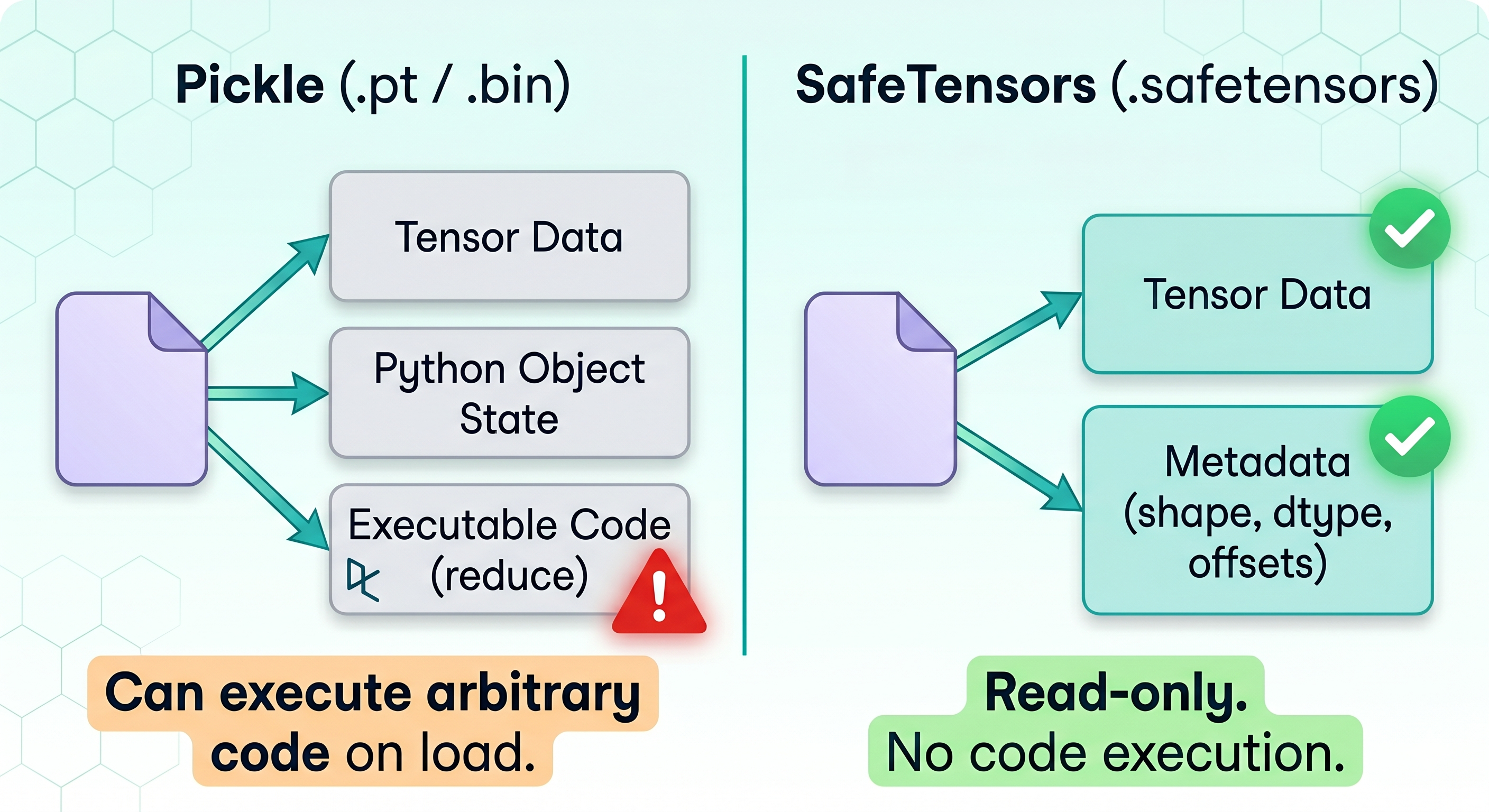
This is the exact problem SafeTensors was built to solve. Instead of serializing arbitrary Python objects, it stores only tensor data and metadata needed to load those tensors correctly. Loading a .safetensors file does not require executing Python reconstruction logic, which significantly reduces the attack surface.
Now that we know what SafeTensors are and why they exist, let’s take a look at their structure and how they work.
A SafeTensors file has two parts: a JSON header followed by the raw tensor data.
The header stores metadata for each tensor, including
After the header, the file stores the raw tensor bytes contiguously.
The header works like a table of contents. It tells the loader which tensors exist and where they are located in the file, similar to how a database index points to stored records. SafeTensors limits this header size to 100MB to prevent oversized metadata payloads.
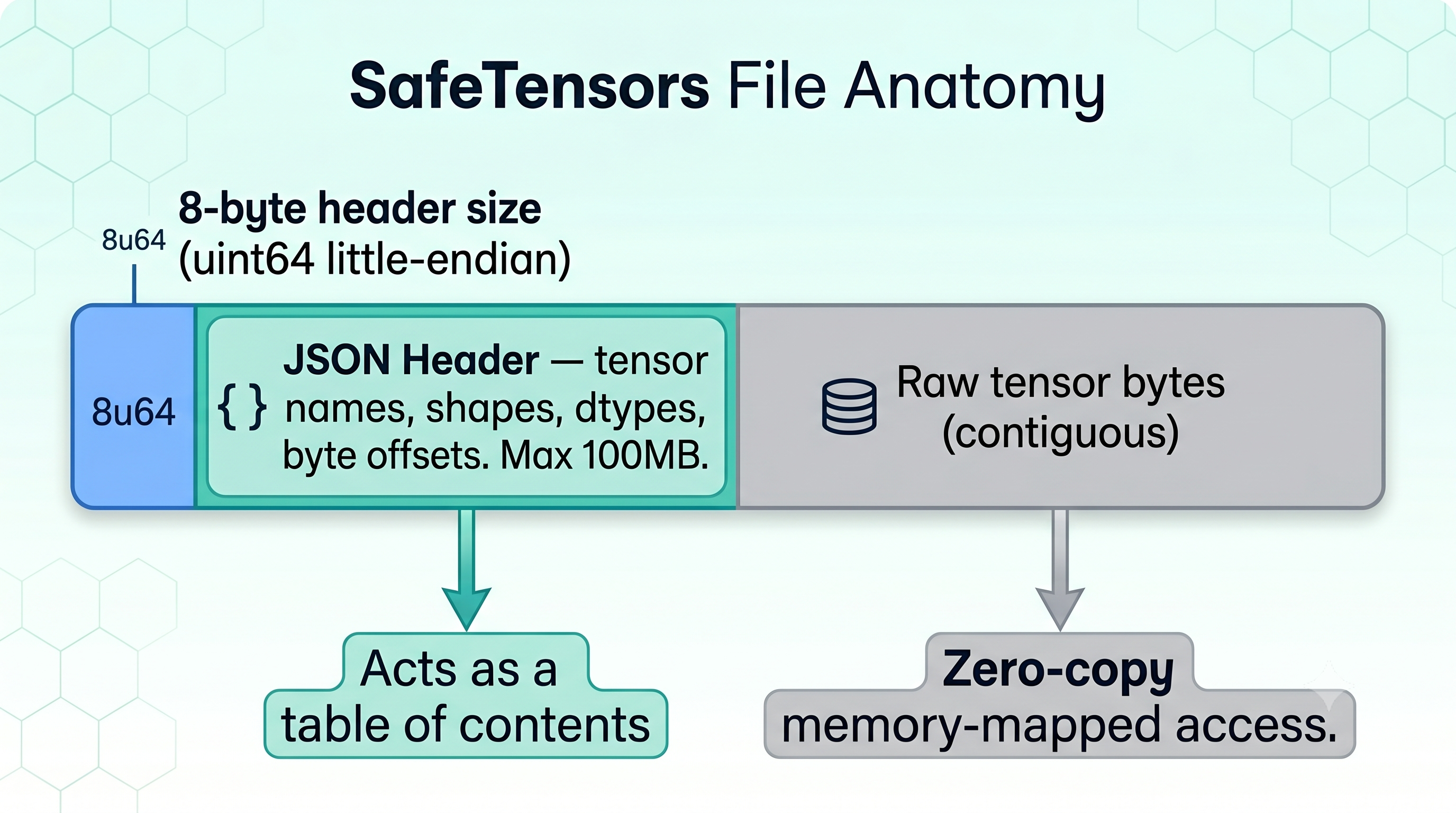
SafeTensors improve loading speed through memory-mapped loading. Instead of rebuilding Python objects during deserialization, frameworks can map tensor data directly from disk into memory. That reduces unnecessary memory copies and lowers CPU overhead during loading.
According to Hugging Face benchmarks, SafeTensors loaded weights about 76x faster than PyTorch on CPU and about 2x faster on GPU workloads. Of course, the exact speedup still depends on the hardware and checkpoint size, but avoiding Python deserialization consistently improves load performance.
SafeTensors loads specific tensors by name instead of reading the entire checkpoint into memory at once.
That’s useful with large distributed models running across multiple GPUs. Take BLOOM’s 176B parameter model for example. With standard PyTorch checkpoints, the system first had to deserialize the full model weights before splitting them across devices, which took around 10 minutes.
With SafeTensors, each GPU loaded only the tensor shards it actually needed. That reduced model startup time to about 45 seconds across 8 GPUs.
SafeTensors works well for storing and loading model weights safely and efficiently, but that does not make it a universal replacement for every format. The right choice depends on what you are storing and where the model sits in the pipeline.
We’ve talked about pickle a lot already, so I will concentrate on different formats.
SafeTensors and GGUF solve different problems.
GGUF, short for GGML Unified Format, was built for quantized inference workloads in runtimes like llama.cpp. The format focuses on efficient deployment of compressed models, especially for CPU inference and edge devices.
SafeTensors sit earlier in the pipeline. Most SafeTensors checkpoints store full-precision or training-ready tensors used for training, fine-tuning, merging, or distributed inference workflows. The format prioritizes safe loading, compatibility with frameworks like PyTorch, and efficient tensor access during training and serving.
They can complement each other instead of competing directly. Example workflow:
SafeTensors focuses on storing model weights safely and loading them efficiently inside frameworks like PyTorch. It stores tensors and metadata only, which makes it lightweight and fast for checkpoint sharing, fine-tuning, and training workflows.
ONNX takes a broader approach. It stores the full computation graph along with the model parameters. That makes ONNX useful when you want to export a model from one framework and run it somewhere else entirely.
For example, teams training and fine-tuning LLMs using PyTorch will usually prefer SafeTensors checkpoints because they load quickly and integrate directly into existing workflows. But if the same team needs to deploy the model into TensorRT, ONNX Runtime, or an edge inference engine, exporting the model to ONNX makes more sense.
One reason SafeTensors spread quickly across the PyTorch ecosystem is that the API feels familiar. You still work with state dictionaries and tensors the same way you normally would.
The basic workflow looks identical to standard PyTorch checkpoint handling. Here’s the example:
import torch
from safetensors.torch import save_file, load_file

tensors = {
    "weights": torch.randn(2, 2),
    "bias": torch.zeros(2)
}

save_file(tensors, "model.safetensors")

loaded_tensors = load_file("model.safetensors")

print(loaded_tensors["weights"])
save_file() writes the tensors into the .safetensors format, while load_file() loads them back into memory.
SafeTensors also supports selective loading through safe_open(), which becomes useful with large checkpoints where you only need a few tensors.
from safetensors import safe_open

with safe_open("model.safetensors", framework="pt") as f:
    weights = f.get_tensor("weights")

print(weights)
Instead of loading the full checkpoint, get_tensor() reads only the tensor you request.
The standard pattern is:
save_file()from transformers import AutoModel
from safetensors.torch import save_file
model = AutoModel.from_pretrained("bert-base-uncased")
save_file(model.state_dict(), "model.safetensors")state_dict() returns the model weights as tensors, which SafeTensors can store directly.
If the model already lives on Hugging Face Hub, you may not even need local conversion code. Hugging Face provides built-in checkpoint conversion support for hosted models through the Hub interface.
| Feature | SafeTensors | Pickle (.pkl/.bin/.pt) |
GGUF | ONNX |
|---|---|---|---|---|
| Arbitrary code execution | No | Yes | No | No |
| Primary use case | Training, fine-tuning, checkpoint sharing | General Python serialization | Quantized edge/CPU inference | Cross-framework deployment |
| Stores computation graph | No | No | No | Yes |
| Memory-mapped loading | Yes | No | Yes | No |
| Lazy/partial tensor loading | Yes | No | Yes | No |
| Framework support | PyTorch, TF, JAX, Flax, NumPy | Python (all frameworks) | llama.cpp, edge runtimes | ONNX Runtime, TensorRT, edge |
| Quantization support | Expanding (FP8, GPTQ, AWQ) | No | Yes (native) | Yes |
| Default on Hugging Face Hub | Yes | No | No | No |
In April 2026, Hugging Face contributed SafeTensors to the PyTorch Foundation under the Linux Foundation. The project now sits alongside PyTorch, vLLM, DeepSpeed, and Ray under foundation governance.
That move signals that SafeTensors is no longer just a Hugging Face project. It is becoming shared infrastructure for the ML ecosystem.
The announcement also touches on where the format is heading next.
One major focus is device-aware loading. Today, many workflows still load tensors into CPU memory before transferring them onto CUDA or ROCm devices. That extra staging step increases startup latency, especially for large distributed systems.
The SafeTensors maintainers are working on direct device loading paths that reduce unnecessary CPU copies and move tensors directly onto accelerators.
Distributed loading support is evolving, too. Modern inference systems rarely run models on a single GPU anymore. Tensor parallelism and pipeline parallelism are now standard deployment patterns for large models, but checkpoint loading APIs across frameworks still are fragmented.
SafeTensors is expanding support for shard-aware loading and distributed tensor layouts, so frameworks can coordinate checkpoint loading more efficiently across devices.
The format is also adapting to newer quantization workflows. Inference systems increasingly rely on FP8, GPTQ, and AWQ formats to reduce memory usage and lower serving costs.
Instead of forcing frameworks to handle these through custom serialization logic, SafeTensors is adding formal support for lower-precision and block-quantized tensor formats directly into the format itself.
Right now, developers still have to opt into SafeTensors manually by switching between save and load workflows. But there is ongoing work around deeper integration with PyTorch’s native serialization system. If that eventually lands, SafeTensors could stop being an alternative checkpoint format and become the default way PyTorch stores models.
For years, developers shared model checkpoints using serialization systems that could execute arbitrary Python code during loading. Once public model hubs started hosting millions of checkpoints, the security risks became much harder to ignore.
SafeTensors changed that by narrowing the format's scope. Instead of trying to serialize entire Python objects, it focuses only on storing tensors and the metadata needed to load them. That simpler design removes the deserialization risks that came with pickle-based checkpoints while also improving loading speed and memory efficiency.
So when you only need model weights, then there's no point in executing arbitrary code during deserialization, and better to use SafeTensors in those cases.
If you want to work more deeply with modern ML tooling, model formats, and Hugging Face workflows, our Deep Learning in Python and Working with Hugging Face courses are a good next step. They cover practical workflows for training, fine-tuning, and deploying models with the tools used across today’s AI ecosystem.
Top Machine Learning Courses
Course
Track
Track
Tutorial
Sayak Paul
11 min
Tutorial
Josep Ferrer
11 min
Tutorial
Aashi Dutt
8 min
Tutorial
Zoumana Keita
13 min
Tutorial
Arjun Sarkar
15 min
code-along
Alara Dirik