Cours
IA pratique avec Google Gemini et NotebookLM
2 h
9.6K
Voici les écarts clés côté modèle, tarification, contexte et outillage.
|
Fonctionnalité |
Gemini CLI |
Claude Code |
|
Licence |
Open source (Apache 2.0) |
Propriétaire |
|
Modèle par défaut |
Gemini 3 Flash |
Claude Sonnet 4.6 |
|
Fenêtre de contexte |
1 million de jetons |
1 million de jetons (Max/Team/Enterprise auto ; Pro au tarif standard) |
|
Sortie max. (jetons) |
64 K |
128 K (Opus 4.6, offre Max) ; 64 K (Sonnet 4.6, offre Pro) |
|
Palier gratuit |
1 000 requêtes/jour (modèles Flash) |
Aucun (abonnement Pro à 20 $/mois requis) |
|
Mode Plan |
Activé par défaut ; lecture seule, bascule auto vers Pro pour la planification |
Bascule Shift+Tab ; utilise le sous-agent Haiku Explore |
|
Multi-agent |
Sous-agents de recherche intégrés |
Agent Teams avec liste de tâches partagée |
|
Checkpoint/retour arrière |
|
Esc+Esc ou |
|
Bac à sable |
gVisor, LXC, macOS Seatbelt |
Système d’autorisations (Allow/Ask/Deny) |
|
Fichier de contexte |
|
|
|
Support IDE |
Alimente Gemini Code Assist dans VS Code |
Extension VS Code, plugin JetBrains (bêta) |
|
Open source |
Oui |
Non |
L’écart de fenêtre de contexte s’est en grande partie réduit. Les deux prennent désormais en charge 1 million de jetons, suite à la GA de Claude au tarif standard en mars 2026. Sur Claude Code, la fenêtre 1 M est incluse automatiquement pour les utilisateurs Max, Team et Enterprise sur Opus 4.6. Les abonnés Pro y accèdent aux tarifs standard par jeton. Les modèles d’exécution diffèrent : Gemini CLI streame l’état de votre terminal via PTY, tandis que Claude Code demande une confirmation avant chaque modification ; c’est plus lent mais plus lisible sur des tâches complexes. L’aspect open source compte aussi : la licence Apache 2.0 de Gemini CLI permet aux entreprises de lire, forker et contribuer au code. Claude Code est propriétaire.
La performance sur des tâches concrètes compte plus qu’une liste de fonctions. Voici comment chaque outil gère les scénarios les plus fréquents.
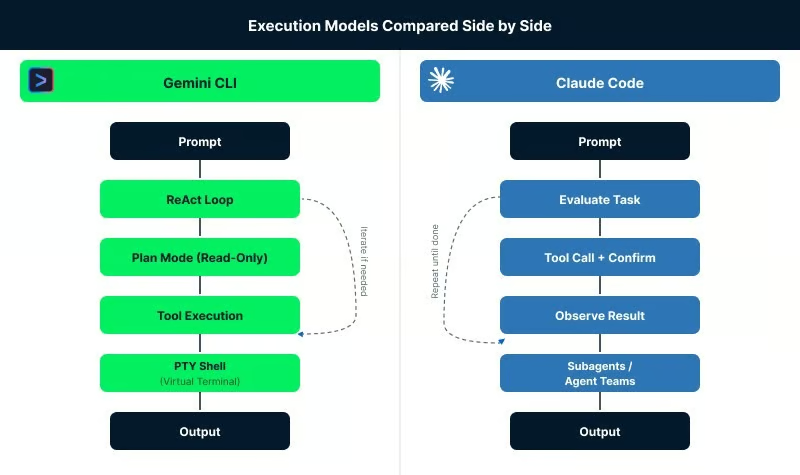
Modèles d’exécution comparés côte à côte. Image de l’auteur.
Pour créer l’ossature d’un projet ou écrire un script isolé, Gemini CLI répond plus vite. Sa latence est faible et l’ancrage via Google Search lui permet de tirer de la documentation à jour pendant la session, de sorte que le code généré colle mieux aux versions récentes des bibliothèques.
Claude Code construit un plan avant d’écrire, donc il démarre plus lentement. Le code produit est en général plus propre et plus cohérent avec le reste d’un projet. Dans une comparaison par Composio, Claude Code a achevé la construction d’un outil CLI complet en 1 h 17 min contre 2 h 02 pour Gemini CLI, avec moins de relances. Ainsi, Gemini CLI est plus rapide pour les scripts simples.
C’est là que la fenêtre de 1 million de jetons compte le plus pour Gemini CLI. Il peut charger une petite ou moyenne base de code d’un seul tenant, ce qui l’aide à suivre les liens entre fonctions et variables au fil des fichiers. Pour des refactors simples, cette approche fonctionne convenablement.
L’écart apparaît sur des chantiers plus complexes. La communauté signale des soucis de fiabilité : erreurs d’appels d’outils, tentatives répétées de formatage, et quelques cas d’écrasement de fichiers. Vous devez souvent rester aux commandes et le réorienter si besoin. Claude Code adopte une démarche plus structurée, en retraçant les dépendances inter-fichiers et en appliquant des diffs plutôt qu’écrire les fichiers à neuf. La fonction Agent Teams peut également répartir les gros refactors entre agents.
Dès que l’on touche à plus de quelques fichiers, Claude Code est généralement plus fiable, même si les résultats varient selon le projet et la taille du code.
Les deux outils savent lire une pile d’appels et proposer un correctif. La différence se voit quand le premier correctif échoue.
Gemini CLI gère bien l’identification initiale des erreurs et la lecture de logs. Idéal pour un diagnostic rapide. Sur des bugs plus complexes, il peut toutefois tourner en rond avec les mêmes approches. Les développeurs rapportent devoir intervenir pour le recadrer.
Claude Code a tendance à considérer le nouvel échec après une tentative et à ajuster sa stratégie plutôt que de se répéter. Il n’est pas infaillible, mais il sort plus régulièrement des boucles sur des débugs en plusieurs étapes.
Les deux outils proposent des modes headless pour CI/CD. Gemini CLI utilise -p "prompt" avec --output-format json pour une sortie structurée, avec une intégration native GitHub Actions. Claude Code utilise -p ou --print pour le mode headless et un Agent SDK en Python et TypeScript. Il propose aussi une app GitHub pour les revues de PR et la génération de code depuis des issues.
Le shell PTY de Gemini CLI gère mieux les scripts interactifs, y compris ceux qui demandent une saisie en cours d’exécution ou des invites d’authentification. Les mécaniques d’approbation de Claude Code ralentissent ces situations, sauf à poser des dérogations explicites.
Début 2026, les deux outils s’appuient sur des modèles qui obtiennent des scores proches sur les principaux benchmarks.
Sur SWE-bench Verified, Claude Opus 4.6 tourne autour de 80,8 % et Gemini 3.1 Pro autour de 80,6 %. L’écart s’est resserré. SWE-bench Verified souffre toutefois de problèmes de contamination, et ses mainteneurs renvoient désormais vers SWE-bench Pro comme mesure plus fiable. Il faut aussi noter que le score de Claude Code reflète en partie l’ingénierie d’agents d’Anthropic (patrons d’usage d’outils, logique de retry), et pas seulement la performance brute du modèle.
En pratique, la différence se voit dans la façon d’écrire le code. Gemini CLI génère plus vite, utile en prototypage ou exploration. Claude Code colle mieux aux conventions d’un projet, mais met plus de temps. Selon la communauté, la sortie de Gemini peut être plus verbeuse et trop commentée, surtout avec le modèle Flash.
Aucun des deux n’est à l’abri des hallucinations, et il n’existe pas de benchmark standard pour les agents CLI. Les deux proposent une commande de retour arrière : /rewind de Gemini CLI (Esc+Esc) remonte l’historique et peut annuler des changements de fichiers ; Esc+Esc ou /rewind de Claude Code fait de même. Gemini CLI propose aussi /restore pour revenir à un checkpoint de fichier donné, à condition d’activer au préalable le checkpointing. Le mode Plan, évoqué plus haut, réduit encore le risque en affichant les modifications proposées avant exécution.
Les deux outils ont soigné l’expérience dans le terminal, avec des arbitrages différents. Si vous utilisez des scripts interactifs ou enchaînez des commandes en session, les différences sautent vite aux yeux.
L’interface de Gemini CLI privilégie la vitesse. Il propose plus de 40 commandes slash, dont /plan, /memory, /skills, /restore, et /theme. La syntaxe @ permet de référencer fichiers, images, PDF et audio dans l’invite. Le système d’Extensions regroupe serveurs MCP, fichiers de contexte et commandes slash en paquets installables, détaillés plus loin dans la section Intégration.
En mode Plan, les changements proposés sont écrits dans un fichier markdown que vous pouvez relire ou éditer avant toute action. Vous pouvez approuver, demander des ajustements ou annuler avec Esc. Shift+Tab bascule entre Default, Auto-Edit et Plan, ou tapez /plan pour y accéder directement.
Comme vu plus haut, le shell PTY évite les blocages du terminal lors des scripts bloquants sur saisie. Les contreparties : 5 à 10 secondes au démarrage, un léger délai après réponse, et des blocs UI volumineux que certains jugent moins lisibles.
La sortie de Claude Code utilise une structure arborescente avec lignes courtes et listes, idéale dans un petit terminal. Les principales commandes : /compact, /context, /model, /cost, /rewind, /doctor et /fast. Shift+Tab bascule entre modes d’interaction : Normal, Auto-Accept, Plan et Auto.
Le mode Plan fonctionne de manière similaire à celui de Gemini CLI : Claude scanne votre code et écrit un plan markdown avant toute modification. Vous pouvez ouvrir et éditer le plan avec Ctrl+G (dans votre éditeur par défaut) avant approbation, pratique pour supprimer des étapes ou ajouter des contraintes. Vous pouvez aussi taper /plan pour y entrer directement ou le définir par défaut dans .claude/settings.json avec permissions.defaultMode: "plan".
La plainte la plus fréquente concerne la fatigue d’approbation. Claude Code s’interrompt pour demander avant d’exécuter des commandes bash ou d’écrire des fichiers, ce qui casse le rythme sur les tâches répétitives. L’option --dangerously-skip-permissions désactive tout contrôle, mais Anthropic déconseille de l’utiliser hors environnements isolés.
Depuis mars 2026, une option intermédiaire existe : auto mode, en préversion de recherche pour les offres Team. Au lieu de demander à chaque étape ou de tout ignorer, un classifieur passe en revue chaque appel d’outil avant exécution et bloque les actions jugées risquées (suppression massive de fichiers, exfiltration de données), tout en laissant passer les sûres. Activez-le avec claude --enable-auto-mode et basculez-y avec Shift+Tab. Il réduit les interruptions sans supprimer toutes les protections, avec un risque de faux positifs.
Les deux outils prennent en charge MCP et GitHub Actions, mais leurs écosystèmes divergent.
Gemini CLI s’intègre bien aux services Google Cloud. Comme indiqué, il est préinstallé dans Google Cloud Shell et prend en charge les comptes Google Workspace. Il fonctionne aussi avec BigQuery et Cloud Run via des extensions MCP. Le même système d’Extensions propose des paquets de Figma, Stripe, Elastic, Postman et Snyk, plus de 90 fin 2025.
L’extension Cloud Run peut construire, containeriser et déployer des applications web depuis le terminal. Elle accepte également images, PDF et audio comme entrées aux côtés du texte. L’intégration GitHub Actions utilise google-github-actions/run-gemini-cli. Gemini CLI possède aussi son SDK pour créer scripts headless et intégrations, ajouté en v0.30.0.
Claude Code se connecte surtout aux outils locaux de dév et à des services tiers. Via MCP, il fonctionne avec Jira, Asana, Slack, des bases de données et des API externes. Il dispose de plugins pour VS Code et les IDE JetBrains, d’une interface navigateur sur claude.ai/code, et d’une intégration GitHub Actions via anthropics/claude-code-action@v1.
L’Agent SDK (Python et TypeScript) permet d’appeler Claude Code depuis vos propres scripts. L’intégration Slack autorise la mention @claude-code dans un fil.
Une limite : Claude Code ne fonctionne qu’avec les modèles Anthropic. Pas d’option pour apporter votre propre modèle. Étant open source, Gemini CLI a déjà été forké, avec Qwen Code CLI comme exemple notable.
La tarification est le point où les deux outils diffèrent le plus clairement.
|
Offre |
Gemini CLI |
Claude Code |
|
Gratuit |
1 000 requêtes/jour (modèles Flash uniquement) |
Aucun (offre Pro requise) |
|
Entrée de gamme |
Google AI Pro ≈20 $/mois |
Claude Pro 20 $/mois |
|
Usage intensif |
Google AI Ultra ≈250 $/mois |
Claude Max 5x 100 $/mois |
|
Power user |
API : 2 $/M entrée, 12 $/M sortie (Gemini 3.1 Pro) |
Claude Max 20x 200 $/mois |
|
Equipe |
Google Workspace / Vertex AI |
Team Premium 150 $/utilisateur/mois |
Le palier gratuit de Gemini CLI vous offre 1 000 requêtes par jour avec un compte Google personnel, sans carte bancaire, et sans limites temporelles actuellement. Fin mars 2026, les utilisateurs gratuits sont limités aux modèles Flash, les modèles Pro étant derrière un abonnement payant.
Claude Code n’a pas de palier gratuit. Le minimum est 20 $/mois pour l’offre Pro, qui donne accès à Sonnet 4.6 avec des limites d’usage que les gros utilisateurs peuvent atteindre en quelques jours. Beaucoup passent à Max (100 à 200 $/mois). Un cas suivi a montré que 10 milliards de jetons sur 8 mois en Max ont coûté ≈800 $, contre ≈15 000 $ aux tarifs API, mais le coût varie selon l’usage.
Vérifiez les tarifs actuels sur la page de tarification Claude et la page de tarification Gemini avant de décider.
Le bon outil dépend de votre contexte.
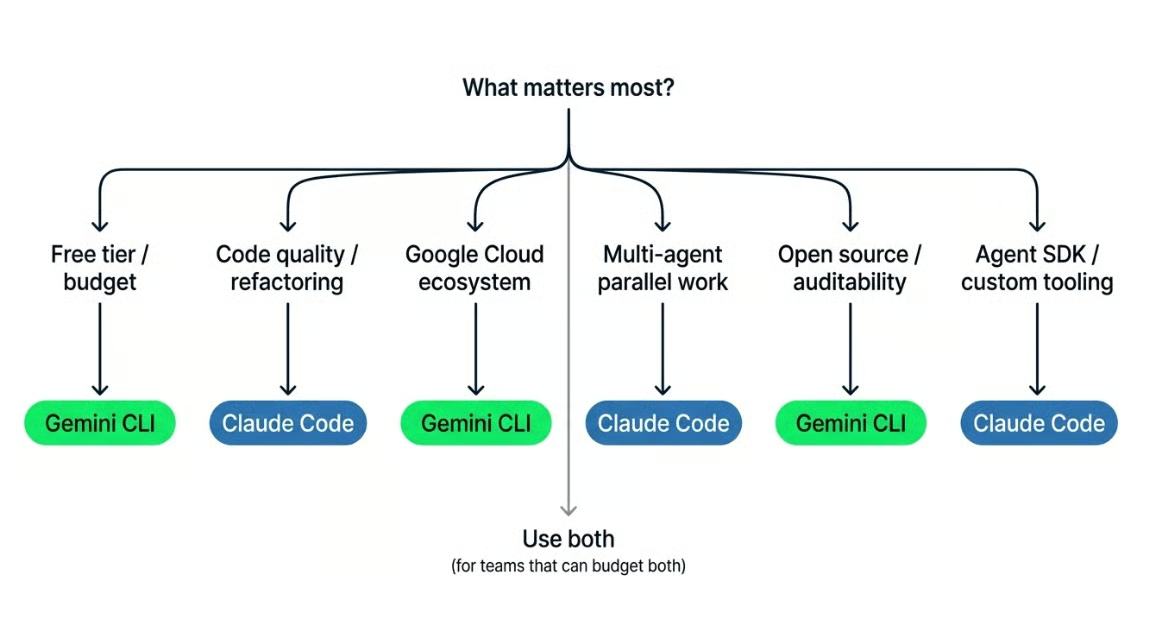
Choisir l’outil qui vous convient. Image de l’auteur.
Gemini CLI convient mieux si vous avez besoin d’un point de départ gratuit, travaillez avec Google Cloud ou Workspace, souhaitez un outil open source à auditer ou forker, utilisez des entrées multimodales comme images ou PDF, ou exécutez des scripts interactifs avec saisie en cours de processus. C’est aussi l’option la plus rapide si la cohérence de sortie importe moins que la vitesse.
Claude Code a plus de sens si vous travaillez sur une grande base de code nécessitant une refactorisation multi-fichiers, cherchez une sortie conforme au style en place, voulez exécuter plusieurs agents sur des tâches distinctes, ou préférez valider chaque changement avant application. C’est aussi l’option à privilégier si vous utilisez les IDE JetBrains ou devez créer des automatisations via l’Agent SDK.
Certains développeurs combinent les deux : Gemini CLI pour l’exploration et la planification rapide, puis Claude Code lorsque le travail demande plus de précision et de cohérence.
Aucun des deux n’est sans compromis. Voici ce qu’il faut surveiller.
Après avoir travaillé avec les deux, la réponse dépend de vos priorités. Aucun ne s’impose en toutes situations.
Si vous débutez, cherchez une option gratuite ou travaillez beaucoup avec Google Cloud, Gemini CLI est plus simple à prendre en main. Il gère bien le prototypage et les tâches légères, et son palier gratuit permet d’essayer sans coût.
Si vous intervenez sur une base de code existante multi-fichiers, avez besoin d’une sortie alignée au style du projet ou menez des refactors complexes, Claude Code tient mieux la distance. La pertinence du coût d’abonnement dépendra de votre intensité d’usage.
Beaucoup de développeurs en 2026 utilisent les deux plutôt que de trancher : Gemini CLI pour l’exploration et les petites tâches, Claude Code quand il faut plus de cohérence.
Gemini CLI offre un palier gratuit, un code open source et un meilleur alignement avec les workflows Google Cloud. Claude Code fournit des sorties plus constantes sur des bases de code complexes, un raisonnement multi-fichiers plus solide et un modèle d’autorisations plus structuré.
Le bon choix dépend de votre travail et de ce que vous êtes prêt à investir. La plupart de ceux qui combinent les deux adoptent ce rythme : Gemini CLI pour les tâches rapides, Claude Code quand il faut plus de précision.
Pour comparer Claude Code à un autre outil, notre article Claude Code vs Codex va plus loin.
Enfin, nos ressources recommandées :
Apprenez avec DataCamp
Cours
Cours
Cours
blog
blog
Lynn Heidmann
Tutoriel
Tutoriel
Matt Crabtree
5 min
Tutoriel
Laiba Siddiqui
6 min