Corso
Claude Code 101
3 ore
27.6K
Fino a poco tempo fa, potevi usare agenti AI personali solo seduto davanti a un computer. Questo è cambiato rapidamente con il lancio di assistenti AI personali con cui puoi chattare sulle tue app di messaggistica preferite. Gli agenti possono poi lavorare in autonomia su un computer ed eseguire task come leggere email o creare applicazioni web.
Con Claude Cowork, puoi usare le capacità agentiche di Claude sul desktop. Finora dovevi usarlo dal computer, ma con l’ultimo aggiornamento di Anthropic puoi usarlo anche dal telefono. Si chiama Claude Cowork Dispatch.
Lo sto esplorando da quando è stato annunciato e in questo articolo condivido ciò che ho scoperto: come configurarlo, casi d’uso e come si confronta con altri agenti come OpenClaw. Ti consiglio anche di dare un’occhiata alle nostre guide su altre funzioni remote di Claude, tra cui Claude Code Channels e Claude Code Remote Control.
Claude Cowork Dispatch è l’ultimo aggiornamento di Anthropic a Claude Cowork, che ti consente di usarlo dal telefono.
Puoi inviare task dal telefono e l’agente locale su desktop li prenderà in carico e li eseguirà. Claude girerà sul tuo computer e ti avviserà quando il risultato è pronto. Questo è possibile perché può accedere ai tuoi file locali, ai connettori e ai plugin.
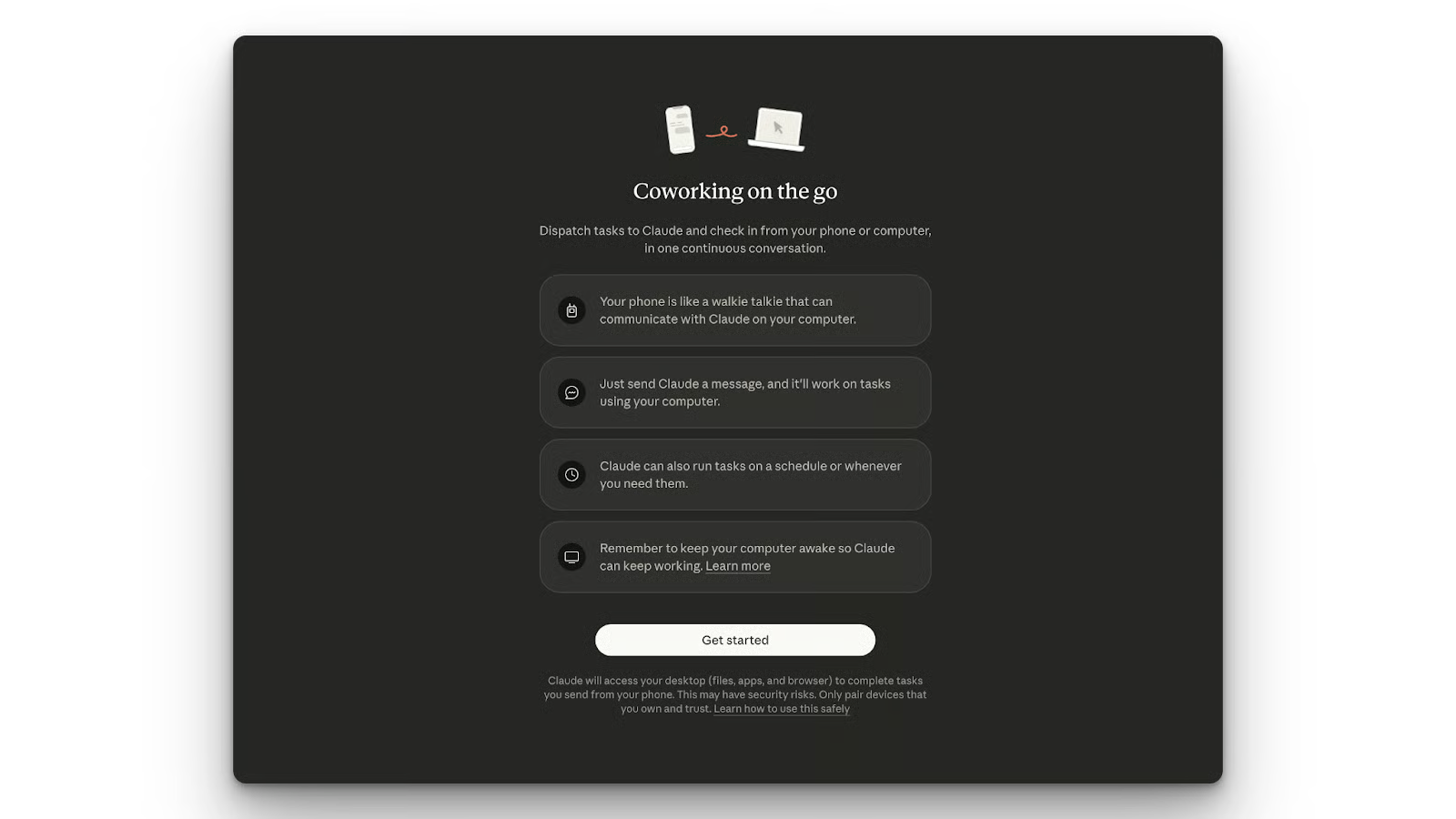
Claude Cowork Dispatch è alimentato da una rete dinamica multi‑modello. Usa Claude Opus 4.8 per ragionamento autonomo complesso, Claude Sonnet 5 per l’esecuzione rapida di task quotidiani e Claude Fable 5 come upgrade per carichi di lavoro di livello elite.
Vediamo alcune funzionalità e capacità chiave di Claude Cowork Dispatch.
La funzione che ho trovato davvero utile è la persistenza cross‑device.
Per esempio, puoi scrivere a Claude dal telefono e poi continuare la conversazione sul desktop. Questo è possibile perché crea un’unica conversazione persistente che mantiene il contesto dei task precedenti.
Passiamo alla esecuzione locale. Quando invii un messaggio dal telefono, questo attiva azioni sul dispositivo host. Claude potrà svolgere il task usando i tuoi file, connettori e plugin esistenti. Al termine, ti invierà il risultato, per esempio un foglio di calcolo.
Claude Cowork Dispatch offre anche accesso unificato ai connettori. Eredita tutti i connettori MCP di Desktop, inclusi file locali, Notion, Slack e Google Drive se collegati. Significa che tutto ciò che potevi fare nell’app desktop ora può essere avviato anche dal telefono.
Infine, parliamo della browser agency. Anche dal telefono avrai pieno controllo sulla macchina host. Per esempio, puoi far accedere Claude a Gmail e preparare delle risposte da rivedere.
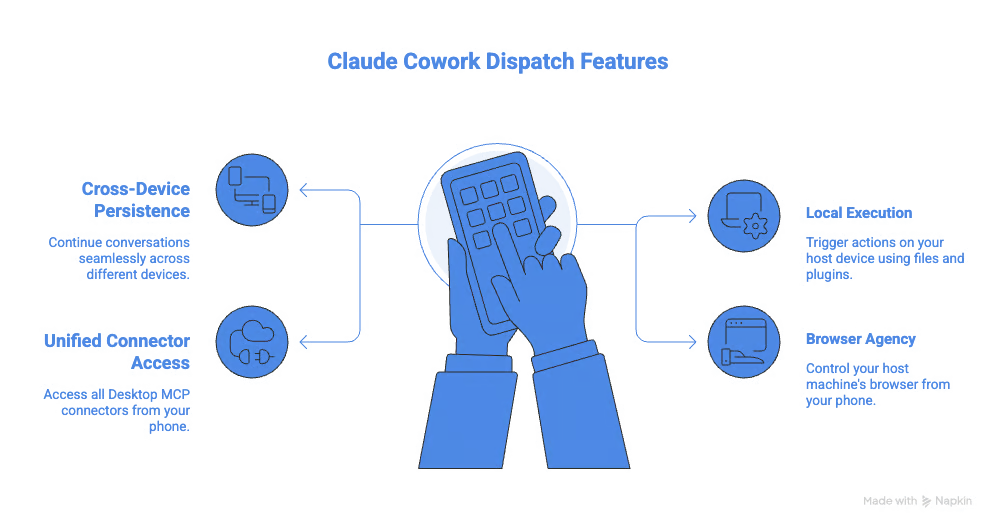
Vediamo come configurare Claude Cowork Dispatch.
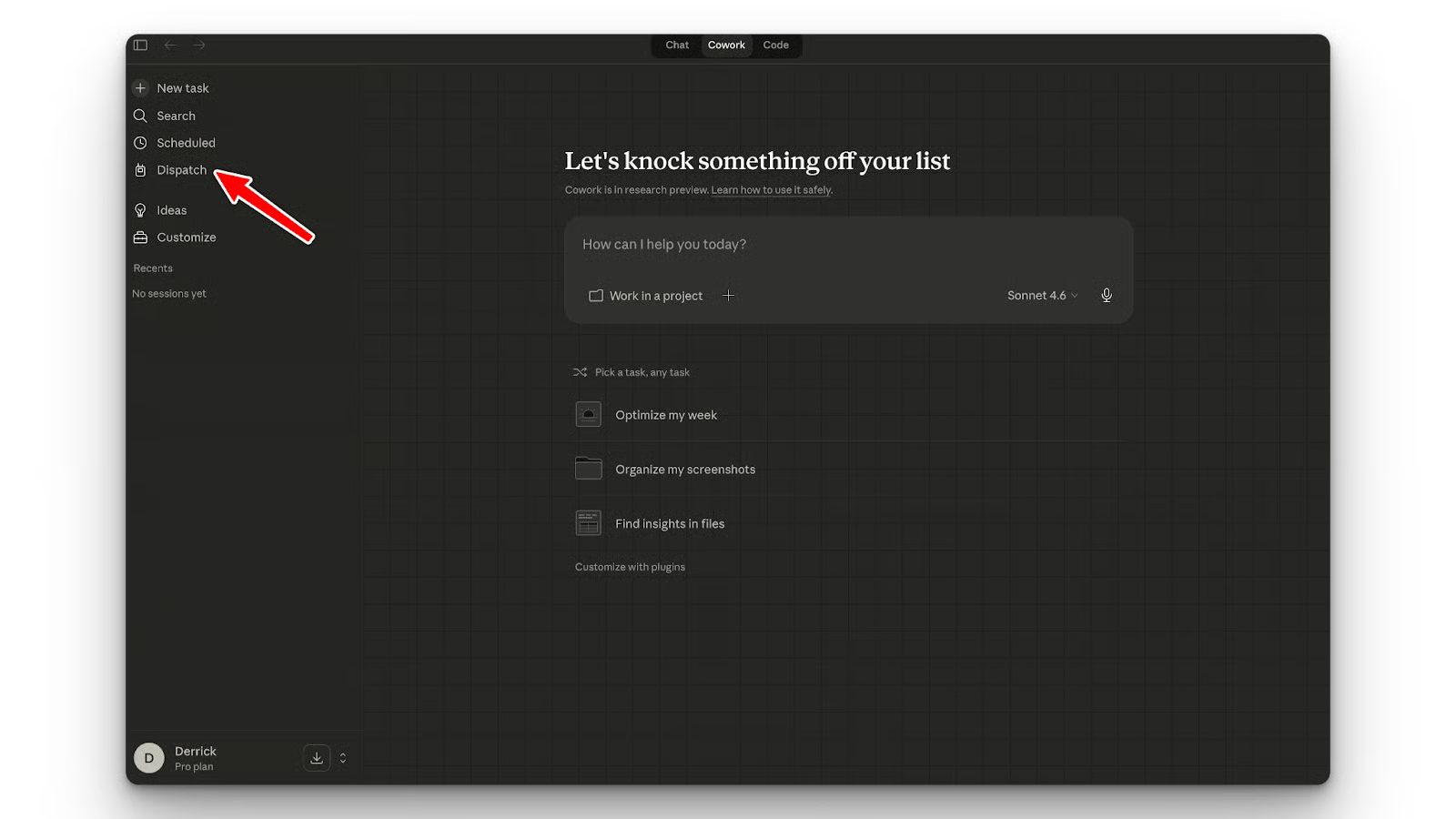
Per usare Claude Cowork Dispatch, devi avere l’ultima versione di Claude Desktop. Vedrai la scheda Dispatch nella barra laterale sinistra. Cliccala per iniziare. Scansiona il codice QR per avviare il processo. Assicurati di avere l’app Claude installata sul telefono.
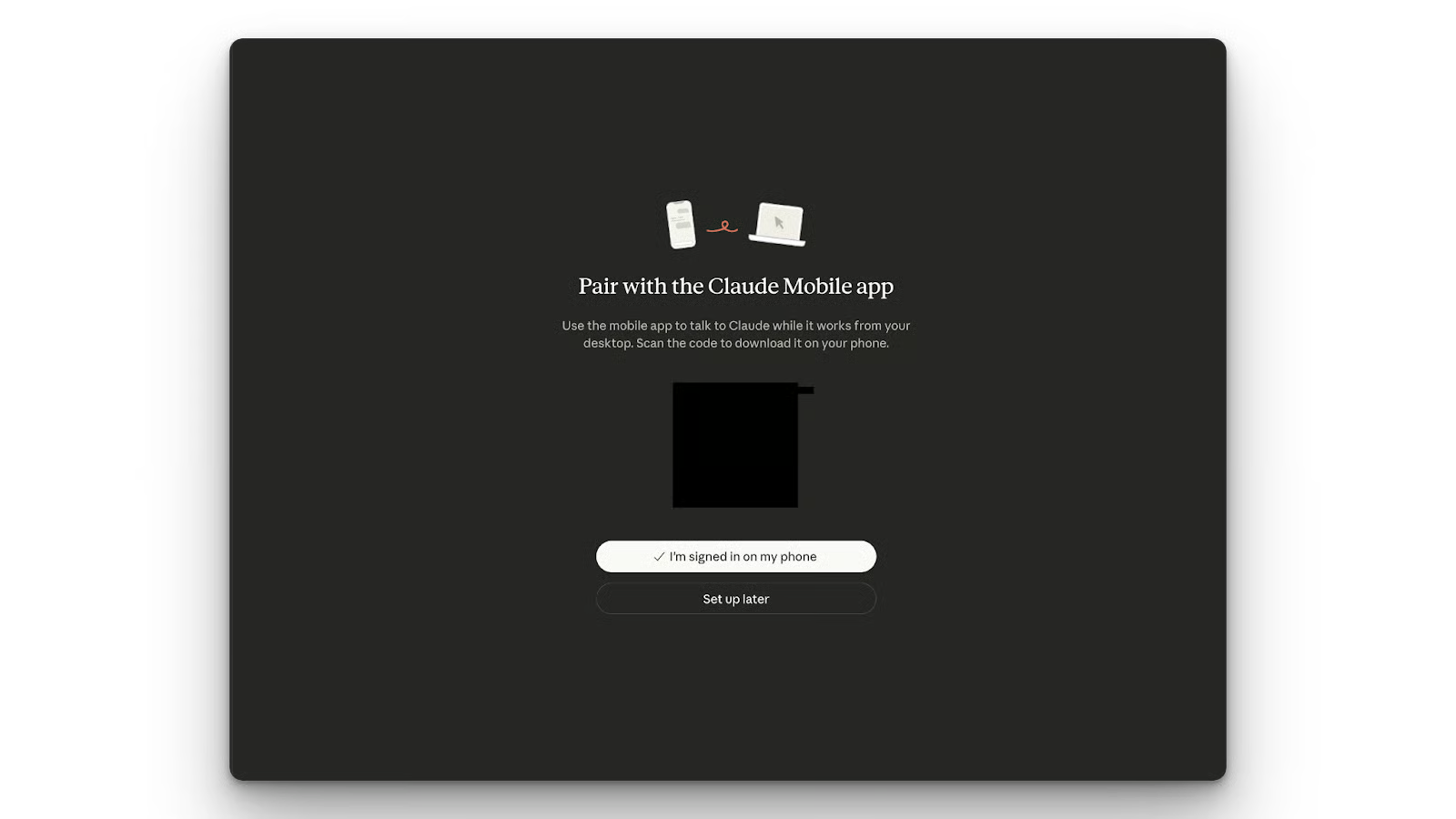
Poi devi abilitare la modalità “mantieni il desktop attivo” per evitare che la macchina host vada in sospensione durante i task remoti.
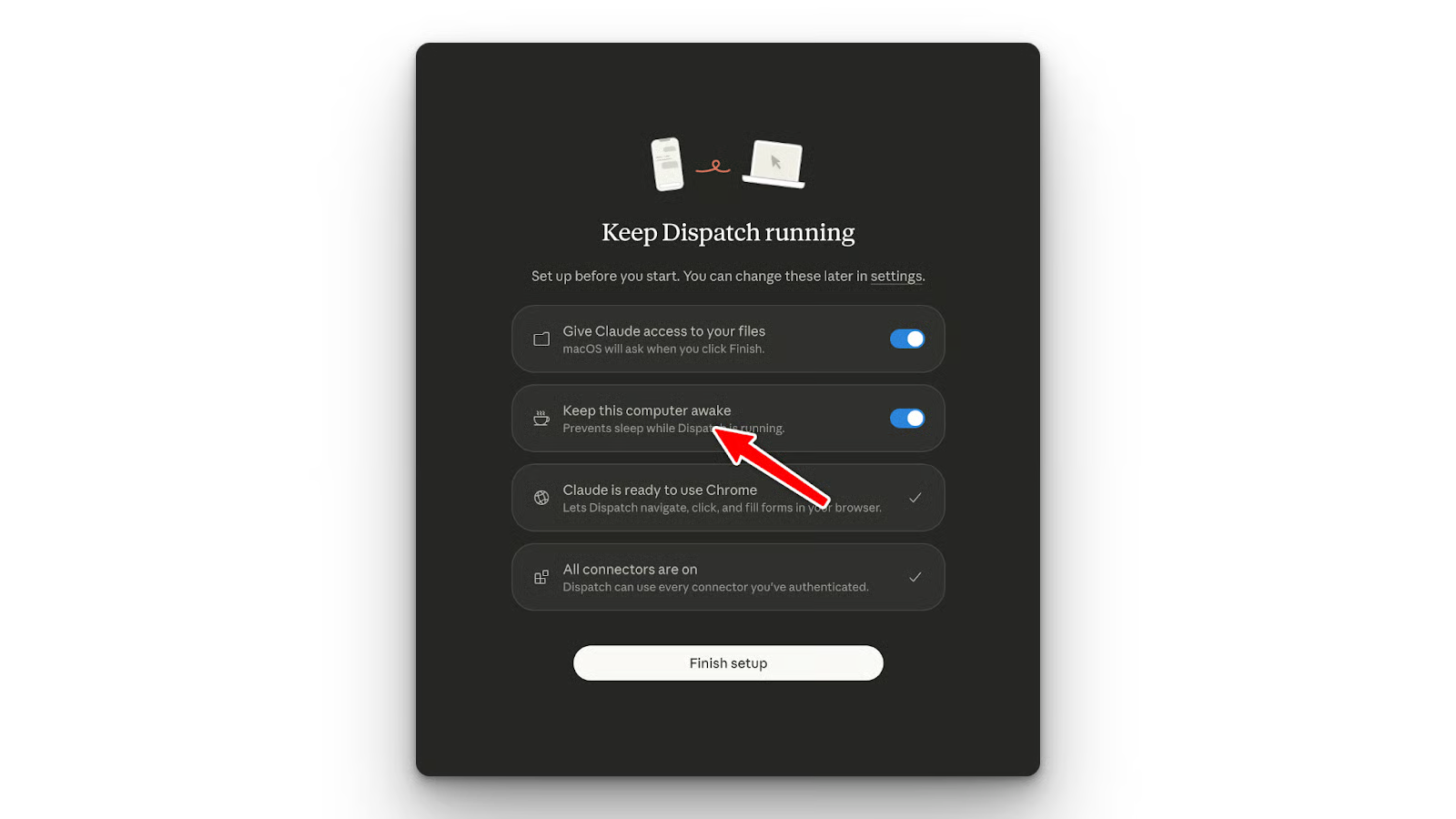
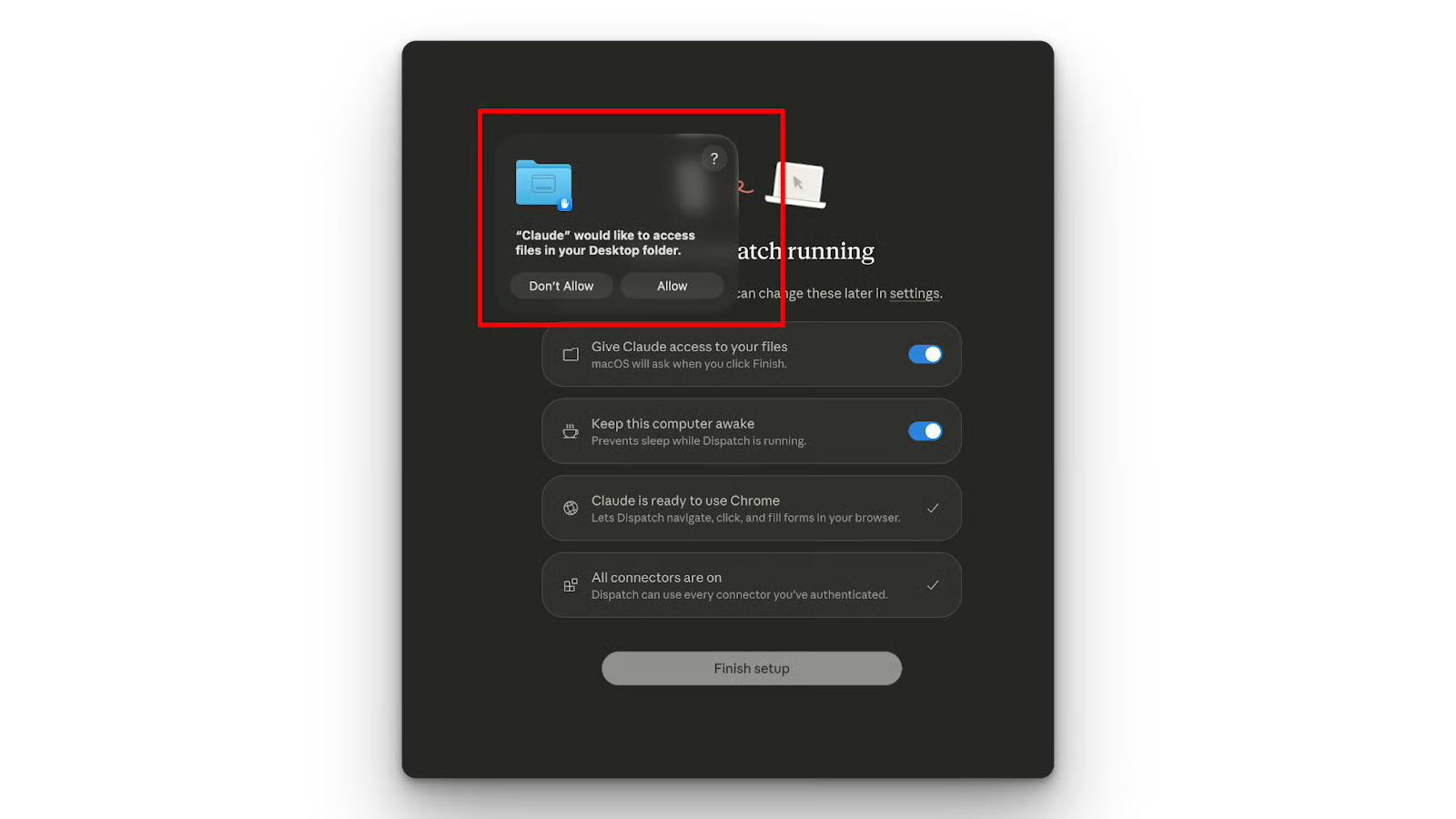
Devi anche concedere alcuni permessi, come l’accesso a directory locali.
Claude Cowork Dispatch ha quattro capacità distintive che lo separano da un normale chatbot da desktop.
Il thread persistente di Claude Cowork Dispatch rende facile passare tra app desktop e mobile. Puoi avviare un task mentre sei a passeggio e riprenderlo quando ti siedi al computer.
Claude Cowork Dispatch ti consente di accedere ai file sul tuo computer dal telefono. Per esempio, puoi chiedere a Claude di analizzare un file CSV dalla cartella download senza che i dati escano dal sandbox locale.
Con il controllo remoto del browser, puoi far accedere Claude alle schede con le tue sessioni autenticate. Significa che puoi chiedere a Claude di completare un task iniziato al computer chattando dal telefono.
Ho testato Claude Cowork Dispatch su tre flussi di lavoro: automazione del browser, code review locale e stesura di email. Sono ispirati a casi d’uso condivisi da altri dopo il lancio.
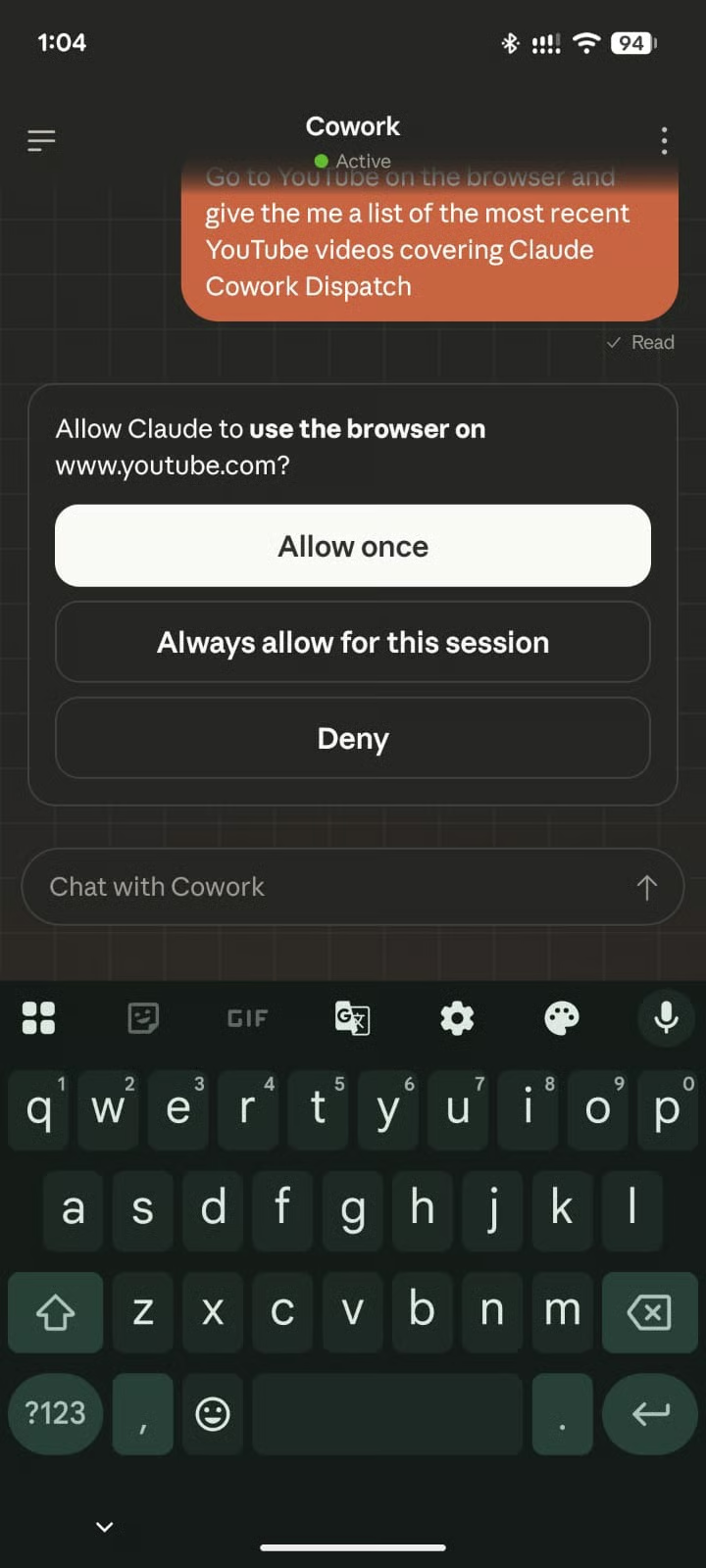
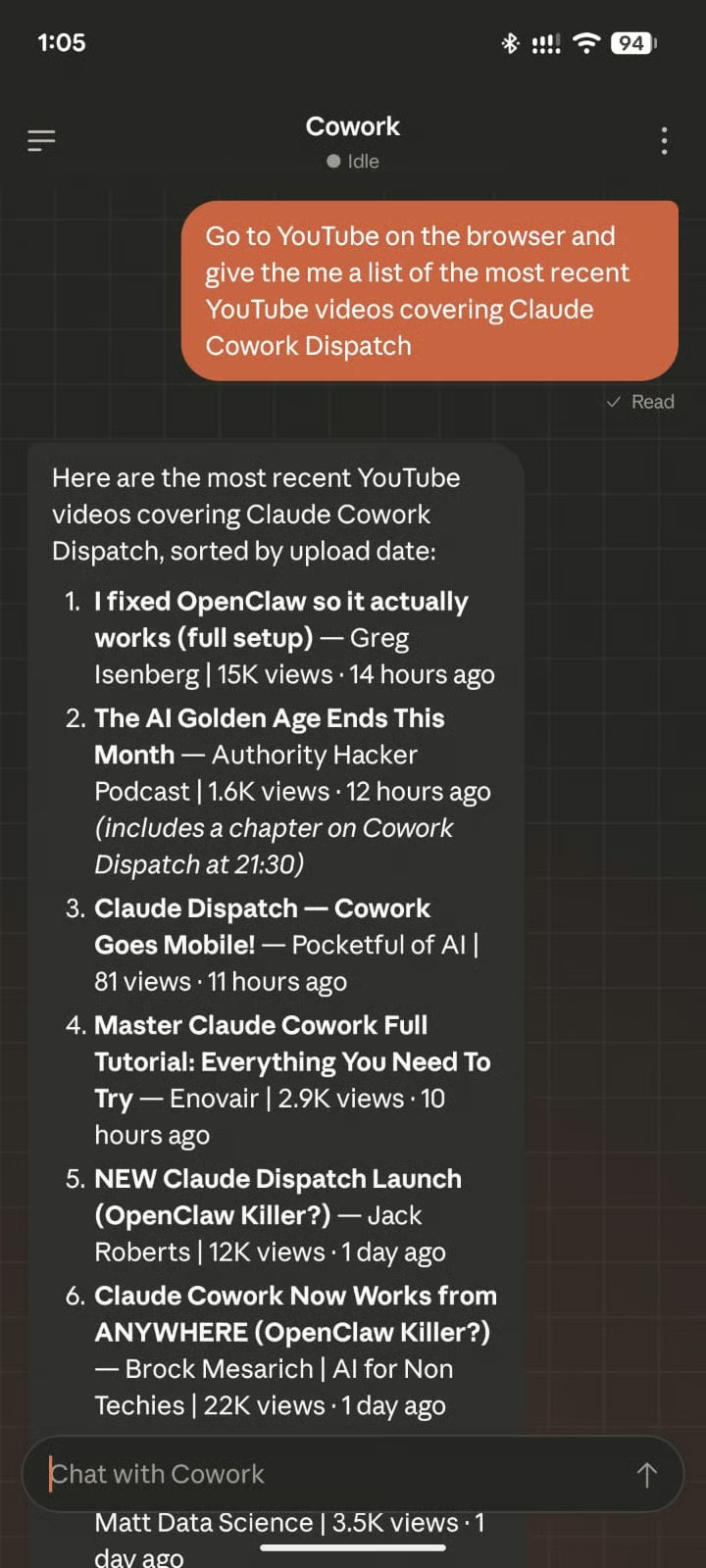
Per iniziare, ho chiesto a Claude dal telefono di andare su YouTube e restituire i 20 titoli più recenti dei video che parlano di Claude Cowork Dispatch.
Come vedi dallo screenshot qui sotto, Claude Cowork Dispatch ha iniziato chiedendo il permesso di accedere al browser.
Successivamente, Claude Cowork Dispatch mi ha fornito il risultato:
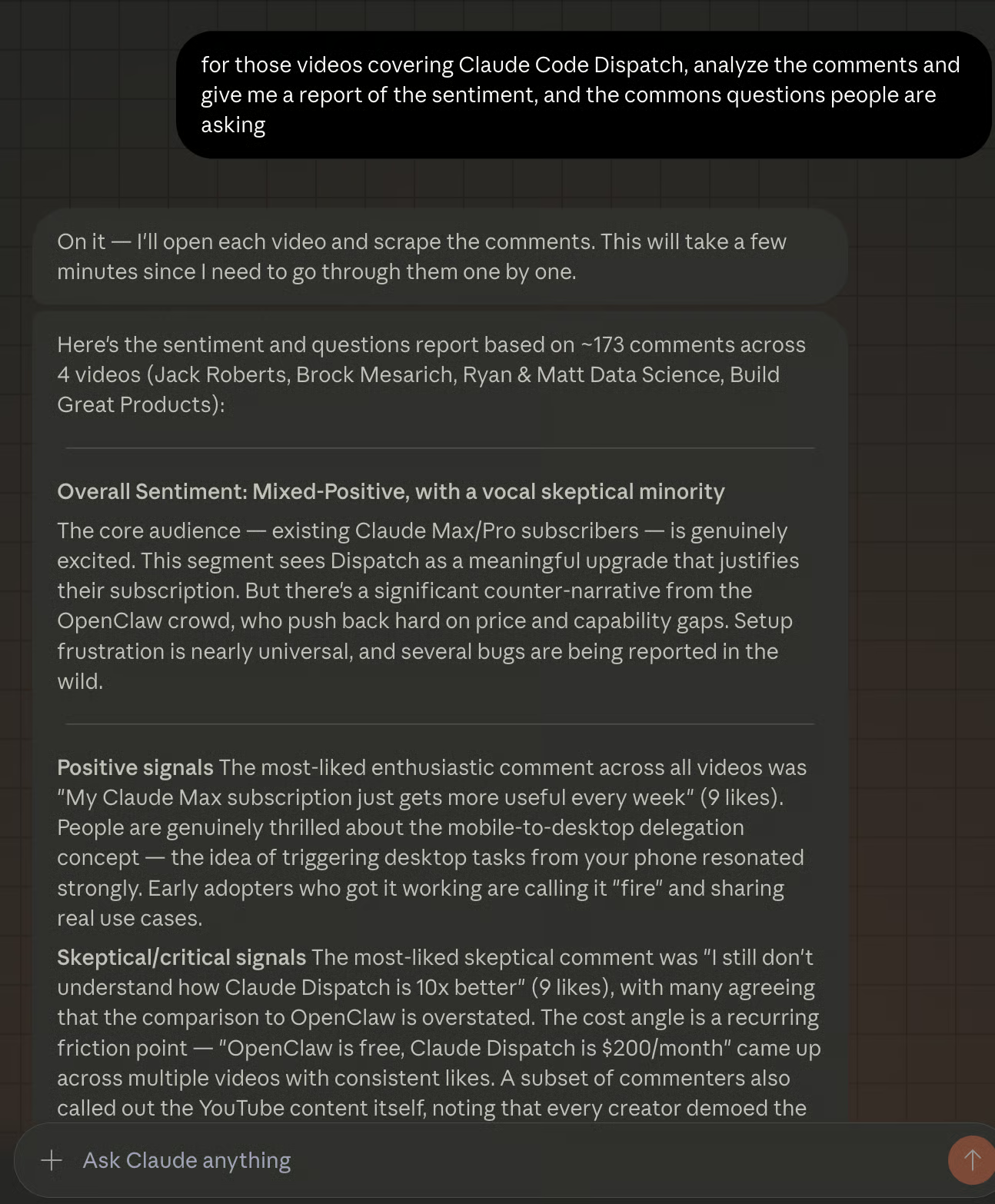
Poi ho voluto verificare se riuscisse davvero ad analizzare i video e inviarmi alcune delle domande che le persone stanno facendo. Così ho mandato il messaggio qui sotto dal telefono.
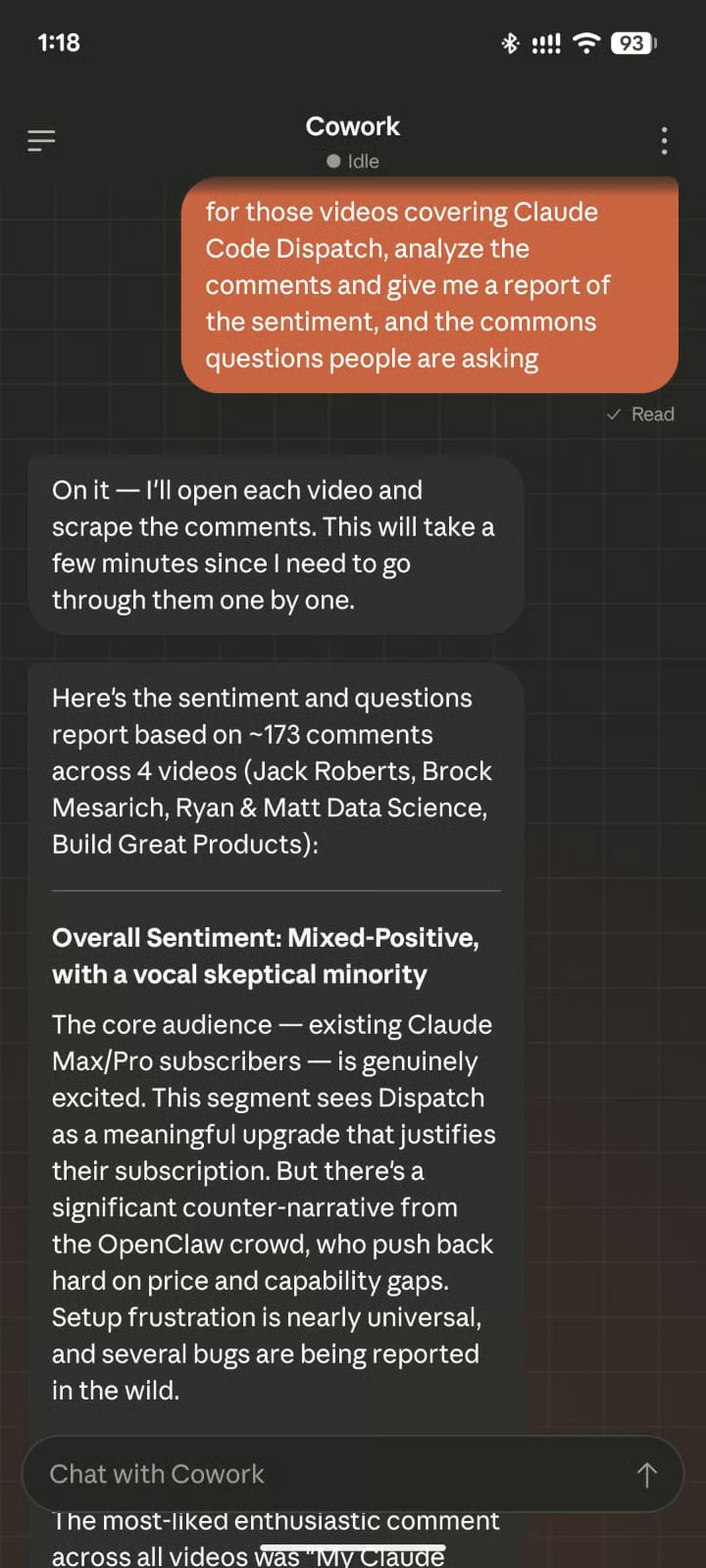
Claude Cowork Dispatch apre tutti i video, scorre fino ai commenti e fornisce il report.
Per saperne di più sull’automazione del browser, leggi il nostro articolo su Chrome DevTools MCP.
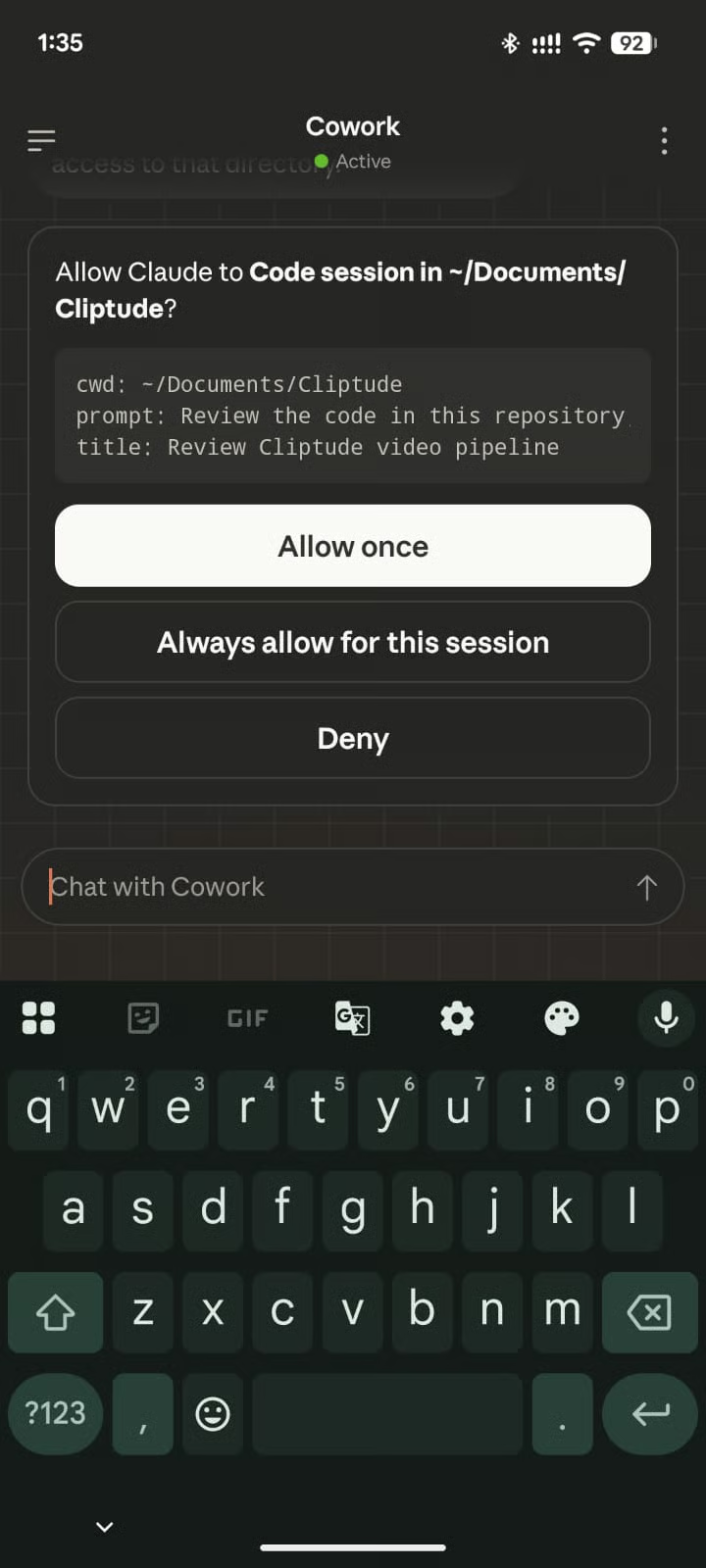
Quando ho provato a far revisionare a Dispatch un repository locale e suggerire miglioramenti, la prima cosa che ha fatto è stata chiedere i permessi per accedere a quella cartella:
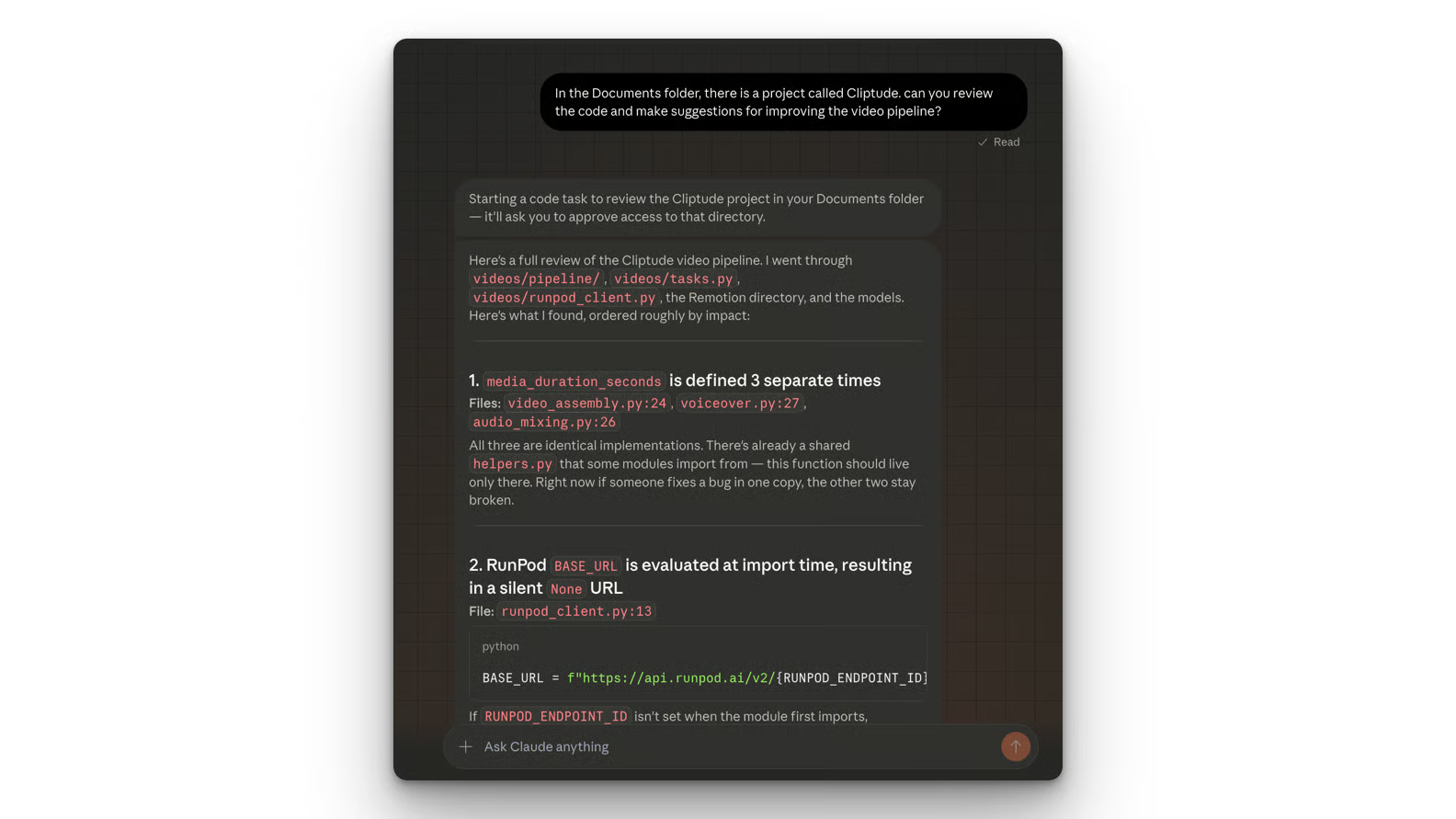
Poi ha inviato il report sia sull’app mobile che su quella desktop, come mostrato di seguito:
Su un progetto reale, è meglio creare prima un piano per garantire buoni risultati. Puoi imparare a usare la Plan Mode di Claude Code per esplorare la tua codebase in sola lettura, far emergere domande e rivedere piani strutturati per modifiche multi‑file nel nostro tutorial su Claude Code Plan Mode .
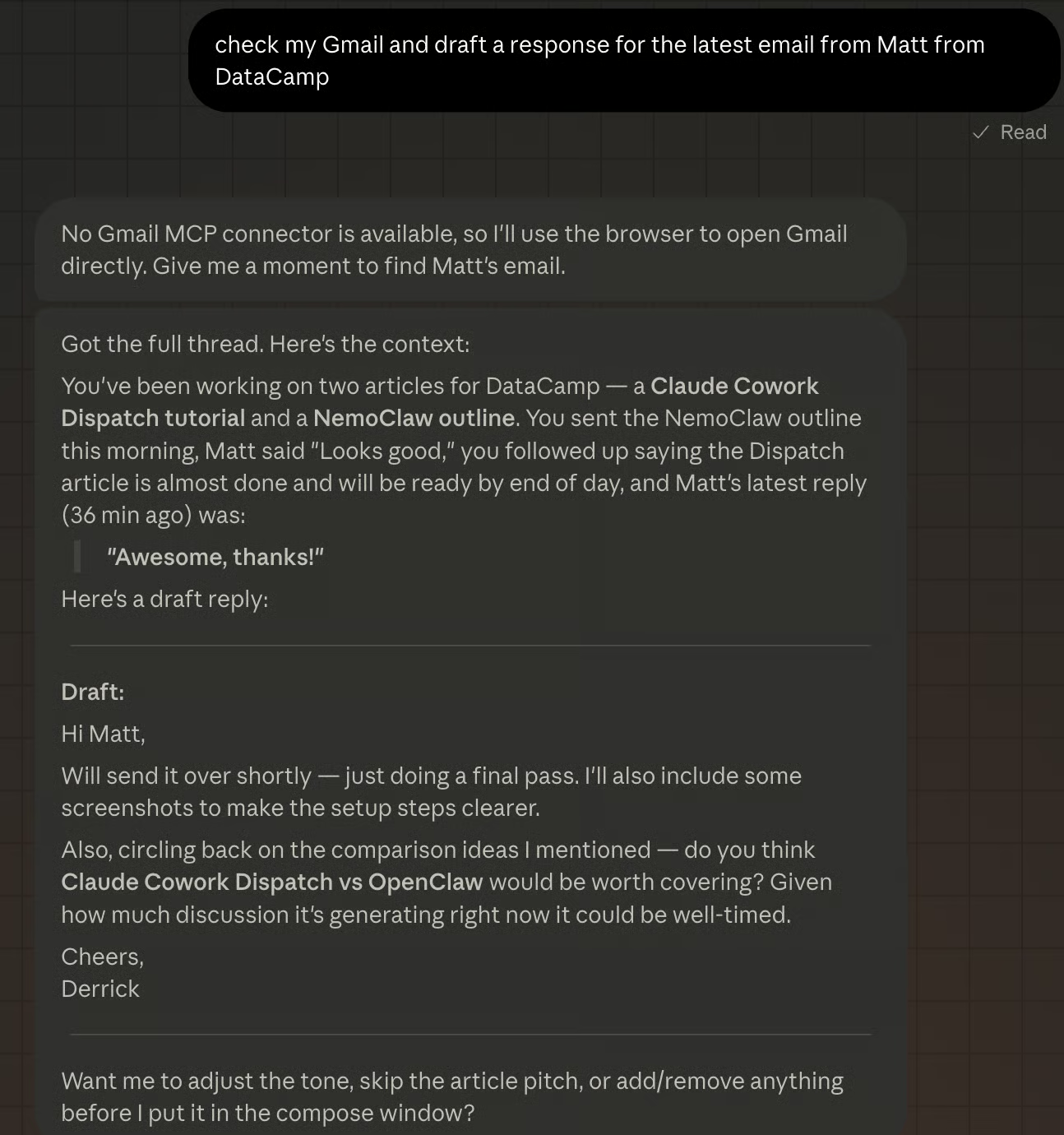
Un ultimo esempio. Vediamo se Claude Cowork Dispatch sa preparare una risposta all’ultima email del mio editor, Matt. Claude si è accorto che non avevo connettori Gmail, ha chiesto il permesso di accedere a Gmail, ha trovato l’email e infine ha redatto una risposta, come mostrato qui sotto.
In base ai miei test e al feedback della community, queste pratiche migliorano l’affidabilità di Dispatch:
Mantieni i task focalizzati sulle informazioni. Operazioni di sintesi, ricerca, elencazione, recupero e compilazione funzionano con costanza. Azioni cross‑app e comandi a livello di sistema sono meno affidabili.
Sii specifico sui percorsi dei file. "Controlla /projects/Q1/budget.xlsx" funziona meglio di "trova il mio budget da qualche parte". Meno ipotesi deve fare Dispatch, più coerenti saranno i risultati.
Prova prima i connettori alla scrivania. Se Gmail o Notion funzionano nel Cowork normale, funzioneranno anche tramite Dispatch. Non provare a configurare nuovi connettori da remoto.
Impedisci al Mac di andare in stop. Vai su Impostazioni di sistema > Energia e regola il timer di stop. Dispatch si ferma nel momento in cui il computer entra in modalità sospensione.
Evita di concatenare task multi‑step. Richieste a scopo singolo come "riassumi le mie email" hanno più successo di istruzioni composte come "riassumi le mie email, poi crea una pagina Notion dal riassunto e poi condividila con il team".
Claude Cowork Dispatch ha quattro limitazioni da conoscere prima di farci affidamento nel lavoro quotidiano.
La prima è il requisito di host attivo. Devi tenere il computer online e attivo per inviare messaggi dall’app mobile. È un po’ come far girare il computer come una macchina virtuale nel cloud, sempre accesa.
Secondo, Claude Cowork Dispatch non ha notifiche push su mobile. Non riceverai una notifica su desktop o mobile quando un task è completo.
Terzo, Claude Cowork Dispatch opera su un unico thread di conversazione. Al momento non c’è modo di avviare un nuovo thread o gestirne più di uno.
Inoltre, non puoi impostare task pianificati o ricorrenti tramite l’interfaccia mobile di Dispatch. Per creare pianificazioni automatizzate (come un riepilogo email quotidiano alle 9), devi configurarli direttamente in Cowork sul desktop.
Una scelta progettuale da sottolineare: Dispatch elabora tutto in locale sulla tua macchina. Il telefono invia istruzioni testuali al desktop, e il desktop le esegue. I file non lasciano mai il tuo computer e i dati non passano attraverso server esterni per l’elaborazione.
I gate di permesso del Cowork normale restano validi. Se un task richiede l’eliminazione di file o la modifica di documenti, Dispatch invia una richiesta di approvazione al tuo telefono prima di eseguire. Qualsiasi istruzione globale impostata in Cowork (come "non eliminare mai file senza conferma") si applica anche alle sessioni Dispatch.
Per i team con requisiti di conformità, l’architettura solo‑locale significa nessuna preoccupazione aggiuntiva sulla residenza dei dati. Il compromesso è il requisito dell’host attivo — niente server cloud sempre attivo significa anche nessuna superficie di attacco sempre attiva.
Informandomi sull’argomento, ho visto molte persone online definire Claude Cowork Dispatch il killer di OpenClaw. Vediamo se è vero.
Per impostazione predefinita, OpenClaw gira con accesso completo al sistema, a meno che tu non lo configuri con Docker e ne limiti i permessi. Questo consente un’automazione più flessibile con il rischio che l’agente faccia qualcosa di dannoso, come eliminare la tua casella di posta, come visto nell’articolo OpenClaw vs Claude Code.
Claude Cowork Dispatch, invece, chiede i permessi quando vuole eseguire determinati comandi, come accedere alle directory. Questo approccio rende Claude Cowork Dispatch più sicuro per aziende e utenti enterprise.
Claude Cowork Dispatch è sensibilmente più semplice e veloce da configurare rispetto a OpenClaw. Basta scaricare l’app desktop e scansionare un QR dal telefono. Funziona subito se hai già effettuato l’accesso su telefono e computer.
OpenClaw è più complesso da impostare. Richiede installazione manuale, familiarità con la riga di comando, Docker e variabili d’ambiente. Sei anche responsabile di definire il giusto livello di permessi e come gestire la sicurezza di rete.
Puoi imparare a configurare OpenClaw e collegarlo a WhatsApp nel nostro tutorial su OpenClaw (Clawdbot).
Claude Cowork Dispatch funziona solo quando il computer è attivo e connesso a internet. OpenClaw è un assistente always‑on che può monitorare l’ambiente, eseguire cron job e portare a termine task con poca supervisione umana.
Claude Cowork Dispatch è un’applicazione chiusa, che richiede un abbonamento Claude Pro o Max. Significa che resti nell’ecosistema Anthropic.
OpenClaw è open‑source, lo puoi auto‑ospitare e usare con qualunque provider di modelli, inclusi quelli open‑source. Tuttavia, per i modelli chiusi paghi ogni token, a differenza di Claude Cowork Dispatch, dove l’uso del modello è incluso nell’abbonamento.
Scopri come usare OpenClaw con Ollama nel nostro tutorial OpenClaw con Ollama.
|
Funzione |
Claude Cowork Dispatch |
OpenClaw |
|
Sicurezza |
Sandbox e permessi granulari. Chiede accesso a directory specifiche e azioni sul browser. |
Accesso completo al sistema. Di default gira con permessi elevati, con potenziali rischi se non configurato correttamente. |
|
Setup |
Abbinamento con un clic / QR code. Richiede solo l’app Claude Desktop e la sincronizzazione con l’app mobile. |
Orientato al terminale. Prevede installazione manuale, Docker, variabili d’ambiente e familiarità con la CLI. |
|
Persistenza |
Basato su sessione. Funziona solo mentre il computer host è attivo e l’app è aperta. |
Demone always‑on. Può girare 24/7 in background per cron job e monitoraggio autonomo. |
|
Modello di costo |
In abbonamento. Incluso nei piani Claude Pro e Max; l’uso è coperto dalla quota mensile. |
Pay‑per‑token. Software open‑source gratuito, ma paghi i costi API per ogni interazione. |
|
Scelta del modello |
Vincolato ad Anthropic. Ottimizzato specificamente per l’ecosistema Claude. |
Agnostico rispetto ai modelli. Utilizzabile con OpenAI, Anthropic o anche modelli open‑source locali. |
|
Utente target |
Knowledge worker. Progettato per velocità, sicurezza e passaggi rapidi da mobile a desktop. |
Sviluppatori e power user. Progettato per controllo totale, skill personalizzate e automazione profonda del sistema. |
Direi che pochi sono sorpresi che Anthropic abbia lanciato qualcosa di simile a OpenClaw. Dato che OpenClaw è diventato il software più popolare al mondo, ogni azienda ora corre per offrire qualcosa di simile risolvendo la principale criticità di OpenClaw: la sicurezza.
Non stupisce che Anthropic abbia lanciato un’offerta simile, ma con permessi e sicurezza più stringenti. Anche altri provider di modelli, come Perplexity, hanno lanciato strumenti analoghi.
Perplexity Computer è sostanzialmente una versione hosted di OpenClaw, che ti permette di eseguire task persistenti e collegarti alle tue app preferite, come Gmail, Slack, Notion e persino il calendario.
Claude Cowork Dispatch è la risposta di Anthropic a OpenClaw, pensata per aziende e utenti attenti alla sicurezza. È anche per chi vuole un assistente AI personale senza dover passare dalla lunga configurazione da zero.
Mi aspetto che Anthropic rilasci nuove funzioni in diretta concorrenza con OpenClaw. Su una posso scommettere: la possibilità di far girare Claude Cowork Dispatch senza che il computer sia acceso.
Per esempio, potrebbero rendere possibile inviare alcuni task al cloud se il computer è offline. Immagino che un’attività come creare una pagina Notion dovrebbe essere possibile via API; servirebbe solo un modo sicuro per archiviare le chiavi API e condividerle tra le app mobile e desktop.
Con Claude Cowork Dispatch, Anthropic dimostra che un agente AI da desktop può funzionare con controlli di permesso stringenti ed essere comunque utile. Se lavori tutto il giorno con file, email e schede del browser, Dispatch elimina la necessità di essere fisicamente al computer per ogni task.
Per un approfondimento sulla piattaforma Cowork, dai un’occhiata al nostro tutorial su Claude Cowork ed esplora come si confrontano altri agenti da desktop nella nostra guida ai migliori agenti AI del 2026. Per iniziare a creare direttamente con le API di Claude, ti consigliamo il corso Introduzione ai modelli Claude.
I migliori corsi DataCamp
Corso
Corso
Programma
blog
Abid Ali Awan
15 min
blog
Abid Ali Awan
10 min
blog
Tim Lu
12 min