Track
When Cursor moved Origin from waitlist to early beta, it became a Git host that eligible paid accounts could access through the CLI and push to. The obvious question is whether it replaces GitHub, and the short answer is that it's a narrower, agent-focused host you can mirror into rather than migrate to.
In this tutorial, I install the Origin CLI on Windows 11 through Ubuntu 24.04 on WSL 2, authenticate with an API key, create a small repository, push a commit, and open a pull request. I keep the repository small, so the Origin flow stays visible. After that, I cover GitHub mirroring, team access, and the limits I would check before moving a real project.
To follow along, you’ll need Git, macOS or Linux (including Windows through WSL), and a Cursor Pro, Teams, or Enterprise account with Origin access. Origin is still in beta, and access is staged, so check the current docs if the Codebase tab is missing.
If Cursor itself is new to you, our Software Development with Cursor course explains the editor basics used here.
TL;DR: Is Cursor Origin a GitHub Replacement?
Not yet. Cursor Origin is an early-beta Git host with standard Git pushes, pull requests, code browsing, agent workflows, and GitHub mirroring. GitHub still handles public hosting, Issues, and Actions; a mirror lets a team try Origin without moving its source of truth. On Windows, the origin CLI runs through WSL.
Learn Git Fundamentals Today
What Is Cursor Origin?
Cursor Origin is a Git forge. It hosts repositories, mirrors GitHub projects, and supports pull requests and code browsing. Origin repositories also work with Cursor's cloud agents and automations.
What is the difference between Cursor Origin and GitHub?
Origin does not cover every GitHub feature. Public repositories are not documented, and mirrors exclude GitHub Issues, GitHub Actions workflows, and Actions secrets. GitHub remains the broader platform for public repositories, Issues, Actions, and third-party apps, so Origin is the narrower service today.
The main difference sits below that familiar Git workflow: Cursor built a separate storage layer for the branch and commit volume produced by agents. Cursor calls this focus "agent scale": workloads where many agents branch, commit, and open pull requests against the same repository.
Why did Cursor build its own Git host?
The storage design explains why Cursor built a new Git host instead of adding another interface to an existing one.
Cursor's engineering post on Continuity describes existing Git hosts as keeping a repository on several servers and committing a push after a majority agrees. Cursor says this model costs more when a system has thousands of short-lived repositories or frequent pushes to a single repository.
How does Cursor Origin's Continuity storage work?
Continuity, or "Cnt," is the storage system behind Origin. It stores a write-ahead log in S3-compatible object storage as the source of truth. The Git repository on local disk is a warm cache that can be rebuilt from the log.
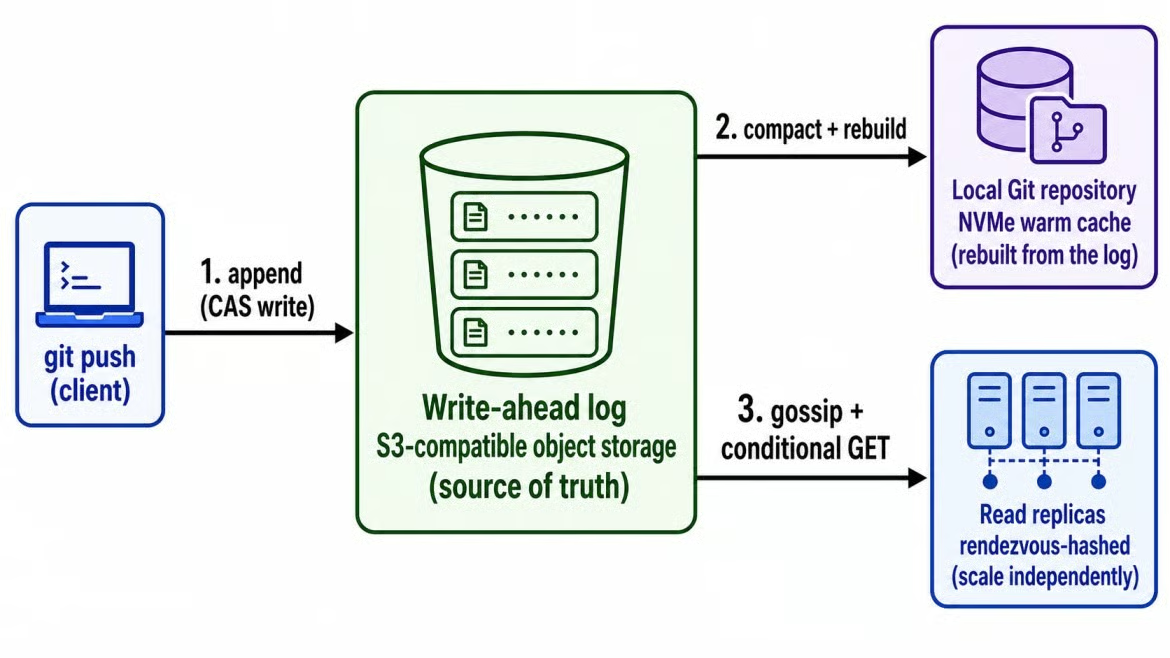
Continuity stores Git writes as objects. Image by Author.
Because the object log is the real record, Cursor can add read replicas for busy repositories and remove them when demand falls. In Cursor's tests, read throughput rose as replicas were added, up to 100 replicas. The system handled up to 120 pushes per second on standard S3, but those figures have not been checked by an independent benchmark.
For a user, the main effect is simpler: a busy repository can gain read capacity, while a short-lived repository does not need a permanent local copy on every server.
Who can access Cursor Origin?
Origin is available on Pro, Teams, and Enterprise plans, but not on free plans. Access rolls out in stages, so an eligible plan doesn't guarantee the Codebase tab appears right away. On Pro you own an individual namespace and claim your own codebase name.
Enterprise admins can disable it for their organization. Cursor's overview says any team member can claim the first codebase name, while the Codebase Settings page says a team admin must claim it. Check that permission in your team before setup.
What Is the Cursor Origin CLI?
Origin ships its own command-line tool for authentication, repositories, pull requests, and account configuration.
Cursor Origin CLI vs. Cursor Agent CLI
Origin's CLI is a separate binary, origin, from Cursor's Agent CLI, which runs as agent.
I found the names easy to mix up because origin is also the conventional name for a Git remote. In this article, "push to origin" means the Git remote, while "run origin" means the CLI.
Which platforms support the Origin CLI?
Cursor documents macOS, Linux, and Windows through WSL. At the time of my test, Windows meant WSL because there was no native installer.
If you are following along on Windows, open the Ubuntu terminal before installing the CLI. Running the shell installer in PowerShell is not the same setup.
Cursor Origin CLI commands
The Cursor Origin CLI currently has nine command groups.
|
Command |
What it manages |
|
|
Sign in, sign out, check status, git credentials |
|
|
Create, list, view, clone, delete repositories |
|
|
Create, review, merge, inspect pull requests |
|
|
View rules (read-only from the CLI) |
|
|
Manage SSH keys on your account |
|
|
Authenticated calls to Origin's REST API |
|
|
Generate shell tab-completion scripts |
|
|
Update the CLI itself |
|
|
Manage config, including the update channel |
Most repository commands read the target from the Git remote named origin. The -R owner/repo option sets the target directly, which is useful in a script that can run against several repositories. The ruleset commands only display existing push and merge rules; they do not change them.
How to Install and Log In to the Cursor Origin CLI
Cursor provides the CLI through a shell script rather than a package manager. The command comes from Cursor's install page.
How to install the Cursor Origin CLI
The install comes down to one line:
curl -fsSL https://downloads.cursor.com/origin/install.sh | sh
The installer placed origin at ~/.local/bin/origin. If your team reviews install scripts before running them, download the script first instead of piping it straight to sh.
Fixing an Origin CLI "command not found" error
If your shell can't find origin after the install, add its directory to PATH:
echo 'export PATH="$HOME/.local/bin:$PATH"' >> ~/.zshrc
source ~/.zshrc
Swap ~/.zshrc for ~/.bashrc on bash. It's a one-time fix per machine.
Checking the install and login
Run origin --version and origin --help to confirm the install, then use origin auth login to open Cursor's browser sign-in flow.
Here's what the verification output looked like in WSL:
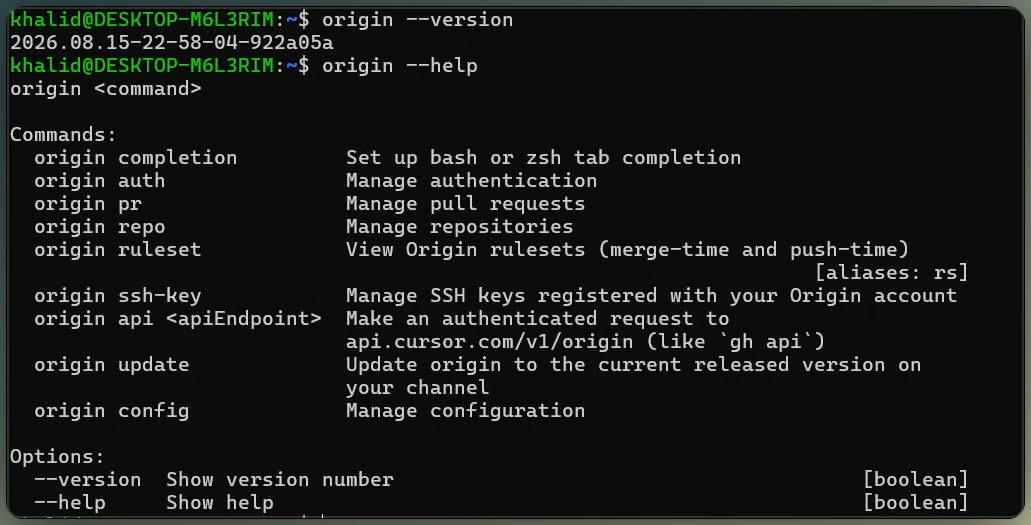
Origin CLI version and help output. Image by Author.
In a headless environment, the CLI prints a URL instead. Login also configures Git's credential helper, so Origin remotes work without a separate Git token. Run origin auth status afterward to check the session.
Using a Cursor API key without a browser
For CI or scripts, run origin auth login --api-key <key> or set CURSOR_API_KEY before origin auth login. Keep the key out of committed files. CURSOR_AUTH_TOKEN is different and expects a bearer token.
How to Create, Clone, and Push a Cursor Origin Repository
After signing in, you can create a repository from the web page or the CLI. Pushing uses standard Git commands.
Creating a repository with origin repo create
From cursor.com/codebase, select New, enter a name, and choose Internal or Private visibility.
From the CLI, origin repo create my-project uses your account's namespace. Include an owner, as in origin repo create acme/my-project, for a team namespace. The optional --default-branch flag changes the server default of main.
The origin repo clone acme/my-project command clones the repository over HTTPS with the login saved by the CLI.
Pushing your first commit to Origin
After the first push, the repository appears in Codebase:
Repository pushed and shown in Codebase. Video by Author.
For a brand-new empty repository, clone it, add a file, and push:
git clone https://origin.cursor.com/{owner}/{repo}.git
cd {repo}
echo "# {repo}" > README.md
git add .
git commit -m "Initial commit"
git push -u origin main
If Git reports a .git/config.lock permission error under /mnt in WSL, clone under ~ instead. That fixed the error in my test.
After the push, open Codebase and check that the commit appears. The Code tab shows the file tree and commit history. Press T for Go to file, or use the search field to search the code.
Pushing an existing Git repository to Origin
If you already have a project with Git history, run git remote -v first. The command below only applies when the repository does not already have a remote named origin:
git remote add origin https://origin.cursor.com/{owner}/{repo}.git
git push -u origin main
If origin already points to GitHub, use another remote name such as cursor rather than replacing the existing URL. Origin CLI commands will not infer the repository from that name, so pass -R owner/repo when running them.
How to Mirror a GitHub Repository in Cursor Origin
A mirror copies an existing GitHub project into Origin and keeps the two services connected.
Cursor Origin GitHub mirroring requirements
You'll need Origin access, the Cursor GitHub app connected to the organization or account that owns the repository, and GitHub admin access to that repository. Write access alone is not enough.
Starting a Cursor Origin GitHub mirror
From cursor.com/codebase, select Sync from GitHub, choose the organization and repository, and confirm. The CLI alternative is origin repo create-mirrored owner/repo, covered in Cursor's mirroring docs.
What Cursor Origin mirrors from GitHub
Origin mirrors Git data, but not every GitHub feature:
|
Content or feature |
Sync behavior |
|
Git history, branches, and tags |
Sync to Origin |
|
Browsable and searchable code |
Available in Origin |
|
Pull requests |
Sync in both directions |
|
Ongoing GitHub updates |
Continue syncing to Origin |
|
GitHub Issues |
Stay on GitHub |
|
GitHub Actions workflows and secrets |
Stay on GitHub |
GitHub Actions continue running on GitHub. Depot and Buildkite integrations apply to Origin-hosted repositories, not mirrored copies.
When GitHub remains the source of truth
While a repository is mirrored, pushes through Origin pass through to GitHub. Detach from GitHub, under repository Settings, makes the Origin copy standalone without changing the GitHub repository.
How to Open and Review a Cursor Origin Pull Request
Origin pull requests use the same branch, push, and review sequence found on other Git hosts. Our guide to how pull requests work explains that sequence.
Creating a branch and pushing a change
Create and push the working branch:
git checkout -b my-change
echo "Example change" >> README.md
git add README.md
git commit -m "Add example change"
git push -u origin my-change
Git has done its part; the next command belongs to Origin.
Opening a pull request with the Origin CLI
Repository commands infer the target from the Git remote named origin. Run origin pr create, or pass -R owner/repo to set the repository directly. The command creates a draft by default; pass --status open for one that is ready for review.
Reviewing a Cursor Origin pull request
The CLI includes origin pr list, origin pr view, origin pr diff, and origin pr checks. With no CI app configured, origin pr checks printed No checks reported. and exited with code 1 in my test.
That exit code matters in shell scripts that use set -e, since an empty Checks tab can stop the script even though the pull request itself is fine.
Pull request review with four tabs. Image by Author.
In the web view, every pull request has four tabs: Activity, Commits, Checks, and Files Changed, plus reviewer requests, inline comments, and a merge button. The web page displays merge conflicts, and origin pr status --conflict-status reports them from the terminal.
The terminal also supports origin pr merge. Pull requests created on an Origin-hosted repository stay on Origin, while activity on a mirrored repository is sent back to GitHub.
Cursor Origin Team Access and Repository Permissions
Origin permissions exist at the codebase and repository levels.
Codebase settings vs. repository settings
Codebase settings are team-wide: who can turn Origin on, create repositories, and install apps. Repository settings are scoped to one repository and cover General, Permissions, Rules and Protections, and Apps, though Cursor's docs warn that the Permissions and Rules screens are being redesigned.
If a teammate can use Origin but cannot open one repository, check that repository's permissions rather than the team-wide settings.
Internal vs. Private repositories
There are two different kinds of repos with restricted access:
- Internal repositories are visible to team members with codebase access.
- Private repositories are visible only to members granted access directly or through codebase permissions. Switching a repository to private keeps whoever made the change as an admin.
How to check Cursor Origin repository access
The origin repo list command shows every repository visible to the current account. To review who can access one repository, open Settings, then Permissions.
Cursor Origin Best Practices
Three things are very important to keep in mind when working with Origin:
-
Before deleting or reconfiguring a repository, confirm the full
owner/repovalue and inspect its remotes. -
Avoid
-yuntil the target is verified. -
Cursor's permission pages conflict, so check the current docs before automating access changes.
Cursor Origin vs. GitHub: Feature Comparison
Origin is tied to Cursor's agent workflow, while GitHub covers a broader repository ecosystem.
Git hosting, pull requests, and CI/CD
Rather than repeat each section, here is the short version of the feature split:
|
Attribute |
Cursor Origin |
GitHub |
|
Git hosting |
Native repos plus GitHub mirrors, early beta |
Public and private repos, GA |
|
Visibility |
Documented creation options are Internal and Private; public hosting is not documented |
Public, Internal, and Private |
|
Pull requests |
Web and CLI review; CLI-created pull requests default to draft |
Web and |
|
AI agent workflows |
Cloud agents and automations |
Agents panel, Copilot agent, Copilot CLI (GA) |
|
CI/CD |
Vercel deployments; Depot and Buildkite CI on Origin-hosted repos |
Native Actions and an app marketplace |
|
GitHub interoperability |
Two-way mirror sync, excludes Issues, Actions |
Not applicable, it's the source |
|
CLI tooling |
|
|
|
Pricing and availability |
Available on Pro, Teams, and Enterprise through a staged rollout |
Free tier, plus paid Team and Enterprise |
The agent row is the one that needs context.
Cursor Origin vs. GitHub for agent workflows
Both platforms let agents work against repositories. Origin keeps that loop inside Cursor; GitHub offers it through its Agents panel and Copilot tools, including the generally available CLI.
When to use Cursor Origin, GitHub, or both
- Use Origin when the repository is internal or private, most agent work already happens inside Cursor, and your deployment or CI setup can run through Vercel, Depot, or Buildkite.
- Keep GitHub as the primary host when the project is public, Issues and Actions are part of the daily workflow, or the team depends on GitHub's app marketplace.
- Use both when you want Origin's code browsing and agent workflow without moving the source repository. A mirror keeps pushing and pulling request activity tied to GitHub while making the same code available in Origin.
Final Thoughts
I went from a fresh WSL install to an open Origin pull request using the same branch, commit, and push flow I use with GitHub. The CLI did not change how Git worked; Origin's differences showed up around hosting, permissions, and mirroring.
After using it, I would treat Origin as a GitHub companion, not a full replacement. Mirroring is the most practical entry point for an existing repository because GitHub can remain authoritative. Public projects and Actions-heavy workflows still have little reason to move.
For related reading, our guide to Cursor Automations covers agent tasks that run against an existing repository. Our guide to what GitHub is and how to use it explains the GitHub workflow in more detail.
GitHub Origin FAQs
Does Cursor Origin have an API?
Yes. The origin api command sends user-authenticated requests to api.cursor.com/v1/origin with the current CLI credential. It accepts method, header, field, input, and jq flags for small command-line scripts or automation jobs, similar to gh api. App connections use app JSON Web Tokens and installation access tokens instead.
Can one local repository push to both GitHub and Origin?
Yes. Git supports multiple push URLs for one remote. For a full GitHub history copy and ongoing synchronization, Cursor's docs direct users to the mirroring workflow.
Does Cursor Origin support SSH keys?
Yes. Origin supports SSH keys, and the CLI provides origin ssh-key add, origin ssh-key list, and origin ssh-key delete for keys registered to your account. The add command accepts a public key file such as ~/.ssh/id_ed25519.pub.
Which privacy setting applies to an Origin repository?
Origin follows the privacy mode of the namespace owner, whether that owner is an individual or a team. Teams using legacy privacy mode must switch before they can activate Origin.
Can I rename an Origin codebase namespace?
Not in the beta I tested. The namespace becomes the {owner} segment in repository URLs, and there was no option to change it later.
I’m a data engineer and community builder who works across data pipelines, cloud, and AI tooling while writing practical, high-impact tutorials for DataCamp and emerging developers.