

What Is the DeepSeek Superagent?
DeepSeek Superagent watches one GitHub repository through DeepSeek Harness. Team rules decide whether an event deserves work; accepted work goes to a separate session. This tutorial covers the published prototype, not design-only ideas.
Harness provides the runtime; Superagent adds event monitoring and authorization. Our agent harness explainer covers tools, memory, and control.
How does the DeepSeek Superagent work?
A new GitHub event can move through four stages. These stages keep the decision and the code change separate:
-
Source and Trigger: GitHub polling turns each event into a Trigger on an Issue, pull request, or
main. -
Admission: the gate labels it an explicit request, inferred candidate, or nothing.
-
Eval and Decision: inferred CI is judged against the rules. An explicit request is routed to an accept Decision, reason
explicitRouted. -
Ticket and Executor: accepted work gets its authorization, worker session, and directory.
A later comment on the Ticket's own Thread goes to its worker with no new Eval. The diagram shows three GitHub paths: default-branch CI, an explicit request, and that review. Inside the CI path, observe and auto-leave a matched rule at different ends.
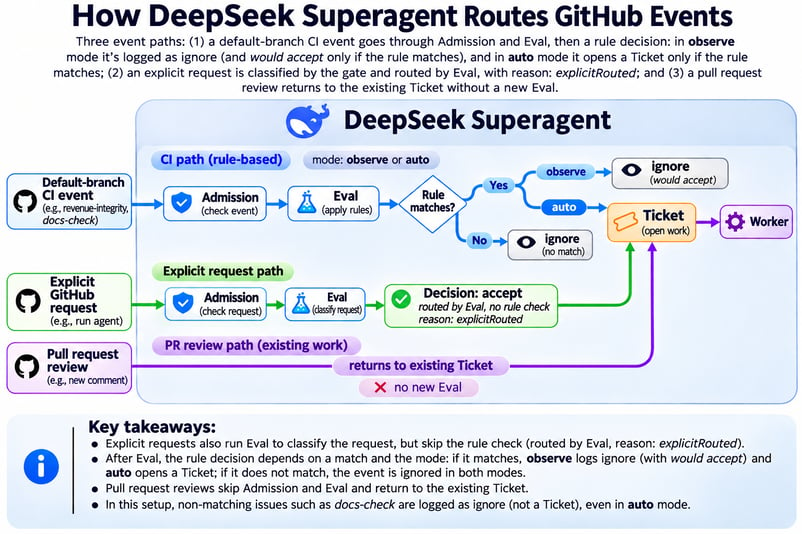
CI is judged. Requests start work. Image by Author.
What is the difference between observe mode and auto mode?
The accept mode applies only to work that Superagent inferred from an event. Choose one of three settings:
-
offdiscards inferred candidates. -
observeevaluates them but records a positive result as "would accept." -
autostarts work after a positive evaluation.
A request from an allowed person works in every mode and creates its own Ticket. Keep auto off for this tutorial.
Build a CI Repair Workflow in Observe Mode
The pipeline uses pytest and two GitHub Actions jobs to turn events into daily revenue. Superagent inserts a decision before work starts. Our Claude Code Routines tutorial covers another event-driven workflow.
Trace the replay bug in daily revenue
The bug counts a replayed payment twice. Each row has an event_id, order_id, timestamps, and an amount. One order can hold several valid payments.
That’s why deduplicating on order_id can pass a replay test but delete real payments; the correct key is event_id. Compute expected totals with Python's csv module before authorizing the agent, so the agent's output is not the answer key.
Define a successful CI repair
Success depends on what the workflow does, not just what the agent says. Set these conditions before changing the repository:
-
Ignore a documentation-only failure.
-
Match
revenue-integritywithout starting work. -
Open a pull request only after an explicit request.
-
Preserve assertions and pass a prebuilt holdout suite.
Prepare the holdout suite before Superagent gets access. This keeps the expected behavior outside the worker's development inputs.
DeepSeek Superagent Prerequisites and Isolation
You need a DeepSeek API key, two GitHub accounts, and a disposable Linux environment. For Harness basics, see our basic setup guide.
Software and accounts you need
Pin the software versions so an upgrade cannot change the workflow. The last column records the setup used for the results later in the article:
|
Component |
Requirement |
Used here |
|
Operating system |
Linux or WSL |
Ubuntu 24.04 LTS on WSL 2.4.11 |
|
Node.js |
22.19+ or 24+ |
22.20.0 |
|
DeepSeek Harness |
Compatible with |
|
|
DeepSeek model |
Configured Harness provider |
|
|
pnpm, Git, tmux, jq |
pnpm, Git 2.32+, tmux; jq for the helper script |
11.7.0, 2.43.0, 3.4, 1.7 |
|
Python, GitHub CLI |
Python 3.8+, |
3.12.3, 2.83.1 |
The agent needs its own GitHub user with write access because Superagent reads that account's notifications. Add only the human maintainers who may authorize work to the allowed list.
Isolate the agent from personal files
Both presets give the operating system (OS) user full access, and the gh wrapper does not isolate the process. Use a fresh WSL distribution with automount and interop off:
If you already have a disposable Linux virtual machine, skip the WSL block and use that machine instead. Keep unrelated credentials and files off it.
# /etc/wsl.conf inside the disposable distribution
[automount]
enabled = false
mountFsTab = false
[interop]
enabled = false
appendWindowsPath = false
[user]
default = superagentA dedicated superagent user should hold only the DeepSeek key and agent token. This reduces accidental access but is not a security boundary; Microsoft's WSL security model recommends a separately managed virtual machine outside WSL for untrusted code.
On GitHub, protect main with a required pull request, at least one independent approval, and both CI checks. Give the agent write access without an administrator bypass. None of this stops prompt injection through Issue text.
Step 1: Build the Python Revenue Pipeline and CI Baseline
The published tutorial repository now has the merged repair on main, so do not use its current branch as the starting state. Use these commits to separate the three stages:
The pipeline and tests below are simplified from the green baseline (a6d2036), not taken from the current main. Create a disposable repository from that commit before following the CI steps:
git clone https://github.com/KhalidAbdelaty/superagent-revenue-lab.git revenue-lab
cd revenue-lab
git switch -C main a6d2036
git remote remove origin

export EXPERIMENT_REPO="YOUR_LOGIN/superagent-revenue-lab"
gh repo create "$EXPERIMENT_REPO" --private --source=. --remote=origin --pushUse this new repository for the controlled failures and the agent's branches. Leave the published repository unchanged; its incident and solution commits are references for comparison.
"""Daily revenue report built from payment events."""
import pandas as pd


def load_events(path):
    """Read payment events; amounts are integer cents."""
    return pd.read_csv(path, parse_dates=["occurred_at", "received_at"])


def daily_revenue(events):
    """Return one row per UTC day with total revenue in cents."""
    days = events["occurred_at"].dt.strftime("%Y-%m-%d")
    report = (
        events.assign(day=days)
        .groupby("day", as_index=False)["amount_cents"]
        .sum()
        .rename(columns={"amount_cents": "revenue_cents"})
    )
return reportThe baseline dataset spans two days and includes multiple real payments for one order. Pytest checks known totals and that shared-order case, and nothing tests replays yet:
import pandas as pd


def test_daily_totals_match_known_values():
    report = daily_revenue(load_events(DATA))
    assert report["revenue_cents"].tolist() == [20398, 27550]


def test_events_on_the_same_order_are_all_counted():
    t = pd.Timestamp(0, unit="s", tz="UTC")
    events = pd.DataFrame({
        "event_id": ["evt_a", "evt_b"],
        "order_id": ["ord_1", "ord_1"],
        "occurred_at": [t, t],
        "received_at": [t, t + pd.Timedelta(seconds=1)],
        "amount_cents": [1000, 250],
    })
assert daily_revenue(events)["revenue_cents"].tolist() == [1250]Name each job after the behavior it checks. The same names then appear in GitHub and in Superagent's Trigger text:
name: ci
on:
  push:
    branches: [main]
  pull_request:

jobs:
  revenue-integrity:
    runs-on: ubuntu-24.04
    steps:
      - uses: actions/checkout@v4
      - uses: actions/setup-python@v5
        with:
          python-version: "3.12"
      - run: pip install -r requirements.txt   # pandas==2.3.3, pytest==8.4.2
      - run: pytest -v

  docs-check:
    runs-on: ubuntu-24.04
    steps:
      - uses: actions/checkout@v4
      - uses: actions/setup-python@v5
        with:
          python-version: "3.12"
- run: python scripts/check_docs.py # fails if README links a missing fileIf bare pytest cannot import revenue, add a pytest.ini with pythonpath = .. Confirm that both jobs pass on main before installing Superagent.
The published experiment/holdout directory documents the original run but is visible in the public clone. For a new experiment, create a fresh suite outside every checkout and filesystem the worker can read.
Hash that suite before sending the repair request. Cover these cases:
- Repeated deliveries of one event.
- Different events with the same order ID.
- An input DataFrame that must remain unchanged.
- The expected output columns and sort order.
Keep this suite hidden until review. Step 6 runs it from the separate human environment after the worker finishes.
The following diagram separates the worker's development inputs from the maintainer's final check.
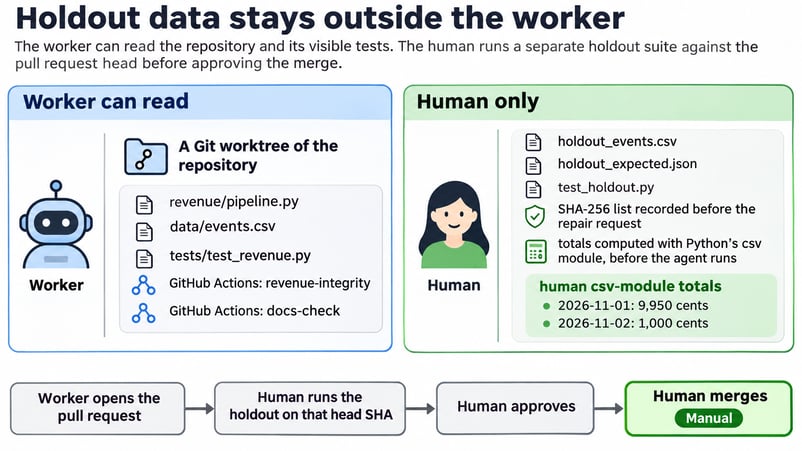
Holdout data stays outside the worker. Image by Author.
Step 2: Install DeepSeek Superagent and Connect GitHub
Install the bundle in a dedicated Harness profile, separate from the profile used for daily work. Load the agent account's token into AGENT_GH_TOKEN without writing it to the repository. Then run these commands as the superagent user:
npm install -g @deepseek-ai/[email protected] [email protected]

git clone https://github.com/deepseek-ai/dsh-superagent-prototype.git ~/dsh-superagent
cd ~/dsh-superagent
git checkout --detach 8c32a9dc5d72c033816c6a8110b37f40cf94fba4
pnpm install && pnpm build

# A gh wrapper that only ever sees the agent account
mkdir -p "$HOME/.local/bin"
export PATH="$HOME/.local/bin:$PATH"
cat > ~/.local/bin/gh-agent <<'W'
#!/bin/sh
GH_CONFIG_DIR="$HOME/.config/gh-agent" exec gh "$@"
W
chmod +x ~/.local/bin/gh-agent
printf '%s' "$AGENT_GH_TOKEN" | gh-agent auth login --hostname github.com --with-token
gh-agent api user --jq .login            # your dedicated agent account

# Dedicated profile, then the bundle
dsh superagent --from-default-profile web --dump-config > /dev/null
dsh plugin --profile superagent add "link:$PWD"Note: The runs in this tutorial used commit 6337fc8, which DeepSeek later squashed into 8c32a9d.
Use the profile example in the cloned repository to set a state directory and bind the panel to 127.0.0.1:3082. Then start the service in tmux:
This profile separates service restarts from personal Harness sessions. It also keeps the plugin's PATH and Git settings out of the normal profile.
status may report setup pending or repositoryUnset until you save the GitHub Source in Step 3. At this point, confirm only that the runtime answers and the Superagent panel opens; do not expect a Source or CI baseline yet.
Open Settings → Models in the dedicated profile and select deepseek-flash. In Superagent → Settings → Eval and Execution, confirm that both roles inherit that profile model or name deepseek-flash explicitly.
Step 3: Configure GitHub Actions Monitoring in Observe Mode
Leave default-branch CI observation off while you save the Source, policy, rule, and executor settings. Turn it on only after the new repository has a green main, so the first reading records a clean baseline.
Configure the GitHub Source
In Settings → Sources, set the repository to EXPERIMENT_REPO, point the CLI field at the dedicated gh-agent wrapper, and keep default-branch CI observation off. Save the Source and wait for any restart to finish before changing the policy.
Configure the CI admission policy
A CI result has no sender. Its admission row has one cell, which defaults to ignore. If you leave that setting unchanged, Eval never sees CI.
Define a narrow revenue-integrity rule
Replace the example rules with one rule named after the check. Tell the evaluator not to guess at causes:
{
  "rules": [{
    "id": "revenue-integrity",
    "name": "Revenue integrity CI failures",
    "enabled": true,
    "instruction": "A default-branch CI result in which the check named revenue-integrity newly fails. That check executes the pytest suite guarding the daily revenue totals. Judge only from the check names and results you can read for that commit; do not guess a root cause. Failures limited to other checks, such as docs-check (README links), do not match. A recovery where every check passes does not match. Work, if accepted: investigate the failing revenue-integrity tests, fix the pipeline without weakening or deleting any assertion, add a regression test, and open a pull request for human review. Never merge."
  }],
  "sources": {"github": {
    "allowed": [{"id": "<human-login>"}],
    "bots": [],
    "admission": {"ci": {"unlistedUnaddressed": "inferred"}}
  }}
}Add a prepare command that creates a Git worktree for each Ticket. Each worker then starts from a repository checkout:
C=/home/superagent/src/superagent-revenue-lab
git -C $C fetch --no-tags "https://github.com/$DSH_SUPERAGENT_GITHUB_REPOSITORY.git" \
  "${DSH_SUPERAGENT_GITHUB_PR_HEAD:-HEAD}:refs/dsh-superagent/$DSH_SUPERAGENT_TICKET" &&
git -C $C worktree add -b "agent/$DSH_SUPERAGENT_NAME" "$DSH_SUPERAGENT_DIR" "refs/dsh-superagent/$DSH_SUPERAGENT_TICKET"Superagent fills in these variables for each Ticket. Check that the resulting directory contains the expected checkout before authorizing work.
The optional configuration helper writes the same Source, policy, Eval, and executor blocks. It keeps CI observation off during the first pass; always set the experiment repository and allowed requester explicitly:
Keep proactive execution disabled
Keep Eval in observe with the profile's default model. After each event, check the Eval tab for the Decision and the Execution tab for any Ticket.
Turn on CI observation and record the baseline
After both GitHub Actions jobs pass on main, turn on default-branch CI observation. With the helper script, use its second pass:
The first reading records state without creating work. Verify all four conditions:
-
Setup shows no pending requirement.
-
The GitHub Source reports
ready. -
The Source records a clean CI baseline.
-
The Trigger and Execution tabs show no baseline Trigger or Ticket.
If one of these checks fails, stop before creating the documentation failure. The Source and Eval screenshots show the final configuration.
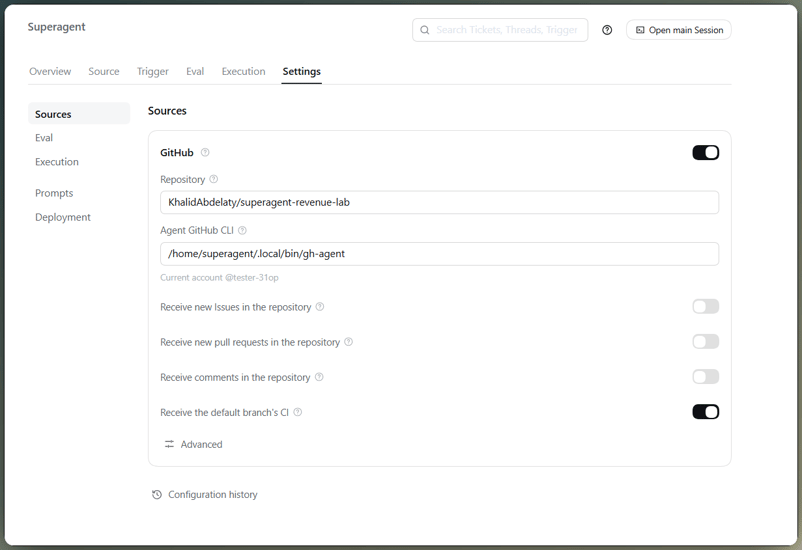
GitHub Source card with CI observation. Image by Author.
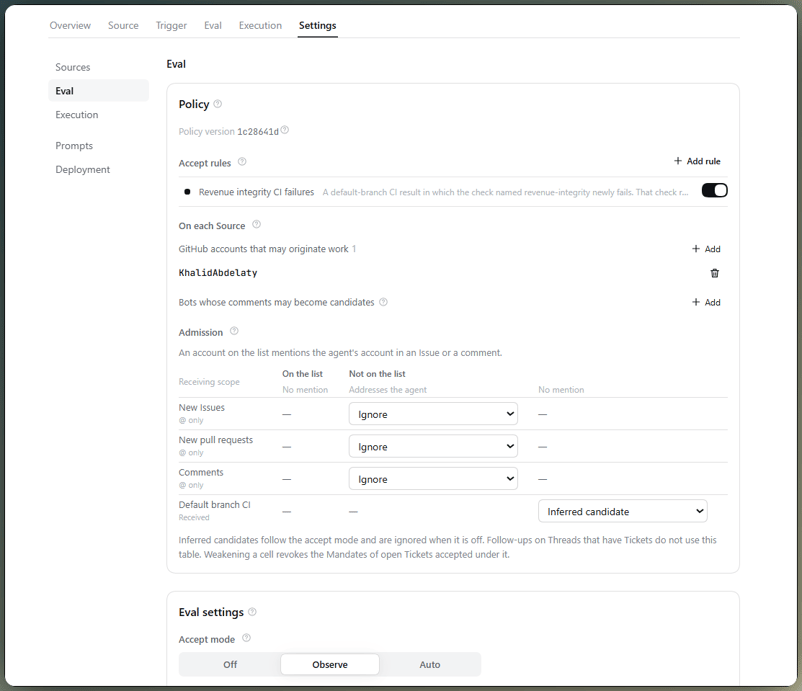
Eval settings: one rule, observe mode. Image by Author.
Step 4: Test an Unrelated GitHub Actions Failure
Use a broken README link as an unrelated failure. Because the protected branch rejects a failed check, use a human administrator's bypass only in this disposable repository; never give that bypass to the agent.
sed -i 's|^- Tests: .*|&\n- Data dictionary: [docs/data-dictionary.md](docs/data-dictionary.md)|' README.md
git commit -am "docs: link the data dictionary from the README" && git pushWhen GitHub Actions finished, docs-check failed and revenue-integrity passed. That matched the rule I had set: Superagent ignored the candidate because the revenue rule did not match.
The Decision used ignoredFromCard, a shortcut for candidates that do not touch an active rule. So this check covers routing, instead of the rule itself.
Revert the README change and wait for both jobs to pass. Superagent should ignore the recovery and stay idle.
Step 5: Trigger a Revenue Integrity CI Failure
Use the same human-only path to add the incident data from the tutorial repository. This summary shows the replay and the separate payments on one order without the timestamp columns:
event_id,order_id,amount_cents,delivery
evt_1009,ord_507,5000,first
evt_1010,ord_508,6400,first
evt_1011,ord_508,1600,first
evt_1009,ord_507,5000,replay
evt_1012,ord_509,2100,firstThe repository keeps the full timestamp columns; they are omitted here because they do not decide event identity. The independent calculation prepared earlier expects 15,100 cents, so set that value in the test and add test_replayed_event_is_counted_once().
E       actual daily total: 20100
E       expected daily total: 15100
E       replay total: 8000 != 4000
FAILED tests/test_revenue.py::test_daily_totals_match_known_values
FAILED tests/test_revenue.py::test_replayed_event_is_counted_once
2 failed, 1 passedThe extra 5,000 cents is one payment counted twice. Editing 15100 to 20100 or deleting the replay test would also turn CI green, and neither is a repair.
The failed GitHub Actions workflow shows only revenue-integrity failing. Its Trigger arrived after about one polling interval.
Eval marked the candidate "would accept," while the Execution tab remained empty. The evaluator saw check names and conclusions, not the pytest log, so it knew which guard failed but not why.

Observe mode logs "would accept" only. Image by Author.
Step 6: Authorize the Repair and Verify the Pull Request
The explicit-request path covered earlier now authorizes execution. GitHub notifications can be late.
Handle a missed GitHub Issue mention
At Superagent 6337fc8, the GitHub Source overlaps polls by five seconds and reads a notified thread from the later cursor. Mention notifications arrived 21 to 23 seconds later, so a poll could advance past the message.
That timing explains why the new Issue body and some comments never became Triggers. A community report describes the same failure mode.
Authorize the repair with a GitHub comment
Post the request again as a fresh comment and confirm that its Trigger appears. Superagent should accept it as an explicit request and start the worker.
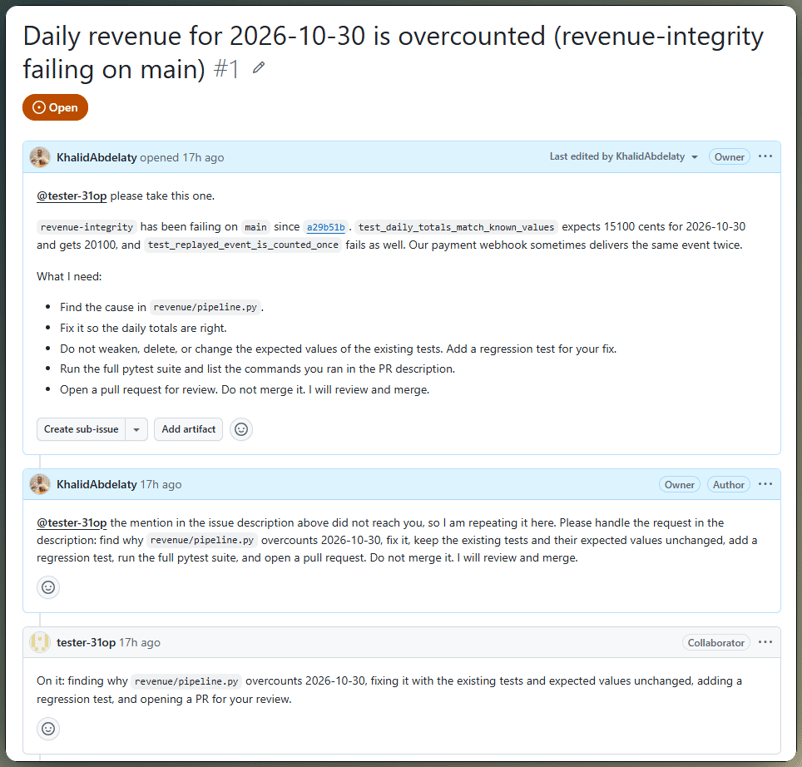
Comment mention creates the authorized Ticket. Image by Author.
Check the agent's event deduplication fix
The resulting pull request keyed the fix on event_id. Review the diff rather than relying on its description:
 def daily_revenue(events):
     """Return one row per UTC day with total revenue in cents."""
+    # The payment webhook may deliver the same event more than once, with a
+    # different received_at but the same event_id. One event_id is one payment
+    # event, so keep only its first delivery before aggregating.
+    events = events.drop_duplicates(subset="event_id", keep="first")
days = events["occurred_at"].dt.strftime("%Y-%m-%d")It added a replay test and deleted nothing. The first test command failed because dependencies were missing. After the worker created a virtual environment, the visible test suite passed.
Test payments that share an order
Request changes without mentioning the agent: prove that two payments on one order, identical apart from event_id, both count, and a replay of one counts once. The review should reach the same Ticket with no new Eval.
The worker responded with a commit that only added a test and left the pipeline unchanged. Before approval, check the exact head SHA and rerun the independent suite against that revision.
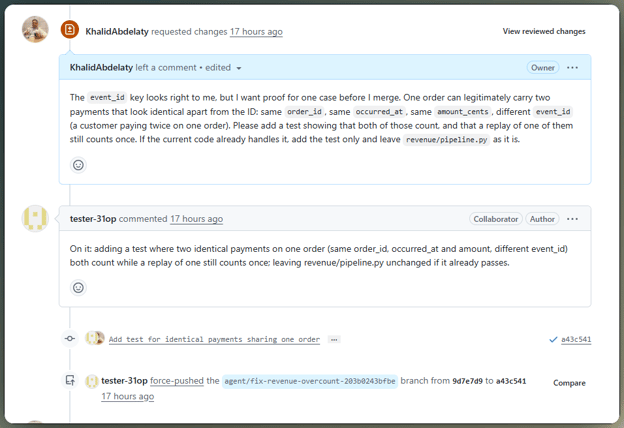
Review feedback continues the same Ticket. Image by Author.
Check the repair with independent data
Run the holdout from the separate human environment against the exact pull request head. On a43c541, both suites passed 5 of 5 tests without removing an assertion; 62bac08 kept the same tree.
Tests written by the agent alone cover only the cases the agent chose.
Step 7: Merge the Fix and Measure CI Recovery
After the merge, check that main returns to green and that recovery starts no new work. Then review the event trace, elapsed time, and provider charge.
Merge the fix and confirm CI recovery
After manual approval and merge, both default-branch checks passed. Superagent ignored the recovery, started no more work, and closed the existing Ticket with the outcome merged.
Evaluate event intake and decisions
Follow each event from intake to outcome, as our guide to evaluating AI agents describes. Across three repetitions, events that reached Eval took the expected route; misses occurred during intake, not model Decision.
Measure repair correctness, time, and cost
The same scenario ran in three fresh repositories and WSL distributions with Superagent 6337fc8, Harness 0.2.1-rc.3, deepseek-flash, and one policy. Costs use the lower off-peak DeepSeek rate; these are reproductions, not a benchmark.
All three repairs used event_id; every holdout test passed. Intake varied more: the Issue-body mention was missed every time, and the third reproduction also missed two comments before one arrived.
The second reproduction rewrote commits, and approval arrived before the holdout reran. The later check passed, but the safer order is head SHA, holdout, then approval.
DeepSeek Superagent Limitations and Troubleshooting
Several failures here look like silence, so start by finding where an event stopped. The frustrating part is that a missed notification and a correct ignore can look the same.
CI failures that produce no Trigger
Superagent tracks changes in the failing set, so the baseline reading, a check that keeps failing, and checks still running produce nothing. A Trigger with no Decision usually points at the CI admission cell, not the model.
GitHub requests that never arrive
Requests can fail when the sender is not allowed, the Source is off, processing is paused, or GitHub notifies late. If those checks pass, post a fresh comment; editing the Issue body creates no event.
Limits of autonomous CI repair
The prototype provides no security boundary. Workers have full OS-user access, and disclosure rules are prompt text. Isolate the agent account and limit it to the disposable repository.
Before switching to auto, collect weeks of observed Decisions, count wrong accepts as well as wrong ignores, and move the worker from WSL to a separate virtual machine.
Final Thoughts
The opening contrast held: two red CI states did not lead to the same action. Superagent ignored docs-check and marked revenue-integrity "would accept," while observe mode kept the code untouched until a person requested the repair.
The event_id patch was straightforward. Notification intake was less reliable: the mention in the Issue body never reached Eval, so a correct rule could not help.
I would not generalize this result to autonomous CI repair. The repository was small, the rule narrow, and the merge human-controlled. Elsewhere, start green, inspect Decisions, authorize explicitly, keep holdout data separate, and merge after independent checks.
My next step would be to fix the GitHub notification path and repeat the workflow with more failure types. Until that evidence exists, I would keep auto mode off.
FAQs
What is DeepSeek Superagent?
DeepSeek Superagent is a DeepSeek Harness plugin. It watches one GitHub repository, accepts optional Feishu input, and gives each accepted Ticket its own worker session. The published research prototype omits some ideas from the design article.
Can DeepSeek Superagent automatically fix GitHub Actions failures?
Yes, but auto only controls whether a matching inferred CI candidate can create a Ticket. It does not grant merge rights or bypass branch protection. I would still require human review and a manual merge.
How does observe mode work in DeepSeek Superagent?
Observe mode saves a positive inferred assessment as an ignore marked "would accept," together with the Policy version that produced it. Explicit requests still work. Use that Decision history to tighten rules before considering auto.
Can DeepSeek Superagent monitor pull request CI checks?
Superagent follows CI for pull requests attached to open Tickets. The first check state sets a baseline; later changes reach the Ticket as context.
Is DeepSeek Superagent ready for production?
No. A worker can call programs by absolute path, so blocked command names and account wrappers are not a sandbox. Run it in an isolated virtual machine with dedicated credentials, branch protection, and a manual merge.

I’m a data engineer and community builder who works across data pipelines, cloud, and AI tooling while writing practical, high-impact tutorials for DataCamp and emerging developers.





DeepSeek dropped its dsh-superagent prototype on GitHub without fanfare, and in under four days it has passed 17,000 stars. It is a research prototype built on DeepSeek Harness, which watches repository events and checks them against team rules. Observe mode records a decision without editing code.
I was interested in testing it and wanted to see how the DeepSeek Superagent handled two red GitHub Actions results. One came from a broken README link; the other came from a payment counted twice. Only the revenue failure should lead to a code repair.
The project is a small pandas revenue pipeline. Could the agent ignore the README failure, wait for permission, and fix a replay without deleting valid same-order payments? Autonomous changes stop at a pull request. Human review, holdout verification, manual merge, and CI recovery complete the experiment.
You'll learn how to:
Familiarity with Python, pytest, and GitHub Actions is enough to follow along. If you need to brush up on either, I recommend taking our course on Introduction to Testing in Python or Intermediate GitHub Concepts.
TL;DR
The workflow separates decision quality from repair quality:
CI filtering followed the rule: documentation failures and recoveries were ignored; the revenue failure was marked "would accept."
Observe mode changed no code: work began after an allowed person posted a request.
GitHub intake was unreliable: the Issue-body mention failed three times, and one reproduction lost two comments.
The repair reproduced: all fixes used
event_idand passed the holdout suite.These results come from one scenario repeated three times. They do not show production reliability.