
Track
AI Agent Fundamentals
6 hr
Practice and track your progress.
Continue with GoogleDeepSeek Harness, shortened to dsh, is an open-source agent harness from DeepSeek AI under the MIT license. It sits between a language model and the outside world, supplying tools, sessions, sandboxing, and the loop that keeps a task moving.
DeepSeek's own framing is "Agent = Model + Harness." The model handles reasoning and generation. The harness is everything that lets that reasoning act on a real filesystem and keep going without you having to re-explain the task at every turn.
It runs on Cordis, a plugin framework that predates DeepSeek Harness. Cordis lets settings replace these parts independently. I will return to the cost of that choice later.
With that framing in place, here are the two common misconceptions.
As mentioned earlier, the model and runtime are separate layers. That split lets you change providers without changing the tools or session setup. The same runtime can use DeepSeek, Anthropic, OpenAI, or an OpenAI-compatible endpoint.
Standard mode creates the coding-assistant impression, but it is only one setup. As I will cover later, Minimal and Creator modes change what the agent can use. Building a new setup still takes engineering work; developers have access to the parts.
As mentioned earlier, Cordis is the plugin framework beneath DeepSeek Harness. It lets each part request a service without tying it to a single provider's code.
Cordis came from the Koishi chatbot ecosystem and was built by a developer known as Shigma; DeepSeek vendors and extends it. Its authors describe the design in their paper called A Programming Paradigm for Spatiotemporal Composability.
Those basics lead to the project's main slogan and two Cordis terms. The names sound academic, but the behavior is fairly simple.
DeepSeek's architecture documentation says you extend dsh by mounting a plugin beside the others. Model adapters, tools, sessions, sandboxes, storage, scheduling, the agent loop, and the UI are all plugins.
Taken literally, the slogan goes too far. Cordis still sits underneath the plugins. It loads and removes them, checks what they need, and runs the events they use to talk to each other. Cordis is required, not one more optional piece.
A plugin declares the services it needs without requiring a hand-written boot sequence. It activates when those services exist and deactivates if a required service disappears. Its dependencies decide when it can run.
DeepSeek calls this spatial composability. Dependencies tell Cordis where a component fits, so developers do not have to arrange the startup order by hand.
Cordis also tracks registrations such as event listeners, prompt sections, and tool schemas. Removing a plugin removes those effects instead of leaving orphaned listeners. This does not undo an external action such as a shell command; reversibility applies only to effects Cordis tracks.
A running instance is a plugin tree built from settings loaded in a set order. Those settings determine which parts are active.
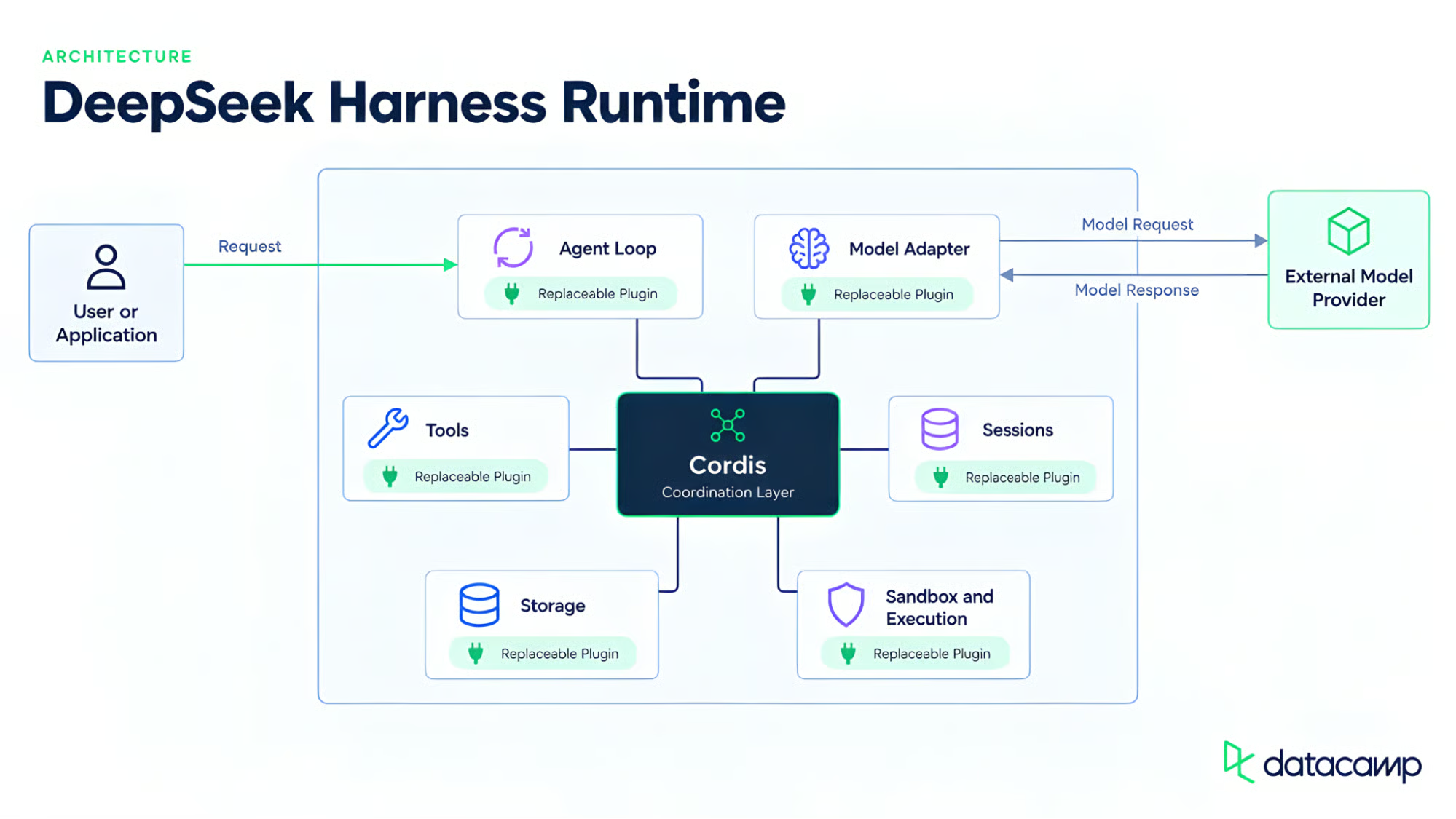
Cordis connects every replaceable runtime plugin. Image by Author.
Cordis provides a shared directory of services. Plugins use stable keys such as ctx.tools, ctx.llm, and ctx.sessions instead of importing one provider's code. A tool calling ctx.llm does not need to know which model adapter sits behind it.
If everything is replaceable, something still has to decide what is mounted for a given run, and DeepSeek Harness answers that at two layers that are easy to conflate.
The short version: a profile controls how the program starts, while a preset controls what the agent can do. If you only use the web app, you can skip the next two subsections.
A runtime profile (web, headless, sdk, sdk-minimal, and acp ship as templates) decides how the application launches and which bundles of Cordis plugins get stacked at boot. Most readers will only ever touch this layer by running dsh web or a similar command.
An agent preset (Standard, PTC, Minimal, or Creator) decides what an active session can use. A patch file can change the preset without touching Harness's source.
DeepSeek distinguishes a step from a turn. A step is one model request plus its tool calls. A turn is zero or more steps: it opens before its first input is claimed and closes once nothing is owed. Most turns run several steps before the agent can answer, but a rejected input closes a turn that spent no steps.
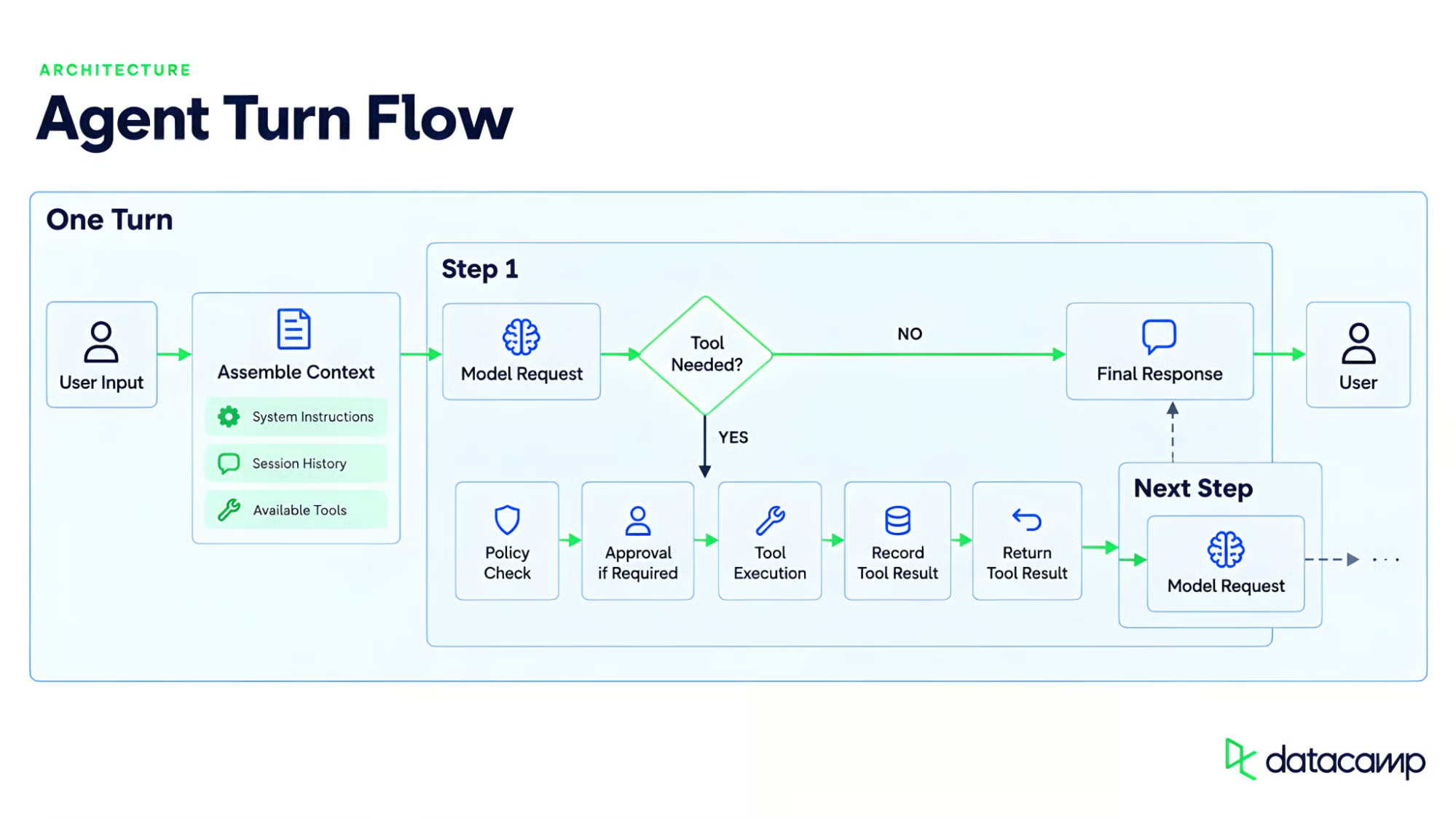
One turn can contain several steps. Image by Author.
This is the part I find most important. A session is an append-only log of typed events, not an array of chat messages. Harness builds the model's history from that log, and the session documentation requires anything sent to the model to be recoverable from it.
Resume, fork, search, replay, and the Trajectory view all build on that event stream.
Re-deriving history is not a deterministic re-run. Model output and external state can differ, but the log still provides an inspectable record of what happened.
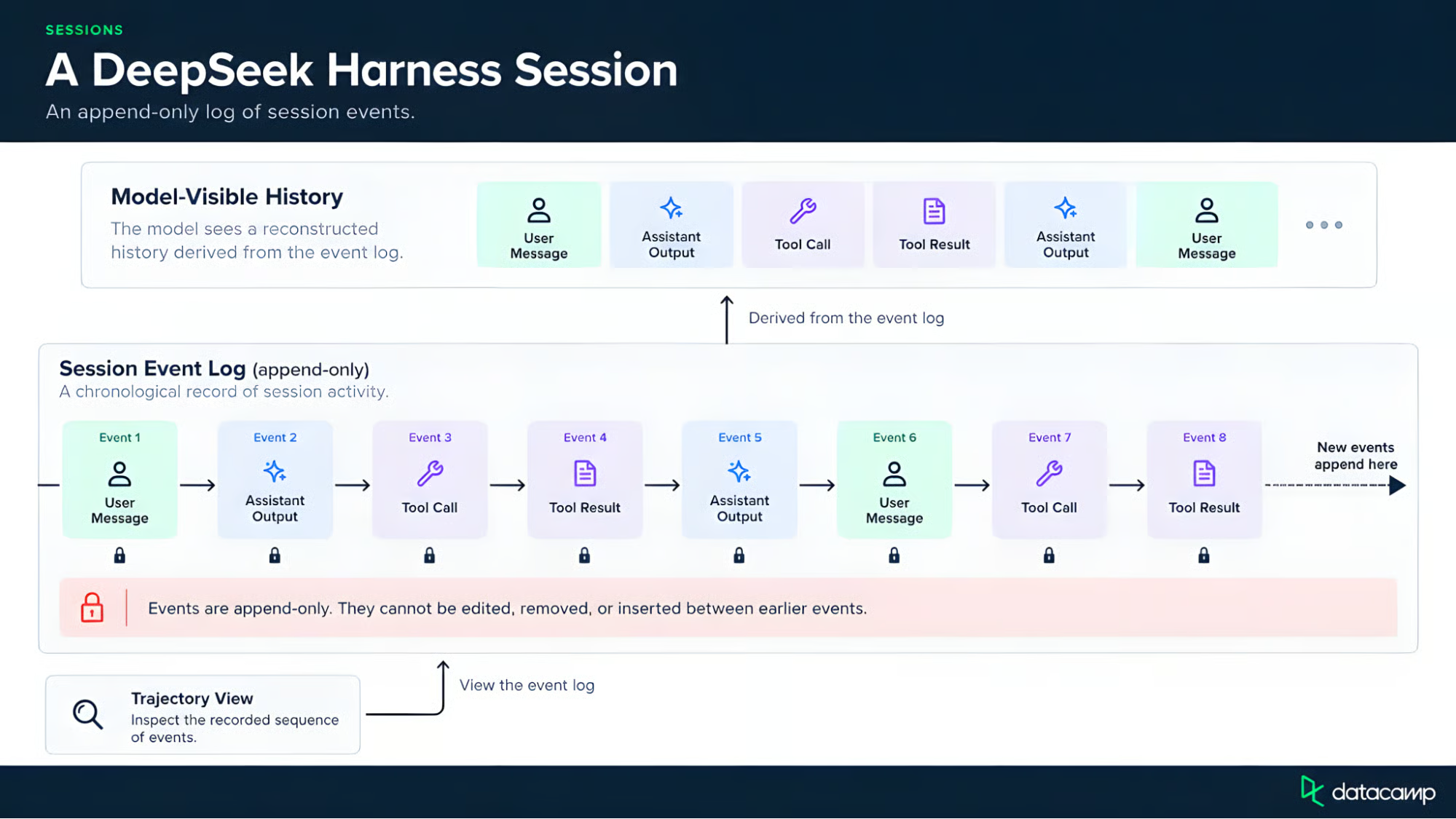
Session history is an append-only log. Image by Author.
A model can request a tool by name, but it does not get to run it directly. Two separate controls stand between the request and a filesystem change.
The call passes through a policy check, execution, and result handling. The model chooses the tool; the runtime decides whether and how it runs.
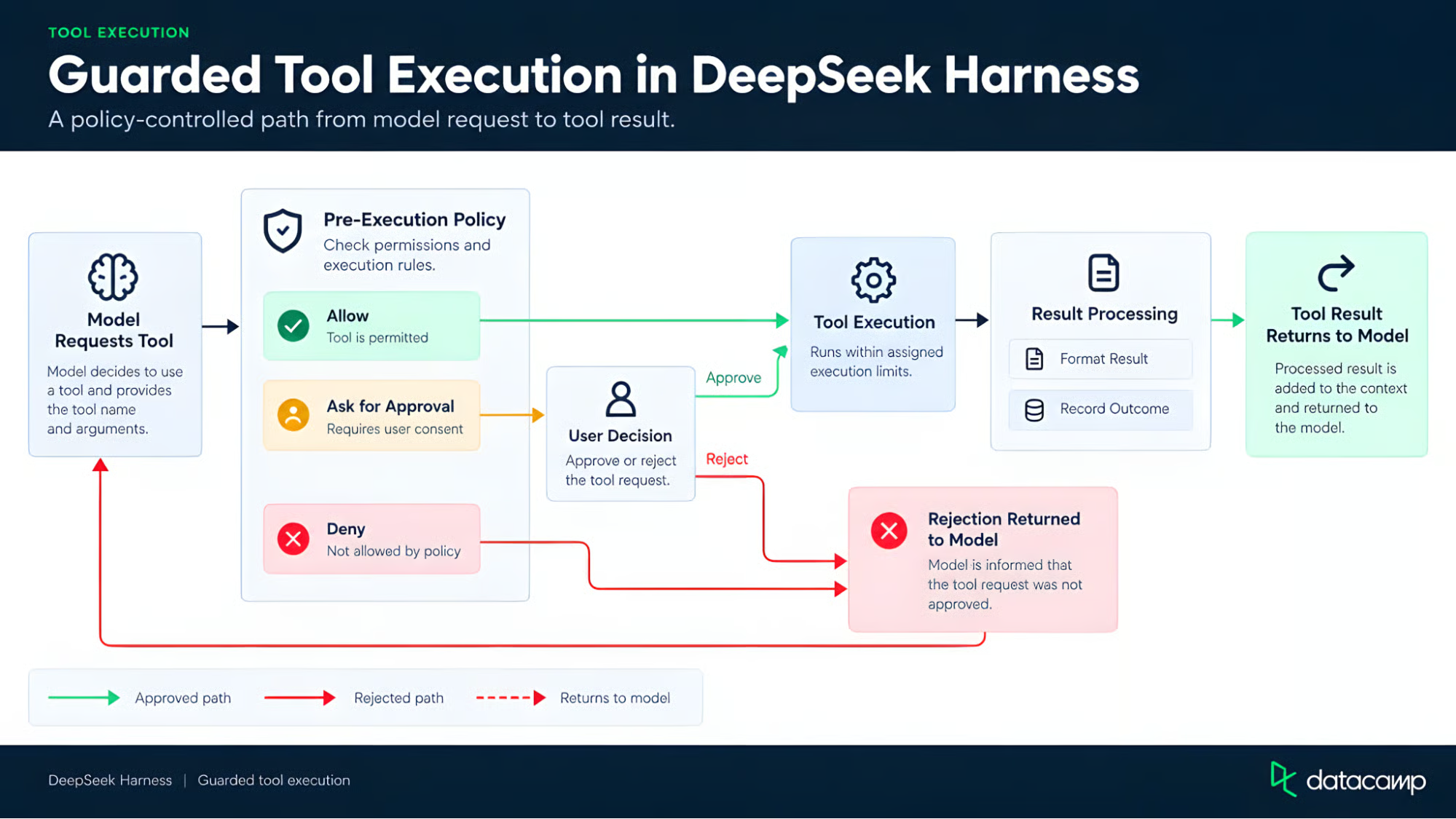
The runtime decides how tools run. Image by Author.
DeepSeek keeps them separate, though permission presets bundle both controls, much as a container runtime separates process permissions from execution boundaries.
Worth flagging now, since I'll return to it in the limitations section: telling a model in a system prompt to "only read files" is a suggestion it can follow, not an enforced boundary the way an OS-level sandbox restriction is.
DeepSeek Harness offers four different modes. None of these four rank above the others. They're four answers to "how much of the runtime should be exposed to this session," and the right one depends on the task at hand. As the architecture section showed, each mode changes the set of tools available to the agent.
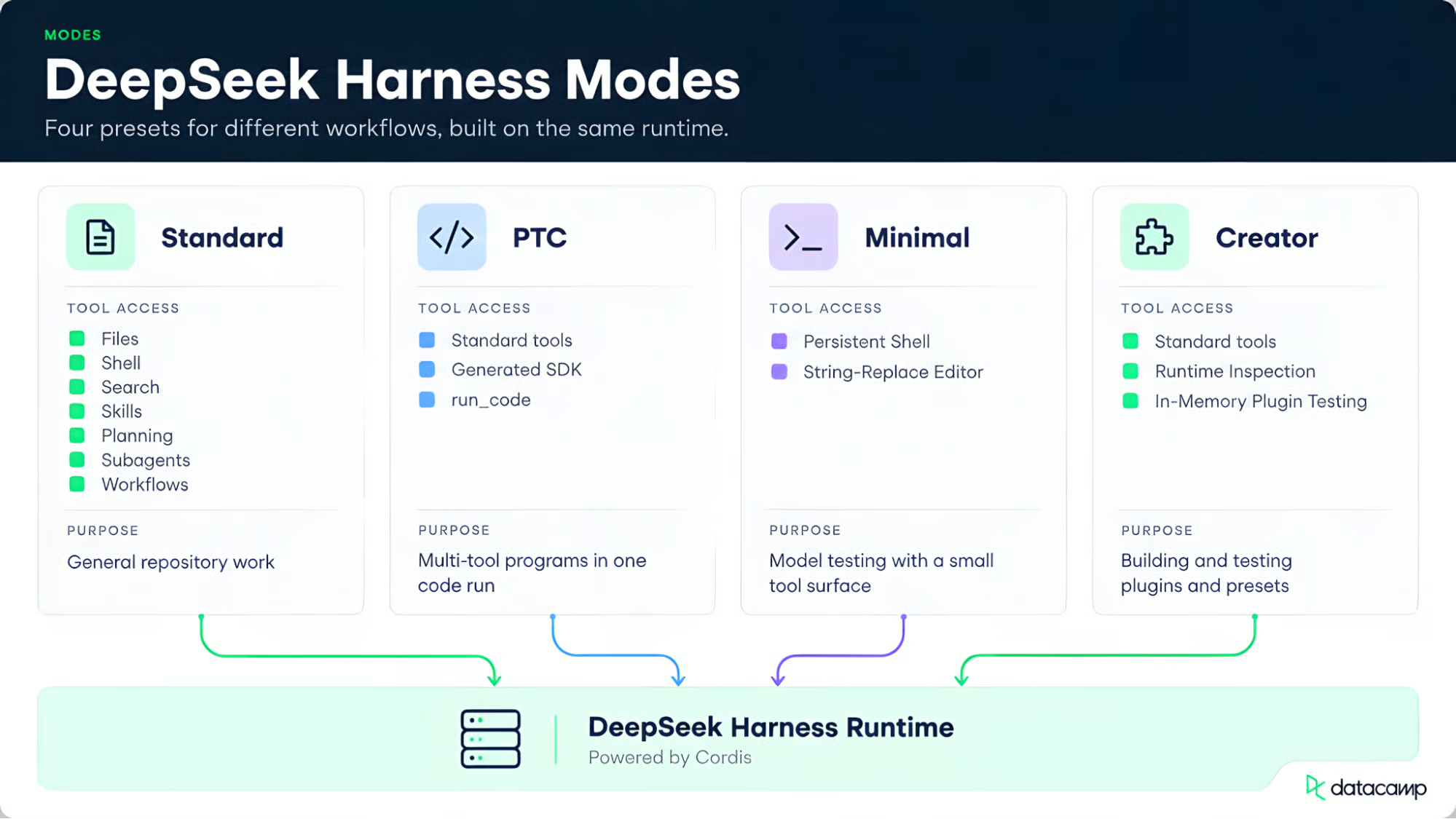
Four modes share one runtime base. Image by Author.
The general-purpose baseline:
For ordinary repository work, this is where I would start.
PTC mode keeps almost all of Standard's toolset but changes how the model reaches it. (Since version 0.1.2, Web PTC mode no longer exposes the general-purpose workflow tool by default.)
Instead of requesting individual tools across several model steps, the model writes a program against a generated SDK. That program can call several tools through run_code. Every call still goes through the same policy checks, so PTC changes how the model states the plan, not what it is allowed to do.
The product page still uses the label "Code mode," but a newer official release renamed it to PTC mode while keeping old conversation records readable. I'll use PTC mode throughout; the FAQ returns to what those initials may mean.
Minimal mode strips the environment to two tools: a persistent shell and a string-replace file editor. DeepSeek uses it for model benchmarks because test results depend partly on the model's harness, not only on its weights.
Creator mode lets developers inspect the runtime and test Cordis plugins in memory. It is for building presets, and I would not call it self-improving in any deeper sense.
DeepSeek Harness differs from many agent frameworks by making the lower parts of the runtime replaceable. I almost folded this into the architecture section, but the distinction is easy to miss. Cordis handles those changes through one plugin system.
You can change how the agent operates, not just the tools it can call. The event log also makes a run that developers can inspect, instead of only reading it as a chat transcript. Minimal and Creator modes then let them test the runtime from opposite directions.
A feature checklist would miss the point. Each competitor supports extensions; the useful question is which parts developers can change. The distinction sounds small, but it isn't. Our dedicated Harness versus Claude Code comparison uses the same model in both and covers setup, logs, and cost.
Claude Code supports project instructions, skills, hooks, MCP, subagents, and an Agent SDK, and it keeps its built-in loop fixed. DeepSeek Harness lets developers replace the loop, model adapter, and storage layer through settings.
Codex needs a more careful comparison because its CLI and App Server are open source, too. It provides an agent harness that developers extend through documented entry points. DeepSeek Harness is built around changing the runtime itself. They offer different levels of control.
OpenCode is already open source, works with several model providers, and uses a client-server architecture. You can configure its tools, permissions, sessions, and providers. Its plugins extend a fixed server core, while DeepSeek also makes the loop and session store replaceable.
Replacing runtime parts is not useful by itself. The extra control matters only when it solves a problem you already have.
It may be unnecessary for simple model calls or for teams that want a ready-made coding agent without needing to touch its internals. Replacing more parts is only worth the extra work when that control solves a real problem.
None of the above architecture matters much without a clear account of where this falls short today.
DeepSeek's repository states plainly that there will be breaking changes. This has already happened: the Code-to-PTC rename came with changes to the session APIs and removal of an optional SQLite storage option. Pin your versions. Skipping that step and hoping the setup stays stable is not a plan.
Making more of the runtime replaceable also gives developers more to learn: plugin dependencies, settings, provider differences, and version compatibility. This is the usual trade between convenience and control.
DeepSeek Harness stores session content, tool records, and settings locally by default, according to its data processing statement. You can turn off its anonymous reports about settings and project lists.
But an external model provider, web tool, MCP server, or plugin can still send data outside your machine under its own policy. "Local-first" does not cover every service you connect.
A runtime that can edit files, run commands, and load third-party plugins can cause real damage. DeepSeek's safety notice says the project has not had a security audit. Sandboxing, approvals, and permission controls reduce risk but do not guarantee isolation.
Running the software on your own machine does not remove that risk. Use limited permissions and a disposable environment for untrusted work, and be careful with content that may contain hidden instructions.
Agent behavior depends on the runtime as well as the model. This returns to "Agent = Model + Harness," and the same split applies to LLM agents beyond DeepSeek.
What a model can produce depends on its weights. What an agent does also depends on which context reaches the model, which actions it's allowed to take, and how tightly execution is constrained. None of that lives in the weights.
DeepSeek Harness shows that the surrounding layer by splitting it into named parts that developers can replace. Minimal mode shows why this matters beyond DeepSeek: a benchmark score partly reflects the harness used for the test, not only the model. The harness does not make a model smarter. It changes the setting in which the model works.
The line from the opening is the one worth keeping: the model reasons, but the runtime decides what that reasoning can reach and do. DeepSeek Harness makes that runtime editable, from the model adapter and tools to the session store and agent loop.
That control creates the cost. Replacing more of the runtime means owning more of its setup, version changes, and security boundaries. A developer preview with shell access is not something to install and forget.
My view is simple: use DeepSeek Harness when the runtime itself is part of the work. If you only need repository edits, a ready-made coding agent asks less of you.
Our DeepSeek Harness tutorial covers the setup. The Claude Code alternatives guide compares more coding agents, while Introduction to AI Agents covers the basics that this article assumes.
Learn Agentic AI With DataCamp!
Track
Course
Practice and track your progress.
Continue with Googleblog
Khalid Abdelaty
12 min
blog
Vinod Chugani
9 min
blog
Khalid Abdelaty
11 min
Tutorial
Abid Ali Awan
10 min
Tutorial
Aashi Dutt
Tutorial
Aashi Dutt
8 min