
Course
Introduction to Relational Databases in SQL
4 hr
201.1K
Practice and track your progress.
Continue with GoogleRelational algebra is a procedural query language. It tells the database how to retrieve data, not just what you want.
That's the key difference from SQL, which is declarative. When you write a SQL query, you describe the result you want. Relational algebra describes the exact sequence of operations to get there.
It operates on relations - the formal term for tables. You feed it one or more relations as input, apply an operation, and get a relation back as output.
That last part is the closure property. No matter which operation you apply - filter rows, pick columns, combine tables - the result is always another relation. This matters because it means you can chain operations together. The output of one operation becomes the input of the next, and you can keep stacking them as deep as you need.

You can think about relational algebra as building blocks. Each block takes a table (or two), does something to it, and gives you back a table. Database engines use these blocks internally to break down and execute your SQL queries.
Before you can work with relational algebra operators, you need to know the vocabulary. The good news is that there are only five terms to remember.
Relation is just a table. It has rows and columns, and it represents a set of data about a specific entity - like employees or departments. In relational algebra, every operation takes one or more relations as input and produces a relation as output.
Tuple is a single row in that table. If your Employees table has 10 rows, it has 10 tuples. Each tuple represents one record - one employee, in this case.
Attribute is a column. The Employees table might have attributes like employee_id, name, and department_id. Attributes define what kind of data each tuple holds.
Degree is the number of attributes in a relation. If Employees has five columns, its degree is 5. This matters when you're combining relations - some operations require matching degrees.
Cardinality is the number of tuples in a relation. If your Employees table has 200 rows, its cardinality is 200. Cardinality changes as you add or remove rows; degree changes only when you add or remove columns.
Here's how these terms map to what you already know:
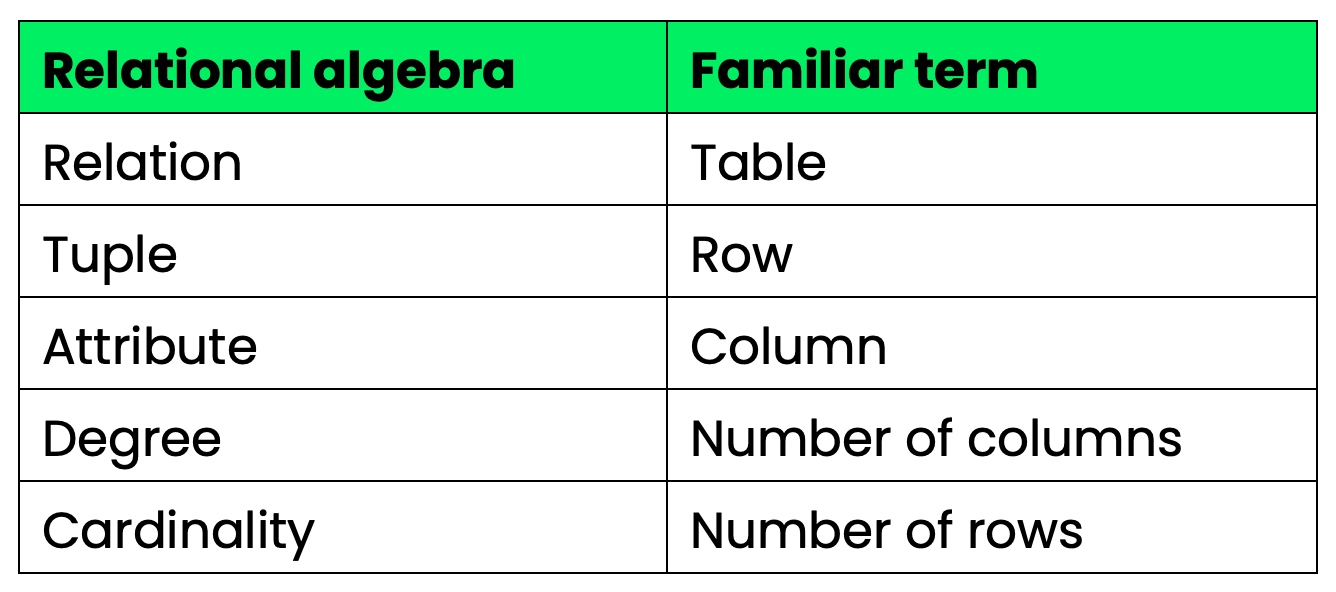
Relational algebra versus common terms
Make sure these click, and then the operators will make perfect sense.
There are five fundamental operators in relational algebra. Every other operation - joins, intersection, division - is built on top of these.
To keep the examples consistent, I'll use two tables throughout this section:
Employees
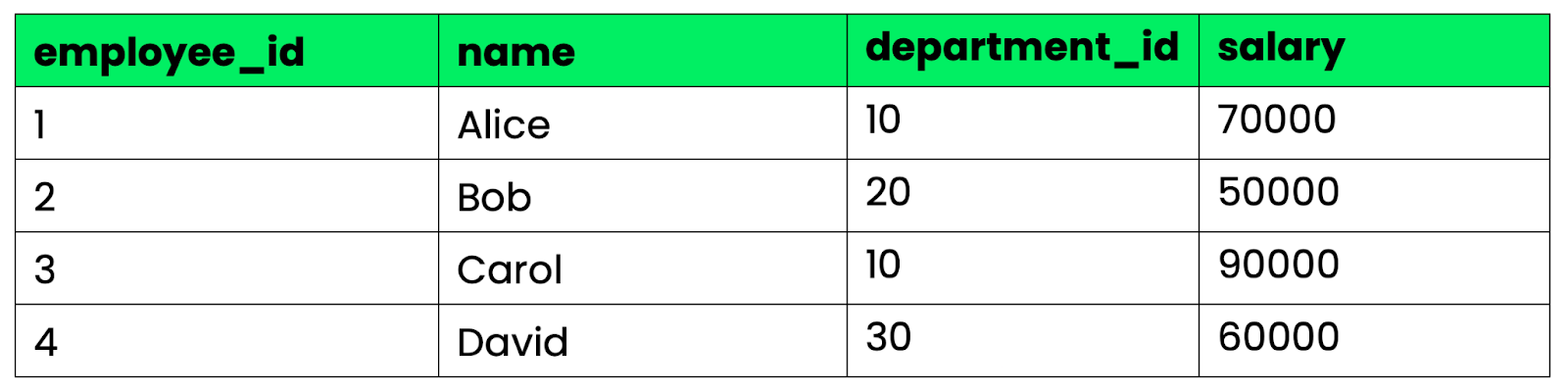
Employees table
Departments
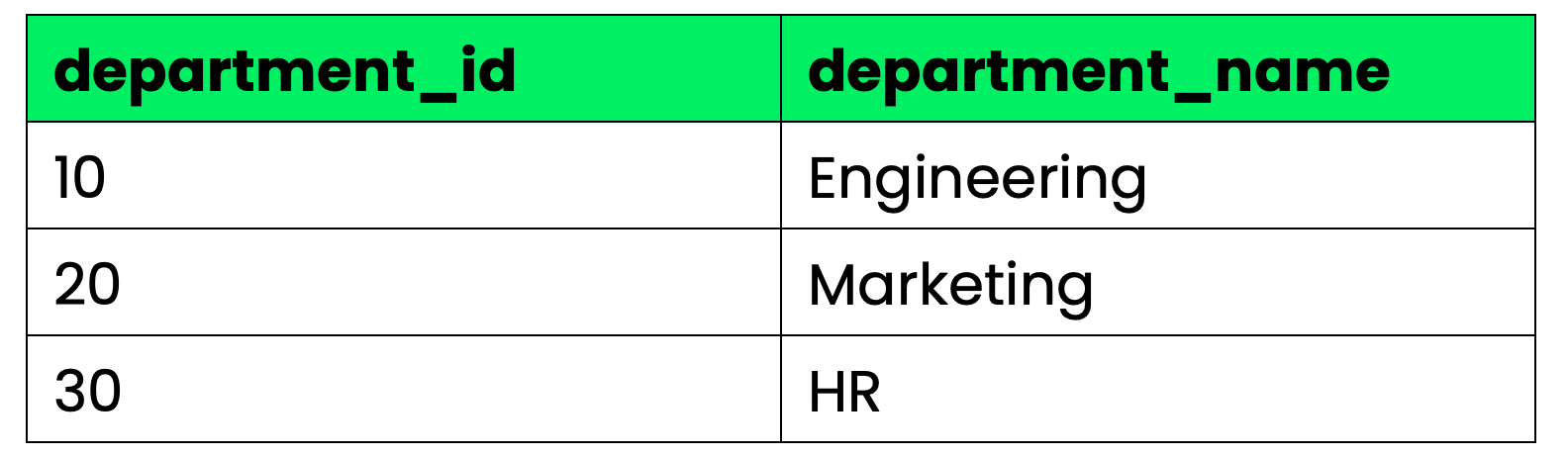
Departments table
Selection filters rows based on a condition. It's the relational algebra equivalent of a WHERE clause.
The notation looks like this:
σ condition (Relation)Say you want all employees with a salary above 60,000:
σ salary > 60000 (Employees)The result is a new relation with only the rows that match - Alice and Carol. The structure of the table stays the same, so you're just removing rows that don't meet the condition.
This is the SQL equivalent:
SELECT * FROM Employees
WHERE salary > 60000;
Projection selects specific columns from a relation and drops the rest. It's how you trim a table down to only the attributes you care about.
π attribute1, attribute2 (Relation)To get just the names and salaries of all employees:
π name, salary (Employees)One thing to watch out for is that projection removes duplicate rows from the result. If two tuples are identical after you drop the extra columns, only one copy makes it into the output.
This is the SQL equivalent:
SELECT DISTINCT name, salary
FROM Employees;
Union combines two relations into one, merging all their tuples. Duplicate rows get removed automatically.
The notation:
Relation1 ∪ Relation2The catch is that both relations must be union-compatible. That means they need the same number of attributes, and the corresponding attributes must have the same data types. You can't union an employee table with a departments table since the schemas don't match.
Say you have a Contractors table with the same structure as Employees. Union gives you every person across both tables, with no duplicates:
Employees ∪ ContractorsThis is the SQL equivalent:
SELECT * FROM Employees
UNION
SELECT * FROM Contractors;
Set difference returns the tuples that exist in the first relation but not in the second. Think of it as subtraction:
Relation1 − Relation2Like union, both relations must be union-compatible.
If you want all employees who are not contractors, this would be the syntax:
Employees − ContractorsThe result contains only the rows from Employees that have no match in Contractors.
SQL equivalent:
SELECT * FROM Employees
EXCEPT
SELECT * FROM Contractors;A Cartesian product combines every tuple from the first relation with every tuple from the second. If Employees has 4 rows and Departments has 3 rows, the result has 4 × 3 = 12 rows.
Employees × DepartmentsOn its own, the result is rarely useful - you get every possible combination of employees and departments, including ones that have nothing to do with each other. But cartesian product is the foundation of joins. You pair it with a selection to keep only the rows where the relationship makes sense.
SQL equivalent:
SELECT * FROM Employees, Departments;These five operators are the foundation. Everything else in relational algebra is a shorthand for combining them.
Joins are the most used operations in relational algebra - and they're not as mysterious as they look.
Every join is just a cartesian product followed by a selection. You combine all tuples from two relations, then filter out the ones that don't meet a condition. Joins exist as a shorthand because doing a full cartesian product first is expensive. A join applies the condition during the combination, which cuts down the size of intermediate results.
Natural join automatically joins two relations on all attributes with the same name, and keeps only one copy of those shared columns in the result:
Employees ⋈ DepartmentsSince both tables share department_id, the natural join matches rows where that value is equal and merges them. Alice (department_id = 10) gets matched with Engineering, Bob with Marketing, and so on.
There's no condition to write - the join figures it out from the schema. That's convenient, but it also means renaming a column can break your query.
This is the SQL equivalent:
SELECT * FROM Employees
NATURAL JOIN Departments;
Theta join joins two relations based on any condition you specify - the condition can use any comparison operator: =, ≠, <, >, ≤, ≥.
Employees ⋈ salary > 60000 AND department_id = department_id DepartmentsThis gives you full control over the join condition. Most joins you write in practice are theta joins under the hood.
This is the SQL equivalent:
SELECT * FROM Employees, Departments
WHERE Employees.salary > 60000
AND Employees.department_id = Departments.department_id;
Equi join is a theta join where the condition uses only equality (=). It's the most common type.
Employees ⋈ Employees.department_id = Departments.department_id DepartmentsThe result includes all columns from both tables, which means department_id appears twice. That's the main difference from natural join - equi join doesn't remove duplicate columns.
This is the SQL equivalent:
SELECT * FROM Employees
INNER JOIN Departments
ON Employees.department_id = Departments.department_id;The joins above only return rows where a match exists in both relations. Outer join keeps unmatched rows too, filling in NULL for missing values.
There are three variants:
Left outer join (⟕) keeps all rows from the left relation. If a row in Employees has no matching department, it still appears in the result with NULL in the department columns.
Right outer join (⟖) keeps all rows from the right relation. Departments with no employees still show up, with NULL in the employee columns.
Full outer join (⟗) keeps all rows from both relations. Unmatched rows from either side appear with NULL for the missing values.
These are the SQL equivalents:
-- Left outer join
SELECT * FROM Employees
LEFT JOIN Departments
ON Employees.department_id = Departments.department_id;

-- Right outer join
SELECT * FROM Employees
RIGHT JOIN Departments
ON Employees.department_id = Departments.department_id;

-- Full outer join
SELECT * FROM Employees
FULL OUTER JOIN Departments
ON Employees.department_id = Departments.department_id;
Use outer joins when you can't afford to lose rows that don't have a match - like when you need a full list of employees regardless of whether their department exists in the system.
Derived operators are shortcuts built from the five basic operators covered previously.
Intersection returns only the tuples that appear in both relations. Like union and set difference, both relations must be union-compatible.
Employees ∩ ContractorsIf an employee is also a contractor, they show up in the result. Everyone else gets dropped.
Under the hood, intersection is just set difference applied twice:
Employees ∩ Contractors = Employees − (Employees − Contractors)This is the SQL equivalent:
SELECT * FROM Employees
INTERSECT
SELECT * FROM Contractors;
Division is the operator that trips up most CS students and juniors - but the concept is simpler than it looks.
Division answers the question: "which tuples in relation A are associated with all tuples in relation B?"
Say you have a CourseEnrollments table that tracks which students are enrolled in which courses, and a RequiredCourses table listing every course a student must complete. Division gives you the students enrolled in every required course.
CourseEnrollments ÷ RequiredCoursesHere's why it's considered tricky: there's no direct SQL equivalent. To replicate division in SQL, you need a double negation - "find students for whom there is no required course they haven't taken":
SELECT DISTINCT student_id FROM CourseEnrollments ce1
WHERE NOT EXISTS (
    SELECT course_id FROM RequiredCourses rc
    WHERE NOT EXISTS (
        SELECT * FROM CourseEnrollments ce2
        WHERE ce2.student_id = ce1.student_id
        AND ce2.course_id = rc.course_id
    )
);
That double NOT EXISTS pattern is the standard way to express division in SQL. If you see a question in an interview asking "find all X that relate to every Y," division is the operator to reach for.
Rename lets you give a relation or its attributes a new name. It doesn't change the data, just what things are called.
ρ NewName (Relation)Or to rename both the relation and its attributes:
ρ NewName(attr1, attr2, ...) (Relation)Rename is handy when you need to join a table with itself - without it, the attribute names would collide and the operation wouldn't make sense. It's also useful when chaining operations and you want intermediate results to have meaningful names.
This is the SQL equivalent:
SELECT * FROM Employees AS E1;
-- or renaming columns:
SELECT employee_id AS id, name AS employee_name FROM Employees;
These three operators are something you have to memorize. Intersection and renaming are easy, and division is the one worth practicing before any database interview.
SQL and relational algebra are not the same thing - but SQL wouldn't exist without it.
The core difference comes down to how each one thinks about queries. Relational algebra is procedural - you specify the exact sequence of operations to get your result. SQL is declarative - you describe what result you want, and the database engine figures out how to get it.
Take a simple example. In relational algebra, retrieving Engineering employees looks like this:
π name, salary (σ department_id = 10 (Employees))You're telling the database exactly what to do: first filter the rows, then pick the columns. The order of operations is explicit.
In SQL, you write:
SELECT name, salary
FROM Employees
WHERE department_id = 10;
You're describing the result you want. The database engine translates that into a sequence of operations - and those internal operations are built on relational algebra.
That's the relationship between the two. SQL is the user-facing language; relational algebra is the theoretical model underneath it. When a database engine receives a SQL query, it parses it into an internal representation based on relational algebra, optimizes it, and then executes it.
SQL also goes well beyond what relational algebra defines. Relational algebra has no concept of:
Aggregation - SUM(), COUNT(), AVG()
Grouping - GROUP BY
Ordering - ORDER BY
Duplicate handling - relational algebra works with sets (no duplicates); SQL works with multisets (duplicates allowed by default)
These features were added to SQL because real-world querying needs them. But they sit on top of the relational algebra foundation.
The bottom line is that understanding relational algebra tells you how your SQL queries are structured and transformed internally. It won't change how you write SQL day to day, but it will change how you reason about what your queries are actually doing.
Most confusions with relational algebra come down to a couple of recurring misunderstandings. Let me go through them.
Treating SQL and relational algebra as the same thing. They're not. SQL is inspired by relational algebra, but the two aren't interchangeable. SQL is declarative and includes features like aggregation and ordering that relational algebra doesn't define. Relational algebra is a formal model; SQL is a practical language built on top of it.
Forgetting schema compatibility requirements. Union, intersection, and set difference all require union-compatible relations - same number of attributes, same data types in the same order. Trying to apply these operators to tables with different schemas won't work. This confuses people because joins have no such requirement.
Not understanding the division operator. Division is the one operator with no direct SQL equivalent, which is why it trips people up. If you see a query that asks "find all X associated with every Y," that's division. The SQL translation requires a double NOT EXISTS pattern - it's not obvious, so it's worth practicing before an exam or interview.
Thinking joins are standalone operators. They're not primitives. Every join is a cartesian product combined with a selection. Natural join, theta join, equi join - all of them are shorthand for that combination. Understanding this makes join behavior much easier to predict when results look unexpected.
Relational algebra is the theoretical backbone of every relational database system. Every query you write in SQL gets translated into a sequence of relational algebra operations before the database engine touches a single row.
The operators - selection, projection, union, set difference, cartesian product, and their derived counterparts - are the building blocks of that translation. Once you understand how they work and how they chain together, you stop seeing SQL as a black box and start seeing the structure underneath it.
That's the real value of learning relational algebra: understanding what your queries are actually doing, and not writing them in formal notation.
Learn with DataCamp
Course
Course
Practice and track your progress.
Continue with Googlecheat-sheet
Richie Cotton
5 min
Tutorial
Sayak Paul
9 min
Tutorial
Dario Radečić
15 min
Tutorial
Allan Ouko
9 min
code-along
Adel Nehme
code-along
Kelsey McNeillie